


.png)


The buyer already looked.
That is the part most agents miss.
They clicked the listing. They opened the email. They watched the Reel for seven seconds. They saved the kitchen photo. They asked their spouse, “What do you think?” Then they disappeared.
Most listing marketing is built for first attention. New post. New email. New open house graphic. New “just listed” blast.
But real estate decisions rarely happen in one touch.
A serious buyer may need to see the home three or four times before requesting a showing. A seller lead may need to see proof that you market listings well before they book a consultation. A relocation buyer may need a reminder about the layout, neighborhood, or price position after comparing five other homes.
That is where video retargeting becomes useful.
Not creepy. Not complicated. Not a giant ad-agency production.
Just a simple follow-up system that uses photo-based AI videos to bring the right listing back in front of the right person with the right message.
PhotoAIVideo helps agents, photographers, brokerages, and property managers turn listing photos into video assets that can be used after the first click, not only before it. If you want to create real estate videos from photos with AI, the next step is learning how to use those videos in appointment follow-up.
Video retargeting for listings means using video content to follow up with people who have already shown interest in a property, neighborhood, price range, rental, or real estate service.
That interest might come from:
A listing page visit.
A social video view.
A lead form submission.
An open house registration.
A saved property.
An email click.
A buyer consultation.
A showing request that went cold.
A seller who viewed your listing presentation page.
A renter who looked at an available unit.
In simple terms, retargeting is the follow-up layer.
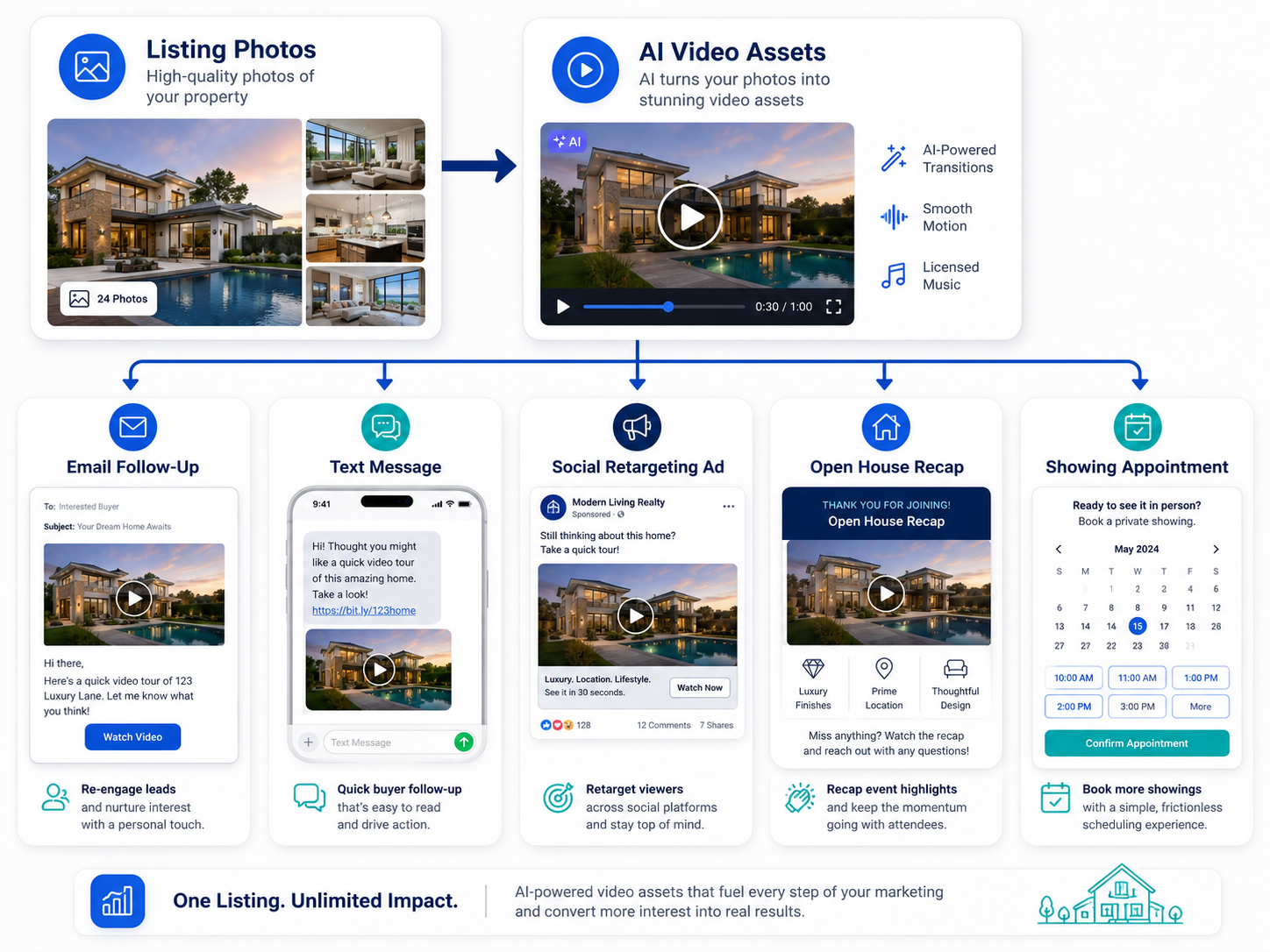
Instead of showing the same generic listing ad to everyone, you create short video messages that match what the person already looked at.
For example:
Someone watched a luxury listing Reel but did not inquire.
Show them a short video focused on the backyard, private showing CTA, or neighborhood.
Someone clicked an email about a listing but did not book.
Send a follow-up video that explains the layout and invites them to tour.
Someone attended an open house but did not make an offer.
Send a recap video that highlights the best features and answers common objections.
Someone viewed a seller marketing plan.
Send a video showing how you turn one listing photo set into multiple promotional assets.
This is where an AI app to turn property photos into videos becomes more than a content tool. It becomes a follow-up tool.
With PhotoAIVideo’s AI photo-to-video workflow, the same photos that power the first listing video can become retargeting clips, email follow-ups, appointment reminders, seller proof assets, and lead nurture videos.
Most real estate leads do not convert immediately.
A buyer may hesitate because they are comparing homes.
A seller may watch quietly for weeks before reaching out.
A renter may need to check timing, pets, move-in cost, commute, or availability.
A past client may not need you today but may remember how professionally you marketed a home.
Video retargeting helps because it gives people a reason to re-engage.
A static listing photo says, “Here is the home again.”
A follow-up video says, “Here is the part you should look at next.”
That is a big difference.
NAR encourages real estate professionals to share strong visual information in online listings, including photos, video, virtual tours, and floor plans, because buyers need more clarity before deciding what to do next through NAR’s online listing presentation guidance. Retargeting simply extends that idea beyond the first listing view.
Video also helps create trust. Realtor.com has described video marketing as a way for agents to capture attention, build trust, and convert leads when used strategically through real estate video marketing guidance for lead generation.
The key phrase is “used strategically.”
A video sitting on a listing page is helpful.
A video sent after a lead shows interest can be persuasive.
A video matched to the buyer’s likely question can turn silence into a showing request.
This matters even more now because online research shapes how consumers choose homes and agents. Zillow has reported that online channels play a major role in how buyers and sellers begin agent relationships through Zillow consumer housing trend insights.
The practical takeaway:
Your follow-up is part of your brand.
If your follow-up is just “checking in,” you sound like every other agent.
If your follow-up includes a helpful video, you give the lead something useful to respond to.
Most agents have a lead follow-up problem disguised as a content problem.
They think they need more leads.
Sometimes they do.
But often, they already have people who clicked, watched, replied once, opened an email, attended an open house, or showed interest. Those people are sitting in a CRM, inbox, spreadsheet, ad audience, or phone thread.
The missing piece is not always traffic.
The missing piece is relevant follow-up.
Here is what actually happens:
An agent launches a listing on Thursday.
The listing gets a lot of attention.
Several people click the email.
A few people watch the Reel.
Two buyers ask for details.
One couple attends the open house.
By Monday, the agent is already focused on the next listing.
The interested people get a generic message:
“Just checking in. Any interest?”
That is not bad.
It is just weak.
A better follow-up would be:
“Since you looked at the home on Oak Ridge, I wanted to send this quick video showing the kitchen-to-backyard flow. That is the part most buyers miss in photos. Want to see it in person this week?”
That message feels specific.
It gives the buyer a reason to re-open the conversation.
This actually happens all the time: agents generate attention with good listing media, then follow up like the lead has no context. The buyer remembers the property vaguely, but the agent does not reconnect the conversation to the visual that got their attention in the first place.
Photo-based AI videos help solve that.
They let you create follow-up assets quickly enough that retargeting becomes part of the workflow, not a special project.
PhotoAIVideo helps real estate professionals turn existing property photos into short video assets that can be used across listing marketing, email follow-up, social media, retargeting ads, seller updates, and appointment nurture.
That matters because retargeting works best when you have multiple video angles.
One listing video is not enough.
You may need:
A 15-second “still interested?” clip.
A 20-second layout explainer.
A 30-second neighborhood reminder.
A backyard feature video.
An open house recap.
A price update video.
A seller proof video.
A private showing CTA.
A rental availability reminder.
An unbranded version for compliance-sensitive placements.
An automated video marketing software for Realtors workflow helps agents produce these assets faster so follow-up does not become another manual task that gets skipped.
With PhotoAIVideo for listing video follow-up, the process can be simple:
Upload listing photos.
Choose the follow-up angle.
Create a short video.
Add the message layer.
Send or publish it through the right channel.
The software does not replace your judgment.
It removes the production bottleneck.
That is important because the best follow-up window is often short. If a buyer viewed the home today, the follow-up video should not arrive two weeks later. If an open house attendee came through Saturday, the recap should hit Saturday evening or Sunday morning.
Speed matters.
The first-touch video introduces the property.
The follow-up video answers the next question.
Do not use the same video for both.
First-touch video example:
“Just listed: 4-bedroom home with pool in Westlake.”
Follow-up video example:
“Here is the backyard and kitchen flow buyers asked about most at the open house.”
That second video feels more personal because it assumes the viewer already has some context.
This is one of the most useful insights in listing retargeting:
Follow-up videos should not restart the conversation. They should continue it.
A retargeting video needs a reason to be sent or shown.
Triggers can include:
Viewed listing page.
Clicked property email.
Watched 50% of a social video.
Saved or shared a post.
Registered for an open house.
Attended a showing.
Requested details but did not book.
Started an application but did not finish.
Asked about price.
Asked about neighborhood.
Asked about floor plan.
Downloaded a buyer guide.
Viewed a seller marketing page.
Each trigger tells you what video should come next.
Someone who clicked an email may need a stronger reason to tour.
Someone who attended the open house may need a recap.
Someone who watched a neighborhood video may need a listing match.
Someone who viewed a seller page may need proof of your marketing process.
There are five useful angles for listing video retargeting:
Feature reminder.
Layout clarification.
Neighborhood fit.
Urgency or timing.
Proof and confidence.
A feature reminder says, “Do not forget this part of the property.”
A layout clarification says, “Here is how the space works.”
A neighborhood fit video says, “This area matches the lifestyle you were looking for.”
An urgency video says, “Here is why you should act before the next showing window.”
A proof video says, “Here is how we market and follow up professionally.”
The mistake is sending every lead the same “still interested?” message.
Better retargeting matches the message to the reason they engaged.
For a feature reminder, choose 3–5 photos of one feature.
For a layout clarification, include floor plan, kitchen, living room, hallway, bedrooms, backyard access, or office placement.
For neighborhood fit, include exterior, community entrance, nearby amenities, parks, street scenes, or lifestyle visuals.
For urgency, use hero exterior, best interior, open house image, and showing CTA.
For proof, use a collage of listing video, social Reel, email follow-up, lead capture, and open house promo.
The photo selection is the strategy.
PhotoAIVideo can create motion from the images, but the story comes from what you choose to include.
Some follow-up videos are clearly promotional. They may include branding, calls to action, agent contact info, and social overlays.
Other videos may need to stay cleaner.
For example, if a video might be used in an MLS-related or syndication environment, avoid assuming your branded social version is safe. Many MLS systems and brokerages have rules around branding, contact information, logos, and promotional language in listing media.
That is where an AI tool for making unbranded real estate videos can support a cleaner workflow. Create one version for follow-up and one version for compliance-sensitive placement if needed.
If your listing video strategy touches MLS uploads, virtual tour links, or syndication, choose real estate video software that works with MLS rules and still confirm local policy before publishing. MLS rules vary by market.
Do not just send the video link.
Give the viewer a reason to watch.
Buyer follow-up example:
“Since you clicked on the Maple Ridge listing, I wanted to send a quick video showing the part that is hard to understand from the photos: the kitchen opens directly to the covered patio and pool. Want to see it in person this week?”
Open house follow-up example:
“Thanks for stopping by today. Here is a quick recap video of the layout and backyard. The office placement seemed to be what most people asked about. Want me to send the floor plan?”
Seller lead follow-up example:
“This is the kind of follow-up video we can create after people view your listing. Instead of waiting for buyers to come back, we re-engage them with specific property angles.”
Property manager follow-up example:
“Here is a quick video showing the unit layout and community amenities. Want to schedule a tour before this floor plan is gone?”
The message should feel like it was written by someone who understands why the lead engaged.
Use the channel based on how the lead interacted.
Email works well for property details, longer explanations, and seller follow-up.
Text works well for warm buyer leads and appointment reminders.
Social retargeting ads work well for listing viewers, video watchers, and local audiences.
CRM automations work well for open house registrants, rental inquiries, and seller nurture.
Landing pages work well for high-intent buyers and seller education.
A video can be created once, but it should be distributed intentionally.
This is where PhotoAIVideo’s AI real estate marketing software becomes useful inside a larger lead follow-up system. The video is the asset. Your CRM, ads, email, and text workflows deliver it at the right time.
Do not measure every retargeting video by views.
Measure by the next action.
For buyer follow-up:
Showing request.
Reply.
Saved property.
Second showing.
Offer discussion.
For seller follow-up:
Booked appointment.
Marketing plan request.
Home value consultation.
Referral.
For property management:
Tour booked.
Application started.
Availability question.
Call scheduled.
For photographers:
Agent reorder.
Package upgrade.
Brokerage inquiry.
A retargeting video is not only content.
It is a conversion step.
The first-touch video starts the conversation.
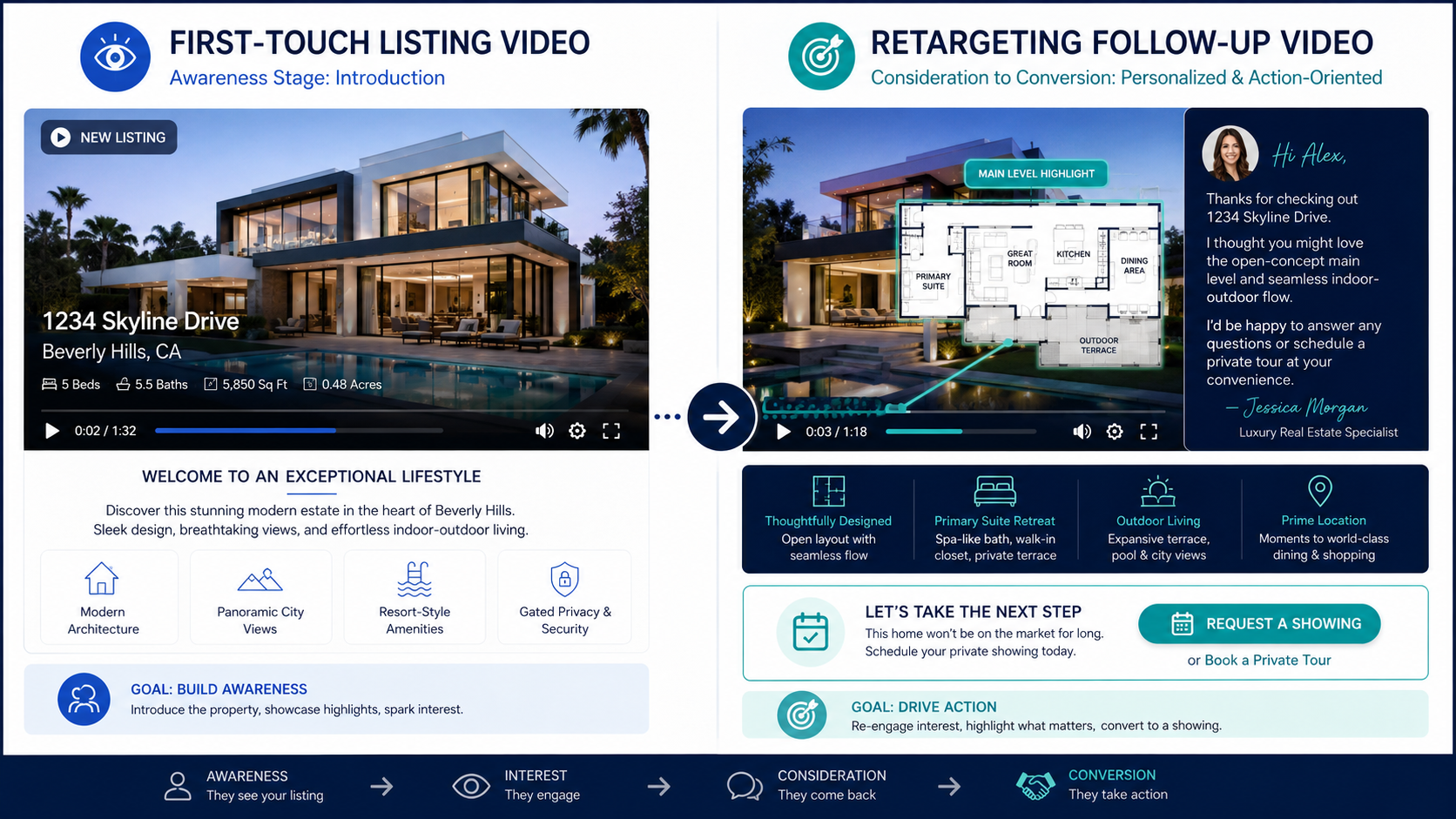
The retargeting video moves it forward.
A buyer clicks a listing email but does not request a showing.
Instead of sending a generic “Any interest?” message, the agent sends a 20-second video showing the strongest three reasons to tour: layout, backyard, and location.
The message says:
“I saw you checked out this one. The photos make it look nice, but the video shows the flow better. Want to take a look this week?”
That feels helpful, not pushy.
An open house gets good foot traffic, but nobody writes an offer that day.
The agent creates a short recap video from the listing photos:
Best exterior.
Kitchen.
Primary suite.
Backyard.
Floor plan.
Open house note.
The follow-up message says:
“Thanks for coming by. Here is a quick recap of the features people asked about most. Want the seller disclosure or floor plan?”
This is better than letting the open house list go cold.
A homeowner is not ready to list yet.
The agent sends a video showing how one listing photo set can become:
Listing teaser.
Social Reel.
Email follow-up.
Retargeting ad.
Open house reminder.
Seller update.
That type of video positions the agent as a marketer, not just a transaction handler.
Google Search Central recommends creating helpful, people-first content rather than content made only to manipulate rankings through Google’s helpful content guidance. The same principle applies to seller nurture: the content should actually help the homeowner understand your process.
A real estate photographer wants to offer more than photos and a single listing video.
The photographer creates a “follow-up video pack”:
Main listing video.
Open house teaser.
Feature reminder clip.
Email follow-up video.
Seller proof clip.
Optional unbranded property video.
Using AI video software for real estate photographers, photographers can turn the same photo set into multiple assets that help agents market longer after delivery.
This is easier to sell than “I can make you a video.”
It is a business outcome: more follow-up content from every shoot.
A brokerage has dozens of agents generating leads through listings, open houses, social media, and online forms.
The problem is consistency.
Some agents follow up well. Others forget. Some send plain text. Some send links with no context.

The brokerage can standardize a retargeting video system:
Every new listing gets a main video.
Every open house gets a recap video.
Every seller lead gets a marketing proof video.
Every buyer click gets a property follow-up video.
Every price change gets a short update video.
This turns listing media into a repeatable brokerage growth system.
A renter views a unit online but does not schedule.
The property manager sends a short video showing the unit layout, amenities, parking, pet area, or move-in special.
The CTA is simple:
“Want to tour this floor plan today?”
For rental marketing, video retargeting can reduce the gap between “I looked” and “I scheduled.”
If someone already watched the main listing video, do not send the same video with “following up.”
Send a new angle.
Show the layout.
Show the backyard.
Show the neighborhood.
Show the open house recap.
Show the price update.
Retargeting works because it adds context.
A retargeting video is not a full tour.
The lead already has some awareness.
Keep it focused.
One feature. One reason. One next step.
The video does not replace the message.
The message frames the video.
A good follow-up note explains why the person should watch and what to do next.
Do not show every listing video to every person.
Segment by behavior.
Listing viewers get property follow-up.
Open house attendees get recap.
Seller leads get marketing proof.
Neighborhood viewers get area content.
Rental leads get availability and tour reminders.
The more relevant the video, the better the response.
Retargeting videos are often branded and promotional.
That is fine for social media, email, and lead follow-up.
But do not assume those same files belong inside MLS-related fields or unbranded listing environments.
Use a clean version when needed.
Views are helpful, but appointments pay.
Track:
Replies.
Calls.
Showings.
Open house attendance.
Second showings.
Applications.
Listing appointments.
Offer conversations.
A video that gets 80 views and 3 showing requests may be more valuable than a video with 3,000 views and no serious leads.
Use video retargeting when someone has already shown intent.
Good triggers include:
They clicked the listing.
They opened the email twice.
They watched the Reel.
They asked about price.
They attended an open house.
They requested details but did not book.
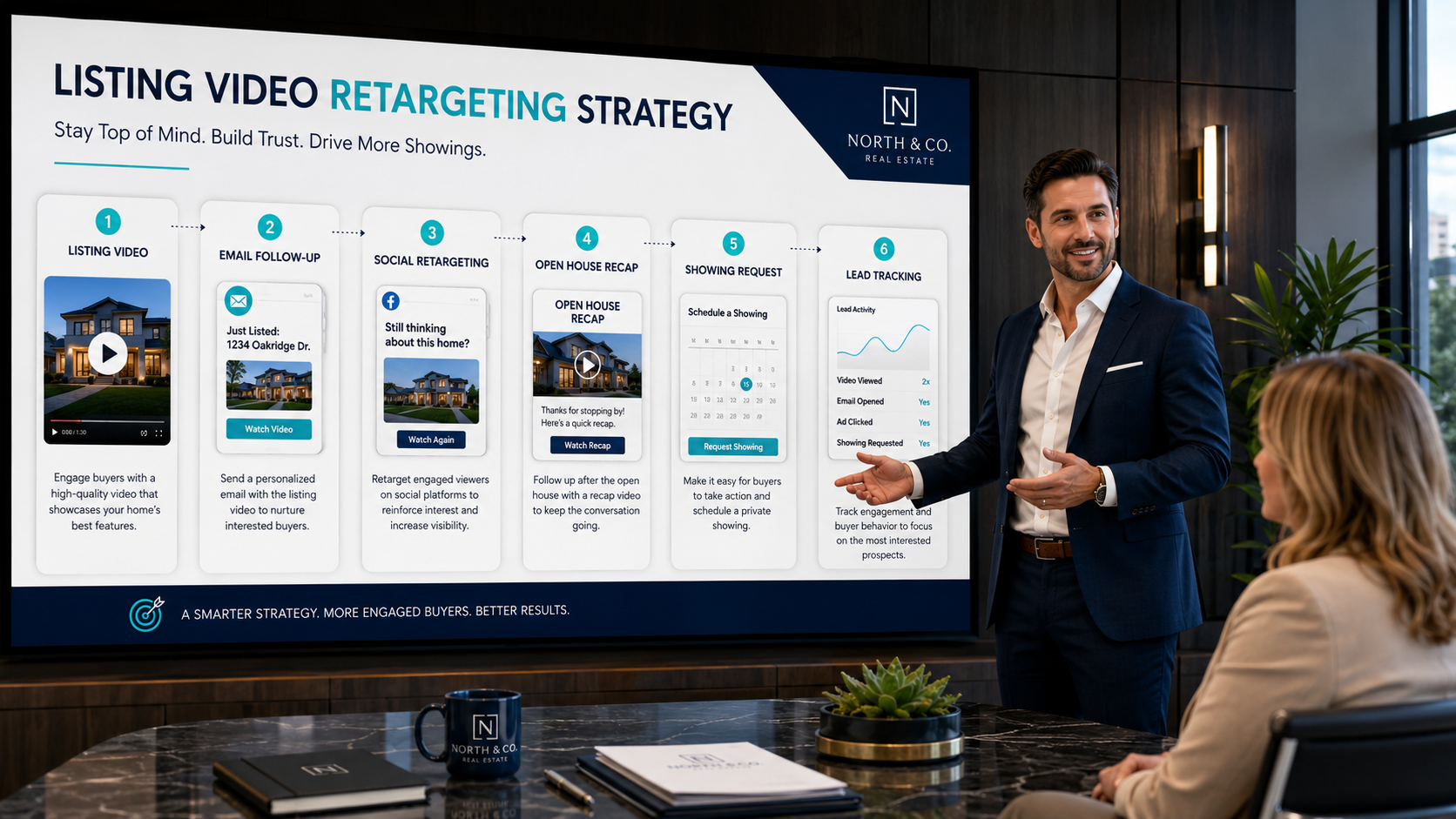
They saved the post.
They viewed a seller page.
They downloaded a neighborhood guide.
They started a rental application.
They asked about a floor plan.
They went quiet after a showing.
Skip retargeting when there is no signal of interest, or when your video does not add anything new.
A simple rule:
If the video answers the next likely question, send it.
If the video only repeats the same pitch, do not.
The best retargeting feels like service.
Not chasing.
Here is a practical sequence agents can use.
Send or post the main listing video.
Goal: create awareness.
CTA: view listing or request details.
Send to people who clicked or watched.
Goal: bring attention back to one standout feature.
CTA: ask for showing.
Send to warmer leads.
Goal: answer the “how does it flow?” question.
CTA: ask for floor plan or private tour.
Send before the event.
Goal: increase attendance.
CTA: stop by or reserve a time.
Send to attendees and no-shows.
Goal: continue the conversation.
CTA: ask what they thought or book second showing.
Send if the listing is still active.
Goal: reframe value.
CTA: compare homes or schedule a call.
This sequence can be built from one photo set and a few specific video angles. That is why best AI video software for real estate agents should be judged by repeatability, not just the beauty of one output.


Compact, ready to go anywhere
Interchangeable lens that’s upgradeable
Dual 1-inch sensors for improved clarity and low light performance
Dynamic range and 6K 360° capture
360° photo resolution at 21MP

8K 360° video recording for ultra-detailed visuals.
4K single-lens mode for traditional wide-angle shots.
Invisible selfie stick effect for drone-like perspectives.
2.5-inch touchscreen with Gorilla Glass protection.
Waterproof up to 33ft for underwater shooting.

360° photo resolution in 23MP
Slim design at 24 mm thick
Built-in image stabilization for smooth video capture.
Internal 19GB storage for photo and video storage.
Wireless connectivity for remote control and sharing.

60MP 360° still images for high-resolution photography.
5.7K 360° video recording at 30fps.
2.25-inch touchscreen for intuitive control.
USB Type-C port for fast charging and data transfer.
MicroSD card slot for expandable storage.
.png)

.png)

Try it free. No credit card required. Instant set-up.







.svg)


.svg)