The Best Tools for Batch-Creating Social Reels With AI.

Cloudpano
September 3, 2025
5 min read
Share this post

The Best Tools for Batch-Creating Social Reels With AI (2025 Guide)

Reels are ruling the social media landscape in 2025. Whether you’re marketing real estate, building a personal brand, or running a media agency, short-form video content is your ticket to reach, engagement, and revenue.

But making Reels manually? That’s time-consuming, inconsistent, and nearly impossible to scale.

This guide walks you through the best AI tools for batch-creating social Reels—so you can post daily, automate editing, and dominate across platforms like Instagram, TikTok, YouTube Shorts, and Facebook.

Why Batch-Creating Reels Is a Must

Consistency beats perfection on social media.

Batching Reels lets you:

✅ Save time by creating multiple videos in one session
✅ Build a posting schedule in advance
✅ Stay consistent on all platforms
✅ Free up your week to focus on closing deals or creating value

When combined with AI tools, this becomes a repeatable, scalable system—even for solo creators and small teams.

🡆 Related: The Weekly AI Video Content Plan (Template + Tools)

What to Look For in an AI Reels Tool

Not all AI video tools are optimized for short-form batching. Choose ones that offer:

  • ✂️ Smart auto-clipping from long videos
  • 🧠 Scene detection and highlights
  • 🗣️ Voiceover generation or sync
  • 📝 Captions and animated text overlays
  • 📲 Exporting in vertical (9:16) format
  • 🗂️ Bulk creation or timeline templates

Let’s explore the top tools in this space.

🔧 1. Opus Clip – Turn Long Videos into Viral Reels

Best for: Podcasters, YouTubers, and educators

Upload one long video (e.g. a webinar, listing overview, or coaching session), and Opus Clip will:

  • Detect the most engaging clips
  • Add captions and emojis
  • Format each clip as a Reel or Short
  • Highlight speaker cuts automatically

✅ Batch 10+ short videos from one source
✅ Includes AI virality scoring

🡆 Related: Turn One Video Into 10 Pieces of Content

🔧 2. CapCut (Desktop) – Manual + AI Precision

Best for: Creators who want more creative control with AI support

CapCut now includes:

  • AI cut detection
  • Subtitle auto-generation
  • Pre-built Reel templates
  • Smart crop (for face detection)
  • Batch rendering queue

Perfect for polishing property Reels or turning branded videos into bite-sized promos.

🡆 Related: How to Add Voiceovers and Captions Automatically to AI Videos

🔧 3. Veed.io – Web-Based Editing + Auto Captions

Best for: Agencies, social media managers, and multi-platform publishing

Veed.io lets you:

  • Create templates for recurring formats
  • Add branded elements (logos, CTAs, colors)
  • Auto-caption in multiple languages
  • Export 10+ videos at once

It’s ideal for teams that want consistency and fast batch production.

🡆 Related: Building a White-Labeled Real Estate Video Marketing Service With AI

🔧 4. Descript – Reels from Audio or Talking Head Video

Best for: Coaches, course creators, and real estate educators

Descript uses transcript-based editing to:

  • Cut filler words automatically
  • Create shorts from keyword highlights
  • Overdub voice with AI
  • Export directly to Reels format

It’s like editing video with Google Docs—but smarter.

🡆 Related: The ROI of Replacing Your Video Editor With AI

🔧 5. Photoaivideo – Photo-to-Video for Real Estate Reels

Best for: Real estate agents and property marketers

Upload listing photos and generate:

  • Cinematic walk-through video
  • Narrated Reel with your AI voice
  • Branding overlays
  • Downloadable and embeddable formats

Batch-create 5+ Reels in 30 minutes for upcoming listings, open houses, or social proof.

🡆 Related: How to Generate Real Estate Videos From Just Photos in Under 5 Minutes

🔧 6. Pictory – Script to Reels in Minutes

Best for: SEO creators, newsletters, and repurposing blog content

Paste a blog post or script, and Pictory will:

  • Match scenes with visuals
  • Generate narration (or upload your own voice)
  • Format for 9:16 vertical
  • Auto-generate captions and transitions

Batch-create 10 Reels from a single newsletter edition or blog.

🡆 Related: AI SEO Toolkit for Video Creators

Sample AI Reel Creation Workflow

Here’s how to use 3 tools together to batch-create 15 Reels from 3 video sources:

  1. Upload full-length video to Opus Clip
    🎬 Receive 10 clips with captions and hooks
  2. Polish in CapCut
    🎨 Add brand elements, music, logo overlays
  3. Schedule with Metricool
    📅 Batch-schedule across TikTok, IG, Facebook, and YouTube

🡆 Related: The Fastest Way to Create 30+ Videos a Month With AI
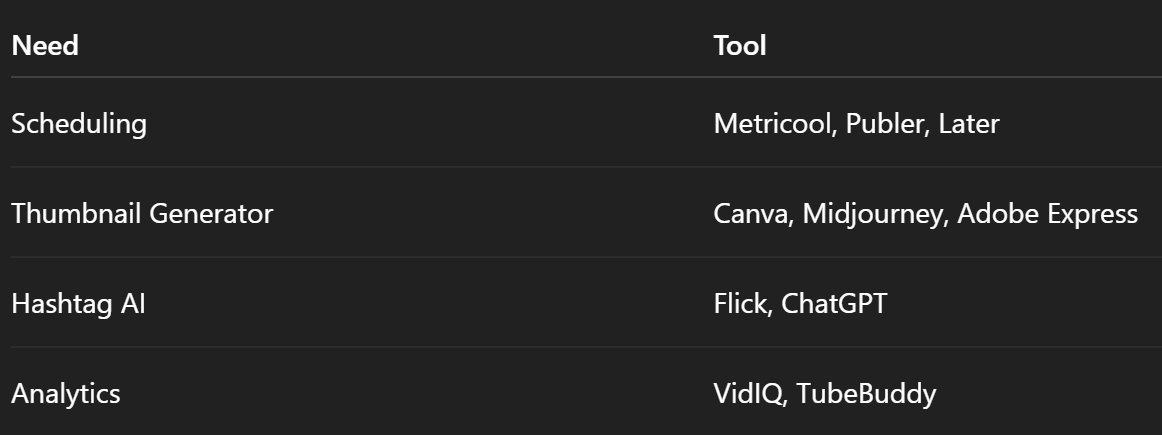
Bonus Tools for Batch Publishing

🡆 Related: AI Video Funnels: How to Automate Lead Gen With Short-Form Content

Real-World Case Study: Austin Agent Reels System

Client: Natalie – Real Estate Agent in Austin
Workflow:

  • Photos to video → Photoaivideo.com
  • Hook script → ChatGPT
  • Voice → ElevenLabs
  • Reels formatted → CapCut
  • Scheduled → Metricool

Output:

  • 12 new Reels/month
  • 3x Instagram reach
  • 2 inbound seller leads from Reels in 30 days

🡆 Related: Real Estate Agents Scaling With AI Video

Final Thoughts: Reels Don’t Sleep—and Neither Should Your System

Batch-creating Reels with AI lets you:

✅ Save 10+ hours per week
✅ Maintain brand visibility
✅ Turn every asset into short-form content
✅ Scale across platforms with ease

With the right tools, what used to take a team now takes a stack—and a smart workflow.

🡆 Start Creating Branded Reels Today With Photoaivideo (Free Walkthrough)

Share this post
Cloudpano

Choose The Right 360° Camera

Insta360 ONE RS 1-Inch 360 Edition

  • Compact, ready to go anywhere

  • Interchangeable lens that’s upgradeable

  • Dual 1-inch sensors for improved clarity and low light performance

  • Dynamic range and 6K 360° capture

  • 360° photo resolution at 21MP

Learn More

Insta360 X4

  • 8K 360° video recording for ultra-detailed visuals.

  • 4K single-lens mode for traditional wide-angle shots.

  • Invisible selfie stick effect for drone-like perspectives.

  • 2.5-inch touchscreen with Gorilla Glass protection.

  • Waterproof up to 33ft for underwater shooting.

Learn More

Ricoh Theta Z1

  • 360° photo resolution in 23MP

  • Slim design at 24 mm thick

  • Built-in image stabilization for smooth video capture.

  • Internal 19GB storage for photo and video storage.

  • Wireless connectivity for remote control and sharing.

Learn More

Ricoh Theta X

  • 60MP 360° still images for high-resolution photography.

  • 5.7K 360° video recording at 30fps.

  • 2.25-inch touchscreen for intuitive control.

  • USB Type-C port for fast charging and data transfer.

  • MicroSD card slot for expandable storage.

Learn More
Property Marketing
Allows potential buyers to explore properties in detail from anywhere, enhancing the real estate marketing process.
Automotive Spins
Create an interactive virtual showroom and engage affluent digital buyers with live 360º video calls, all through the CloudPano mobile app for a complete automotive sales solution.
Interactive Floor Plans
Create 2D and 3D floor plans with measurements in 4 minutes or less, all from your phone. Download the Floor Plan Scanner app and get your first scan free.

360 Virtual Tours With CloudPano.com. Get Started Today.

Try it free. No credit card required. Instant set-up.

Try it free
Latest posts

See our other posts

Interviews, tips, guides, industry best practices, and news.

Using AI Avatars for Real Estate Listing Presentations and Property Walkthrough Videos

This article explains how real estate professionals are using AI avatars for listing presentations and property walkthrough videos to scale their marketing and stay competitive in a video-first industry. It covers how AI avatars work, why they are becoming popular among agents, and how they help create professional listing videos without constant filming. The post also highlights how tools like PhotoAI allow agents to upload a headshot, generate a digital avatar, and quickly produce polished video content for property tours, seller presentations, and social media marketing. By leveraging AI avatars, agents can maintain consistent branding, create more content, and showcase listings more effectively while saving time.
Read post

AI Avatar Compliance and Best Practices for Real Estate Marketing

This article explores how real estate professionals can responsibly use AI avatars in property marketing while maintaining transparency and trust. It explains the importance of AI real estate compliance, including how agents should implement proper disclosure for AI videos and follow ethical AI marketing practices when using AI-generated presenters in listing videos. The guide walks through how AI avatars are created, how they can automate listing presentations, and how agents can integrate them into their marketing workflow without misleading buyers or violating advertising standards. By following clear best practices—such as accurate scripts, transparent disclosures, and consistent review of generated content—real estate teams can scale video marketing while protecting their reputation and building long-term client trust.
Read post

Managing Multiple AI Clones Inside One Real Estate Team

This article explains how real estate teams can successfully manage AI avatars across multiple agents to scale their marketing and listing presentations. It walks through the process of creating AI avatar clones, organizing them into a structured team avatar management system, and integrating them into a streamlined real estate AI workflow. The guide demonstrates how listing descriptions can quickly be converted into scripts, allowing AI avatars to present properties automatically in listing videos. By combining automation with personalization, brokerages can maintain individual agent branding while producing high-quality marketing content faster than ever. The article also highlights how photographers and real estate media companies can resell AI avatar presentations as an additional service, creating new revenue streams while helping agents generate engaging listing videos without filming themselves.
Read post



