


.png)


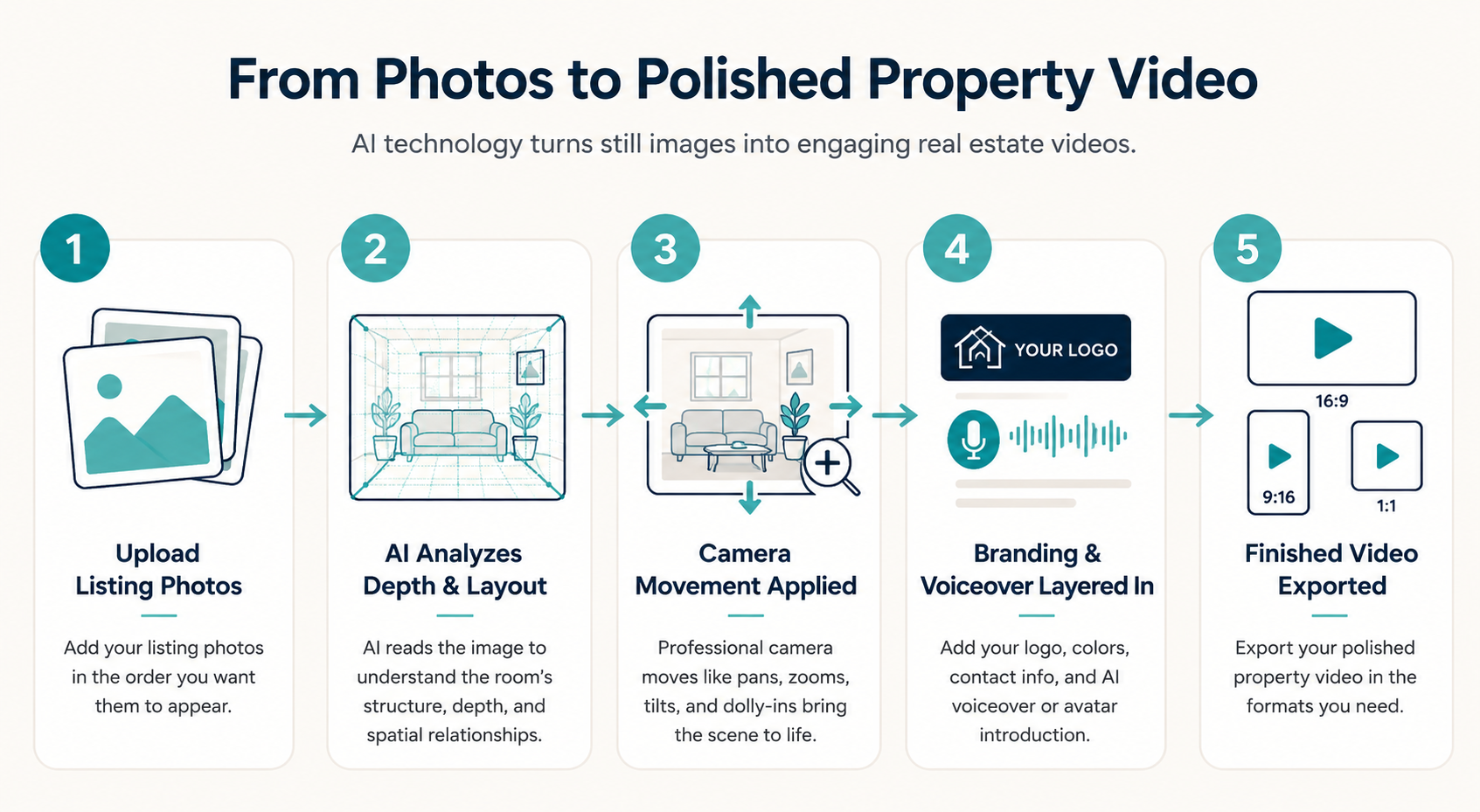
If you've ever wondered how a single listing photo turns into a smooth, moving property tour, the short answer is that the software isn't "filming" anything — it's interpreting and transforming an image to simulate camera movement. This is the core idea behind AI real estate video, and understanding it at a conceptual level can make the whole workflow feel a lot less like magic and much more like a practical tool for your listings.
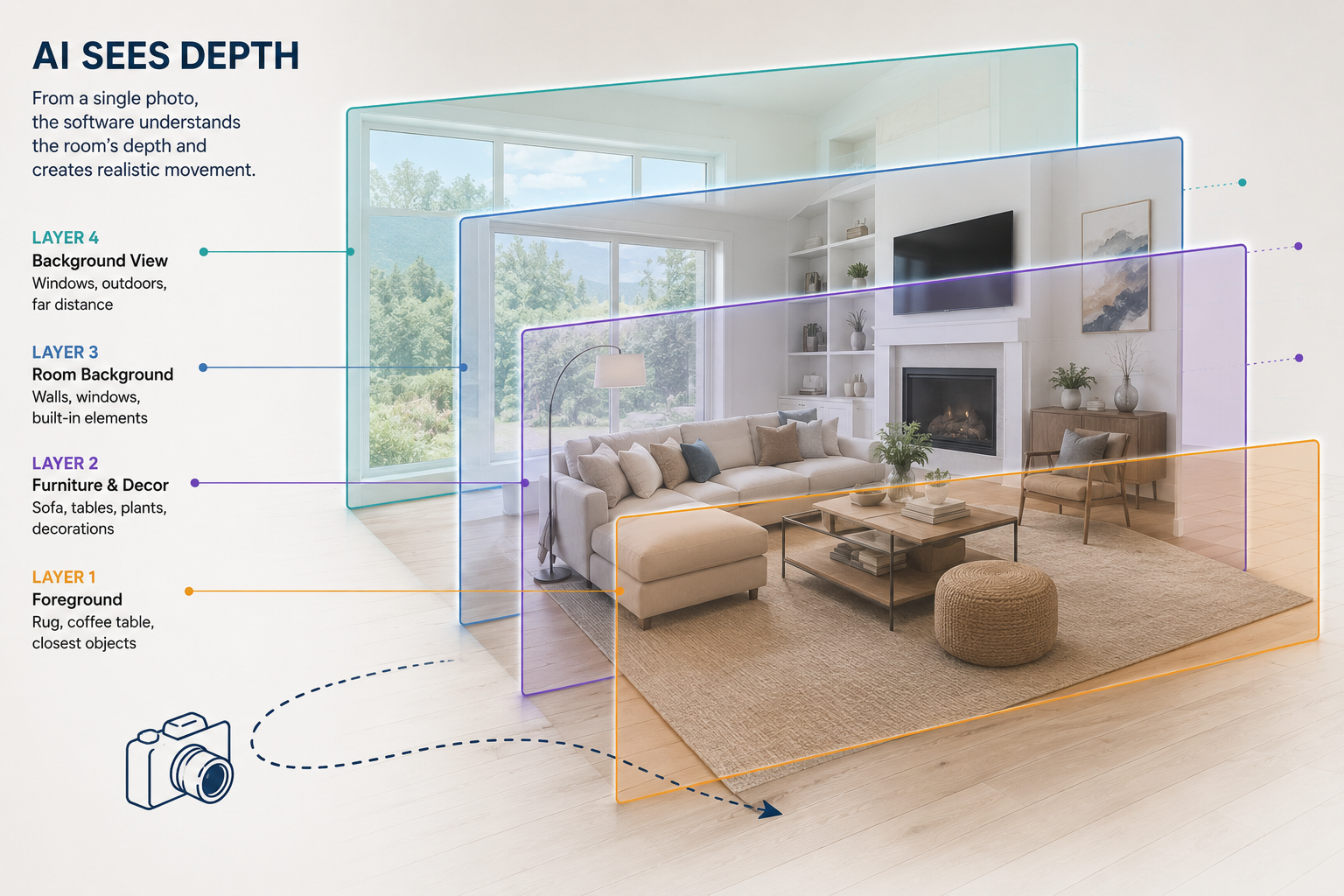
When you upload a photo, AI-powered software can analyze visual cues within the image, such as walls, floors, ceilings, major objects, and the apparent depth of the scene. From that information, it can estimate how different elements relate spatially and generate motion that creates the impression of moving through or around the room.
It's similar to how you can look at a photograph and immediately recognize that the kitchen island is closer to you than the window behind it — except the software uses visual information in the image to generate a convincing sense of movement.
Once the software has analyzed the photo, it can generate different types of camera movement — such as pans, zooms, tilts, dolly-ins, orbits, and more. Rather than simply enlarging a flat image, AI-generated motion can create the impression that the viewpoint itself is moving through the space.
For example, a slow push into a living room can feel like the camera is gliding toward the fireplace, while a pan across a bedroom can create the impression of a videographer sweeping a camera from left to right.
Because every photo is different — a wide-angle kitchen shot behaves differently from a tight bathroom photo — selecting an appropriate movement for each image can help produce a more natural-looking result. A vaulted living room might suit a slow movement that emphasizes the height of the space, while a compact home office may look better with a subtle push or pan that avoids excessive distortion.
This per-photo control can help distinguish an AI-generated real estate video from a traditional slideshow using simple pan-and-zoom effects.
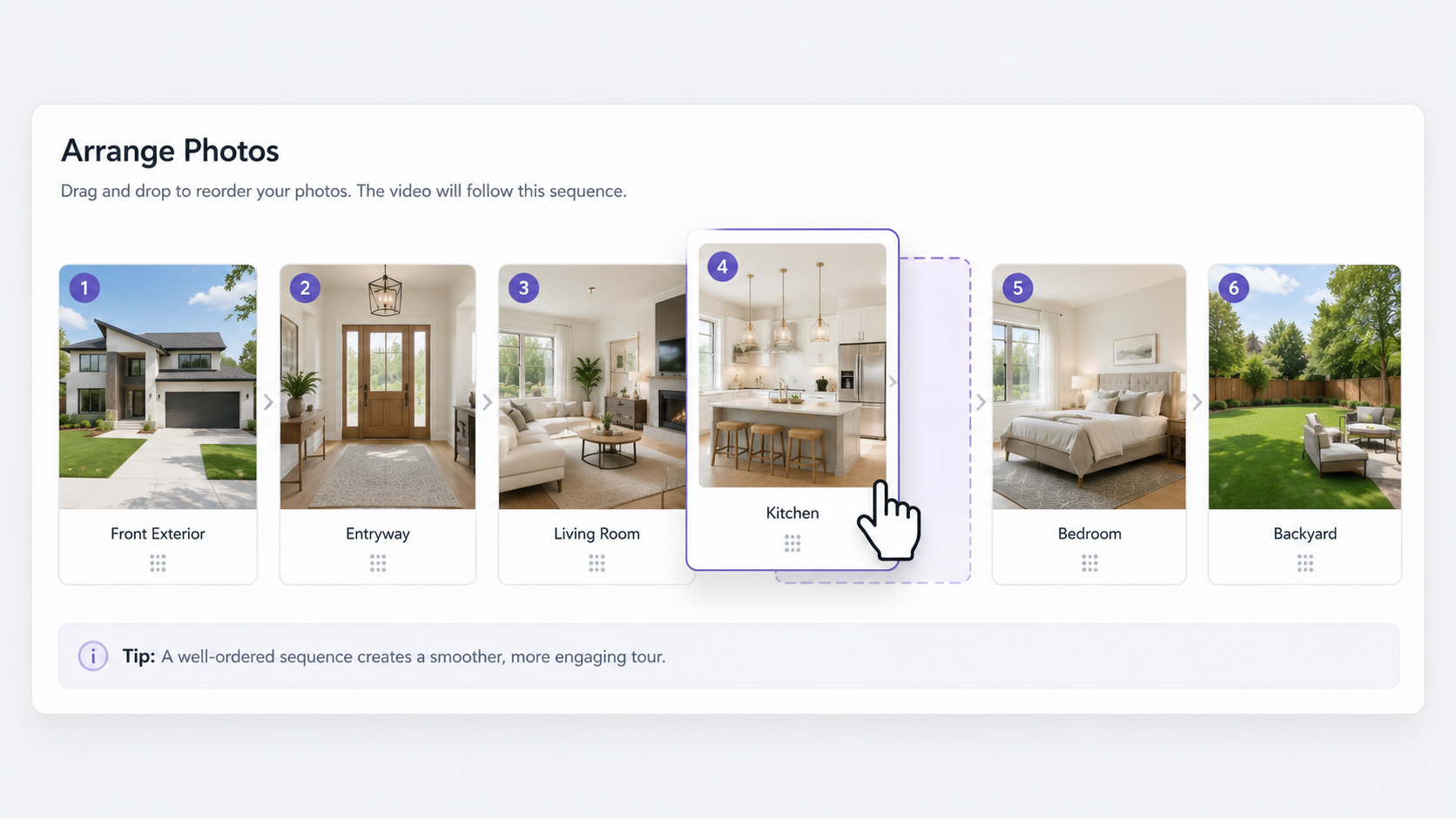
A convincing property tour isn't just a series of moving photos — it's also a sequence that should feel intentional and easy to follow. That's a pacing challenge as much as a visual one, and modern video creation tools can help automate much of the process.
After you drag and drop your photos into the order you want — front exterior, entryway, living room, kitchen, bedrooms, backyard, or whatever flow makes sense for the listing — the software can turn those images into individual clips and combine them into a continuous property video.
Transitions help connect one room to the next without making the experience feel unnecessarily abrupt. The overall visual style or template you choose can also influence the presentation, helping create a more polished and consistent final video.
This matters because video only works as a marketing tool if people are willing to watch it. According to Wyzowl's State of Video Marketing report, video continues to play an important role in how businesses communicate with audiences online. Automating much of the sequencing and production process means an agent doesn't need extensive editing experience to create a polished property video.
Once the visual portion of the video is created, branding elements can be layered on top. Depending on the platform, these can include your logo, chosen color palette, contact information, and custom intro and outro segments.
Conceptually, this works like a template system: your branding elements remain consistent while the property photos and other listing-specific content change from video to video. This means agents don't have to redesign their branding every time they create a new property video.
The value isn't purely cosmetic. Every property video can also reinforce the agent or brokerage behind the listing. A consistent intro, outro, logo, and contact information help viewers identify who created the video and who to contact if they're interested in the property.
Over time, using the same visual identity across multiple listings can also help create a more consistent and professional marketing presence.
Beyond visuals, some agents may want a video that also describes the property — highlighting its layout, finishes, amenities, or neighborhood — without having to record their own narration.
That's where AI voiceover can help. You provide or generate a script, and text-to-speech technology turns that text into spoken narration that can be incorporated into the property video.
This removes two common barriers to voiceover production: recording your own audio and having access to suitable recording equipment. It can also make it easier to revise narration when listing details change, since the script can be updated without necessarily recording everything again.
Another option is an AI avatar or digital clone — a feature that can create a talking, on-camera-style introduction without requiring the agent to film a new introduction for every property.
Think of it as a digital stand-in for the opening of a traditional walkthrough video, where an agent might introduce themselves and welcome viewers to the property. Instead of filming that segment each time, an AI-generated version can be incorporated into the beginning of the video.
This can be useful for agents who want a more personal introduction but don't want to set up lighting, a camera, and recording equipment every time a new listing goes live. Resources such as Think with Google provide broader guidance on using video effectively within digital marketing strategies.
When combined with the photo-based property tour, the result can provide both a personal introduction and a visual walkthrough within the same piece of content.
Many of the processes described above — generating camera movement, sequencing photos, applying transitions, adding branded elements, and incorporating AI-generated narration — can be handled within the platform rather than through traditional video-editing software.
Traditional video editing often requires working with timelines, keyframes, frame rates, transitions, audio tracks, and export settings. AI real estate video software can simplify much of that process into choices agents already understand: which photos to use, what order they should appear in, which visual style fits the property, and what branding information should be included.
That's a meaningful shift for an industry where producing property videos has traditionally involved either hiring a videographer, learning video-editing software, or spending significant time assembling videos manually.
HubSpot's video marketing statistics highlight the broader role video plays in modern digital marketing. Making video creation easier gives individual agents another way to incorporate video into their listing marketing without necessarily developing professional editing skills.
If you want to see the process end to end rather than just read about it, PhotoAIVideo's walkthrough demonstrates how listing photos can move from upload to a finished, branded property video. The platform is built for real estate agents, so the workflow focuses on familiar tasks such as selecting listing photos, arranging room order, choosing a visual style, and adding agent information.
Does AI real estate video require a camera crew or on-site shoot?
Not when you're creating the video from existing listing photos. Photo-based AI real estate video tools use still images as the source material and generate motion from those images, allowing agents to create property videos without conducting a separate video shoot.
Can I control which camera movement is used in each room?
Depending on the platform and available features, you may be able to choose different camera movements for individual photos or scenes. This allows you to select motion that better suits the composition and characteristics of each space.
Do I need to record my own voice or appear on camera to use these features?
Not necessarily. AI-generated voiceovers can provide narration without requiring you to record your own audio, while AI avatar features can provide an on-camera-style introduction without requiring a new recording for every listing.
What formats can I export an AI real estate video in?
Available formats depend on the platform. Common aspect ratios for real estate marketing include widescreen 16:9 for websites and platforms such as YouTube, vertical 9:16 for short-form social content, and square 1:1 for certain social media placements. Check your platform's current export options to confirm which formats are supported.
Taken together, features such as AI-generated camera movement, automated sequencing, branding, voiceover, and avatar introductions can turn a collection of listing photos into a polished, shareable property video without requiring traditional video-editing expertise.
For agents considering adding video to their marketing routine, this significantly lowers the technical barrier to getting started. You can explore the full feature set on the PhotoAIVideo homepage to see how the platform approaches AI-powered video creation for real estate.


Compact, ready to go anywhere
Interchangeable lens that’s upgradeable
Dual 1-inch sensors for improved clarity and low light performance
Dynamic range and 6K 360° capture
360° photo resolution at 21MP

8K 360° video recording for ultra-detailed visuals.
4K single-lens mode for traditional wide-angle shots.
Invisible selfie stick effect for drone-like perspectives.
2.5-inch touchscreen with Gorilla Glass protection.
Waterproof up to 33ft for underwater shooting.

360° photo resolution in 23MP
Slim design at 24 mm thick
Built-in image stabilization for smooth video capture.
Internal 19GB storage for photo and video storage.
Wireless connectivity for remote control and sharing.

60MP 360° still images for high-resolution photography.
5.7K 360° video recording at 30fps.
2.25-inch touchscreen for intuitive control.
USB Type-C port for fast charging and data transfer.
MicroSD card slot for expandable storage.
.png)

.png)

Try it free. No credit card required. Instant set-up.







.svg)


.svg)