


.png)


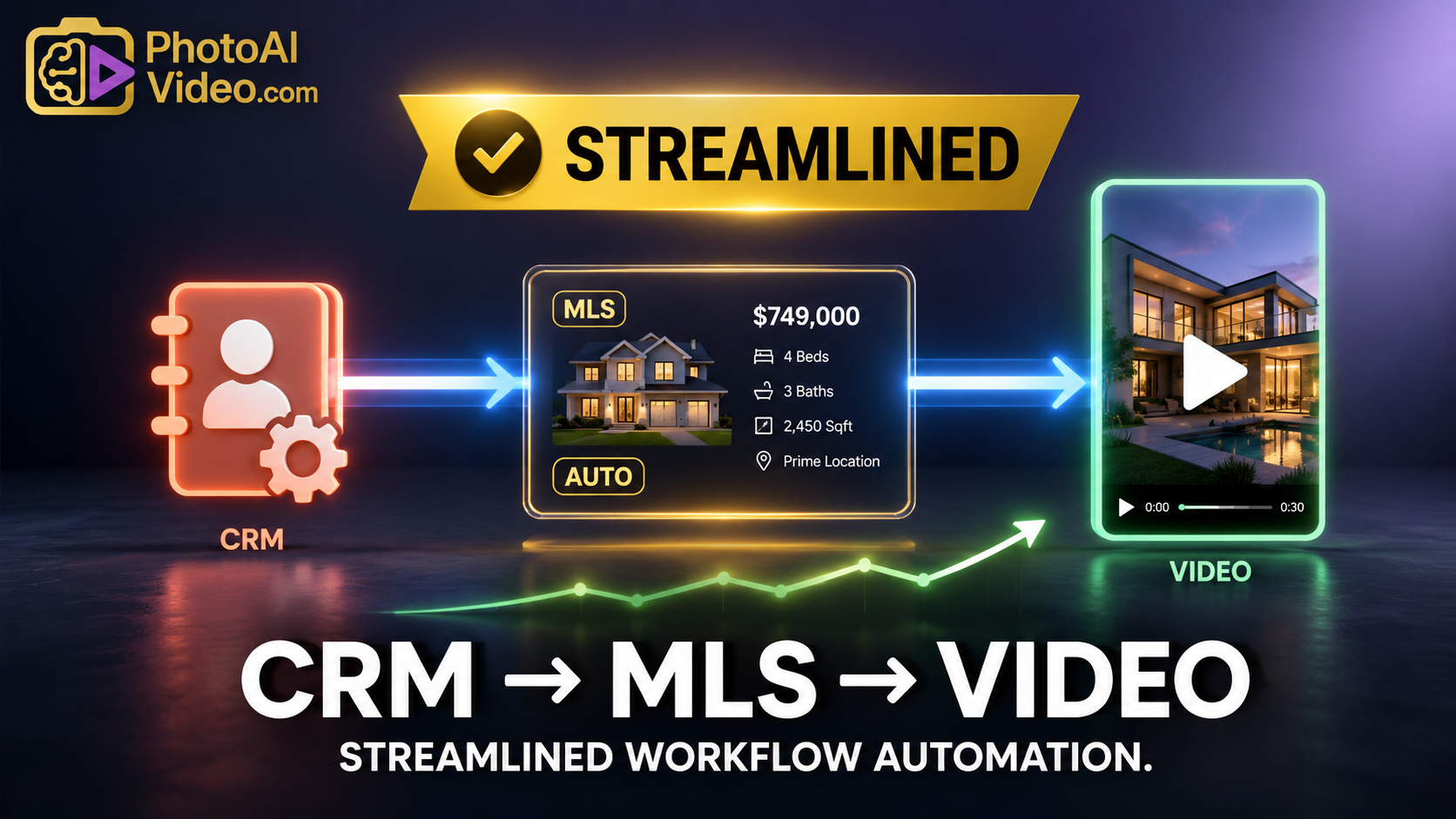

A lead comes in from a listing ad.
The agent checks the CRM.
The CRM has the buyer’s name, phone number, email, source, saved search, showing history, and maybe a note that says, “Interested in homes with pools under $600K.”
The listing team has photos for a new property that matches.
The social media calendar needs content.
The seller wants more exposure.
The agent wants follow-up.
The problem is not that the business lacks information.
The problem is that the information is trapped in separate places.
The CRM knows who the lead is. The MLS listing has the property details. The photo gallery has the visuals. The marketing team needs videos. The agent needs follow-up. The seller wants proof that the listing is being promoted.
That is why the next step for real estate marketing is not just better videos.
It is a better workflow from CRM to automated video.
PhotoAIVideo helps real estate professionals turn listing photos into AI-generated videos. When paired with a CRM-driven marketing process, those videos can become more than one-off social posts. They can become follow-up assets, seller updates, listing Reels, Facebook video ads, buyer nurture content, and property website media.
MLS rules vary by board, brokerage, and region. Always confirm your local requirements before publishing listing media. For broader policy context, review NAR’s Clear Cooperation Policy and NAR’s Handbook on Multiple Listing Policy.
A CRM-to-video workflow connects three parts of the real estate business that are often handled separately:
The CRM knows the audience.
The listing media shows the property.
Automated video turns that property media into content that can be used across marketing channels.
For example, an agent may have a CRM segment of buyers looking for:
If a matching listing is ready, the agent should be able to create content quickly.
That could include:
This is where AI social media videos for Realtors become more valuable. They are not just random posts. They can be tied to real CRM segments, listing triggers, and follow-up opportunities.
The goal is simple:
Use the data you already have to create more relevant video content from the listings you already manage.
Most real estate CRMs are full of leads that never receive useful follow-up.
Not because agents do not care.
Because follow-up takes time.
A lead asks about one property. The agent responds. The lead goes quiet. A similar listing appears two weeks later, but the agent is busy. The CRM record sits there. The new property gets posted publicly, but the perfect buyer segment never receives a targeted video.
That is a missed opportunity.
A CRM should not just store contacts. It should help drive marketing actions.
When listing photos are approved, a strong workflow can trigger video ideas:
That is why a real estate reels generator AI is more powerful when connected to CRM thinking.
The agent is not just posting.
The agent is matching content to intent.
Google’s video SEO documentation explains that video content should be easy for Google to find and understand when it appears on websites. Google’s SEO Starter Guide also emphasizes creating helpful content for users and making it easy for search engines to understand that content. That matters when agents use video on property pages, blog posts, and landing pages. See Google’s video SEO best practices and Google’s SEO Starter Guide.
The CRM is usually treated like a database.
The video tool is treated like a content tool.
The listing photos are treated like a media folder.
That separation creates friction.
Here is what often happens.
A new listing goes live. The agent posts the photos. Maybe the assistant creates one Reel. The CRM does not trigger anything. Buyer leads are not segmented. Past clients are not updated. Seller prospects do not see the marketing effort. The same video, if it exists, gets posted once and then forgotten.
The listing had more potential.
The CRM had the audience.
The photos had the visual material.
But there was no bridge.
The bridge is a repeatable marketing workflow.
Instead of asking, “Should we make a video?” after every listing, the team should already know what happens when listing media is approved.
Example:
That is a system.
Without it, the agent keeps reinventing the process from scratch.
PhotoAIVideo helps create videos from property photos.
That makes it a practical production layer between the MLS/listing media and the CRM.
The CRM does not create the video.
The listing photos do not distribute themselves.
PhotoAIVideo helps turn the photos into usable video assets that can support follow-up, social media, ads, and seller communication.
A listing photo set can become:
This is why PhotoAIVideo can support an AI real estate reels app workflow for teams that want video creation to happen as part of their listing process.
The software helps agents turn approved property media into video.
The CRM helps agents decide who should see it.
Together, they create a more complete marketing system.
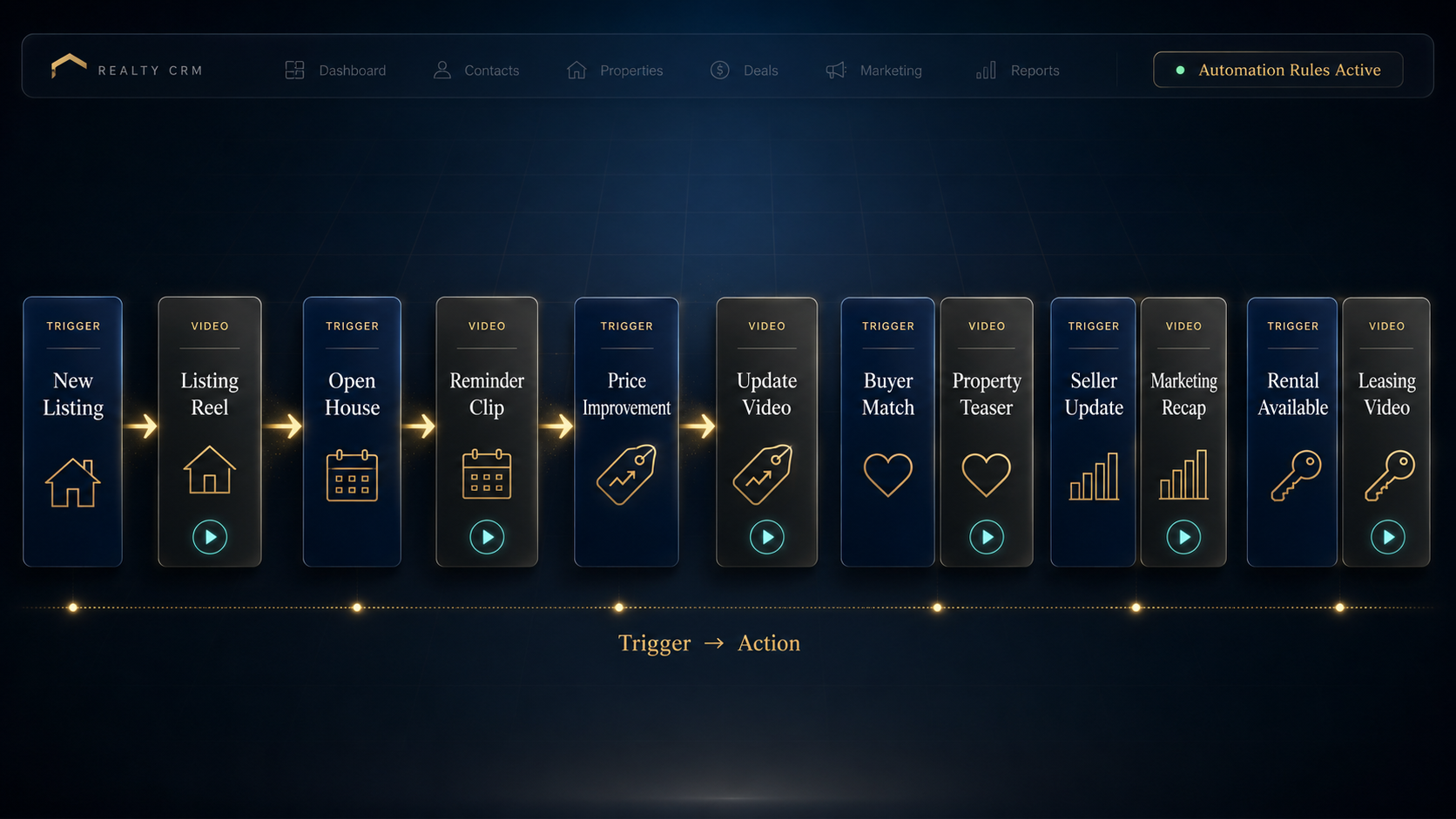
Start with the event that should cause a video to be created.
Possible triggers:
A trigger turns video from an optional task into a workflow step.
Different triggers need different videos.
Examples:
This keeps the content relevant.
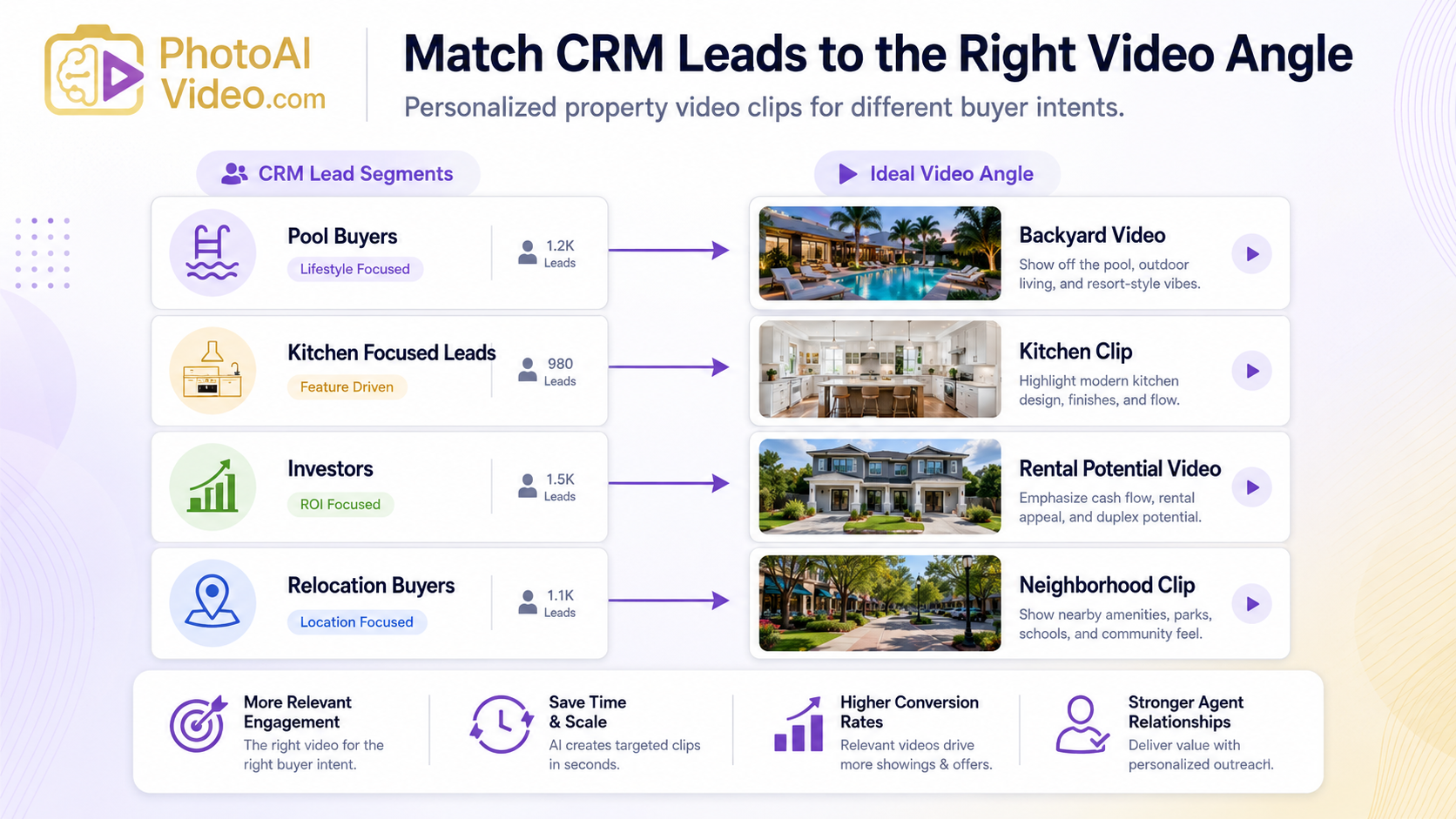
Use the photos that support the video’s purpose.
For a buyer follow-up video, lead with the feature the buyer cares about.
If the CRM notes say “needs big backyard,” start with the backyard.
If the lead wants “updated kitchen,” do not bury the kitchen in the middle.
The CRM should influence the creative direction.
That is the difference between generic content and useful content.
Upload the selected property photos into PhotoAIVideo and generate the video.
This is where the process saves time.
Instead of manually editing from scratch, the agent or team can create a video asset from approved listing photos.
For teams producing AI listing reels for Realtors, this step turns listing media into repeatable short-form content.
The video itself is only part of the follow-up.
Add context based on the CRM segment.
Examples:
For buyer leads:
“Thought this home matched what you asked for — especially the backyard and open kitchen.”
For sellers:
“Here is one of the video assets we created this week to promote your listing.”
For past clients:
“This new listing gives a good look at where the neighborhood market is heading.”
For rental leads:
“This unit just became available and matches the area you were asking about.”
The video gets attention.
The message creates relevance.
Before publishing or sending, review the video.
Check:
If the video will be used in paid housing ads, review platform rules. Meta provides guidance on Special Ad Category requirements for housing-related ads. See Meta’s Special Ad Category guidance.
Different videos belong in different channels.
Possible channels:
A CRM-to-video workflow is not just about making content.
It is about routing the right content to the right audience.
Random video posting can still help.
But CRM-driven video marketing creates a stronger business case because the video is tied to a contact, campaign, listing event, or follow-up sequence.
That is how video becomes part of revenue operations.
A solo agent can use a CRM-to-video workflow to follow up faster.
Example:
A buyer lead asks about homes with large kitchens. The agent saves that preference in the CRM. When a new listing with a strong kitchen becomes available, the agent uses PhotoAIVideo to create a short kitchen-focused video from the listing photos and sends it directly to that lead.
That is more useful than a generic property link.
Photographers can use PhotoAIVideo to help agents create CRM-ready video assets.
Instead of only delivering files, photographers can package videos by use case:
This is a strong use case for AI property reels software because the photographer can deliver videos that fit the agent’s marketing funnel.
Brokerages can use this workflow to help agents standardize video follow-up.
A brokerage might create a system where every new listing generates:
That gives agents a repeatable marketing system instead of a blank content calendar.
Property managers can connect CRM leasing leads to rental video content.
If a lead wants a two-bedroom unit near a certain area, and a matching unit becomes available, the team can generate a video from unit photos and send it through the CRM.
This reduces friction for renters who do not want to schedule a showing just to understand the layout.
Listing coordinators can own the workflow.
They can make sure that when photos are approved, the right video assets are created, labeled, reviewed, and routed to the correct agent, seller, CRM campaign, and social channel.
This makes video production less dependent on the agent remembering to ask.
A CRM should not just hold contacts.
It should trigger marketing actions.
If the CRM says a buyer wants a certain type of property, that information should influence the video content the agent sends.
Generic blasts can work for visibility, but targeted follow-up should be more specific.
If a lead cares about outdoor space, send a backyard-focused video.
If a lead is an investor, focus on rent potential, condition, and location.
Before sending or posting listing videos, confirm the listing status and local MLS requirements.
This is especially important for coming-soon, delayed, private, or office-exclusive situations.
If the video becomes a Facebook ad, the campaign may fall under housing ad rules.
Do not treat paid ad distribution the same as a normal social post.
If a video appears on a property page or blog post, add descriptive text.
Google’s video SEO documentation recommends making video content easy for Google to access and understand. Google’s image SEO documentation also recommends helpful surrounding context for images and visual content. See Google’s video SEO best practices and Google’s image SEO best practices.

Do not stop at “video created.”
Track:
That feedback should improve the next video.


Compact, ready to go anywhere
Interchangeable lens that’s upgradeable
Dual 1-inch sensors for improved clarity and low light performance
Dynamic range and 6K 360° capture
360° photo resolution at 21MP

8K 360° video recording for ultra-detailed visuals.
4K single-lens mode for traditional wide-angle shots.
Invisible selfie stick effect for drone-like perspectives.
2.5-inch touchscreen with Gorilla Glass protection.
Waterproof up to 33ft for underwater shooting.

360° photo resolution in 23MP
Slim design at 24 mm thick
Built-in image stabilization for smooth video capture.
Internal 19GB storage for photo and video storage.
Wireless connectivity for remote control and sharing.

60MP 360° still images for high-resolution photography.
5.7K 360° video recording at 30fps.
2.25-inch touchscreen for intuitive control.
USB Type-C port for fast charging and data transfer.
MicroSD card slot for expandable storage.
.png)

.png)

Try it free. No credit card required. Instant set-up.







.svg)


.svg)