


.png)


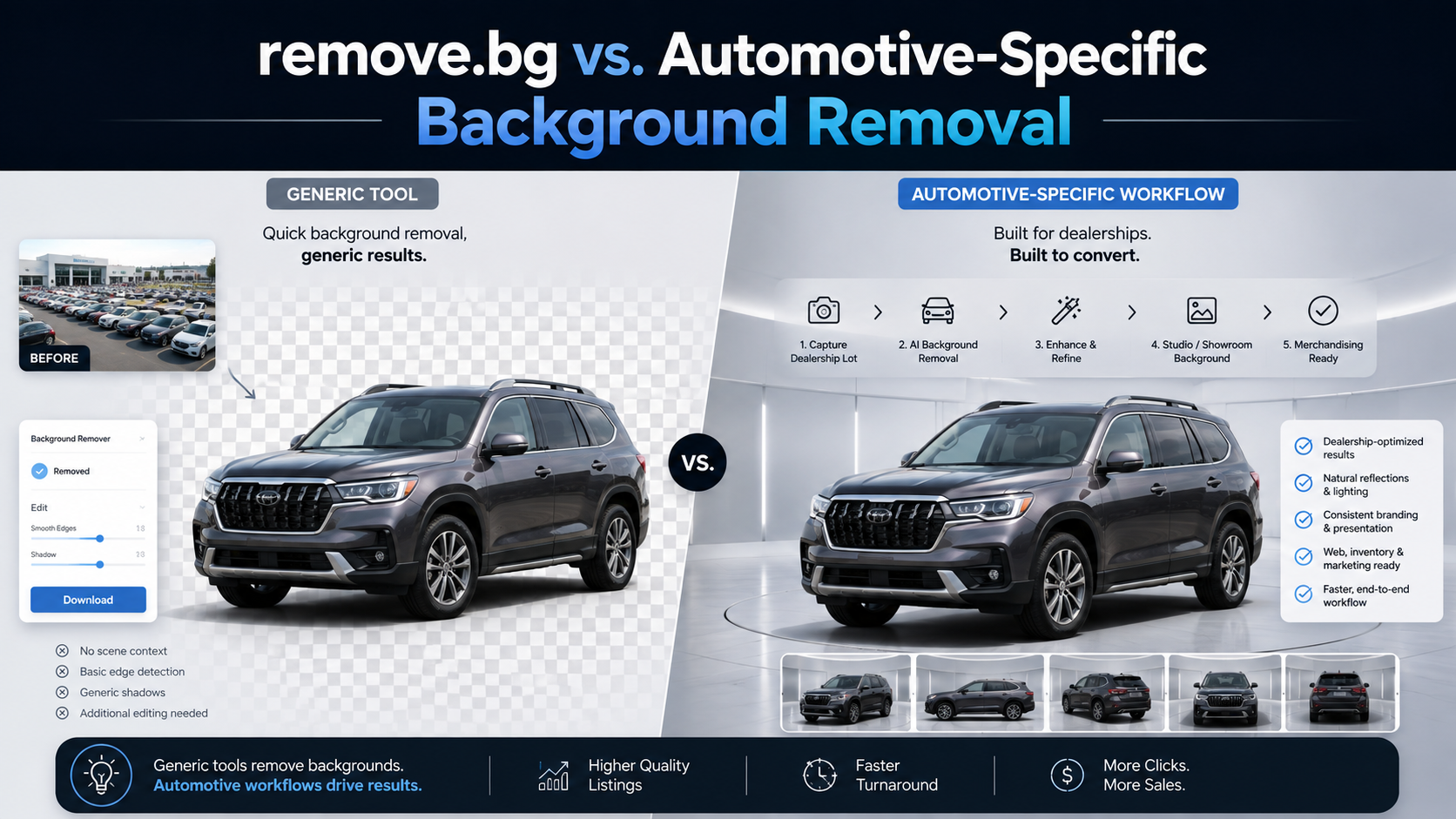
Dealership vehicle photography rarely happens under perfect conditions.
Inventory may be photographed on crowded lots, beside other vehicles, near a service department, against distracting buildings, after a rainstorm, or under completely different lighting from one day to the next.
Traditionally, producing consistent inventory photography could mean investing in a dedicated photo booth, creating a controlled photography area, sending images to an outsourced editing company, or having employees manually edit photographs.
AI background removal software provides another option.
Instead of rebuilding the capture process, dealerships can photograph vehicles where they already are and automate much of the background cleanup afterward.
That raises an important question: should a dealership use a broad background-removal platform such as remove.bg, or choose software built specifically around automotive inventory?
If you are searching for a remove.bg car alternative, the answer should not be based on which platform has the flashiest AI demo. It should come down to how well each option fits the dealership's actual photography and merchandising workflow.
It would be inaccurate to describe remove.bg as a simple tool that cannot handle automotive photography.
remove.bg supports cars as a recognized foreground type through its API, offers high-resolution output, provides bulk editing through its desktop application, supports customizable backgrounds, and includes car-specific functionality such as automatic shadows. Its API can also be incorporated into larger software workflows.
That makes it a capable option for many photographers, developers, ecommerce businesses, and dealerships.
The more useful question is not:
"Can remove.bg remove a car background?"
It can.
The better question is:
"Does my dealership need background removal, or does it need an automotive inventory photography workflow?"
That distinction becomes increasingly important as inventory volume, rooftop count, branding requirements, and integration needs grow.
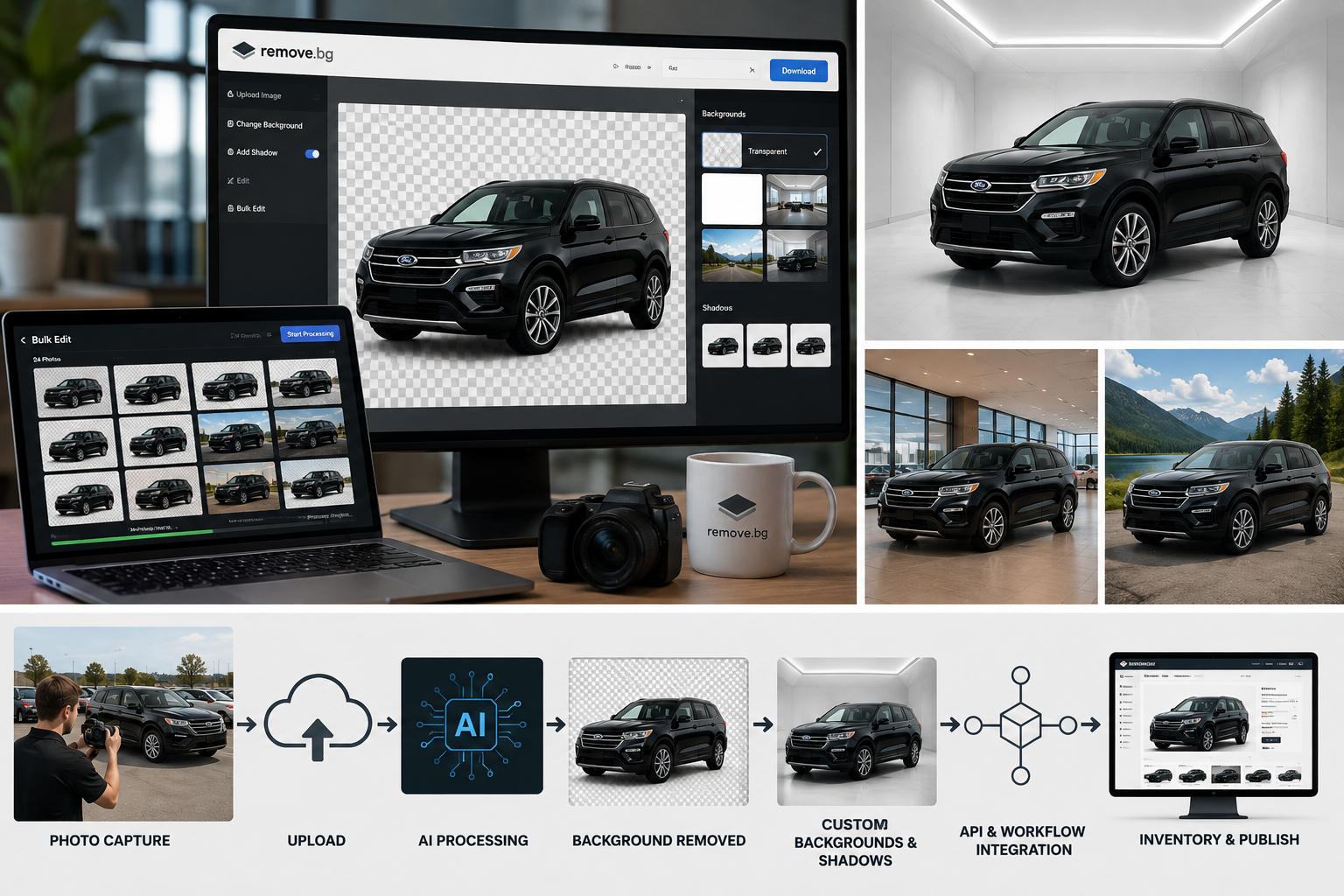
Before comparing platforms, map out what your organization actually needs.
Ask:
A dealership photographing 50 cars per month has a very different problem from a dealer group managing thousands of vehicles across multiple rooftops.
For the smaller dealership, a broad tool may provide everything necessary.
For the larger organization, the entire workflow begins to matter.
Automotive background removal is more complicated than isolating a simple rectangular ecommerce product.
Vehicle images contain difficult edges and surfaces, including:
Windows are especially challenging because the software must distinguish between the vehicle, reflections on the glass, and scenery visible through it.
remove.bg specifically supports cars and even recommends best practices such as photographing one vehicle at a time, avoiding extreme angles, and keeping the vehicle unobstructed for stronger cutout results.
An automotive-specific platform should be held to the same standard.
Do not choose a remove.bg car alternative based entirely on polished website samples.
Upload your own dealership photos.
Try a black SUV photographed near the service lane. Test a white pickup against a bright sky. Upload vehicles parked near other inventory. Include difficult wheels, glass, mirrors, roof racks, and reflections.
Real dealership images are the proper benchmark.
A clean transparent cutout is useful, but dealerships often need more.
The finished image may need:
Both remove.bg and automotive-focused platforms can support forms of background replacement. remove.bg, for example, supports custom backgrounds and other editing controls through its products and API.
The difference is often how those capabilities are organized around automotive operations.
AutoBackgrounding currently offers studio, showroom, outdoor, white, and custom automotive background options and allows dealership branding to be incorporated into the workflow.
Regardless of provider, inspect the finished image carefully.
Does the vehicle look grounded?
Do the tires meet the floor naturally?
Does the scale make sense?
Are shadows believable?
A technically correct cutout can still produce an image that looks obviously pasted onto another scene.
This is one of the most important areas to evaluate.
Imagine a dealership photographing:
40 photos × 100 vehicles = 4,000 images
Processing images individually quickly becomes impractical.
remove.bg does provide serious bulk capabilities. Its desktop application supports bulk editing and unlimited queued batches, while its API can process images programmatically at scale.
Therefore, a dealership should not assume that choosing an automotive platform is necessary simply to obtain batch processing.
Instead, evaluate how the batch workflow fits vehicle inventory.
Look for:
AutoBackgrounding's current Bulk Business offering includes bulk processing, multi-image uploading, batch-processing support, and advanced export options.
For dealerships, the key question is whether employees can process an entire vehicle—or many vehicles—without repeatedly configuring every image.
Inventory photography is part of the dealership's digital brand.
A buyer browsing 30 vehicles should see a consistent merchandising style.
Evaluate whether a platform supports:
remove.bg allows users to replace backgrounds and work with custom backgrounds, and its automotive materials also discuss adding branding or logos to vehicle imagery.
An automotive-specific system may go further by structuring those controls specifically around inventory.
AutoBackgrounding currently promotes custom backgrounds, automatic dealership logos, watermarks, branding controls, and Enterprise white-label capabilities.
For a single photographer, that difference may be minor.
For a dealer group operating 10 or 20 rooftops, consistent branding can become an operational requirement.
Resolution matters because inventory images are used in many places.
Consider:
remove.bg currently supports output up to 50 megapixels through its API and premium workflows. Its credit system distinguishes between free low-resolution previews and higher-quality output.
Automotive-specific platforms may use different credit models.
AutoBackgrounding's current web-app plans distinguish between 1K AI swaps at one credit and 4K swaps at two credits.
That means dealerships should calculate cost based on the output they actually require.
Do not automatically assume every inventory photograph needs maximum resolution.
Instead ask:
What image dimensions does our VDP require, and what does producing those images cost at our monthly volume?
For larger dealerships and automotive software companies, manual uploading may eventually become the bottleneck.
Both remove.bg and AutoBackgrounding offer APIs.
remove.bg's API is mature and broadly designed for developers. It supports direct image uploads or URLs, multiple output resolutions, car identification, background controls, and substantial processing throughput.
That can make remove.bg an attractive choice for a development team that wants a general-purpose image background service.
An automotive-specific API becomes more interesting when the desired workflow looks like:
Vehicle photographed
↓
Images uploaded
↓
Background automatically processed
↓
VIN or stock record matched
↓
Finished photos sent to VDP
↓
Inventory syndicated to marketplaces
AutoBackgrounding's current automotive offering lists API access, website integration, inventory-management integration, and custom Enterprise integrations. Its dedicated automotive API also provides bulk endpoints and direct-to-storage uploads.
If you are evaluating a remove.bg car alternative for an automotive SaaS product, marketplace, or dealer group, examine the integration architecture—not simply whether an API exists.
Ask:
Those details determine how useful an API becomes in production.
Another important difference is the scope of the platform.
A dealership's merchandising stack may eventually include:
remove.bg specializes primarily in image background processing across many industries.
AutoBackgrounding is positioned specifically around automotive merchandising and currently offers 360° vehicle spin functionality alongside its background-processing products.
That does not automatically make one approach better.
If all you need is a reliable API that removes backgrounds, a focused general-purpose service may actually be simpler.
If you are building a broader automotive merchandising workflow, consolidating related capabilities may be more valuable.
Do not compare platforms only by the cheapest advertised plan.
Review:
remove.bg currently provides free low-resolution usage, subscription plans, and pay-as-you-go credits. High-resolution processing uses credits, while pay-as-you-go credits do not expire.
AutoBackgrounding currently offers:
Free: $0 per month with three background swaps and no credit card required.
Professional: 2,400 credits with unlimited projects, 1K and 4K processing, reference-image support, downloads, and standard support.
Bulk Business: 6,000 credits plus bulk processing, multi-image uploads, batch-processing support, priority support, and advanced exports.
Enterprise: Custom/demo-based pricing with API access, website integration, inventory-management integration, 360° spin access, and additional dealership-focused functionality.
Pricing can change, so verify the latest credit allowances and plan pricing directly on the AutoBackgrounding pricing page before choosing a plan.
Most importantly, calculate cost based on images, not vehicles.
If you photograph 100 vehicles with 40 photos each, you are processing 4,000 images.
Regardless of provider, watch for:
Also be careful about assuming that software marketed as "automotive AI" is automatically better for cars.
The label does not matter.
The output and workflow do.
Using AutoBackgrounding as the real-world example:
Original dealership photo
↓
AI identifies the vehicle
↓
Original background is removed
↓
White, studio, showroom, outdoor, or custom background is applied
↓
Branding can be added
↓
Images are processed individually or in batches
↓
Finished media is downloaded or incorporated into a dealership workflow
The current platform includes automotive background removal, multiple background styles, custom backgrounds, white-background mode, batch processing, branding controls, API capabilities, inventory-system integration, and 360° vehicle spins.
That makes it a useful example of what dealerships should look for when evaluating an automotive-focused remove.bg car alternative.
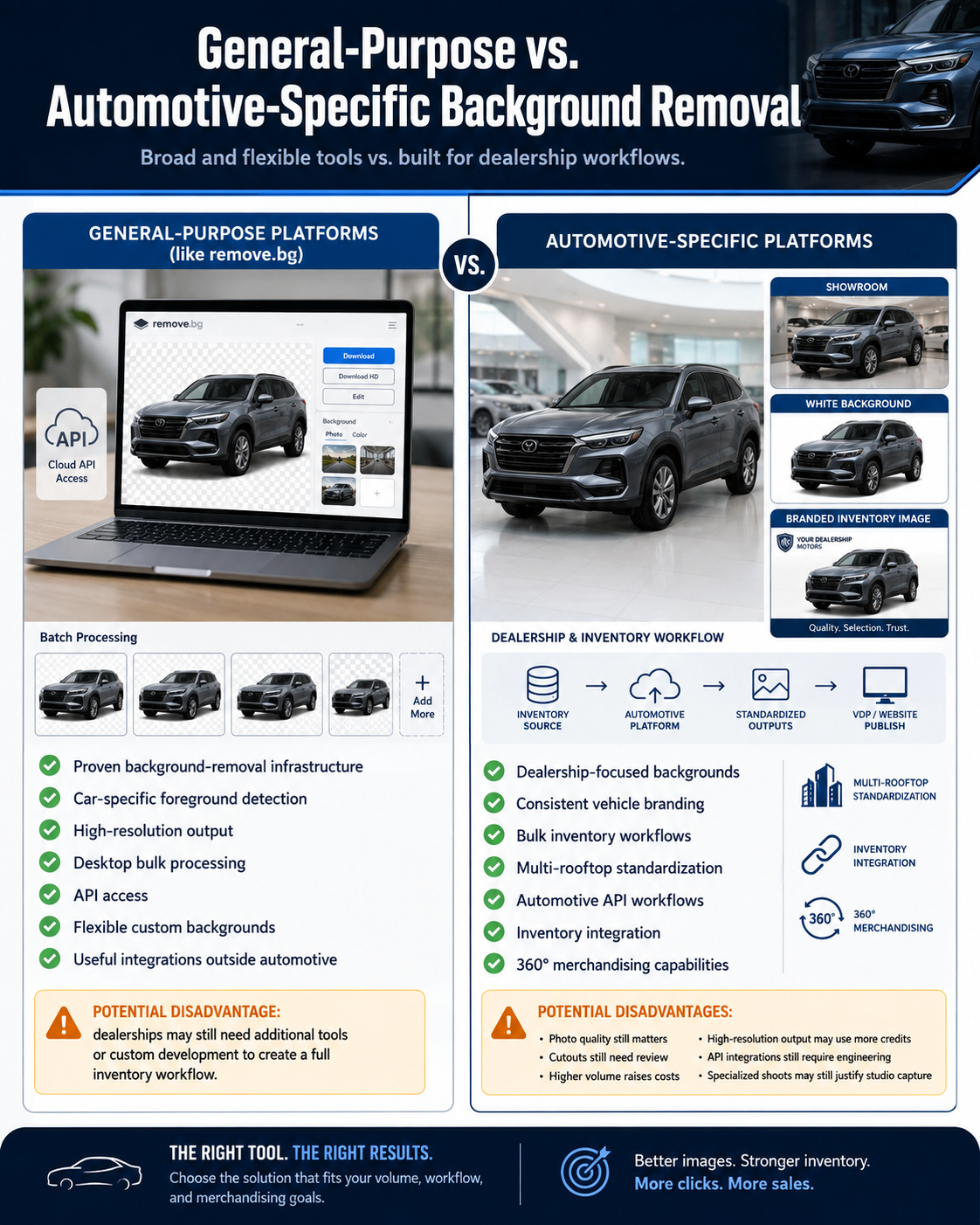
Advantages can include:
Potential disadvantage:
A dealer may still need to assemble additional tools or custom development around the background-removal engine to create its complete inventory workflow.
Advantages can include:
Potential disadvantages include:
It uses computer vision to identify a vehicle, separate it from its original surroundings, and create a transparent image or place the vehicle onto another background.
Yes. remove.bg specifically supports cars, provides automotive-oriented functionality, bulk processing, high-resolution output, and API access. Dealerships should compare those capabilities against their broader operational requirements.
Look beyond cutout quality. Evaluate batch processing, automotive backgrounds, branding, resolution, API capabilities, inventory integrations, scalability, and support.
Yes. Both general-purpose and automotive-focused platforms can support high-volume workflows. The important difference is how well the batch process maps to vehicle inventory.
Many platforms support custom backgrounds. Test how naturally vehicles are positioned within the background and whether your branding can be applied consistently.
Yes, when the platform provides an appropriate API or direct integration. Larger dealerships should verify the exact technical workflow before buying.
Some automotive-specific platforms can. AutoBackgrounding currently includes 360° vehicle spin capabilities within its broader automotive product offering.
remove.bg is a capable background-removal platform, including for automotive images.
That is exactly why dealerships should make a more thoughtful comparison.
The decision is not simply between a "generic tool" and an "automotive tool."
It is between different approaches to the photography workflow.
A smaller dealership, photographer, or developer may primarily need dependable background removal, high-resolution output, batch processing, or a flexible API.
Dealer groups, marketplaces, website providers, and automotive SaaS companies may need something broader:
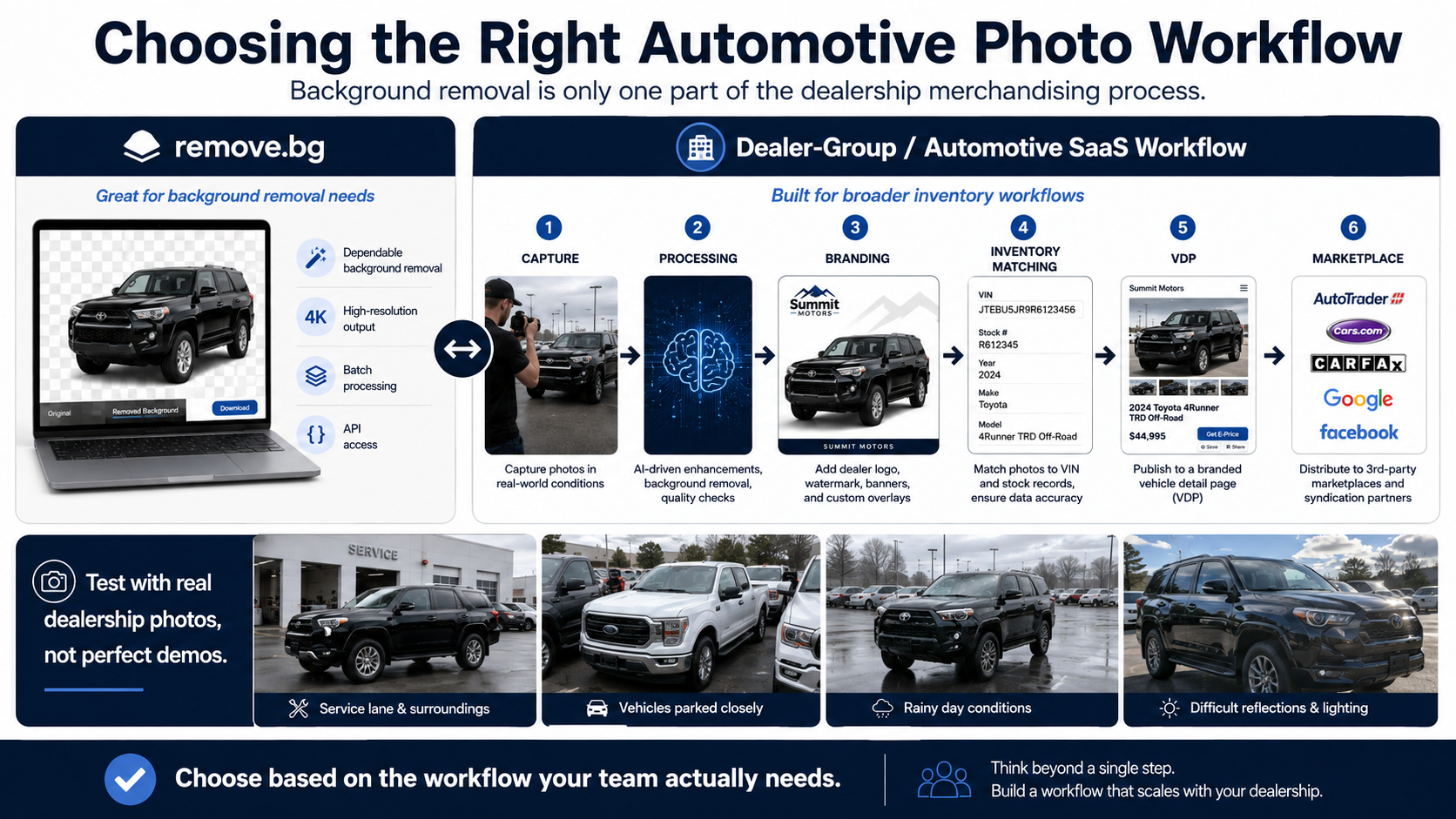
capture → processing → branding → inventory matching → VDP → marketplace
At that point, bulk workflows, branding controls, automotive APIs, inventory integrations, multi-rooftop scalability, and 360° merchandising may become just as important as the cutout itself.
If you are evaluating a remove.bg car alternative, upload the photographs your employees actually capture.
Test the black SUV beside the service lane. Test the white pickup parked near other inventory. Test rainy-day photos, difficult reflections, and inconsistent lighting.
Do not make your decision using perfect demo photography.
Make it using the images your dealership needs to process every day.


Compact, ready to go anywhere
Interchangeable lens that’s upgradeable
Dual 1-inch sensors for improved clarity and low light performance
Dynamic range and 6K 360° capture
360° photo resolution at 21MP

8K 360° video recording for ultra-detailed visuals.
4K single-lens mode for traditional wide-angle shots.
Invisible selfie stick effect for drone-like perspectives.
2.5-inch touchscreen with Gorilla Glass protection.
Waterproof up to 33ft for underwater shooting.

360° photo resolution in 23MP
Slim design at 24 mm thick
Built-in image stabilization for smooth video capture.
Internal 19GB storage for photo and video storage.
Wireless connectivity for remote control and sharing.

60MP 360° still images for high-resolution photography.
5.7K 360° video recording at 30fps.
2.25-inch touchscreen for intuitive control.
USB Type-C port for fast charging and data transfer.
MicroSD card slot for expandable storage.
.png)

.png)

Try it free. No credit card required. Instant set-up.







.svg)


.svg)