


.png)


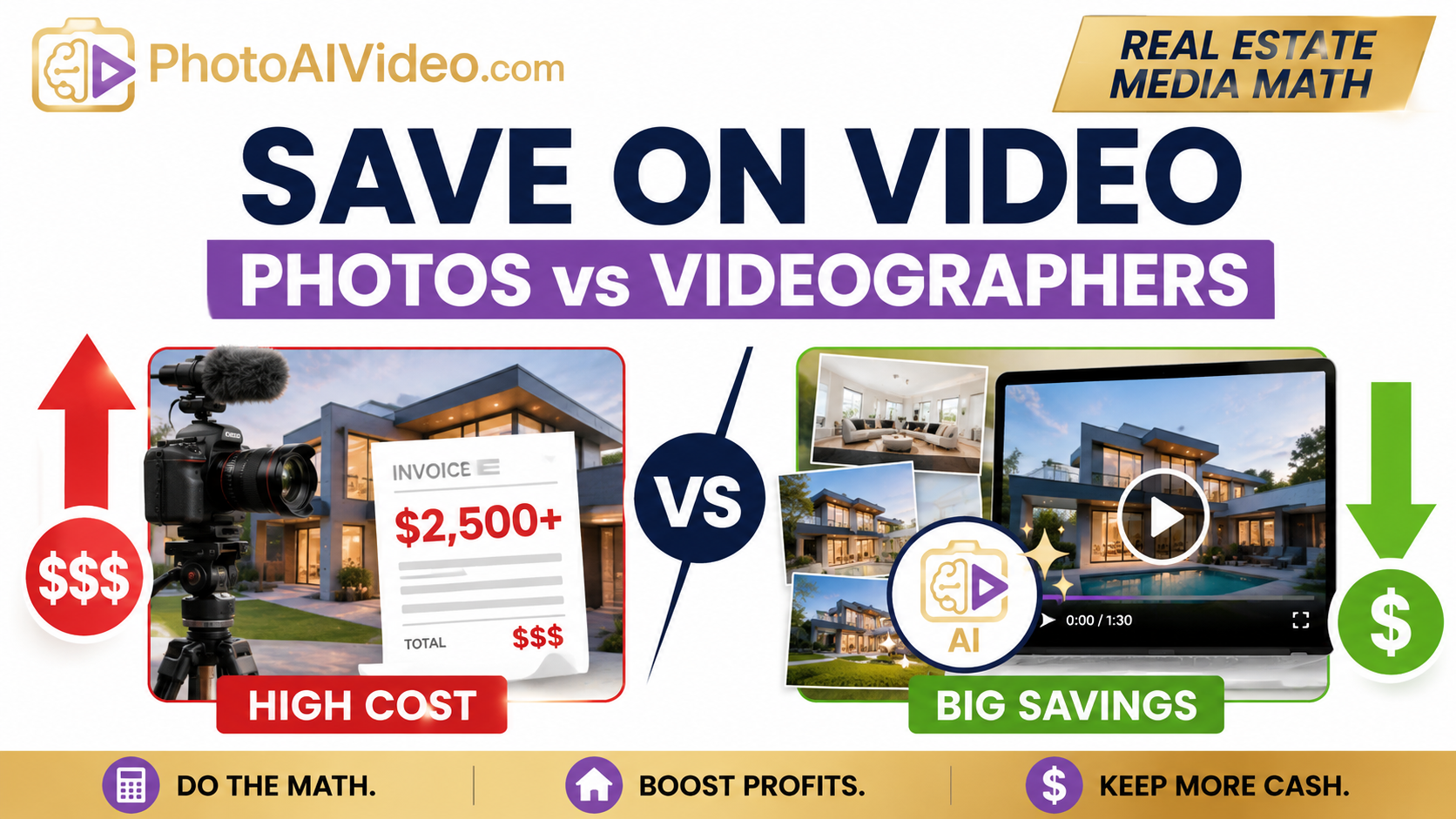
A real estate agent does not usually wake up thinking, “I need a more complicated media workflow.”
They wake up thinking:
The seller wants more marketing.
The listing needs to go live fast.
The photographer already delivered the photos.
The videographer is booked out.
The budget is getting tight.
And somehow, the listing still needs video.
That is the real problem.
Video works. Agents know it. Photographers know it. Brokerages know it. Property managers know it. But traditional video production can become expensive when every listing needs its own shoot, edit, revision cycle, export, and delivery.
The question is not whether video matters.
The question is whether every listing needs a separate videographer.
For many listings, the smarter financial move is to turn existing listing photos into video using PhotoAIVideo’s AI real estate video platform. When the photos are already captured, edited, and approved, you can often create a polished listing video without paying for a second media appointment.
That changes the math.
“The math of media” means looking at listing content like a business decision, not just a creative decision.
A traditional real estate video often includes:
An AI photo-to-video workflow works differently.
Instead of filming the property again, you use the photos you already have. The agent, photographer, property manager, or brokerage uploads the finished listing photos into an AI app to turn property photos into videos, then generates a marketing video from the existing media.
The savings come from removing duplicate labor.
You are not replacing every type of video production. Luxury listings, agent-hosted walkthroughs, drone-heavy campaigns, lifestyle shoots, and cinematic brand pieces may still deserve a videographer.
But for everyday listings, rentals, property management units, quick social posts, and seller updates, using AI to turn photos into video can dramatically reduce the cost per asset.
Real estate marketing has become more content-heavy.
A single listing may now need:
That is a lot of content for one property.
Buyers also rely heavily on online listing media. The National Association of Realtors reports in its 2025 Profile of Home Buyers and Sellers that online home search behavior remains central to how buyers evaluate properties. Photos, property details, floor plans, and virtual tours all play a role in helping buyers decide what to see in person.
Zillow also encourages sellers and agents to include pictures and videos when promoting listings through social channels in its home marketing guidance for sellers.
That means the pressure on agents is real.
Sellers expect better media. Buyers expect more context. Social platforms reward movement. Brokerages want consistency. Property managers need faster leasing assets.
But the budget does not always grow with the expectation.
That is why automated video marketing software for Realtors is not just a convenience tool. It can become a margin-protection tool.
Here is what actually happens on a normal listing.
The agent hires a photographer. The photographer captures the home. The photos come back looking great. The seller is happy.
Then the agent realizes they still need video.
At that point, the choices are usually:
This actually happens all the time: an agent pays for professional photos, then separately pays for video, then separately needs short-form content for social media. By the end, the agent has paid multiple vendors or spent hours trying to repackage the same listing.
That is not always necessary.
The photo gallery already contains the story of the home: exterior, entry, living room, kitchen, bedrooms, bathrooms, backyard, amenities, and neighborhood context. A good photo-to-video workflow turns that gallery into a motion-based marketing asset without restarting production from scratch.
The problem is not video.
The problem is duplicate production.
PhotoAIVideo fits into the workflow after the listing photos are ready.
The simple process looks like this:
Photos are captured.
Photos are edited.
The best images are selected.
Those images are uploaded into PhotoAIVideo’s real estate photo-to-video software.
A video is generated for listing marketing, social media, property websites, seller updates, or team campaigns.
This is especially useful for agents and teams looking for the best AI video software for real estate agents because the tool does not require a separate capture day. You are using the assets already created for the listing.
For photographers, it creates a high-margin add-on.
For brokerages, it makes listing video more consistent across agents.
For property managers, it helps turn vacant unit photos into leasing content faster.
For teams that need clean MLS workflows, PhotoAIVideo can also support a versioning mindset: use a branded version for social media and property marketing, then create a separate unbranded version when local MLS rules require it.
That matters because not every video belongs everywhere.
A branded Instagram reel and an MLS-safe video should not always be the same file.
First, write down what you actually pay for video.
Do not estimate emotionally. Use real numbers.
For example:
Total video cost: $575 per listing
Some markets will be lower. Luxury markets may be much higher. The exact number is less important than knowing your baseline.
If you are a photographer, use your production cost instead of the client price. How much time, subcontractor expense, editing labor, and delivery work does each video require?
If you are a brokerage, use the blended cost across all listings.
The goal is to know what video really costs before you compare options.
This is the part most agents miss.
A finished listing video has value because it helps market the property. But a large portion of traditional video cost comes from capture and editing labor.
When photos already exist, you do not always need another capture process.
That creates a key distinction:
Traditional video cost = new capture + editing + revisions + delivery
AI photo-to-video cost = existing photos + AI generation + review + delivery
The second workflow is lighter because the property has already been documented.
This is where create real estate videos from photos with AI becomes financially useful. The photo shoot becomes the foundation for multiple assets, not just a gallery.
Now compare your traditional video cost to your AI-assisted workflow.
Use a simple formula:
AI video cost per listing = platform cost ÷ number of videos created
For example, if a team spends $200 in a month on software and creates 20 listing videos, the rough platform cost is $10 per video before internal time.
If a brokerage creates 50 videos in a month, the cost per video may drop even further.
The real savings come from volume.
A solo agent may save money on a few listings. A real estate team, photography company, or property management group may save dramatically because the same workflow repeats across many properties.
That is why PhotoAIVideo for real estate teams can make sense when multiple agents or listings need repeatable video content.
AI video is faster, but it is not magic. Someone still needs to select photos, review the output, and publish the final video.
Estimate that time honestly.
Example:
Total internal time: 18 minutes
If an admin, marketing coordinator, photographer, or agent assistant handles that process, assign an hourly cost.
For example:
So if your platform cost is $10 and your labor cost is $9, your rough AI-assisted video cost is $19.
That is very different from a $400–$700 traditional video bill.
Here is a simple example.
For a single listing, saving $300 may feel helpful.
For 10 listings, that can become $3,000.
For 50 listings, that can become $15,000.
For 100 listings, that can become $30,000 or more.
The exact savings depend on your local video costs, your software plan, and your team’s workflow. But the pattern is simple: the more listings you market, the more expensive traditional video becomes as a default option.
The goal is not to eliminate videographers.
The goal is to use them where they create the most value.
A smart decision model looks like this:
Use a videographer for:
Use AI photo-to-video for:
This is the practical middle ground.
Use full production where the listing deserves full production. Use AI video where speed, consistency, and cost control matter more.
The best way to understand the savings is to look at the cost categories.
The biggest financial difference is that AI video scales better.
A videographer charges per shoot because each property requires time on site. AI video uses existing photo assets, so the cost structure is less tied to travel, capture, and scheduling.
That is why AI real estate marketing software for agents is especially powerful for teams with repeated listing volume.

A solo agent may not have the budget to hire a videographer for every listing.
Maybe a $900,000 listing gets full video production, but a $275,000 listing does not. The problem is that the seller of the $275,000 listing still expects good marketing.
With PhotoAIVideo’s property video workflow, that agent can turn the photo gallery into a video without adding a full second shoot.
That gives the seller visible marketing effort without blowing up the listing budget.
A photographer may already be capturing 10–20 homes per week.
If each photo shoot can include an optional AI video add-on, the photographer can increase average order value without adding another appointment.
Example package:
This is where AI video software for real estate photographers becomes a business model, not just a tool.
The photographer’s advantage is that they already control the source media. Better photos usually produce better videos.

Brokerages often have uneven listing quality.
Top producers may use professional media on every property. Newer agents may use inconsistent vendors or skip video entirely. The brand looks different from listing to listing.
An AI photo-to-video workflow helps create a baseline standard.
Every listing can have:
That consistency matters when a brokerage wants to look premium across the entire market, not just on luxury listings.
Property managers may need videos for multiple vacant units, but hiring a videographer for every unit can become expensive.
For a 50-unit portfolio, even a modest video fee adds up quickly.
A photo-to-video workflow lets the team create leasing videos from standard property photos. For apartments, single-family rentals, short-term rentals, and small multifamily units, speed often matters more than cinematic production.
The goal is simple: help renters understand the unit faster and book the next step.

One photo shoot can become multiple assets.
From the same finished photo set, a team can create:
This is the hidden savings.
You are not just saving against one videographer invoice. You are increasing the number of marketing assets created from the same media investment.
That is why the best AI real estate video generator for social media should be judged by workflow speed, output quality, and repeatability—not just flashy effects.
A videographer may quote $500 and software may look cheaper, but that is not the full comparison.
You need to compare:
Sometimes a traditional video is absolutely worth the money. But if you need 30 simple listing videos per month, the math changes.
Not every property should use the same media strategy.
A luxury waterfront estate may need drone footage, agent narration, twilight video, lifestyle clips, and cinematic pacing. AI photo-to-video may still be useful for extra social clips, but it should not always replace the main production.
For a standard listing or rental unit, however, AI video may be the smarter default.
The decision should be based on property value, seller expectations, marketing strategy, and budget.
AI video depends on the source images.
Dark photos, crooked photos, cluttered rooms, and duplicate angles will weaken the final video. If the listing photos do not look professional, the video will not magically fix the entire presentation.
Use clean, edited, well-composed images.
That one decision improves the final output immediately.
A social video and an MLS-safe video may need different rules.
A branded social media version might include an agent name, brokerage logo, phone number, captions, music, and a call to action. An MLS-safe version may need to remove branding or contact information depending on local rules.
Teams looking for an MLS compliant video maker for property listings should think in terms of version control, not one-size-fits-all content.
Local MLS policies can vary, so always check your local rules before uploading videos to MLS systems or syndication channels.
The biggest mistake is creating one video and stopping there.
A listing video can be repurposed.
Use the same media for launch day, open house reminders, social clips, seller updates, retargeting, email campaigns, and property website content.
Google’s image and video SEO guidance also reinforces the importance of using crawlable text and descriptive context around visual assets. If your videos and images live on a listing page or blog post, support them with written content, filenames, alt text, and clear headings.
Video should be part of a content system, not a single file in a folder.
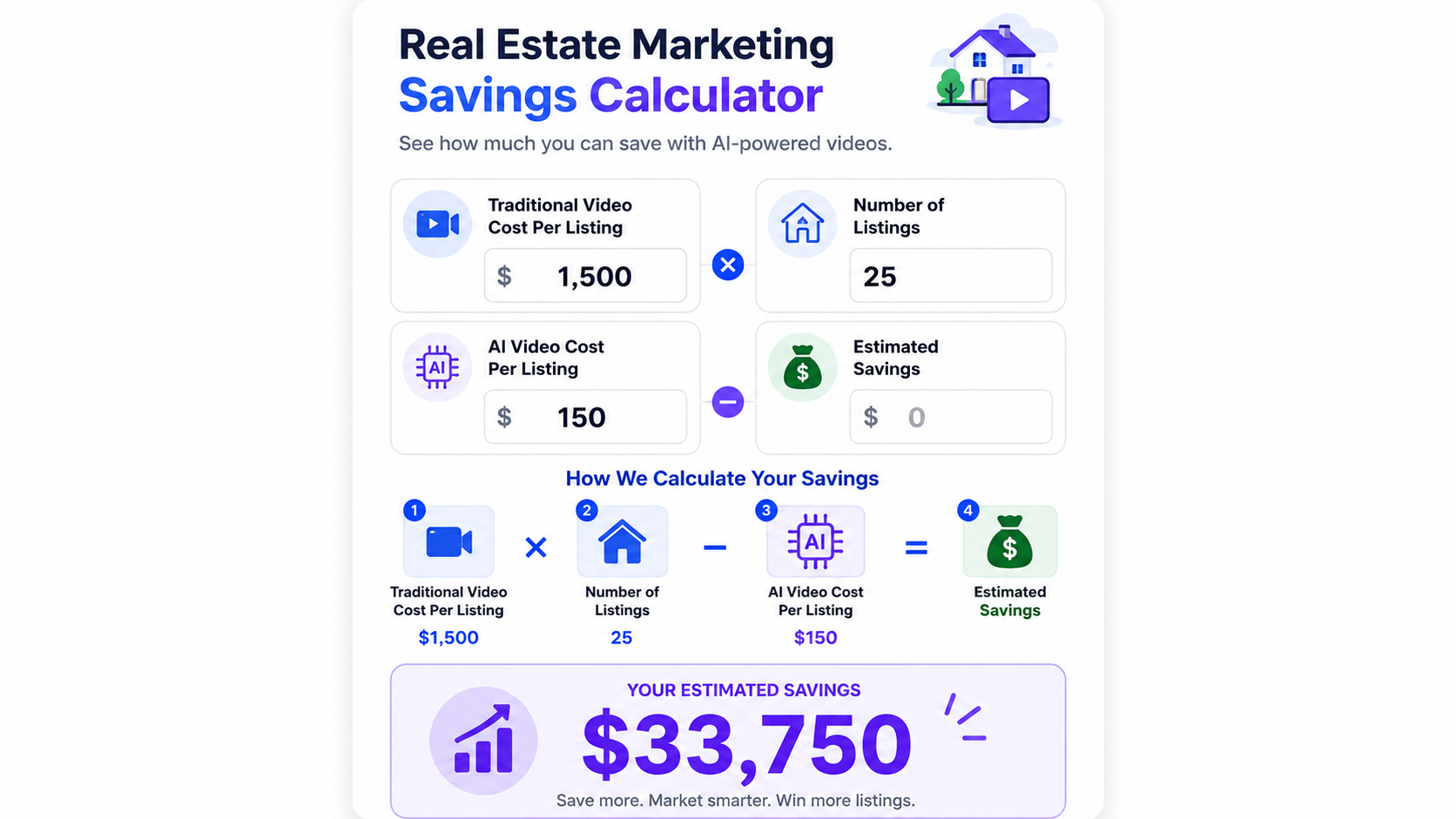
Example calculator showing estimated savings from converting listing photos into AI videos instead of hiring videographers.
Use this quick formula:
Traditional video cost per listing × number of listings = traditional video budget
AI workflow cost per listing × number of listings = AI video budget
Traditional budget minus AI video budget = estimated savings
Example:
Traditional video cost: $500
Number of listings: 20
Traditional video budget: $10,000
AI workflow cost per listing: $30
Number of listings: 20
AI video budget: $600
Estimated savings: $9,400
Now adjust the numbers to match your market.
Maybe your videographer costs $300. Maybe your internal labor is higher. Maybe you only create 10 videos per month. Maybe your team creates 100.
The point is not that every team will save the same amount.
The point is that once you separate video value from video capture cost, you can make better decisions.
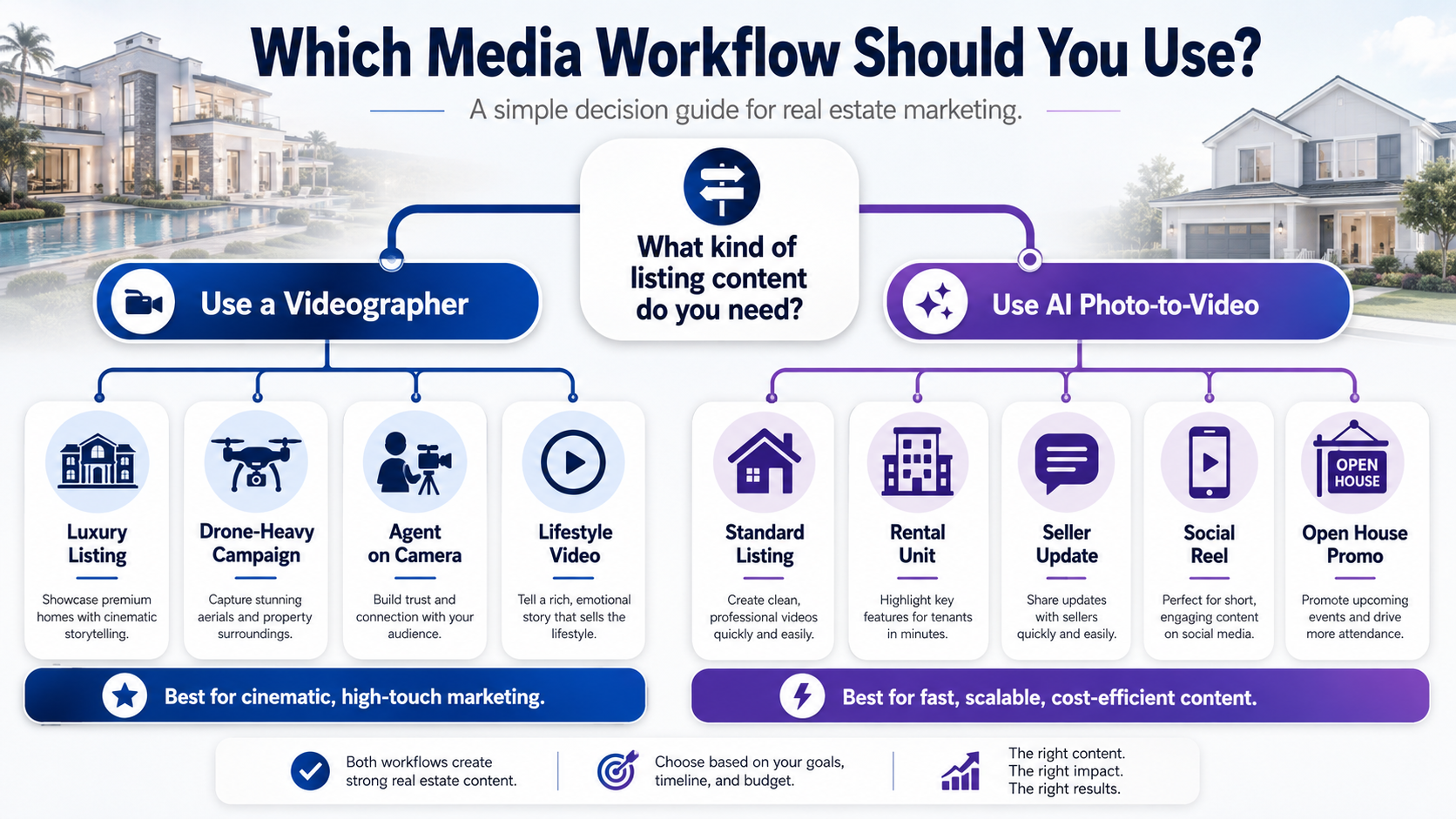
AI photo-to-video is usually the better financial choice when:
Traditional videography is usually better when:
The best strategy is not “AI or videographer.”
The best strategy is “use the right production method for the right listing.”


Compact, ready to go anywhere
Interchangeable lens that’s upgradeable
Dual 1-inch sensors for improved clarity and low light performance
Dynamic range and 6K 360° capture
360° photo resolution at 21MP

8K 360° video recording for ultra-detailed visuals.
4K single-lens mode for traditional wide-angle shots.
Invisible selfie stick effect for drone-like perspectives.
2.5-inch touchscreen with Gorilla Glass protection.
Waterproof up to 33ft for underwater shooting.

360° photo resolution in 23MP
Slim design at 24 mm thick
Built-in image stabilization for smooth video capture.
Internal 19GB storage for photo and video storage.
Wireless connectivity for remote control and sharing.

60MP 360° still images for high-resolution photography.
5.7K 360° video recording at 30fps.
2.25-inch touchscreen for intuitive control.
USB Type-C port for fast charging and data transfer.
MicroSD card slot for expandable storage.
.png)

.png)

Try it free. No credit card required. Instant set-up.







.svg)


.svg)