


.png)



A photographer once told me he tracked his hours for a month after switching video tools, expecting to see a modest improvement. Instead he found something strange: the new software had more features than his old one, a longer list of templates, more "AI-powered" bullet points on the sales page — and it was costing him twenty extra minutes per listing compared to what he'd been doing before. Feature count and time saved, it turns out, aren't the same axis at all.
Most real estate video automation software comparisons rank tools by what they can do. Almost none of them measure what actually happens to your Tuesday afternoon. This article does the math differently — not "what features does it have," but "how many minutes does a listing actually take you, start to finish, and where does that time really go."
Time saved isn't just render speed. A tool can generate a video in ninety seconds and still cost you more time overall if the upload process is clunky, if you have to manually reorder photos, if the branding has to be re-applied every single listing instead of saved as a default, or if the export needs a second pass in another app before it's postable.
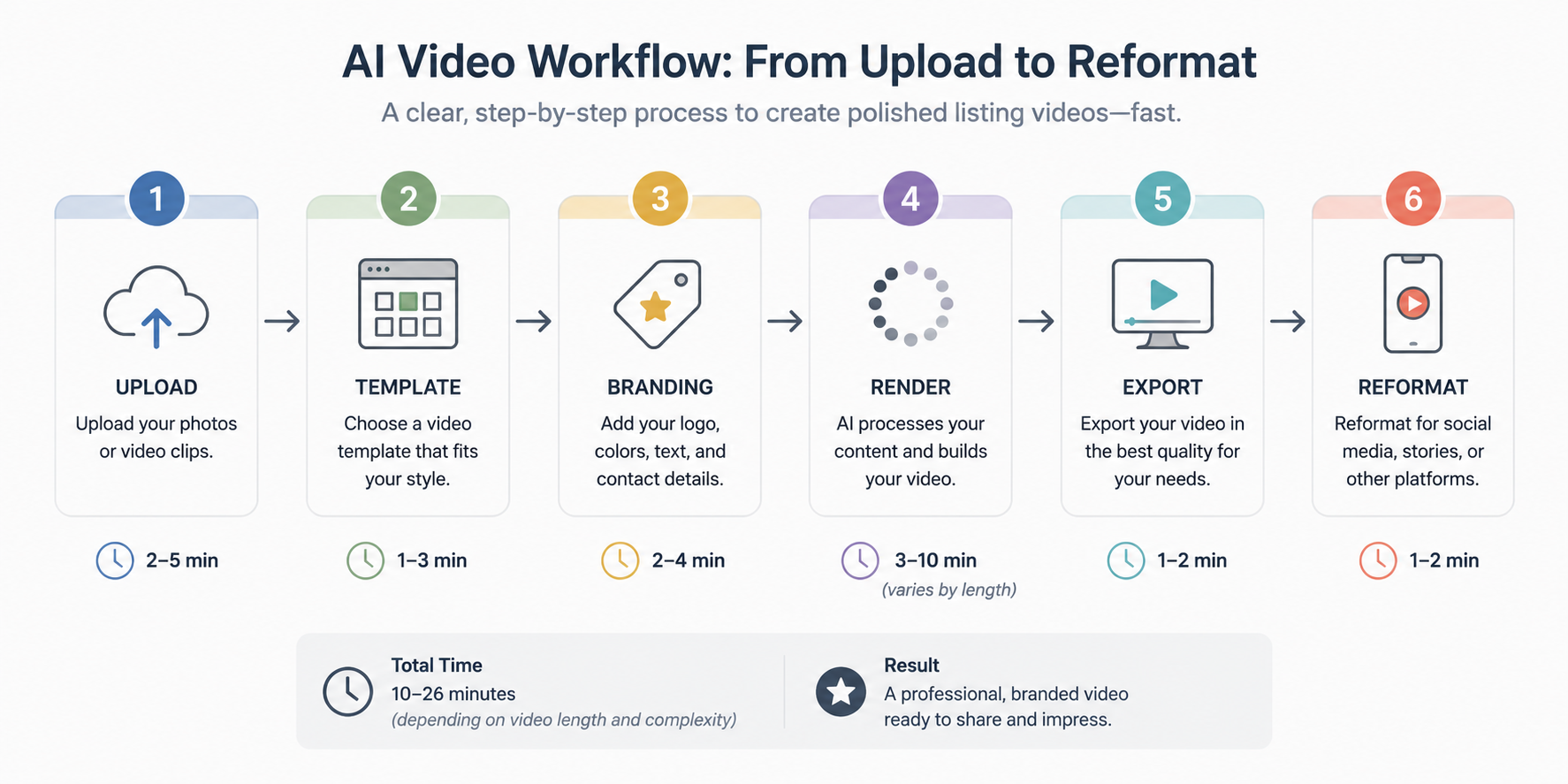
The honest measurement is door-to-door: from the moment you have finished listing photos in a folder to the moment a finished, branded, platform-ready video exists. Everything in between — upload, template selection, branding, review, export, reformatting for social — counts. Most software marketing only quotes the fastest step in that chain, usually the render itself, and lets you assume the rest is equally quick.
Time is the one resource agents can't get back, and it's the one metric that maps directly to how many listings you can realistically take on in a season. A tool that saves you fifteen minutes per listing doesn't sound dramatic until you multiply it across thirty listings a year — that's more than seven hours back, which is a full workday. For a brokerage multiplying that across forty agents, the math turns into hundreds of hours annually, which is a staffing-level difference, not a convenience.
This is also where a lot of agents get burned by pricing decisions: they pay more for a tool with a longer feature list, assuming more capability equals more time saved, when the opposite is sometimes true — feature-dense tools often have more setup and more decisions per listing, which quietly eats the time they were supposed to save.
Here's how the mismatch usually plays out. An agent compares two tools using a features checklist: Tool A has twelve video styles, Tool B has six. Tool A looks like the obviously better deal on paper. She picks it. What she doesn't account for is that Tool A's twelve styles all require manual selection and preview-checking per listing, while Tool B's six styles include a "smart default" that auto-picks based on property type — meaning Tool B actually gets her to a finished video faster, despite fewer options.
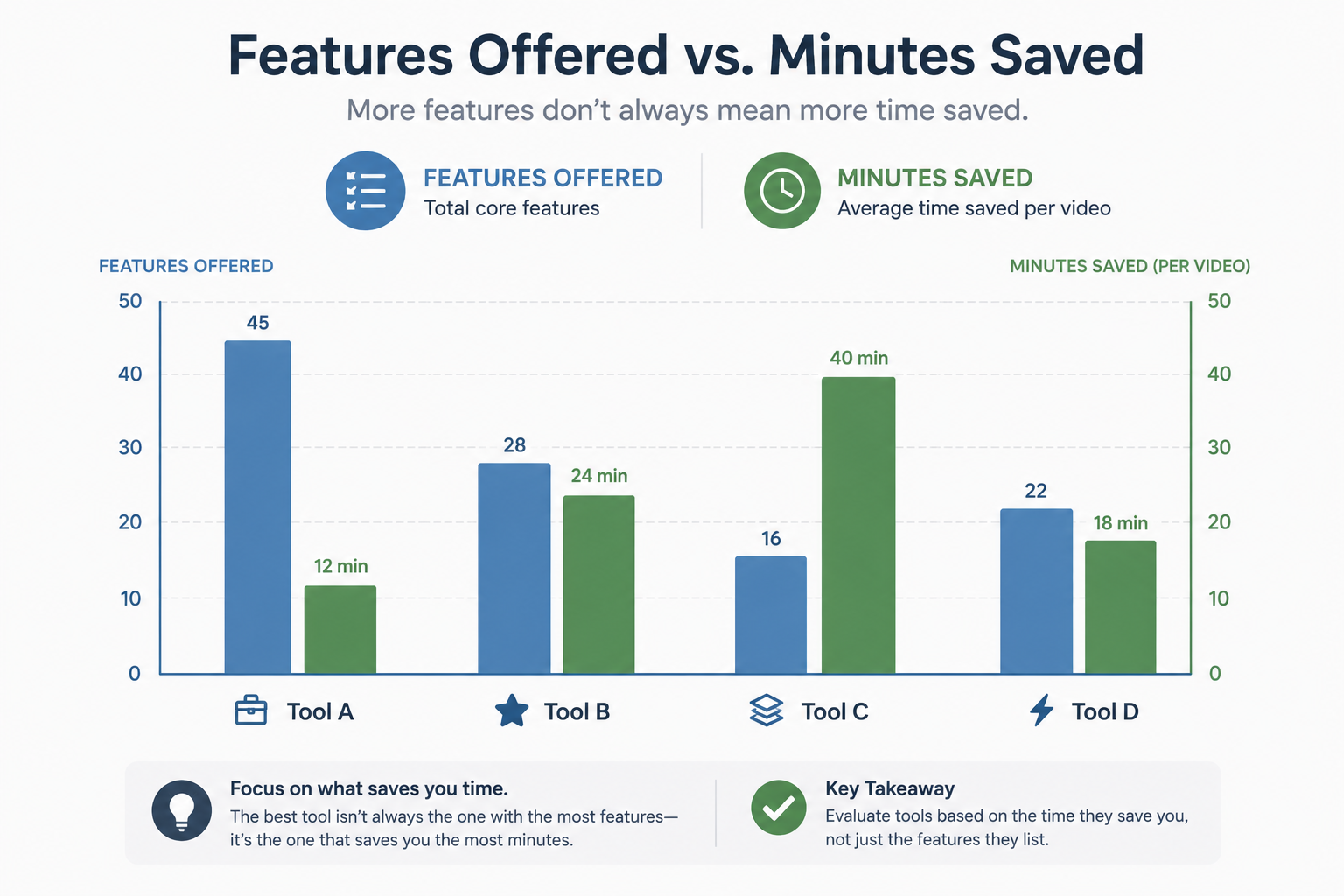
This actually happens constantly with template-heavy platforms: more choice sounds like more value, but every choice is a decision point, and decision points are where minutes disappear. A feature list rewards abundance. A stopwatch rewards defaults that are good enough not to need overriding.
The useful question isn't whether PhotoAIVideo has more features than a competitor — it's how many total minutes a listing takes from a raw folder of photos to a finished, brokerage-compliant, platform-ready video. Automation earns its keep when it removes decision points rather than adding them: default branding that doesn't need to be reapplied every time, an upload flow that doesn't require manual reordering, and export options that don't require a second app to reformat for social. Measured door-to-door, that's the number worth comparing — not template count.
Step 1: Time your current process first. Before comparing anything, clock your existing workflow from raw photos to posted video, including every manual step you currently do outside the software (cropping, reformatting, adding disclosures by hand).
Step 2: Run the same real listing through a trial. Use an actual folder of listing photos, not the tool's demo images, and clock the entire process the same way — upload to export, no shortcuts.
Step 3: Count decision points, not just steps. Every moment you have to choose a template, reorder photos, or manually apply a brand element is a place where time varies wildly by user comfort level — check whether defaults can be saved so this shrinks after the first listing.
Step 4: Separate one-time setup time from per-listing time. A tool that takes twenty minutes to configure once but then takes ninety seconds per listing after that is a completely different value proposition than one that takes ninety seconds to open but ten minutes every single time to adjust.
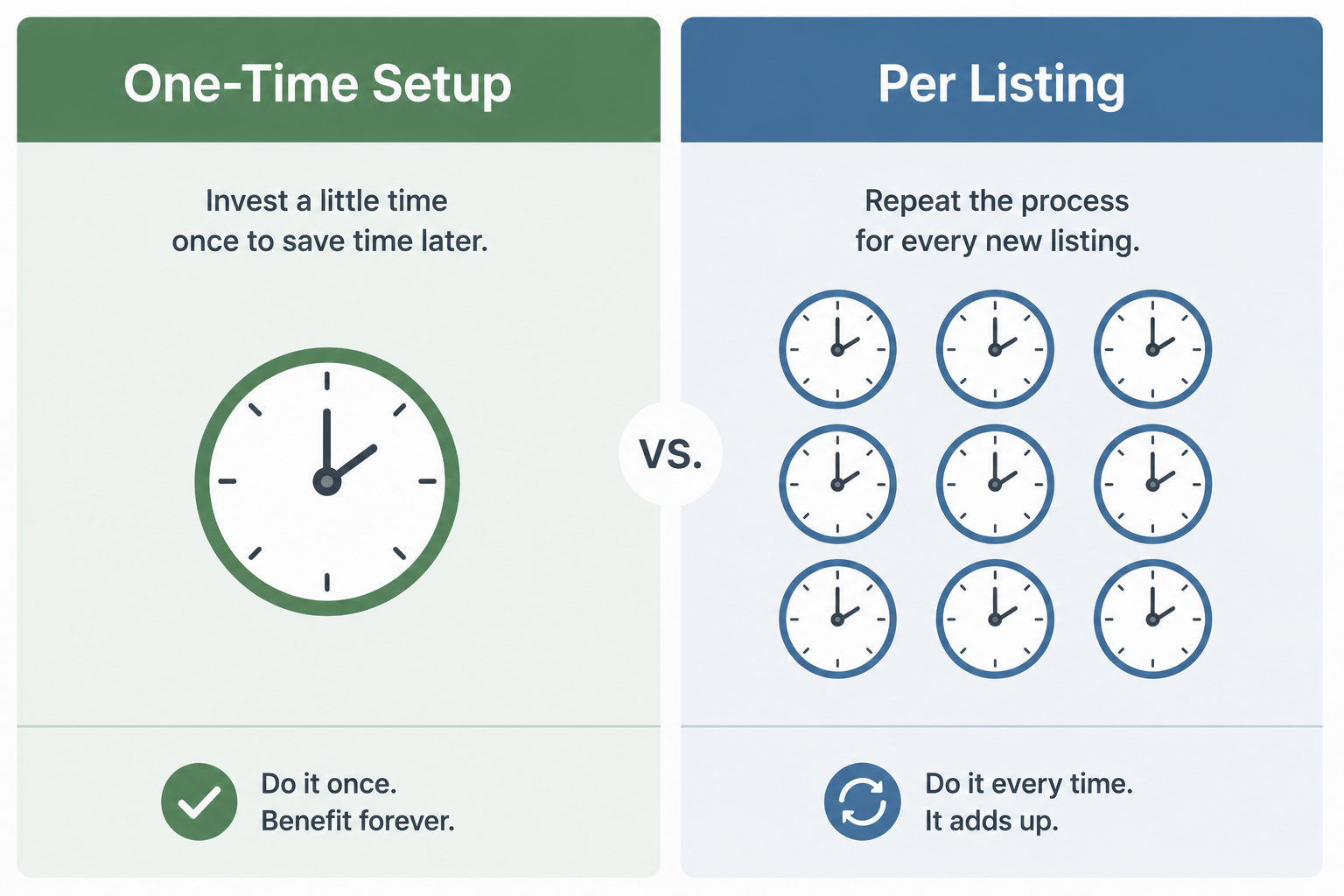
Step 5: Factor in reformatting time for your actual channels. If your workflow includes posting to social, confirm export formats match those platforms natively — a tool that saves time on the listing page but costs you time reformatting for Instagram isn't actually faster overall.
How do I measure "time saved" for real estate video software myself?
Time your current process fully, from raw listing photos to a finished, posted video, then run the same real listing through a trial of the new software and compare the full door-to-door time, not just the render step.
Does a longer feature list usually mean a faster workflow?
Not necessarily. More templates and options often mean more decision points per listing, which can add time rather than save it, especially if the tool lacks strong default settings.
What's the difference between setup time and per-listing time?
Setup time is a one-time cost when you configure branding, templates, and defaults. Per-listing time is what you spend on every individual listing afterward — a tool with slower setup but fast per-listing time is usually the better long-term choice.
Should I include social media reformatting in my time calculation?
Yes, if social posting is part of your workflow. A tool that's fast for a listing page but requires manual reformatting for vertical platforms isn't saving as much time as it appears to on the surface.
How much time can real estate video automation actually save per listing?
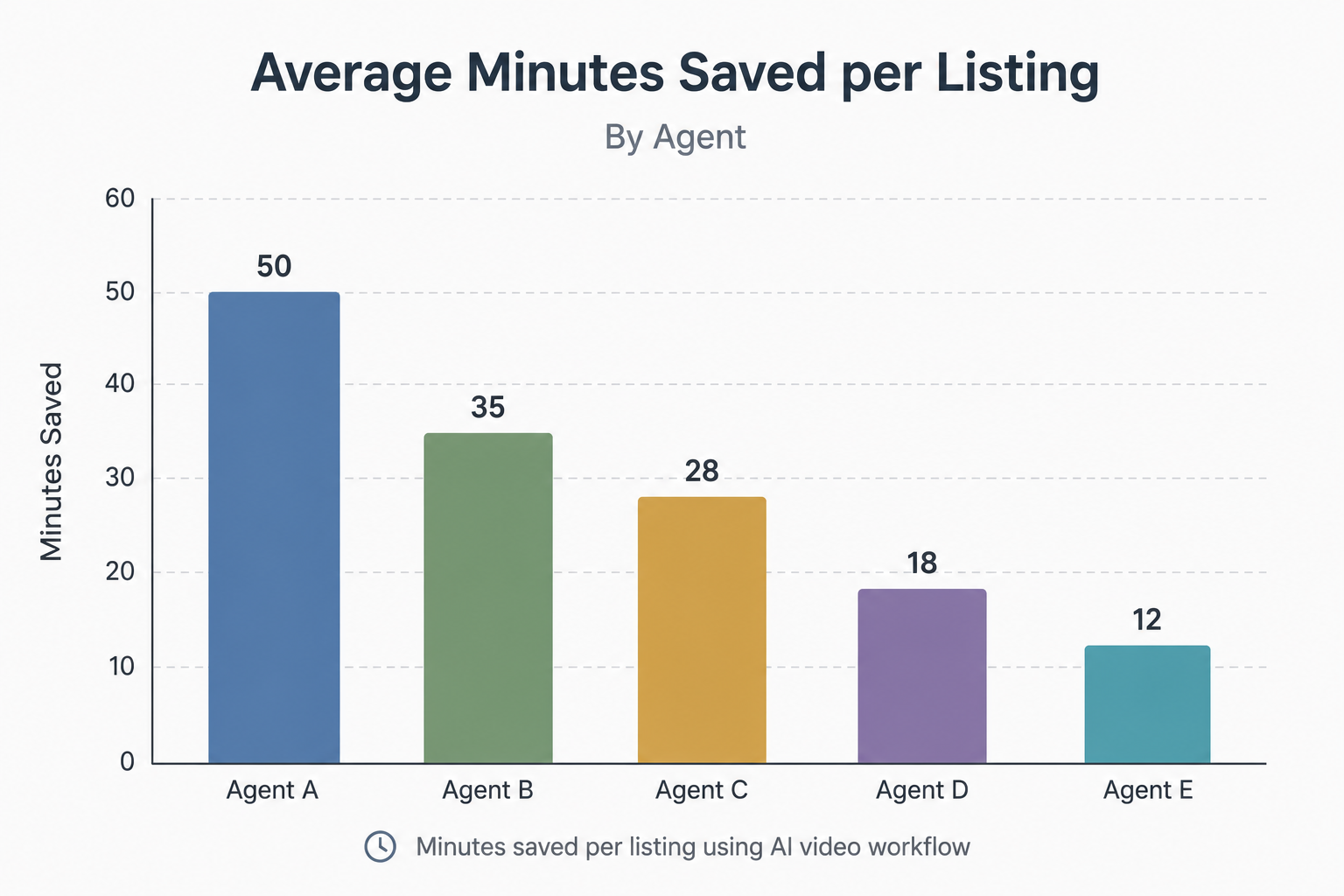
It varies widely by workflow, but agents who track their process often find fifteen to thirty minutes saved per listing once defaults are configured — which compounds significantly across a full year of listings.
Is render speed a reliable way to compare tools?
Not on its own. Render speed is usually the fastest part of the entire process; upload, branding, and export steps around it often account for more total time than the render itself.
Do brokerages benefit differently from time-saved measurements than solo agents?
Yes — because the same per-listing time savings multiply across every agent on the team, a small individual time gain becomes a much larger operational gain at brokerage scale.

Compact, ready to go anywhere
Interchangeable lens that’s upgradeable
Dual 1-inch sensors for improved clarity and low light performance
Dynamic range and 6K 360° capture
360° photo resolution at 21MP

8K 360° video recording for ultra-detailed visuals.
4K single-lens mode for traditional wide-angle shots.
Invisible selfie stick effect for drone-like perspectives.
2.5-inch touchscreen with Gorilla Glass protection.
Waterproof up to 33ft for underwater shooting.

360° photo resolution in 23MP
Slim design at 24 mm thick
Built-in image stabilization for smooth video capture.
Internal 19GB storage for photo and video storage.
Wireless connectivity for remote control and sharing.

60MP 360° still images for high-resolution photography.
5.7K 360° video recording at 30fps.
2.25-inch touchscreen for intuitive control.
USB Type-C port for fast charging and data transfer.
MicroSD card slot for expandable storage.
.png)

.png)

Try it free. No credit card required. Instant set-up.







.svg)


.svg)