


.png)


A vacant unit does not just need more exposure.
It needs clearer answers.
That is the part property managers deal with every week. A renter sees a listing, likes the price, opens the photos, then starts wondering:
Is the living room actually big enough?
Where is the bedroom in relation to the kitchen?
Is the unit bright or dark?
What does the community feel like?
Is parking close?
Does the amenity area look real or staged?
Is this worth scheduling a tour?
If those questions are not answered quickly, the renter keeps scrolling.
Most property management teams already have the raw material: listing photos, amenity images, exterior shots, unit photos, leasing office images, floor plans, neighborhood visuals, and move-in-ready pictures. The problem is that those assets are usually scattered across folders, portals, emails, old listings, and leasing platforms.
A property manager video hub fixes that.
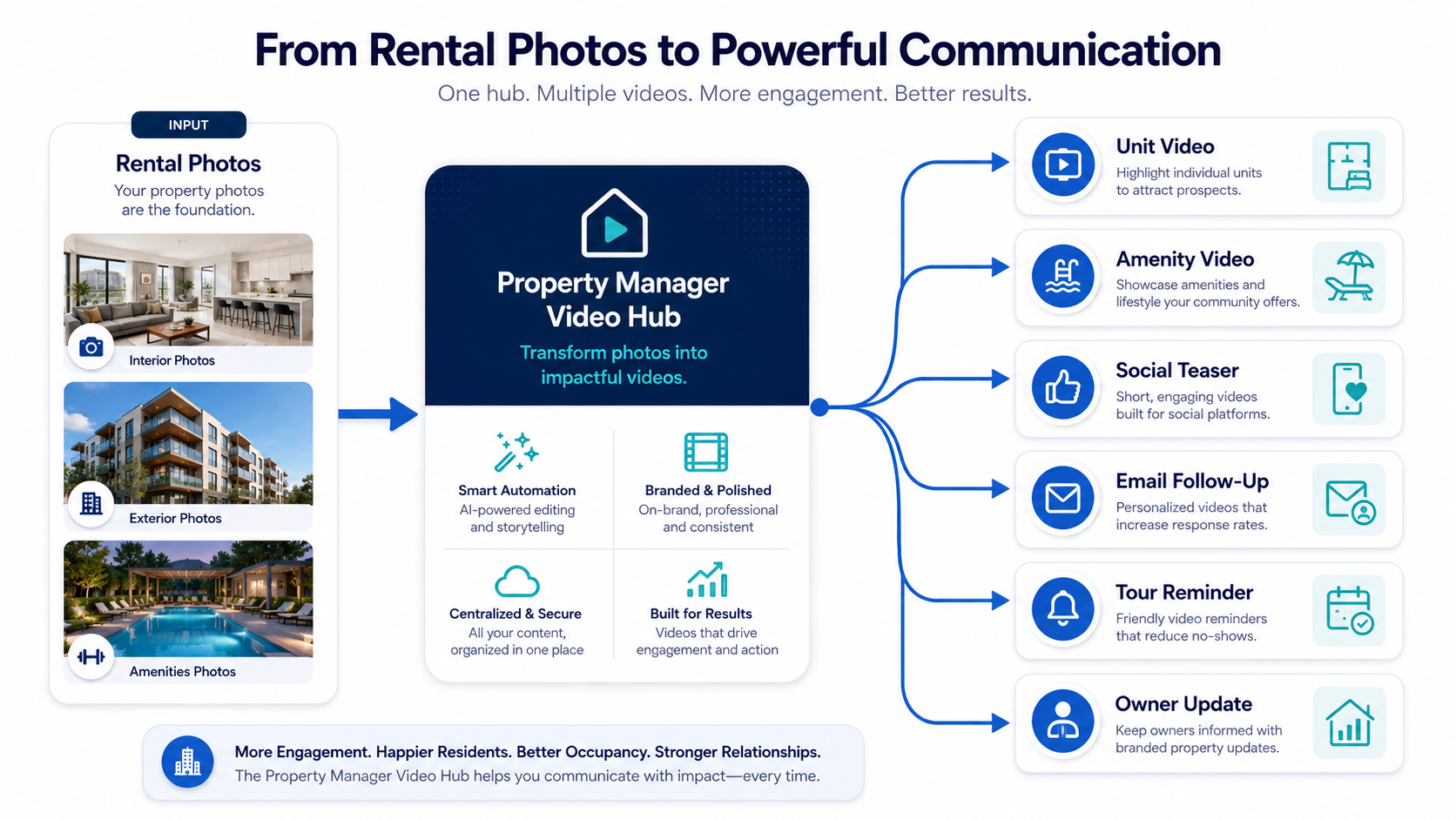
Instead of treating each rental video as a one-off task, property managers can build a repeatable AI photo-to-video workflow that turns existing rental photos into short videos for listings, social media, email follow-up, leasing pages, tour reminders, owner updates, and retargeting campaigns.
PhotoAIVideo helps property managers, leasing teams, real estate photographers, and brokerages turn property photos into video assets faster. For teams that need to create real estate videos from photos with AI, the goal is not just prettier content. The goal is a rental visibility system that can scale across units, buildings, communities, and portfolios.
A property manager video hub is a centralized workflow for creating, organizing, and reusing rental video assets across a property management business.
It is not just a folder of videos.
It is a repeatable system for turning rental media into marketing assets.
A good property manager video hub may include:
Unit videos
Amenity videos
Neighborhood clips
Move-in-ready videos
Vacancy announcement videos
Tour reminder videos
Owner update videos
Social media reels
Email follow-up videos
Leasing page videos
Application reminder videos
Property comparison videos
Renewal or resident communication videos
The goal is simple: make every unit easier to understand before the renter schedules a tour.
An AI app to turn property photos into videos makes this practical because most rental teams do not have time to shoot custom video for every turnover. With the right workflow, a leasing team can take approved unit photos and create video assets for multiple channels without waiting on a full editing process.
For example:
A two-bedroom apartment photo set can become a listing video, a vertical social teaser, an email follow-up clip, a tour reminder, and a unit comparison video.
A community amenity photo set can become a clubhouse video, pool video, pet-friendly community clip, leasing ad, and neighborhood lifestyle asset.
A single-family rental gallery can become a family-focused tour teaser, backyard highlight, floor plan explainer, and relocation-friendly video.
That is the difference between “we made a video” and “we built a rental video system.”
PhotoAIVideo supports this type of workflow by helping teams turn rental and property photos into AI videos that can be used throughout the leasing journey.
Property management marketing is different from traditional home sales.
A Realtor may market one listing intensely for a short window. A property manager may market dozens, hundreds, or thousands of units with changing availability, pricing, seasons, lease terms, and renter questions.
That changes the content problem.
Property managers need speed.
They need consistency.
They need reusable assets.
They need less back-and-forth.
They need content that helps renters self-qualify.
NAR has emphasized that strong online visuals help consumers evaluate properties before deciding whether to take the next step through NAR’s guidance on online listing presentation. For rentals, the same principle applies. The more clearly a renter understands the unit, layout, community, and lifestyle, the easier it is for them to decide whether to book a tour.
Video also helps property managers reduce repetitive questions.
A good rental video can answer:
What does the unit feel like?
How do the rooms connect?
What amenities are included?
Is the property pet-friendly?
What does the exterior look like?
How close is parking?
What does the kitchen actually look like in motion?
Is this unit worth seeing in person?
For a property manager, that clarity is operational value.
It can reduce low-quality tours, improve lead follow-up, support leasing staff, help owners see stronger marketing activity, and give renters a better experience before they ever speak with the office.
This is why automated video marketing software for Realtors also applies to property managers and rental teams. The same automation that helps agents promote listings can help leasing teams produce repeatable rental visibility assets from the media they already collect.
With PhotoAIVideo’s AI real estate video workflow, property managers can turn everyday listing photos into a scalable leasing content system.
Most property managers do not have a video creation problem.
They have a media organization problem.
Here is what actually happens.
A unit turns over. Someone takes photos. Maybe the photos are uploaded to a leasing platform. Maybe they sit in a shared folder. Maybe the best amenity shots are in another folder from two years ago. The leasing office has a few social graphics. The owner wants an update. A renter asks for a video. The team sends the same photo gallery again.
Then the unit sits.
Not always because the price is wrong. Not always because demand is weak.
Sometimes the listing simply does not give renters enough confidence to act.
The workflow usually breaks in a few places:
Photos are created, but no video is made.
Videos are made once, but not reused.
Amenity media is separate from unit media.
Social content is disconnected from leasing follow-up.
Old unit videos are not labeled clearly.
Team members do not know which assets are current.
Owner updates do not show the marketing effort.
Renter follow-up relies on plain text and links.
A leasing agent may write:
“Are you still interested in Unit 204?”
That message is not wrong.
But it is weak.
A stronger follow-up might be:
“Here is a quick video showing the kitchen, bedroom placement, and pool access for Unit 204. It should help you decide if it is worth touring this week.”
That feels useful.
This actually happens all the time: property managers have enough media to help the renter make a decision, but the media is not packaged into the right follow-up format.
A property manager video hub solves this by turning rental media into organized, reusable video assets.
PhotoAIVideo helps property managers turn still photos into motion-based real estate videos.
For rental teams, that matters because photos are already part of the leasing workflow. You do not need to rebuild the marketing process around a video crew. You can start with the unit photos, amenity photos, and community images your team already has.
A property manager can use PhotoAIVideo to create:
Vacant unit videos
New availability videos
Amenity highlight videos
Neighborhood fit videos
Pet-friendly rental videos
Tour reminder clips
Email follow-up videos
Social media Reels and Shorts
Owner marketing proof videos
Seasonal leasing videos
Portfolio-level brand videos
For teams comparing the best AI video software for real estate agents, the property management use case is slightly different. You are not only asking, “Can this make a nice listing video?” You are asking, “Can this help our team create repeatable rental videos at the speed of leasing operations?”

That means the workflow needs to support:
Fast creation
Simple input from photos
Clear output types
Reusable video formats
Social-friendly versions
Property-first versions
Team consistency
Minimal editing skill
Repeatable naming and organization
With PhotoAIVideo.com, the rental photo gallery becomes the source. The video hub becomes the system.
Before creating more videos, organize the media you already have.
A simple structure works best:
Property name
Unit number or floor plan
Unit photos
Amenity photos
Exterior photos
Neighborhood photos
Floor plans
Approved videos
Archive
For example:
Maple Ridge Apartments / Unit 204 / PhotosMaple Ridge Apartments / Unit 204 / AI VideosMaple Ridge Apartments / Amenities / Pool and ClubhouseMaple Ridge Apartments / Neighborhood / Local Area
The goal is to help any team member find the correct media quickly.
This matters because property management teams often have staff turnover, seasonal leasing pushes, and multiple people touching the same listing. A clean media hub reduces confusion.
Do not create random videos.
Define your core formats.
For most property managers, five video types are enough to start:
Unit availability video
Amenity highlight video
Neighborhood lifestyle video
Tour reminder video
Owner marketing proof video
Each has a different job.
The unit availability video helps a renter decide if the space is worth seeing.
The amenity video sells the community.
The neighborhood video sells location and lifestyle.
The tour reminder reduces no-shows and keeps the renter engaged.
The owner proof video shows that the property is being marketed actively.
Once these formats are defined, your team can repeat them every time a unit becomes available.
A video is only as useful as the photos selected.
For unit videos, use:
Exterior or building shot
Living room
Kitchen
Bedroom
Bathroom
Laundry or storage
Balcony or patio
Best feature
Floor plan, if available
Amenity or parking image
For amenity videos, use:
Pool
Clubhouse
Fitness center
Dog park
Package lockers
Parking
Laundry
Outdoor spaces
Community entrance
Nearby lifestyle images
For single-family rentals, use:
Front exterior
Main living area
Kitchen
Primary bedroom
Secondary bedroom
Backyard
Garage
Neighborhood street
Pet or family-friendly feature
Do not use every photo.
A rental video should answer the renter’s next question, not overwhelm them.
Start with the question the renter is most likely asking.
Examples:
“Is the unit move-in ready?”
“Does the layout work?”
“Is there enough natural light?”
“Are the amenities worth it?”
“Is this better than the other property I saw?”
“Should I schedule a tour?”
That question becomes the video angle.
A generic video says:
“Available now.”
A stronger video says:
“See the layout before you tour.”
Or:
“Pool, parking, and pet-friendly amenities in 20 seconds.”
Or:
“Two-bedroom rental with a real work-from-home setup.”
That is more useful.
This is where AI real estate marketing software for agents can also serve rental teams. The same software can help turn property photos into targeted video content for specific renter questions.
One rental photo set should not create one video.
It should create a small campaign.
From one unit gallery, create:
A 30-second unit video
A 15-second social teaser
A 20-second tour reminder
A short email follow-up video
A still-available video
A move-in-ready clip
From one amenity gallery, create:
A pool highlight
A pet-friendly community video
A fitness center clip
A clubhouse teaser
A neighborhood lifestyle video
This is how property managers scale visibility without constantly creating from scratch.
With PhotoAIVideo’s AI photo-to-video workflow, teams can build multiple videos from the same image set, then use each one in a different leasing channel.
File naming prevents mistakes.
Use labels like:
maple-ridge-unit-204-main-video.mp4maple-ridge-unit-204-social-teaser.mp4maple-ridge-unit-204-tour-reminder.mp4maple-ridge-pool-amenity-video.mp4maple-ridge-pet-friendly-video.mp4maple-ridge-owner-marketing-proof.mp4
Avoid vague names:
final-video.mp4unit-video-new.mp4social-final-2.mp4apartment-video-final-final.mp4
Property management teams move fast. The easier the file is to understand, the more likely it gets used correctly.
A unit video can go on the listing page.
A social teaser can go on Instagram, Facebook, TikTok, YouTube Shorts, or community pages.
A tour reminder video can go in email or text.
An amenity video can support paid ads.
An owner proof video can go in a monthly update.
A neighborhood video can go on the property website.
The video hub should support the full leasing journey:
Discovery
Interest
Follow-up
Tour scheduling
Application
Owner reporting
Renewal and resident communication
This is where the workflow becomes valuable. A video is not just a marketing asset. It is a leasing operations asset.
Property managers need to be careful with accuracy and representation.
Make sure videos do not misrepresent:
Unit condition
Unit availability
Amenities
Pricing
Lease terms
Included features
Pet policies
Parking
Accessibility
Location
Renovation status
Fair housing also matters. Marketing should focus on the property, unit features, amenities, and location facts rather than implying who should or should not live there. HUD provides guidance and enforcement information related to fair housing through HUD’s fair housing resources.

Your video workflow should include a review step before publishing.
A simple review checklist:
Is the unit still available?
Are the photos accurate?
Are the amenities shown actually available?
Are captions factual?
Is pricing current?
Are claims supportable?
Is the CTA correct?
Is the file labeled clearly?
Is the video suitable for the channel?
This protects the property manager and improves renter trust.
A random video can help one listing.
A video hub can help the whole portfolio.
An apartment community has five common floor plans.
Instead of creating a new video from scratch every time a unit opens, the property manager creates a video hub for each floor plan:
Studio overview
One-bedroom overview
Two-bedroom overview
Three-bedroom overview
Amenity highlight
Pet-friendly community clip
Tour reminder video

When Unit 318 becomes available, the leasing team can quickly create or reuse the correct floor plan video, then add current availability language.
The result is faster leasing content with less manual work.
A property manager handles 80 single-family rentals across a metro area.
Each home has different features: fenced yard, garage, updated kitchen, office, school proximity, pet policy, or commute access.
The team uses PhotoAIVideo to create short videos for each home using existing property photos.
A renter who asks about a home receives a video showing:
Exterior
Living area
Kitchen
Bedroom
Backyard
Garage
Best feature
That is more helpful than sending a listing link again.
Owners want to know what is being done to market a vacant unit.
Instead of writing:
“We are actively marketing the unit,”
the property manager can send:
“Here is the video we created for the listing, plus a social teaser and email follow-up version.”
That changes the conversation.
The owner sees effort.
The property manager shows professionalism.
This can help with retention, trust, and perceived value.
Photographers can build recurring packages for property managers.
Instead of only shooting unit photos, they can offer:
Unit photos
AI unit video
Amenity video
Social teaser
Leasing email video
Owner proof clip
Using AI video software for real estate photographers, a photographer can turn one shoot into a higher-value deliverable package.
This is especially useful for multifamily communities, build-to-rent portfolios, vacation rentals, senior living communities, student housing, and short-term rental operators.
A brokerage that manages rentals can standardize video across both sales and leasing.
For sales listings, they may create branded and unbranded property videos.
For rentals, they may create unit videos, amenity clips, and tour reminders.
The workflow is similar, but the goal is different.
Sales video often drives buyer interest.
Rental video often reduces friction and books tours faster.
A shared platform helps the brokerage train staff and keep content consistent.
Short-term rental managers need guests to understand experience quickly.
A video hub can include:
Property walk-in video
Bedroom setup clip
Pool or hot tub highlight
Nearby attraction video
Family-friendly feature clip
Pet-friendly feature clip
Check-in preview video
This reduces uncertainty and helps guests choose between options.
Not every rental video needs to show everything.
A social teaser may only need one strong feature.
A tour reminder may need the layout and CTA.
An amenity clip may focus only on the pool or gym.
Use the video for the job it needs to do.
Rental videos can create trust or destroy it.
If the unit has changed, do not use old images.
If the amenity is under renovation, do not feature it as available.
If the floor plan is similar but not exact, label it carefully.
Accuracy matters.
Many property managers create a video and only upload it to the listing.
That misses the bigger opportunity.
Use video in:
Email replies
Text follow-up
Tour reminders
No-show recovery
Application reminders
Owner updates
Social retargeting
Leasing office responses
The follow-up value may be just as important as the listing value.
If your team cannot find the video, the video will not get used.
Naming and folder structure are part of the strategy.
Renters are often watching on mobile.
Use short captions:
Open kitchen
Private balcony
In-unit laundry
Pet-friendly community
Covered parking
Pool and clubhouse
Available this week
Do not turn the video into a lease document.
The same video may not work everywhere.
Listing page videos can be more detailed.
Social videos should be shorter and more visual.
Email follow-up videos should answer a specific question.
Owner proof videos should show the marketing system.
Match the video to the channel.
If a property page relies only on video, some details may be missed by search engines or users who do not watch.
Google recommends creating helpful page content for people, not just relying on media alone, through Google’s helpful content guidance. Use supporting text, captions, alt text, and clear property descriptions around the video.
Start with the video that solves the biggest leasing bottleneck.
If renters ask the same layout questions, create a layout video.
If renters are not booking tours, create a tour reminder video.
If the property has strong amenities, create an amenity highlight video.
If owners want more visibility, create an owner proof video.
If social media is weak, create short vertical unit teasers.
If lead quality is low, create videos that clarify fit before the tour.
Use this simple guide:
Need more inquiries? Create a social teaser.
Need better-qualified tours? Create a unit walkthrough video.
Need fewer repetitive questions? Create an FAQ-style unit video.
Need more owner confidence? Create a marketing proof video.
Need better leasing follow-up? Create email and text videos.
Need stronger property branding? Create an amenity and neighborhood video.
Do not create video for the sake of video.
Create the asset that removes the next leasing friction point.
Here is a practical starting framework.
These videos represent the property or community.
Use them for property websites, ads, leasing pages, and social media.
Examples:
Community overview
Amenities
Pet-friendly features
Location and neighborhood
Parking and access
Lifestyle highlights
These videos represent the specific rental.
Use them for listing pages, email follow-up, text replies, and tour scheduling.
Examples:
Studio video
One-bedroom video
Two-bedroom video
Single-family rental video
Move-in-ready unit video
Renovated unit video
These videos help convert interest.
Use them after a renter views a listing, asks a question, books a tour, misses a tour, or starts an application.
Examples:
Tour reminder
Still available
Application reminder
Layout explanation
Open unit recap
Similar unit suggestion
These videos help show marketing activity and professionalism.
Use them for owner reports, retention, and portfolio updates.
Examples:
Listing launch video
Social media proof
Marketing recap
Vacancy update
Before-and-after media improvement
Do not delete completed videos.
Archive them by property, unit type, and date.
Old videos can still help with future marketing, owner reporting, portfolio examples, and team training.


Compact, ready to go anywhere
Interchangeable lens that’s upgradeable
Dual 1-inch sensors for improved clarity and low light performance
Dynamic range and 6K 360° capture
360° photo resolution at 21MP

8K 360° video recording for ultra-detailed visuals.
4K single-lens mode for traditional wide-angle shots.
Invisible selfie stick effect for drone-like perspectives.
2.5-inch touchscreen with Gorilla Glass protection.
Waterproof up to 33ft for underwater shooting.

360° photo resolution in 23MP
Slim design at 24 mm thick
Built-in image stabilization for smooth video capture.
Internal 19GB storage for photo and video storage.
Wireless connectivity for remote control and sharing.

60MP 360° still images for high-resolution photography.
5.7K 360° video recording at 30fps.
2.25-inch touchscreen for intuitive control.
USB Type-C port for fast charging and data transfer.
MicroSD card slot for expandable storage.
.png)

.png)

Try it free. No credit card required. Instant set-up.







.svg)


.svg)