


.png)


Every agent who now turns out cinematic listing videos in minutes once stared at a blank upload screen wondering where to start. That’s normal. The learning curve for a real estate video creator is short by design, but it still helps to know what to expect from your first project.
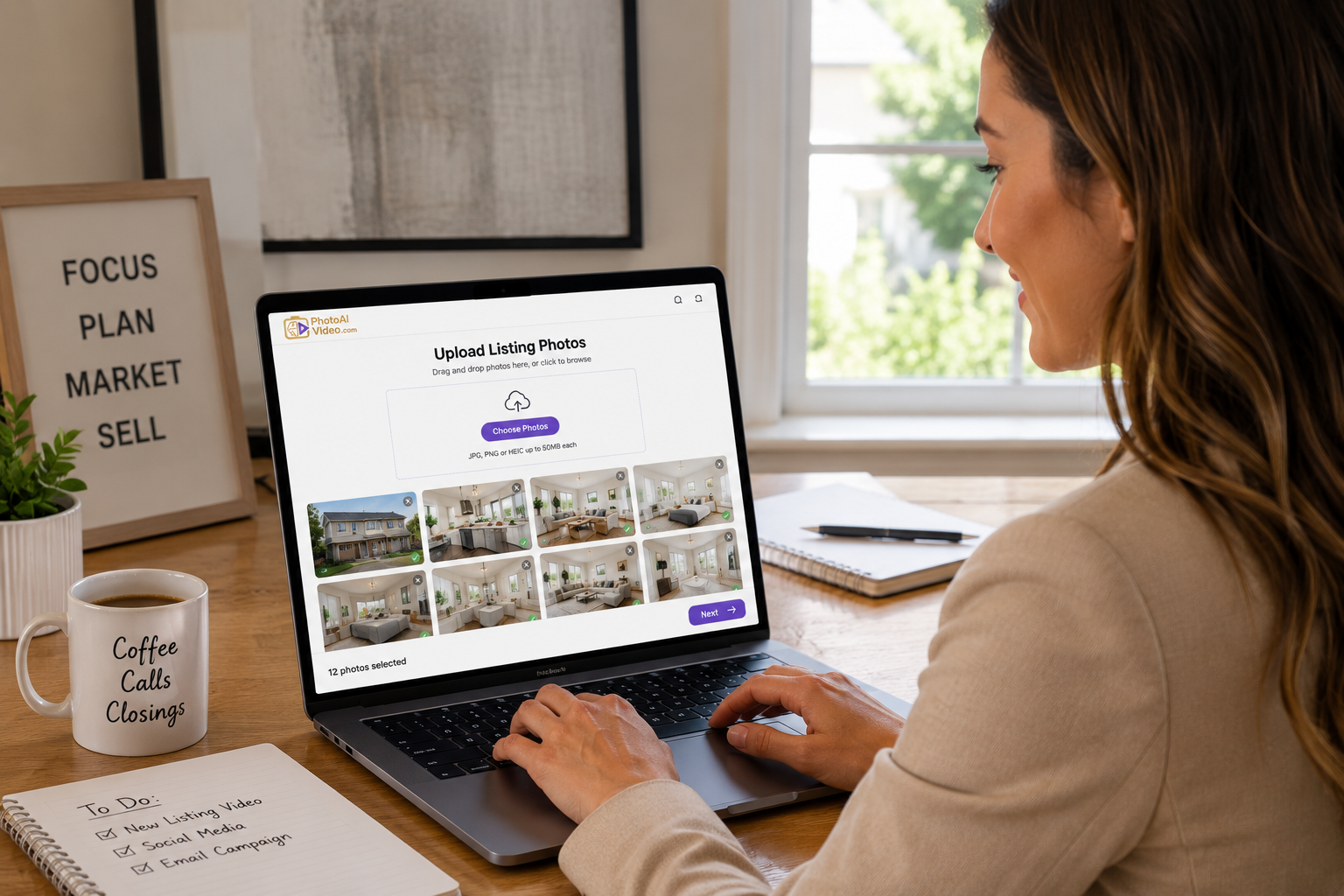
Your first video is about proving to yourself that the process works, not about perfection. Here’s a simple way to get started:
Most beginners are surprised that a usable, shareable property video can take about five minutes from upload to export—no camera crew, no editing software, and no waiting on a videographer’s schedule. That speed is the whole point of a real estate video creator built specifically for the listing photos agents already have.
Once you’ve made two or three videos, the interface stops feeling new and starts feeling like a normal part of preparing a listing.
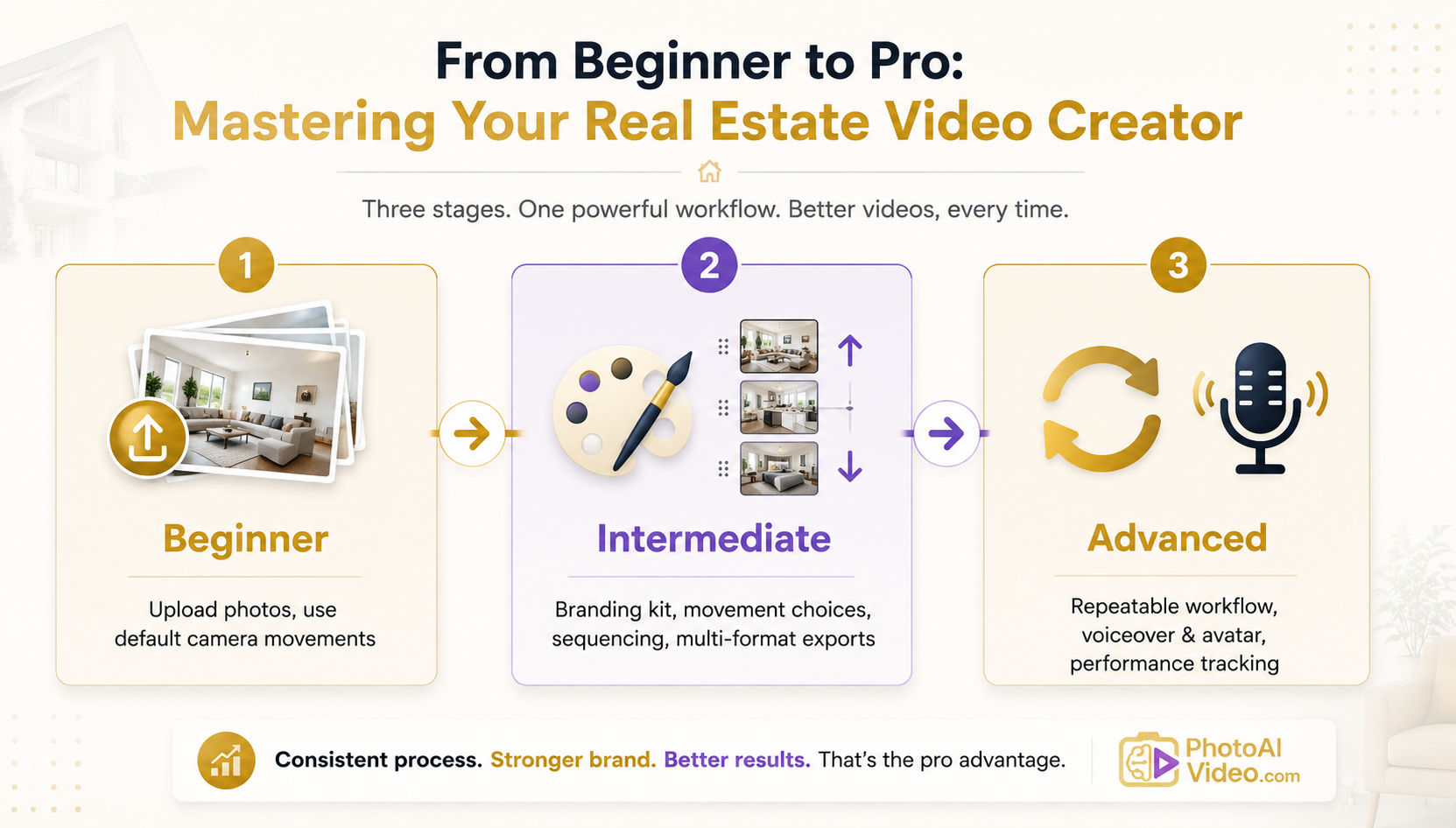
Once the mechanics feel familiar, the real growth happens in the choices you make—not just clicking “generate,” but actively directing the outcome.
Branding consistency.
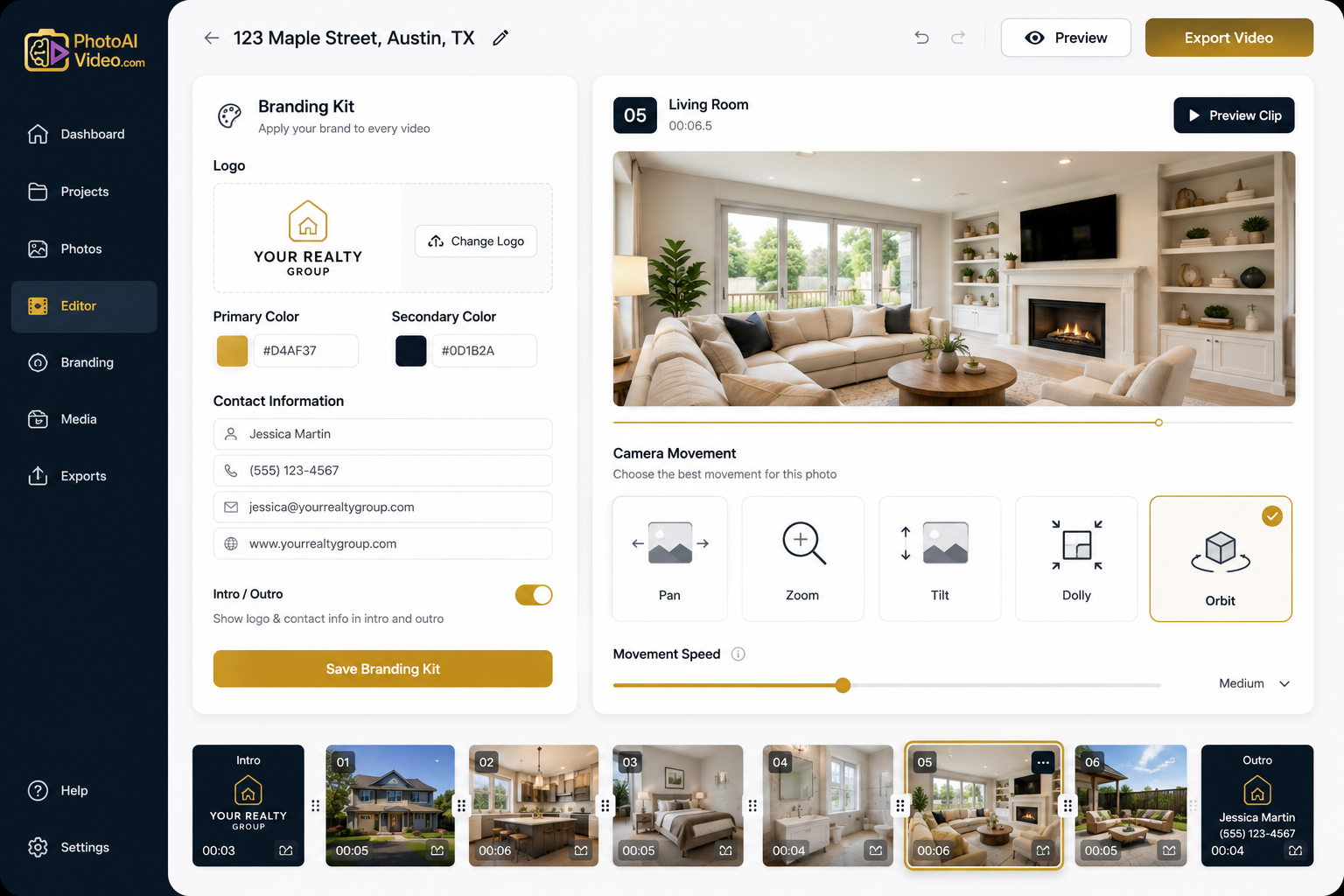
This is where intermediate users start to pull ahead. Instead of manually re-adding your logo, colors, and contact information to every project, set up a reusable branding kit once and apply it automatically to future videos. Consistent branding across listings helps past clients and neighbors recognize your videos in a crowded feed before they even see your name.
Intentional camera movement selection.
A wide living room might call for a slow pan that lets the space breathe, while a kitchen with a striking island may benefit from a tighter zoom that draws the eye. Intermediate agents start choosing movements per photo or per room rather than simply accepting the default, matching the motion to what actually showcases the space best.
Sequencing and pacing.
The order in which rooms appear matters almost as much as how each one is presented. Drag-and-drop room reordering lets you build a narrative—entry, living space, kitchen, primary suite, outdoor feature, closing shot—instead of creating a random slideshow. Good pacing means no single room drags on too long and no standout feature gets buried in the middle.
Multi-format exports.
A video built for a listing page doesn’t always fit a Story, Reel, or email. Getting comfortable exporting different aspect ratios and lengths from the same project means one set of photos can serve every channel you actually use, rather than forcing a single format everywhere.
This is also the stage where it’s worth studying general video marketing behavior. Buyers increasingly expect visual, mobile-first content when researching homes. Resources such as Think with Google’s video marketing strategies can help you understand broader video trends, while the Zillow Research hub can provide additional context about changes in the housing market and digital home discovery.
You don’t need to become a data analyst—just stay aware of how digital content fits into the way today’s buyers discover and evaluate properties.
Advanced agents don’t think of video as a special project reserved for the “big” listings. They treat every new listing, whether a starter condo or a luxury estate, as a potential video opportunity because a real estate video creator significantly reduces the time and effort traditionally required to produce listing videos.
At this stage, a few habits separate advanced users:
For teams and brokerages, this advanced workflow can scale even further. A shared branding kit can help keep every agent’s videos on-brand, while larger operations may choose to hand off production entirely through a Done-For-You service. Photographers working with multiple agent clients can also offer white-label video as a natural extension of their existing photography packages rather than treating it as an entirely separate service.
The progression from beginner to advanced user isn’t about changing who you are—it comes from repetition, small refinements, and allowing the tool to handle more of the technical work as you become more deliberate about the creative choices.
Most agents don’t stall because a real estate video creator is difficult to use. They stall because the progression from “fine” to “great” happens through small, easy-to-miss improvements.
Here are a few common plateaus and how to move past each one:
Every video starts to look the same.
This usually means you’ve settled into one style template and one set of camera movements out of habit rather than intention. Try matching the template to the property type instead—a modern, minimal style for a downtown condo, a warmer template for a family home, or a luxury template for a high-end listing—so your catalog of videos reflects the range of homes you actually sell.
Videos feel polished but don’t seem to drive inquiries.
Polish and pacing aren’t the same as providing a clear next step. Revisit your outro and make sure it states exactly what you want viewers to do—call, message, schedule a showing, or visit the listing page—rather than assuming a good video speaks for itself.
Branding feels like an extra step every time.
If you’re still manually adding your logo and contact details project by project, that’s a sign it’s time to create and save a branding kit so those elements can be applied consistently going forward instead of being recreated for every listing.
You’ve mastered the basics but aren’t sure what’s next.
This is usually the right time to experiment with AI voiceover or AI avatar clone features or start paying closer attention to which videos perform best across your channels. That way, your next round of listings can benefit from what you learned from the previous one.
Recognizing which plateau you’re on is often enough to identify which habit from the intermediate or advanced stage you should focus on next.
Do I need video editing experience to use a real estate video creator?
No. PhotoAIVideo is designed to work with listing photos you already have, applying professional camera movements automatically. There’s no traditional editing timeline to master or complicated editing software to learn.
How long does it actually take to make one video?
Videos can come together in about five minutes, from uploading photos to exporting a finished, branded video. This makes it much more practical to incorporate video into your regular listing workflow rather than reserving it for special occasions.
What’s the difference between the DIY app and the Done-For-You service?
The self-service app gives you control over style, branding, and pacing, making it a good fit for hands-on agents who want to create their own videos. The Done-For-You service is designed for agents or teams that would rather hand off production while still receiving a polished, branded result.
Can my videos stay consistent with my personal brand across every listing?
Yes. You can save a reusable branding kit with your logo, colors, contact information, and intro/outro and apply it to future videos, helping your content remain recognizable from listing to listing.
How do I know when I’ve moved from intermediate to advanced?
There’s no test to pass. The clearest sign is that your workflow has become routine. When choosing a style template, sequencing rooms, and applying branding no longer require much conscious thought—and video has become a standard part of your listing workflow rather than an occasional extra—you’re operating at the advanced stage.
Mastery isn’t about reaching a finish line. It’s about steadily raising the quality of your videos, listing by listing, until reaching for a real estate video creator becomes a natural part of your workflow.
Start with one property, get comfortable with the defaults, then gradually layer in branding, intentional movement choices, pacing, and eventually voiceover or avatar features as they begin to feel natural.
Whether you’re an individual agent building a personal brand, part of a team standardizing video across a brokerage, or a photographer adding white-label video to your offerings, the platform is built for real estate agents at every stage of that journey.
Explore what’s possible at PhotoAIVideo and let your next listing be the one where video stops feeling like extra work and starts feeling like second nature.


Compact, ready to go anywhere
Interchangeable lens that’s upgradeable
Dual 1-inch sensors for improved clarity and low light performance
Dynamic range and 6K 360° capture
360° photo resolution at 21MP

8K 360° video recording for ultra-detailed visuals.
4K single-lens mode for traditional wide-angle shots.
Invisible selfie stick effect for drone-like perspectives.
2.5-inch touchscreen with Gorilla Glass protection.
Waterproof up to 33ft for underwater shooting.

360° photo resolution in 23MP
Slim design at 24 mm thick
Built-in image stabilization for smooth video capture.
Internal 19GB storage for photo and video storage.
Wireless connectivity for remote control and sharing.

60MP 360° still images for high-resolution photography.
5.7K 360° video recording at 30fps.
2.25-inch touchscreen for intuitive control.
USB Type-C port for fast charging and data transfer.
MicroSD card slot for expandable storage.
.png)

.png)

Try it free. No credit card required. Instant set-up.







.svg)


.svg)