


.png)



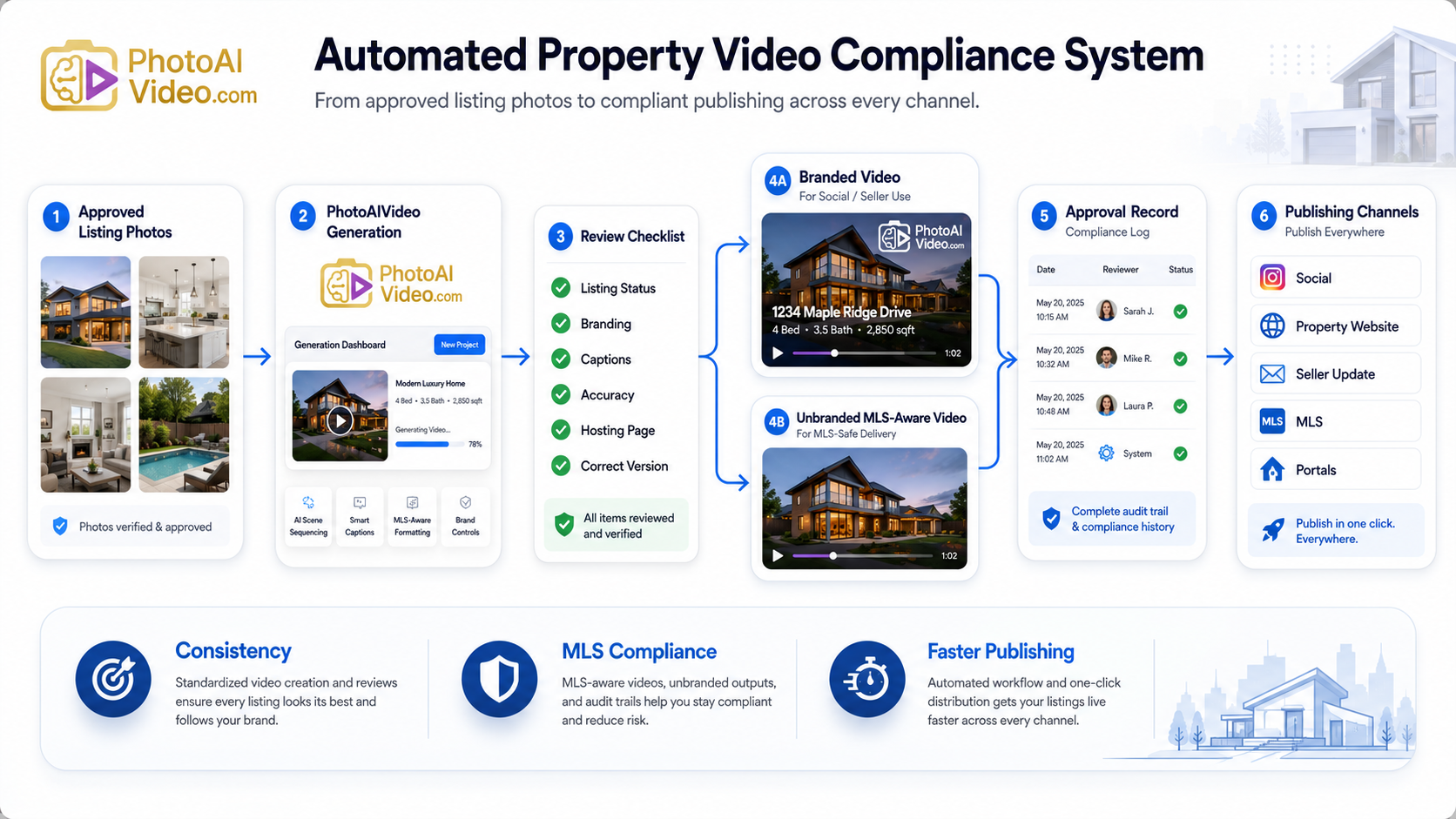
The risky part of automated property video is not the AI.
It is the handoff.
A property photo set gets uploaded. A video is generated. Someone downloads the file. Someone else adds branding. Another person wants an MLS-safe version. The listing coordinator asks whether the video has been reviewed. The agent says, “I think so.” The broker asks where the unbranded file is stored. Nobody is completely sure which version went where.
That is where automation either helps the business or makes the mess move faster.
The future of automated property video is not just faster creation. It is controlled creation.
Real estate teams need video systems that can produce listing media quickly while still protecting the brokerage, the agent, the seller, and the publishing workflow. That means clear review steps, separate branded and unbranded versions, documented file naming, approved publishing channels, and a process that does not fall apart when more agents start using video.
PhotoAIVideo helps real estate professionals turn property photos into AI-generated videos. Used correctly, it can become part of a compliance-ready media system where agents create better video assets without relying on a messy manual editing process.
MLS rules vary by board, brokerage, and region. Always confirm your local requirements before publishing listing media.
Automated property video compliance is the process of creating real estate videos faster without losing control over how those videos are reviewed, labeled, stored, and published.
That is different from simply creating a video.
A basic video tool might help an agent make a listing clip.
A compliance-ready video workflow helps the team answer more important questions:
Those questions matter more as teams create more content.
The more videos a brokerage produces, the more important the operating system becomes.
That is where MLS safe AI video for listings fits into the larger conversation. The future is not just about generating video from photos. It is about creating listing media that can move through a repeatable approval path before it reaches the public.
A tool like PhotoAIVideo can help with production. The brokerage or team still needs the compliance framework.
Real estate marketing is moving toward higher media volume.
One listing no longer needs only photos and a short description. Agents now use listing videos, short-form clips, property websites, seller updates, email campaigns, paid ads, rental videos, and social media teasers.
That creates opportunity.
It also creates more places for mistakes.
A branded video might be perfect for Instagram but wrong for an MLS listing field. A clean video file might still be hosted on a branded page. A property teaser might go public before the listing status is ready. A caption might accidentally imply a feature the property does not have. A file might be renamed so poorly that nobody knows whether it is approved.
These are not creative problems.
They are governance problems.
This is why MLS compliant listing media software should be evaluated by more than video quality. Brokerages, photographers, and listing teams should also look at how the workflow supports review, separation of assets, approval records, and publishing discipline.
For teams using PhotoAIVideo, the practical advantage is that approved listing photos can become video assets quickly. The compliance advantage comes when the team defines what happens before those videos are published.
Fast media is only useful if the process stays clean.
Most real estate teams build compliance around memory.
That is the problem.
The agent remembers which file is branded. The assistant remembers which version was sent to the seller. The photographer remembers which export was clean. The coordinator remembers which folder has the final version. The broker assumes someone checked the hosting page.
Memory is not a system.
The breakdown usually happens in one of five places.
The team creates several videos but does not label them clearly.
Files end up named:
That might work when one person handles everything. It fails when multiple people are involved.
The video gets created, but nobody owns the review.
The agent assumes the coordinator checked it. The coordinator assumes the agent checked it. The brokerage only sees it after it is already published.
A team removes the obvious logo but misses other branding elements.
Branding can appear in:
This is why MLS compliant branded video removal is not just a design task. It is a full media review process.
The same video gets used everywhere.
That is convenient, but not always smart.
A video for paid ads may need a different structure than a video for a property website. A seller update video may include context that does not belong in a public listing. An MLS-aware version may need to be cleaner than the social media version.
Nobody can explain what happened.
Who approved the file?
When was it published?
Which version went to the MLS?
Was the seller’s requested change made?
If a brokerage cannot answer those questions, the workflow is not mature yet.
PhotoAIVideo helps real estate professionals create videos from property photos.
That matters because listing photos are already part of the standard property marketing process. They are usually the first approved visual asset. They are also easier to manage than raw footage, multiple editing timelines, or scattered phone videos.
PhotoAIVideo can support a compliance-ready workflow by helping teams generate property videos from a controlled source: approved listing images.
That gives the team a better starting point.
Instead of asking every agent to become a video editor, PhotoAIVideo allows the team to create videos faster from media they already understand.
A brokerage or team can then build a process around it:
That makes PhotoAIVideo useful as an MLS compliant real estate media app inside a larger listing media system.
The app helps create the video.
The workflow protects the business.
Do not build compliance around random files.
Start with the media that has already passed quality review:
This reduces the risk of creating a beautiful video from the wrong inputs.
Every video needs a destination.
Before creating the asset, choose one:
The destination determines the rules.
An Instagram video can usually carry more branding. An MLS-aware video may need to be cleaner. A seller update may include marketing commentary. A paid ad may require additional policy review.
Upload the approved property photos into PhotoAIVideo and create the first video draft.
Treat the first output as a draft, not the final word.
That mindset matters.
Automation creates speed. Review creates safety.

Use a consistent checklist.
Review for:
This is where many teams need discipline. A good-looking video can still be wrong for the channel.
One export should not carry the whole marketing plan.
Create separate versions when needed:
This is where an unbranded listing video creator becomes valuable. The team needs a way to create clean listing media without rebuilding every project manually.
File names should remove doubt.
Use a naming system like:
The file name should tell the next person what they are looking at.

Do not mix drafts and approved files in the same folder.
Create separate folders:
This prevents accidental publishing.
Keep a simple approval note.
It does not need to be complicated.
Track:
That small record can save a lot of confusion later.
Speed is useful.
But speed without control creates rework.
A compliance-ready system gives the team both: faster production and cleaner handoffs.
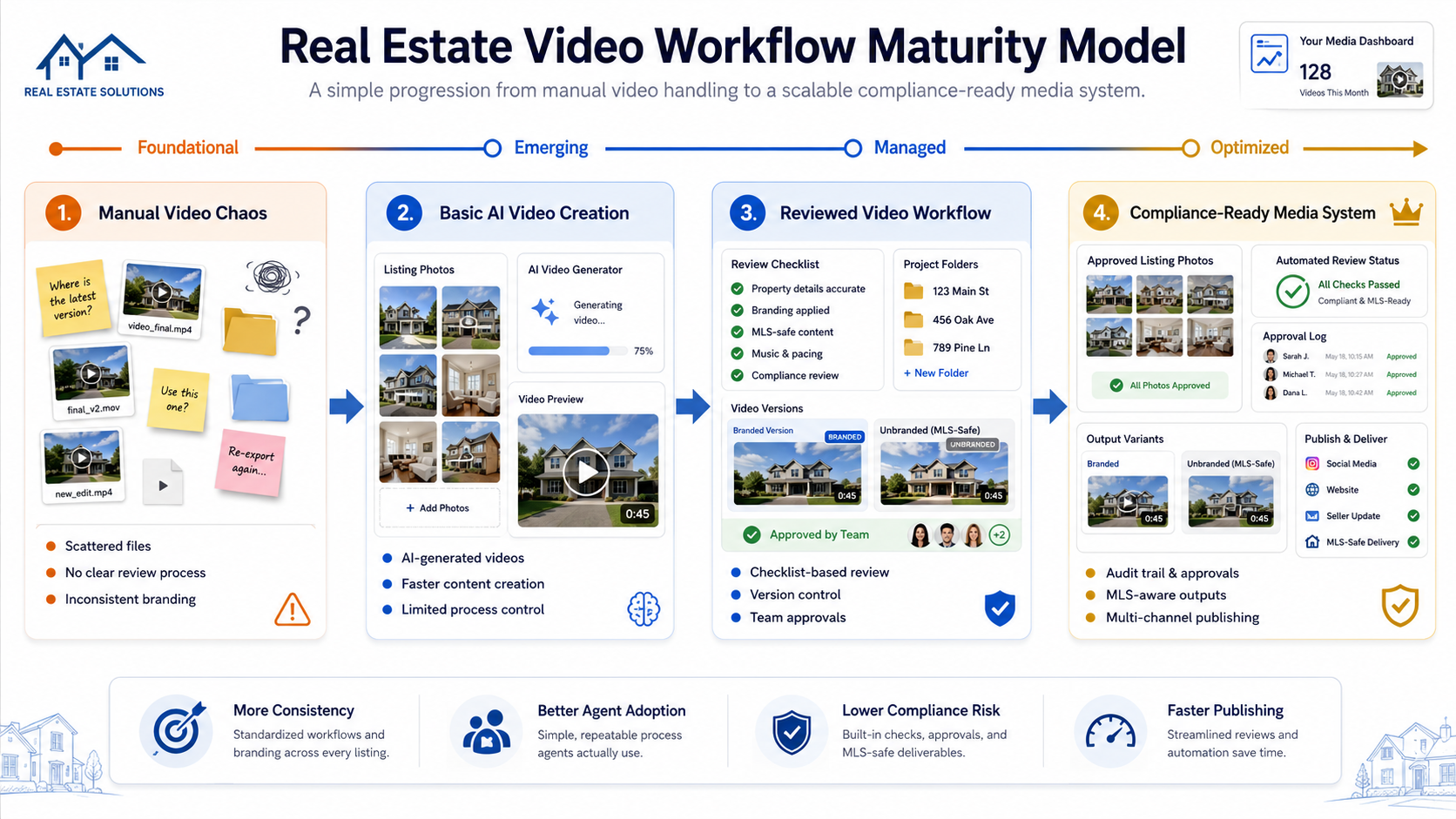
A solo agent can use PhotoAIVideo to create videos from listing photos without learning complex editing software.
The agent can create:
The key is keeping the versions labeled clearly.
Even solo agents need version control.
Photographers can use PhotoAIVideo to offer video add-ons from the same photo shoot.
That can create a stronger media package:
This gives agents more value without requiring a full custom video shoot on every listing.
Brokerages need repeatability.
A brokerage can use PhotoAIVideo as part of a standard listing media workflow. Agents can create videos from approved photos, then route them through a brokerage review process before publishing.
This supports:
Listing coordinators can manage the approval workflow.
They can confirm that the correct version is being used, the file is labeled properly, the seller update is separate from the MLS-aware file, and the branded social version is stored in the right folder.
This reduces last-minute cleanup.
Property managers can use the same compliance-ready structure for rental media.
A unit video should still be accurate, current, and clearly labeled. If the rental team uses one video for leasing emails and another for public advertising, those files should be separated.
Video governance is not only for residential sales.
Automation creates the asset.
It does not automatically create judgment.
A human still needs to review accuracy, branding, context, and publishing destination.
One property may need several video versions.
Do not force the same file into the MLS, Instagram, a seller report, and a paid ad campaign.
Each channel has a different job.
The surrounding experience matters.
Review:
A clean video on a branded page may not be clean in context.
Captions should be accurate.
Do not let the video claim a room is renovated, oversized, private, waterfront, luxury, or move-in ready unless the statement is true and appropriate.
Draft folders and approved folders should be separate.
This is basic, but it prevents real mistakes.
If your process is shown in a graphic, also explain it in text.
Google’s image SEO best practices recommend descriptive filenames, alt text, and relevant surrounding context. Google’s Article structured data documentation also explains how structured data can help search engines understand article details like title, author, images, and dates.
MLS rules are local.
Brokerage policies are local.
Team workflows are local.
A national article can explain the framework, but your team still needs to confirm the rules that apply to your market.


Compact, ready to go anywhere
Interchangeable lens that’s upgradeable
Dual 1-inch sensors for improved clarity and low light performance
Dynamic range and 6K 360° capture
360° photo resolution at 21MP

8K 360° video recording for ultra-detailed visuals.
4K single-lens mode for traditional wide-angle shots.
Invisible selfie stick effect for drone-like perspectives.
2.5-inch touchscreen with Gorilla Glass protection.
Waterproof up to 33ft for underwater shooting.

360° photo resolution in 23MP
Slim design at 24 mm thick
Built-in image stabilization for smooth video capture.
Internal 19GB storage for photo and video storage.
Wireless connectivity for remote control and sharing.

60MP 360° still images for high-resolution photography.
5.7K 360° video recording at 30fps.
2.25-inch touchscreen for intuitive control.
USB Type-C port for fast charging and data transfer.
MicroSD card slot for expandable storage.
.png)

.png)

Try it free. No credit card required. Instant set-up.







.svg)


.svg)