


.png)


Prospective students increasingly begin their college search from a screen, not with a car ride down a campus loop road. Long before an admitted student ever tours a campus in person, they may have already clicked through a virtual walkthrough of residence halls, lecture buildings, dining commons, and student unions — sometimes at midnight, sometimes from another country, and sometimes months before filling out an application.
For admissions and enrollment marketing teams, this means a virtual tour can be much more than a nice-to-have addition to the website. It can become an important recruitment tool that helps prospective students experience a campus before they're able or ready to visit in person.
Not all virtual tour platforms are built with higher education in mind, though. Many were originally designed for single-property real estate listings and may not be well suited to multi-building campuses, complex navigation, and admissions-specific goals such as inquiry capture.
Before your institution signs a contract, it's worth understanding which features separate a tool that simply displays 360° images from one that can actively support enrollment goals. This guide walks through the features that matter most so your team can evaluate vendors with confidence — and if you want a head start, you can explore the best virtual tour software for universities to see how platforms stack up against these criteria.

A university virtual tour has different requirements from a single-listing walkthrough. It may need to connect dozens of scenes — academic buildings, athletic facilities, dorms, libraries, and student centers — into one cohesive experience that reflects the flow of an actual campus visit.
It may also need to function as a marketing and data-collection tool rather than simply a visual showcase.
As outlets such as The Chronicle of Higher Education have covered, enrollment offices face ongoing pressure to demonstrate the value of their marketing efforts and reach prospective students throughout the college search process. For admissions teams, this makes a tour's ability to capture and measure engagement an important consideration alongside its visual quality.
At the same time, the platform needs to be manageable by the staff who will actually use it day to day — admissions counselors, communications coordinators, and marketing generalists, not necessarily full-time developers.
The features below reflect what matters when a virtual tour needs to serve prospective students, families, counselors, and internal stakeholders at the same time.
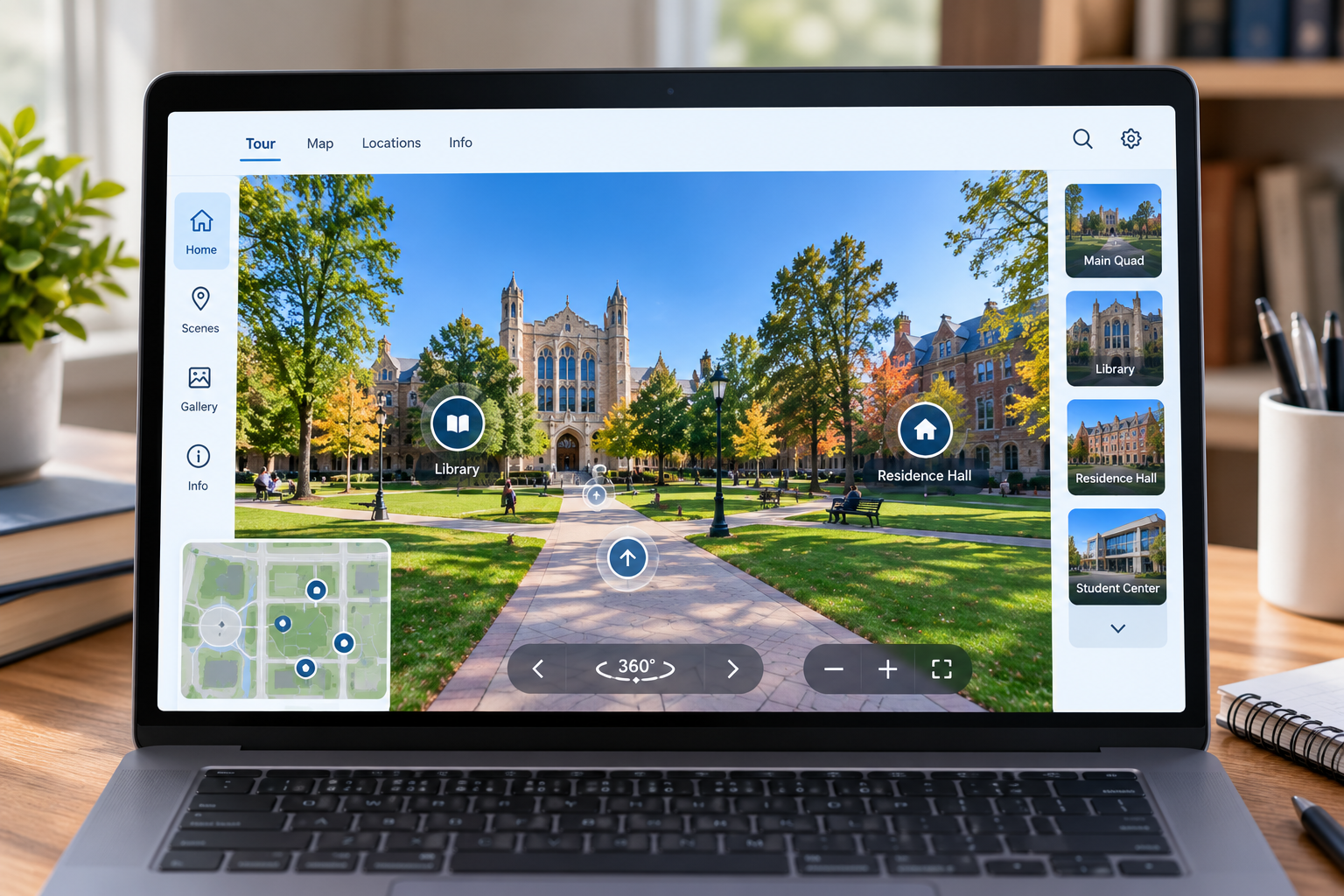
At its foundation, a virtual tour platform should allow viewers to move naturally between locations using clickable hotspots embedded directly within the 360° imagery.
Well-designed hotspot navigation can let a visitor move from the quad into the library, then into a residence hall lobby, and finally into a dining hall in a sequence that resembles an actual guided walk.
Look for software capable of supporting the number of linked scenes your institution requires. A comprehensive campus tour may include dozens of locations once academic buildings, athletic venues, residence halls, and student-life spaces are included.
CloudPano's hotspot system is designed to connect multiple 360° scenes into a continuous, easy-to-follow tour.
Prospective students may explore university websites from a variety of devices, particularly smartphones. Some institutions may also want to use VR headsets at college fairs, recruitment events, or other immersive experiences.
Virtual tour software should therefore render cleanly across devices without requiring visitors to install a special app or plug-in.
When comparing platforms, test the tour experience on desktop computers, tablets, and smartphones, and confirm whether VR headset compatibility is available if your recruitment strategy requires it.
CloudPano supports responsive mobile viewing as well as VR headset compatibility, allowing the same tour to be used across different recruitment settings.
A virtual tour is most useful when prospective students can access it from the pages they're already visiting — such as your admissions homepage, academic department pages, housing pages, and campus-life sections.
Look for a platform that allows straightforward embedding through a simple code snippet without requiring your web team to rebuild pages or manage complicated integrations.
This can be particularly valuable for institutions using content management systems maintained by a small IT or web team.
CloudPano tours can be embedded on websites using standard embed code, allowing institutions to incorporate tours into their existing website structure and CMS.
Consistency matters in enrollment marketing because every digital touchpoint contributes to how prospective students perceive an institution.
A tour that prominently displays a third-party vendor's logo, watermark, or generic subdomain may feel disconnected from the rest of the university's digital experience.
When evaluating platforms, ask whether white-label options are available. These options can allow the tour to better reflect the institution's own domain, visual identity, and branding.
CloudPano's higher-tier plans include white-label and custom-domain capabilities, allowing institutions to create a tour experience that feels more integrated with their overall branding.
For enrollment marketing teams, another valuable feature is the ability to capture visitor information directly within the tour experience.
A prospective student who spends time exploring residence halls and academic buildings may already be showing meaningful interest in the institution. Providing an inquiry form within the experience gives that student an immediate opportunity to request additional information or take another step.
Look for platforms that allow you to embed inquiry or lead-generation forms directly within the tour rather than requiring visitors to leave the experience and search for a separate contact page.
CloudPano includes built-in lead-generation forms that can help turn tour engagement into actionable admissions inquiries.
Enrollment marketing decisions benefit from data about how prospective students interact with digital content.
When evaluating virtual tour platforms, look for analytics capabilities that can help your team understand tour traffic and visitor engagement. If the platform integrates with tools such as Google Analytics, your team may be able to incorporate tour activity into its broader website and campaign reporting.
The exact metrics available will depend on the platform and analytics configuration, so it's worth confirming what can actually be measured before choosing a vendor.
CloudPano offers analytics integration that can help admissions and marketing teams gain greater visibility into tour performance.
Static imagery can answer the question, "What does the campus look like?" But many prospective students and families also value the opportunity to interact with a real person before committing to a visit or submitting an application.
Live 360° video functionality can provide another way for an admissions counselor or student ambassador to guide prospective students through a campus experience remotely while answering questions in real time.
This may be particularly useful for out-of-state and international applicants who cannot easily travel to campus before deciding where to apply.
Organizations such as NACAC emphasize the importance of guidance and communication throughout the college admission process. A live virtual walkthrough can help institutions incorporate that human element into a remote experience.
CloudPano's live video functionality can be used alongside its 360° environment to support guided virtual experiences.
For buildings where understanding the layout matters — such as dormitories, student unions, or science buildings with laboratories and classrooms across multiple floors — a 3D dollhouse view can give visitors a broader understanding of how spaces connect.
Instead of piecing together room-by-room impressions, viewers can see a larger portion of a floor or building and navigate toward the areas that interest them.
This is a feature worth confirming during a vendor evaluation because not every 360° tour platform provides dollhouse-style floor plans.
CloudPano includes 3D dollhouse functionality within its tour-building ecosystem, giving prospective students another way to understand the spatial relationship between different areas of a building.
Finally — and perhaps most practically — the software needs to be manageable by the people who will actually use it.
Admissions and marketing staff aren't necessarily developers, and IT departments often have many competing priorities. A no-code platform that allows marketing staff to upload images, place hotspots, and publish updates without writing code can make it easier to keep a tour current.
CloudPano is designed as a no-code solution, allowing admissions and marketing teams to build and maintain tours without requiring coding knowledge.
Teams comparing several vendors may find it useful to compare virtual tour platforms built for higher education, since ease of use can vary considerably even when feature lists appear similar.
No single feature makes a virtual tour effective on its own. It's the combination of features — and how well they match your institution's needs — that determines whether the platform can meaningfully support enrollment goals.
A visually impressive tour with no lead capture may generate interest without creating a clear opportunity for follow-up. A tour with sophisticated analytics but confusing navigation may lose visitors before they've explored enough of the campus to form an impression.
When evaluating vendors, map each platform's features against your institution's specific requirements:
Answering these questions before making a purchase can help your team avoid paying for capabilities it won't use — or discovering important gaps after a contract has already been signed.
It's also worth remembering that a virtual tour is only one part of a broader digital recruitment journey.
Prospective students might discover your institution through search, social media, college-search platforms, email campaigns, or other recruitment channels before eventually reaching your virtual tour.
The tour should therefore work well as a self-contained experience regardless of where the visitor comes from.
Choosing virtual tour software for a university involves more than selecting whichever platform produces the sharpest 360° images.
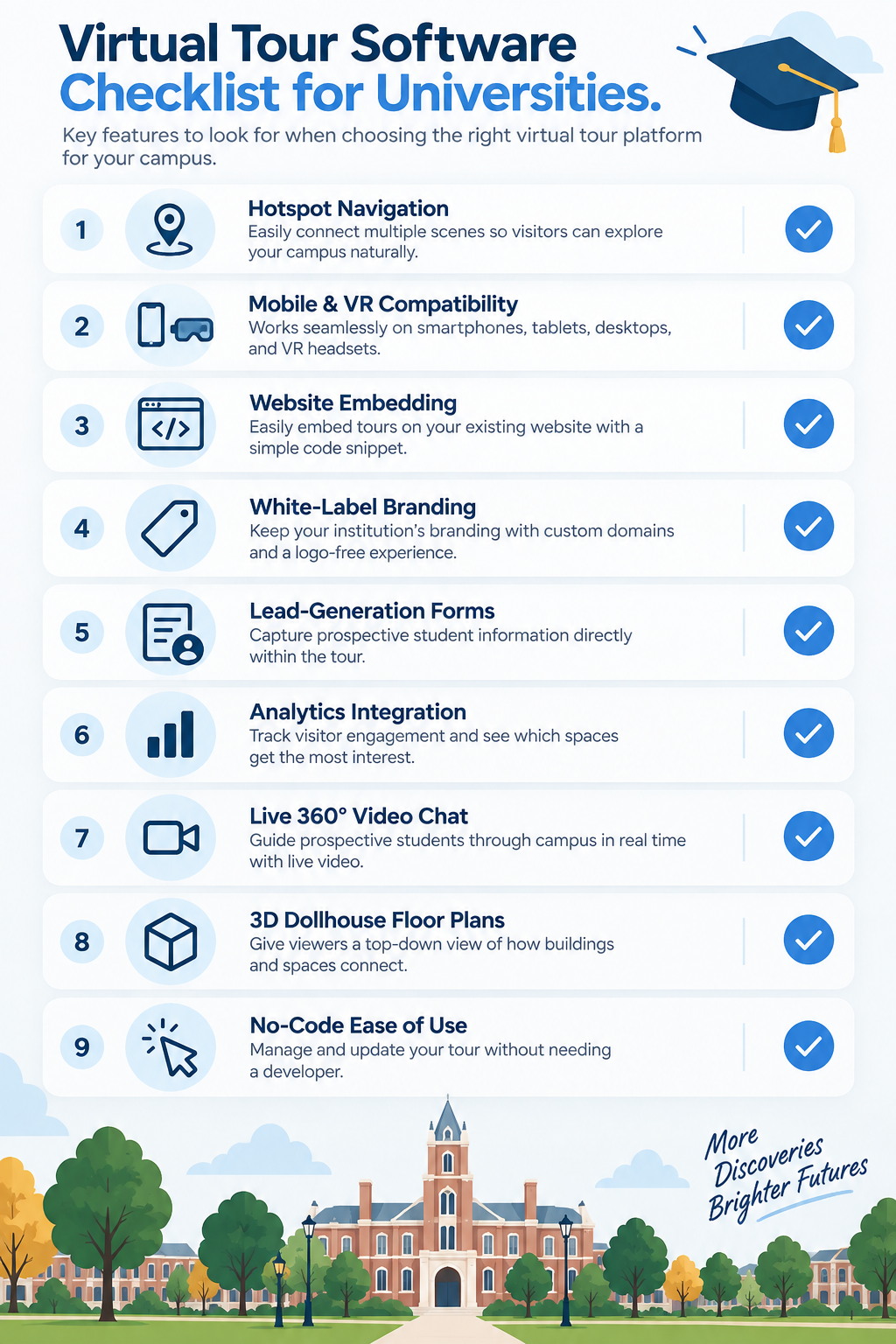
Features such as hotspot navigation, mobile and VR compatibility, easy website embedding, white-label branding, built-in lead capture, analytics, live video functionality, 3D floor plans, and no-code usability can work together to turn a tour from a passive visual asset into a more interactive part of the enrollment journey.
Admissions and enrollment marketing teams should weigh each of these capabilities against their institution's specific campus, staffing, recruitment strategy, and follow-up processes.
For teams ready to compare options against this checklist, it's worth taking the time to review virtual tour solutions for college campuses before making a final decision.
It's difficult to attribute a student's application decision to a single digital tool. However, virtual tours can provide prospective students and families with another way to research an institution, particularly when visiting campus in person isn't practical.A tour that's easy to navigate, mobile-friendly, and rich in useful visual information can help an institution make a stronger digital impression during the research process.
Yes, provided the platform is genuinely no-code. Look for software that allows non-technical admissions and marketing staff to upload images, set navigation points, add forms, and publish routine updates without ongoing developer assistance.
Built-in lead-generation forms can allow prospective students who are already engaged with your campus tour to request additional information without leaving the experience.Depending on your platform and integrations, those inquiries can then become part of your admissions follow-up process.


Compact, ready to go anywhere
Interchangeable lens that’s upgradeable
Dual 1-inch sensors for improved clarity and low light performance
Dynamic range and 6K 360° capture
360° photo resolution at 21MP

8K 360° video recording for ultra-detailed visuals.
4K single-lens mode for traditional wide-angle shots.
Invisible selfie stick effect for drone-like perspectives.
2.5-inch touchscreen with Gorilla Glass protection.
Waterproof up to 33ft for underwater shooting.

360° photo resolution in 23MP
Slim design at 24 mm thick
Built-in image stabilization for smooth video capture.
Internal 19GB storage for photo and video storage.
Wireless connectivity for remote control and sharing.

60MP 360° still images for high-resolution photography.
5.7K 360° video recording at 30fps.
2.25-inch touchscreen for intuitive control.
USB Type-C port for fast charging and data transfer.
MicroSD card slot for expandable storage.
.png)

.png)

Try it free. No credit card required. Instant set-up.







.svg)


.svg)