


.png)



Virtual tour software for construction can be worth the investment when teams manage multiple job sites, work with remote stakeholders, or spend significant time on site visits and photo documentation. Its value comes from creating organized 360° records that support remote project reviews, progress tracking, communication, and easier access to site conditions.
If you run a construction company or manage field operations, you’ve probably heard the pitch for 360° tours and virtual walkthroughs more than once. The harder question isn’t whether the technology looks impressive in a demo — it’s whether it actually pays for itself once you factor in the time your team already spends managing site documentation, client updates, and subcontractor coordination.
This article skips the hype and walks through a straightforward cost-versus-benefit framework so you can decide for yourself whether virtual tour software for construction is worth adding to your workflow — and at what point in a company’s growth it starts to make financial sense.
Before evaluating any new tool, it helps to be honest about what your current process actually costs. Most construction companies don’t have a formal line item for “site documentation,” which is exactly why the expense is easy to underestimate — it’s spread across dozens of small activities that rarely get totaled up.
Start with site visits. When an architect, lender, insurance adjuster, or out-of-town client needs to see current progress, someone typically has to physically walk the property with them, or a project manager has to drive out separately just to confirm conditions before a call.
For a single-site project, this may be a manageable inconvenience. For a company running several active sites across a region, however, it can add up to a meaningful portion of a superintendent’s or project manager’s week — time that could otherwise be spent scheduling trades, solving problems, or moving the next project forward.
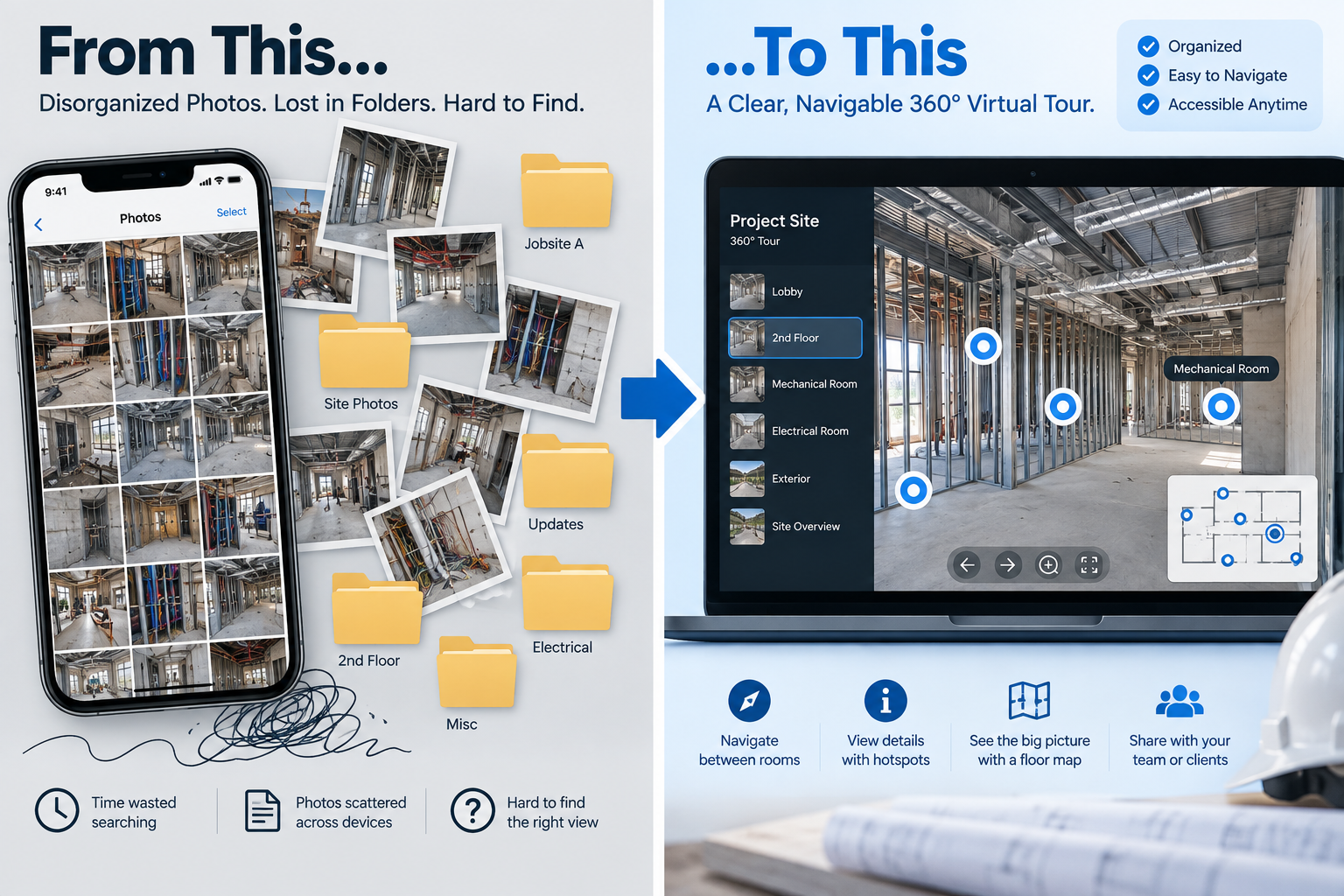
Then there’s the travel burden for remote stakeholders. A developer based two states away, a bank underwriter, or a corporate client with a distributed real estate team can’t always drop in for a site visit on short notice. That can mean progress updates or decisions have to wait until an in-person visit is feasible, potentially slowing discussions around change orders, draw approvals, and design clarifications.
Finally, there’s the photo problem almost every construction company recognizes: thousands of site photos scattered across phones, shared drives, and email threads, loosely organized by date or job number, with no easy way to see how a specific area looked at a particular phase without scrolling through folders.
When a dispute arises six months later about what was installed behind a wall before it was closed up, “we have photos somewhere” isn’t a particularly reassuring answer.
None of these costs appears as a single invoice, but together they represent real hours and potential risk. That’s the baseline any new documentation tool has to improve upon.
One of the clearest potential benefits of 360° virtual tours is reducing unnecessary or redundant site visits.
Once a space or phase is captured, authorized stakeholders can review it remotely from a phone, laptop, or other compatible device — without scheduling another visit or spending time traveling to the site.
This doesn’t eliminate site visits entirely, since some tasks still require someone to be physically present. But it can reduce some of the “just need to check something” trips that eat into a project manager’s calendar.
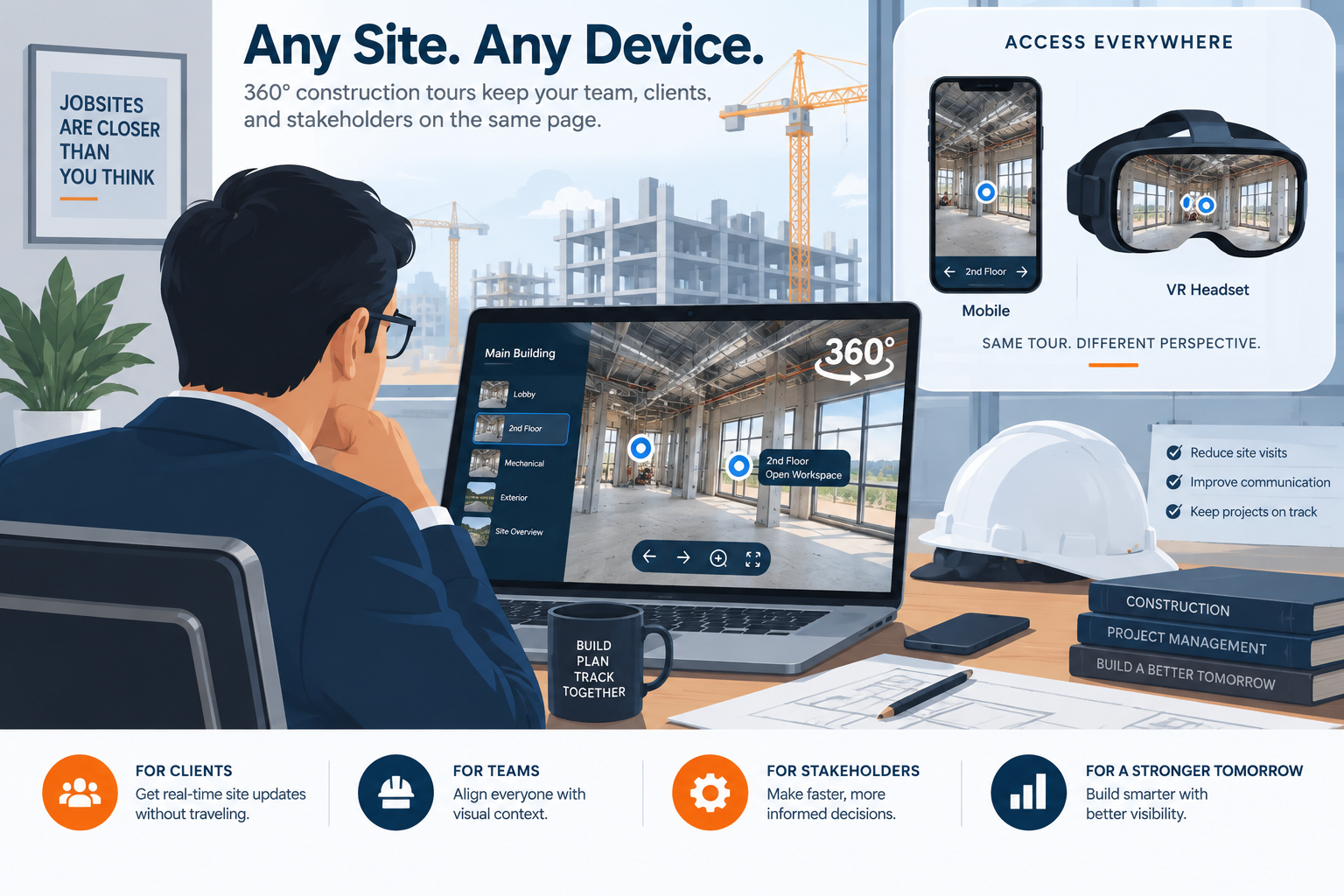
Faster stakeholder review is another potential time saver. When a lender, owner’s representative, or design consultant can review current conditions on their own schedule instead of waiting for an in-person walkthrough, some questions and approvals may be addressed sooner.
Hotspot navigation between rooms, floors, or project phases can also let reviewers move directly to the areas they care about rather than sifting through folders of disconnected images.
This type of self-serve access reflects a broader shift toward digital construction documentation. Industry publications such as Construction Dive regularly cover the construction sector’s adoption of digital tools for project management, documentation, and collaboration.
There’s also a coordination benefit that’s easy to overlook. When subcontractors, inspectors, and project managers can reference the same navigable tour instead of relying solely on secondhand descriptions or a text message with a few photos attached, teams have a clearer shared visual reference.
That can reduce some clarifying calls and unnecessary trips to the site simply to “see for themselves.” It may be a modest efficiency gain in any single instance, but across a full project schedule involving multiple trades, those small savings can add up.
This is one of the practical reasons companies evaluating virtual tour software for construction may find that the return comes less from one dramatic use case and more from many small, recurring improvements to their workflow.
Time savings are among the easiest benefits to calculate, but they aren’t the only ones worth considering. For many companies, the less quantifiable benefits may be just as important.
Fewer documentation disputes through a clearer visual record. Disagreements about what was or wasn’t in place at a particular stage of construction can become expensive and time-consuming.
A dated, navigable 360° record of a space before drywall goes up, before a mechanical system is enclosed, or at other important project milestones can provide stakeholders with a clearer shared visual reference.
It won’t prevent every disagreement, nor should a virtual tour be treated as a substitute for contractual records or other required documentation. But having organized visual evidence can provide valuable context when questions arise later.
This kind of documentation discipline reflects a broader principle recognized throughout the building industry: maintaining useful records of a building’s condition and systems can have value beyond the immediate project. Resources such as the Whole Building Design Guide address the importance of building information throughout operations, maintenance, and future renovation planning.
Better subcontractor coordination. When trades can reference the same visual tour of current site conditions instead of relying on inconsistent verbal updates, there’s less room for confusion about what has already been completed and what still needs attention.
A plumber scheduling work around electrical rough-in, for example, may be able to review the relevant area remotely before arriving on-site.
A more professional client-facing presentation. For companies competing for larger contracts or working with institutional clients, the presentation of your process can matter.
Being able to send a client an organized, self-guided walkthrough of their project can demonstrate transparency and provide a more structured experience than sending a folder of disconnected site photos.
Some platforms extend this further with live guided walkthrough capabilities, allowing a project representative to walk a remote client or stakeholder through the site in real time. This can be particularly useful when visual clarification is needed and an immediate in-person visit isn’t practical.
It’s also worth considering virtual tours within the broader trend toward construction technology adoption. Publications such as Engineering News-Record regularly cover digital construction technologies as firms look for new ways to improve project management, communication, documentation, and efficiency.
Visual documentation tools fit naturally into that broader trend, particularly when they can be incorporated into an existing workflow without adding unnecessary complexity.
Rather than relying on a generic ROI calculator, it can be more useful to ask a short set of practical questions about how your company actually operates.

1. How many active job sites do you typically manage at once?
A single-project company with one job site and a tight-knit team may get less value from remote visual documentation than a company running multiple concurrent sites across a wider geographic area, where travel and coordination overhead are naturally higher.
2. How often do you deal with remote or out-of-town stakeholders?
If your clients, lenders, or design consultants frequently can’t visit in person, the value of a self-guided or live virtual walkthrough increases. If nearly everyone involved is local and can easily visit the site, the benefit may be smaller.
3. How much time does your team currently spend organizing and retrieving site photos?
If someone on your team can already produce a clear, dated visual record of any area within minutes of being asked, your existing documentation process may already be working well.
If the answer usually involves searching through multiple phones, folders, email threads, or shared drives, there may be an efficiency gap worth addressing.
4. Has your company dealt with disputes where clearer documentation would have helped?
Past experience with disagreements over installed conditions, damage claims, or scope interpretation may be a practical reason to consider more rigorous visual documentation.
5. Do you compete for contracts where client-facing presentation matters?
If you’re bidding against larger firms or working with clients who evaluate vendors partly on professionalism, transparency, and communication, a polished virtual tour may provide an additional way to differentiate your process.
6. Is the platform simple enough for non-technical staff to maintain?
Any documentation system only works if your team actually uses it consistently. A no-code, straightforward interface that doesn’t require specialized technical knowledge may be easier to incorporate into day-to-day field operations than a system that requires a dedicated specialist.
There isn’t a universal number of “yes” answers that automatically proves the investment will pay off. However, the more of these challenges your company regularly encounters, the stronger the case becomes for testing virtual tour software on a real project.
For companies that are unsure, a limited pilot on one active project can provide a more useful answer than a generic ROI estimate. Track the time spent capturing tours, the number of site visits avoided, how often stakeholders use the tour, and whether the visual record helps resolve questions more efficiently. You can then compare those benefits against the actual cost and effort involved.
There’s no universal answer to whether virtual tour software is worth the investment. It depends on how many sites you manage, how geographically dispersed your stakeholders are, how much time your team spends on site visits and documentation, and how much friction your current process creates.
For construction companies juggling multiple projects, frequent remote reviews, or recurring documentation challenges, the combination of reduced travel, easier remote collaboration, and a clearer visual record can make virtual tours worth evaluating.
The most reliable way to determine the return is to measure it against your own workflow: how much time the platform takes to use, how many unnecessary trips it helps avoid, how frequently stakeholders rely on it, and whether it makes project information easier to retrieve when questions arise.
If those benefits outweigh the cost and effort of maintaining the system, virtual tour software for construction becomes less of a technology novelty and more of a practical operational tool.
No. It can reduce some redundant or purely observational visits, but hands-on inspections, physical measurements, safety walkthroughs, and other tasks may still require someone to be physically present. The value is in reducing visits that exist primarily to check conditions or provide visual context.
Not necessarily. Smaller firms managing multiple concurrent projects or communicating frequently with remote clients can benefit as well. The deciding factors are more likely to be project complexity, travel requirements, documentation needs, and stakeholder locations than company size alone.
This depends on the camera, platform, size of the site, and level of documentation required. Modern 360° cameras and no-code virtual tour platforms can simplify the process, but teams should still account for capture time, image organization, labeling, and tour maintenance when evaluating the workflow.
Potentially. Some virtual tour platforms include lead-generation or contact-capture features, which may allow companies to use project walkthroughs as part of their marketing or business-development efforts in addition to internal documentation and stakeholder communication.


Compact, ready to go anywhere
Interchangeable lens that’s upgradeable
Dual 1-inch sensors for improved clarity and low light performance
Dynamic range and 6K 360° capture
360° photo resolution at 21MP

8K 360° video recording for ultra-detailed visuals.
4K single-lens mode for traditional wide-angle shots.
Invisible selfie stick effect for drone-like perspectives.
2.5-inch touchscreen with Gorilla Glass protection.
Waterproof up to 33ft for underwater shooting.

360° photo resolution in 23MP
Slim design at 24 mm thick
Built-in image stabilization for smooth video capture.
Internal 19GB storage for photo and video storage.
Wireless connectivity for remote control and sharing.

60MP 360° still images for high-resolution photography.
5.7K 360° video recording at 30fps.
2.25-inch touchscreen for intuitive control.
USB Type-C port for fast charging and data transfer.
MicroSD card slot for expandable storage.
.png)

.png)

Try it free. No credit card required. Instant set-up.






.svg)


.svg)