


.png)


Most agents do not fail at Instagram Reels because they lack content.
They fail because they treat every Reel like a tiny custom production.
The listing goes live. The photos are ready. The agent knows they should post a Reel. Then the small decisions start stacking up.
Which photo goes first?
Should the agent use captions?
Should the video show every room?
Should it include a logo?
What should the call to action say?
Should this also be used on the MLS?
What if the video looks too much like every other listing post?
That is where agents get stuck.
The better workflow is not “automate everything” or “customize everything.”
The better workflow is knowing which parts of an Instagram Reels listing video should be automated, and which parts should always receive human judgment.
That is the difference between fast content and good marketing.
Instagram Reels listing videos are short vertical videos designed to promote a property in a mobile-first format. They usually use listing photos, short motion effects, captions, music, overlays, property highlights, and a clear next step.
But not every part of the Reel deserves the same amount of attention.
Some parts should be automated because they are repetitive:
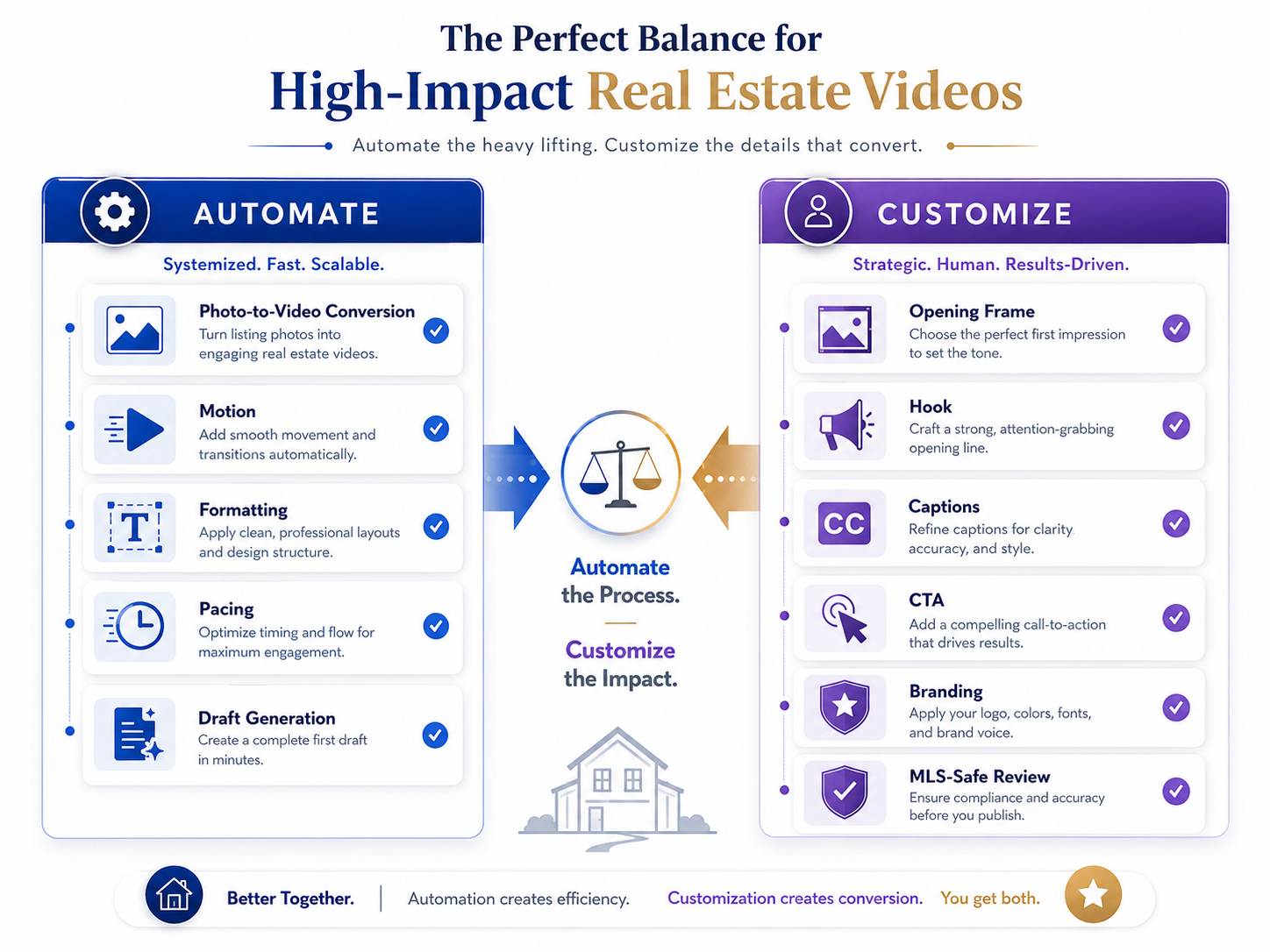
Other parts should be customized because they affect strategy:
When agents search for the best AI real estate video generator for social media, they are usually looking for a way to create Reels faster. But the real value is not speed by itself. The real value is speed with enough control to make the listing feel intentional.
That is the balance this article is about.
Instagram Reels are not just “extra content” anymore. For many agents, they are part of the listing presentation, seller communication strategy, and lead-generation engine.
A seller may not understand every detail of your paid ads, MLS syndication, email automation, or retargeting system. But they can see whether their home is being promoted.
A clean listing Reel gives sellers something visible.
It also gives buyers a fast first impression.
According to NAR’s digital marketing guidance for real estate professionals, real estate consumers increasingly expect useful online information and digital communication. Listing videos support that expectation because they help turn static property media into a more guided experience.
But here is the problem: Instagram content moves fast.
If every Reel requires a full editing session, most agents will not stay consistent. If every Reel is fully automated with no judgment, the videos start looking generic.
That is why a clear automate-vs-customize framework matters.
For agents using AI real estate marketing software for agents, the goal should be simple: automate the repeatable production work, then customize the marketing decisions that make the listing feel specific.
The common mistake is thinking the AI tool should make every decision.
An agent uploads 28 listing photos, lets the software generate a video, downloads it, posts it, and moves on.
Sometimes that works.
Often it produces a Reel that feels technically finished but strategically weak.
This actually happens all the time.
The video opens with the front exterior because that was the first image in the folder. The strongest room is the kitchen, but it appears seven seconds later. The primary suite looks great, but the video spends too much time on a hallway and bathroom. The caption says “Beautiful home!” which could apply to any listing in the city.
Nothing is broken.
But nothing is sharp either.
The opposite mistake is over-customizing. The agent spends an hour tweaking every transition, rewriting every text overlay, choosing music, adjusting timing, and trying to make the Reel perfect. By the time it is done, the momentum is gone.
The right workflow is in the middle.
Let AI handle the repeatable build.
Let the agent or marketer handle the story.
PhotoAIVideo fits into this workflow as the production layer for turning property photos into video assets quickly.
Instead of filming a separate Reel for every listing or opening a complex video editor, agents can use PhotoAIVideo to transform listing photos into polished real estate videos with motion, pacing, and a more professional presentation.
That matters because Instagram Reels are rarely a one-time need.
A single listing might need:
For agents who want to create real estate videos from photos with AI, the practical win is turning existing media into multiple usable content pieces without starting from scratch every time.
PhotoAIVideo is especially useful when you pair automation with a simple review system. Upload the right photos, generate the video, review the story, adjust the order, create the branded social version, and keep a clean unbranded version when needed.
That is how the tool becomes part of a repeatable listing workflow instead of just a one-off video generator.
Do not start by uploading the full gallery.
Start by naming the job of the Reel.
Is this Reel meant to:
A “Just Listed” Reel and an “Open House Reminder” Reel should not use the same structure.
A “Kitchen Tour” Reel should not spend time on the laundry room.
A “Still Available” Reel should feel different from the launch post.
The purpose determines the photo selection, the hook, the caption, and the call to action.
This is the part you customize.
Once you know the purpose, automation should take over the mechanical work.
This includes:
This is where an AI app to turn property photos into videos can save agents a lot of time.
The agent should not be manually keyframing every image or rebuilding the same Reel format for every listing. That is not high-value work.
The high-value work is deciding which photos matter and what story they should tell.
The first frame should almost always be customized.
This is one of the biggest performance levers for Instagram Reels.
Many agents start with the exterior because that is the traditional listing order. Sometimes that is correct. But often the strongest scroll-stopper is something else:
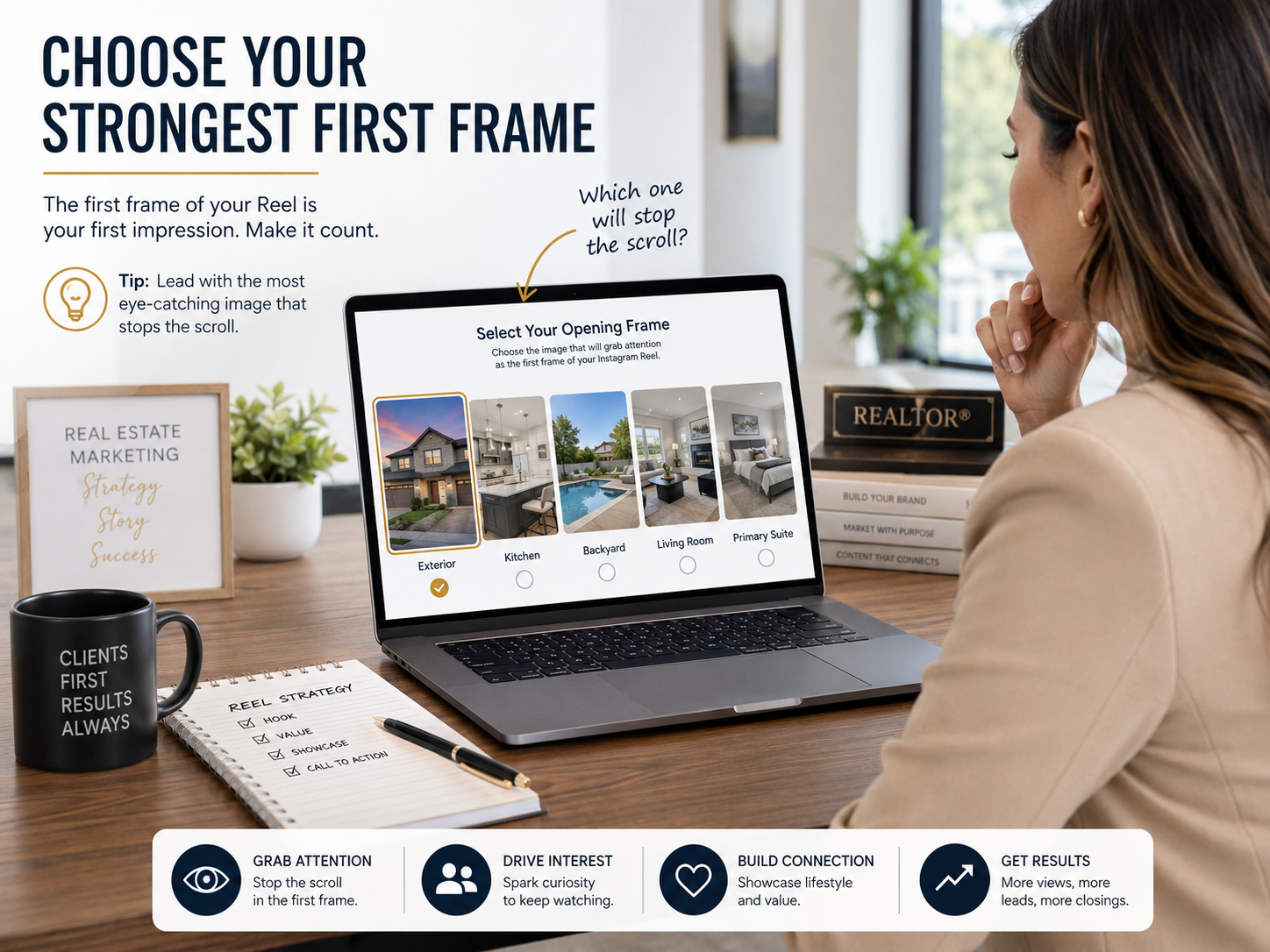
The first frame should answer this question:
“What would make someone stop for two seconds?”
That does not always mean the most complete image. It means the most compelling image.
If the kitchen is the reason buyers will care, open with the kitchen.
If the backyard sells the lifestyle, open with the backyard.
If the exterior has strong curb appeal, use it.
Do not let file order decide your hook.
AI-generated motion is useful because it makes still photos feel more alive. But motion should match the room.
A kitchen can handle a slightly more active pan or push-in because there are visual lines to follow: island, cabinets, pendant lights, sink, dining connection.
A bedroom usually needs slower motion.
A small bathroom should not be over-animated.
A darker room should not be forced into aggressive camera movement.
For social content, the motion should keep attention without making the property feel artificial.
Use automation to generate motion quickly. Then customize or regenerate when a room feels awkward, rushed, or distracting.
This matters because Instagram users may not know why a video feels off, but they will scroll away when motion feels cheap.
The hook should not be generic.
“Beautiful home” is not a hook.
“Luxury listing” is not enough.
Try hooks that match the actual property:
The hook is where the agent’s local knowledge matters.
AI can help generate options, but the final hook should sound like something a real agent would say to a real buyer.
Meta’s own Instagram Reels information describes Reels as short videos for sharing creative content, which is exactly why the hook matters. The format rewards speed, clarity, and visual interest.
Vertical video formatting should be mostly automated, but the final review should be manual.
Instagram’s interface can cover parts of the video with buttons, captions, usernames, and engagement icons. That means important property details should not sit too close to the bottom or far right side of the frame.
Customize placement for:
Keep the most important text in the center-safe area.
This is a small detail, but it makes a big difference.
A beautiful Reel with unreadable text is wasted effort.
Instagram Reels are usually branded.
That is fine.
A branded Reel can include:

But a video meant for MLS or certain syndication environments may need to be cleaner and unbranded depending on local rules.
For teams that need an AI tool for making unbranded real estate videos, the safe workflow is to separate social content from MLS-safe content early.
Do not create one branded Reel and assume it belongs everywhere.
NAR’s Code of Ethics and Standards of Practice is a useful professional baseline around truthful and accurate representation, but local MLS rules should always be reviewed before uploading videos into MLS-related environments.
The caption should match the Reel’s purpose.
A Just Listed Reel caption might invite buyers to message for details.
A kitchen highlight caption might ask, “Would this kitchen make your shortlist?”
An open house caption should include date, time, and showing instructions.
A seller update caption might not be public at all. It might be sent directly to the seller as proof that marketing is active.
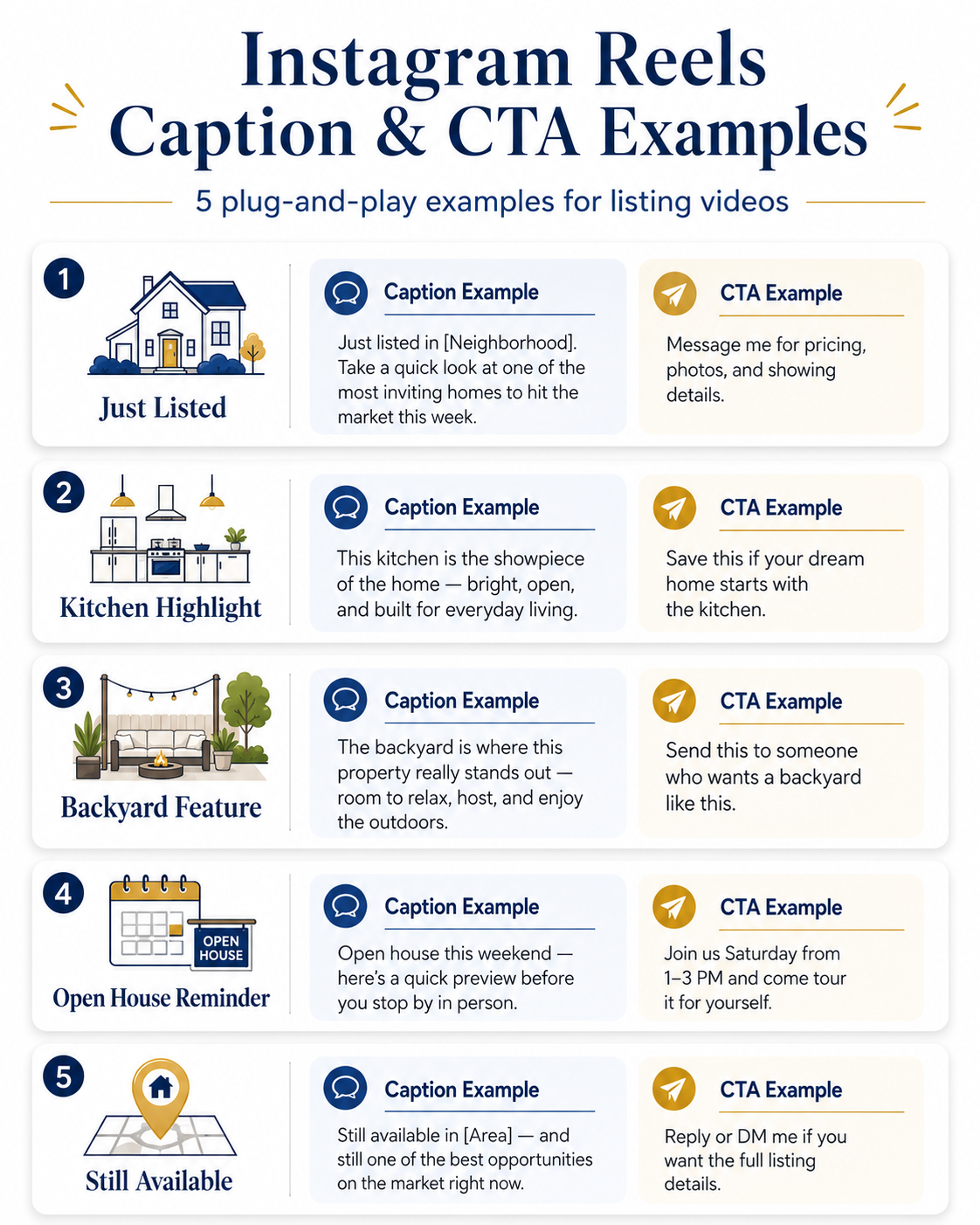
A good CTA is specific:
This should not be fully automated.
This is where the agent’s relationship with the audience matters.
The simple rule:
Automate production.
Customize judgment.
That is the framework.
A solo agent gets photos back on Thursday afternoon and wants a Reel before the listing announcement goes out.
The agent uses automated video marketing software for Realtors to turn the listing photos into a draft Reel. The automation handles the motion and vertical format.
Then the agent customizes three things:
The final Reel feels fast, specific, and polished.
A real estate photographer wants to increase revenue without adding a full video shoot.
The photographer offers a Reel package from the listing photos:
This is a strong use case for AI video software for real estate photographers because the photographer already has the media. The value is turning that media into ready-to-post marketing assets.
The photographer automates the video generation but customizes the photo selection and export package.
A brokerage has 50 agents posting inconsistent listing content.
Some use polished Reels. Some use static photos. Some use random templates. Some forget to post altogether.
The brokerage creates a standard system:
Agents get consistency without losing local flexibility.
This is where automation supports brand standards, while customization keeps the content from feeling robotic.
A property manager has multiple available units and needs content that shows the unit quickly.
For rentals, the Reel should be clear, not overly dramatic.
Automate:
Customize:
A rental Reel might open with: “Available this week near [Area].”
That is much stronger than a generic “Apartment tour.”
A listing has been live for 21 days.
The agent does not want to repost the same launch Reel.
Instead, they create a new Instagram Reel from the same photo set, but with a different angle:
“Feature you may have missed: the backyard.”
The video uses only five backyard and exterior images. It skips the rest of the home. The CTA says: “Still available — message me before the weekend.”
That is not more content for the sake of content.
That is strategic repackaging.
The hook is too important to leave entirely to automation.
AI can help suggest ideas, but the final hook should come from the actual property and the actual audience.
If the best feature is the pool, lead with the pool.
If the home is near a popular school, mention the area carefully and accurately.
If the listing is a rental, focus on availability and clarity.
Instagram Reels are not full property tours.
A Reel should create interest.
It does not need to answer every question.
If the video includes every room, it often becomes too long, too slow, and too similar to a slideshow.
Branded content is useful, but not every video should be promotional.
Sometimes the property should speak first.
A cleaner video may feel more premium. It may also be easier to adapt for MLS-safe or property-only use.
Do not assume an Instagram Reel can be reused everywhere.
A Reel with agent branding, phone numbers, URLs, social handles, or promotional CTA text may not be appropriate for MLS use depending on local rules.

For safer publishing, keep a clean version available and use real estate video software that works with MLS rules when the video may need to support MLS-aware workflows.
Trendy audio can help on social, but it can also distract from the property.
If the audio makes the listing feel cheap or mismatched, skip it.
The home is still the product.
A Reel without a strong caption loses context.
Even a simple caption can improve the viewer’s understanding:
“New listing in [Neighborhood]. Watch the kitchen, then message me for the full gallery.”
That is clearer than dropping the video with three emojis and no direction.
Do not only look at views.
Look at:
Google’s video SEO best practices are written for search visibility, but the broader principle also applies to social and property pages: videos perform better when they are placed with useful context, titles, supporting text, and a clear user purpose.


Compact, ready to go anywhere
Interchangeable lens that’s upgradeable
Dual 1-inch sensors for improved clarity and low light performance
Dynamic range and 6K 360° capture
360° photo resolution at 21MP

8K 360° video recording for ultra-detailed visuals.
4K single-lens mode for traditional wide-angle shots.
Invisible selfie stick effect for drone-like perspectives.
2.5-inch touchscreen with Gorilla Glass protection.
Waterproof up to 33ft for underwater shooting.

360° photo resolution in 23MP
Slim design at 24 mm thick
Built-in image stabilization for smooth video capture.
Internal 19GB storage for photo and video storage.
Wireless connectivity for remote control and sharing.

60MP 360° still images for high-resolution photography.
5.7K 360° video recording at 30fps.
2.25-inch touchscreen for intuitive control.
USB Type-C port for fast charging and data transfer.
MicroSD card slot for expandable storage.
.png)

.png)

Try it free. No credit card required. Instant set-up.






.svg)


.svg)