


.png)


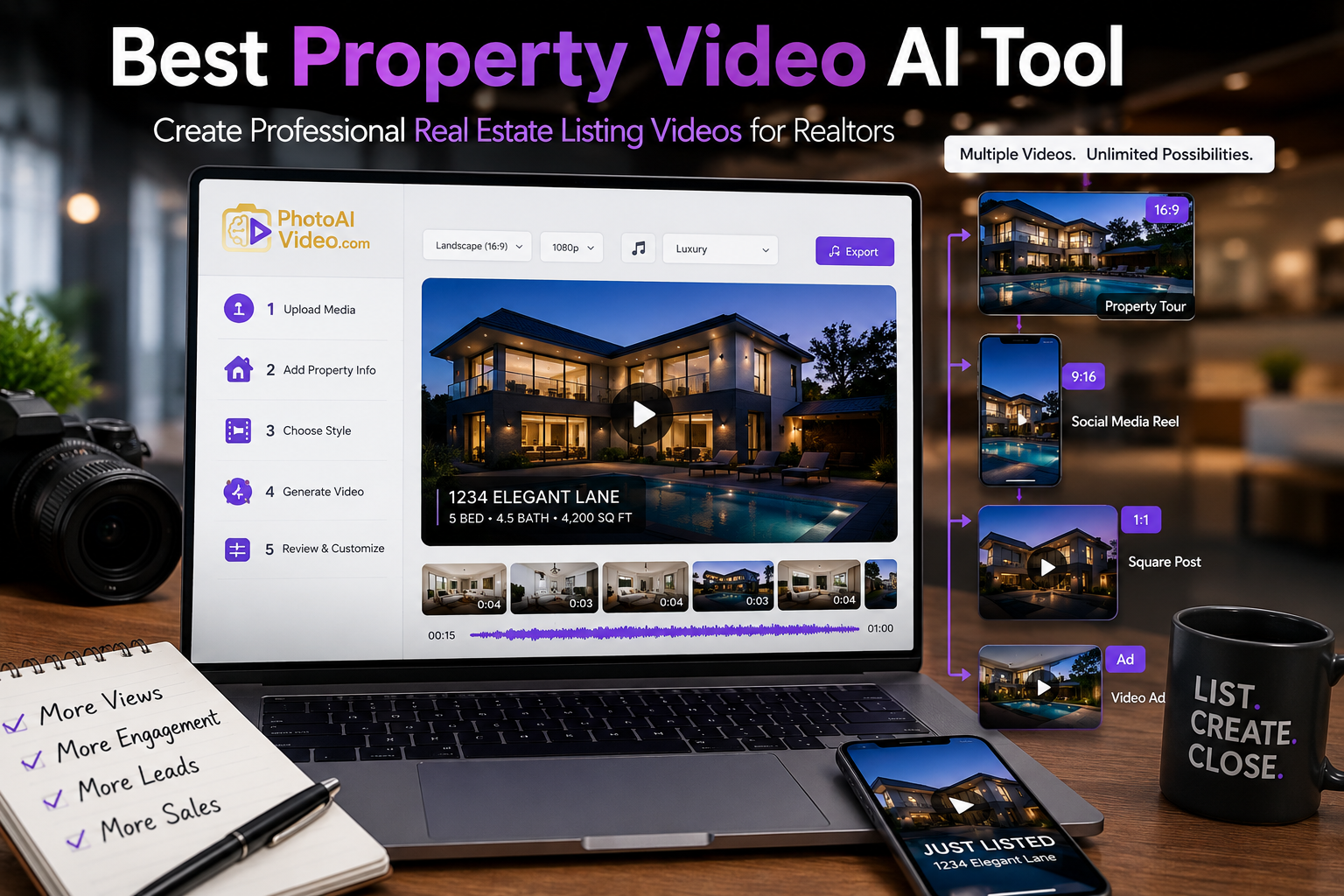
Video has become one of the most effective ways to help a property listing stand out online. Buyers want to understand the layout, experience the flow of each room, and imagine themselves living in the home before scheduling a showing.
The challenge is that traditional video production can be expensive and time-consuming. Realtors may need to hire a videographer, coordinate a property visit, wait for editing, and request multiple versions for different marketing channels.
A best property video AI tool can simplify that process by turning listing photos, video clips, property details, and branding assets into polished real estate videos. Instead of building every scene manually, agents can use automation to produce professional content for social media, property websites, email campaigns, and listing presentations.
This guide explains how AI property video software works, which features matter most, and how Realtors can create better listing videos without becoming professional video editors.
A property video AI tool is software that uses automation to create real estate videos from existing listing content.
Depending on the platform, users may upload:
The software then organizes those assets into a finished video. It may automatically add camera movement, transitions, text overlays, music, branding, captions, and calls to action.
The best real estate listing video software should not simply place photos into a basic slideshow. It should create an experience that feels intentionally designed for real estate marketing.
That means presenting the exterior first, moving logically through the property, highlighting important features, and ending with a clear next step for the viewer.
Real estate professionals are expected to create more marketing content than ever before.
A single listing may need:
Creating each version manually can take hours. Outsourcing every video can become expensive, especially for agents and photographers managing multiple listings each week.
The best AI video maker for Realtors helps turn one collection of listing assets into several reusable marketing videos.
This allows Realtors to spend more time serving clients, following up with leads, and winning new listings instead of repeatedly editing videos.
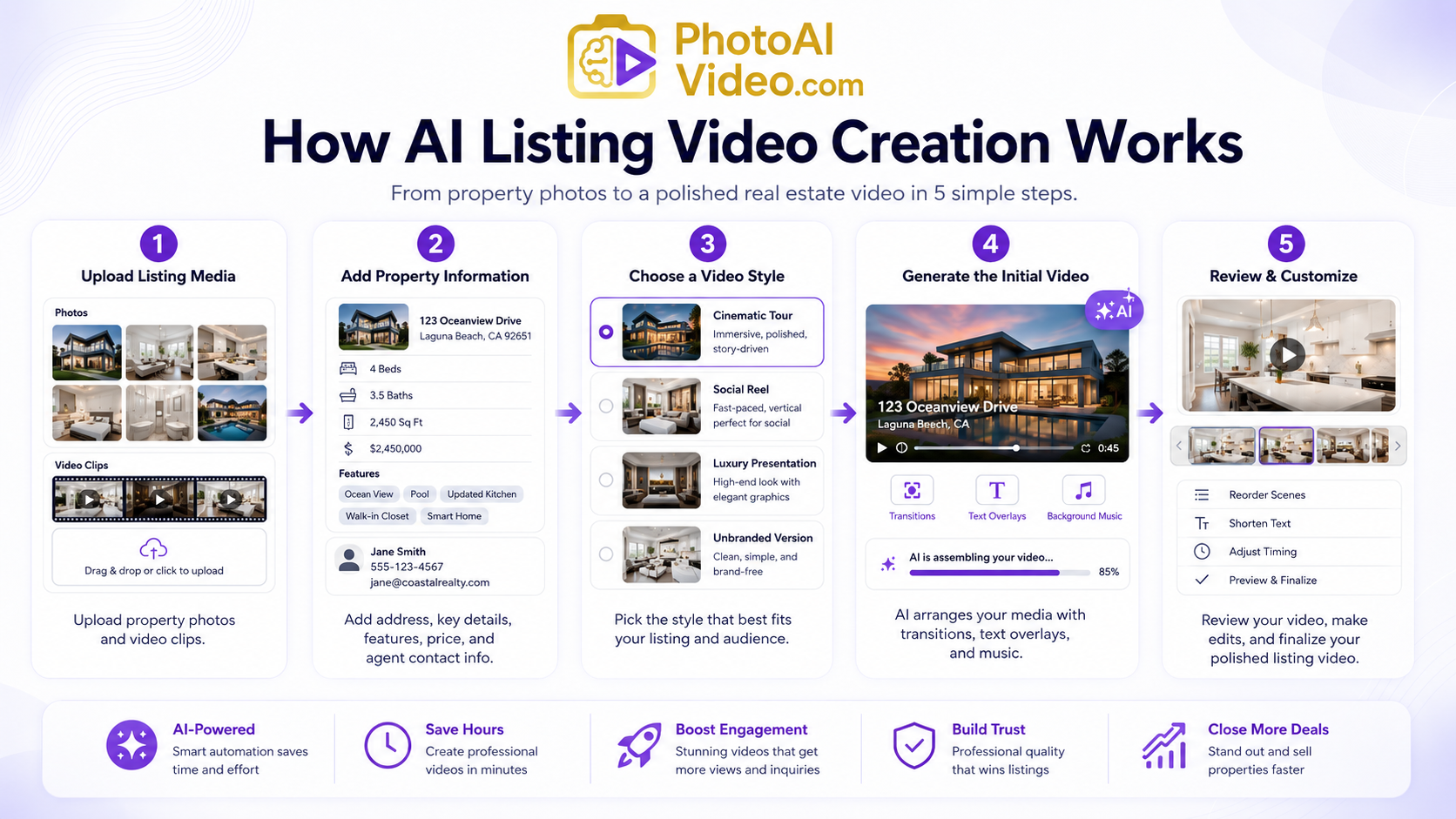
Although every platform is different, most AI listing video tools follow a similar workflow.
The user begins by uploading property photos or video clips. High-quality, well-lit images generally produce the strongest result.
Some tools allow the user to rearrange the images manually, while others automatically determine a logical sequence.
Next, the user may enter important listing details, such as:
The software can use this information to create text overlays, captions, title screens, or voiceover scripts.
Many platforms include templates for different marketing goals.
A Realtor might choose a cinematic property tour, a fast-paced social media Reel, a luxury listing presentation, or a simple unbranded property video.
The AI arranges the media, adds movement to still photos, applies transitions, inserts property details, and selects or applies music.
This initial generation gives the user a starting point without requiring them to edit every scene.
The user should always review the finished video before publishing it.
Photos may need to be reordered, text may need to be shortened, and certain scenes may need to stay on the screen longer.
A strong best property video AI tool combines automation with enough customization to keep the final video accurate and professional.
Not every AI video platform is built specifically for real estate. General-purpose video generators may create attractive content but lack the controls Realtors need.
Here are the most important features to consider.
Realtors often need different videos for different channels.
A branded video may include:
An unbranded version may remove agent-specific information for platforms or listing situations where promotional branding is restricted.
The best real estate listing video software should make it easy to generate both versions without rebuilding the entire project.
Horizontal videos work well for YouTube, property websites, presentations, and certain listing platforms.
Vertical videos are better suited for:
A useful AI platform should resize and restructure the content rather than simply cropping the sides of a horizontal video.
AI tools can add movement to still photographs by panning, zooming, or creating a subtle sense of depth.
The movement should feel smooth and realistic. Excessive zooming or artificial motion can distract viewers and make the property difficult to understand.
Consistent branding helps agents build recognition over time.
Look for software that allows users to save:
This makes it easier to produce consistent videos across multiple listings.
Music can influence the tone of the listing video. A modern downtown apartment may benefit from a different soundtrack than a quiet luxury home or rural property.
Some AI tools also create voiceovers from the listing description. This can be useful, but the script should sound natural and avoid exaggerated claims.
Automation should save time, but users still need control.
The platform should allow Realtors to:
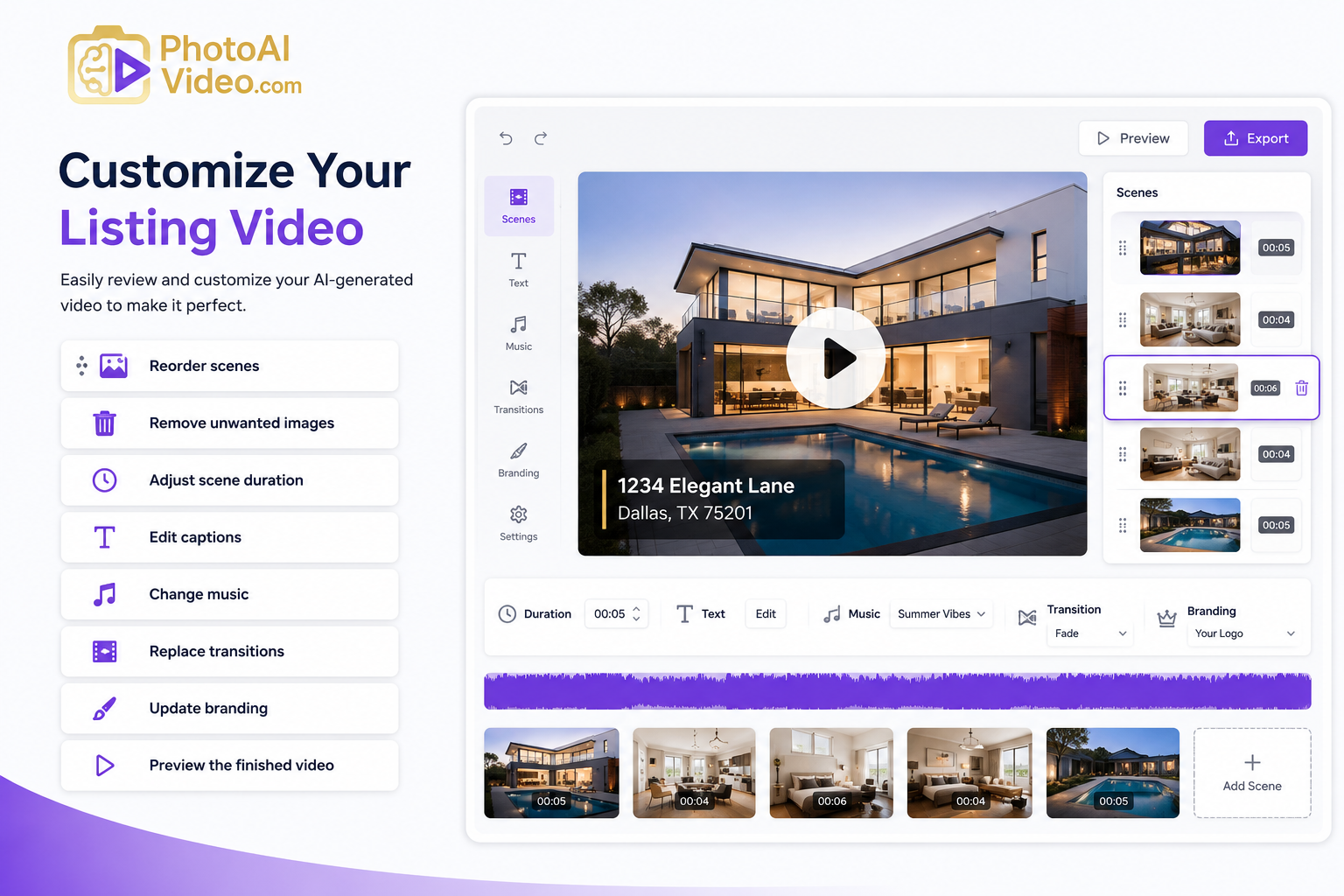
The best AI video maker for Realtors should be easy enough for a beginner while still providing meaningful editing options.
AI can reduce a process that previously took hours into a much shorter workflow. Realtors can upload their listing media, generate an initial video, make adjustments, and publish it without starting from an empty editing timeline.
Professional videography remains valuable, especially for luxury or highly competitive listings. However, it may not be practical for every property.
AI video software gives agents an affordable way to create consistent listing content across more of their inventory.
One project can often produce several marketing assets.
For example, the same listing photos may become:
Saved templates help ensure every video uses the same visual identity. This creates a more polished and recognizable presence across social media and digital campaigns.
Realtors can demonstrate their marketing process during listing appointments. Showing sellers how their property will be promoted through professional videos can help an agent stand out from competitors.
AI cannot completely fix dark, blurry, poorly composed, or heavily distorted listing photos.
Better inputs generally lead to better videos.
The software may place photos in an illogical order, emphasize the wrong feature, or create text that does not accurately reflect the property.
Every video requires a human review.
Using the same template for every listing can make the content feel predictable. Realtors should rotate templates, change the pacing, and customize the message for each property.
A generated photo-based video is not identical to a professionally filmed cinematic property tour.
Luxury listings, architectural properties, and high-value campaigns may still benefit from professional video production, drone footage, and custom editing.
The goal is not necessarily to replace every production method. It is to select the right tool for each listing.
Upload sharp, well-lit images with straight vertical lines and consistent color correction.
Avoid screenshots, heavily compressed files, or duplicate photos.
A typical sequence may begin with the exterior, move through the entryway and main living areas, continue into bedrooms and bathrooms, and finish with outdoor spaces or community amenities.
The video should feel like a guided tour rather than a random collection of images.
Text overlays should be easy to read on a phone.
Instead of placing a full paragraph on the screen, use short highlights such as:
Social media videos can include stronger branding, attention-grabbing hooks, and calls to action.
A listing-focused version may need to be more neutral. Always review the rules and requirements of the platform, brokerage, MLS, or association where the video will be published.
Treat the first generation as a starting point.
Review the photo order, spelling, property details, transitions, music, branding, and contact information. A few minutes of editing can make the final result feel significantly more professional.
Do not overwhelm viewers with multiple instructions.
Choose a single next step, such as:
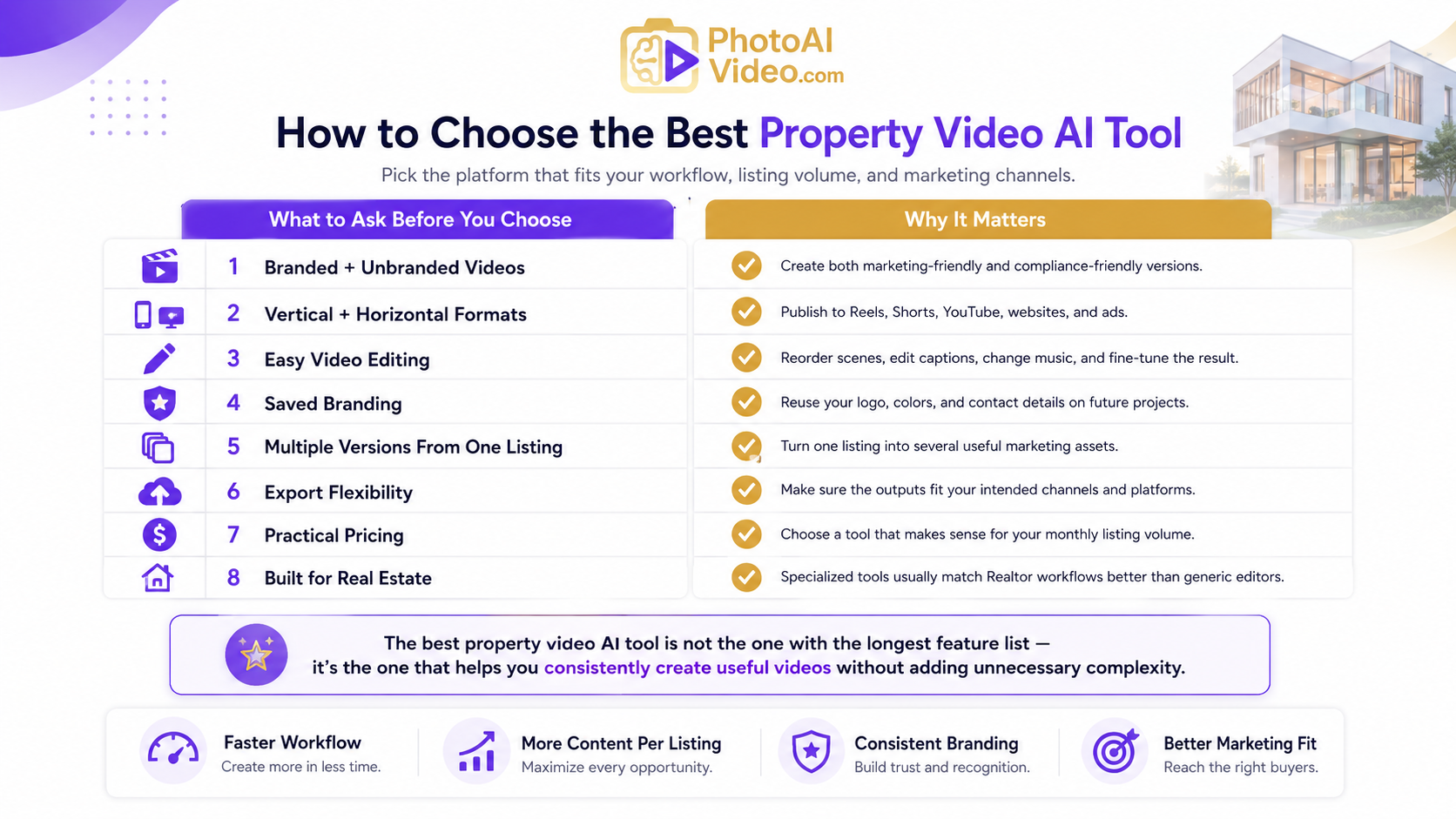
The right platform depends on your workflow, listing volume, and marketing channels.
Before choosing a tool, ask:
The best property video AI tool is not necessarily the platform with the longest feature list. It is the one that helps you consistently create useful videos without adding unnecessary complexity to your workflow.
Yes. Many AI property video tools can turn still listing photos into videos by adding motion, transitions, music, text overlays, and branding.
Most real estate AI video platforms are designed for users without professional editing experience. However, reviewing and customizing the generated video is still important.
You may be able to, but separate versions are usually more effective. Social media benefits from vertical formatting, stronger branding, and a direct call to action, while listing platforms may require a more neutral presentation.
It can be useful for social media clips, previews, retargeting content, and additional marketing assets. For a primary luxury property film, professional videography may still provide a more customized result.
The best AI video maker for Realtors should support real estate-specific workflows, multiple aspect ratios, custom branding, simple editing, branded and unbranded outputs, and high-quality exports.
Real estate video no longer has to be limited to listings with large production budgets.
With the best real estate listing video software, Realtors can transform existing photos and property details into professional videos for social media, property websites, email marketing, advertisements, and listing presentations.
AI provides the speed, but the Realtor still provides the strategy. The strongest results come from combining automation with quality photography, accurate property information, thoughtful sequencing, and a clear call to action.
A reliable best property video AI tool can help agents create more content, market listings consistently, and deliver a better experience to sellers and buyers.
Ready to turn your listing photos into professional real estate videos?
Create your first AI-powered property video today, review the results, and start sharing your listings across the channels where buyers are already watching.


Compact, ready to go anywhere
Interchangeable lens that’s upgradeable
Dual 1-inch sensors for improved clarity and low light performance
Dynamic range and 6K 360° capture
360° photo resolution at 21MP

8K 360° video recording for ultra-detailed visuals.
4K single-lens mode for traditional wide-angle shots.
Invisible selfie stick effect for drone-like perspectives.
2.5-inch touchscreen with Gorilla Glass protection.
Waterproof up to 33ft for underwater shooting.

360° photo resolution in 23MP
Slim design at 24 mm thick
Built-in image stabilization for smooth video capture.
Internal 19GB storage for photo and video storage.
Wireless connectivity for remote control and sharing.

60MP 360° still images for high-resolution photography.
5.7K 360° video recording at 30fps.
2.25-inch touchscreen for intuitive control.
USB Type-C port for fast charging and data transfer.
MicroSD card slot for expandable storage.
.png)

.png)

Try it free. No credit card required. Instant set-up.







.svg)


.svg)