
How to Create a Clean White Studio Background for Car Photos Using AI

Cloudpano
February 12, 2026
5 min read
Share this post

🚗 How to Create a Clean White Studio Background for Car Photos Using AI

In today’s digital automotive marketplace, your photos sell the car before your salesperson ever speaks to the customer.

Buyers scroll fast. They compare listings instantly. And within seconds, they decide which dealership looks more professional.

That’s why learning how to create a white studio background for car photos using AI has become a competitive advantage for modern dealerships.

In this guide, you’ll learn:

  • Why clean white studio backgrounds increase conversions
  • How AI automotive background removal works
  • How to generate a white studio background instantly
  • How to save and reuse backgrounds for consistency
  • How to process vehicles in bulk
  • How to maintain quality control at scale

If you want to see the system in action, watch the full walkthrough here:

Let’s get started. 🚀

📸 Why a White Studio Background Matters

A white studio background is one of the most powerful presentation styles in automotive marketing.

Why?

Because it removes distraction.

When a vehicle is placed on a clean white backdrop:

  • The car becomes the sole focus 🚘
  • Body lines stand out clearly
  • Colors appear more accurate
  • Lighting looks controlled
  • The listing feels premium

In contrast, traditional lot photography often includes:

  • Other cars in the background
  • Light poles and buildings
  • Uneven pavement
  • Harsh sunlight or deep shadows

Clutter reduces perceived value.

Clean studio imagery increases perceived value. 💎

That’s why dealerships are switching to AI to generate consistent white studio environments.

🤖 What Is AI Automotive Background Removal?

AI automotive background removal uses machine learning and computer vision to:

  • Detect the vehicle automatically
  • Separate it from the background
  • Remove distractions
  • Replace the background with a professional studio setting

Instead of manually editing each image, AI handles everything in seconds.

The result is a professional white studio background for car photos without needing a physical studio.

🧠 How AI Creates a White Studio Background

Let’s break down how the process works.

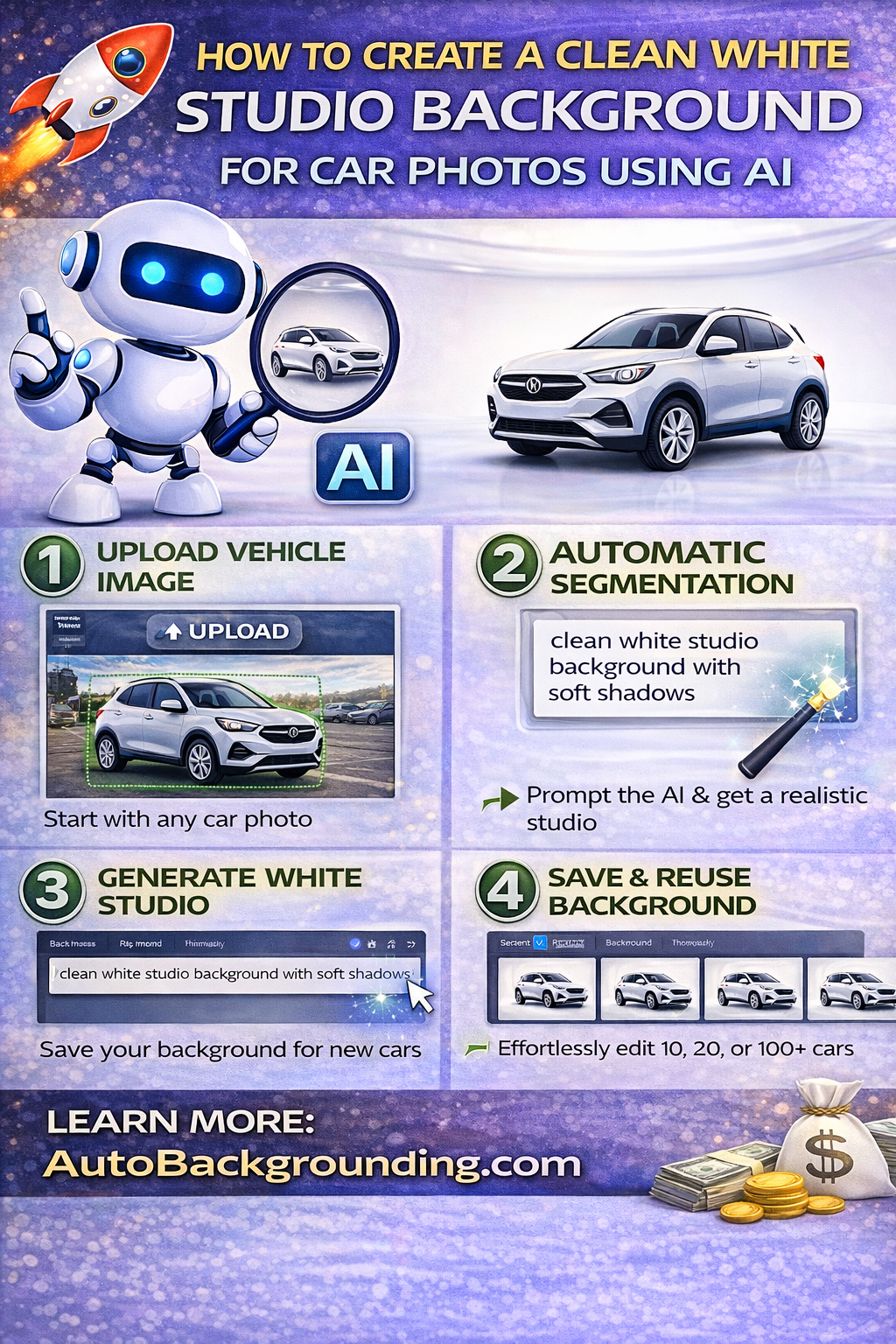
Step 1️⃣ Upload the Vehicle Image

Start by uploading your original vehicle photo. This can be taken on your lot or anywhere convenient.

The AI scans the image and identifies the vehicle as the primary subject.

Step 2️⃣ Automatic Vehicle Segmentation

The system uses deep learning models trained on automotive images to:

  • Outline the vehicle precisely
  • Preserve details like mirrors and tires
  • Separate the car cleanly from the background

This ensures no rough edges or artificial cutouts.

Step 3️⃣ Generate the White Studio Environment

Here’s where the magic happens ✨

Instead of uploading a background image, simply type a prompt such as:

“Clean white studio background with soft shadows.”

The AI then:

  • Creates a bright white studio environment
  • Adjusts lighting to match the vehicle angle
  • Generates realistic, proportional shadows
  • Balances exposure automatically
  • Outputs in high resolution (1K or 4K)

The vehicle now looks professionally staged — instantly.

No physical studio required. 🏢

🔁 Save and Reuse Your White Studio Background

Consistency is everything in dealership marketing.

One powerful feature in modern AI systems is the ability to save previously generated backgrounds.

When you create your white studio environment, it is saved automatically.

Instead of recreating it every time, you can:

  • Click “Recent”
  • Select the saved white background
  • Apply it instantly to new vehicles

For dealerships processing 10, 20, or 100+ cars per day, this is transformative.

Consistency = trust.
Consistency = brand polish.
Consistency = faster uploads.

That’s how you maintain consistent dealership inventory photos at scale.
⚡ Bulk Processing for High-Volume Dealerships

If you’re managing multiple vehicles daily, editing one image at a time is not realistic.

AI platforms allow you to:

  • Upload multiple vehicles at once
  • Select your saved white studio background
  • Click one button
  • Process everything simultaneously

Every vehicle will be placed into the exact same clean white studio environment.

No re-prompting.
No manual duplication.
No inconsistency.

Bulk processing turns studio consistency into an operational system.

🎯 Why White Studio Backgrounds Increase Click-Through Rates

When shoppers compare inventory online, professional imagery stands out immediately.

A white studio background:

  • Eliminates visual noise
  • Highlights vehicle shape and color
  • Creates a premium feel
  • Builds buyer trust

Better presentation leads to:

  • 📈 Higher click-through rates
  • ⏱ Longer time on listing
  • 💬 Increased lead submissions
  • 🚗 Faster sales

Buyers associate clean studio imagery with professionalism.

Professionalism increases perceived value.

🔍 Compare View for Quality Control

AI automation is powerful, but quality control still matters.

Modern systems allow you to toggle between:

  • Before vs After view
  • Final output view

This makes it easy to:

  • Confirm clean cutouts
  • Check shadow realism
  • Ensure lighting balance
  • Maintain brand standards

For teams and resellers, this simplifies oversight dramatically.

📥 Flexible Downloads for CRM Integration

Once your white studio images are generated, you can download them in:

  • JPEG format
  • PNG format
  • Bulk packages

These images can be uploaded directly into:

  • Dealership CRM systems
  • Inventory feeds
  • Marketplace platforms
  • Website listings

Upload → Generate → Process → Download → Publish.

Simple. Scalable. Efficient. ✅

💰 Cost Savings Compared to Physical Studios

Traditional white studio photography requires:

  • Studio space
  • Lighting equipment
  • Staff
  • Scheduling
  • Transportation

AI eliminates those barriers.

With subscription pricing starting at affordable monthly rates and free test credits available, dealerships can:

  • Experiment without risk
  • Scale efficiently
  • Reduce editing labor
  • Improve operational speed

This makes a white studio background for car photos accessible to dealerships of all sizes.

🏢 Multi-Rooftop Consistency

If you manage multiple dealership locations, white studio backgrounds become even more powerful.

AI allows you to:

  • Standardize presentation across rooftops
  • Maintain identical lighting and shadows
  • Reinforce brand identity
  • Centralize processing

This creates a cohesive visual brand across all locations.

Consistency builds recognition.

Recognition builds trust.

🔮 The Future of Automotive Inventory Photography

AI-powered studio generation is not a trend.

It’s the new standard.

As buyer expectations increase, dealerships that present inventory with:

  • Clean white studio backgrounds
  • Consistent lighting
  • High-resolution clarity
  • Uniform branding

Will outperform competitors relying on inconsistent lot photography.

Digital retail demands professional presentation.

AI delivers it.

🚀 How to Get Started Today

If you want to create a clean white studio background for car photos using AI, follow these steps:

1️⃣ Upload your vehicle image
2️⃣ Enter a prompt like “clean white studio background with soft shadows”
3️⃣ Save it to “Recent”
4️⃣ Apply it to future vehicles
5️⃣ Use bulk processing for scale
6️⃣ Download and publish

Upload a car.
Generate a studio.
Process in bulk.
Download.
Done. 🚗✨

🏁 Final Thoughts

Your photos are your first salesperson.

A clean white studio background removes distractions and highlights what matters — the vehicle.

AI makes it possible to generate a professional white studio background for car photos instantly, consistently, and at scale.

The benefits are clear:

  • Speed ⚡
  • Consistency 🎯
  • Scalability 📈
  • Higher perceived value 💎
  • Faster sales 🚗

Dealerships that adopt AI-powered studio generation now will lead the digital showroom of tomorrow.

See you inside. 🚀

🚀 Your All-In-One Virtual Experience Stack Starts Here

Share this post
Cloudpano

Choose The Right 360° Camera

Insta360 ONE RS 1-Inch 360 Edition

  • Compact, ready to go anywhere

  • Interchangeable lens that’s upgradeable

  • Dual 1-inch sensors for improved clarity and low light performance

  • Dynamic range and 6K 360° capture

  • 360° photo resolution at 21MP

Learn More

Insta360 X4

  • 8K 360° video recording for ultra-detailed visuals.

  • 4K single-lens mode for traditional wide-angle shots.

  • Invisible selfie stick effect for drone-like perspectives.

  • 2.5-inch touchscreen with Gorilla Glass protection.

  • Waterproof up to 33ft for underwater shooting.

Learn More

Ricoh Theta Z1

  • 360° photo resolution in 23MP

  • Slim design at 24 mm thick

  • Built-in image stabilization for smooth video capture.

  • Internal 19GB storage for photo and video storage.

  • Wireless connectivity for remote control and sharing.

Learn More

Ricoh Theta X

  • 60MP 360° still images for high-resolution photography.

  • 5.7K 360° video recording at 30fps.

  • 2.25-inch touchscreen for intuitive control.

  • USB Type-C port for fast charging and data transfer.

  • MicroSD card slot for expandable storage.

Learn More
Property Marketing
Allows potential buyers to explore properties in detail from anywhere, enhancing the real estate marketing process.
Automotive Spins
Create an interactive virtual showroom and engage affluent digital buyers with live 360º video calls, all through the CloudPano mobile app for a complete automotive sales solution.
Interactive Floor Plans
Create 2D and 3D floor plans with measurements in 4 minutes or less, all from your phone. Download the Floor Plan Scanner app and get your first scan free.

360 Virtual Tours With CloudPano.com. Get Started Today.

Try it free. No credit card required. Instant set-up.

Try it free
Latest posts

See our other posts

Interviews, tips, guides, industry best practices, and news.

Best File Formats for Dealership Inventory Images (JPEG vs PNG)

This comprehensive guide explains the best image format for dealership inventory by comparing JPEG vs PNG for car photos. Learn how file format impacts website speed, image quality, SEO performance, and CRM compatibility. Discover why most dealerships should use optimized JPEG images for daily inventory listings, when PNG makes sense, and how AI-generated studio images can be exported efficiently for faster sales and better online presentation.
Read post

How AI Automatically Adds Realistic Shadows to Vehicle Images

This in-depth guide explains how AI car photo shadow generation automatically adds realistic shadows to vehicle images. Learn how AI detects vehicle angles, lighting direction, and ground contact points to create studio-quality shadows without manual editing. Discover how dealerships can use automated shadow generation to improve image consistency, increase perceived value, and create high-converting inventory photos at scale.
Read post

How to Create a Clean White Studio Background for Car Photos Using AI

This comprehensive guide explains how to create a white studio background for car photos using AI. Learn how AI automotive background removal detects vehicles, removes distracting lot backgrounds, and generates clean white studio environments with realistic shadows and lighting. Discover how saved background presets, bulk processing, and high-resolution exports help dealerships produce consistent inventory photos that increase trust, boost click-through rates, and drive faster vehicle sales.
Read post