How AI Automatically Adds Realistic Shadows to Vehicle Images

Cloudpano
February 12, 2026
5 min read
Share this post

🚗 How AI Automatically Adds Realistic Shadows to Vehicle Images

When it comes to automotive photography, shadows matter more than most dealerships realize.

Without proper shadows, a vehicle looks like it’s floating. It feels artificial. It loses depth. And buyers subconsciously sense that something is “off.”

That’s why ai car photo shadow generation has become one of the most important innovations in modern dealership marketing.

In this guide, you’ll learn:

  • Why realistic shadows are critical for vehicle presentation
  • How AI car photo shadow generation works
  • How AI detects lighting direction and angle
  • How shadows improve perceived value
  • How dealerships can apply consistent studio shadows at scale

If you want to see this technology in action, watch the full walkthrough here:

Let’s break it down. 🚀

🌤 Why Shadows Matter in Vehicle Photography

Shadows create realism.

In traditional studio photography, lighting setups are carefully designed to:

  • Anchor the vehicle to the ground
  • Add depth and dimension
  • Highlight body lines
  • Create contrast
  • Simulate natural light behavior

When shadows are missing or inconsistent, the image feels edited.

When shadows are realistic and proportional, the vehicle looks professionally staged.

That difference directly impacts buyer perception. 💎

🤖 What Is AI Car Photo Shadow Generation?

AI car photo shadow generation is the automated process of:

  • Detecting a vehicle in an image
  • Understanding its orientation
  • Identifying light direction
  • Generating realistic ground shadows
  • Matching shadow softness and density

All without manual editing.

Instead of designers adding drop shadows in Photoshop, AI handles everything in seconds.

This makes high-quality presentation accessible at scale.

🧠 How AI Understands Light and Perspective

Modern AI doesn’t just “guess” where shadows go.

It analyzes:

  • Vehicle shape
  • Wheel placement
  • Ground contact points
  • Camera angle
  • Light source direction
  • Surface reflections

Using trained neural networks, the system calculates:

  • Shadow length
  • Shadow angle
  • Softness at edges
  • Darkness gradients

The result is a shadow that looks physically accurate.

This is what separates advanced AI car photo shadow generation from basic background replacement tools.
🎯 The Problem With Manual Shadow Editing

Before AI, dealerships relied on manual editors to:

  • Cut out the vehicle
  • Add a fake drop shadow
  • Adjust opacity
  • Blur edges
  • Hope it looked realistic

This process was:

  • Time-consuming
  • Expensive
  • Inconsistent
  • Hard to scale

Manual editing also varies from editor to editor, creating inconsistencies across inventory.

Inconsistent shadows = inconsistent branding.

And consistency builds trust. 🔁

🚗 How AI Adds Realistic Shadows Automatically

Let’s walk through how the process works in a modern AI-powered system.

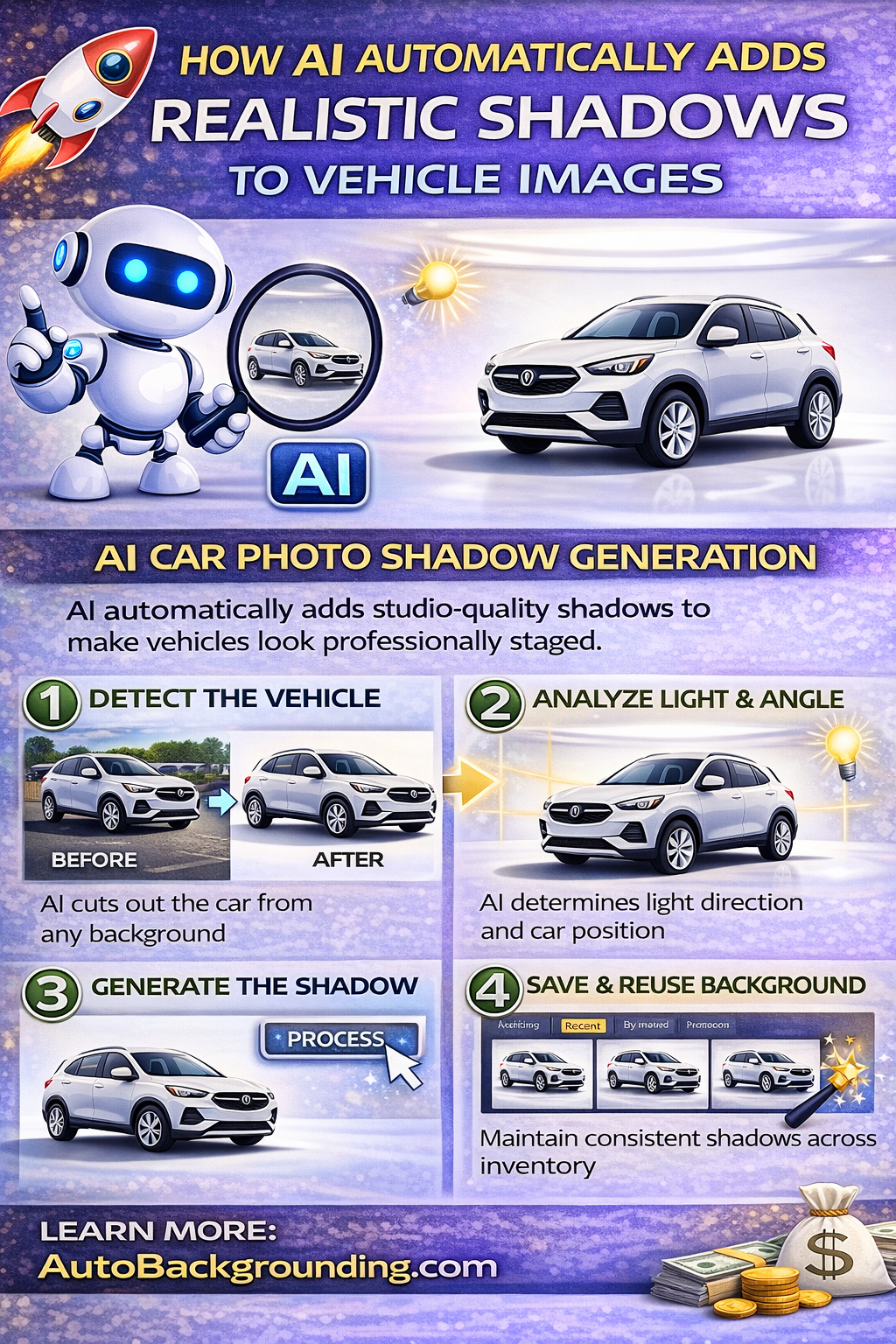
Step 1️⃣ Vehicle Detection

When you upload a vehicle image, AI identifies:

  • The vehicle body
  • Tires
  • Mirrors
  • Windows
  • Edges

It isolates the car cleanly from the background.

Step 2️⃣ Angle and Ground Analysis

The system then evaluates:

  • Whether the vehicle is angled left or right
  • The tilt of the vehicle
  • Where tires meet the ground
  • Camera height

This determines how the shadow should fall.

Step 3️⃣ Shadow Generation

Once angle and perspective are calculated, the AI:

  • Generates a proportional shadow
  • Adjusts softness near the tires
  • Fades the shadow naturally outward
  • Aligns it with the virtual light source

If you generate a white studio background using a prompt like:

“Clean white studio background with soft shadows”

The AI automatically creates a studio-quality shadow to match.

No manual placement required. ✨

🏢 Studio-Level Results Without a Studio

Traditional studios require:

  • Controlled lighting rigs
  • Diffusers
  • Reflectors
  • Floor surfaces
  • Dedicated space

AI recreates that effect digitally.

You get:

  • Soft ground shadows
  • Balanced lighting
  • Depth and realism
  • Clean white infinity wall environments

All generated instantly.

This is especially powerful when creating a white studio background for car photos at scale.

⚡ Shadow Consistency at High Volume

Dealerships often process:

  • 10 vehicles per day
  • 50 vehicles per week
  • 100+ vehicles across multiple rooftops

Without automation, maintaining consistent shadows is nearly impossible.

AI solves this with:

  • Saved background presets
  • Shadow locking
  • Bulk processing

You can:

  • Select a previously generated studio background
  • Apply it to multiple vehicles
  • Process everything in one click

Each vehicle receives identical lighting style and shadow consistency.

This builds a unified visual identity across your inventory. 🎯

🔍 Compare View for Quality Control

Even with AI automation, quality control remains important.

Modern platforms allow you to toggle between:

  • Before view
  • After view
  • Final output view

This makes it easy to verify:

  • Shadow placement
  • Realism
  • Lighting match
  • Overall presentation

For teams and resellers, this ensures professional standards are maintained.

📈 Why Realistic Shadows Increase Sales

Shadows impact perception more than most people realize.

When buyers scroll inventory:

  • Flat images feel artificial
  • Shadowless cars look “cut out”
  • Floating vehicles feel low quality

Realistic AI-generated shadows create:

  • Visual depth
  • Professional polish
  • Premium feel
  • Increased trust

Better presentation leads to:

  • Higher click-through rates
  • Longer viewing time
  • More engagement
  • Faster sales 🚗

It’s not just design — it’s psychology.

💰 Cost Benefits of AI Shadow Automation

Manual editing costs:

  • Designer labor
  • Revision time
  • Turnaround delays

AI eliminates those costs.

With subscription-based pricing models and bulk credit discounts, dealerships can:

  • Process high-volume inventory affordably
  • Reduce editing staff workload
  • Improve turnaround speed
  • Scale across multiple locations

That makes AI car photo shadow generation both a creative and operational upgrade.

🏬 Multi-Location Standardization

If you manage multiple dealerships or rooftops, shadow consistency becomes even more important.

AI allows you to:

  • Standardize lighting style
  • Match shadow softness
  • Keep brand identity uniform
  • Centralize image processing

Customers browsing multiple locations see a cohesive, professional presentation.

Consistency builds recognition.

Recognition builds confidence.

Confidence drives conversions. 📊

🔮 The Future of Automotive Image Enhancement

AI-generated shadows are just one part of a larger transformation in automotive marketing.

The future includes:

  • Automated background replacement
  • Studio environment generation
  • Perspective correction
  • Angle balancing
  • High-resolution output

AI-powered tools are becoming the standard for digital showrooms.

Dealerships that adopt these technologies early gain a competitive advantage.

🚀 How to Get Started

If you want to leverage AI car photo shadow generation, here’s a simple workflow:

1️⃣ Upload your vehicle image
2️⃣ Enter a studio prompt such as “clean white studio background with soft shadows”
3️⃣ Let AI cut out the vehicle
4️⃣ Allow automatic shadow generation
5️⃣ Save the background preset
6️⃣ Apply it to multiple vehicles
7️⃣ Use bulk processing for scale
8️⃣ Download and publish

Upload.
Generate.
Process.
Download.
Done. ✨

🏁 Final Thoughts

Shadows are not just aesthetic details.

They anchor the vehicle.

They create realism.

They increase perceived value.

With AI car photo shadow generation, dealerships can automatically add studio-quality shadows to every vehicle image — instantly and consistently.

The benefits are clear:

  • Speed ⚡
  • Consistency 🎯
  • Scalability 📈
  • Professional polish 💎
  • Faster inventory turnover 🚗

In the modern digital showroom, presentation is everything.

AI ensures every vehicle looks like it belongs in a premium studio — even if it was shot on a busy lot.

See you inside. 🚀

🚀 Your All-In-One Virtual Experience Stack Starts Here

Share this post
Cloudpano

Choose The Right 360° Camera

Insta360 ONE RS 1-Inch 360 Edition

  • Compact, ready to go anywhere

  • Interchangeable lens that’s upgradeable

  • Dual 1-inch sensors for improved clarity and low light performance

  • Dynamic range and 6K 360° capture

  • 360° photo resolution at 21MP

Learn More

Insta360 X4

  • 8K 360° video recording for ultra-detailed visuals.

  • 4K single-lens mode for traditional wide-angle shots.

  • Invisible selfie stick effect for drone-like perspectives.

  • 2.5-inch touchscreen with Gorilla Glass protection.

  • Waterproof up to 33ft for underwater shooting.

Learn More

Ricoh Theta Z1

  • 360° photo resolution in 23MP

  • Slim design at 24 mm thick

  • Built-in image stabilization for smooth video capture.

  • Internal 19GB storage for photo and video storage.

  • Wireless connectivity for remote control and sharing.

Learn More

Ricoh Theta X

  • 60MP 360° still images for high-resolution photography.

  • 5.7K 360° video recording at 30fps.

  • 2.25-inch touchscreen for intuitive control.

  • USB Type-C port for fast charging and data transfer.

  • MicroSD card slot for expandable storage.

Learn More
Property Marketing
Allows potential buyers to explore properties in detail from anywhere, enhancing the real estate marketing process.
Automotive Spins
Create an interactive virtual showroom and engage affluent digital buyers with live 360º video calls, all through the CloudPano mobile app for a complete automotive sales solution.
Interactive Floor Plans
Create 2D and 3D floor plans with measurements in 4 minutes or less, all from your phone. Download the Floor Plan Scanner app and get your first scan free.

360 Virtual Tours With CloudPano.com. Get Started Today.

Try it free. No credit card required. Instant set-up.
Try it free
Latest posts

See our other posts

Interviews, tips, guides, industry best practices, and news.

Property Manager Video Hub: Scaling Rental Visibility with AI Photo-to-Video Workflows

This article explains how property managers can use PhotoAIVideo to build a property manager video hub: a repeatable system for turning rental photos, amenity images, floor plans, exterior shots, and neighborhood visuals into reusable rental marketing videos. The main idea is that property managers do not just need more listing exposure. They need clearer visual answers that help renters decide whether to schedule a tour. PhotoAIVideo is positioned as a practical tool for creating: Unit availability videos Amenity highlight videos Neighborhood videos Tour reminder clips Leasing follow-up videos Owner marketing proof videos Social media rental teasers Application or availability reminder videos Key takeaways: Property managers already have the media they need; the challenge is organizing it and turning it into reusable video assets. A video hub helps teams create consistent videos across units, floor plans, amenities, communities, and owner updates. Rental videos can reduce friction by answering renter questions about layout, condition, amenities, parking, pet features, and community feel. One rental photo set can become multiple video outputs for listings, social media, email, text follow-up, tour reminders, and owner reporting. Photographers can sell AI rental video packages to property managers as an upsell. Brokerages with property management divisions can use the same workflow to standardize leasing content. The article ends with a step-by-step process, video hub framework, mistakes to avoid, visual recommendations, FAQs, and a CTA encouraging readers to use PhotoAIVideo to turn rental photos into a scalable video system for rental visibility.
Read post

YouTube Shorts Listing Teasers: The 3-Scene Structure for Higher Property Clicks

This article explains how real estate agents, photographers, brokerages, and property managers can use YouTube Shorts listing teasers to drive more property clicks and showing requests. The main idea is that a YouTube Short should not try to show the entire house. Instead, it should use a simple 3-scene structure: Scene 1: Hook — stop the scroll with the strongest property feature. Scene 2: Proof — show the visuals that support the hook. Scene 3: Click Path — tell the viewer what to do next. The article positions PhotoAIVideo as a practical tool for turning listing photos into short vertical videos for YouTube Shorts, Reels, open house promotion, and listing campaigns. Key takeaways: YouTube Shorts should create curiosity, not replace the full listing video. The strongest property feature should appear first, not necessarily the front exterior. Agents should build each Short around one click reason, such as backyard, kitchen, layout, neighborhood, open house, or price point. One listing can become multiple Shorts instead of one generic video. Photographers can offer YouTube Shorts teaser packs as a video upsell. Brokerages can standardize the 3-scene structure across agents. Property managers can use the same structure to promote rentals and tours. The article ends with practical scripts, visual recommendations, FAQs, a visual placement guide, and a CTA encouraging readers to use PhotoAIVideo to create YouTube Shorts listing teasers from property photos.
Read post

Video Retargeting for Listings: Turning Photo-Based AI Videos into Appointment Follow-Up

This article explains how Realtors, photographers, brokerages, and property managers can use photo-based AI videos as follow-up assets after someone shows interest in a listing. The main idea is that most real estate marketing focuses on getting the first click, but many buyers and sellers need multiple touchpoints before booking a showing or appointment. Video retargeting helps agents re-engage people who already clicked a listing, watched a Reel, opened an email, attended an open house, asked about a property, or went quiet after showing interest. PhotoAIVideo is positioned as a practical tool for turning listing photos into short follow-up videos, including: Feature reminder videos Layout explainer videos Neighborhood fit videos Open house recap videos Price update videos Seller proof videos Showing request videos Rental tour recovery videos Key takeaways: A first-touch listing video introduces the property, while a retargeting video answers the next likely question. Follow-up videos should be short, usually 10–30 seconds, and focused on one action. Agents should send different videos based on behavior, such as email clicks, open house attendance, listing views, or showing interest. A good video follow-up feels helpful, not pushy. Photographers can package retargeting video clips as an upsell. Brokerages can standardize video retargeting workflows across agents. Property managers can use the same strategy to recover rental leads and book tours. The article ends with a simple retargeting sequence, visual recommendations, FAQs, and a CTA encouraging readers to use PhotoAIVideo to turn listing photos into appointment-driving follow-up videos.
Read post