


.png)


If you've searched for a real estate video creator lately, you already know the problem isn't finding options — it's narrowing them down. A quick search turns up dozens of apps promising cinematic listing videos, AI voiceovers, and "professional" results in minutes. Some are genuinely useful. Others are clunky, overpriced, or built for filmmakers rather than busy agents.
Choosing the right one matters more than it might seem. Video has become one of the most effective ways to market a listing, capture attention on social media, and give buyers a real sense of a property before they ever schedule a showing. The wrong tool wastes time and money. The right one becomes part of your regular listing workflow, much like professional photography already is.
This guide walks through how to actually evaluate a real estate video creator — what to look for, what to ignore, and which red flags should send you looking elsewhere.

Before comparing features or reading reviews, get clear on what you actually need. Every agent's situation is different, and the "best" real estate video creator for a high-volume team is rarely the best fit for a solo agent handling only a handful of listings each month.
Ask yourself:
Writing these answers down — even informally — makes the rest of the evaluation process much faster because you can filter out tools that don't fit before spending time testing them.
Once you know your requirements, it's time to compare tools using a consistent set of criteria. These are the factors that separate a genuinely useful real estate video creator from one that looks good in a demo but falls short in daily use.
Saving time is one of the main reasons to use an AI video generator instead of hiring a videographer or learning traditional editing software. If a tool requires a steep learning curve, multiple tutorials, or hours of fiddling with timelines and transitions, it defeats the purpose.
Look for a platform where you can upload photos and generate a finished property video in minutes rather than hours — ideally with an interface that's intuitive enough to use without extensive training.
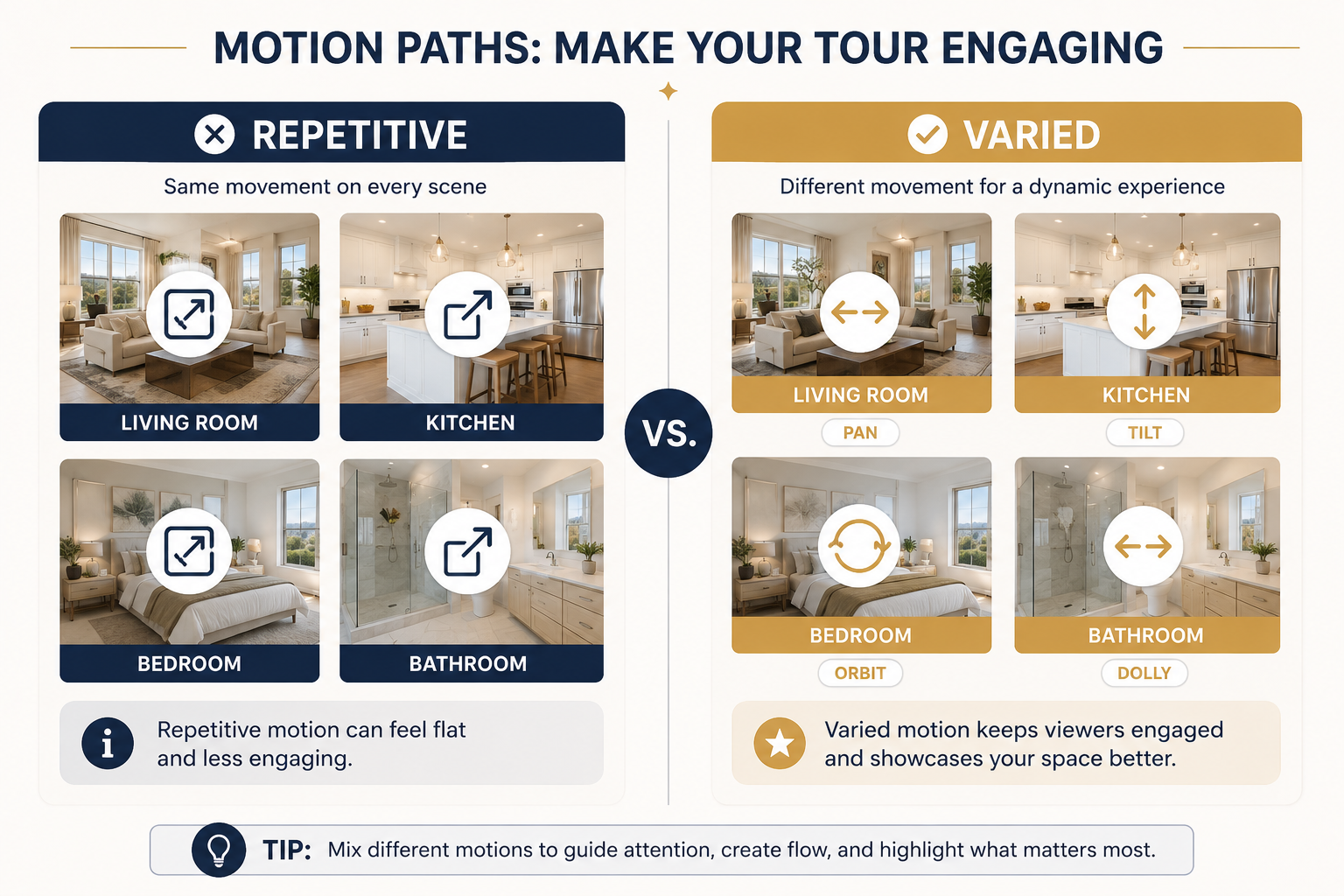
Not all AI-generated videos look the same. Some tools produce a single generic pan-and-zoom effect for every photo, which can quickly become repetitive across a listing.
Better platforms offer a wider range of camera movements — pans, zooms, tilts, dolly effects, orbits, and more — so the final video feels intentional and cinematic rather than templated.
When comparing a real estate video creator, ask to see sample output across a variety of property types, not just a single polished demo reel.
Your video should look like it came from you, not from a generic template that every other agent in your market is also using.
Check whether the tool lets you add your logo, brand colors, contact information, and consistent intro and outro elements. For agencies and brokerages, white-label options can matter even more, since videos may need to reflect a company brand rather than an individual agent.
A silent slideshow with music may be enough for some listings, but many agents want more.
Look for built-in licensed music libraries so you don't risk copyright issues when sharing videos on social media. You should also check whether the platform offers AI voiceovers or the ability to record your own narration.
Some tools go even further with AI avatar features that let you create a talking intro without appearing on camera yourself — useful for agents who want to add a personal touch without the production hassle.
A property video is only useful if it fits the platforms where you want to share it.
Vertical formats work well for Instagram Reels and TikTok, square formats can be useful for social feeds, and standard widescreen formats are ideal for YouTube and listing pages.
A tool that only exports in one format may force you to resize or re-edit your videos elsewhere, reducing much of the time you saved by using an automated video creator in the first place.
Compare not just the advertised price, but what's actually included at each tier — video limits, resolution caps, watermarks on free plans, and whether the pricing scales reasonably as your volume grows.
A tool that's inexpensive at low volume but becomes disproportionately expensive as you scale may not be a good long-term fit.
Real estate moves fast, and listing videos are often needed the same day.
Check whether the company offers responsive customer support, clear documentation, and a reliable platform. It's also worth looking for signs that the tool is actively maintained and used by other real estate professionals rather than being a side project with an uncertain future.
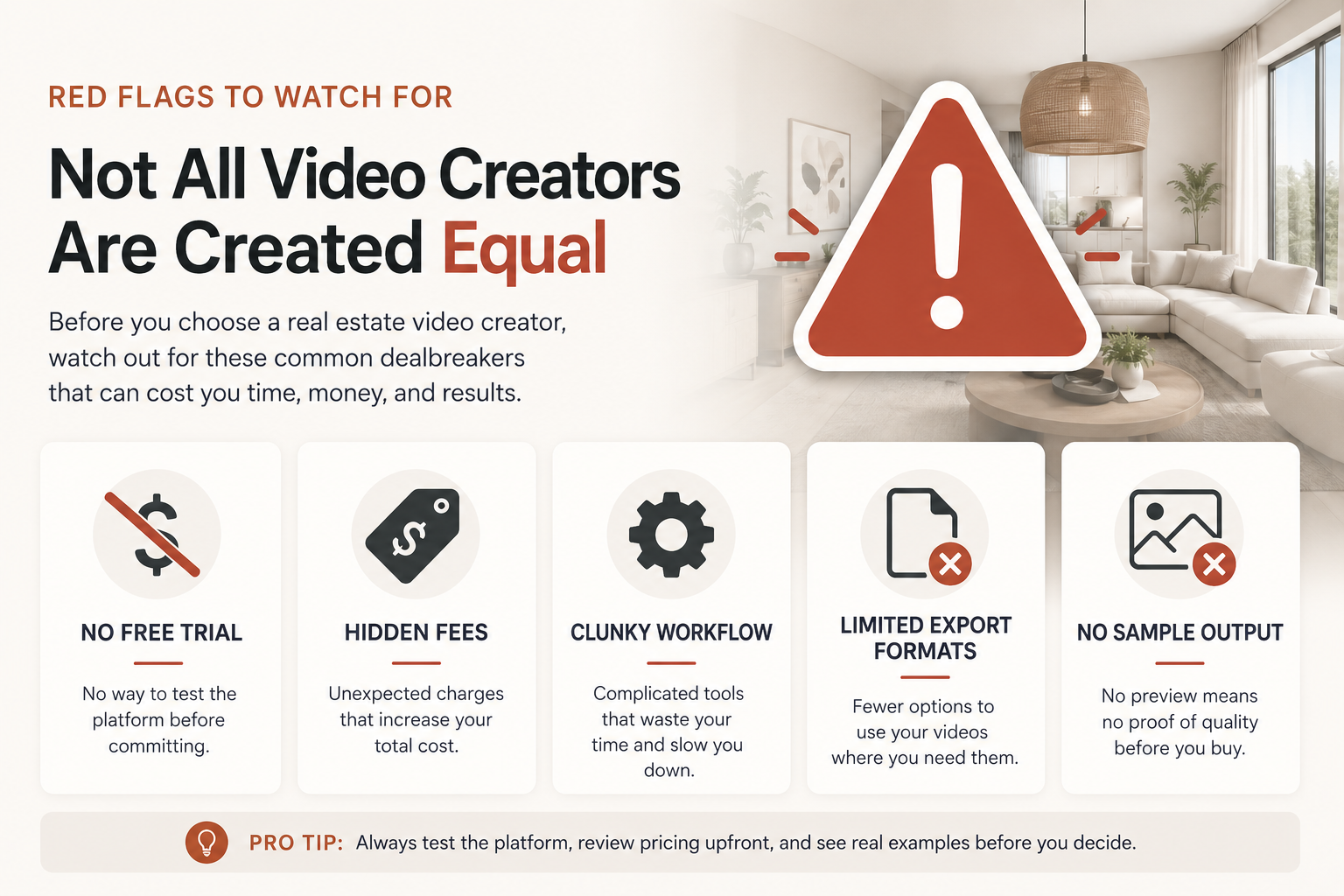
Some warning signs are easy to miss until you're already committed. Watch for:
These patterns appear often enough among video marketing tools for realtors that they're worth checking specifically rather than assuming a polished website automatically means a polished product.
It helps to see how these criteria apply to an actual product.
PhotoAIVideo is one example of a platform built around many of these considerations. It turns static listing photos into finished property videos without requiring filming or traditional video editing skills. It also offers multiple camera movement styles rather than relying on a single repetitive effect, along with custom branding, AI voiceover options, and AI avatar features that agents can use to add a personal introduction without stepping in front of a camera.
Its pricing structure is also relatively straightforward to evaluate against the criteria above, with a free option for testing the product, paid tiers for agents who need additional volume or features, and options designed for larger teams.
PhotoAIVideo also provides both a self-service app for agents who want more control and a done-for-you option for those who would rather hand off the video creation process entirely. That's a distinction worth considering when comparing platforms because not every tool offers both approaches.
The real estate agents page provides an example of what a tool designed specifically around this workflow looks like. If you want to see how a listing goes from photos to a finished video, the walkthrough is also worth reviewing for a closer look at the process from start to finish.
The point isn't that this is the only option — it's that comparing any tool against the same criteria, including speed, output variety, branding, formats, pricing, and support, makes the decision much clearer than relying on marketing copy alone.
Before committing to a subscription, run any real estate video creator you're considering through this checklist:
If a tool checks most or all of these boxes, it's a strong candidate. If it falls short on several important criteria, keep looking — there's enough competition in this space that you shouldn't have to settle.
It's also worth considering the broader role video plays in property marketing. Industry research from sources such as Zillow's research division and Redfin's Data Center can provide useful insights into changing buyer behavior and increasingly digital home-search experiences.
Think with Google's video marketing resources also provide broader insights into the role video plays in digital marketing and audience engagement.
None of this means every listing needs a Hollywood-level production. It does, however, help explain why a capable real estate video creator has become a practical marketing tool rather than simply a luxury.
Do I need video editing experience to use a real estate video creator?
No — that's one of the main advantages of modern AI-based tools. Platforms designed for real estate agents can let you upload listing photos and generate a finished property video without requiring you to work with a traditional editing timeline or learn professional editing software.
How much should I expect to pay?
Pricing varies widely, from free plans with basic features to paid subscriptions costing tens of dollars per month and custom enterprise pricing for brokerages and larger teams. The right price depends on your listing volume and the branding, voiceover, and other features you need.
Can one tool work for both individual agents and larger teams?
Yes, although it's worth checking the platform's specific capabilities. Some tools are designed primarily for solo agents, while others offer features such as multi-seat access, white-label branding, team workflows, and done-for-you services for agencies and photographers.
Is a photo-based video creator as good as hiring a videographer?
They serve somewhat different purposes. An AI-powered photo-to-video creator can provide a fast and affordable way to repurpose professional listing photos into video content for social media, listing pages, email campaigns, and other marketing channels.
For high-end or luxury properties where custom cinematography is an important part of the marketing strategy, agents may still choose professional videography — or use both approaches together.
Choosing a real estate video creator doesn't have to be complicated once you know what to look for.
Start with your own needs, evaluate tools against consistent criteria — including speed, output quality, branding, formats, pricing, and support — and watch for the red flags that separate a genuinely useful platform from an overhyped one.
If you're ready to see how the process works in practice, PhotoAIVideo offers a way to try the photo-to-video workflow and determine whether it fits your listing marketing needs.


Compact, ready to go anywhere
Interchangeable lens that’s upgradeable
Dual 1-inch sensors for improved clarity and low light performance
Dynamic range and 6K 360° capture
360° photo resolution at 21MP

8K 360° video recording for ultra-detailed visuals.
4K single-lens mode for traditional wide-angle shots.
Invisible selfie stick effect for drone-like perspectives.
2.5-inch touchscreen with Gorilla Glass protection.
Waterproof up to 33ft for underwater shooting.

360° photo resolution in 23MP
Slim design at 24 mm thick
Built-in image stabilization for smooth video capture.
Internal 19GB storage for photo and video storage.
Wireless connectivity for remote control and sharing.

60MP 360° still images for high-resolution photography.
5.7K 360° video recording at 30fps.
2.25-inch touchscreen for intuitive control.
USB Type-C port for fast charging and data transfer.
MicroSD card slot for expandable storage.
.png)

.png)

Try it free. No credit card required. Instant set-up.







.svg)


.svg)