


.png)


A “coming soon” video can feel harmless.
The photos are done. The seller approved the listing. The agent wants to build demand before launch. Someone creates a short teaser video, adds a few property clips, posts it to social, and sends it to a buyer list.
Then the clock starts.
That is the part many teams miss.
Clear Cooperation is not just an MLS rule sitting in a handbook. It affects how agents think about pre-market promotion, teaser videos, email blasts, social posts, public websites, office-exclusive conversations, and automated listing media.
If your business uses AI tools, templates, scheduled posts, or automated video workflows, you need to understand where marketing ends and MLS obligations begin.
That is why an automated video strategy needs more than speed.
It needs timing control.
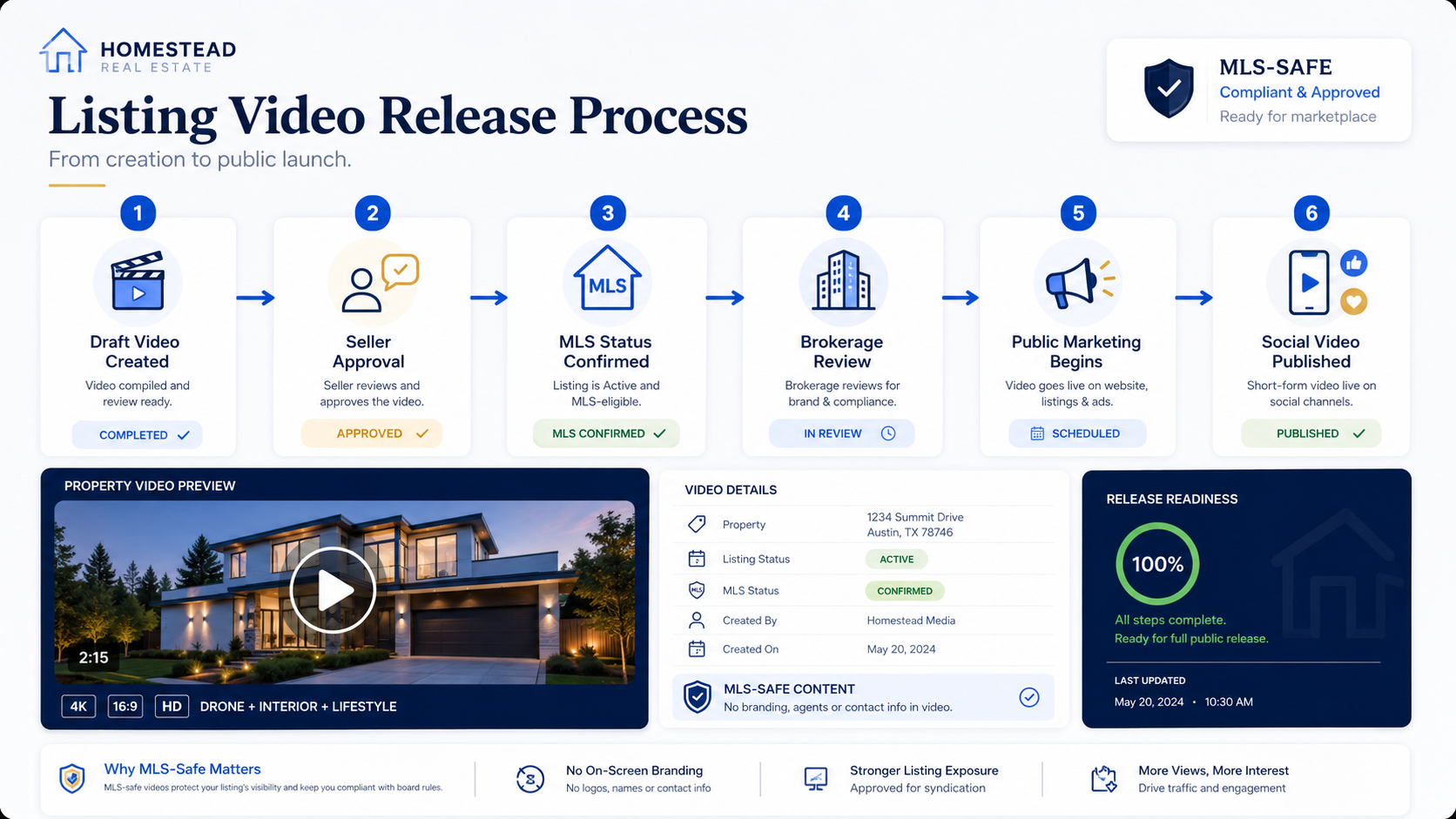
PhotoAIVideo helps real estate professionals create listing videos from property photos. But the real advantage comes when agents use AI video inside a smart publishing process: one that separates private preparation from public marketing, creates clean assets before launch, and avoids sending the wrong video into the wrong channel too early.
MLS rules vary by board, brokerage, and region. Always confirm your local requirements before publishing listing media. For national policy context, review NAR’s Clear Cooperation Policy, NAR’s Handbook on Multiple Listing Policy, and NAR’s Multiple Listing Options for Sellers.

Clear Cooperation affects when a listing must be submitted to the MLS after public marketing begins.
NAR’s Clear Cooperation Policy states that within one business day of marketing a property to the public, the listing broker must submit the listing to the MLS for cooperation with other MLS participants. Public marketing can include things like public-facing websites, digital marketing, flyers, yard signs, email blasts, multi-brokerage networks, and applications available to the general public.
That matters because video is often the first marketing asset people want to release.
A listing video can trigger attention quickly. It can also create risk quickly if the team does not understand whether that video counts as public marketing.
This article is not legal advice. It is a practical media strategy guide for agents and teams using AI video tools.
The core question is simple:
How do you use automated video marketing software for Realtors without accidentally publishing listing content before your MLS workflow is ready?
The answer is not to avoid video.
The answer is to separate production from distribution.
You can create media before launch. You can prepare assets. You can build your social plan. You can generate videos from listing photos. But publishing, sharing, posting, emailing, syndicating, or making that content public needs to follow your local MLS and brokerage rules.
That distinction matters.
Clear Cooperation changes the way listing media should be planned.
A lot of agents think of compliance as a final step. They make the content first, then ask if it is okay to use.
That is backwards.
With automated listing video, the publishing plan should come before the export.
The issue is not only whether a video is branded or unbranded. The issue is also when and where that video appears.
A property video may appear in:
Some of those uses may be private preparation. Others may be public marketing. Some may trigger local MLS requirements. Some may be allowed under specific seller options or brokerage rules. Some may need signed seller disclosure.
This is why the strategy has to be specific.
The goal is not just to create videos faster. The goal is to create videos in a way that does not confuse the team about whether the listing has been publicly marketed.
PhotoAIVideo can help agents create real estate videos from photos with AI, but the agent still needs a release plan.
A good automated listing video strategy answers four questions before anything goes live:
If your team cannot answer those questions, automation can create problems faster than manual marketing ever did.
The risky moment is not the video generation.
It is the scheduled release.
Here is a common scenario.
A listing coordinator uploads property photos into a tool. A marketing assistant creates a teaser video. The agent likes it. The team adds it to a social scheduler. A caption says, “Coming soon in River Oaks.” The post goes live on Friday morning.
But the MLS entry is not ready.
The seller disclosure has not been finalized.
The brokerage review is still pending.
The office assumed the video was only a draft, but the scheduler treated it like a finished campaign.
That is the problem with automation. It does exactly what it is told to do.
Fast.
A manual workflow gives people more chances to pause. An automated workflow needs those pauses built into the process.
The mistake is not using AI video.
The mistake is connecting video generation directly to public distribution without a review gate.
This is where real estate video software that works with MLS rules becomes a strategy, not just a category. The software can help you create assets, but your process needs to define what happens before those assets become public.

PhotoAIVideo helps agents, photographers, and listing teams turn property photos into AI-generated video content.
That is useful before a listing goes public because the team can prepare listing media in advance.
Preparation is not the problem.
Confusing preparation with public marketing is the problem.
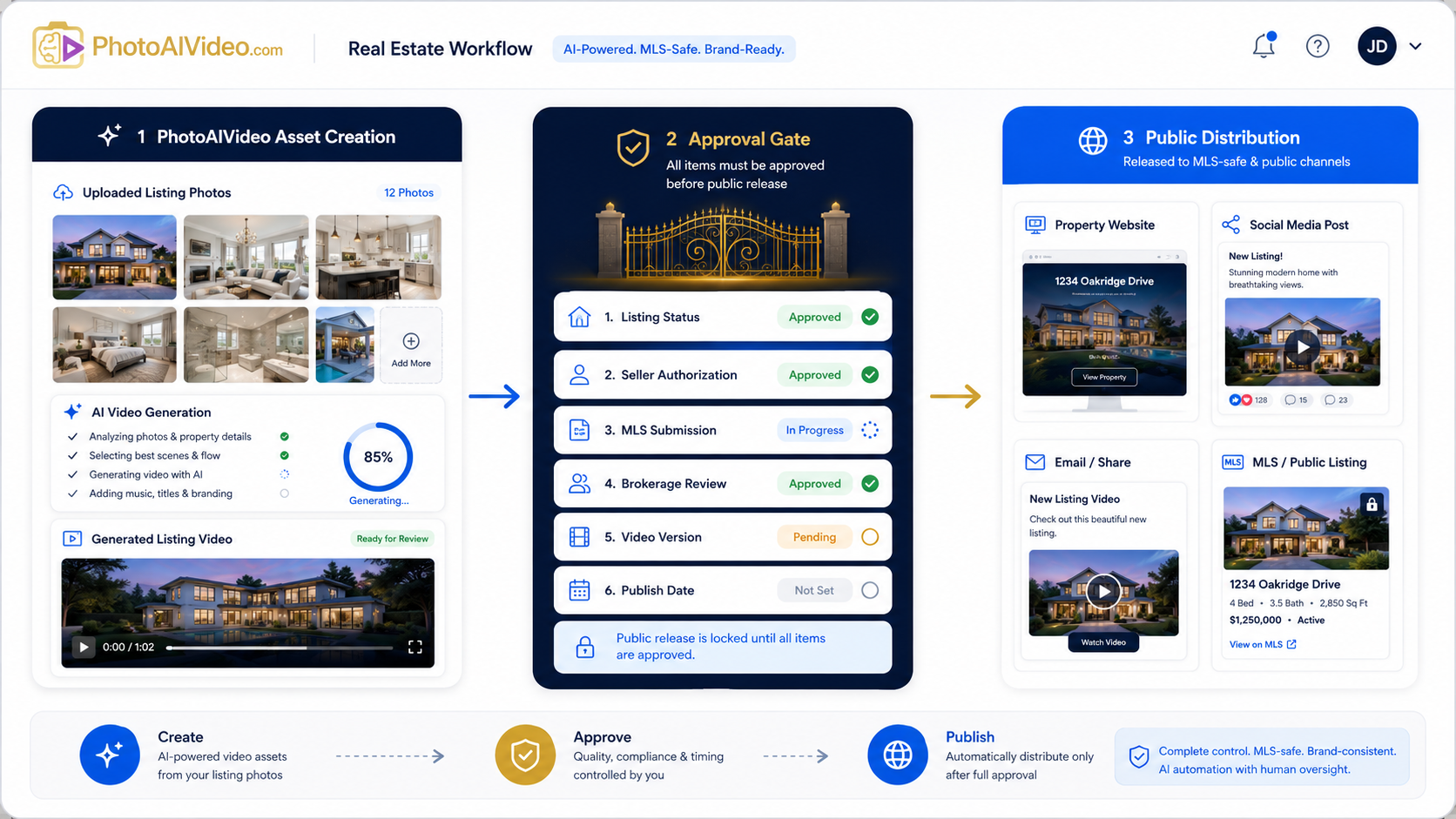
PhotoAIVideo can support a safer workflow because agents can create video assets from approved photos, then hold those assets until the MLS, seller, brokerage, and publishing plan are aligned.
For example, a team can use PhotoAIVideo to prepare:
That gives the team more content options without forcing immediate publication.
This is especially useful for agents looking for an AI app to turn property photos into videos without adding another complex editing workflow.
The key is to create a holding pattern:
Generate first.
Review second.
Release only when the listing strategy is ready.
Before creating or scheduling any video, identify the listing’s status.
Use simple categories:
Do not let the marketing team guess.
If the listing is not ready for public marketing, label the project clearly.
Example:
“Draft only — do not publish.”
That label should be visible in the project folder, the file name, the task board, and the social media workflow.
Not every video has the same exposure level.
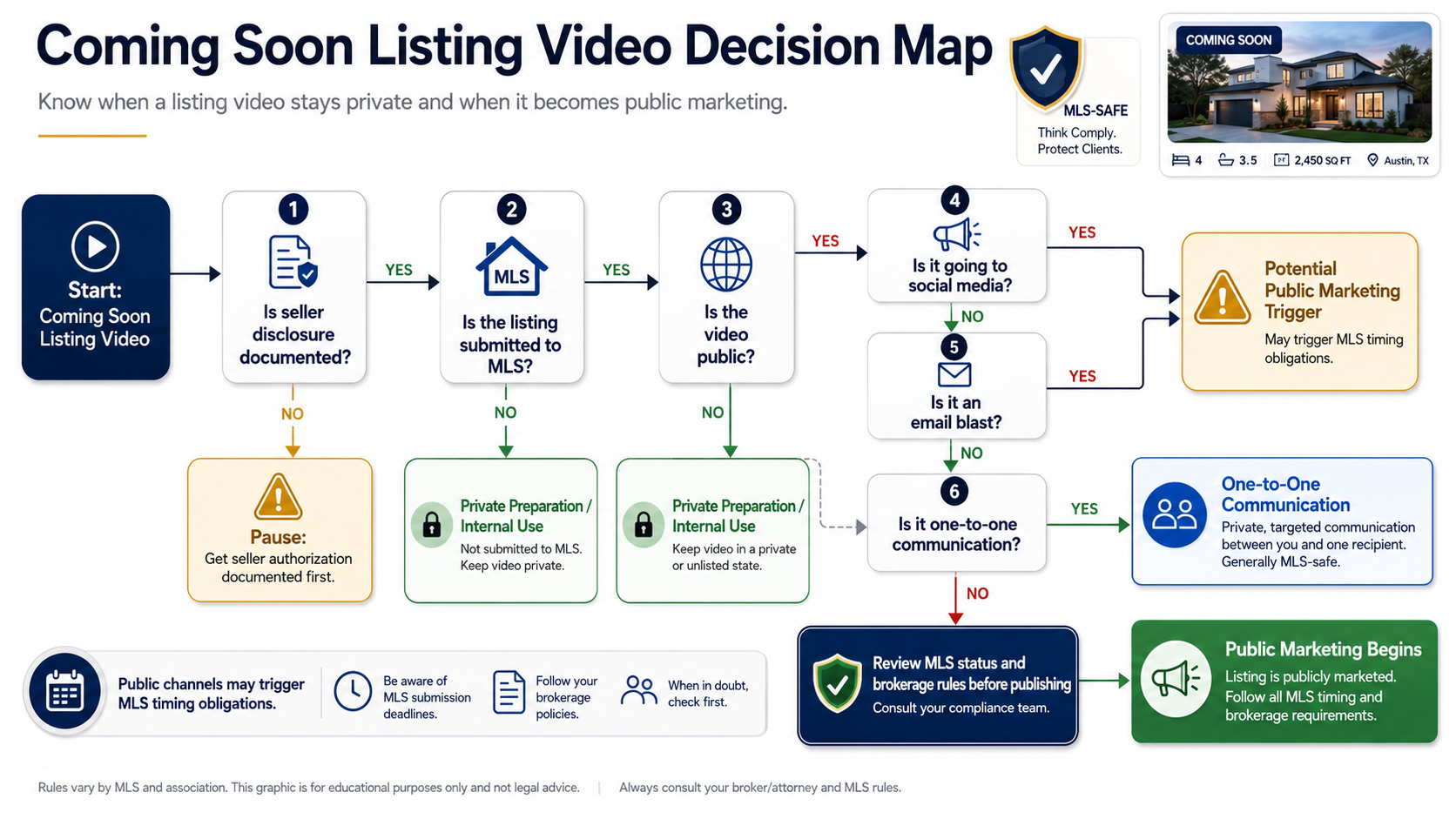
A private video used in a listing presentation is different from a public Instagram Reel. A one-to-one conversation may be treated differently from a multi-brokerage email blast. NAR’s Multiple Listing Options for Sellers policy also clarifies that one-to-one broker communications and multi-brokerage communications may be treated differently under Clear Cooperation.
Build three categories into your process:
If the video is public marketing, your MLS timeline may be triggered.
Once the source photos are approved, use PhotoAIVideo to generate the listing video.
This is the production step.
Keep it separate from the publishing step.
The video can be created before launch. It should not automatically be posted before the listing’s status allows it.
This separation is what makes AI useful without making it risky.
Clear Cooperation is about public marketing timing, but video strategy also involves the right version for the right channel.
Create versions such as:
A team using an MLS compliant video maker for property listings should not assume one export fits every destination.
This is the most important step.
Before a video is posted, emailed, scheduled, embedded, syndicated, or added to a public-facing page, require a release check.
The release check should confirm:
If this sounds like too much, remember the alternative: a public post goes out before the MLS workflow is ready.
File names should tell the team what the asset is allowed to do.
Use labels like:
Bad file names create bad decisions.
“Final video.mp4” does not tell anyone whether the asset is safe to publish.
For teams using automated campaigns, keep a simple log.
Track:
This creates accountability.
It also helps the team improve the process over time.
The point is not to make automation slower.
The point is to make automation safer.
A solo Realtor may use PhotoAIVideo to create a launch-day video before the listing is active.
That is fine as long as the video stays in draft mode until the MLS and brokerage requirements are satisfied.
For solo agents, the key habit is labeling.
Do not leave finished videos sitting in a folder where they look publish-ready if they are not approved for public use.
Photographers can use PhotoAIVideo to deliver video add-ons to agents, but they should avoid implying that every delivered asset is ready for every channel.
A photographer can deliver:
This is a strong use case for an AI video app for real estate photographers.
The photographer’s value increases when the deliverables are clearly labeled by use case.
Brokerages need rules that agents can actually follow.
A good brokerage video workflow should define:
For brokerages, the issue is not one bad post.
It is repeatability.
A weak process repeated across 100 agents becomes a brokerage-level problem.
Listing coordinators should own the release checklist.
They do not need to create every video, but they should be able to confirm whether the asset is ready to publish.
That means the coordinator needs access to:
PhotoAIVideo can help create the media faster. The coordinator keeps the release process clean.
Clear Cooperation may not apply to every rental marketing scenario the same way it applies to residential sales listings, but the same discipline helps.
A rental team still needs to know:
For rental marketers, this is less about Clear Cooperation and more about avoiding inaccurate automated media.
A draft is private.
A scheduled post is a pending public release.
That difference matters.
If a video is sitting inside a social scheduler, your team should treat it like a public marketing asset waiting to launch.
Automation should not remove review.
If the brokerage requires approval before public listing marketing, the video workflow should include that approval before the post, email, or property page goes live.
Captions like “Something big is coming” may feel indirect, but if the property is identifiable, local rules may still matter.
Do not rely on vague language as a compliance strategy.
One-to-one communication may be treated differently from broader multi-brokerage marketing. NAR’s Multiple Listing Options for Sellers policy specifically clarifies that one-to-one broker communications about listings do not trigger Clear Cooperation requirements, while multi-brokerage communications can count as public marketing.
If your automated video goes into a broad agent group, email blast, or multi-brokerage network, treat it seriously.
This is the obvious one, but it still happens.
The video is done, the caption is written, the scheduler is loaded, and nobody confirms MLS timing.
Build the confirmation into the process.
The hosting page, caption, thumbnail, metadata, and surrounding page content can all affect how the asset is understood.
A clean video embedded on a branded public page may not be clean in context.
If your article or internal SOP explains the process through an infographic, also include the same guidance as normal text.
Google’s image SEO best practices recommend using descriptive filenames, titles, alt text, and relevant surrounding page content. For blog pages, Google’s Article structured data documentation can also help search engines understand article metadata like title, image, date, and author.


Compact, ready to go anywhere
Interchangeable lens that’s upgradeable
Dual 1-inch sensors for improved clarity and low light performance
Dynamic range and 6K 360° capture
360° photo resolution at 21MP

8K 360° video recording for ultra-detailed visuals.
4K single-lens mode for traditional wide-angle shots.
Invisible selfie stick effect for drone-like perspectives.
2.5-inch touchscreen with Gorilla Glass protection.
Waterproof up to 33ft for underwater shooting.

360° photo resolution in 23MP
Slim design at 24 mm thick
Built-in image stabilization for smooth video capture.
Internal 19GB storage for photo and video storage.
Wireless connectivity for remote control and sharing.

60MP 360° still images for high-resolution photography.
5.7K 360° video recording at 30fps.
2.25-inch touchscreen for intuitive control.
USB Type-C port for fast charging and data transfer.
MicroSD card slot for expandable storage.
.png)

.png)

Try it free. No credit card required. Instant set-up.







.svg)


.svg)