


.png)


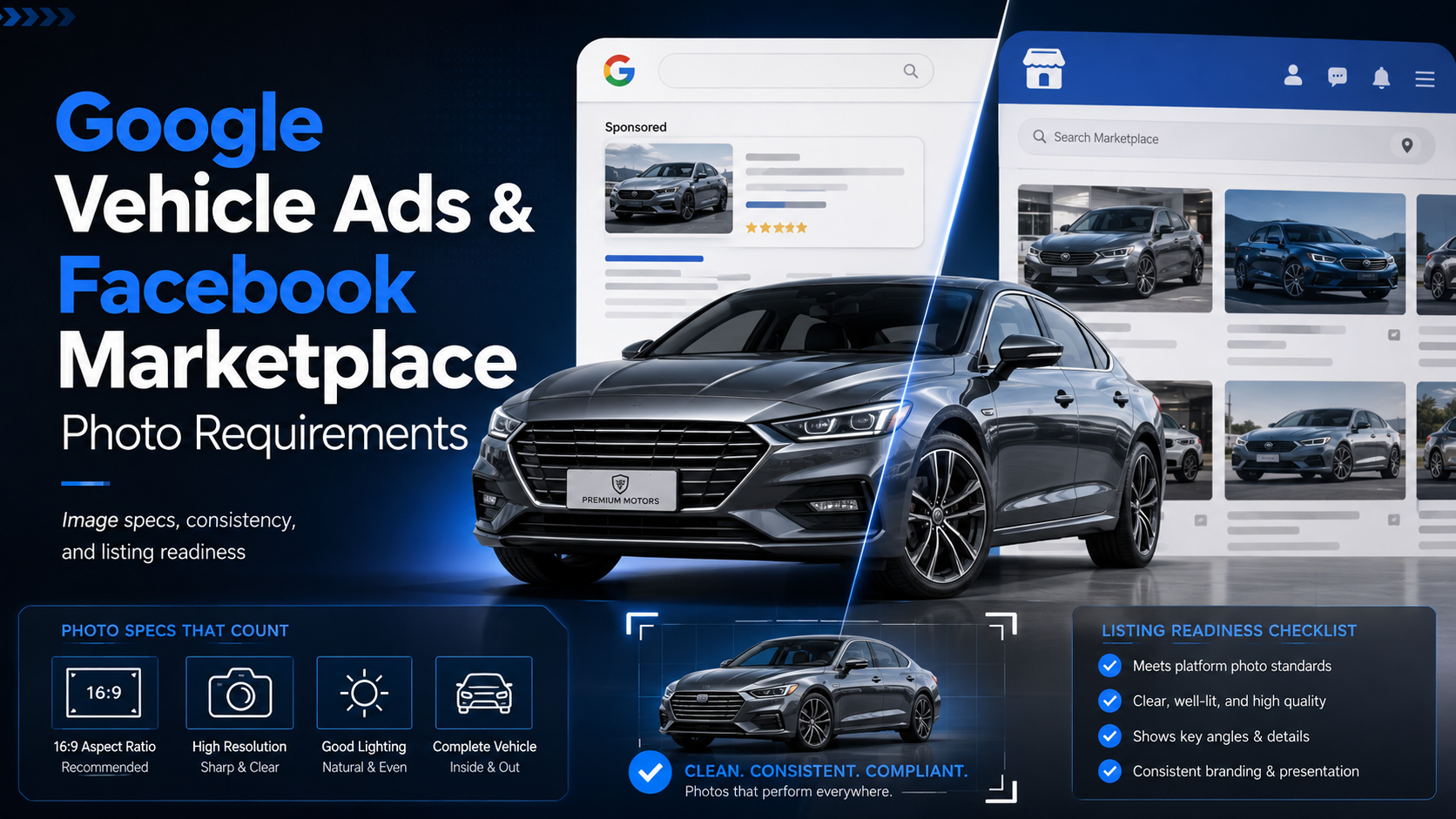
Vehicle listing photo requirements vary by platform, but dealerships should start with high-resolution images that show the entire vehicle, use consistent angles, avoid promotional overlays, and leave enough space for cropping. Google recommends a 4:3 ratio for Vehicle Ads, while Meta placements may require adaptable square, landscape, or vertical images. Google Help
Vehicle photography plays a major role in how dealership inventory appears across search engines, marketplaces, dealer websites, and social platforms.
A vehicle may be photographed once, but those images can eventually appear in several places:
That creates a practical challenge.
An image that looks good on a dealership VDP may not always meet the preferred dimensions, cropping behavior, or branding rules of another platform.
For dealerships managing hundreds or thousands of photos, understanding vehicle listing photo requirements can help reduce inconsistent presentation, poor crops, rejected images, low-resolution listings, and unnecessary re-editing.
The goal is not to create a different photo shoot for every platform.
The goal is to capture and prepare strong source images that can be adapted cleanly wherever inventory is published.
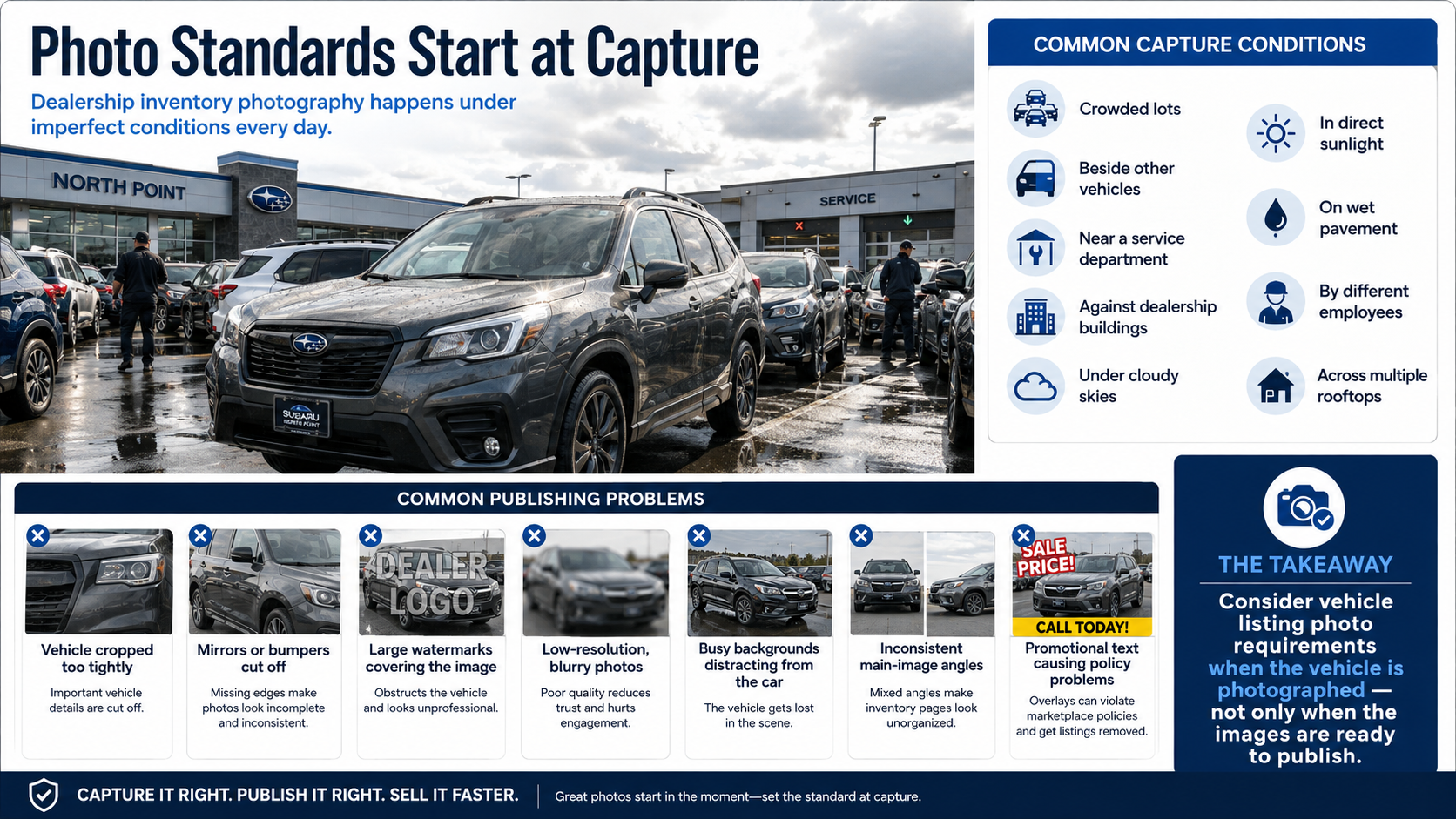
Dealership inventory photography often happens under imperfect conditions.
Vehicles may be photographed:
Those images may look acceptable inside the dealership's own website, but other platforms may crop, resize, reject, or display them differently.
A strong photo standard helps dealerships avoid common issues such as:
For that reason, vehicle listing photo requirements should be considered when the vehicle is photographed—not only after the images are ready to publish.
Google provides specific guidance for vehicle imagery used in Vehicle Ads.
The general goal is straightforward: show the vehicle clearly, accurately, and professionally.
Google recommends clean, high-quality photos where the vehicle is easy to identify and the surrounding environment does not distract from the product.
Google currently recommends vehicle images around:
Dealerships should avoid creating inventory images at the smallest possible resolution.
Even if a platform accepts a small image, that photo may still appear soft or pixelated when displayed on larger screens.
Using higher-quality source images gives Google, dealer websites, and marketplaces more flexibility when resizing the photo.
One of the most important image rules is also one of the simplest.
The whole vehicle should be visible.
Avoid photographs where:
Leaving some space around the vehicle helps protect the image when a platform applies its own crop.
This is particularly important for dealerships publishing the same image across several channels.
A photograph that is already extremely tight may look acceptable on one website but become unusable when converted into a square or vertical placement elsewhere.
The first inventory image usually has a different purpose from the rest of the photo set.
It needs to communicate the vehicle quickly.
A front three-quarter angle is commonly one of the strongest options because shoppers can see:
Google specifically recommends a front-to-side view around a 45-degree angle for Vehicle Ads.
The remaining photos can then provide additional views, including:
Consistency matters.
If one employee photographs the front left corner and another starts every vehicle from the rear, the inventory grid can feel disorganized.
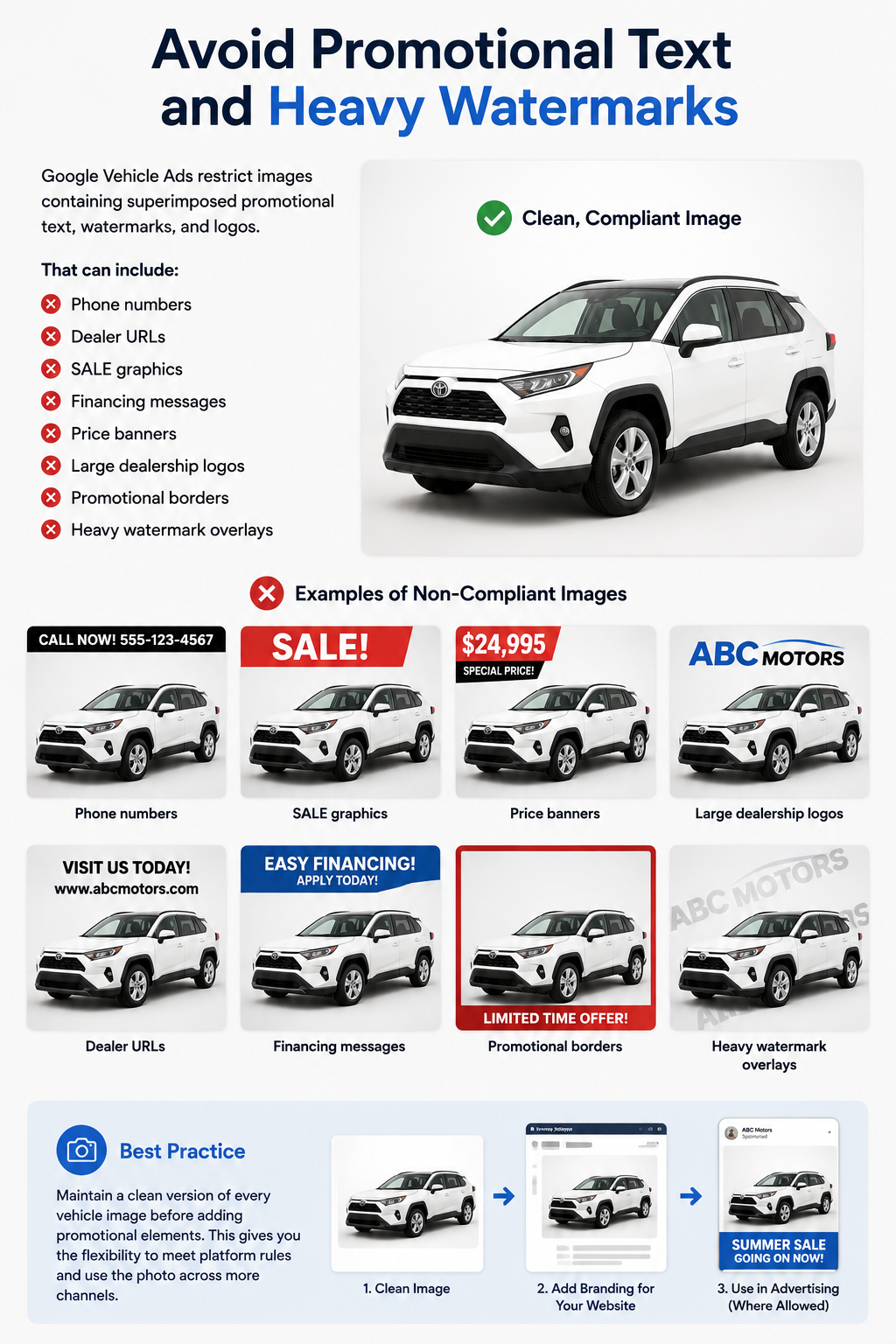
One major issue dealerships should watch closely is permanent branding added directly to the image.
Google Vehicle Ads restrict images containing superimposed promotional text, watermarks, and logos.
That can include:
This does not mean dealership branding is never useful.
A dealer may still want branded photos on its own website or in certain advertising environments.
The important point is to maintain a clean version of the vehicle image before adding promotional elements.
That gives the dealership more flexibility when sending photos to platforms with stricter image rules.
A technically acceptable vehicle photo can still be visually weak.
Consider a black SUV photographed with:
The shopper can still see the SUV.
But the vehicle has to compete with everything else in the frame.
Google encourages clean and minimally distracting backgrounds for Vehicle Ads.
That is where background cleanup can become useful.
Automated background removal can help dealerships convert photographs captured in inconsistent environments into cleaner inventory images.
This is particularly helpful for dealerships that do not have a dedicated photography booth.
A clean white or neutral background can make vehicle inventory easier to scan.
Instead of every vehicle appearing in a different environment, the shopper sees a consistent presentation.
That can be useful when photography happens:
The vehicle remains the focus.
However, background removal should still look natural.
Check:
A poor cutout can make the vehicle look pasted onto the scene or appear to float.
The best automated processing should improve presentation without making the image feel artificial.
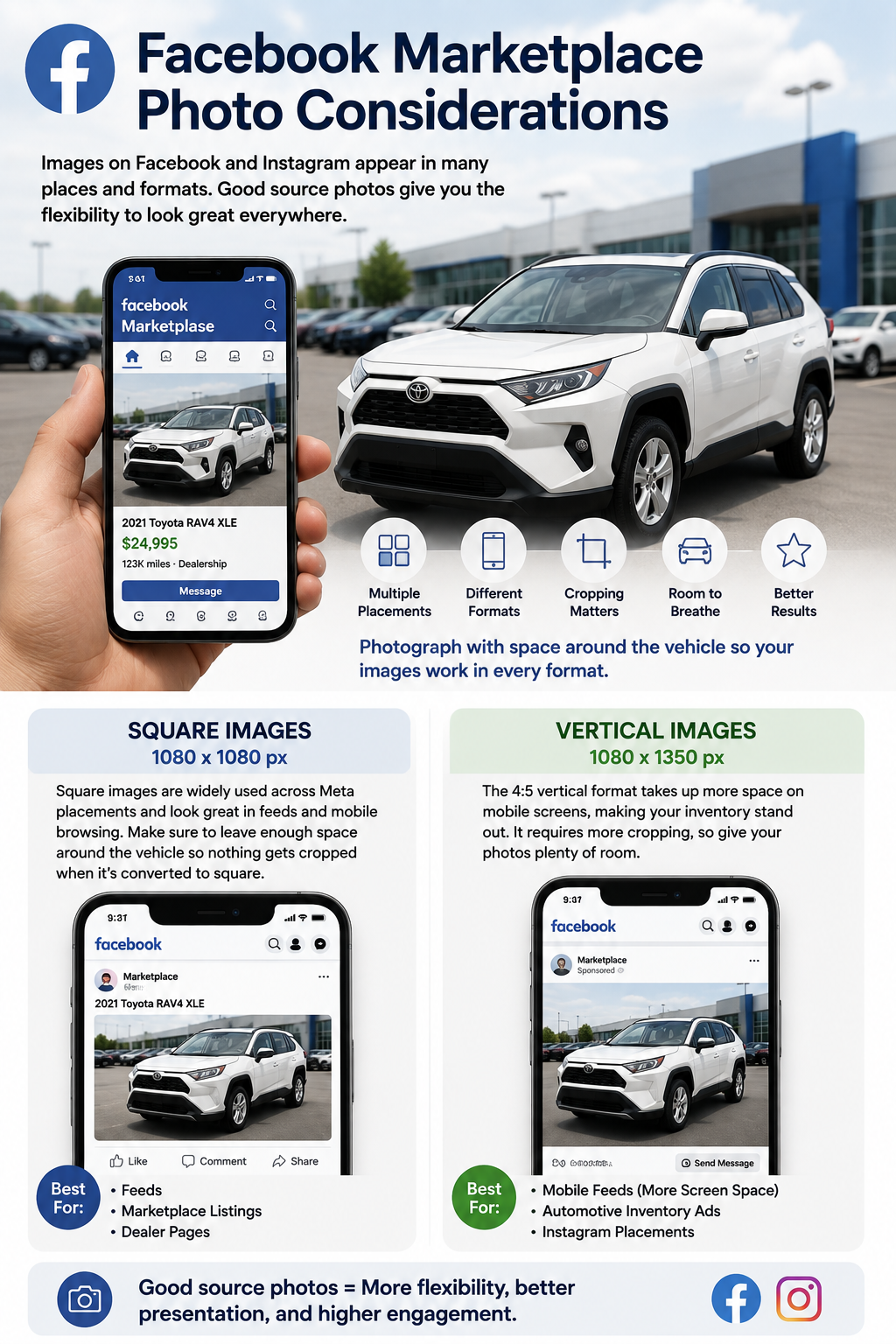
Facebook Marketplace operates differently from Google Vehicle Ads.
There is not one single automotive image specification that applies identically across every Meta surface.
Dealership images may appear through:
Because those surfaces can use different layouts, dealerships should prepare images with flexibility in mind.
Square images are widely used across Meta placements.
A common recommended size is:
1080 × 1080 pixels
Square formatting works especially well in feeds and mobile browsing.
The main challenge is cropping.
If the vehicle is photographed too tightly in a wide horizontal frame, converting it to square may remove mirrors, bumpers, or portions of the vehicle.
Leave enough surrounding room when taking the original photograph.
Vertical images are also increasingly important across mobile placements.
A common Meta format is:
1080 × 1350 pixels
This 4:5 format occupies more vertical screen space in mobile feeds.
It can make inventory more visually prominent, but it also requires more aggressive cropping than a standard horizontal dealership photo.
Again, good source framing matters.
The more breathing room around the vehicle, the easier it becomes to adapt the image.
Dealers should not assume that every Marketplace or Meta placement will always display images exactly as they appear in the dealership's inventory system.
Platforms may adjust:
That is why the entire exterior photo set should maintain reasonable quality.
Do not put all the effort into one hero image while the rest of the inventory set uses inconsistent framing or distracting backgrounds.
Shoppers may encounter several different photos before clicking through to the dealership website.
Low-resolution source images create problems across nearly every platform.
A small image may look acceptable as a tiny thumbnail but fall apart when:
Dealerships should capture high-quality originals and resize downward when needed.
Trying to enlarge a low-resolution image later does not restore missing detail.
For vehicle listing photo requirements, resolution should therefore be treated as a source-quality decision rather than an export-only decision.
Cropping is one of the most common reasons a strong vehicle photograph performs poorly across different channels.
A dealership may capture a very tight 4:3 image that works beautifully on its VDP.
Then the same photograph is converted to 1:1.
Suddenly the front bumper is touching the edge.
Then it is converted to 4:5.
Now part of the rear quarter panel disappears.
A safer source photo leaves enough room around the vehicle to accommodate multiple formats.
This does not mean the car should appear tiny.
It simply needs enough margin for platforms to resize the image without damaging the composition.
Consistency becomes particularly important when shoppers view many vehicles on one screen.
Try to maintain:
A row of inventory images looks much stronger when every vehicle follows a predictable visual standard.
That consistency also makes automated resizing and background processing easier.
Automated background removal can help dealerships meet vehicle listing photo requirements more reliably when original photography conditions vary.
The software can help standardize:
This is useful for dealer groups where each rooftop has a different physical environment.
One store may photograph beside a showroom.
Another may use an open lot.
Another may take photos near the service department.
Automated processing can reduce those environmental differences.
The goal should not be to manipulate the vehicle itself.
The goal is to present the actual vehicle more clearly and consistently.
Inventory without real photography is usually less useful to shoppers.
Avoid relying on placeholders such as:
Used vehicles especially should be represented by photographs of the actual inventory whenever possible.
For new inventory, some advertising environments may allow manufacturer or stock images when they accurately represent the vehicle being offered.
Even then, dealerships should verify current platform policies before relying heavily on stock imagery.
Most modern platforms support standard formats such as JPEG and PNG.
JPEG is usually practical for dealership inventory because it provides strong image quality at manageable file sizes.
PNG may be useful when transparent backgrounds are required.
Regardless of format, avoid:
The goal is to balance visual quality with efficient delivery.
The easiest way to manage multiple destinations is to create better source photography.
A good dealership photo standard should generally produce images that are:
That creates a much stronger foundation than trying to repair weak inventory images separately for every marketplace.
Google, Facebook, and other marketplaces will continue updating their advertising formats and technical specifications.
That is normal.
The most durable approach is not to memorize one exact pixel dimension forever.
Instead, build photography around principles that remain useful:
Those practices make inventory easier to adapt when platform requirements change.
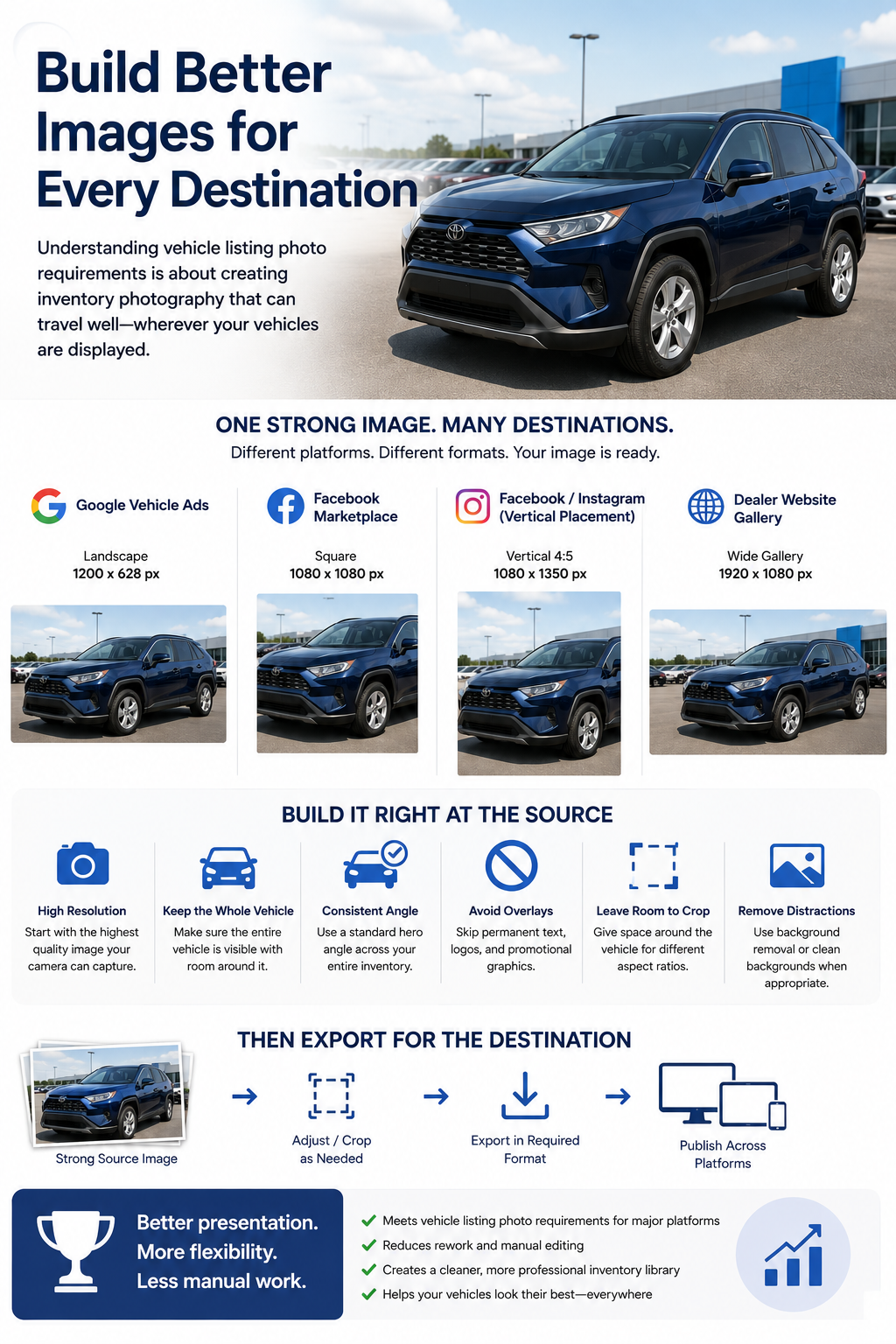
Understanding vehicle listing photo requirements is ultimately about creating inventory photography that can travel well.
Google Vehicle Ads may favor one image shape.
Facebook may display the same vehicle in square or vertical placements.
Your dealer website may use a wide horizontal gallery.
A marketplace may create its own thumbnail.
The dealership should not need to rebuild the vehicle photo from scratch every time.
Start with a strong, high-resolution image.
Keep the entire vehicle visible.
Use a consistent hero angle.
Avoid permanent promotional overlays.
Leave room for cropping.
Remove distracting backgrounds when appropriate.
Then export the image in the format required by the destination.
That approach gives dealerships a cleaner, more flexible inventory photography library while reducing the amount of manual editing required whenever vehicle images are distributed to a new platform.
Good vehicle listing photo requirements include high-resolution images, clear views of the actual vehicle, consistent positioning, sufficient space around the vehicle for cropping, and clean backgrounds. Platform-specific rules vary, so dealerships should keep unbranded master images that can be adapted for Google, Meta, dealer websites, and marketplaces.
Google currently recommends a 4:3 aspect ratio for Vehicle Ads. Google has also announced that images must be at least 500 × 500 pixels starting January 31, 2027, while recommending 1500 × 1500 pixels or larger for optimal performance across different display formats.
Google Vehicle Ads can be disapproved when images contain superimposed logos, promotional text, or watermarks. Dealers should therefore maintain clean versions without phone numbers, URLs, price banners, SALE graphics, promotional borders, or added dealership logos and use branding only where the destination's policies allow it.
For Google Vehicle Ads, Google recommends using a front-to-side view at approximately a 45-degree angle for the primary image. This gives shoppers a recognizable view of the vehicle while showing its front, side profile, wheels, and overall shape. Rear views can be submitted as additional images.
Clean or minimally distracting backgrounds can improve consistency, especially when inventory is photographed across multiple lots. However, background processing should preserve the vehicle accurately. Google discourages cluttered backgrounds and recommends clean imagery, but edits should not misrepresent the actual vehicle being advertised.


Compact, ready to go anywhere
Interchangeable lens that’s upgradeable
Dual 1-inch sensors for improved clarity and low light performance
Dynamic range and 6K 360° capture
360° photo resolution at 21MP

8K 360° video recording for ultra-detailed visuals.
4K single-lens mode for traditional wide-angle shots.
Invisible selfie stick effect for drone-like perspectives.
2.5-inch touchscreen with Gorilla Glass protection.
Waterproof up to 33ft for underwater shooting.

360° photo resolution in 23MP
Slim design at 24 mm thick
Built-in image stabilization for smooth video capture.
Internal 19GB storage for photo and video storage.
Wireless connectivity for remote control and sharing.

60MP 360° still images for high-resolution photography.
5.7K 360° video recording at 30fps.
2.25-inch touchscreen for intuitive control.
USB Type-C port for fast charging and data transfer.
MicroSD card slot for expandable storage.
.png)

.png)

Try it free. No credit card required. Instant set-up.






.svg)


.svg)