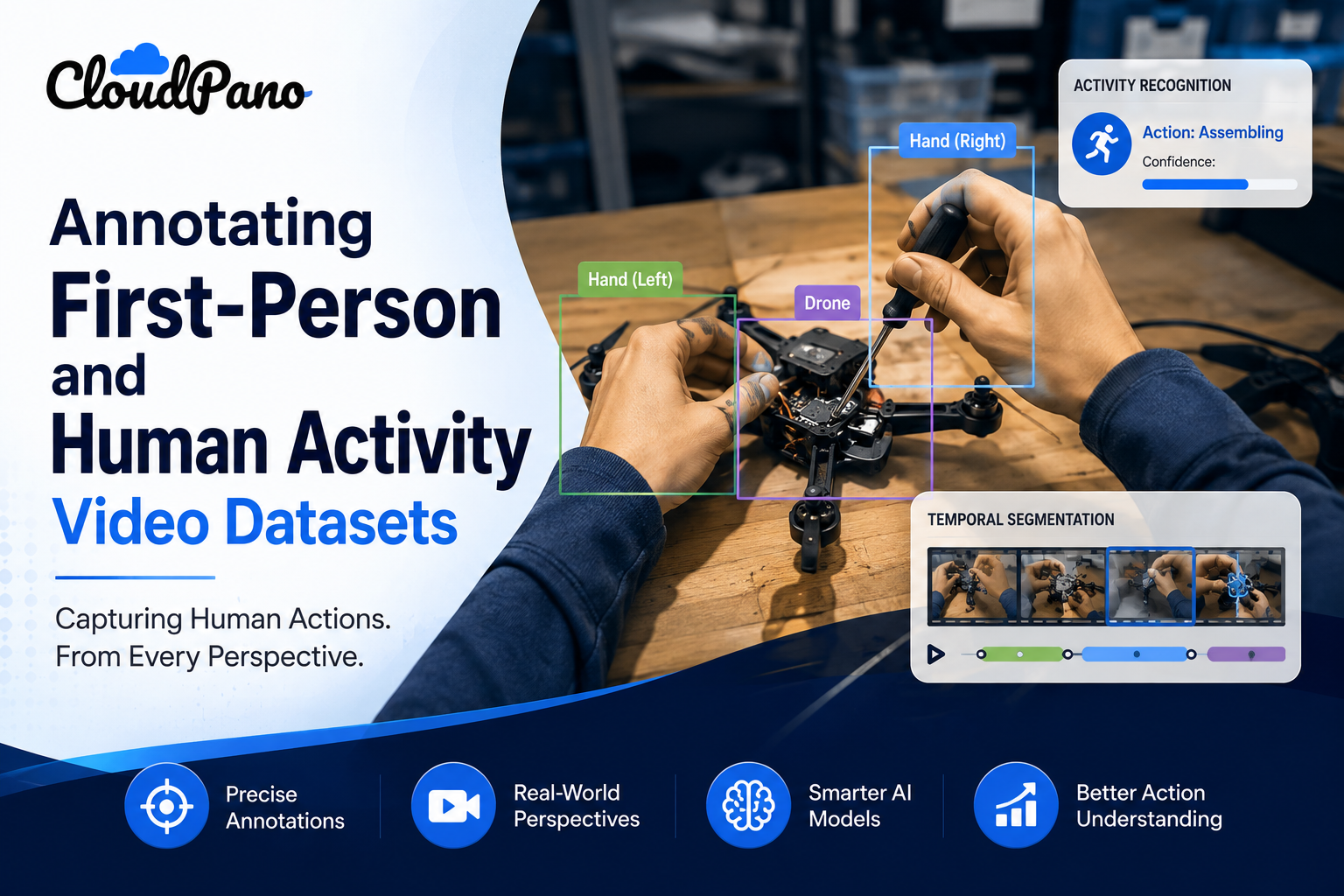
Annotating First-Person and Human Activity Video Datasets

Cloudpano
August 1, 2026
5 min read
Share this post

Annotating First-Person and Human Activity Video Datasets

Footage from a fixed security camera and footage from a wearable, first-person camera look like the same problem from a distance — video, objects, people. First-person video annotation is a genuinely different task, because the camera itself is moving constantly with the wearer, objects appear and disappear from frame far more unpredictably, and the entire viewpoint shifts with body movement rather than staying anchored to a fixed position.

Egocentric Video Annotation work has to account for conditions standard, fixed-camera video annotation guidelines simply don't address — motion blur from head or body movement, hands frequently occluding the very objects being interacted with, and activities that need to be understood from a viewpoint the wearer never sees themselves from directly.

Why It Matters

Applying standard video annotation practices to first-person footage produces inconsistent or unusable labels precisely because the conditions that make egocentric video valuable — proximity, natural interaction, real activity — are the same conditions that make it harder to annotate consistently. Google Research's "Data Cascades" study documented how data quality issues that seem manageable in isolation compound into larger problems once a model has been trained on inconsistent data, a pattern directly relevant to egocentric annotation inconsistencies that propagate into activity recognition failures (Sambasivan et al., Google Research).

Comparison table of fixed-camera vs egocentric video annotation requirements

NIST's AI Risk Management Framework treats data fitness for the intended task as foundational to trustworthy AI, directly relevant to First-Person Vision Datasets needing annotation guidelines specifically designed for egocentric conditions rather than borrowed from fixed-camera video practices (NIST AI RMF).

The stakes rise as wearable and first-person camera applications expand across industries. Stanford HAI's AI Index has tracked growing interest in human activity recognition and wearable sensor applications across research and industry (Stanford HAI, AI Index Report), and annotation quality issues specific to this viewpoint carry consequences for any downstream activity recognition system trained on it.

How It Works

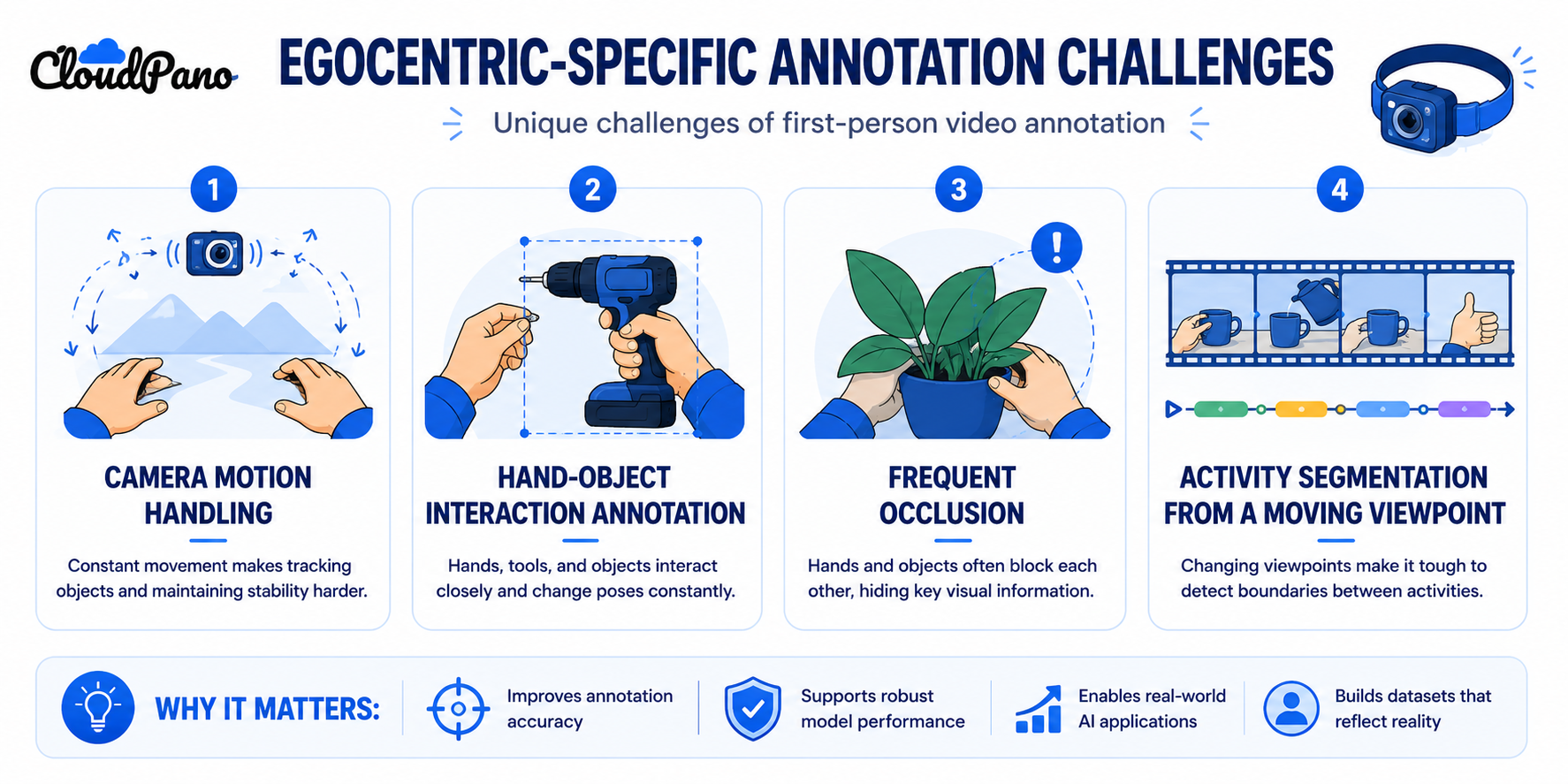
Video Annotation for Computer Vision in the egocentric context requires addressing a few conditions specific to the first-person viewpoint.
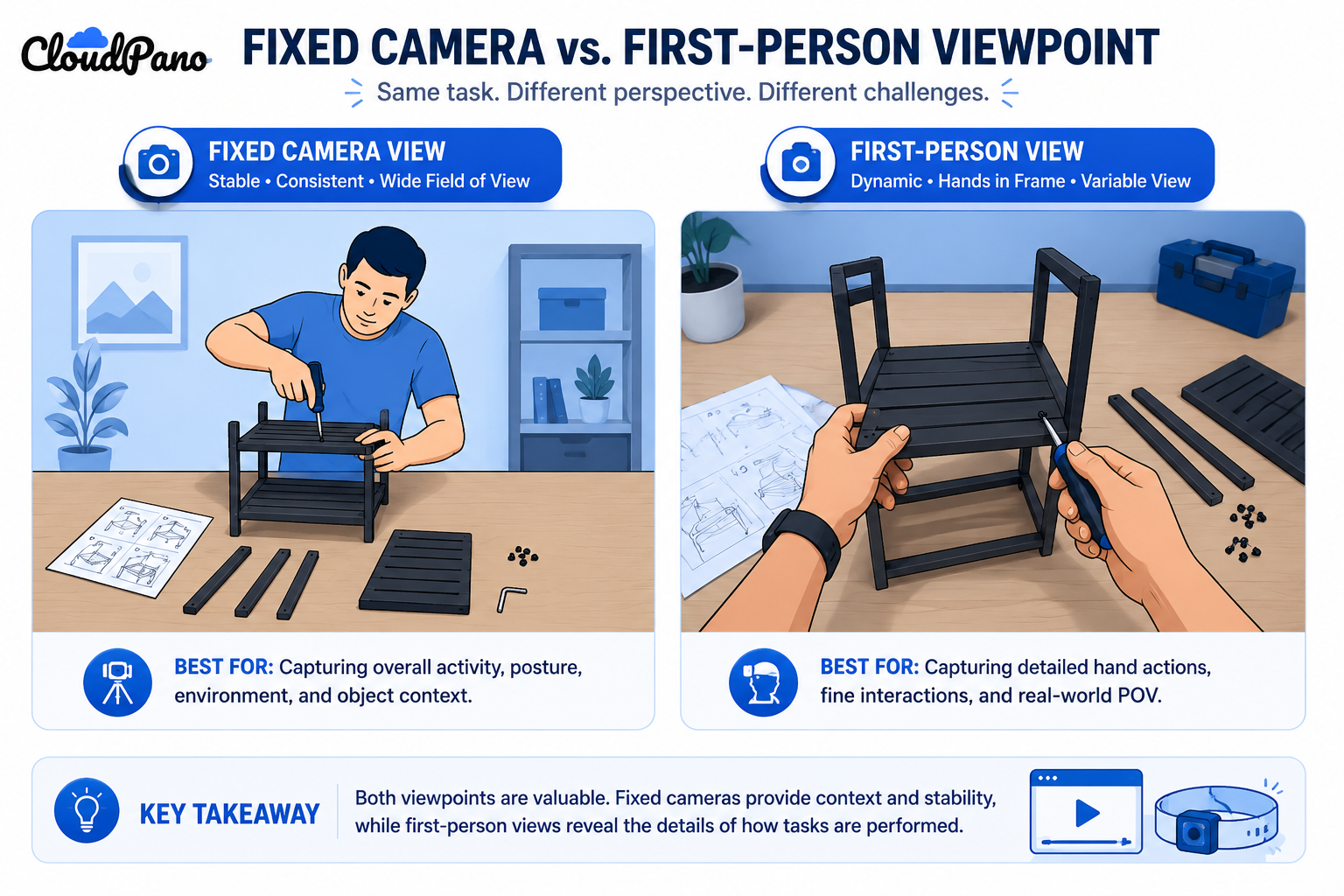
Camera motion handling. Unlike a fixed camera, first-person footage moves constantly with the wearer's head or body, meaning objects and scenes shift, blur, and reframe far more than static-camera video, requiring annotation guidelines that account for this baseline instability.

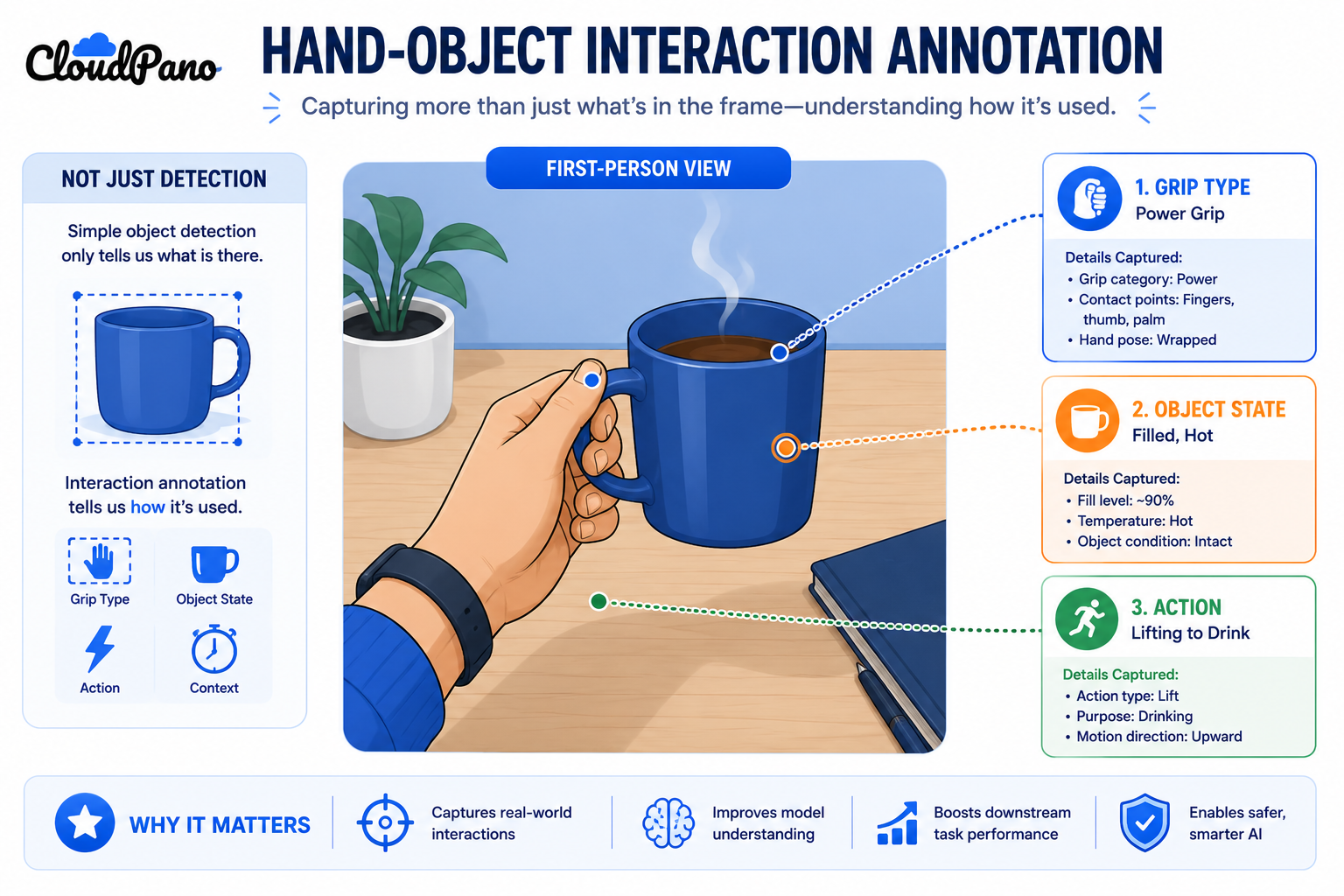
Hand-object interaction annotation. First-person footage frequently centers on hands manipulating objects at close range, which means annotation needs to capture interaction detail — grip, object state, action being performed — not just object presence.
Frequent occlusion and reappearance. Objects and even the wearer's own hands regularly move in and out of frame or become partially obscured by the interaction itself, requiring specific conventions for tracking continuity that differ from fixed-camera occlusion handling.

Activity segmentation from a moving viewpoint. Identifying discrete activities — a specific task or action — needs to work despite the viewpoint itself changing throughout, rather than assuming a stable reference frame.

Understanding how these workflows operate as addressing genuinely different visual conditions — not just "video annotation with a different camera angle" — is what separates egocentric annotation done well from fixed-camera guidelines applied without adjustment.
Step-by-Step Workflow

  1. Assess the specific egocentric conditions your dataset presents. Camera motion intensity, typical hand-object interaction frequency, and activity types all shape the annotation approach needed.
  2. Write annotation guidelines that explicitly address motion and occlusion. Standard fixed-camera guidelines won't cover the specific ambiguity egocentric footage introduces.
  3. Define conventions for hand-object interaction annotation. Establish how to label grip type, object state, and the specific action being performed at close range.
  4. Select tooling that supports rapid, motion-tolerant annotation. Standard video annotation tools may not handle the frame-to-frame instability typical of egocentric footage well.
  5. Train annotators specifically on egocentric-viewpoint challenges. Recognize that annotators experienced with fixed-camera video may need dedicated training for this specific context.
  6. Apply quality assurance addressing occlusion handling and interaction labeling accuracy. Standard tracking-continuity checks need to be adapted for the frequency and nature of egocentric occlusion.
  7. Validate the finished dataset against your specific activity recognition or interaction modeling goals. Confirm the annotation format and detail level actually support the downstream task.

Industry Use Cases

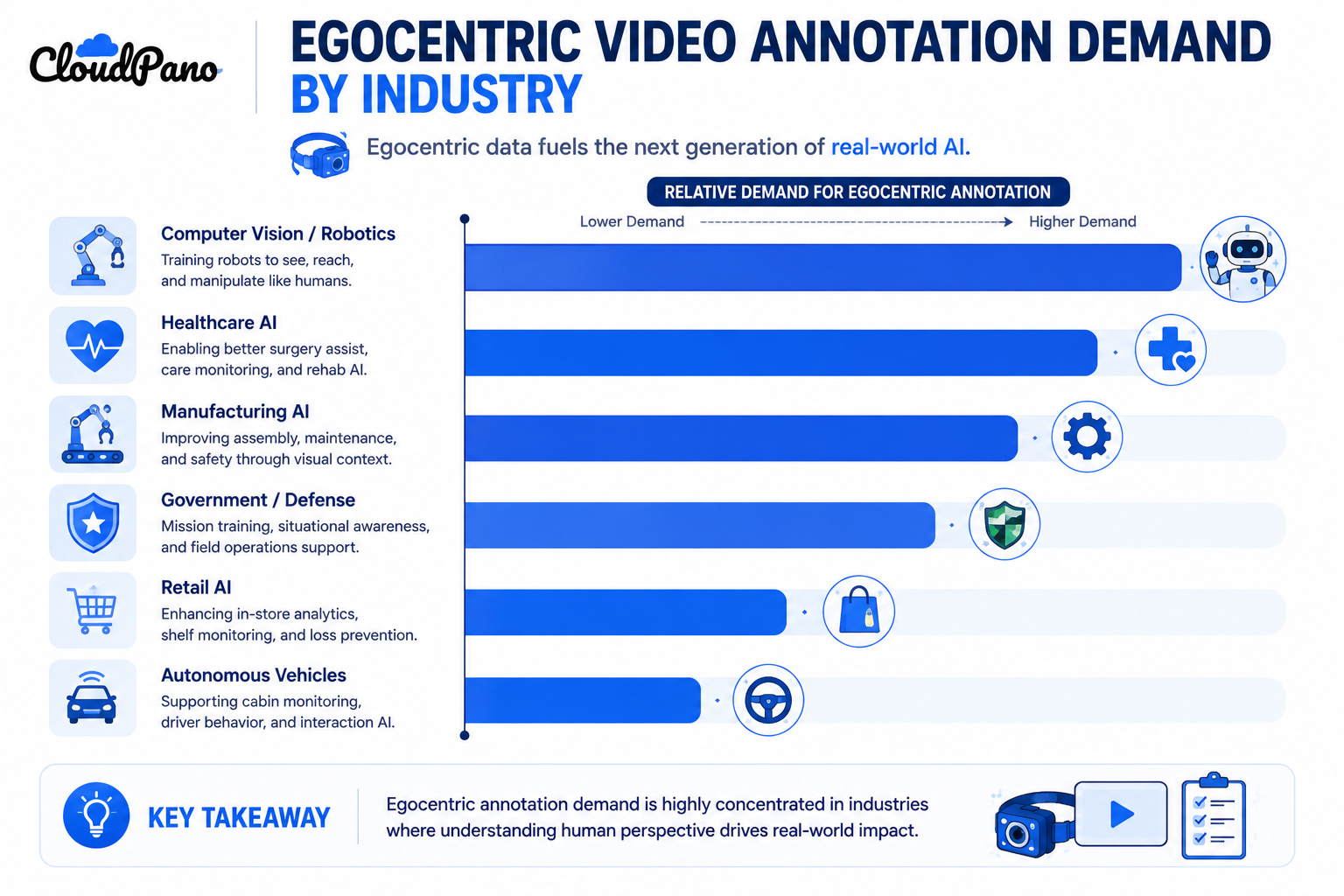
Bar chart showing egocentric video annotation demand across industries
  • Computer vision / robotics: Egocentric video annotation supports robots learning from human demonstration, where hand-object interaction detail directly informs manipulation learning.
  • Healthcare AI: First-person video supports training for surgical assistance or rehabilitation monitoring applications, where precise activity and interaction labeling matters for clinical relevance.
  • Manufacturing AI: Wearable-camera footage of assembly or inspection tasks supports process training and quality monitoring applications requiring detailed activity segmentation.
  • Retail AI: First-person footage from associates or customers supports understanding of in-store interaction patterns, though with less intensity of hand-object annotation than manipulation-focused domains.
  • Government & defense: Body-worn camera footage requires egocentric-specific annotation for training systems, often layered with strict security and privacy handling requirements.
  • Autonomous vehicles: These specific egocentric annotation challenges have limited direct application, since vehicle-mounted cameras don't share the same motion and interaction characteristics as a human-worn camera.

Benefits

  • Models that genuinely understand first-person activity. Properly annotated egocentric data teaches a model to recognize interaction and activity from the actual viewpoint it will encounter in deployment.
  • Better support for demonstration-based learning. Detailed hand-object interaction annotation gives robotics and manipulation-learning applications the specific information they need.
  • Reduced downstream activity recognition errors. Consistent handling of occlusion and motion in annotation reduces the chance a model learns unreliable patterns from inconsistent labels.
  • More efficient annotator onboarding for this specific domain. Clear, egocentric-specific guidelines reduce the ramp-up time compared to adapting fixed-camera instructions on the fly.
  • Better-targeted quality assurance. QA processes designed for egocentric-specific error patterns catch issues that standard fixed-camera checks would miss.

Common Mistakes

  • Applying fixed-camera annotation guidelines to egocentric footage without adjustment. Missing that motion, occlusion frequency, and hand-object interaction all require guidance standard video annotation doesn't provide.
  • Underestimating annotator training needs for this specific viewpoint. Assuming general video annotation experience transfers directly without dedicated egocentric-specific training.
  • Not defining specific conventions for hand-object interaction detail. Leaving grip type, object state, and action labeling ambiguous rather than explicitly defined.
  • Using tooling not suited to rapid motion and frequent occlusion. Attempting to annotate egocentric footage with tools designed for stable, fixed-camera video.
  • Applying standard occlusion-handling QA to egocentric-specific occlusion patterns. Missing that the frequency and cause of occlusion in first-person footage differs meaningfully from fixed-camera scenarios.
  • Not validating the dataset against the specific downstream task. Assuming general activity annotation is sufficient without confirming it actually supports the intended interaction modeling or recognition goal.

Best Practices

  • Assess the specific egocentric conditions in your footage before designing an annotation approach.
  • Write guidelines that explicitly address camera motion, occlusion frequency, and hand-object interaction detail.
  • Define clear conventions for interaction annotation — grip, object state, action — rather than leaving these judgment calls implicit.
  • Select tooling genuinely suited to motion-heavy, frequently-occluded footage.
  • Train annotators specifically for egocentric viewpoint challenges, even if they have strong fixed-camera video experience.
  • Validate the finished dataset against your specific activity recognition or interaction modeling requirements before considering the project complete.

FAQ

What makes first-person video annotation different from standard video annotation?

Constant camera motion from the wearer's movement, frequent close-range hand-object interaction, and a viewpoint that shifts continuously rather than staying fixed, all of which require annotation guidance standard video annotation doesn't address.

What is egocentric video annotation specifically?

Labeling video captured from a first-person, typically wearable-camera perspective, addressing conditions like motion, occlusion, and hand-object interaction that are distinctive to this viewpoint.

Why does hand-object interaction annotation matter for first-person vision datasets?

Because egocentric footage frequently centers on hands manipulating objects at close range, and capturing interaction detail — not just object presence — is often the actual signal a downstream model needs to learn.

Can annotators experienced with fixed-camera video annotate egocentric footage without additional training?

Generally not without adjustment. Egocentric-specific challenges like constant motion and frequent occlusion require dedicated training even for annotators with strong standard video annotation experience.

How is occlusion different in egocentric footage compared to fixed-camera video?

Occlusion in egocentric footage often results from the wearer's own hands or body interacting with objects at close range, occurring more frequently and differently than occlusion in typical fixed-camera scenes.

What industries rely most on first-person video annotation?

Robotics and manipulation learning rely on it directly for hand-object interaction data, with meaningful use in healthcare, manufacturing process training, and body-worn camera applications in government and defense contexts.

Does egocentric video annotation require different tooling than standard video annotation?

Often yes. Tooling needs to handle rapid motion and frequent occlusion effectively, which standard video annotation tools designed for stable, fixed-camera footage may not support well.

Conclusion

First-person video annotation requires treating egocentric footage as a genuinely distinct annotation challenge, not standard video labeling viewed from a different angle. Camera motion, frequent hand-object interaction, and a constantly shifting viewpoint all need guidelines, tooling, and quality assurance built specifically for these conditions. Getting this right is what actually produces training data that supports activity recognition or interaction modeling from the first-person perspective a deployed model will actually encounter.

🚀 Your All‑In‑One Virtual Experience Stack
🎬
PhotoAIVideo
Turn photos into scroll‑stopping AI videos.
Get Started →
🏡
Pictastic
Instantly stage listings with AI.
Try Staging →
🌀
CloudPano
Create stunning 360° tours in minutes.
Launch Tour →
💰
VirtualTourProfit
Build a profitable virtual tour business.
Learn More →
🤝
CloudPano Reseller
Resell AI visual software without building it.
Become a Reseller →
🚗
Auto CloudPano
Sell more vehicles with 360° experiences.
Explore Auto →
🏗️
AI Floor Plan Builder
Generate detailed floor plans with AI.
Build Now →
📐
3D Measure
Capture accurate floor plans & 3D measurements.
Measure Now →
🧠
AI Training Data
Custom AI training data services.
Learn More →
Share this post
Cloudpano

Choose The Right 360° Camera

Insta360 ONE RS 1-Inch 360 Edition

  • Compact, ready to go anywhere

  • Interchangeable lens that’s upgradeable

  • Dual 1-inch sensors for improved clarity and low light performance

  • Dynamic range and 6K 360° capture

  • 360° photo resolution at 21MP

Learn More

Insta360 X4

  • 8K 360° video recording for ultra-detailed visuals.

  • 4K single-lens mode for traditional wide-angle shots.

  • Invisible selfie stick effect for drone-like perspectives.

  • 2.5-inch touchscreen with Gorilla Glass protection.

  • Waterproof up to 33ft for underwater shooting.

Learn More

Ricoh Theta Z1

  • 360° photo resolution in 23MP

  • Slim design at 24 mm thick

  • Built-in image stabilization for smooth video capture.

  • Internal 19GB storage for photo and video storage.

  • Wireless connectivity for remote control and sharing.

Learn More

Ricoh Theta X

  • 60MP 360° still images for high-resolution photography.

  • 5.7K 360° video recording at 30fps.

  • 2.25-inch touchscreen for intuitive control.

  • USB Type-C port for fast charging and data transfer.

  • MicroSD card slot for expandable storage.

Learn More
Property Marketing
Allows potential buyers to explore properties in detail from anywhere, enhancing the real estate marketing process.
Automotive Spins
Create an interactive virtual showroom and engage affluent digital buyers with live 360º video calls, all through the CloudPano mobile app for a complete automotive sales solution.
Interactive Floor Plans
Create 2D and 3D floor plans with measurements in 4 minutes or less, all from your phone. Download the Floor Plan Scanner app and get your first scan free.

360 Virtual Tours With CloudPano.com. Get Started Today.

Try it free. No credit card required. Instant set-up.
Try it free
Latest posts

See our other posts

Interviews, tips, guides, industry best practices, and news.

Synchronizing Video and Motion Data for Robot Imitation Learning

Video annotation robotics motion data for imitation learning requires precise synchronization between video frames and the robot's own joint angles or end-effector trajectory, not just labeling visible objects. Timing misalignment between video and motion data teaches a model an inaccurate mapping between what it sees and how it should move.
Read post

Annotating First-Person and Human Activity Video Datasets

First-person video annotation addresses challenges third-person video doesn't — constant camera motion from the wearer's own movement, frequent close-range hand-object interaction, and a viewpoint that shifts unpredictably rather than staying fixed. These conditions require annotation guidelines and quality checks distinct from standard, fixed-camera video labeling approaches.
Read post

AI Dataset Licensing and Copyright: What Training Data Teams Need to Know

AI dataset licensing requires confirming that content used for training is either properly licensed, in the public domain, or covered by an applicable legal exception, since public accessibility alone doesn't establish training rights. Copyright questions specific to AI training remain actively contested in ongoing litigation, making this an area requiring real legal diligence.
Read post