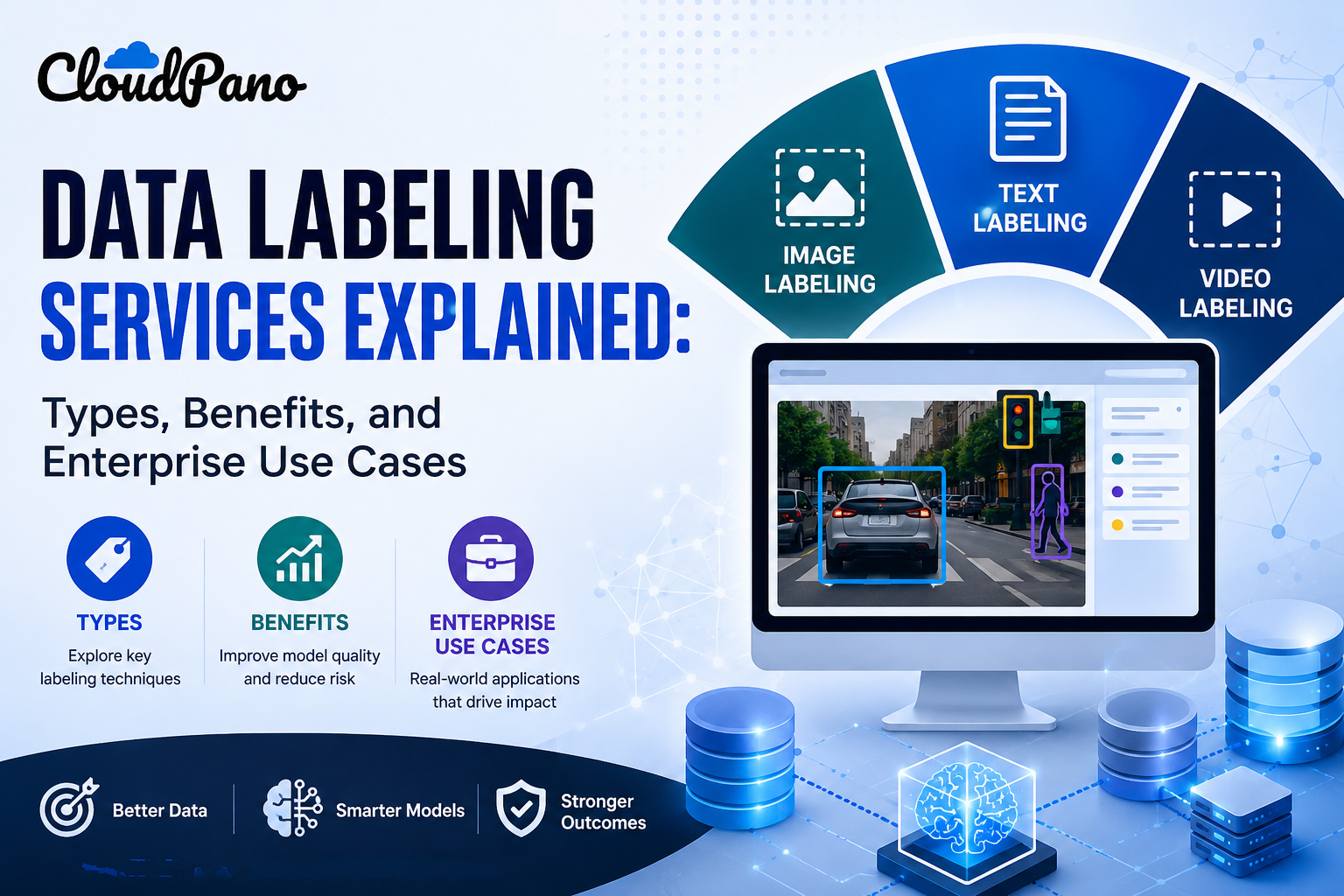
Data Labeling Services Explained: Types, Benefits, and Enterprise Use Cases
Cloudpano
July 20, 2026
•
5 min read
Share this post
Data Labeling Types: A Guide to Image, Text, and Video Annotation Techniques
Knowing you need labeled data and knowing which data labeling types actually apply to your project are two different things. Most teams start with the first and only work out the second once they're already trying to scope a project or write a vendor requirement.
That gap causes real friction. A project brief that says "we need image labeling" without specifying bounding boxes versus segmentation leaves a huge amount of room for a mismatched proposal, mismatched timeline, and mismatched cost.
Why It Matters
Choosing the wrong labeling type for your data isn't a minor scoping error — it directly shapes what your model can learn. A classification label tells a model "this image contains a car," while a bounding box tells it "the car is here, in this exact region," and a model trained for one task can't simply repurpose labels built for the other.
Google Research's "Data Cascades" study documented how mismatches and gaps introduced early in data preparation compound into expensive, hard-to-trace problems later in a model's lifecycle (Sambasivan et al., Google Research), and choosing the wrong labeling type is exactly the kind of early mismatch that fits this pattern.
NIST's AI Risk Management Framework treats data quality and fitness for purpose as foundational to trustworthy AI (NIST AI RMF), and a labeling type that doesn't match your actual model objective undermines that fitness before training even begins.
The pace of AI development adds pressure to get this right the first time. Stanford HAI's AI Index has tracked how quickly organizations are moving models into production (Stanford HAI, AI Index Report), leaving little room for a full relabeling cycle if the wrong type was chosen initially.
How It Works
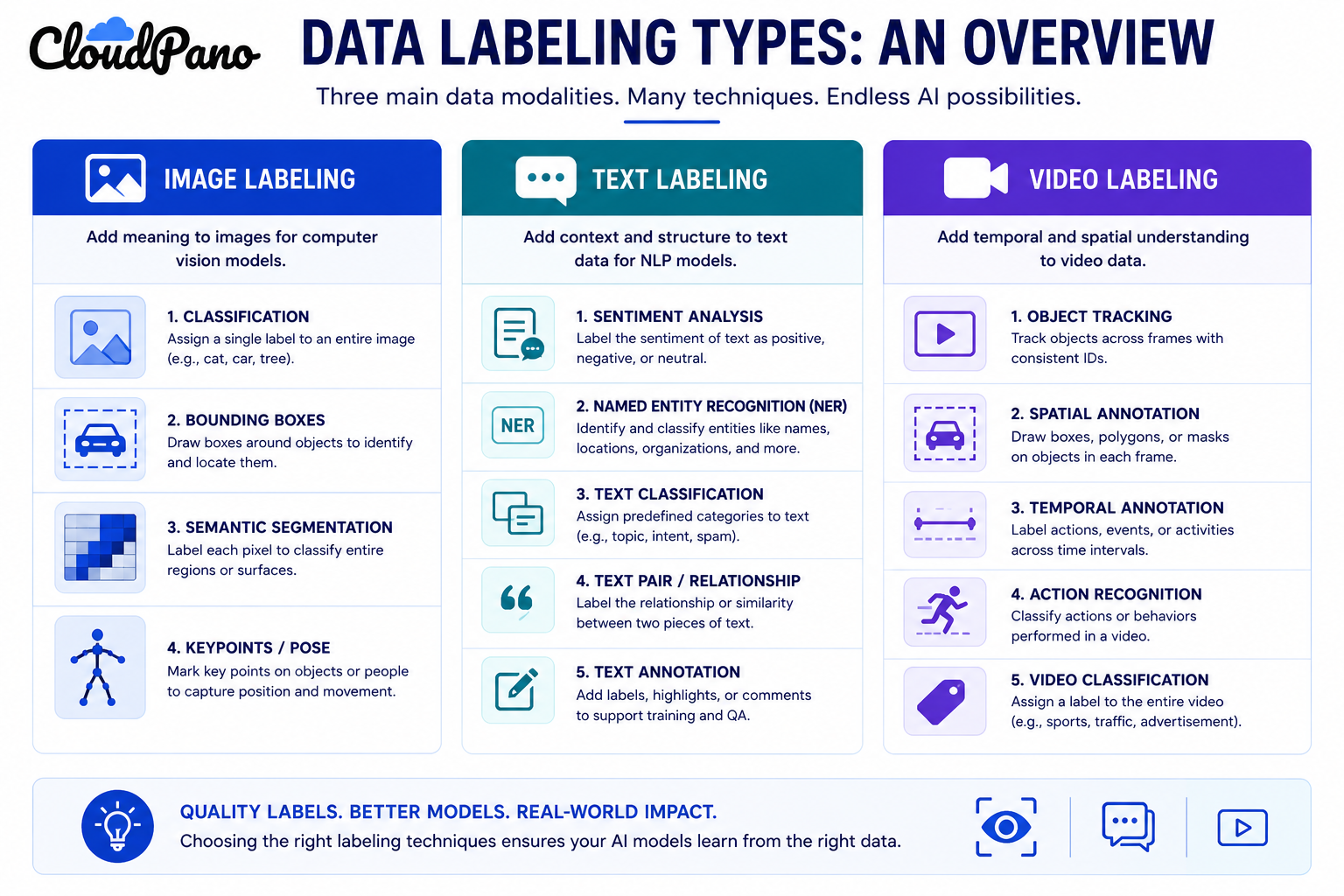
Data labeling types generally split into three modality categories, each with several specific techniques. Understanding how these workflows operate at the technique level, not just the modality level, is what actually determines project scope.
Image labeling covers techniques applied to static visual data:
Classification — assigning one or more category labels to an entire image (e.g., "contains a defect" or "no defect").
Bounding boxes — drawing a rectangle around an object of interest to mark its location.
Semantic segmentation — labeling every pixel in an image according to the object or region it belongs to.
Keypoint annotation — marking specific points on an object, commonly used for pose estimation or facial landmark detection.
Text labeling covers techniques applied to written or transcribed language:
Classification — assigning a category to a piece of text, such as topic or intent.
Named entity recognition (NER) — tagging specific spans of text as people, organizations, locations, or other defined entity types.
Sentiment analysis labeling — tagging text with the emotional tone or opinion it expresses.
Preference and ranking labeling — comparing two or more text outputs and labeling which is preferred, common in LLM development.
Video labeling covers techniques applied to sequential visual data:
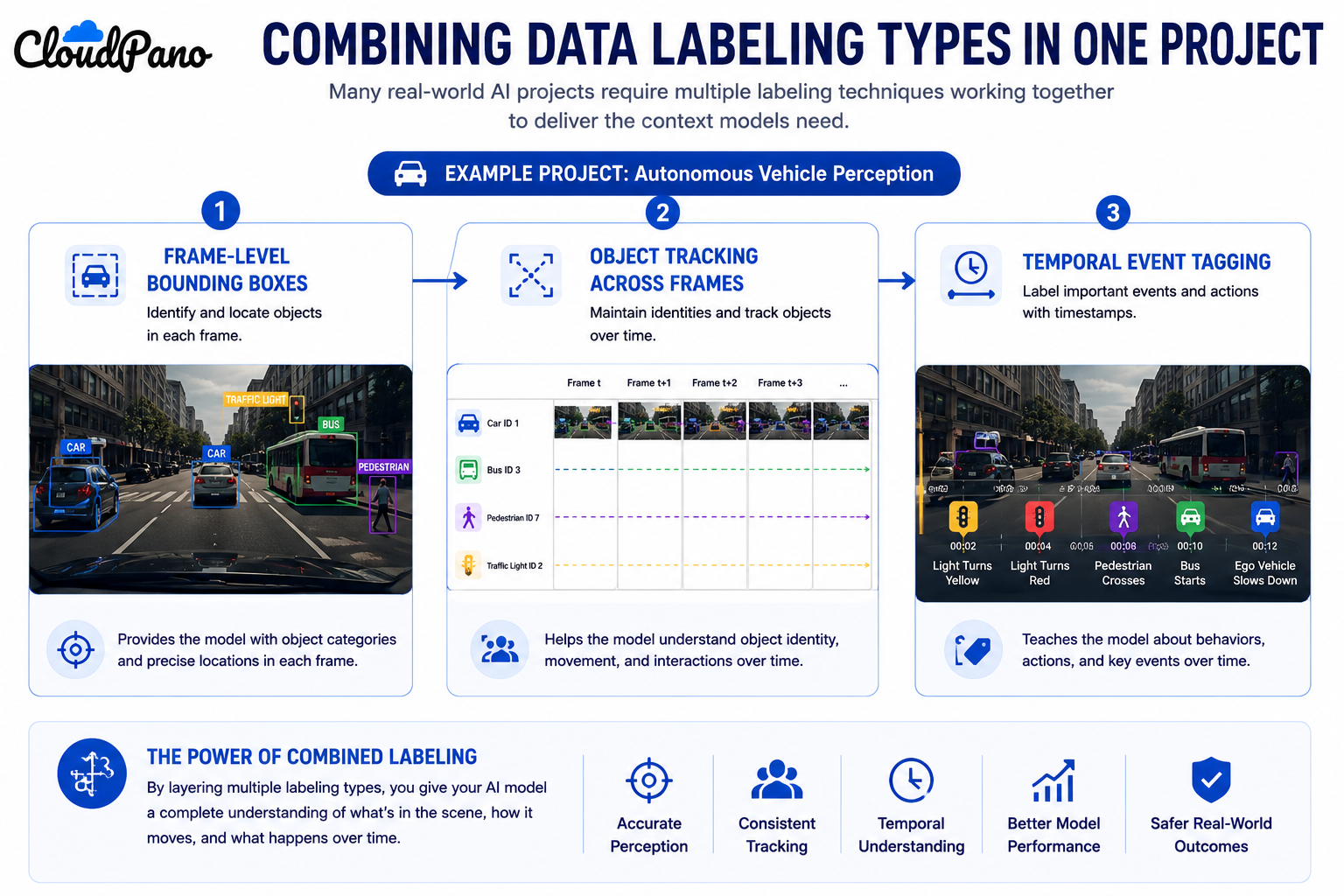
Object tracking — following a labeled object's bounding box or segmentation across multiple frames.
Action recognition — labeling specific actions or events occurring within a video segment.
Temporal event tagging — marking the start and end timestamps of a defined event within a longer video.
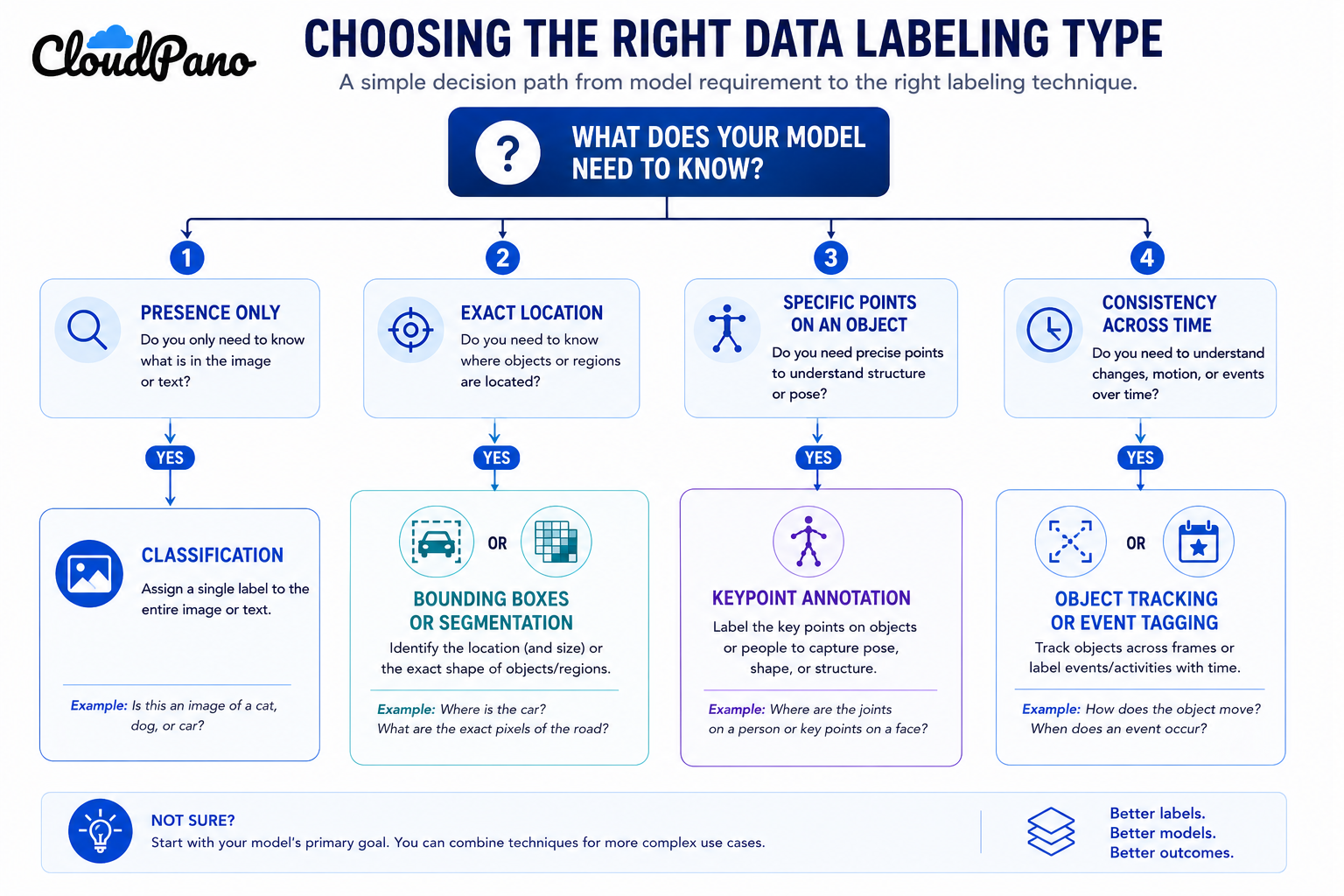
Step-by-Step Workflow for Choosing the Right Type
Define what your model needs to detect or understand. A model that needs to know "is this object present" needs a different label type than one that needs to know "exactly where is this object."
Match your data modality to its category of techniques. Confirm whether your data is fundamentally image, text, or video before narrowing to a specific technique within that category.
Select the most specific technique that meets your model's requirement. Don't default to a more complex technique (like segmentation) if a simpler one (like classification) meets the actual need.
Write guidelines specific to the chosen technique. Bounding box guidelines, NER guidelines, and tracking guidelines each need different edge-case coverage.
Pilot the labeling type on representative data. Confirm the technique actually produces labels your model pipeline can use before committing to full volume.
Apply quality assurance specific to the technique. Boundary agreement checks for bounding boxes, category agreement for classification, tracking consistency for video.
Revisit the technique choice if project requirements change. A project that starts needing simple classification sometimes evolves to require segmentation or tracking as model requirements mature.
Industry Use Cases
Computer vision / robotics: Heavy use of bounding boxes, segmentation, and keypoint annotation for object detection and pose estimation tasks.
Autonomous vehicles:Video labeling techniques like object tracking and temporal event tagging dominate, layered with image-based bounding boxes for individual frame analysis.
Healthcare AI: Segmentation for diagnostic imaging (marking tumor boundaries, for example) alongside text labeling for clinical note classification.
Retail AI: Image classification for product categorization, paired with text labeling for sentiment analysis on customer reviews.
LLM developers: Almost entirely text labeling — classification, NER, and preference ranking dominate over image or video techniques here.
Government & defense: A mix of image segmentation for geospatial imagery and video labeling for surveillance footage analysis, often under strict security requirements.
Benefits of Understanding Data Labeling Types
More accurate project scoping. Knowing the specific technique needed lets you estimate cost, timeline, and required annotator expertise correctly from the start.
Better vendor and team communication. Specifying "bounding boxes" instead of "image labeling" prevents a vendor or internal team from guessing at what's actually needed.
Alignment between labels and model objective. Choosing the technique that matches what your model actually needs to learn avoids wasted labeling effort on the wrong level of detail.
Easier quality assurance design. Each labeling type has its own natural QA method, and knowing the type in advance lets you design the right checks from day one.
Common Mistakes
Defaulting to a more complex technique than necessary. Choosing segmentation when classification would meet the model's actual requirement adds unnecessary cost and time.
Underspecifying the technique when requesting labeling work. Asking for "image labeling" or "text labeling" without naming the specific technique invites a mismatched proposal.
Applying one QA method across different labeling types. Boundary agreement checks don't translate directly to classification agreement or entity-tagging agreement — each technique needs its own approach.
Ignoring how techniques interact within a single project. Many real projects need more than one type — missing that a video project also needs frame-level image techniques, for example.
Not revisiting the labeling type as model requirements evolve. Sticking with an initial classification-only approach even after the model's actual requirements grow to need spatial or temporal detail.
Assuming annotator skill transfers evenly across techniques. An annotator skilled at classification isn't automatically equipped for segmentation or NER without specific training.
Best Practices
Always name the specific technique — not just the modality — when writing labeling requirements internally or for a vendor.
Choose the simplest technique that fully meets your model's actual requirement rather than defaulting to the most detailed option available.
Design quality assurance specific to each technique in use, rather than applying one generic QA method across a multi-type project.
Train or select annotators based on the specific technique required, not just general modality experience.
Reassess the labeling types in use periodically as a project or model's requirements evolve. McKinsey's research on generative AI adoption notes that data readiness — including how precisely organizations define their actual labeling requirements — remains a consistently underestimated factor in AI project outcomes (McKinsey, "The economic potential of generative AI").
FAQ
What are the main data labeling types?
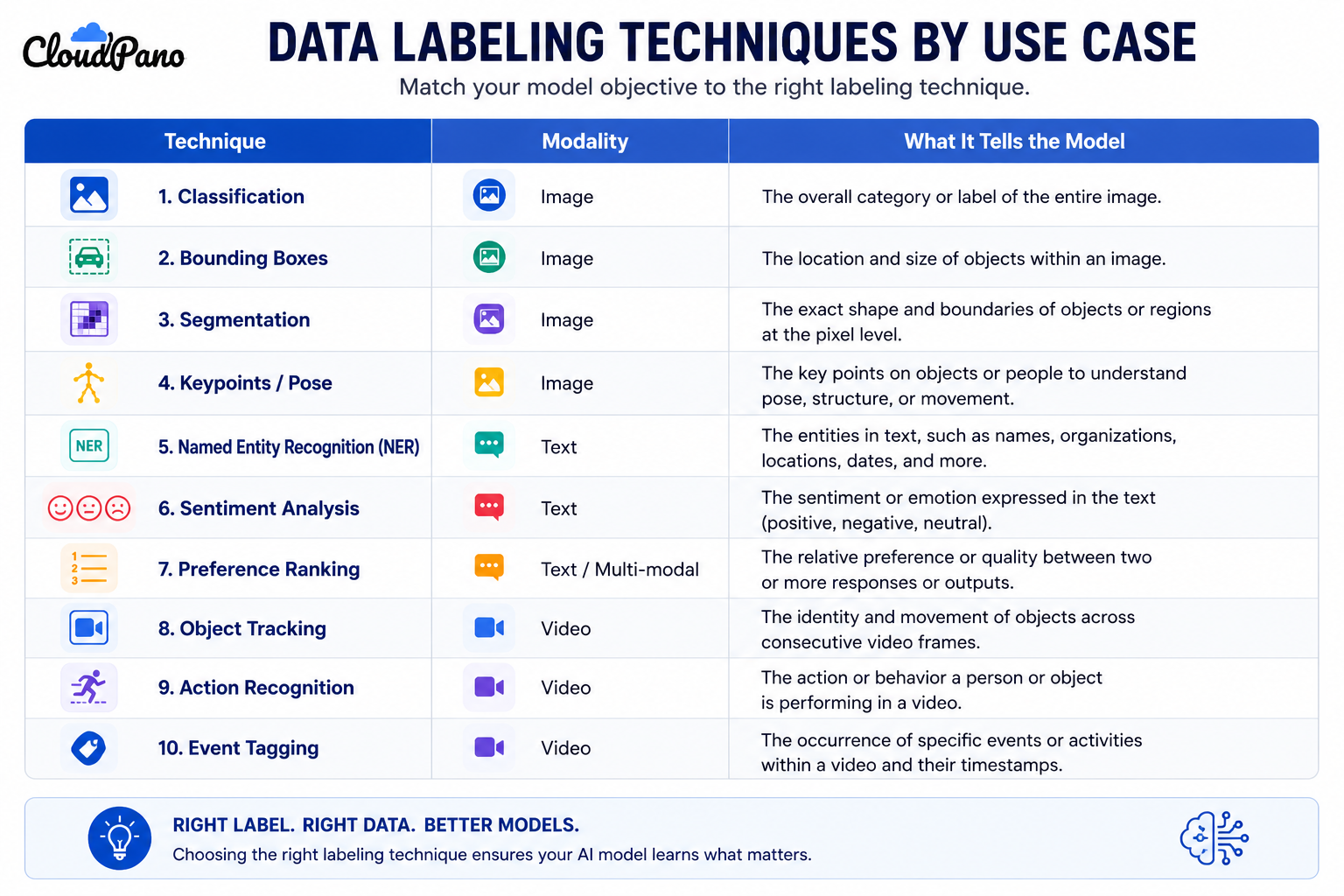
The three broad categories are image labeling (classification, bounding boxes, segmentation, keypoints), text labeling (classification, entity recognition, sentiment, preference ranking), and video labeling (tracking, action recognition, event tagging).
What's the difference between image labeling and video labeling?
Image labeling applies techniques to individual static images, while video labeling applies techniques across sequences of frames, often requiring the labeled object or event to be tracked consistently over time.
How do I choose the right labeling type for my project?
Start by defining exactly what your model needs to detect or understand, then match that requirement to the most specific technique available rather than defaulting to a more complex one.
What is text labeling used for in LLM development?
Text labeling techniques like classification, entity recognition, sentiment tagging, and preference ranking are commonly used to train and evaluate LLMs on tasks like intent detection, content moderation, and response quality comparison.
Can a single project need more than one labeling type?
Yes. Many real-world projects combine techniques — for example, a video project may need frame-level bounding boxes in addition to sequence-level object tracking.
Which data labeling type is the most time-intensive?
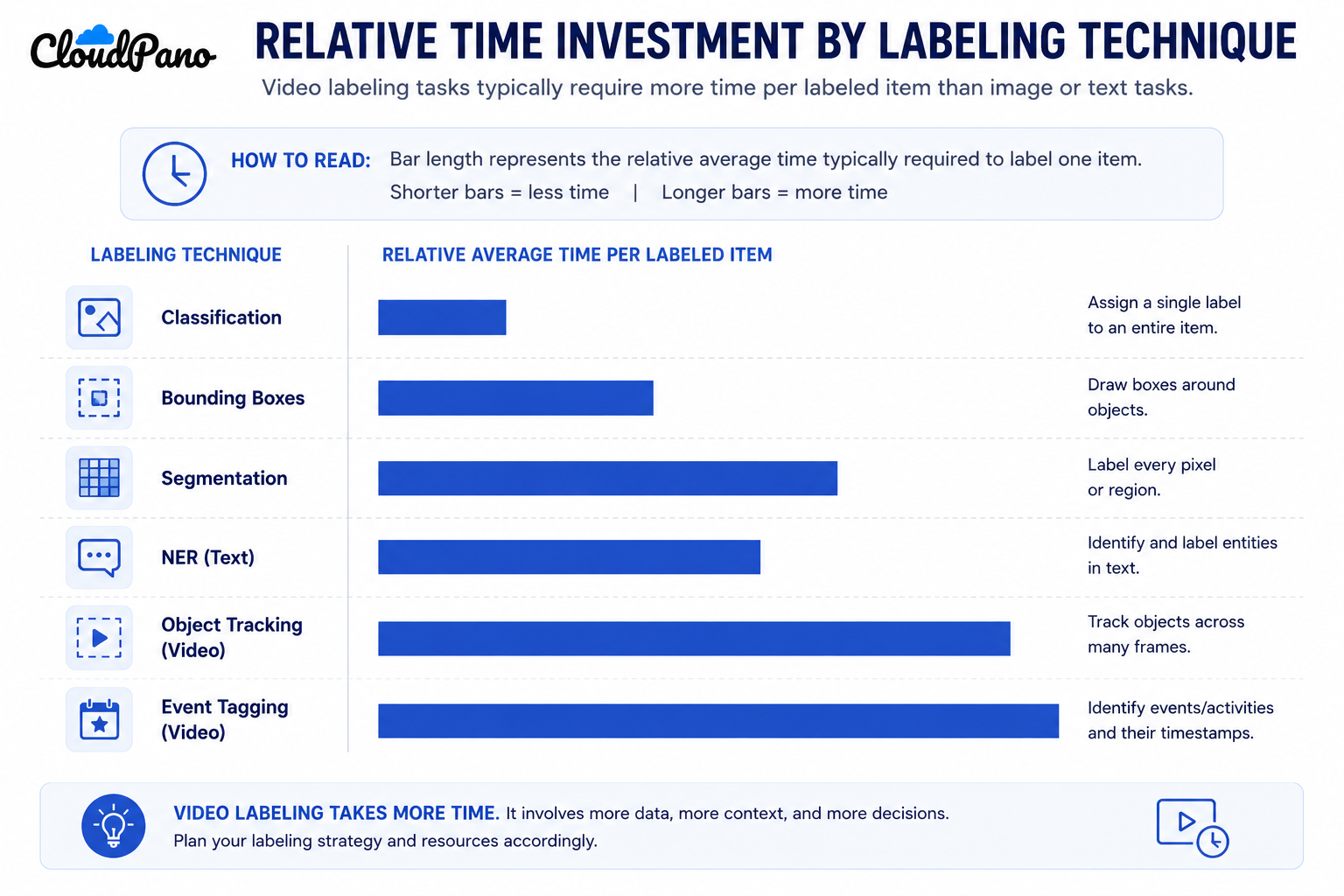
Video labeling techniques, particularly object tracking and temporal event tagging, are typically the most time-intensive since they require consistency across many frames rather than a single judgment per item.
How does quality assurance differ across labeling types?
Each technique has its own natural QA focus — boundary agreement for bounding boxes and segmentation, category agreement for classification, and tracking consistency for video — so QA methods should be matched to the specific type in use.
Conclusion
Data labeling types aren't interchangeable, and the specific technique you choose shapes exactly what a model can learn from the resulting data. Getting clear on image, text, and video labeling techniques before scoping a project — rather than defaulting to a broad modality description — leads to more accurate proposals, better quality assurance, and fewer surprises mid-project.
Create an interactive virtual showroom and engage affluent digital buyers with live 360º video calls, all through the CloudPano mobile app for a complete automotive sales solution.
Create 2D and 3D floor plans with measurements in 4 minutes or less, all from your phone. Download the Floor Plan Scanner app and get your first scan free.
Building a custom computer vision dataset takes more than collecting images and adding labels. Learn how to define annotation requirements, gather representative visual data, maintain labeling quality, and prepare reliable datasets for AI model training.
Bounding boxes, segmentation, and classification are three essential computer vision annotation methods, but they serve different purposes. Discover how each works, where it performs best, and how to choose the right annotation approach for accurate, scalable AI training data.
Home robots and vision models need video from real homes, yet the best-known indoor datasets cover a few dozen kitchens or a few hundred people. This guide explains why home footage is scarce, what public datasets offer, and how custom in-home collection works.


.png)




.png)

.png)








.svg)


.svg)