


.png)


The difference between a smooth AI real estate video and a weird one often comes down to one thing:
The still photo was never chosen with motion in mind.
A room photo may look great in a gallery. It may be bright, sharp, professionally edited, and perfectly usable for the MLS. But once that same image becomes the source for a moving video, a new question appears:
Where should the camera move?
Should it pan left to right?
Should it tilt upward toward the ceiling?
Should it push into the kitchen island?
Should it reveal the windows?
Should it hold steady because the room is small?
That is the part many agents and photographers miss. AI video is not just about uploading photos and hoping for motion. The best results come from giving the system still images that already suggest a clean camera path.
With PhotoAIVideo’s real estate photo-to-video platform, real estate teams can turn standard room stills into polished listing videos. But if you want better pans, smoother tilts, and more natural movement, you need to think about layout before you generate the video.
This guide explains how to choose, crop, sequence, and prepare standard real estate photos so AI camera motion feels intentional instead of random.
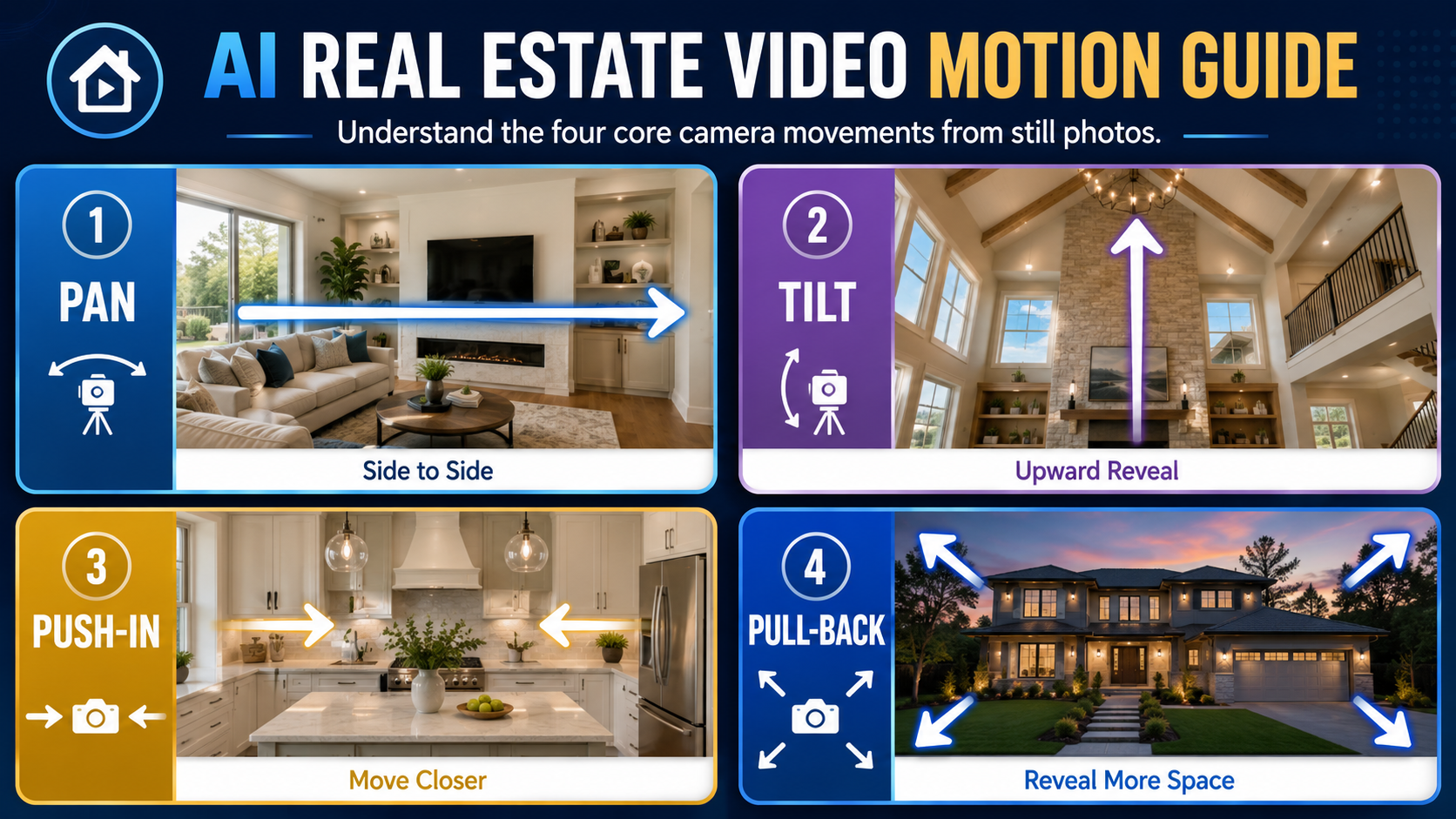
AI camera panning and tilting means using artificial intelligence to simulate camera movement from a still image.
A pan moves side to side.
A tilt moves up or down.
A push-in moves closer to the subject.
A pull-back creates a wider reveal.
A subtle drift adds motion without making the viewer feel like the room is spinning.
When you create real estate videos from photos with AI, the software is interpreting the still image and deciding how motion should happen. It looks at the room, the visual depth, the subject, the edges of the frame, and the likely focal point.
But the AI only has what you give it.
If the source image is too tight, crooked, cluttered, dark, or visually confusing, the motion may feel awkward. If the source image has a clear subject, clean lines, enough breathing room, and a natural direction of attention, the motion usually feels stronger.
A standard room still can become a great video shot when it has:
This is where agents and photographers can improve output before they ever touch the video tool.
Real estate video has one job: help buyers understand the space faster.
Static photos are helpful, but video adds rhythm. It lets the viewer feel like they are moving through the property. That matters because buyers are not calmly studying every image. They are scrolling, comparing, saving, and deciding quickly whether a listing is worth their time.
The National Association of Realtors continues to highlight how important digital search and online property information are in the buyer journey through NAR’s home buyer and seller research. Realtor.com also emphasizes the importance of strong listing presentation through Realtor.com’s home selling and listing guidance.
That is why movement matters.
A good pan across a living room can show width.
A slow push toward a kitchen island can create desire.
A tilt up in a vaulted room can reveal ceiling height.
A pull-back from a primary bedroom can make the space feel larger.
A simple hold on a small bathroom can avoid unnecessary motion.
For agents, better camera motion means stronger listing videos. For photographers, it means better deliverables and fewer client complaints. For brokerages, it means more consistent media across agents. For property managers, it means rental videos that feel clean and professional without needing a second shoot.
This is not just creative preference.
Motion changes how buyers perceive space.
Most real estate photos are selected for gallery viewing, not video motion.
That creates problems.
Here is what actually happens: a photographer delivers 35 edited images. The agent uploads all of them into a video tool. The AI creates motion from every frame. Some shots look great. Others feel strange.
The kitchen pan moves toward a blank wall.
The bathroom zooms into a mirror reflection.
The bedroom tilt emphasizes the ceiling fan instead of the room.
The hallway shot feels too fast.
The living room movement cuts off the sofa.
The exterior shot pushes into the driveway instead of the home.
This actually happens.
Not because AI video is broken, but because the input photos were not curated for motion.
A still photo can survive visual clutter because the viewer controls how long they look at it. A video shot cannot. Once motion begins, the viewer’s eye follows the movement. If the movement leads to the wrong part of the room, the video feels less professional.
That is why the new workflow is not simply:
Upload every photo → generate video.
The better workflow is:
Choose motion-friendly photos → organize by room story → match the photo to the right movement → generate video → review and adjust.
That is where an AI app to turn property photos into videos becomes more powerful. It is not just creating motion. It is helping you turn existing stills into a more controlled visual walkthrough.
PhotoAIVideo is built for real estate professionals who already have listing photos and want to turn them into video assets without filming the property again.
Instead of hiring a videographer for every room or manually animating every photo in editing software, you can use PhotoAIVideo’s AI video workflow to create property videos from existing still images.
That makes it practical for agents who need faster listing content, photographers who want to offer video add-ons, brokerages that need repeatable quality, and property managers who need scalable rental marketing assets.
It is especially useful as AI video software for real estate photographers because photographers already understand composition. They know which photos have strong lines, clean lighting, and natural depth. With a few small workflow changes, they can capture or select photos that perform better in motion.
PhotoAIVideo can also support different output needs. A social media version may use branded elements, captions, and a call to action. An unbranded version may be needed for local MLS use, depending on the market. That is why teams looking for a real estate video software that works with MLS rules should think about motion and versioning together.
The photo determines the movement.
The version determines where that movement can be used.
Every room still needs a visual anchor.
The anchor is the thing the viewer should notice first.
In a living room, it may be the fireplace, window wall, sectional sofa, or open connection to the kitchen. In a kitchen, it may be the island, range hood, sink wall, or breakfast area. In a bedroom, it may be the bed, windows, or size of the room. In an exterior shot, it may be the front elevation, pool, porch, or yard.
Before generating the video, ask:
What should the camera movement reveal?
If the photo has no obvious anchor, AI motion may feel less focused. If the room has two competing anchors, the motion may choose one that does not match your marketing goal.
A practical rule:
Use one strong subject per image.
If the image tries to show too much, motion becomes harder to control.

Different rooms need different motion.
A living room often works well with a slow left-to-right pan because buyers want to understand width and connection to other spaces. A kitchen may work well with a push-in toward the island or a gentle pan across cabinetry. A bathroom usually works better with subtle motion because the space is smaller. A vaulted room may benefit from a tilt upward. A backyard may work well with a wide reveal.
Use this simple guide:
The mistake is using dramatic motion everywhere.
Not every photo needs a big camera move.
Sometimes the most premium-looking motion is almost invisible.

AI motion needs space.
If the subject is too close to the edge of the photo, a pan or zoom may crop important details. This is especially common with tight kitchen shots, small bedrooms, bathrooms, and vertical exterior photos.
Look for images with breathing room around the main subject.
For example:
This is one of the easiest ways to improve AI video quality.
A photo that looks fine as a still may be too tight for motion.
Real estate photos are full of visual lines:
Countertops
Ceiling beams
Floorboards
Window rows
Hallways
Cabinet lines
Stair railings
Rooflines
Patio edges
These lines tell the viewer where to look.
They also help suggest camera direction.
If a kitchen island runs horizontally through the frame, a side pan may feel natural. If a hallway pulls the eye forward, a push-in may feel natural. If a vaulted ceiling has beams drawing upward, a tilt may feel natural.
A strong still image already contains a motion path.
You just need to recognize it.
When using PhotoAIVideo examples for inspiration, study not only the final video effect, but also the still photo layout behind the motion. The best shots usually have clean lines and a clear direction of attention.

Camera movement improves when the entire video sequence makes sense.
Do not just choose good individual photos. Place them in a logical order.
A simple residential sequence might be:
This helps each pan or tilt feel like part of a guided tour.
If the video jumps from a bathroom to an exterior to a kitchen to a bedroom, the viewer has to mentally rebuild the home. That creates friction.
The viewer should not feel lost.
The video should feel like walking through the property with a calm, confident guide.
More photos do not always create a better AI video.
If you upload 40 images, the video may include too many weak angles, duplicate rooms, or tight shots. That makes the final result feel busy.
For a clean listing video, start with 10–18 strong images.
For larger homes, use 20–30.
For social media, fewer can be better.
This is especially true for the best AI real estate video generator for social media use case. A short reel needs rhythm. It should not feel like a photo dump with motion added.
Good AI video is not just “more movement.”
It is better selection.
After generating your video, review it with a specific checklist.
Ask:
This is where a little judgment goes a long way.
AI can create the motion, but the real estate marketer still decides whether the motion helps sell the property.
The key idea is simple:
AI movement amplifies whatever the photo already suggests.
If the photo has clarity, motion feels intentional. If the photo has confusion, motion exposes it.
A Realtor gets edited photos back from a photographer and wants a video for social media before the listing goes live.
Instead of uploading every image, the agent selects 12 photos:
Exterior, living, kitchen, dining, primary bedroom, primary bath, secondary bedroom, office, backyard, patio, community feature, and final exterior.
For each image, the agent thinks about motion:
Using PhotoAIVideo’s walkthrough workflow, the agent can create a stronger video because the inputs already support natural motion.
A photographer wants to sell video add-ons without filming video.
The photographer starts capturing stills with video motion in mind:
That photographer can then offer AI-generated listing videos as part of a premium package.
This is a practical use case for AI video software for real estate photographers because the photographer’s skill directly improves the final AI video output.
The better the still, the better the motion.
A brokerage wants every listing to have video, but not every agent has the same media budget.
The marketing coordinator creates a simple internal rule:
Every listing video must include:
This gives the brokerage a repeatable system.
Instead of every agent guessing, the team has a video layout standard that works across listings.
Property managers often work with standard unit photos: living room, kitchen, bedroom, bathroom, laundry, parking, amenities.
The motion strategy should be simple:
Renters want clarity. They are not expecting a cinematic film. They want to know whether the unit is worth seeing.
A clean photo-to-video workflow helps leasing teams move faster without sending staff back to film every unit.

A team creates a branded video for Instagram, Facebook, and email. That version can include logo overlays, contact details, captions, and calls to action.
But the same team may need a cleaner version for MLS use, depending on local rules.
That is where an MLS compliant video maker for property listings workflow becomes important. The camera motion may stay the same, but the overlays, branding, text, and distribution channel may change.
Before uploading to MLS systems, always check your local policy. Branding and contact information rules vary by market.
A full real estate gallery is not automatically a good video sequence.
Some photos exist for documentation. Others exist for marketing. The video should use the marketing shots.
Skip duplicate angles, dark hallways, cluttered utility rooms, awkward corners, and photos with no visual anchor.
If the room has clutter, a mirror reflection, a dark corner, or a distracting object, AI motion may pull attention toward it.
Before uploading, look at each photo and ask:
“If the camera moves here, what will the buyer notice?”
That question prevents many bad video moments.
Fast pans, big zooms, and aggressive tilts can make a listing video feel cheap.
Real estate video should usually feel smooth, confident, and calm.
Use motion to reveal space, not to show off the effect.
A photo that works well in a horizontal video may not work well in a vertical reel.
For social media, make sure the room still can survive cropping. Center the subject. Avoid placing important features too far left or right.
Google’s video and image SEO guidance also reinforces the importance of surrounding visual assets with crawlable, descriptive context. For blog posts and property pages, do not rely on the image alone. Use descriptive headings, filenames, and alt text.
A property website video can be slower and more complete.
A social reel needs faster pacing.
A seller update may need a polished overview.
An MLS-aware video may need to stay clean and unbranded.
Motion choices should match the channel.
The same room still may need different treatment depending on where the video will be used.
Use a slow pan when:
Use a push-in when:
Use a tilt when:
Use a subtle drift when:
Use a hold or very minimal movement when:
This is the practical rule:
Let the room decide the motion.
Not every image needs the same move.


Compact, ready to go anywhere
Interchangeable lens that’s upgradeable
Dual 1-inch sensors for improved clarity and low light performance
Dynamic range and 6K 360° capture
360° photo resolution at 21MP

8K 360° video recording for ultra-detailed visuals.
4K single-lens mode for traditional wide-angle shots.
Invisible selfie stick effect for drone-like perspectives.
2.5-inch touchscreen with Gorilla Glass protection.
Waterproof up to 33ft for underwater shooting.

360° photo resolution in 23MP
Slim design at 24 mm thick
Built-in image stabilization for smooth video capture.
Internal 19GB storage for photo and video storage.
Wireless connectivity for remote control and sharing.

60MP 360° still images for high-resolution photography.
5.7K 360° video recording at 30fps.
2.25-inch touchscreen for intuitive control.
USB Type-C port for fast charging and data transfer.
MicroSD card slot for expandable storage.
.png)

.png)

Try it free. No credit card required. Instant set-up.







.svg)


.svg)