


.png)


A listing video sells the home.
A community spotlight video sells the life around the home.
That difference matters more than most agents realize. Buyers rarely choose a property based only on countertops, square footage, and bedroom count. They picture school mornings, coffee runs, weekend parks, commute patterns, local restaurants, walking routes, and whether the neighborhood feels like a place they can belong.
The problem is that most real estate video workflows stop at the property line.
Agents post a listing video. Maybe they post a drone clip. Maybe they share a few Instagram Stories from the open house. Then the content disappears into the feed and the agent starts over with the next listing.
Community spotlight videos fix that.
With the right workflow, a Realtor, photographer, brokerage, or property manager can use listing photos, neighborhood photos, local visuals, captions, and AI motion to create repeatable community videos that build authority long after one listing sells. This is where create real estate videos from photos with AI becomes more than a listing tactic. It becomes a local market positioning strategy.
PhotoAIVideo helps make that practical. Instead of waiting for a full video crew every time you want to highlight a neighborhood, you can turn curated photo sets into polished video assets for social media, email, seller presentations, relocation buyers, landing pages, and neighborhood content campaigns through AI-powered real estate video creation.

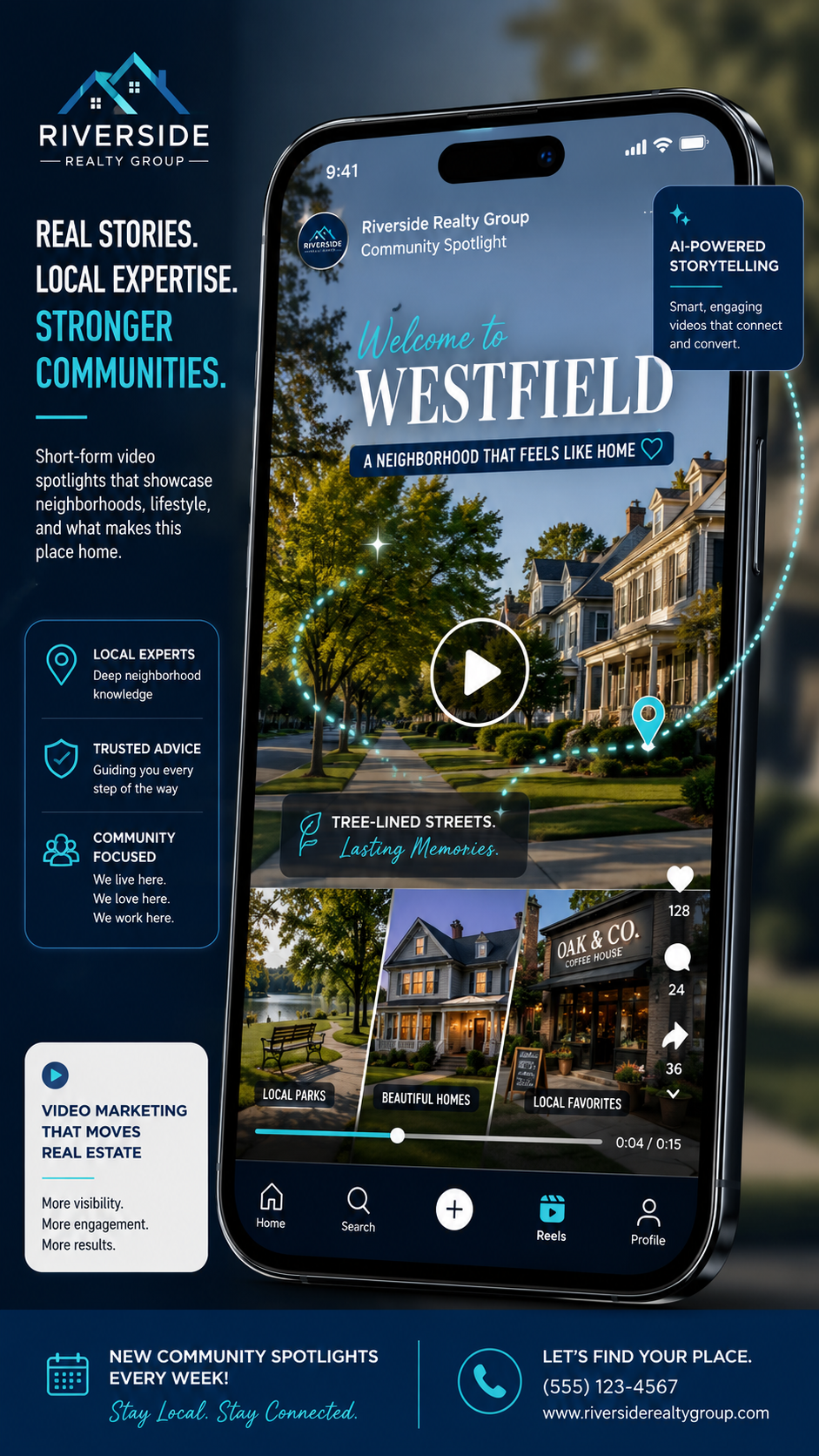
Community spotlight videos are short, visual videos that introduce buyers and sellers to a specific neighborhood, subdivision, condo community, apartment area, rental market, or local lifestyle zone.
They are not generic city promo videos.
A good community spotlight video answers questions buyers actually have:
What does the area feel like?
What types of homes are common here?
What amenities are nearby?
Who is this neighborhood a good fit for?
What makes this location different from the one five minutes away?
How does this area support daily life?

An AI photo-to-video workflow takes still images and turns them into motion-based video content. For real estate, that may include listing photos, exterior shots, amenity photos, school-area visuals, downtown images, park photos, aerial stills, neighborhood entrance signs, clubhouse photos, floor plan screenshots, map-style visuals, or lifestyle imagery.
That is why an AI app to turn property photos into videos can be useful beyond the individual listing. The same technology that creates a listing promo can also help an agent build a library of neighborhood authority content.
Think of it like this:
A listing video says, “Here is this house.”
A community spotlight video says, “Here is why people want to live here.”
That second message has a longer shelf life.
Most agents compete at the listing level. They post the same “just listed” graphics, the same open house reminders, and the same sold announcements.
Neighborhood authority content moves the conversation up a level.
Instead of only asking for attention when you have something for sale, you become the person who consistently explains the local market. That is more valuable for SEO, social media, listing appointments, and referral trust.
The National Association of Realtors has emphasized that online listings need strong visual presentation, including professional photos and staging considerations, because buyers evaluate properties digitally before they ever visit in person. That same buyer behavior applies to neighborhoods. If buyers research homes online, they also research lifestyle, location, walkability, commute, schools, parks, and community fit through NAR guidance on making online listings shine.
This is where community spotlight videos become a lead generation asset.
They can help Realtors:
Attract relocation buyers searching from out of town.
Win sellers by showing a stronger marketing plan.
Create social content that is not always sales-heavy.
Build neighborhood landing pages with video.
Give photographers a new recurring content package.
Help brokerages standardize local market content across agents.
Give property managers better leasing content for apartment communities or rental neighborhoods.
Support email campaigns for buyers who are still deciding where to live.
And the biggest advantage is simple: you do not need to film a full neighborhood documentary every week.
You need a repeatable visual system.
PhotoAIVideo gives agents and media teams a practical way to create that system using existing photos, curated local images, listing visuals, and AI-generated motion through real estate photo-to-video software.
Here is what actually happens.
An agent gets a great listing in a popular neighborhood. The photographer delivers beautiful photos. The agent posts the listing, runs a few social clips, sends an email, and maybe uploads a video to the listing page.
Then the listing sells.
The content dies.
But the neighborhood still has search demand. Buyers are still asking about it. Sellers still want to know whether the agent understands it. Other homeowners in the same community are still potential future clients.
Most agents accidentally treat every listing like a one-time campaign when it could become the start of a neighborhood content engine.
A better workflow is to pull two types of content from the same media set:
The property-specific video: focused on the home.
The community spotlight video: focused on the lifestyle, location, and neighborhood value.
For example, a listing in a golf course community could produce:
A 45-second listing video.
A 30-second “Life in [Neighborhood Name]” video.
A 15-second social reel about the clubhouse, walking trails, and commute.
A seller presentation clip showing how you market the area, not just the house.
A buyer nurture video for relocation leads comparing nearby communities.
This is where automated video marketing software for Realtors becomes powerful. The time savings are important, but the bigger benefit is consistency. If it takes six hours to make one community video, it will not become a repeatable marketing system. If it takes a simple upload-and-generate workflow, it can become part of every listing package.
PhotoAIVideo is best used as the motion layer in a real estate content workflow.
You still need judgment. You still need good photos. You still need to choose the right story.
But you do not need to manually edit every neighborhood video from scratch.
A practical PhotoAIVideo workflow might look like this:
You gather 8–15 images connected to the neighborhood.
You separate listing-specific photos from community-specific photos.
You choose the story angle.
You generate a short video from the photo set.
You export versions for social media, email, website pages, and seller presentations.
You reuse the same video in campaigns for that neighborhood.
This is especially useful for agents and photographers who already have listing media. If you already captured the exterior, backyard, clubhouse, nearby amenities, aerial stills, or surrounding lifestyle shots, you can use PhotoAIVideo for real estate video marketing to turn those photos into a polished video asset instead of letting them sit unused in a folder.
The key is not to make the video feel like a slideshow.
The key is to create a small story.
For community spotlight videos, the story usually follows one of these angles:
Lifestyle: “What daily life feels like here.”
Convenience: “Why buyers like this location.”
Amenities: “What this community offers beyond the home.”
Market authority: “Why this neighborhood stays in demand.”
Relocation: “What out-of-town buyers should know.”
Seller value: “How we market your home within the neighborhood story.”
A tool can create the motion. The strategy decides why the video should exist.
Do not start with “Best places to live in Dallas” or “Why move to Tampa.”
Those topics are too broad.
Start with one specific area:
A subdivision.
A condo tower.
A golf course community.
A luxury pocket.
A rental neighborhood.
A school-zone community.
A lake community.
A downtown apartment district.
The more specific the topic, the easier it is to sound useful. Specific content also tends to perform better for local lead generation because it matches how serious buyers and sellers think.
A buyer does not only search “homes in Houston.” They search “homes near Memorial Park,” “best neighborhoods near The Woodlands,” or “what is Greatwood like.”
This is the step most agents skip.
Before you create the video, decide who it is for.
A relocation buyer needs context.
A move-up seller needs confidence.
A luxury buyer wants lifestyle and exclusivity.
A landlord wants leasing speed and renter demand.
A first-time buyer wants affordability, commute, and convenience.
A brokerage recruiting new agents wants proof that the team provides better marketing assets.
The same neighborhood can produce different videos depending on the audience.
Example:
For buyers: “Three reasons families like this neighborhood.”
For sellers: “How we position homes in this community.”
For investors: “Why this rental area stays active.”
For photographers: “Add-on community video package for every listing.”
That small decision changes everything.
Do not upload random photos.
Arrange the image set like a mini tour:
Opening image: neighborhood entrance, aerial still, street view, or strong exterior.
Context images: streetscape, nearby amenities, local landmarks, parks, clubhouse, pool, trails, restaurants, downtown access, community features.
Housing images: exterior styles, representative listing shots, patio, living area, kitchen, view, or architectural detail.
Closing image: call-to-action visual, neighborhood name, agent branding, or lifestyle shot.
This structure gives the final video a natural rhythm.
A community video should feel like a guided local introduction, not a pile of pretty images.
AI motion works best when it supports the message.
Use movement to highlight space, depth, and location:
Slow push-in on a neighborhood entrance.
Gentle pan across a clubhouse or pool.
Subtle movement through a living room photo.
Smooth motion on an aerial still.
Slow reveal on a floor plan or amenity map.
Avoid overly dramatic camera movement on simple informational photos. The goal is not to make every image look like a movie trailer. The goal is to keep the viewer engaged long enough to understand the neighborhood.
This is especially important for best AI real estate video generator for social media searches. Social video needs motion quickly, but it still needs clarity. Fast motion with no context may get attention, but it often fails to create trust.
One community spotlight video should usually become at least two assets.
Social version:
15–30 seconds.
Strong hook in the first three seconds.
Square or vertical format when needed.
Simple captions.
Designed for Instagram, Facebook, TikTok, YouTube Shorts, and LinkedIn.
Evergreen version:
45–90 seconds.
More context.
Neighborhood overview.
Useful for landing pages, email follow-up, seller presentations, and buyer nurture.
This is the part many agents miss.
The social version gets attention.
The evergreen version builds authority.
PhotoAIVideo can help agents produce repeatable video assets from photo sets, but the distribution plan is what turns the video into leads. Use AI real estate marketing software for agents as part of a larger content system, not as a one-off content trick.
The caption should not say, “Check out this beautiful community.”
That says almost nothing.
Try captions like:
“Relocating to Springfield? This neighborhood is popular with buyers who want larger lots, quiet streets, and quick access to shopping.”
“Selling in this subdivision? Buyers are not just comparing your home to other homes. They are comparing the lifestyle, commute, and neighborhood feel.”
“Here is how we market homes in this community differently: floor plan clarity, neighborhood context, AI video, and social-ready listing assets.”
That is how you sound like a consultant instead of a content poster.
A community video should point somewhere.
That could be:
A neighborhood landing page.
A home valuation page.
A buyer consultation.
A listing media plan.
A relocation guide.
A rental availability page.
A brokerage recruiting page.
A photographer’s media package page.
Google Search Central recommends creating helpful content for people, not just for search traffic, and that advice applies here. A community video should answer real questions and connect the viewer to a next step, not simply exist as another post in the feed. Follow Google’s people-first content guidance by making the page around the video genuinely useful.
The best agents use all of these, but they do not treat them the same.
A listing video is time-sensitive.
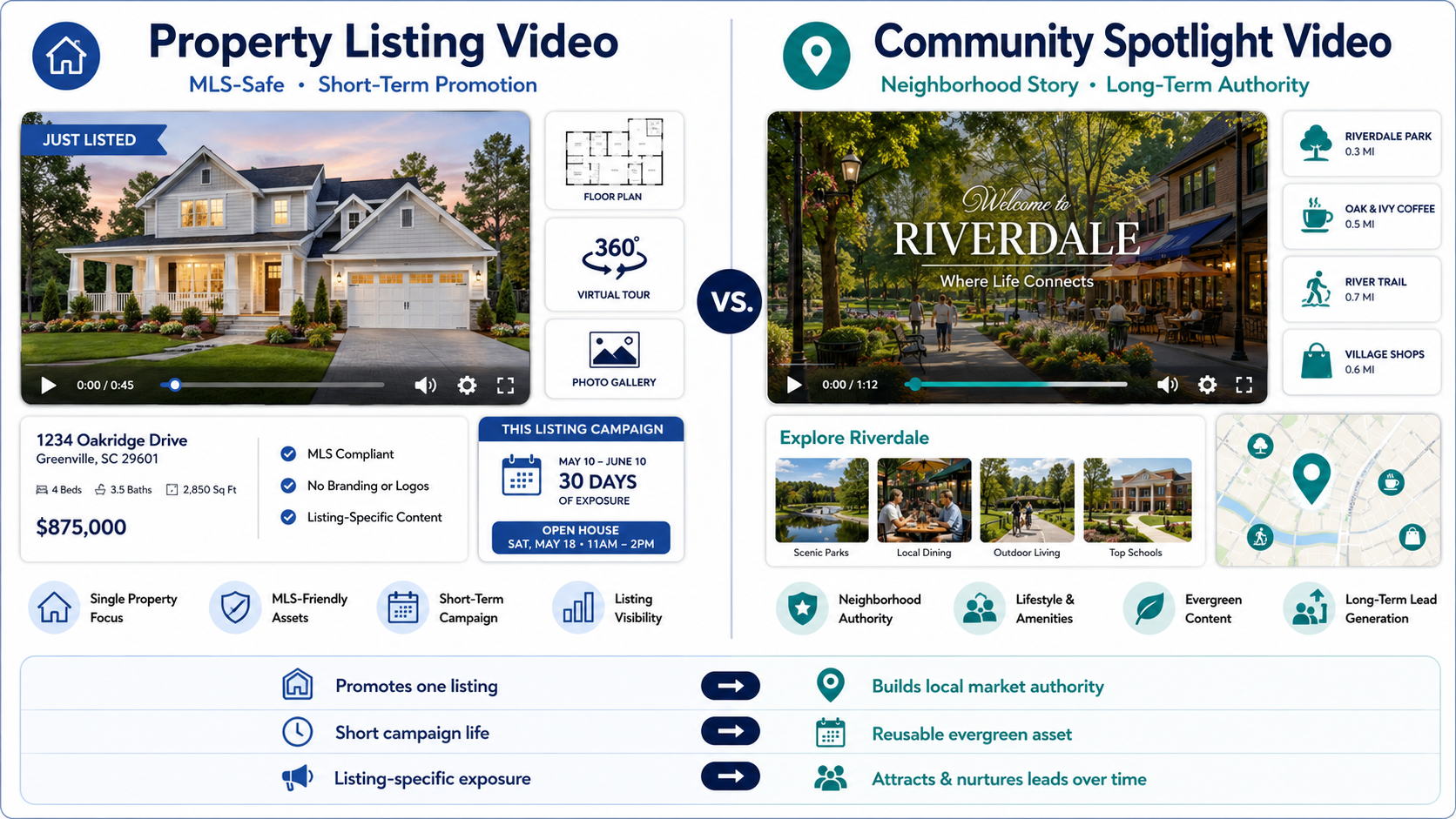
A community spotlight video is market positioning.
A buyer from another state is trying to choose between three neighborhoods. They have looked at listings online, but they do not understand the difference between the areas.
A short community spotlight video can explain the neighborhood feel, common home styles, commute access, amenities, and why buyers choose that area.
This is where video does something photos alone cannot. It creates context.
A strong relocation video can be sent by email, text, CRM automation, or embedded on a neighborhood page. It also gives the agent a reason to follow up without sounding pushy.
Imagine sitting with a seller and showing them two things:
A standard listing photo package.
A listing plus community marketing plan.
The second one feels more strategic.
You can say:
“We do not only market your house. We market why buyers want to live here. We create listing video, neighborhood content, social assets, and buyer education around the location.”
That is a stronger conversation than “we put it on the MLS.”
This is where AI real estate marketing software for agents can support listing presentations. The software helps create the assets, but the agent wins the client by explaining the plan.
Real estate photographers often deliver beautiful media but leave money on the table.
A community spotlight add-on can become a simple upsell:
Listing photos.
AI listing video.
Neighborhood spotlight video.
Social reel package.
Optional floor plan or staging video.
This creates a higher-value package without requiring a full video shoot on every job. Photographers can use PhotoAIVideo for real estate photographers to deliver motion-based assets from existing photo sets and selected community images.
Brokerages can build a library of community spotlight videos for their agents.
Each video can support:
Buyer leads.
Seller leads.
New agent training.
Market education.
Social posting.
Local SEO pages.
Recruiting.
A brokerage does not need every agent inventing their own process. The team can create a consistent content library by neighborhood and let agents personalize captions, intros, and calls to action.
This is a real advantage for brokerages because consistency is usually the hardest part of marketing at scale.
Property managers can use community spotlight videos to explain why a rental area is attractive.
This works for:
Apartment communities.
Single-family rental neighborhoods.
Vacation rentals.
Student housing.
Senior living communities.
RV parks and campground-style property marketing.
Instead of only showing the unit, the video can show access, amenities, nearby attractions, parking, common areas, and lifestyle value.
Renters want to know what living there feels like.
“Great neighborhood. Beautiful homes. Close to everything.”
That could describe almost anywhere.
Use specific details:
Trail access.
Commute corridors.
School-zone appeal.
Lot sizes.
Home age.
HOA amenities.
Walkability.
Nearby employers.
Local dining.
Market segment.
Specificity builds authority.
Listing photos are useful, but community spotlight videos need local context.
Add visuals of the neighborhood entrance, amenities, nearby roads, public spaces, clubhouse, pool, parks, retail, or representative exterior details. Even a few community-specific images can make the video feel more useful.
Community videos used for social media can include branding, agent info, calls to action, and local positioning.
But property listing videos used in MLS environments may need different treatment depending on local MLS rules. Many MLS systems have restrictions around branding, contact information, brokerage marks, URLs, and promotional overlays.
That is why agents should maintain two workflows:
Branded social/community version.
Unbranded listing-safe version.
An AI tool for making unbranded real estate videos can help when you need separate assets for different channels. Always check your local MLS rules before uploading any video, virtual tour, or media link. Your MLS is the final authority on what is allowed.
A video without a next step is only awareness.
Add a lead path:
“Want the neighborhood guide?”
“Thinking about selling in this community?”
“Ask for the current pricing report.”
“Request a custom listing media plan.”
“Get the relocation checklist.”
“See available homes in this area.”
The content should start a conversation.
AI can generate motion. It cannot decide your market position.
The agent or marketer still needs to choose the audience, story, offer, and follow-up. That is where the business value comes from.
Create one when the neighborhood has repeat value.
Good candidates include:
Neighborhoods where you want more listings.
Communities with frequent buyer questions.
Areas where you already have past sales.
Subdivisions with unique amenities.
Luxury areas where lifestyle matters.
Relocation-heavy communities.
Rental neighborhoods with strong leasing demand.
Condo buildings or townhome communities.
Places where buyers often compare multiple nearby options.
Skip it when the location has no recurring strategic value or when you do not have enough context to say something useful.
A simple test:
Would this video still be useful six months from now?
If yes, it may be a community spotlight video.
If no, it may just be a listing promo.


Compact, ready to go anywhere
Interchangeable lens that’s upgradeable
Dual 1-inch sensors for improved clarity and low light performance
Dynamic range and 6K 360° capture
360° photo resolution at 21MP

8K 360° video recording for ultra-detailed visuals.
4K single-lens mode for traditional wide-angle shots.
Invisible selfie stick effect for drone-like perspectives.
2.5-inch touchscreen with Gorilla Glass protection.
Waterproof up to 33ft for underwater shooting.

360° photo resolution in 23MP
Slim design at 24 mm thick
Built-in image stabilization for smooth video capture.
Internal 19GB storage for photo and video storage.
Wireless connectivity for remote control and sharing.

60MP 360° still images for high-resolution photography.
5.7K 360° video recording at 30fps.
2.25-inch touchscreen for intuitive control.
USB Type-C port for fast charging and data transfer.
MicroSD card slot for expandable storage.
.png)

.png)

Try it free. No credit card required. Instant set-up.







.svg)


.svg)