


.png)


The mistake usually happens late at night.
An agent gets the listing photos back, creates a beautiful video, adds their logo, phone number, brokerage badge, “DM me for a showing,” maybe even a music track and branded intro.
It looks great on Instagram.
Then someone uploads the same video into an MLS field that requires unbranded media.
Now the agent is texting the photographer, the assistant is re-exporting files, the brokerage is asking what happened, and the listing launch feels messier than it should.
This actually happens all the time because most agents think in terms of “the listing video.”
But a modern listing does not need one video.
It needs two.
One file should be clean, property-focused, and MLS-safe. The other should be branded, promotional, and built for social media. This article explains the two-file workflow Realtors, photographers, brokerages, and property managers can use to create better listing videos without mixing up compliance rules, branding needs, and marketing goals.
The simplest way to think about it:
One video is for the listing system.
One video is for the attention system.
PhotoAIVideo helps agents and media teams create both types of video from the same listing photo set using AI-powered real estate photo-to-video software.
The two-file workflow is a listing video process where you create two separate versions of the same property video:
The MLS-safe version is unbranded, clean, and focused only on the property.
The branded social version includes marketing elements such as agent name, brokerage logo, call to action, captions, listing hooks, neighborhood language, and social-friendly formatting.
This matters because different platforms have different jobs.
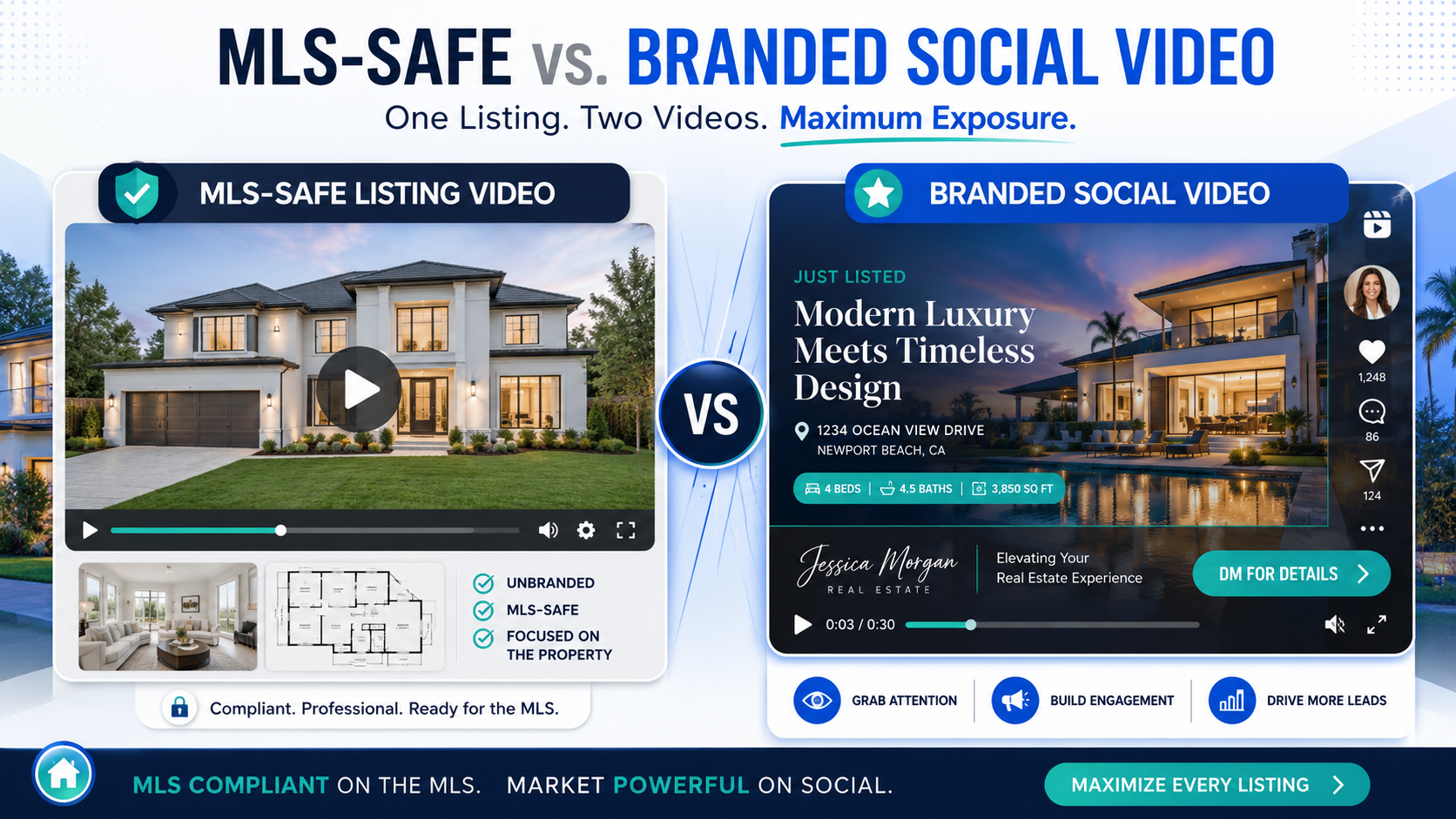
Your MLS is not Instagram.
Your Instagram Reel is not the MLS.
Your seller presentation is not always the same as your syndication file.
Your email follow-up video may not need the same treatment as a YouTube Short.
An MLS compliant video maker for property listings should help agents create a clean version that avoids obvious branding issues, while a social video workflow should let agents market aggressively where branding is allowed.
That separation prevents confusion.
It also improves performance because each file is built for the channel where it will live.
Real estate video has two competing pressures.
First, agents need compliant listing assets. Many MLS organizations have rules around branding, links, contact information, logos, and promotional content inside listing media fields. NAR’s MLS policy framework emphasizes cooperation, data standards, and local MLS governance, which is why agents should always confirm their own board’s media rules before publishing listing assets through NAR’s MLS policy resources.
Second, agents need marketing that actually gets attention.
A clean, unbranded listing video might be perfect for the MLS, but it is usually too plain for social media. On Instagram, Facebook, TikTok, YouTube Shorts, and LinkedIn, the video needs a hook. It needs captions. It may need the agent’s face, brand, offer, neighborhood positioning, or “book a showing” CTA.
Realtor.com has encouraged agents to use short-form video and high-impact content for lead generation, especially when video is built around clear, local messaging through real estate video marketing guidance.
So the answer is not to choose between compliance and branding.
The answer is to stop forcing one file to do both jobs.
With PhotoAIVideo’s real estate video workflow, agents can turn property photos into video assets and then think strategically about which version belongs in which channel.
Most agents create listing media in a straight line:
Photos come back.
Video gets created.
Video gets posted everywhere.
That sounds efficient, but it causes problems.
The MLS version may accidentally include branding.
The social version may feel too plain.
The photographer may not know which version the agent needs.
The brokerage may have to police compliance after the fact.
The seller may wonder why the best-looking video cannot be used everywhere.
The assistant may save the wrong file name and upload the wrong asset.
The problem is not the video itself.
The problem is the lack of file separation.
Here is a real-world scenario:
A photographer delivers a branded listing video with the agent’s name, brokerage logo, and phone number burned into the lower corner. The agent loves it and posts it on Facebook. Then the transaction coordinator grabs the same file from the shared folder and uploads it as the virtual tour or video link in the MLS. The MLS flags it. Now everyone has to scramble.
The fix is simple: build the two-file workflow before the listing goes live.
Not after something gets rejected.
PhotoAIVideo helps agents, photographers, brokerages, and property managers turn still listing photos into polished video assets without needing to edit every project manually from scratch.
That makes it useful for the two-file workflow because the starting point is the same: the listing photo set.
From there, you create separate outputs:
A clean, unbranded version for MLS-safe listing use.
A branded, social-ready version for promotion and lead generation.
An AI tool for making unbranded real estate videos is valuable because compliance issues often come from extra layers: logos, phone numbers, watermarks, personal branding, promotional overlays, and calls to action. Keep the MLS version clean. Add the marketing layers separately for social.
This is also where create real estate videos from photos with AI becomes practical. You are not creating two full productions. You are creating two purposeful versions from the same core media.
PhotoAIVideo works best when you treat it like a production system, not just a video generator. Upload the photos, create the motion, then decide what each version is supposed to accomplish.
For agents who want faster listing launches, PhotoAIVideo.com can become the video layer between the photographer’s delivery and the agent’s marketing channels.
Before creating the video, name the project around the property and the intended outputs.
Example:
123-oak-street-video-project
Inside that project, plan for two exports:
123-oak-street-mls-safe-video
123-oak-street-branded-social-video
This seems small, but it prevents real mistakes.
Do not rely on memory. Do not name the file “final video.” There is never only one final video in a professional listing workflow.
Start with the version that can survive the strictest environment.
The MLS-safe file should be property-focused.
Use:
Exterior hero image.
Kitchen.
Living room.
Primary bedroom.
Primary bathroom.
Backyard.
Key features.
Floor plan visual if allowed.
Neutral captions if allowed.
Avoid:
Agent name.
Brokerage logo.
Phone number.
Email address.
Website URL.
“Call me.”
“DM for a showing.”
Social media handle.
Personal photo.
Branded intro or outro.
Music with licensing concerns.
Any claim your local MLS does not allow.
This clean version becomes the base asset.
Even if your local MLS allows more flexibility, it is smart to keep a conservative unbranded version available. Rules vary, syndication paths vary, and brokerages often have their own policies.
A local MLS rule example from Southern New Mexico MLS states that virtual tour links entered into the MLS cannot contain advertising, signage, QR codes, logos, branding, identifying marks, website addresses, emails, or phone numbers. That is a useful reminder to check your own local rules before uploading media through MLS rules on unbranded virtual tour links.
Now create the version designed to attract attention.
This is where the agent can market.
Add:
Agent or brokerage branding.
Short hook.
Captions.
Listing highlights.
Neighborhood mention.
CTA.
Social-safe framing.
Open house mention.
“Save this home” prompt.
Lead magnet or showing request.
The branded social version should not look like a compliance document. It should look like marketing.
Example hook ideas:
“New listing in one of the most convenient pockets of town.”
“Three reasons this home will stand out this weekend.”
“Not just a kitchen upgrade. This floor plan actually works.”
“Relocating buyers, watch the backyard and layout.”
“Before you book a showing, notice the flow from kitchen to patio.”
That is how you move from a generic listing video to a content asset that can generate conversations.
If your goal is social engagement, the best AI real estate video generator for social media is not just the tool that makes the prettiest clip. It is the one that helps you create versions for the way people actually watch: fast hook, clear visuals, simple captions, and a direct next step.
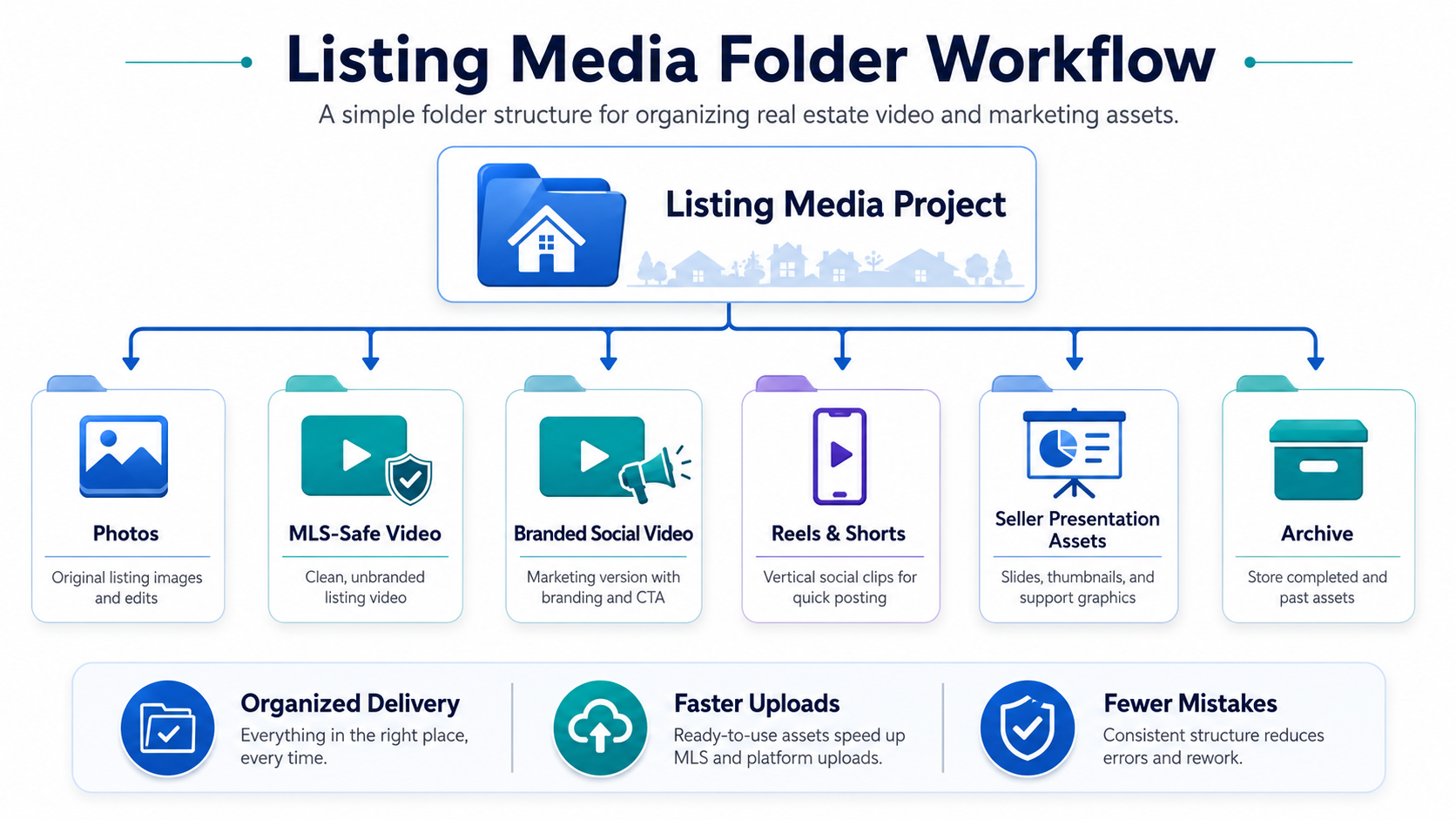
Use a folder structure that makes the correct upload obvious.
Example:
Listing Media - 123 Oak Street
01 Photos
02 MLS-Safe Video
03 Branded Social Video
04 Reels and Shorts
05 Seller Presentation Assets
06 Archive
This is especially important for brokerages and photographers working with multiple agents. If the file delivery is sloppy, the agent will eventually upload the wrong version.
A polished video workflow is not only about creating the asset.
It is about making the asset hard to misuse.
Inside the delivery folder, include a short note:
“Use the MLS-safe video for MLS upload, syndication fields, and unbranded listing environments. Use the branded social video for Instagram, Facebook, YouTube, email marketing, landing pages, and seller promotion. Confirm local MLS rules before uploading.”
This one note can save a lot of back-and-forth.
It also positions the photographer or brokerage marketing team as more professional.
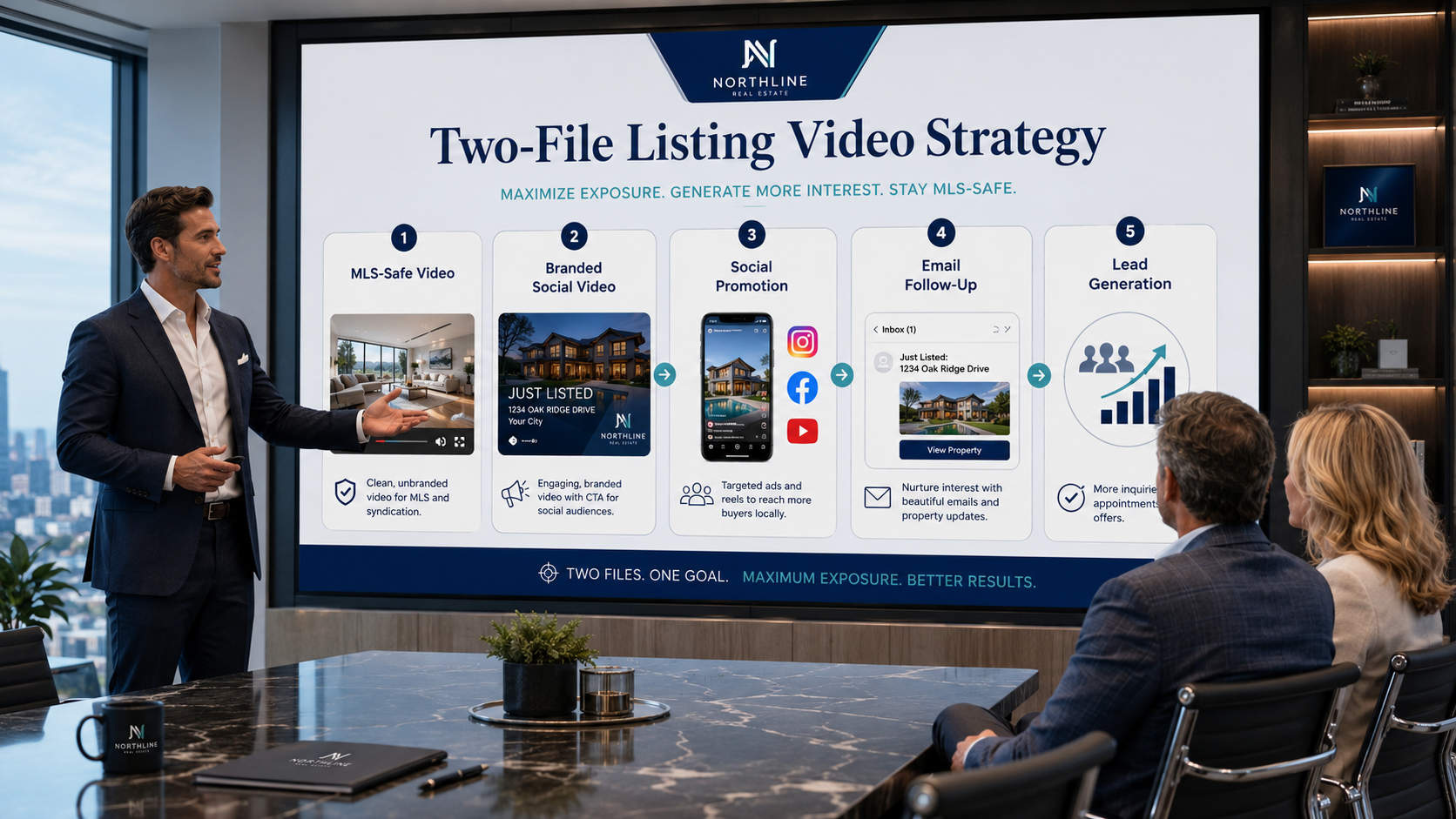
The MLS-safe video belongs in places where neutral property media is required or preferred.
The branded social video belongs where the agent is actively trying to build attention, capture leads, and win more visibility.
Use the clean version for:
MLS media fields.
Unbranded virtual tour slots.
Syndication environments.
Brokerage compliance review.
Listing portals when required.
Use the branded version for:
Instagram Reels.
Facebook posts.
TikTok.
YouTube Shorts.
LinkedIn.
Email campaigns.
Open house promotion.
Seller updates.
Retargeting ads.
Listing appointment examples.
This is where real estate video software that works with MLS rules should support channel-specific thinking. The software should not force the same video into every use case.
Here is the actionable insight most agents miss:
Track social performance and compliance separately.
The MLS-safe version should be judged by whether it supports the listing launch without issues.
The branded social version should be judged by reach, saves, comments, shares, clicks, showing requests, and seller response.
Do not blame the MLS-safe version for not going viral.
Do not judge the social version by whether it is clean enough for the MLS.
They have different jobs.
Both are valuable.

They are just not interchangeable.
An agent has 24 hours to get the listing live.
The photographer delivers photos in the morning. The agent uses AI video software for real estate agents to create a clean listing video from the photo set, then exports a branded Reel for social.
The MLS-safe version goes into the listing workflow.
The branded version goes out with a caption like:
“Just listed in Westfield. This one has the layout buyers keep asking for: open kitchen, flexible office, and a backyard that actually feels usable.”
That is a stronger launch than posting photos alone.
A real estate photographer wants to upsell video without filming every listing.
The package becomes:
Photos.
MLS-safe video.
Branded social video.
Vertical Reel.
Optional open house teaser.
This makes the photographer more valuable because they are not just delivering images. They are delivering a channel-ready marketing system.
An automated video marketing software for Realtors workflow also helps the photographer keep turnaround time manageable while increasing average order value.
A brokerage has 80 agents, and every agent handles listing media differently.
Some use branded videos everywhere. Some do not use video at all. Some post social content but forget the MLS-safe version.
The brokerage can standardize a two-file rule:
Every listing gets one unbranded property video and one branded social video.
That creates consistency while still allowing agents to promote their own listings.
It also reduces compliance headaches because the upload path is clearer.
Property managers can use the same workflow for rental listings.
The clean version can be used on rental listing platforms where promotional overlays may not fit. The branded version can promote the property management company, leasing phone number, community features, pet policy, move-in offer, or availability.
The two-file idea works because rental marketing also has platform differences.
Not every channel wants the same video.
This workflow can help win listings before the property is even photographed.

During a listing appointment, the agent can say:
“We create two versions of your listing video. One is clean and property-focused for MLS-safe use. The other is branded for social media, email, open house promotion, and buyer follow-up. That way your home gets professional exposure without mixing up compliance and marketing.”
That sounds organized.
Sellers notice organized.
This is the big one.
If the social version has your logo, phone number, website, call to action, or branded outro, do not assume it belongs in the MLS. Check your local rules first.
Keep the MLS-safe file clearly labeled and separate.
The MLS-safe version should not feel like an ad.
It should feel like a clean visual tour of the property.
Let the home be the focus.
Some agents overcorrect.
They remove all branding, captions, hooks, and personality from every version. Then they wonder why the video does not perform on social.
Social media is not a filing cabinet. It is an attention environment.
Use the branded version to market.
If you add permanent text, logos, and captions too early in the process, you may have to recreate the video later.
A smarter workflow is to keep the clean version first, then add branding layers for social.
That gives you more flexibility.
A horizontal MLS-safe video may work well for listing pages.
A branded social video may need vertical or square formatting.
Do not assume one aspect ratio fits every channel. Create a vertical version for Reels and Shorts when social reach matters.
After the video is live, send the seller both versions with a simple explanation.
Example:
“Here is the clean version we use for listing-safe placement, and here is the branded social version we are using to promote the home to our audience.”
That makes your marketing feel tangible.
Use this simple rule:
If the file is going into a controlled listing environment, use the clean version.
If the file is going into an audience-building channel, use the branded version.
Ask these questions before uploading:
Will this platform allow agent branding?
Will this video appear inside an MLS field?
Could this file syndicate somewhere unexpected?
Does the video include contact info?
Does the video include a logo or watermark?
Is the CTA appropriate for this channel?
Is the aspect ratio right?
Will the seller understand where this is being used?
Google Search Central recommends creating content for people first, not simply to satisfy search systems, through Google’s people-first content guidance. The same principle applies to real estate video. Create each file for the person and platform it is actually meant to serve.


Compact, ready to go anywhere
Interchangeable lens that’s upgradeable
Dual 1-inch sensors for improved clarity and low light performance
Dynamic range and 6K 360° capture
360° photo resolution at 21MP

8K 360° video recording for ultra-detailed visuals.
4K single-lens mode for traditional wide-angle shots.
Invisible selfie stick effect for drone-like perspectives.
2.5-inch touchscreen with Gorilla Glass protection.
Waterproof up to 33ft for underwater shooting.

360° photo resolution in 23MP
Slim design at 24 mm thick
Built-in image stabilization for smooth video capture.
Internal 19GB storage for photo and video storage.
Wireless connectivity for remote control and sharing.

60MP 360° still images for high-resolution photography.
5.7K 360° video recording at 30fps.
2.25-inch touchscreen for intuitive control.
USB Type-C port for fast charging and data transfer.
MicroSD card slot for expandable storage.
.png)

.png)

Try it free. No credit card required. Instant set-up.







.svg)


.svg)