


.png)



A busy real estate agent does not need another content idea.
They need something they can actually post today.
The problem is not that agents do not understand short-form video. Most agents already know Reels, TikToks, Shorts, and Facebook videos can help listings get more attention. The real problem is simpler:
The listing photos are ready.
The seller wants more exposure.
The agent has showings, calls, texts, paperwork, and follow-up.
And somehow, a polished short-form video still needs to be created before the day ends.
That is where short-form real estate video AI tools become useful.
The right tool should not force an agent to become a video editor. It should turn existing listing photos into clean, vertical, attention-friendly videos that can be used for Instagram Reels, TikTok, YouTube Shorts, Facebook, listing updates, seller reports, and paid ads.
For agents, photographers, brokerages, and property managers, PhotoAIVideo’s real estate video platform is built around that exact workflow: take property photos you already have, turn them into usable video content, and publish faster without hiring a full video production team for every listing.
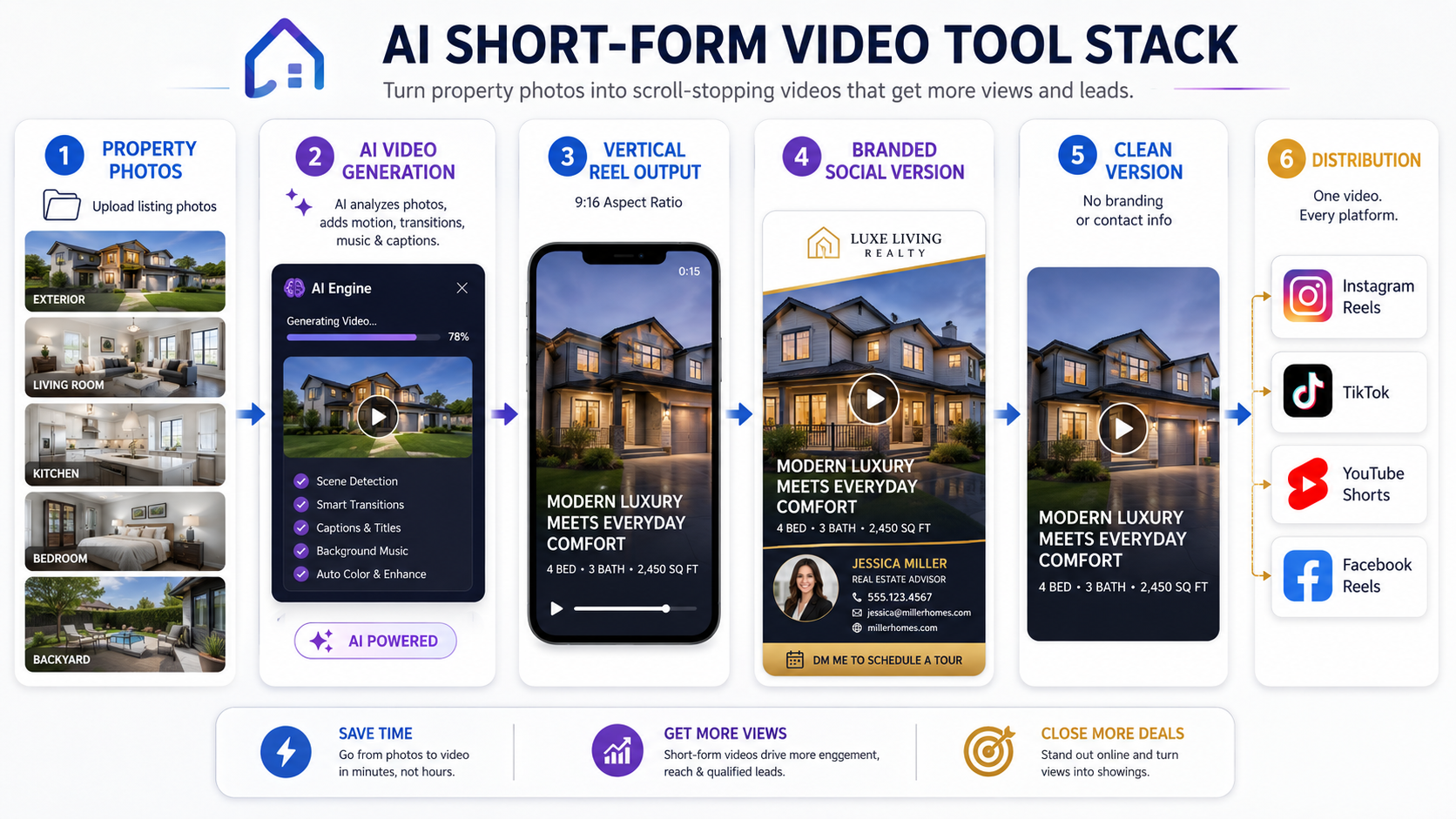
Short-form real estate video AI refers to software that helps real estate professionals create quick, mobile-first videos from existing property media.
That usually means turning still photos, listing images, staged photos, room shots, exterior shots, amenity photos, or property website visuals into short videos designed for vertical platforms.
A good short-form real estate video AI workflow helps with:
This is different from traditional listing video production.
A videographer captures footage on-site. A video editor cuts it together. A social media manager may then resize or repurpose it.
AI short-form tools work from the other direction. They start with the media you already have and help you package it into faster, more usable social content.
That matters because a real estate agent’s biggest content bottleneck is not creativity.
It is production speed.
Short-form video is not just a trend for influencers. It has become a practical real estate marketing format because buyers, sellers, renters, and homeowners spend so much time consuming content on mobile platforms.
NAR has highlighted social media as a tool real estate professionals can use to grow their client base, market properties, and build visibility through real estate social media marketing guidance. NAR has also reported that social media remains a major lead-generation technology tool for agents, with many agents identifying it as one of their strongest sources of quality leads through real estate technology and lead generation research.
The takeaway is simple: if social media is a real lead source, then listing video cannot be treated like a luxury add-on.
It needs to become part of the normal listing workflow.
A short-form listing video can help an agent:
This is why an AI real estate reels app can be so valuable. It does not just create one video. It helps agents build a repeatable content system around listings they already have.
Here is what actually happens in the field.
An agent gets 35 listing photos back from the photographer. The photos look great. The property is ready to launch. The agent posts a few images to Instagram, adds the listing link to Facebook, and maybe creates a story.
Then the agent thinks, “I should make a Reel.”
That is where the process breaks.
The agent opens a video editor. They choose photos. They decide on music. They crop images into vertical format. They try to add motion. They write captions. They export. They notice the video feels too slow. They start over. Then a buyer calls, the seller texts, and the Reel never gets posted.
This actually happens all the time.
The issue is not lack of motivation. It is workflow friction.
Traditional short-form video creation requires too many decisions:
Which photos should I use?
What order should they go in?
Should it be branded?
Should I add captions?
What format fits Reels?
Can I use this on TikTok too?
Do I need an unbranded version?
What should the call to action say?
Is this video too long?
A good real estate reels generator AI should reduce those decisions. It should help the agent move from “I need a video” to “I have a usable video” without losing the afternoon.
PhotoAIVideo fits best after the listing photos are already available.
Instead of filming a separate walkthrough, agents and teams can upload their property photos into PhotoAIVideo’s AI listing video workflow and create short-form videos designed for listing promotion.
The workflow is practical:
Choose the listing photos.
Select the strongest rooms.
Create a short video.
Export for social.
Use it in the listing campaign.
That makes PhotoAIVideo useful as AI property reels software because it is not asking the agent to build everything from scratch. It uses the visual assets already created for the listing.
For photographers, it can become a video add-on.
For brokerages, it can help standardize social video output across agents.
For property managers, it can turn rental photos into leasing reels.
For teams, PhotoAIVideo’s real estate teams package can support a more repeatable content system when multiple agents need consistent video assets.
The real advantage is not just AI generation.
The advantage is removing the daily content bottleneck.
Not every short-form video has the same job.
A “just listed” Reel is different from an open house video. A listing ad is different from a seller update. A property manager’s vacant unit video is different from a luxury listing teaser.
Before using any AI listing reels for Realtors workflow, decide what the video needs to accomplish.
Common goals include:
This matters because the goal controls the video structure.
A buyer-interest video should move quickly and highlight the best spaces.
An open house promo should include timing and urgency.
A seller update should feel professional and polished.
A video ad should make the first three seconds obvious.
A rental reel should answer “Is this worth touring?”
Short-form video is not one format.
It is a category of use cases.
The best AI short-form videos usually start with fewer, stronger photos.
Most agents should not upload the entire gallery.
A good starting set for a listing Reel might include:
For a 15-second Reel, 6–10 images may be enough.
For a 30-second listing video, 10–16 images may work better.
For a property website or longer video, 16–25 images can make sense.
The mistake is thinking more photos equal more value. In short-form video, more photos can actually make the video weaker because each image gets less time and the story feels crowded.
The better question is:
Which photos will make someone stop scrolling?

A real estate Instagram video maker should create content that fits Instagram Reels, but busy agents rarely post only on Instagram.
The same property may need video for:
Vertical 9:16 is usually best for Reels, TikTok, Shorts, and Stories. Horizontal or square formats can work better for websites, YouTube, email, and certain ad placements.
Google’s video search documentation also emphasizes that video content should be accessible, crawlable, and properly supported on pages through Google Search Central video best practices.
For agents, the practical lesson is this: do not only make the video. Place it somewhere useful. Add text around it when it lives on a page. Use descriptive filenames. Make the video part of a content asset, not just a file saved on your phone.

Busy agents need templates more than they need inspiration.
A repeatable short-form listing video structure could look like this:
That structure can be reused over and over.
For an AI TikTok videos for real estate workflow, the hook may need to feel even more direct:
Short-form video works best when the viewer understands the point immediately.
Do not make them wait 12 seconds to realize it is a listing.

Some videos are for marketing. Some are for cleaner distribution.
A branded social video may include:
A clean version may remove agent branding, phone numbers, personal promotion, or calls to action depending on where it will be used.
This is where agents need to be careful. A short-form video made for Instagram may not be appropriate for every listing platform or MLS context. Rules vary by market, especially when it comes to branding, contact information, and promotional overlays.
If a team needs an AI social media videos for Realtors workflow, it should include versioning from the start.
Create the social version.
Create the clean version.
Label both files clearly.
Use each one in the right place.

The biggest win is not making one Reel.
The biggest win is making five useful assets from the same listing photos.
One listing can become:
This is where PhotoAIVideo examples can help agents think beyond a single output. One photo set can support several pieces of content when the images are curated intentionally.
An actionable insight many agents miss:
Do not build one video from the full listing.
Build several short videos from different angles of the listing.
A kitchen-focused video may perform better than a full-home video on social because the viewer instantly understands what they are seeing.
Short-form video should not be judged only by likes.
Track:
For agents running a real estate video ad maker AI workflow, the goal is not to create a pretty video. The goal is to create an asset that can drive attention, clicks, and conversations.
NAR has written about agents using video to build memorable listing campaigns and stand out through real estate video marketing examples. The lesson is not that every agent needs to become a full-time creator. The lesson is that video can make listings and agents easier to remember.
The best tool for a busy agent is not always the most complex.
The best tool is the one that gets used.
If a tool requires too much editing, too many clicks, or too much creative decision-making, agents will stop using it during a busy week.
The photos arrive at 4:00 PM. The listing goes live in the morning. The seller expects social promotion.
The agent uses PhotoAIVideo’s short-form real estate video workflow to create a quick just-listed Reel from the best 8–12 images. The video opens with the exterior, moves into the living room and kitchen, then ends with the backyard and a call to action.
That gives the agent something visual to post before launch day.
A real estate photographer already delivers edited photos to agents. By adding AI-generated listing reels, the photographer can increase average order value without scheduling a separate video shoot.
A simple package could include:
This turns short-form AI video into a business service, not just a content tool.
A brokerage wants every agent to promote listings consistently.
Instead of letting each agent use different templates, fonts, captions, and vendors, the brokerage creates a repeatable process:
Every listing gets one launch Reel.
Every listing gets one clean video.
Every listing gets one open house promo if applicable.
Every listing gets one seller update asset.
Top listings get paid ad creative.
This is where PhotoAIVideo for real estate teams can help support consistency across multiple agents and listings.
A property manager does not need a cinematic video for every vacant apartment.
They need fast leasing content.
A rental unit video can be simple:
Entry
Living room
Kitchen
Bedroom
Bathroom
Laundry
Parking
Amenities
Call to schedule
Short-form AI video can help property managers create leasing reels from standard unit photos, then post them to social, property pages, email campaigns, and ads.
Most agents do not have a posting problem. They have a repeatability problem.
A weekly rhythm might look like this:
Monday: new listing Reel
Tuesday: kitchen highlight
Wednesday: neighborhood feature
Thursday: open house promo
Friday: seller update or price improvement
Weekend: showing reminder
The agent does not need new video footage for every post. They need a system for turning existing media into short-form content quickly.
That is the real value of AI Facebook video ads for real estate and social video workflows: one listing can become an entire campaign.
Not every short-form video needs to show the entire house.
Sometimes the strongest video is about one thing:
The kitchen.
The backyard.
The view.
The pool.
The primary suite.
The neighborhood.
The price improvement.
The open house.
Feature-specific videos can be easier to understand and more scroll-stopping than a full tour compressed into 15 seconds.
The first three seconds matter.
Do not start with a logo animation, long intro, slow fade, or generic exterior if the property’s strongest feature is the kitchen or backyard.
Lead with the thing people will care about most.
A good hook might be:
“Wait until you see the backyard.”
“This kitchen sells the home.”
“New listing in [City].”
“Tour this home in 20 seconds.”
“Open house this weekend.”
A 15-second Reel with 30 photos is usually too much.
The viewer cannot process the rooms. The video feels rushed. The property does not feel memorable.
Use fewer photos and give each image enough time to register.
A lot of people watch social videos without sound.
Captions, short labels, or simple on-screen text can help the viewer understand the video immediately. For listing videos, captions can highlight:
Keep captions short and readable.
Instagram, TikTok, Facebook, YouTube Shorts, email, and property websites do not all behave the same way.
A short vertical Reel may work well on Instagram but feel awkward on a property website. A branded social video may work well on Facebook but may not be appropriate for every listing feed or MLS-aware use case.
Create versions.
Agents should not assume that every video can be used everywhere.
Some listing platforms and MLS systems may restrict branding, contact information, promotional overlays, or external calls to action. Always check local MLS rules before using branded videos in MLS-related contexts.
Views are useful, but they are not the whole story.
A video with fewer views but more saves, shares, DMs, showing requests, or seller confidence may be more valuable than a video with lots of passive views.
Short-form content should support business outcomes, not just vanity metrics.
Choose a photo-to-video AI tool when:
Choose a traditional video editor when:
Choose a videographer when:
Choose a social media scheduler when:
The smartest workflow may include all four.
But for busy agents who already have property photos, the fastest starting point is often an AI photo-to-video tool.


Compact, ready to go anywhere
Interchangeable lens that’s upgradeable
Dual 1-inch sensors for improved clarity and low light performance
Dynamic range and 6K 360° capture
360° photo resolution at 21MP

8K 360° video recording for ultra-detailed visuals.
4K single-lens mode for traditional wide-angle shots.
Invisible selfie stick effect for drone-like perspectives.
2.5-inch touchscreen with Gorilla Glass protection.
Waterproof up to 33ft for underwater shooting.

360° photo resolution in 23MP
Slim design at 24 mm thick
Built-in image stabilization for smooth video capture.
Internal 19GB storage for photo and video storage.
Wireless connectivity for remote control and sharing.

60MP 360° still images for high-resolution photography.
5.7K 360° video recording at 30fps.
2.25-inch touchscreen for intuitive control.
USB Type-C port for fast charging and data transfer.
MicroSD card slot for expandable storage.
.png)

.png)

Try it free. No credit card required. Instant set-up.







.svg)


.svg)