


.png)



Real estate buyers often decide whether to explore a property within seconds of seeing the first few photos. A well-produced listing video can hold their attention longer, show how rooms connect, and make a property feel more memorable.
The challenge is that traditional video production can be expensive and time-consuming. Agents may need to schedule a videographer, record footage, organize files, select music, add text, and create different versions for each marketing platform.
Real estate video AI software simplifies much of that process.
The best real estate video AI software can transform property photos and short clips into polished videos without requiring advanced editing skills. These tools can add movement, transitions, music, text overlays, branding, and platform-specific formatting in a fraction of the time required by traditional editing.
This guide explains how AI real estate video tools work, what features matter most, and how to choose the right software for your listings.
Real estate video AI software uses automation to create property videos from listing photos, video clips, floor plans, written descriptions, or a combination of these assets.
Instead of building every scene manually, users can upload their media and allow the software to create an initial video.
Depending on the platform, the software may automatically:
The final result can be used on social media, property websites, email campaigns, digital advertisements, and approved real estate listing platforms.
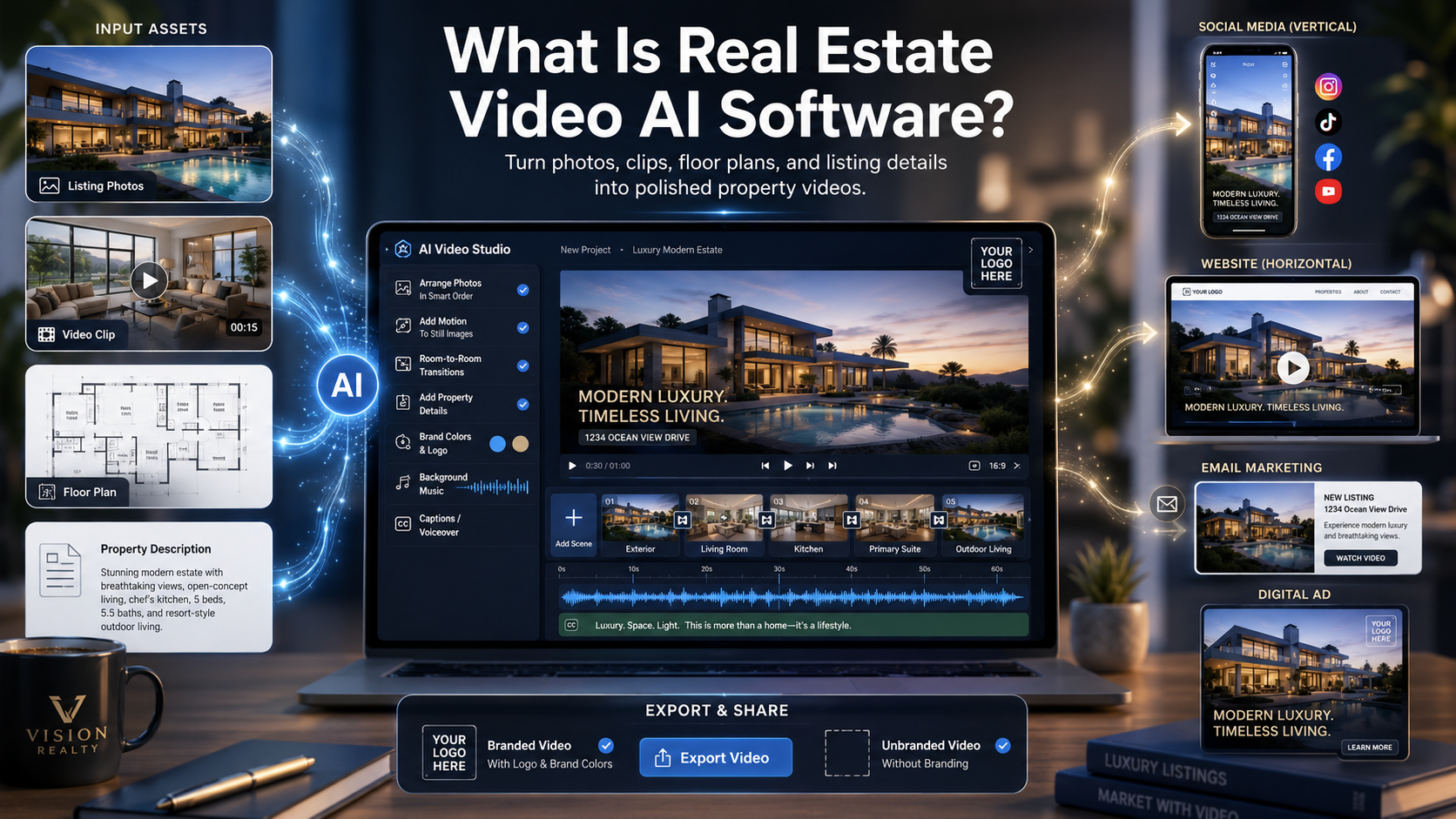
Video is valuable, but traditional editing does not always fit the speed of real estate.
A listing may need to be published quickly. An agent may also need several versions of the same video for different platforms. A brokerage managing dozens of listings may not have time to edit every project from scratch.
AI video tools help solve these problems by creating a repeatable production process.
AI can handle common editing tasks automatically. This allows agents and photographers to create a first draft without manually arranging every photo or transition.
One set of listing photos can become:
This helps real estate professionals get more value from photography they have already purchased.
Templates can keep logos, fonts, colors, and layouts consistent across multiple listings. This is especially helpful for teams, brokerages, and photographers serving several agents.
AI-generated videos may reduce the need to hire an editor for every basic listing video. Professional videography still has value, but AI can make everyday property marketing more affordable.
The right platform depends on how you market properties, how many listings you manage, and how much control you need.
Here are the most important features to consider.
A strong platform should create natural movement without making the property look distorted.
Look for smooth pans, subtle zooms, stable transitions, and accurate image rendering. Excessive movement can distract viewers or make rooms appear different from the original photographs.
The best AI real estate video generator should enhance the presentation without changing the property's actual features.
Automation should save time, but users should still be able to make adjustments.
Useful editing controls include:
A fully automatic tool may be fast, but it can become frustrating if the user cannot correct the output.
Real estate professionals often need different versions of the same video.
A branded version may include:
An unbranded version may remove promotional information for platforms that restrict agent branding.
Because listing rules vary, users should confirm what their local MLS and brokerage permit before uploading a video.
Different platforms require different dimensions.
Horizontal video is commonly used for property websites, YouTube, presentations, and some listing pages. Vertical video is better suited for Instagram Reels, Facebook Reels, TikTok, and YouTube Shorts.
The best AI video app for real estate should make it easy to create both formats without rebuilding the entire project.
Text can highlight important property information, including:
Text should be short and easy to read. Large paragraphs can block the property photos and overwhelm viewers.
Background music can influence the tone of a listing video. A modern condominium may need a different style than a country property or luxury estate.
Look for software that offers licensed music or allows users to upload approved audio. Users should also be able to lower the volume or remove music when necessary.
Some platforms can generate voiceovers from a listing description.
Voiceover can be useful for:
However, the narration should be reviewed carefully. Property details, measurements, and claims must remain accurate.
A good tool should create videos quickly without sacrificing image quality.
For most marketing uses, 1080p video provides a strong balance between quality and file size. Higher-resolution exports may be useful for premium presentations, but they can also take longer to process and upload.
The platform should be easy enough for agents, assistants, photographers, and marketing teams to use consistently.
A complicated editor may contain more features, but those features have little value if users avoid the software because it takes too long to learn.
The exact process varies by platform, but most projects follow a similar workflow.
Choose clear, well-lit photos that accurately represent the property.
Add the photos or clips to your video project.
Select horizontal, vertical, branded, or unbranded output.
Include only the most useful listing information.
Check the photo order, text, music, and transitions.
Download the correct version for each platform.
Post the video on the channels where potential buyers are most active.
AI can speed up production, but the quality of the final video still depends on the input and review process.
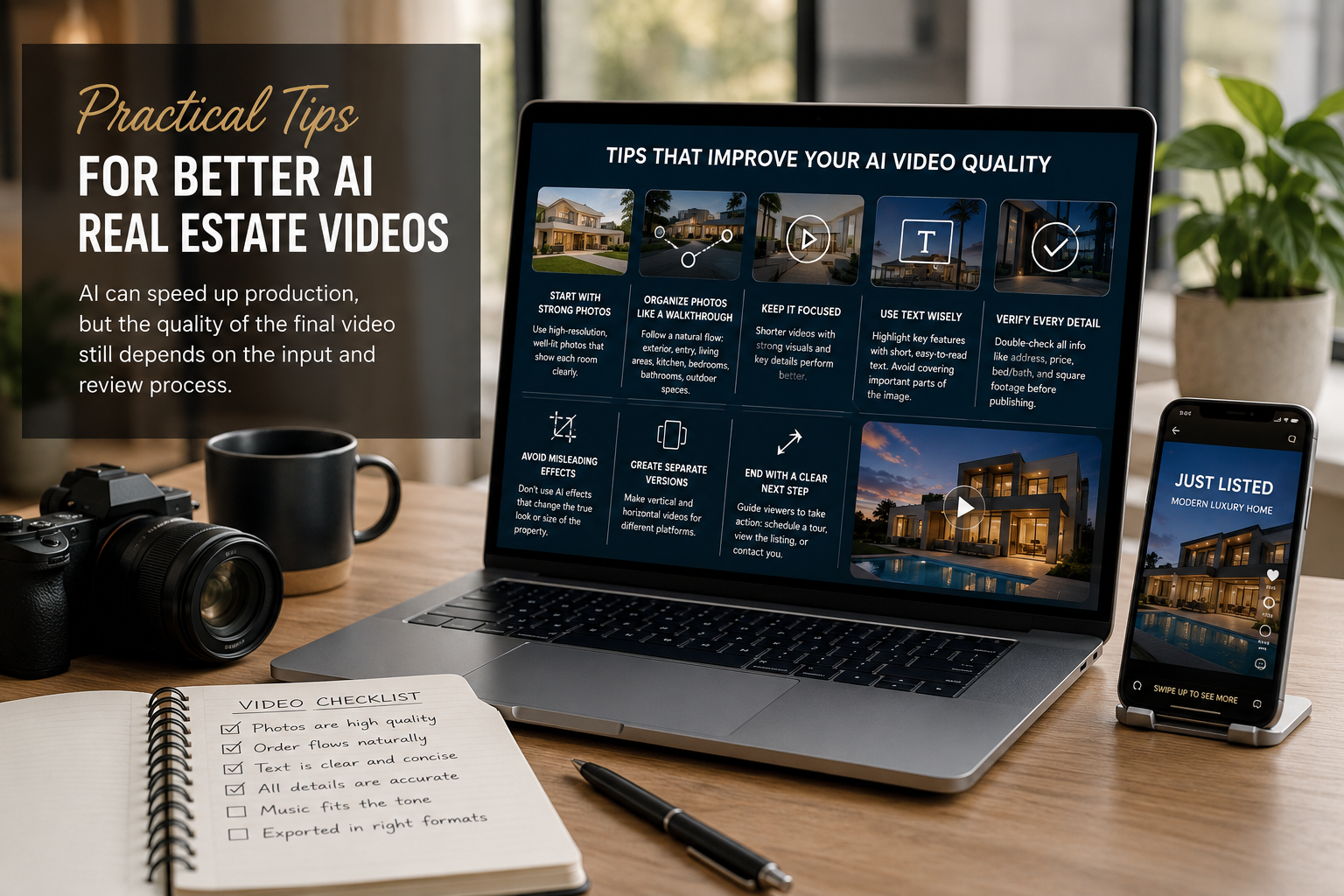
The first scene should immediately capture attention. This may be the exterior, kitchen, living room, primary suite, view, or pool.
Place images in an order that feels natural. For example:
Exterior, entry, living room, kitchen, bedrooms, bathrooms, outdoor area, and closing exterior.
This helps viewers understand the layout.
Longer is not always better. A short video with strong visuals may perform better than a long presentation containing repetitive images.
Do not cover important parts of the photo. Keep each text overlay short enough to read within a few seconds.
Check addresses, prices, room counts, measurements, amenities, and renovation claims before publishing.
Do not use AI effects that substantially change room dimensions, landscaping, lighting conditions, finishes, or property features.
A single video does not always work equally well everywhere. A short vertical video may be ideal for social media, while a longer horizontal version may perform better on a property website.
Branded marketing videos can end with an appropriate action, such as:
AI can create a usable first draft much faster than manually building a video timeline.
Basic listing videos can often be produced without hiring an editor for every property.
One project can generate videos for social media, listing pages, websites, and advertising.
Templates help brokerages and photographers maintain a recognizable visual style.
Teams can produce more videos without increasing editing time at the same rate.
Users do not need extensive video production experience to create professional-looking content.
Poorly lit, low-resolution, or badly composed images will limit the quality of the video.
The software may arrange rooms incorrectly, crop important details, or choose transitions that do not fit the property.
Using the same template repeatedly can make different listings look too uniform.
A platform may offer an unbranded export, but the user remains responsible for checking local MLS, brokerage, advertising, and licensing requirements.
High-end properties may still benefit from professional footage, drone video, agent narration, and custom editing.
AI-written captions and voiceovers should never be published without human review.
AI video software and traditional editing serve different needs.
AI is often a good fit when speed, volume, and simplicity matter. It can be especially useful for standard residential listings, rental properties, property management portfolios, and social media content.
Traditional editing may be better when a project requires:
Many real estate professionals use both. AI handles everyday content, while custom production is reserved for premium listings and major campaigns.
Yes. Many real estate video platforms can turn still listing photos into a moving video using pans, zooms, transitions, text, and music.
The best platform depends on your workflow. Look for accurate photo animation, simple editing, multiple aspect ratios, high-resolution exports, branding controls, and the ability to create unbranded versions.
Possibly, but separate versions are often more effective. Social media videos may include branding and calls to action, while an MLS version may need to remain neutral. Confirm your local rules.
That depends on the platform and marketing strategy. An address may be useful in branded marketing, but you should confirm what your MLS and brokerage permit.
Many listing videos work well between 30 and 90 seconds. The ideal length depends on the property, platform, and amount of useful media available.
Not completely. AI is useful for fast, affordable photo-based videos, while professional videographers remain valuable for custom walkthroughs, cinematic footage, drone content, and luxury marketing.
The best real estate video AI software should make property marketing easier without reducing accuracy or quality. It should help users create polished videos, adapt content for different platforms, maintain consistent branding, and produce multiple versions from one listing project.
The right platform is not necessarily the one with the most features. It is the one that fits your workflow, gives you control over the final video, and helps you publish content consistently.
Start by testing the software with a complete set of listing photos. Create both a vertical and horizontal version, review every property detail, and compare how much time the process saves.
Choose an AI real estate video tool that helps you move from finished photography to publish-ready marketing content with fewer manual steps—and start turning every listing into a stronger visual experience.


Compact, ready to go anywhere
Interchangeable lens that’s upgradeable
Dual 1-inch sensors for improved clarity and low light performance
Dynamic range and 6K 360° capture
360° photo resolution at 21MP

8K 360° video recording for ultra-detailed visuals.
4K single-lens mode for traditional wide-angle shots.
Invisible selfie stick effect for drone-like perspectives.
2.5-inch touchscreen with Gorilla Glass protection.
Waterproof up to 33ft for underwater shooting.

360° photo resolution in 23MP
Slim design at 24 mm thick
Built-in image stabilization for smooth video capture.
Internal 19GB storage for photo and video storage.
Wireless connectivity for remote control and sharing.

60MP 360° still images for high-resolution photography.
5.7K 360° video recording at 30fps.
2.25-inch touchscreen for intuitive control.
USB Type-C port for fast charging and data transfer.
MicroSD card slot for expandable storage.
.png)

.png)

Try it free. No credit card required. Instant set-up.







.svg)


.svg)