


.png)




New agents, FSBO sellers, and anyone testing whether video is worth the effort at all tend to share the same instinct: try the free option first. That's reasonable — but "free" has historically come with real trade-offs in creative software, from watermarks stamped across finished exports to data practices that are anything but transparent.
The good news is that AI-powered tools have changed what "free" can mean, without automatically making it synonymous with "lesser."
Here's how to evaluate a free real estate video maker app for Android, what red flags to check for before trusting it with your listing photos, and how Photo Ai Video approaches its free offering.
The assumption that free software is simply a stripped-down, watermarked version of a "real" paid product made more sense a decade ago than it does today. AI-driven tools have made it possible for developers to offer increasingly capable free experiences rather than simply using them as previews of a paid product.
That said, "doesn't have to" isn't the same as "always does." The burden is still on you to check what you're actually getting before you commit your listing photos to any app.
Before you upload anything, look at three things specifically.
First, check the Data safety section on the app's Google Play listing, which provides information about what data the developer says the app collects and whether data may be shared with third parties — a standardized disclosure required for apps on Google Play (Google Play Help).
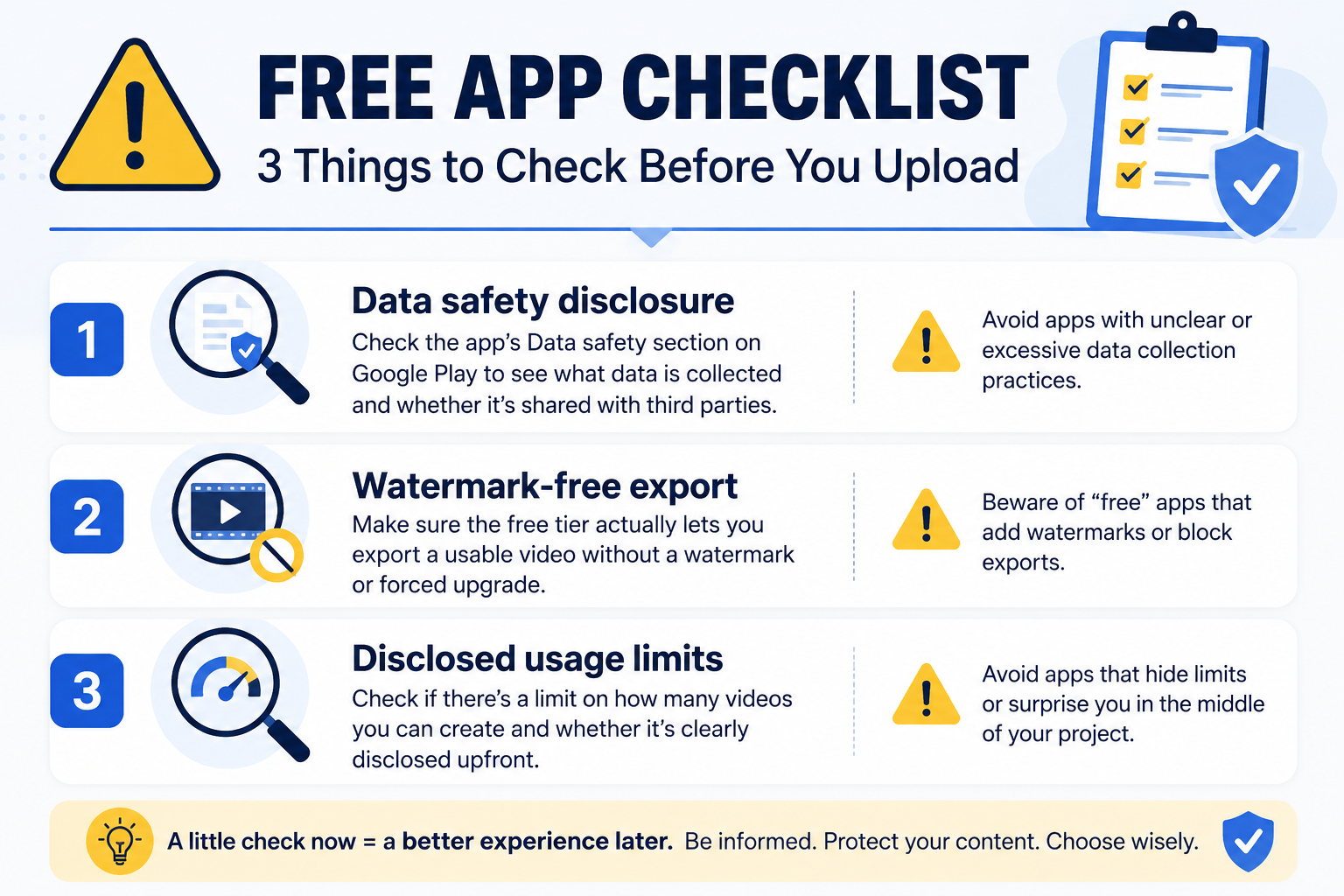
Second, determine whether the free tier actually produces a usable, watermark-free export or whether "free" simply means a trial that pushes you toward payment before you can use the finished result.
Third, check whether there's a cap on how many videos you can create and, importantly, whether that limit is disclosed upfront rather than discovered in the middle of a project.
Photo Ai Video is listed on Google Play under the Business category. Its Data safety disclosure should be reviewed directly on the listing so you can see the developer's current disclosures regarding data collection and third-party sharing rather than relying on secondhand information from a blog post.
The core workflow is straightforward: upload listing photos, describe a style, generate a video, and create content suitable for platforms such as Reels, TikTok, Facebook, or YouTube Shorts.
Check the Google Play listing directly for the current specifics of what's included at no cost, since pricing, usage limits, and feature tiers can be updated by the developer over time.
When a paid real estate video tool justifies its cost, it's often through additional capabilities such as more advanced customization, team or multi-user features for brokerages, faster processing, increased usage allowances, or additional storage.
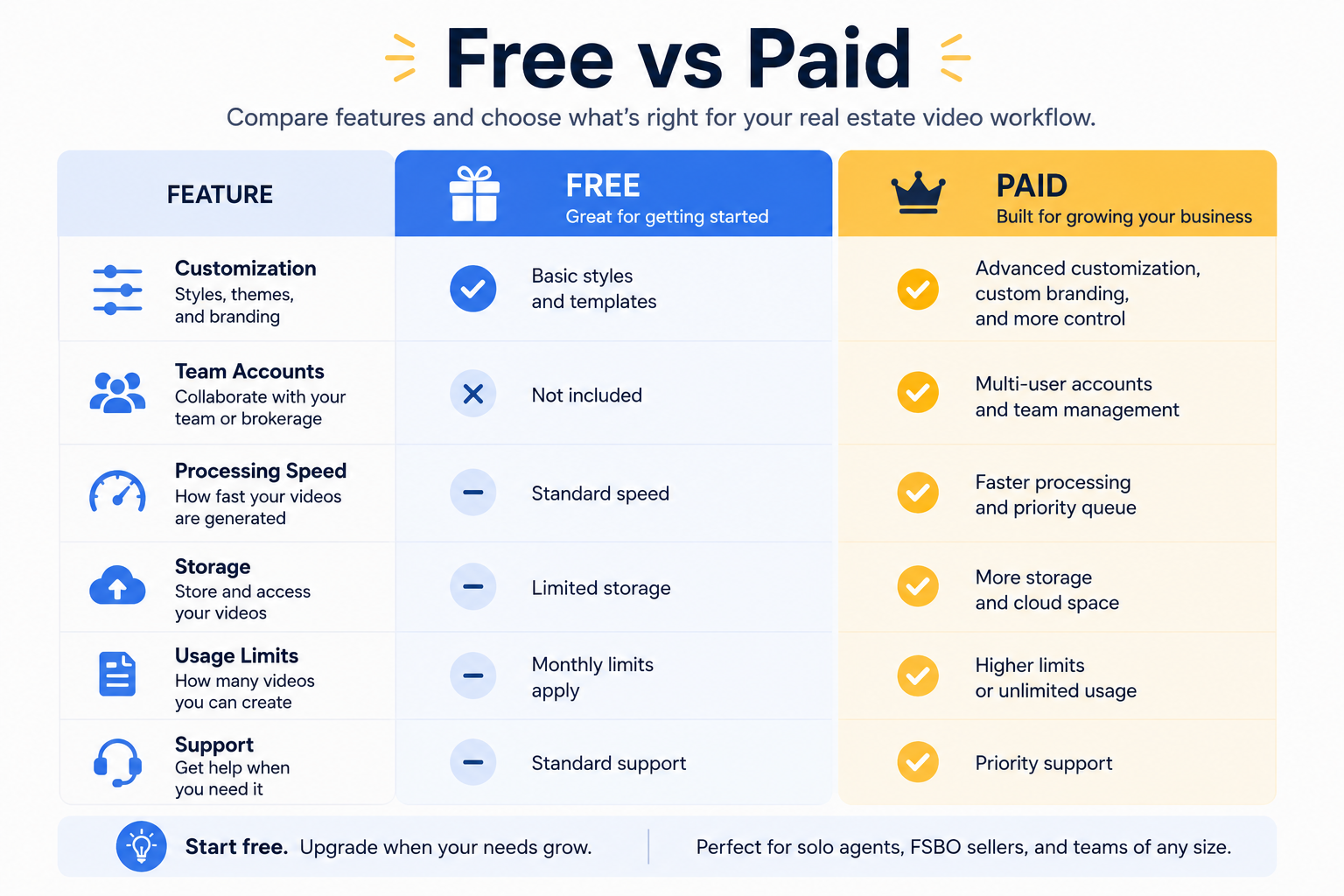
Those features may not be essential for an individual agent or FSBO seller creating only a handful of listing videos each month — which is where a capable free option can make sense.
The calculation changes if you're producing videos across an entire team or handling dozens of properties a month. But for many individual users, starting with a free option is a reasonable way to determine whether the workflow fits their needs before paying for additional features.
A few habits can make a bigger difference than simply upgrading to a paid plan.
Curate your photo set before uploading rather than dumping in every shot you took. A tighter, better-chosen set of photos can produce a more focused video regardless of the price tier.
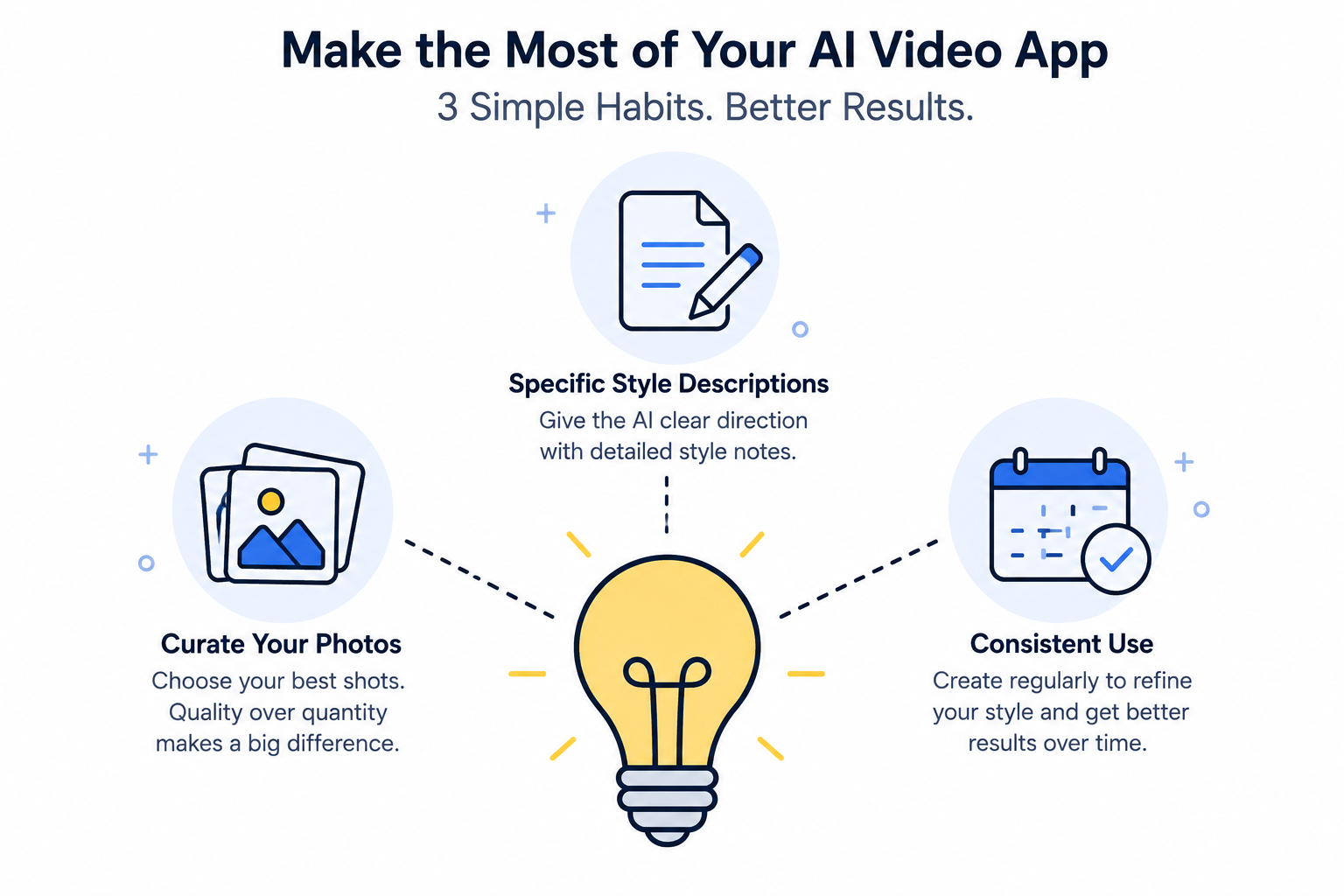
Write a specific style description rather than a generic one so the AI has clearer creative direction. And instead of assuming you'll eventually need to upgrade, first determine whether the free tier already covers your regular workflow.
That practical mindset matters given how much of the market this reaches. Even accounting for iOS's larger overall share of U.S. mobile users, Android still represents a substantial portion of the market according to StatCounter, making a capable free Android option relevant to a large number of agents and sellers.
A paid tier may become relevant when your needs scale beyond those of an individual creator — for example, coordinating video output across an entire team, standardizing branding across multiple agents, or producing videos at a volume where processing speed, usage limits, and storage become bottlenecks.
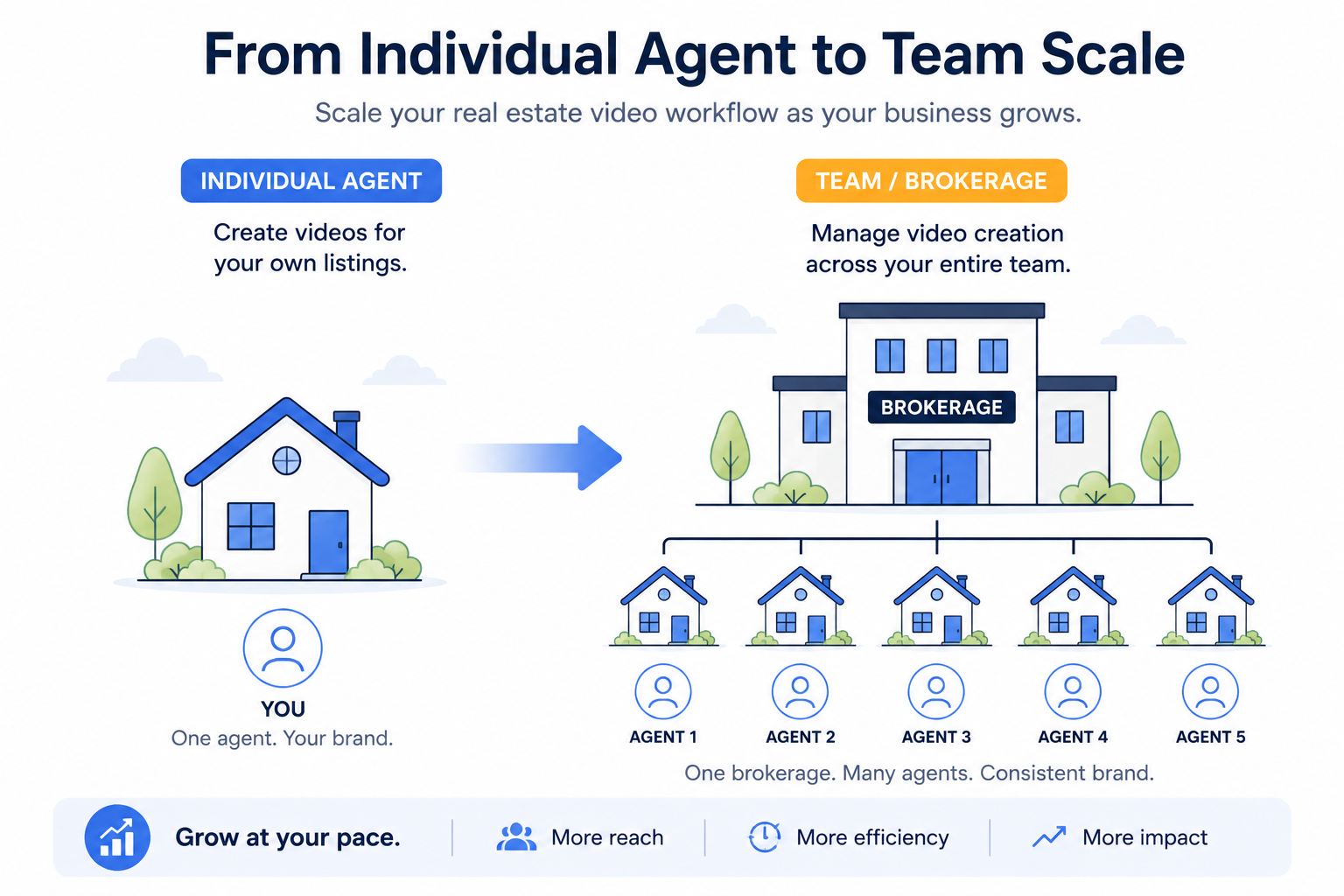
That's more of a real estate video strategy question at the brokerage level than a day-to-day concern for most individual agents or sellers.
It also ties into the broader shift toward video as a standard part of digital marketing. Sprout Social's research highlights the importance and engagement potential of video across social platforms (Sprout Social), making accessible video creation useful whether you're a solo agent using a free tool or part of a larger team with a paid workflow.
It's worth being specific about what "bad free" actually looks like, since it's rarely as obvious as an app simply not working.
More often, it shows up as a finished export stamped with a watermark you didn't expect, discovered only after you've already spent time creating the video. Or it's a "Generate" button that turns out to require an account upgrade the moment you try to export anything, despite the app being promoted as free.
It could also mean discovering data practices you're uncomfortable with only after you've already uploaded content.
None of these are failure modes unique to real estate apps — they're common concerns across free mobile software generally. The reason to check the Data safety section and recent reviews before installing isn't paranoia; it's the same due diligence worth applying to any free app, made slightly more important here because you're uploading photos associated with real properties and potentially with clients.
It's worth going in with a clear sense of what "free" should reasonably provide so you're evaluating the app against the right standard.
Ideally, a solid free real estate video app should let you create a genuinely finished, shareable video from your listing photos using its core AI generation workflow, while clearly disclosing any watermarks, usage limits, or other restrictions before you invest significant time.
What a free tier may not include — and what could reasonably sit behind a paid tier — are features such as team-wide account management, bulk processing across dozens of properties at once, higher usage limits, or specialized branding controls.
The practical test is simple: if the free tier lets you go from listing photos to a finished, shareable video without unexpected friction at the export step, it's doing its job for many individual agents, FSBO sellers, and property managers. Anything beyond that is an added benefit rather than a baseline expectation.
It's also fair to expect that a free tier might come with reasonable, clearly disclosed limits rather than being completely unlimited in every dimension.
A cap on videos per month, for instance, is very different from a watermark that appears unexpectedly after you've finished your project, precisely because it's the kind of limitation you can plan around once you know it exists.
The distinction that actually matters isn't, "Does this app have any limits at all?" It's, "Were those limits disclosed clearly before I invested my time?"
Transparency matters more than the mere existence of limitations.
Are there hidden costs or watermarks?
Check the current terms directly on the Google Play listing, along with the "About this app" and Data safety sections. You should also review any information about in-app purchases or subscriptions before creating your first video.
Is there a limit on videos per month?
Any usage limits are set by the developer, so confirm the current terms on the Google Play listing rather than assuming. Free-tier limits can change as an app is updated.
Is my data sold or shared?
Review the app's Data safety section on Google Play yourself. Google Play requires developers to provide standardized information about how their apps collect, share, and handle user data (Google Play Help), allowing you to review the developer's disclosures before installing the app.
For a broader category comparison, see our guide to the best AI real estate video app on Google Play and our full roundup of the best mobile apps for real estate photos to AI video.
Download Photo Ai Video free on Google Play and see what the free option can do for your next listing.


Compact, ready to go anywhere
Interchangeable lens that’s upgradeable
Dual 1-inch sensors for improved clarity and low light performance
Dynamic range and 6K 360° capture
360° photo resolution at 21MP

8K 360° video recording for ultra-detailed visuals.
4K single-lens mode for traditional wide-angle shots.
Invisible selfie stick effect for drone-like perspectives.
2.5-inch touchscreen with Gorilla Glass protection.
Waterproof up to 33ft for underwater shooting.

360° photo resolution in 23MP
Slim design at 24 mm thick
Built-in image stabilization for smooth video capture.
Internal 19GB storage for photo and video storage.
Wireless connectivity for remote control and sharing.

60MP 360° still images for high-resolution photography.
5.7K 360° video recording at 30fps.
2.25-inch touchscreen for intuitive control.
USB Type-C port for fast charging and data transfer.
MicroSD card slot for expandable storage.
.png)

.png)

Try it free. No credit card required. Instant set-up.






.svg)


.svg)