


.png)


Most Realtors do not hate video.
They hate editing video.
They hate opening a timeline, trimming clips, choosing transitions, hunting for music, resizing files, exporting the wrong format, realizing the text is too small, starting over, and then remembering the seller expected the listing post yesterday.
That is the real issue.
Video marketing sounds simple when someone says, “You should post more videos.” But for a working agent, every video creates another mini-production project. Photos are already finished. The listing is ready. The seller wants exposure. The agent has calls, showings, contracts, inspection updates, and follow-up.
So the video gets skipped.
This is exactly where PhotoAIVideo’s real estate video platform fits into the workflow. It helps agents turn listing photos into usable videos without becoming editors, producers, or social media managers overnight.
For Realtors who want the benefits of video without the pain of editing, the best solution is not another complicated editing app.
It is automation built around the real listing workflow.
Automated video marketing software for Realtors means a tool that helps agents create listing videos, social videos, property videos, seller updates, and marketing assets without manually editing every piece of content.
Instead of starting with raw video footage, a blank timeline, and a pile of creative decisions, the agent starts with the media they already have:
From there, the software helps create video outputs that can be used for listing launches, social media, email updates, open houses, price improvements, and property marketing campaigns.
This is why automated video marketing software for Realtors matters. It turns video creation from a creative burden into a repeatable marketing process.
A good automated video workflow should help Realtors:
The goal is not to make every agent a video editor.
The goal is to help every agent use video consistently.
Real estate marketing has become more visual, more mobile, and more frequent.
Buyers look online before they tour. Sellers expect proof that their agent is actively promoting the listing. Social media rewards movement. Brokerages want consistent marketing standards. Property managers need fast leasing content.
NAR explains that social media can help real estate professionals network, grow their client base, and promote specific properties through real estate social media marketing. Google also recommends making video pages crawlable and easy for search engines to understand through Google Search Central’s video best practices.
For Realtors, this creates a practical challenge.
The agent needs video content, but the agent also needs time.
That is why best AI video software for real estate agents should be judged by one simple question:
Can the agent actually use it during a normal workday?
A tool that takes two hours to edit one video may be powerful, but it does not solve the agent’s real problem. A tool that turns existing listing photos into a usable video quickly can become part of the normal listing checklist.
That is the difference between a creative tool and a business workflow.
Here is what happens on a normal listing.
The agent schedules the photographer. The photos are delivered. The listing goes into the MLS. The agent posts a few photos on Instagram and Facebook. Maybe they create a story. Maybe they email the seller.
Then comes the thought:
“I should really make a video.”
That is where everything slows down.
The agent opens a video editing app. The app asks for a format. The agent chooses photos. Then they need music. Then captions. Then transitions. Then the video feels too slow. Then it exports blurry. Then it is the wrong size for Instagram. Then the agent wonders if the branded version can be uploaded everywhere.
This actually happens all the time.
Not because agents are lazy. Because the video workflow is too heavy.
The common mistake is treating video as a custom production task every time.
A better approach is to treat video like a repeatable listing asset.
Photos come in.
Best images are selected.
Video is generated.
Branded version is used for social.
Clean version is used where appropriate.
Seller update gets sent.
Open house promo gets made.
The listing gets more mileage.
That is the workflow agents actually need.

PhotoAIVideo is built for Realtors, photographers, teams, brokerages, and property managers who already have property photos and want to turn those photos into videos without complicated editing.
Instead of filming a separate video or building a timeline manually, an agent can use PhotoAIVideo to create real estate videos from photos and build a faster content workflow around the listing.
This matters because most agents already have the raw material for video. They have the exterior shot, the living room, the kitchen, the primary bedroom, the backyard, and the community feature. What they do not have is extra time.
PhotoAIVideo works well as an AI app to turn property photos into videos because it starts where the agent already is: with the finished listing gallery.
A simple listing workflow might look like this:
For teams and brokerages, PhotoAIVideo for real estate teams can help create a more consistent video system across multiple agents and listings.
The best part is that the agent does not have to start from scratch every time.
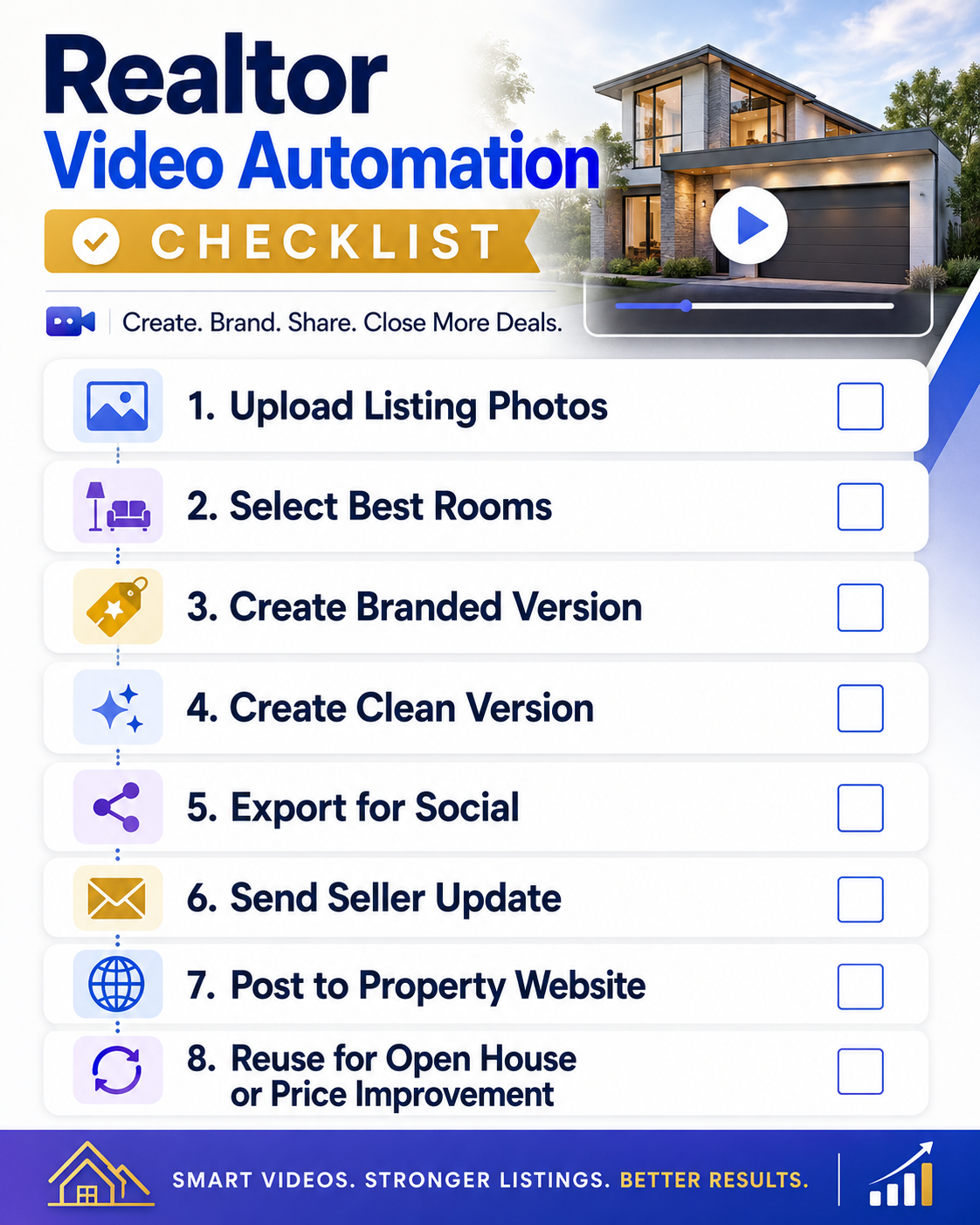
The first step is not software.
The first step is deciding that every listing should have a basic video workflow.
A simple checklist could include:
This removes the guesswork.
Instead of asking, “Should I make a video for this listing?” the agent asks, “Which video version does this listing need today?”
That mindset turns video from a random task into a marketing system.
Do not upload every image just because it exists.
Most listing videos work better when the agent chooses a tighter photo set.
A good starting sequence:
For a short social video, 8–12 photos may be enough. For a longer listing video, 15–25 may work.
This is one of the easiest ways to improve quality.
The video should feel like a guided tour, not a slideshow dump.
This is where automated software helps.
Instead of manually setting motion, timing, transitions, music, and formatting on every video, use PhotoAIVideo’s automated real estate video workflow to handle the repetitive production layer.
The agent still makes the important decisions:
But the software reduces the editing burden.
That is the useful balance.
Automation should not remove strategy. It should remove busywork.
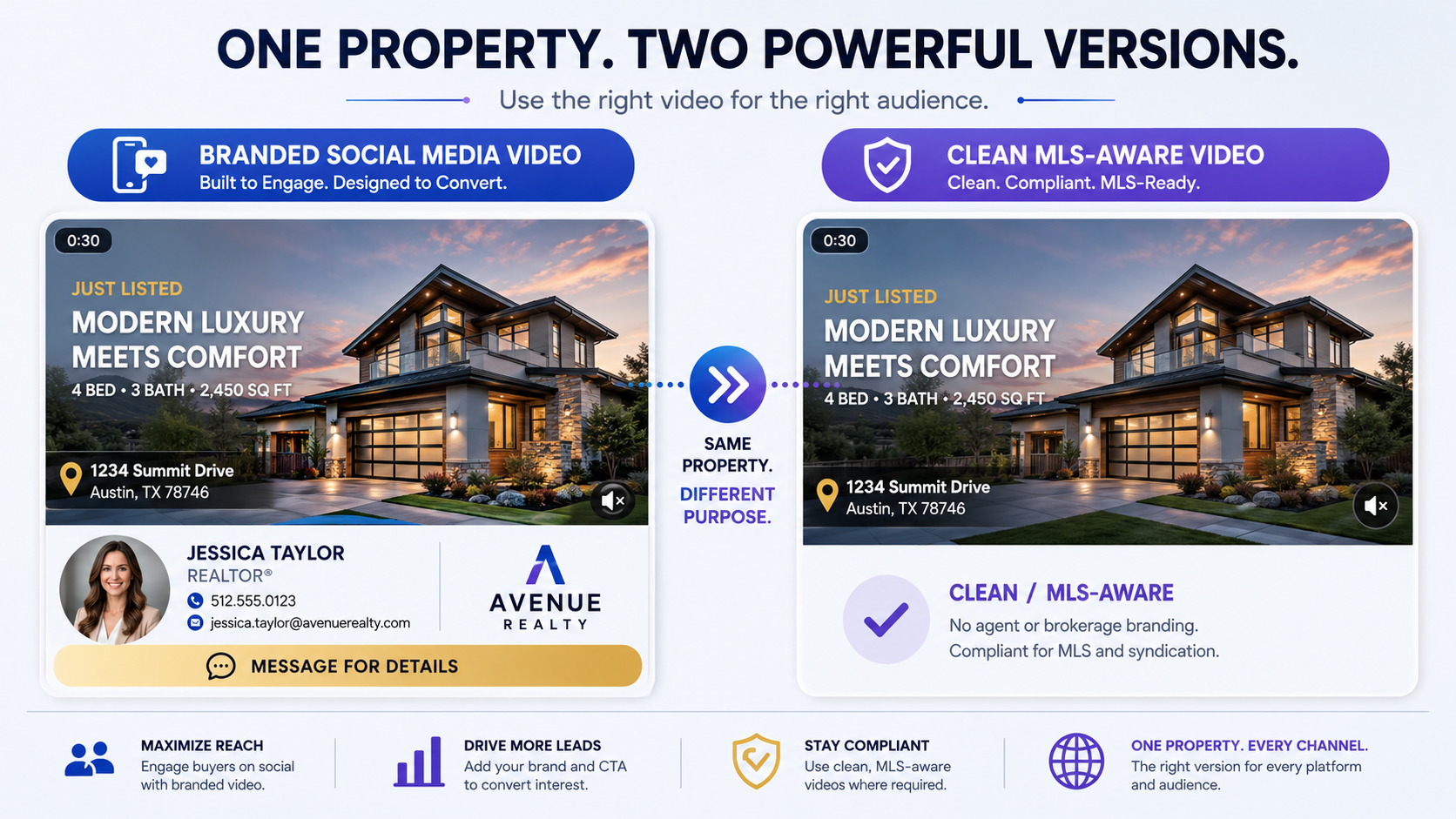
A branded video is built for promotion.
It may include:
A clean version removes the personal promotion and contact details.
That distinction matters because a social media post and an MLS-related upload may not follow the same rules. Policies vary by market, so Realtors should always check local MLS requirements before uploading branded video assets.
This is where a real estate video software that works with MLS rules becomes valuable. It should help agents think in terms of versioning, not one-size-fits-all video.
One photo set can become multiple video versions.
That is the point.
Every channel does not need the same file.
Instagram Reels, TikTok, YouTube Shorts, and Facebook Reels usually favor vertical 9:16 videos. Email campaigns and property websites may work better with horizontal or square formats. Seller updates may need a polished but simple version.
A good automation workflow should help agents think through distribution:
Google’s video guidelines emphasize that video content should be easy for Google to find and understand, including using crawlable pages, structured data where appropriate, and clear video information through video SEO best practices.
For Realtors, the practical takeaway is simple: do not let the video sit unused in a folder. Put it somewhere buyers, sellers, and search engines can understand.
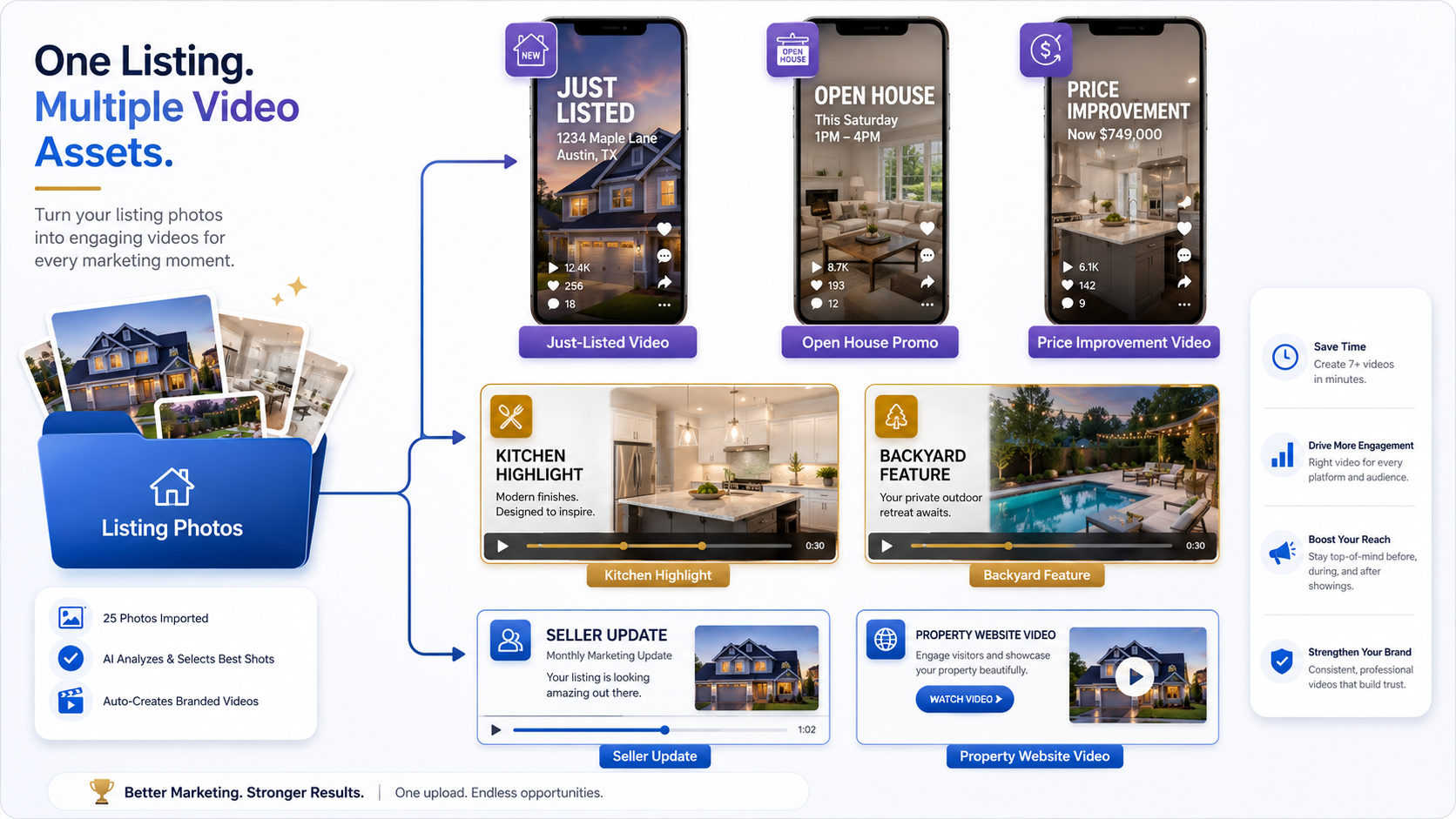
One listing can create more than one video.
From one photo set, a Realtor can create:
This is where create real estate videos from photos with AI becomes a true marketing advantage. The same property media can support multiple pieces of content instead of one single post.
An actionable insight many agents miss:
Do not create one full property video and stop.
Create smaller videos around the listing’s strongest moments.
A kitchen video may perform better on social than a full-home tour because the viewer instantly understands what they are looking at. A backyard teaser may drive more saves than a generic listing post. An open house promo may be more useful than another photo carousel.
Automation helps because it makes repurposing realistic.
Video marketing is not about posting for the sake of posting.
Track practical signals:
NAR has also shared examples of video helping agents create more memorable listing campaigns through real estate video marketing ideas.
For Realtors who hate editing, the win is not “I made a video.”
The win is “I made the right video fast enough to use it.”
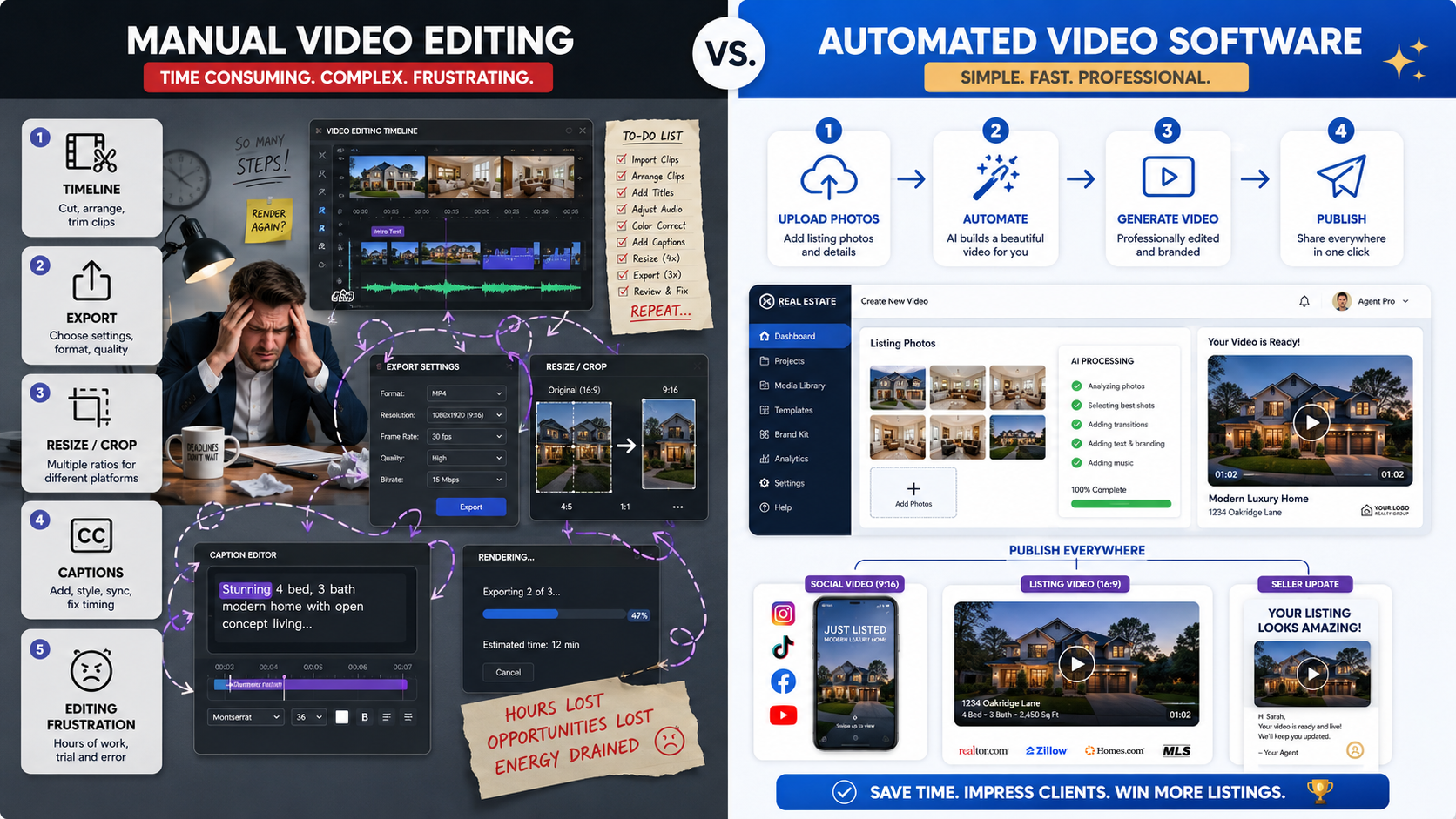
Manual editing is still useful for advanced creative projects.
But most Realtors do not need full creative control for every listing. They need a clean, professional video they can use quickly.
That is why AI real estate marketing software for agents should be evaluated by speed, repeatability, and usefulness, not just fancy editing features.
The photos arrive at 5:00 PM. The listing launches the next morning.
Instead of staying up late editing, the agent selects the best images, uses PhotoAIVideo to create a listing video, and posts a branded version the next day.
The video does not need to be a Hollywood production.
It needs to be good, clear, and ready.
Some agents are strong at sales and relationships but hate content production.
They know they should post. They just do not want to spend an hour adjusting text boxes.
For that agent, automated video software creates a lower-friction habit. The listing photos become the content source. The tool handles the video creation. The agent focuses on the message and follow-up.
Real estate photographers already have the best raw material: professionally edited photos.
With AI video software for real estate photographers, a photographer can offer video add-ons without returning to the property for a separate shoot.
Package examples:
The photographer increases average order value while the agent gets more marketing assets.
A brokerage may have 20, 50, or 200 agents, all using different marketing styles.
That creates inconsistent listing presentation.
A brokerage-wide video workflow can standardize:
This helps the brokerage protect brand quality without forcing every agent to become a designer.
Property managers often have many units and limited time.
They may not need a full videographer for every apartment, rental home, or small multifamily unit. They need fast leasing content that helps prospects understand the space.
Using an automated photo-to-video workflow, a property manager can create:
The goal is speed and clarity.
Video helps renters decide faster.
Some “easy” video tools still require too much editing.
If the tool forces agents to manually build every timeline, add every transition, resize every output, and create every version from scratch, it may not solve the problem.
For Realtors who hate editing, the tool should reduce steps.
More photos can make the video worse.
A 20-second listing video with 35 photos feels rushed and forgettable. Use fewer, stronger images and let each one breathe.
A branded video may work perfectly for Instagram, Facebook, email, and property websites.
But a clean version may be needed for certain MLS-related workflows or other distribution channels. Do not assume one file should go everywhere.
This is why an MLS compliant video maker for property listings workflow should include version control.
A just-listed Reel, an open house promo, a seller update, and a property website video do not need the same pacing.
Short social videos should move quickly. Website videos can breathe. Seller updates should feel polished and organized.
Match length to purpose.
The first three seconds decide whether most social viewers keep watching.
Do not start every video with a slow exterior fade.
Sometimes the kitchen, backyard, view, pool, or price point should come first.
Many people watch videos without sound.
Short captions can explain the property faster:
Captions should be readable, simple, and useful.
Agents often think video is only for buyers.
But video is also useful for sellers.
Sending the seller a polished listing video can reinforce that marketing is happening. It helps the seller see the work. It can reduce anxiety and improve perceived value.
Realtors who hate editing should look for software that is:
Avoid tools that require too much manual control unless you have a dedicated editor.
The best tool is the one that becomes part of your normal listing process.
For most busy agents, PhotoAIVideo’s photo-to-video workflow is useful because it starts with the assets Realtors already have and turns them into videos that can support real marketing moments.


Compact, ready to go anywhere
Interchangeable lens that’s upgradeable
Dual 1-inch sensors for improved clarity and low light performance
Dynamic range and 6K 360° capture
360° photo resolution at 21MP

8K 360° video recording for ultra-detailed visuals.
4K single-lens mode for traditional wide-angle shots.
Invisible selfie stick effect for drone-like perspectives.
2.5-inch touchscreen with Gorilla Glass protection.
Waterproof up to 33ft for underwater shooting.

360° photo resolution in 23MP
Slim design at 24 mm thick
Built-in image stabilization for smooth video capture.
Internal 19GB storage for photo and video storage.
Wireless connectivity for remote control and sharing.

60MP 360° still images for high-resolution photography.
5.7K 360° video recording at 30fps.
2.25-inch touchscreen for intuitive control.
USB Type-C port for fast charging and data transfer.
MicroSD card slot for expandable storage.
.png)

.png)

Try it free. No credit card required. Instant set-up.







.svg)


.svg)