


.png)


Captions can make a listing video perform better.
They can also get you in trouble.
That is the part most agents, photographers, and brokerage marketing teams miss. A caption that says “walk to downtown” may sound harmless until someone asks, “Is it actually walkable?” A caption that says “new roof” may help grab attention until the seller says, “It was replaced eight years ago.” A caption that says “best school district” may feel like a social media hook until it turns into a fair housing or advertising concern.
Real estate video captions are not just design elements.
They are marketing claims.
That means every caption needs to be treated like visible listing copy, especially when the video is used for MLS, Reels, email, paid ads, property management listings, or seller-facing updates.
This article breaks down when auto-captions help real estate videos, when they create risk, and how to build a safer workflow using PhotoAIVideo.com.
Auto-captions are text overlays or subtitle tracks generated from video content, audio, scripts, or prompts. In real estate marketing, they usually appear in one of three ways:
Burned-in captions that are permanently visible on the video.
Closed captions or subtitle files that viewers can turn on or off.
Text overlays that are not true captions but are used like captions, such as “Open House This Weekend,” “3 Bed / 2 Bath,” or “Just Listed in Austin.”
For real estate professionals, the distinction matters.
A social Reel may benefit from bold burned-in text because people often watch short-form videos without sound. A property website video may benefit from cleaner captions or a short written summary nearby. An MLS-safe version may need fewer text overlays, no branding, and no promotional claims depending on local MLS rules.
That is why the question is not, “Should I use captions?”
The better question is: “Which captions belong on which version of the video?”
If you use PhotoAIVideo’s real estate video platform to turn listing photos into video content, the safest workflow is to create a clean base video first, then add captioned or branded versions for specific channels.
Captions help because real estate videos are often consumed quickly, silently, and out of context.
A buyer may see your video while standing in line for coffee.
A seller may watch your marketing update from their phone.
A relocation lead may scan the video before deciding whether to request a showing.
A property manager may send a unit video to a renter who cannot tour in person.
In each case, captions can clarify the point of the video in seconds.
Google’s video guidance emphasizes that video pages should provide clear signals about the content through page context, titles, descriptions, and structured information. Captions and supporting text can help make video content easier to understand for users and search engines when used accurately. Google Search Central video best practices
Captions also support accessibility. WCAG guidance for prerecorded media says captions should be provided for prerecorded audio content in synchronized media, except in limited cases where the media is already a media alternative for text. WCAG captions guidance for prerecorded video
For Realtors, photographers, and brokerages, that creates a practical advantage. A captioned video can be easier to watch, easier to understand, and easier to repurpose.
But only if the captions are accurate.
That is where the risk starts.
Most caption problems happen because captions are added too late.
Here is the normal workflow:
The agent uploads listing photos.
The video gets generated.
A branded social version is created.
Auto-captions are added.
The video gets posted.
Then someone notices a problem.
The caption says “fully renovated,” but the seller only updated the kitchen. The caption says “minutes from the best schools,” but the brokerage does not want school-quality claims in marketing copy. The caption says “new construction,” but the home is actually a newer resale. The caption says “private backyard,” but the yard backs up to a visible neighbor.
This actually happens.
Not because the agent is careless. It happens because auto-caption tools often try to make the video more exciting. They may summarize, simplify, or polish the message. That is helpful for social media, but dangerous for regulated real estate advertising.
Captions can turn vague visual marketing into specific written claims.
That means your caption workflow needs review points, not just export buttons.
PhotoAIVideo is useful because real estate teams often need multiple versions of the same video.
You may need one clean version for MLS, one captioned version for social media, one short version for email, one branded version for ads, and one version for the seller recap.
That is why PhotoAIVideo’s caption and subtitle tools should be used as part of a versioning system, not as a one-size-fits-all caption layer.
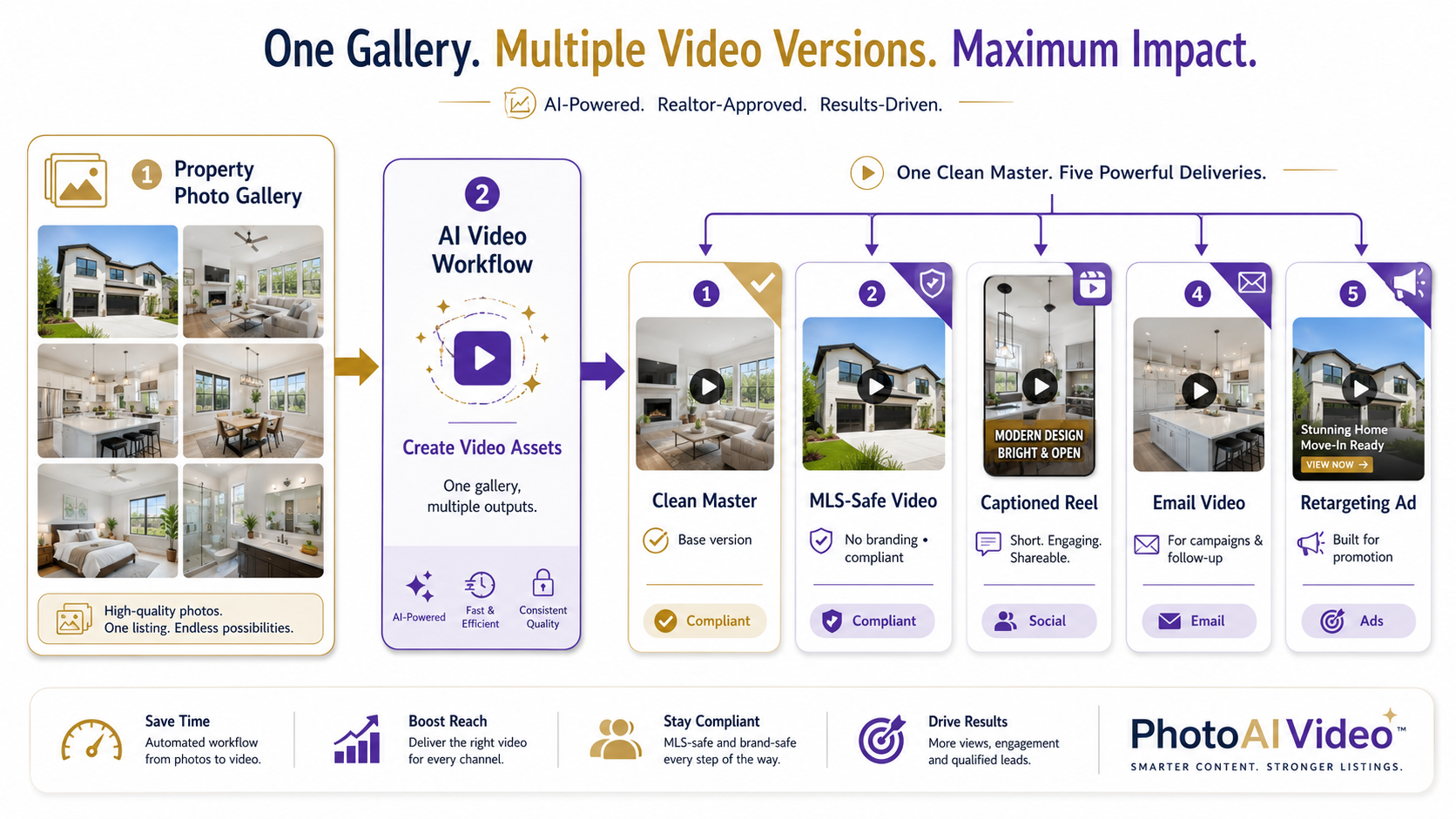
For example, an agent using an AI app to turn property photos into videos may start with edited listing photos, create a clean property-focused video, then add captions only where captions make sense. A real estate photographer using AI video software for real estate photographers might deliver both an unbranded MLS-safe version and a captioned social Reel as separate upsell assets.
That matters because the safest video is not always the highest-performing video.
The best workflow gives you both.
A clean version protects flexibility. A captioned version improves engagement. A branded version drives leads. A short version supports follow-up.
PhotoAIVideo fits best when it helps you build those versions quickly without forcing every channel to use the same captions.

Before you write or generate captions, decide where the video will live.
MLS.
Instagram Reels.
TikTok.
YouTube Shorts.
Property website.
Email.
Paid ad.
Seller update.
Rental listing.
Brokerage presentation.
Each destination has a different risk profile.
For MLS, captions should be minimal, factual, and unbranded unless your local MLS allows otherwise. For social media, captions can be more promotional, but still need to be accurate. For paid ads, captions should avoid claims you cannot support. For property management, captions should focus on unit features, availability, and next steps without overpromising.
A video caption is not just text.
It is a public-facing representation of the property.
Start with a version that has no captions, no agent branding, no phone number, no logo, and no call-to-action.
This is your clean master file.
Use it for:
MLS review
Broker approval
Property website embedding
Future edits
Unbranded delivery
Compliance backup
This is where an AI tool for making unbranded real estate videos becomes valuable. You can preserve a clean version before creating social or branded variants.
If you start with a caption-heavy version, you may have to remake the video later. If you start clean, you can build outward.
Not all on-screen text is the same.
Captions should reflect what is said or shown.
Marketing overlays are promotional messages.
Examples of captions:
“Open kitchen and living area”
“Primary suite with natural light”
“Covered patio and backyard space”
Examples of marketing overlays:
“Your dream home is here”
“Best deal in the neighborhood”
“This one will not last”
“Perfect for young families”
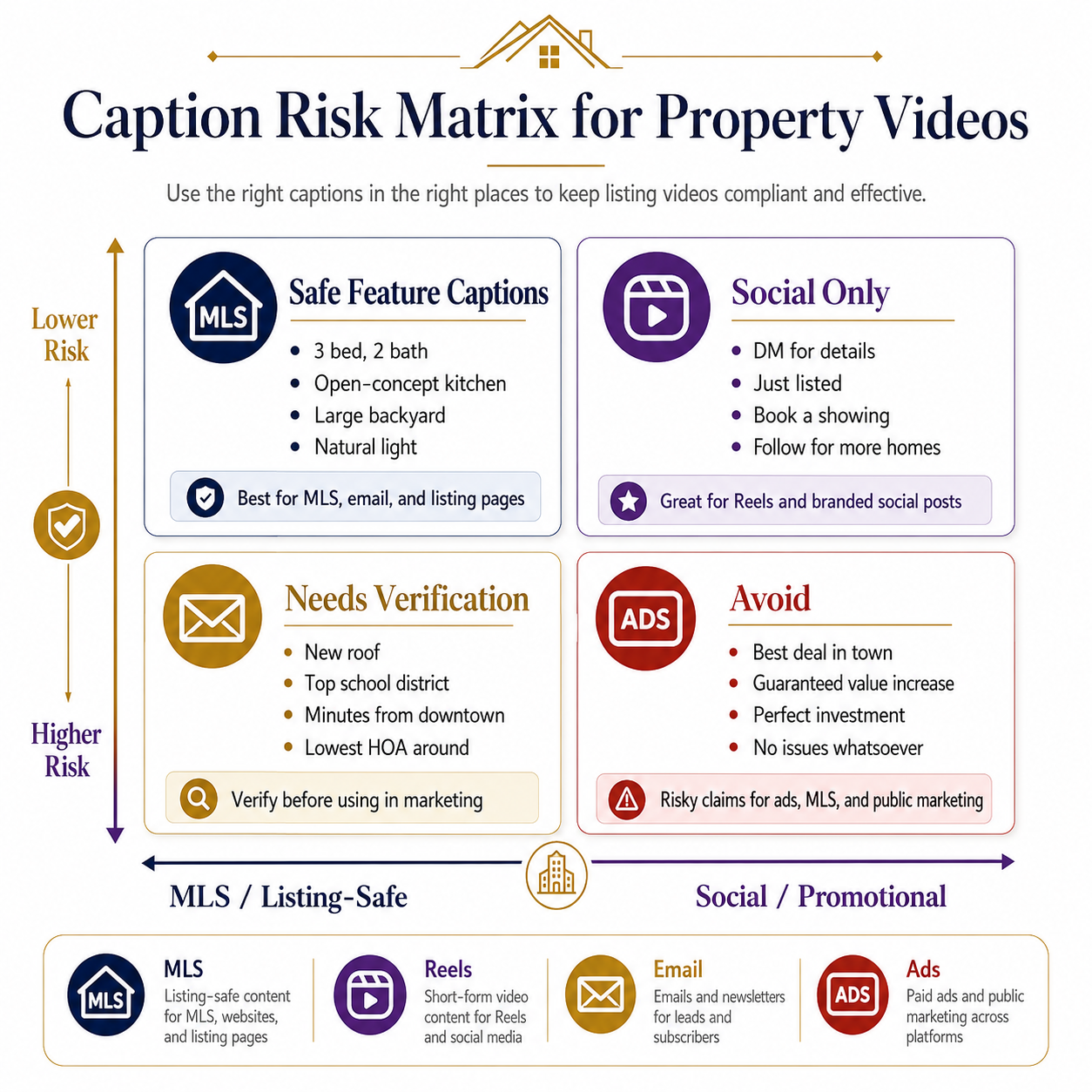
The first group is safer because it describes visible property features. The second group may be useful in social marketing, but it carries more risk because it makes subjective, urgency-based, or audience-specific claims.
When in doubt, use feature-based captions.
Before publishing, review every caption and ask five questions:
Is this visible in the video or supported by the listing information?
Is this factually accurate?
Is this allowed by the broker?
Is this appropriate for the platform?

Could this create an MLS, fair housing, advertising, or seller expectation issue?
This does not need to be complicated. A five-minute review can prevent most problems.
The caption “large backyard” may be fine. The caption “largest backyard in the area” needs proof. The caption “family-friendly neighborhood” may create fair housing concerns. The caption “quiet street” may be subjective. The caption “new HVAC” needs documentation.
The more specific the caption, the more proof it needs.
Do not use the same caption track everywhere.
Here is a simple versioning model:
MLS-safe version: no branding, minimal text, property-focused.
Social Reel version: stronger hook, captions, branded CTA.
Email version: short captions, clear preview, no clutter.
Retargeting version: one feature-focused message.
Seller update version: polished but not overly promotional.
A tool like PhotoAIVideo’s AI marketing video generator for real estate agents is most useful when you think in versions instead of one final video.
Good captions should be easy to read on a phone.
Use fewer words.
Use contrast.
Avoid tiny text.
Do not cover key property features.
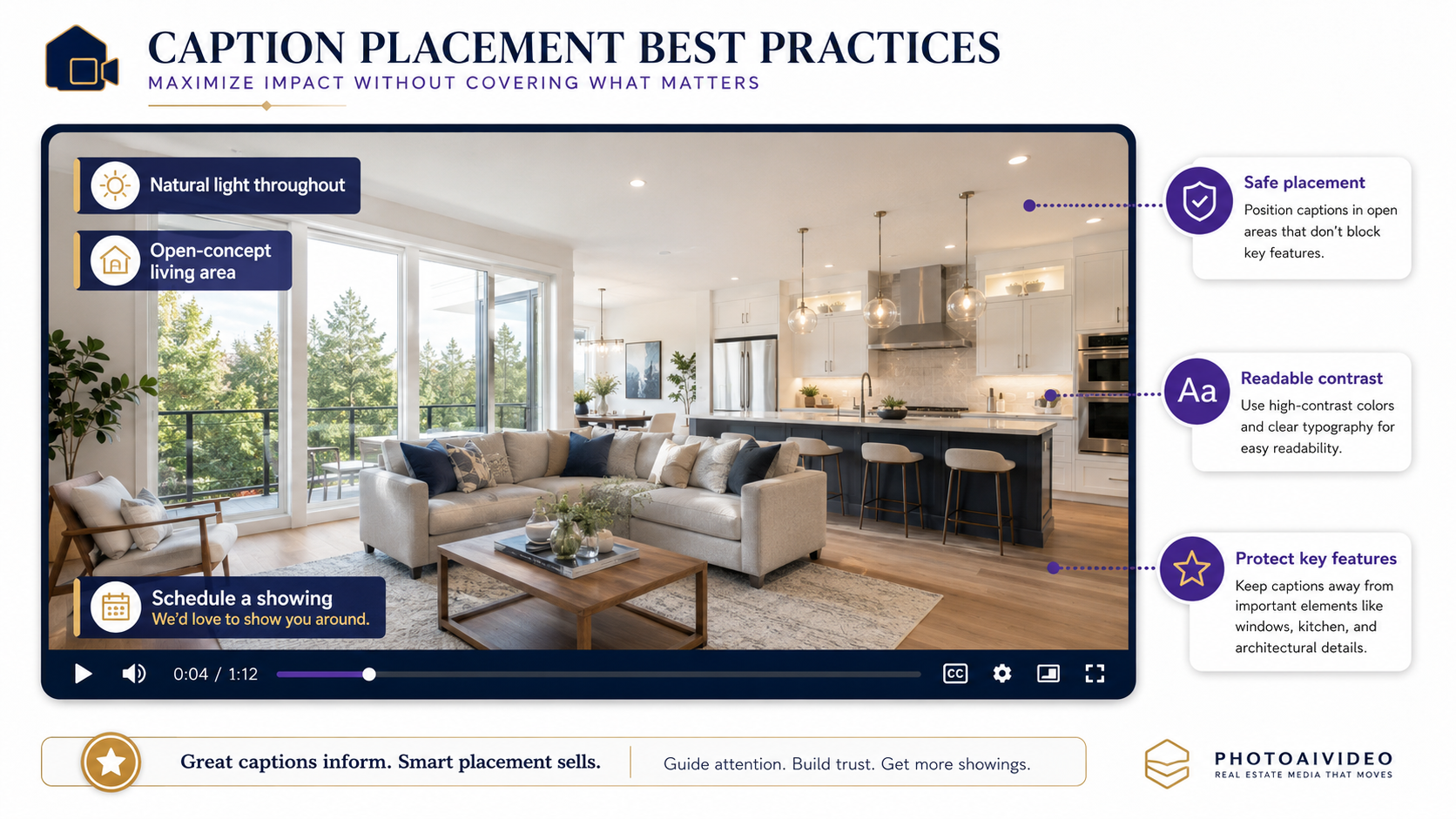
Do not stack captions over busy kitchen countertops, stair rails, or exterior details.
Keep each caption on screen long enough to read.
Professional subtitling guidance commonly emphasizes timing, readability, and limiting the amount of text on screen so viewers can process the message. online subtitling best practices
For real estate videos, the rule is even simpler:
If the caption hides the room, it is hurting the listing.
Keep both versions.
Your file naming might look like this:
123-main-street-clean-mls-video.mp4
123-main-street-captioned-reel.mp4
123-main-street-email-video.mp4
123-main-street-retargeting-clip.mp4
123-main-street-seller-recap-video.mp4
This helps agents, photographers, brokerages, and property managers avoid confusion later.
It also protects you when someone asks, “Can we send the unbranded version?” or “Can we remove that caption?”
You already have it.
Captions are not good or bad by themselves.
The risk depends on where they appear, what they claim, and whether anyone reviewed them.
A Realtor wants a quick Reel for a new listing.
Good caption:
“Just listed: 4 bedrooms, open kitchen, covered patio.”
Riskier caption:
“The perfect family home in the best school district.”
The first caption gives buyers useful property information. The second introduces subjective and potentially sensitive language.
For social media, captions should create interest without drifting into claims that are hard to support.
A real estate photographer wants to offer video as an upsell.
The smart delivery package includes:
Clean unbranded video
Captioned social Reel
Branded agent version
Short open house clip
Email preview video
This is a great use case for create real estate videos from photos with AI because the photographer can use the finished photo gallery to create multiple assets without scheduling another shoot.
The key is to label each file clearly so the agent does not accidentally upload the branded captioned version to MLS.
A brokerage with 40 agents cannot rely on everyone making caption decisions on the fly.
The brokerage should create approved caption categories:
Allowed: room names, verified features, listing status, open house time.
Use with caution: neighborhood claims, school references, renovation claims, urgency language.
Avoid: protected-class language, unverifiable superlatives, unapproved guarantees, exaggerated location claims.
This turns captions from a creative guess into a compliance-aware marketing system.
Brokerage teams looking for real estate video software that works with MLS rules should not only look for video generation speed. They should look for clean exports, branding controls, and versioning discipline.
A property manager may use captions to speed up leasing.
Good captions:
“Updated kitchen”
“In-unit laundry”
“Reserved parking”
“Available now”
“Schedule a tour”
Riskier captions:
“Safest building downtown”
“Perfect for students”
“Luxury living at the lowest price”
Property management captions should help renters understand the unit quickly while avoiding claims that are subjective, sensitive, or difficult to prove.
A retargeting video does not need ten captions.
It needs one clear reason to come back.
Examples:
“Still looking in Westhaven?”
“Open house this Saturday”
“Tour the backyard before it is gone”
“See the kitchen buyers are saving”
Retargeting captions should be short because the audience already showed interest. The goal is not to re-explain the whole property. The goal is to move the buyer to the next action.
This is where the best AI real estate video generator for social media is not just the tool with the flashiest effects. It is the tool that helps you create the right message for the right viewer.
Auto-captions should not invent better-sounding claims.
If the listing says “updated kitchen,” do not let the video say “fully renovated chef’s kitchen” unless that is true and approved.
A Reel caption like “DM me for a private tour” may be fine for Instagram, but it may not belong on an MLS version.
Treat MLS as a separate export, not another upload destination.
Too much text makes the video feel busy.
Let the property breathe.
Use captions to guide attention, not narrate every image.
Do not place text over countertops, room dimensions, fireplace details, exterior features, or pool areas buyers need to see.
The best caption placement is usually in negative space: sky, wall, floor edge, or darkened overlay areas.
Avoid captions that imply a preferred buyer type.
Be careful with phrases that reference families, age, religion, disability, national origin, or other protected characteristics. The safest captions describe the property, not the person who “should” live there.
NAR’s Code of Ethics and professional standards reinforce the importance of truthful, non-misleading advertising and professional conduct in real estate communications. NAR Code of Ethics resources
Captions can show up in emails, ads, landing pages, property websites, MLS-adjacent media, listing presentations, and seller reports.
If it is visible to the public, review it.
This is the easiest mistake to avoid.
Always keep a caption-free version.
Even if the captioned version performs better, the clean version gives you flexibility.


Compact, ready to go anywhere
Interchangeable lens that’s upgradeable
Dual 1-inch sensors for improved clarity and low light performance
Dynamic range and 6K 360° capture
360° photo resolution at 21MP

8K 360° video recording for ultra-detailed visuals.
4K single-lens mode for traditional wide-angle shots.
Invisible selfie stick effect for drone-like perspectives.
2.5-inch touchscreen with Gorilla Glass protection.
Waterproof up to 33ft for underwater shooting.

360° photo resolution in 23MP
Slim design at 24 mm thick
Built-in image stabilization for smooth video capture.
Internal 19GB storage for photo and video storage.
Wireless connectivity for remote control and sharing.

60MP 360° still images for high-resolution photography.
5.7K 360° video recording at 30fps.
2.25-inch touchscreen for intuitive control.
USB Type-C port for fast charging and data transfer.
MicroSD card slot for expandable storage.
.png)

.png)

Try it free. No credit card required. Instant set-up.







.svg)


.svg)