


.png)


A property manager and a solo listing agent walked into the same software demo last month and asked completely different questions. She wanted to know if it could churn out fifteen unit-turnover videos before Friday. He wanted to know if it could make one three-bedroom colonial look cinematic enough to justify his commission. Same tool, same sales pitch — two completely different jobs to be done.
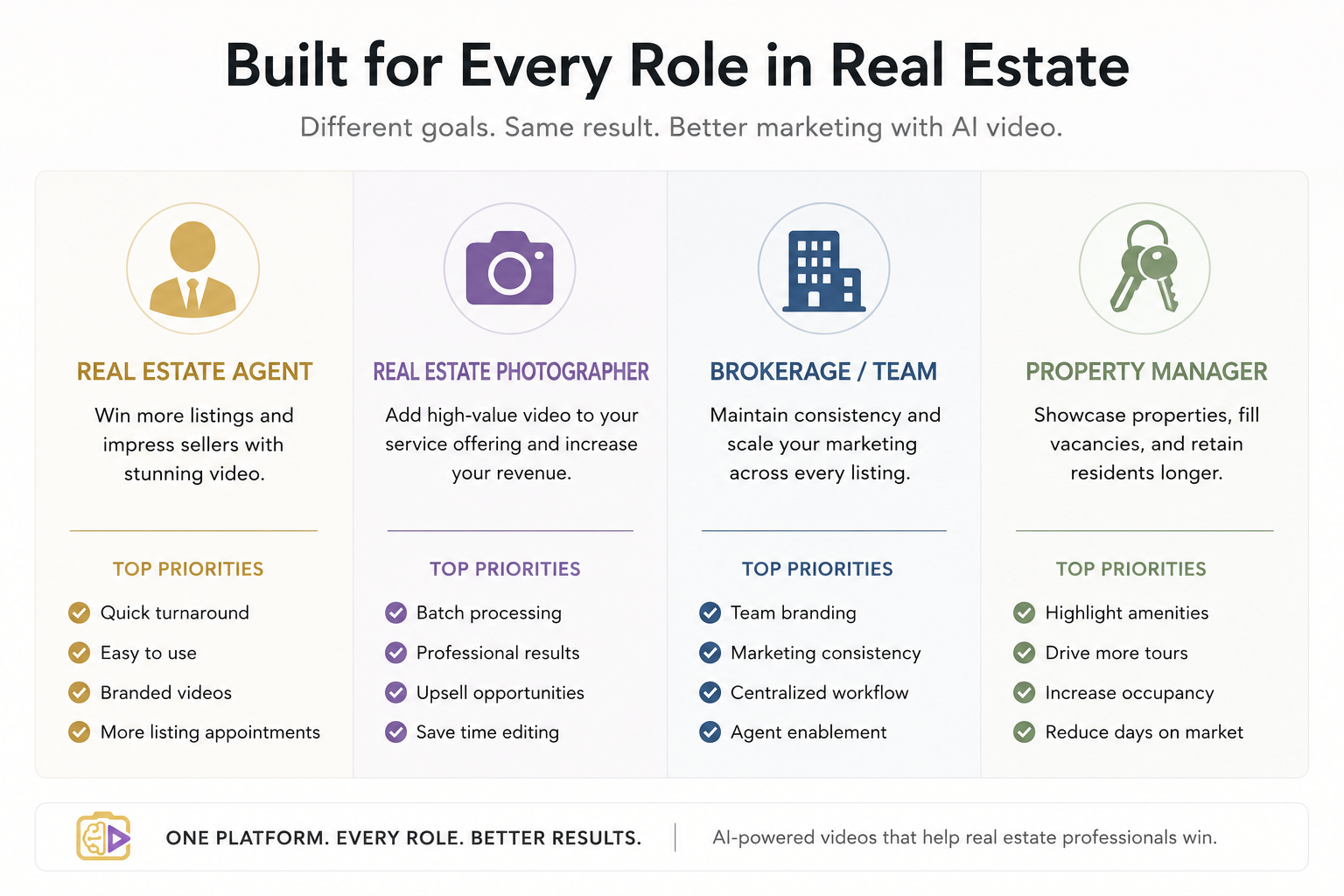
That's the problem with most AI video tools for real estate marketing roundups: they review the software like there's one universal buyer, when the truth is a brokerage scaling across forty agents and a photographer doing weekend upsells need almost opposite things from the same category of tool. This isn't another generic feature list. It's a breakdown by who you actually are and what your Monday morning actually looks like.
At its core, this category covers software that turns static listing photos (and sometimes video clips or floor plans) into a finished, branded video — usually with transitions, music, voiceover or captions, and agent/brokerage branding — without requiring a video editing background. Some tools lean fully automated (upload photos, get a video in minutes). Others sit closer to templated editing, where automation handles the heavy lifting but you still make creative choices.
The distinction matters more than most comparisons admit, because "AI-powered" doesn't mean "hands-off," and the amount of manual polish a tool expects from you is often the single biggest factor in whether it fits your actual week.
Listing video isn't optional anymore — it's table stakes, particularly on social platforms where photo carousels get scrolled past in under two seconds. But the business impact isn't just "more views." It's turnaround speed on a seller's timeline, consistency of brand across every unit a property manager leases, and — for brokerages — whether forty agents are producing videos that look like they belong to the same company or forty unrelated ones.
Choosing the wrong tool for your specific use case shows up as friction weeks later: a photographer who bought a heavy automated tool discovers he can't customize enough to justify charging a premium for it, or a brokerage standardizes on a single-listing tool and finds it buckles the moment someone tries to batch-process a 12-unit new construction release.
Here's a pattern that keeps showing up: someone picks a tool based on a best real estate video apps list built for solo agents, then tries to apply it to a completely different job. A property manager onboards a tool praised for its cinematic transitions and "emotional storytelling" templates — great for a $2M single-family listing, badly overbuilt for a 500-square-foot unit turnover that needs to go live in under ten minutes.
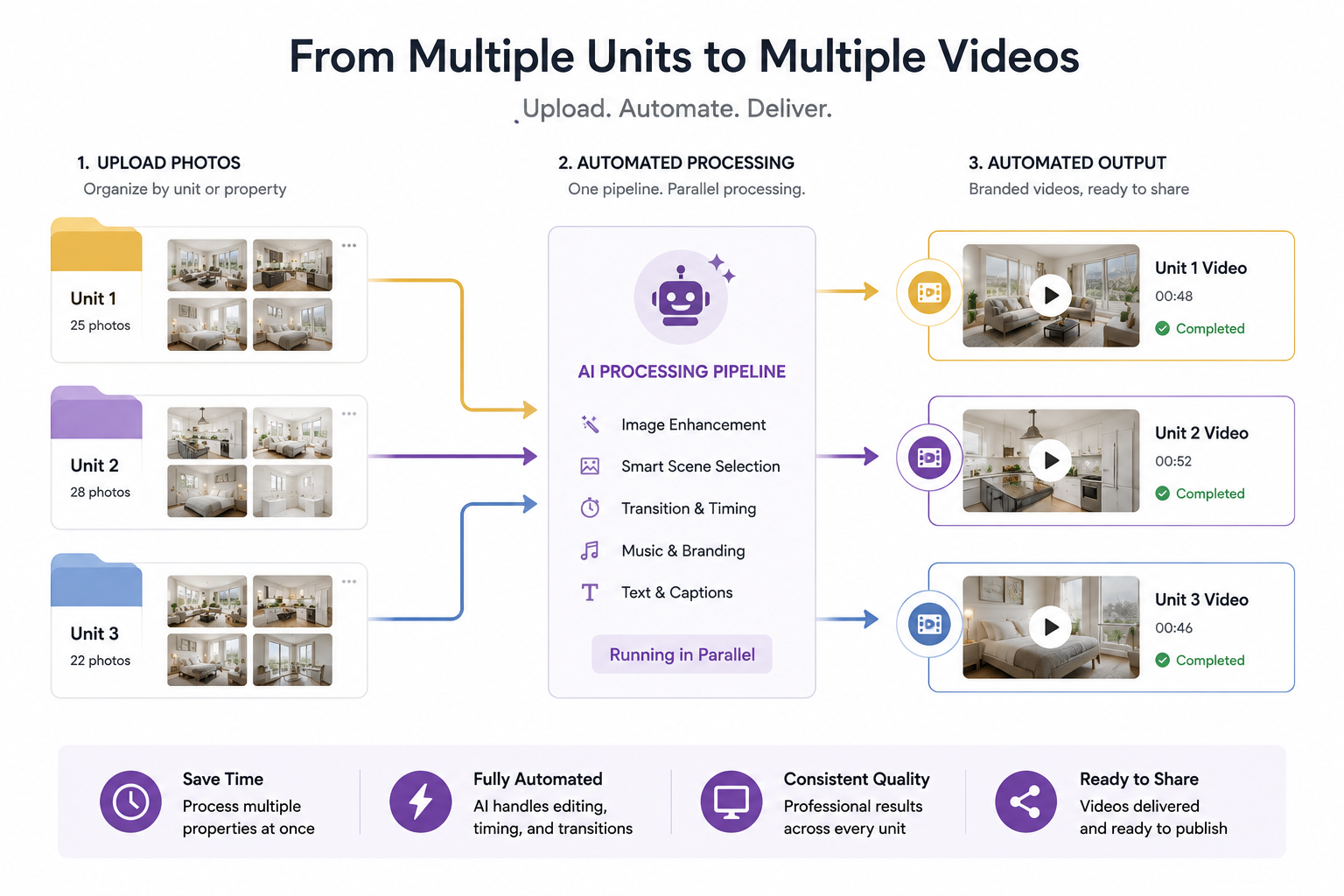
This actually happens constantly in multi-unit portfolios: the team spends longer designing the "perfect" template than they would have spent just shooting and posting a walkthrough. The tool wasn't bad. It was built for the wrong job.
Rather than optimizing for one persona, the practical test for AI video tools for real estate marketing is whether the software flexes across the actual range of jobs a real estate business generates in a single week — a luxury single-family listing on Monday, a batch of leasing units on Wednesday, a quick social teaser on Friday. A platform that can move between "polished and slow" and "fast and simple" without forcing you into a different tool for each job is solving the actual problem, not just the demo-day problem.
Step 1: Identify your actual weekly volume. One listing a month and forty units a month are not the same software decision, even if both fall under "real estate video."
Step 2: Separate "creative control" from "speed" as your priority. A photographer upselling video as a premium add-on needs more creative latitude than a leasing agent who needs a unit live on the internet within the hour.
Step 3: Test batch upload before you subscribe. If your business involves more than a handful of properties at once, confirm the tool handles batch photo sets — not just a single listing's worth of images — before committing to a plan.
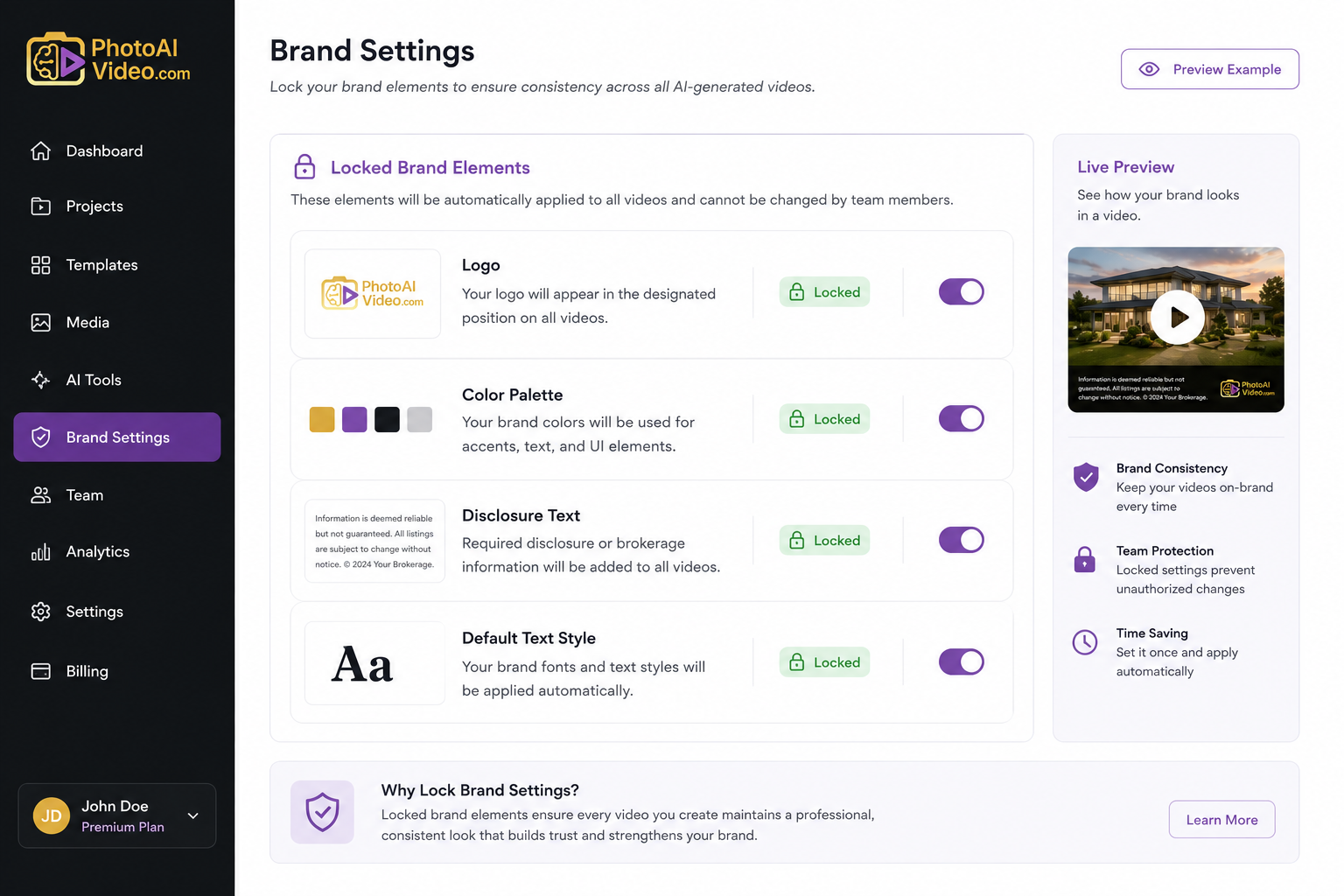
Step 4: Check brand consistency controls. For brokerages, this means confirming logo placement, color scheme, and disclosure text can be locked in as defaults so every agent's video looks like it came from the same company, not forty different freelancers.
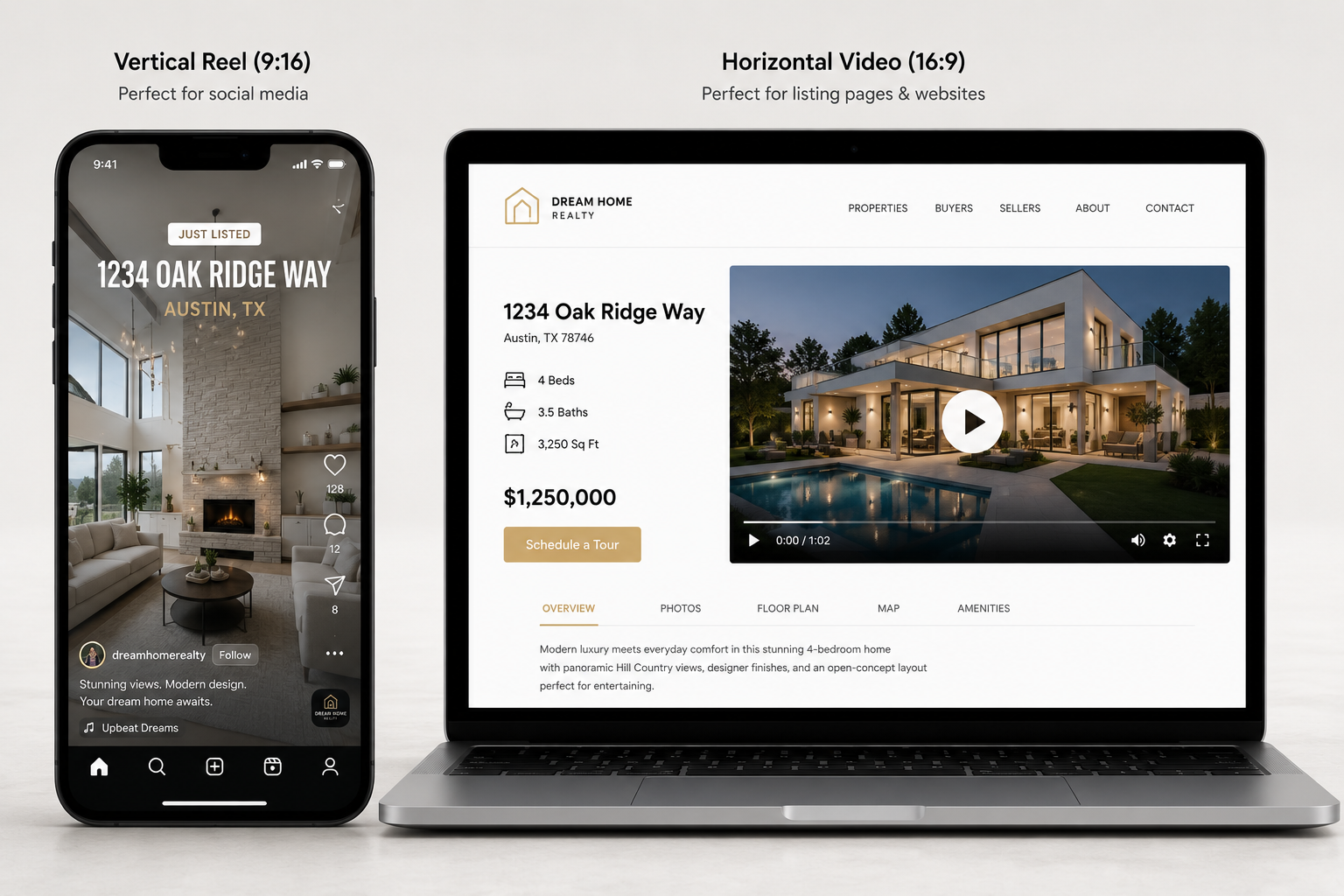
Step 5: Confirm export format matches your primary channel. A video optimized for a full listing page looks wrong cropped into an Instagram Reel — check that the export options cover both if social is part of your strategy.

Do all real estate AI video tools work the same way regardless of use case?
No. Some are built for high-volume, low-customization jobs like unit turnovers, while others prioritize creative flexibility for single high-value listings. The right tool depends heavily on your weekly workload and priorities.
What should a brokerage look for that a solo agent doesn't need to worry about?
Centralized brand controls — locking logo, color palette, and disclosure text across every agent's account — matter far more at brokerage scale than they do for a single user.
Can property managers use the same tools as luxury listing agents?
Technically yes, but the priorities differ enough that a tool optimized for cinematic single-listing videos often slows down a workflow built around batch unit turnovers.
How important is social media export format when choosing a tool?
Very, if short-form content is part of your strategy — a video built only for a horizontal listing page will need reformatting for vertical platforms, which adds a step most people don't budget time for.
Is more automation always better?
Not for every use case. Photographers upselling video often need more manual creative control specifically because full automation can make their delivery look identical to a competitor's.
What's the biggest mistake agencies make when picking real estate video software?
Choosing based on a single impressive demo video rather than testing the tool against their actual mixed weekly workload — a listing, a leasing unit, and a social teaser all in the same week.
Does MLS compliance vary by use case as well?
Yes — a property manager producing dozens of leasing videos needs the same disclosure consistency a brokerage needs across agents, while a solo agent may only need to confirm compliance on a per-listing basis.


Compact, ready to go anywhere
Interchangeable lens that’s upgradeable
Dual 1-inch sensors for improved clarity and low light performance
Dynamic range and 6K 360° capture
360° photo resolution at 21MP

8K 360° video recording for ultra-detailed visuals.
4K single-lens mode for traditional wide-angle shots.
Invisible selfie stick effect for drone-like perspectives.
2.5-inch touchscreen with Gorilla Glass protection.
Waterproof up to 33ft for underwater shooting.

360° photo resolution in 23MP
Slim design at 24 mm thick
Built-in image stabilization for smooth video capture.
Internal 19GB storage for photo and video storage.
Wireless connectivity for remote control and sharing.

60MP 360° still images for high-resolution photography.
5.7K 360° video recording at 30fps.
2.25-inch touchscreen for intuitive control.
USB Type-C port for fast charging and data transfer.
MicroSD card slot for expandable storage.
.png)

.png)

Try it free. No credit card required. Instant set-up.







.svg)


.svg)