AI Video Landing Pages: How to Convert Viewers Into Clients

June 29, 2025
5 min read
Share this post

AI Video Landing Pages: How to Convert Viewers Into Clients

You’ve created engaging video content using AI. You’ve posted it on YouTube, Instagram, and TikTok. Maybe you’re getting views, likes, and shares.

But here’s the real question…

Are your viewers turning into paying clients?

That’s where AI-powered video landing pages come in. These high-converting, automated pages are designed to capture attention, build trust, and drive action—all from a single video.

In this guide, we’ll break down how to build AI video landing pages that convert viewers into qualified leads, consultations, and sales—on autopilot.

What Is a Video Landing Page?

A video landing page is a standalone page built around a single, focused goal: to convert visitors into clients.

It typically features:

✅ A featured video (hero section)
✅ Headline + benefit-driven copy
✅ Call-to-action (book call, download, buy)
✅ Supporting testimonials or proof
✅ Optional lead form or scheduling tool

AI tools now make it possible to create these in minutes, not days—complete with video, copy, branding, and conversion tracking.

🡆 Related: AI Video Funnels: How to Automate Lead Gen With Short-Form Content

Why Video Landing Pages Convert So Well

Compared to traditional landing pages, video landing pages:

  • Boost engagement time by 80%
  • Increase conversions by up to 86%
  • Build trust faster through face and voice
  • Showcase your service or product clearly
  • Allow for retargeting and automation

When paired with AI video creation tools, this becomes a scalable lead-gen system you can use across every campaign, offer, and client segment.

🡆 Related: The ROI of Replacing Your Video Editor With AI

Step 1: Create Your Video With AI

First, you’ll need a core video that speaks to your audience and solves a problem.

Structure:

  1. Hook – Address pain point or big promise
  2. Story – Who you help and why it works
  3. Value – Benefits and transformation
  4. Proof – Quick testimonial or stat
  5. Call to Action – What to do next

Tools:

  • PropertyEdits.ai – Create explainer or real estate videos
  • Pictory / Descript – Convert blog post or script to video
  • ElevenLabs – Add AI voiceover in your voice
  • CapCut / Runway ML – Add captions, visuals, overlays

🡆 Related: From Script to Screen: The Ultimate AI Video Content Stack

Step 2: Build the Landing Page (Fast)

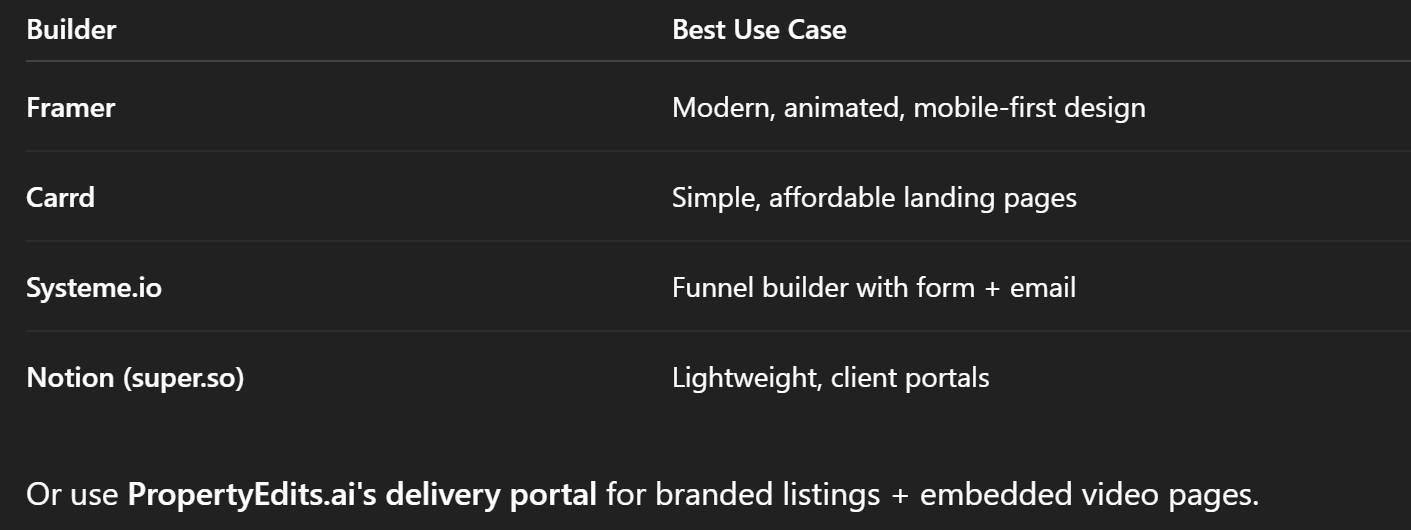
Use AI-friendly website builders to quickly create a mobile-friendly, conversion-optimized page:
🡆 Related: Building a White-Labeled Real Estate Video Marketing Service With AI

Step 3: Add Smart Copy With AI

Use ChatGPT to generate or refine landing page copy.

Prompt Example:

“Write a landing page headline and subhead for a real estate agent offering a free listing video demo using AI.”

Include:

✅ Headline: Benefit + urgency
✅ Subheadline: Problem-solving statement
✅ CTA: Clear, action-driven (book a call, get a demo)
✅ Short form or embedded calendar

🡆 Related: How to Package AI Video Services for Clients (and Charge More)

Step 4: Add Lead Capture or CTA Button

Choose your primary call-to-action:

  • 📆 Calendly embed (book a call)
  • 📨 Email opt-in (get a checklist or lead magnet)
  • 🛍️ Purchase button (for product or service)
  • 💬 Chat bubble or SMS link

Use tools like:

  • Calendly, TidyCal – for appointments
  • Beehiiv, MailerLite – for lead capture
  • Zapier – for form → CRM workflows

🡆 Related: AI SEO Toolkit for Video Creators

Step 5: Drive Traffic With AI Content

Once the landing page is live, create a content loop:

  • Cut your video into 3 Reels or Shorts
  • Post to IG, TikTok, YouTube with CTA “link in bio”
  • Add thumbnail + embed in email newsletter
  • Run retargeting ads with your video clip
  • Send page link in DMs, comments, or replies

🡆 Related: Turn One Video Into 10 Pieces of Content

Real-World Example: Lead Gen for Real Estate Agent

Agent: Bryan in Charlotte, NC
Video: “Why My Listings Sell 10 Days Faster”
Built With: PropertyEdits.ai + Framer
Landing Page: 1-minute video + seller form
CTA: “Book a 15-min listing strategy call”

Results:

  • 2,100+ page views in 30 days
  • 75 form submissions
  • 11 listing appointments
  • 3 closed deals (>$25,000 in GCI)

🡆 Related: How Real Estate Agents Are Scaling Listings With AI Video Automation

Bonus: Automate Follow-Up with AI Tools

You can extend your funnel by using:

  • ChatGPT – Write 3-day email follow-up sequence
  • ConvertKit / Beehiiv – Send automated value emails
  • HighLevel / Systeme.io – Build a full video funnel
  • Zapier / Make.com – Connect form → CRM → task list

🡆 Related: The Weekly AI Video Content Plan (Template + Tools)

Final Tips for High-Converting Video Pages

✅ Keep it simple—one goal per page
✅ Make video the FIRST thing visible
✅ Use bold, benefit-driven headlines
✅ Test short vs. long-form versions
✅ Always include a CTA—don't just “show” the video
✅ Track clicks and conversions

🡆 Related: The Best Tools for Batch-Creating Social Reels With AI

Final Thoughts: Turn Your Videos Into Conversion Machines

AI helps you make video fast. A landing page turns that video into revenue.

Don’t just post your videos—leverage them with a focused funnel that educates, builds trust, and captures leads. With the right stack, you can build 1–5 of these per week for yourself or your clients.

🡆 Start With the photoaivideo Free Walkthrough – Create Video + Landing Delivery in Minutes

Share this post

Choose The Right 360° Camera

Insta360 ONE RS 1-Inch 360 Edition

  • Compact, ready to go anywhere

  • Interchangeable lens that’s upgradeable

  • Dual 1-inch sensors for improved clarity and low light performance

  • Dynamic range and 6K 360° capture

  • 360° photo resolution at 21MP

Learn More

Insta360 X4

  • 8K 360° video recording for ultra-detailed visuals.

  • 4K single-lens mode for traditional wide-angle shots.

  • Invisible selfie stick effect for drone-like perspectives.

  • 2.5-inch touchscreen with Gorilla Glass protection.

  • Waterproof up to 33ft for underwater shooting.

Learn More

Ricoh Theta Z1

  • 360° photo resolution in 23MP

  • Slim design at 24 mm thick

  • Built-in image stabilization for smooth video capture.

  • Internal 19GB storage for photo and video storage.

  • Wireless connectivity for remote control and sharing.

Learn More

Ricoh Theta X

  • 60MP 360° still images for high-resolution photography.

  • 5.7K 360° video recording at 30fps.

  • 2.25-inch touchscreen for intuitive control.

  • USB Type-C port for fast charging and data transfer.

  • MicroSD card slot for expandable storage.

Learn More
Property Marketing
Allows potential buyers to explore properties in detail from anywhere, enhancing the real estate marketing process.
Automotive Spins
Create an interactive virtual showroom and engage affluent digital buyers with live 360º video calls, all through the CloudPano mobile app for a complete automotive sales solution.
Interactive Floor Plans
Create 2D and 3D floor plans with measurements in 4 minutes or less, all from your phone. Download the Floor Plan Scanner app and get your first scan free.

360 Virtual Tours With CloudPano.com. Get Started Today.

Try it free. No credit card required. Instant set-up.

Try it free
Latest posts

See our other posts

Interviews, tips, guides, industry best practices, and news.

Automating Listing Presentations with AI Avatars

This article explains how AI avatars are transforming real estate marketing by automating listing presentations. It walks readers through how AI avatar listing videos work, how agents can create AI powered real estate walkthroughs using platforms like PhotoAIVideo, and how real estate professionals can clone themselves to present properties automatically. The post also explores business models for photographers and agents, benefits for social media marketing, and best practices for creating engaging automated listing presentations that attract more buyers and generate leads.
Read post

Using AI Avatars for Real Estate Listing Presentations and Property Walkthrough Videos

This article explains how real estate professionals are using AI avatars for listing presentations and property walkthrough videos to scale their marketing and stay competitive in a video-first industry. It covers how AI avatars work, why they are becoming popular among agents, and how they help create professional listing videos without constant filming. The post also highlights how tools like PhotoAI allow agents to upload a headshot, generate a digital avatar, and quickly produce polished video content for property tours, seller presentations, and social media marketing. By leveraging AI avatars, agents can maintain consistent branding, create more content, and showcase listings more effectively while saving time.
Read post

AI Avatar Compliance and Best Practices for Real Estate Marketing

This article explores how real estate professionals can responsibly use AI avatars in property marketing while maintaining transparency and trust. It explains the importance of AI real estate compliance, including how agents should implement proper disclosure for AI videos and follow ethical AI marketing practices when using AI-generated presenters in listing videos. The guide walks through how AI avatars are created, how they can automate listing presentations, and how agents can integrate them into their marketing workflow without misleading buyers or violating advertising standards. By following clear best practices—such as accurate scripts, transparent disclosures, and consistent review of generated content—real estate teams can scale video marketing while protecting their reputation and building long-term client trust.
Read post



