


.png)


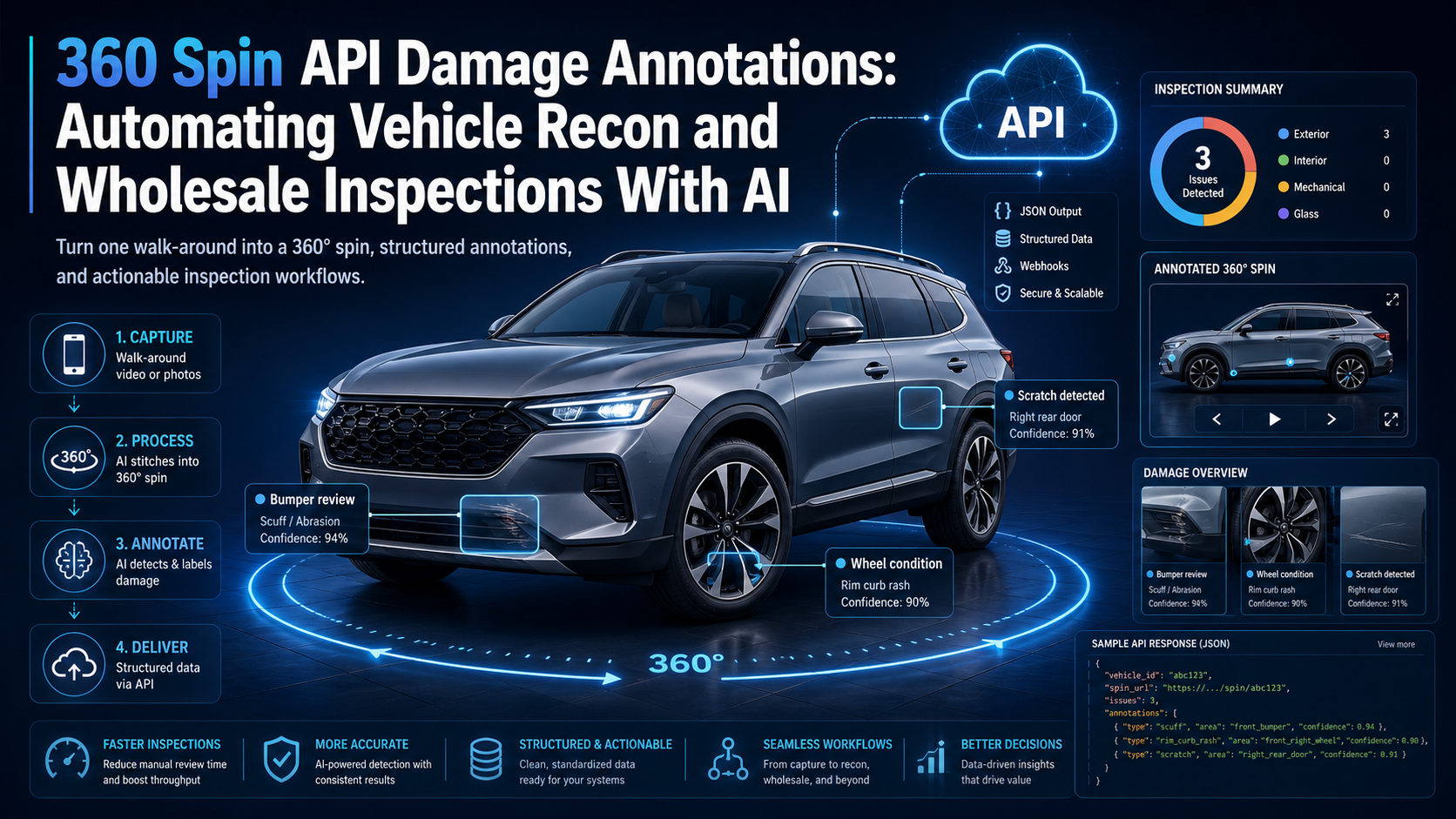
A 360° vehicle spin is usually thought of as a merchandising tool.
A shopper drags the vehicle left or right, examines the exterior from multiple angles, and gets a better understanding of the car before visiting the dealership.
But the same walk-around media can potentially support another valuable workflow: vehicle condition review.
Instead of using a 360° sequence only for presentation, automotive applications can combine spin processing with AI-generated annotations to identify areas that may deserve additional attention during recon, appraisal, wholesale intake, or inspection.
Using an option such as annotations_prompt, developers can instruct a processing workflow to analyze available vehicle imagery for specific observations and return information their application can use downstream.
That turns a car damage annotation API into more than an image-processing feature. It can become part of a broader system connecting vehicle capture, inventory data, recon workflows, wholesale operations, and digital merchandising.
The goal is not to replace a qualified human inspector. It is to reduce repetitive visual review, organize potential findings, and help teams focus attention where it is most useful.
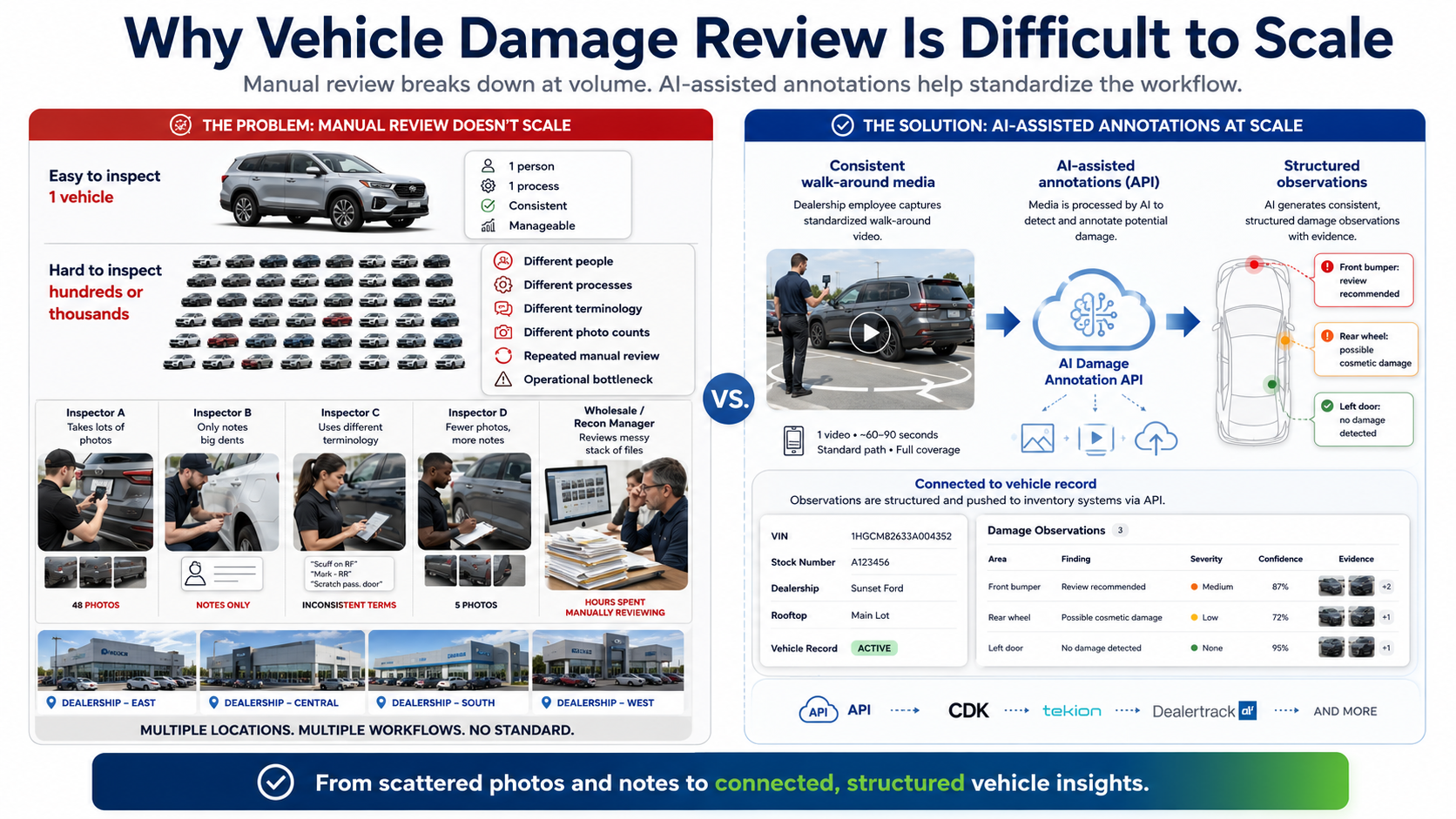
Inspecting one vehicle is straightforward.
Inspecting hundreds or thousands becomes an operational challenge.
At a dealership, auction, marketplace, or recon facility, condition information may be gathered by several different people using different processes.
One employee may photograph every scratch.
Another may record only larger dents.
Someone else may describe damage in a notes field.
A wholesale manager may then need to review those photos again before deciding how to price, repair, or merchandise the vehicle.
The process becomes even more complicated across multiple rooftops.
Different employees may use different terminology, capture different numbers of photographs, or focus on different parts of the vehicle.
AI-assisted annotations can help introduce more structure into that workflow.
Instead of asking every operator to manually describe everything they notice, a car damage annotation API can help analyze consistent walk-around media and generate observations that can be connected with the vehicle record.
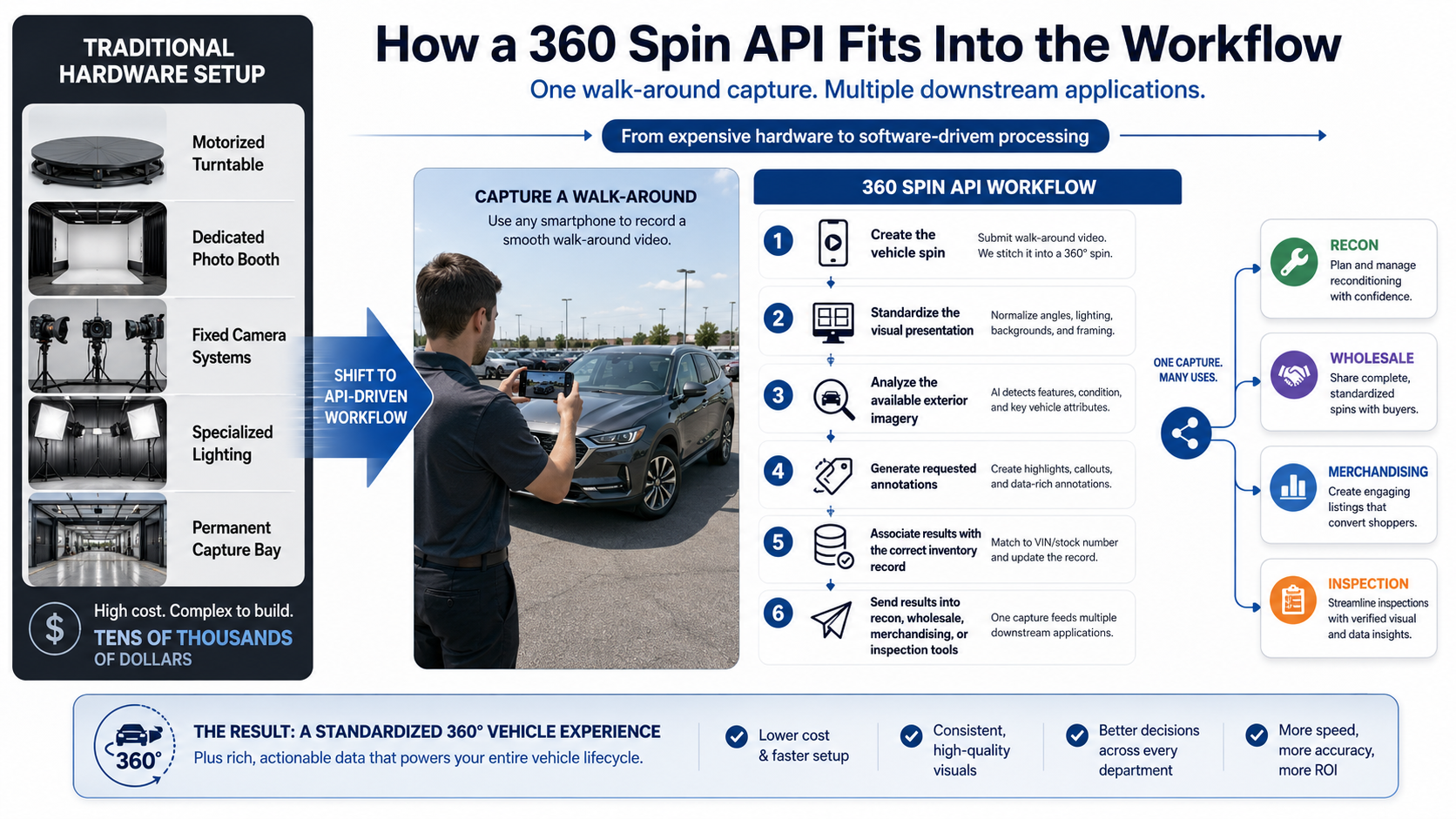
Traditionally, highly controlled automotive imagery could require expensive hardware.
A dealership might install:
Those systems can produce excellent media, but they are not always practical for every dealership location.
An API-driven workflow changes the model.
A dealership employee can record a complete walk-around video using a supported capture process. Software handles the processing needed to turn that footage into a standardized 360° vehicle experience.
Once that video is already entering an automated processing pipeline, additional analysis can potentially happen during the same workflow.
The capture therefore becomes useful for multiple purposes:
One capture can support several downstream applications.
annotations_prompt Is Designed to EnableThe concept behind annotations_prompt is straightforward: tell the processing system what additional information you want it to look for or describe.
For a merchandising workflow, a prompt could focus on visible exterior characteristics.
For a recon workflow, the prompt could instead ask the system to pay attention to potential condition issues.
For example, an application might request observations related to:
The exact request and response structure should always follow the current Spin API Annotations documentation.
That documentation should be treated as the source of truth for currently supported processing parameters and outputs.
The real opportunity is not simply displaying an AI-generated sentence under a photograph.
The larger opportunity is creating structured workflows around the result.
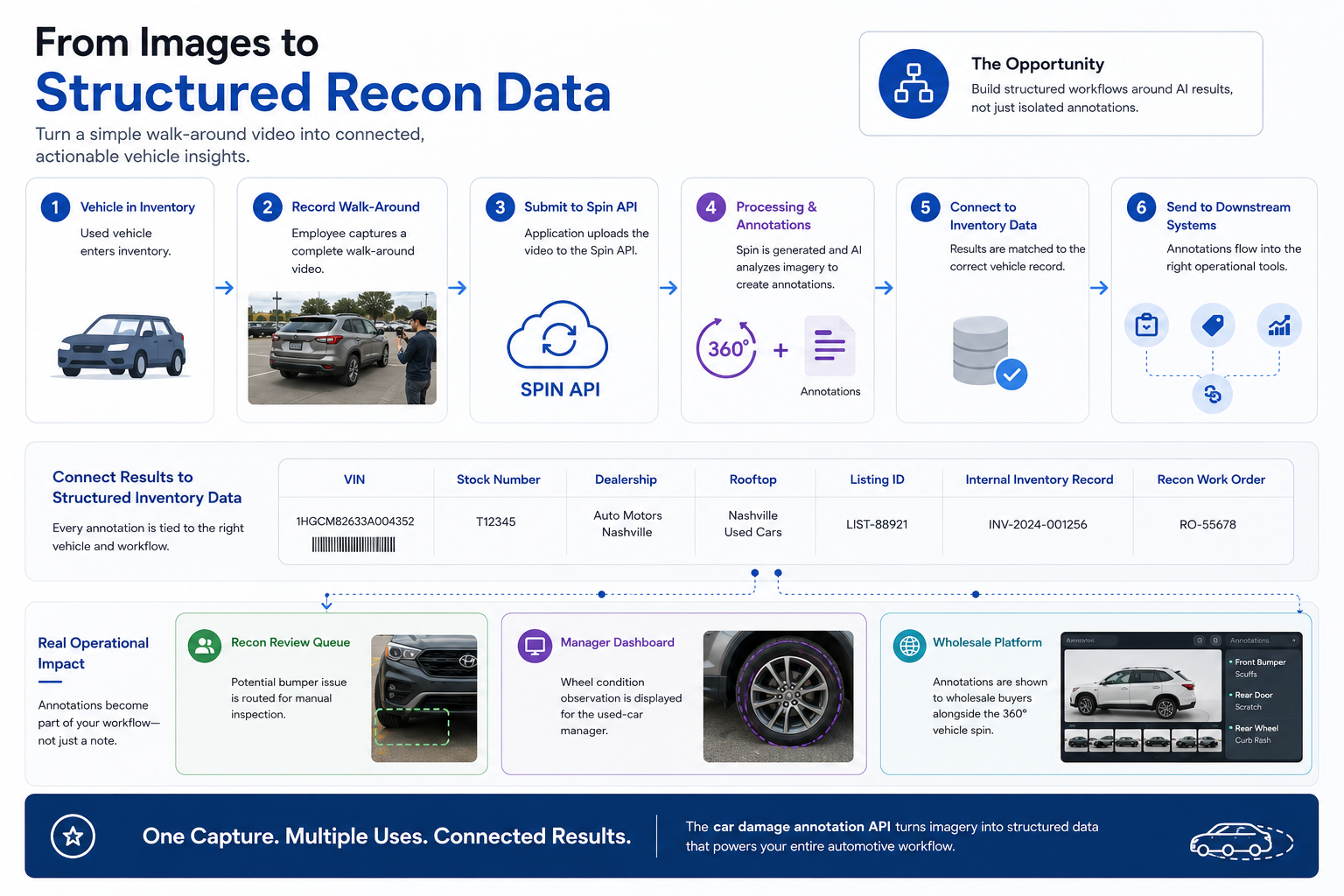
Imagine a used vehicle enters inventory.
The employee records the normal walk-around.
The application submits the footage to the Spin API.
The processing job generates the spin and any requested annotations.
Your application then connects those results to:
Now the annotation becomes part of the operational system instead of an isolated AI response.
For example, a potential bumper issue could be routed into a recon review queue.
A wheel condition observation could be displayed to the used-car manager.
A wholesale platform could present the annotation alongside the corresponding vehicle imagery.
That is where a car damage annotation API becomes particularly valuable.
A basic Spin API integration can revolve around three endpoints:
POST /api/v1/spins
GET /api/v1/spins/:id
GET /api/v1/spins
/api/v1/spinsThe POST endpoint creates the processing job.
Your application can submit the vehicle capture along with supported processing options, including configuration relevant to annotations.
Inventory metadata can also be associated with your own workflow so the finished assets can be matched back to the correct vehicle.
/api/v1/spins/:idVideo and AI processing are better handled asynchronously.
Instead of forcing an employee to keep a browser request open while processing finishes, the application can retrieve a particular spin by its ID.
Your system can check its status and access the completed result once processing is finished.
/api/v1/spinsThe collection endpoint becomes especially useful when operating at scale.
An internal dashboard may need to display hundreds of jobs across different states such as queued, processing, completed, or failed.
That architecture works well for dealer groups, marketplaces, inspection platforms, and other applications processing large quantities of inventory.
A production-ready vehicle spin normally combines multiple processing options.
centering helps maintain a more consistent vehicle position throughout the rotation.
This makes inspection and merchandising imagery easier to review because the vehicle is not constantly drifting around the canvas.
smooth_rotation helps normalize a walk-around where the employee did not move around the vehicle at a perfectly consistent speed.
The shopper—or inspector—gets a more predictable progression through the different viewing angles.
car_blur can help reduce distracting background detail.
For merchandising, this helps keep attention on the vehicle.
For inspection applications, however, developers should carefully test whether any visual processing affects the details they want to analyze. Condition-oriented workflows should preserve the source information necessary for reliable review.
The frames option controls the number of viewing angles included in the finished sequence.
More frames can provide finer angular coverage, although additional frames do not automatically mean better condition detection.
Coverage, image quality, lighting, and visibility still matter.
Geometry-related outputs can support more advanced applications that need spatial information in addition to normal spin imagery.
That can become useful when building inspection interfaces, interactive annotation tools, or other automotive systems where location matters.
Generating an annotation is only half of the product experience.
The next question is how users interact with it.
Imagine a used-car manager opens the vehicle record and sees the normal 360° viewer.
As the manager rotates the car, your application could potentially display relevant information alongside the appropriate view.
An interface might show:
Front bumper
Potential surface damage identified. Review recommended.
Driver-side rear wheel
Possible visible rim damage.
Passenger-side door
Potential scratch or paint irregularity.
The annotation does not necessarily need to cover the photograph with large graphics.
Sometimes a simple side panel connected to the correct viewing angle creates a cleaner experience.
The best interface depends on the use case.
A consumer VDP should probably remain visually simple.
A recon dashboard can expose considerably more information.
Developers also need to decide how the finished spin will be delivered.
A frame-array viewer loads separate images representing the different angles around the vehicle.
This can make it easier to associate information with individual frames.
For inspection-oriented applications, that flexibility can be valuable.
Your application can maintain relationships such as:
Frame 28
Passenger rear quarter
Potential scratch
Review required
A sprite sheet packages many frames into one or more larger image files.
This can reduce the number of network requests and can be effective for optimized 360° viewers.
The tradeoff is that annotation mapping needs to work with the sprite coordinates or corresponding frame index.
Neither approach is universally better.
The correct choice depends on VDP architecture, performance requirements, caching, mobile behavior, annotation needs, and developer preferences.
Damage annotations become particularly interesting outside the traditional consumer VDP.
A recon team could receive AI-generated observations as an initial review layer before employees manually inspect the vehicle.
The workflow might help prioritize obvious cosmetic issues without requiring someone to manually review every frame first.
Wholesale buyers need accurate condition information.
Annotations can supplement photographs and spins by drawing attention to areas a buyer may want to inspect more closely.
A dealership receiving a trade could process a walk-around and attach potential condition observations to the appraisal record.
Marketplaces handling thousands of vehicles can use consistent processing to standardize how condition information enters their systems.
Inspection applications can combine imagery, annotations, geometry, metadata, and human review inside a single workflow.
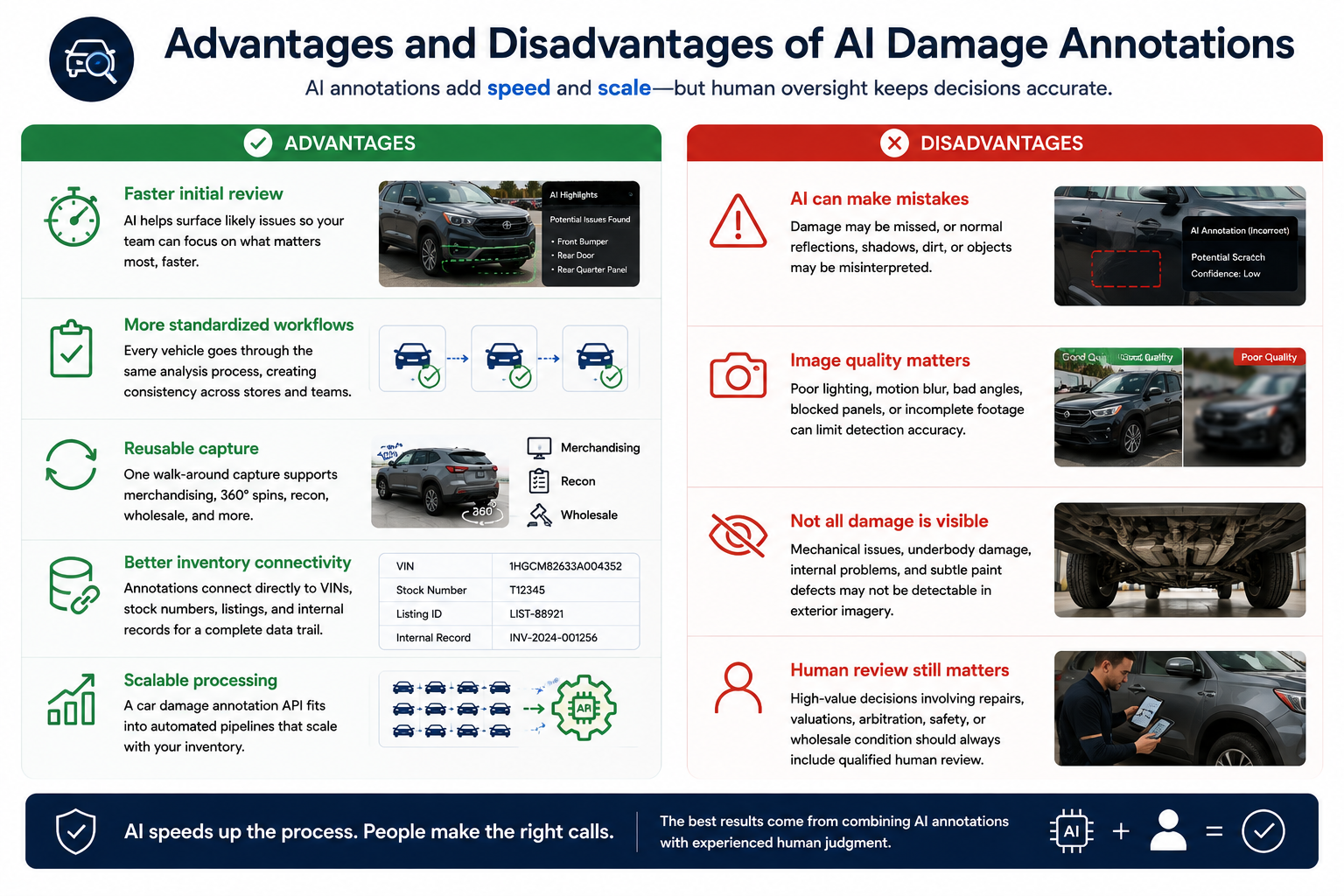
Faster initial review
AI can help surface areas that deserve additional attention rather than requiring employees to manually inspect every image first.
More standardized workflows
Every vehicle can move through the same requested analysis process.
Reusable capture
The same walk-around can support merchandising, 360° presentation, and operational workflows.
Better inventory connectivity
Annotations can be associated with VINs, stock numbers, listing IDs, or internal records.
Scalable processing
A car damage annotation API can fit into automated pipelines handling far more inventory than a manual-only process.
AI can make mistakes
Visible damage may be missed, and normal reflections, shadows, dirt, or environmental features may occasionally be interpreted incorrectly.
Image quality matters
Poor lighting, excessive motion, bad angles, blocked panels, or incomplete footage can limit what can be observed.
Not all damage is visible
Mechanical issues, underbody damage, internal problems, and subtle paint defects may not be detectable from ordinary exterior imagery.
Human review still matters
High-value decisions involving repairs, valuations, arbitration, safety, or wholesale condition should not rely blindly on an automated annotation.
Do not request every possible observation simply because the system supports flexible prompting.
Ask for information your application can actually use.
A recon application should focus on actionable recon information.
Complete a full walk-around and keep every important panel visible.
An AI system cannot evaluate a quarter panel that never appears clearly in the footage.
Reflections and shadows can make bodywork difficult to interpret.
Consistent lighting improves both human and automated review.
The processing system can compensate for normal movement, but better capture still creates better source material.
Allow employees to confirm, dismiss, or modify AI observations.
This creates a more practical workflow than presenting annotations as unquestionable facts.
Include clean vehicles, damaged vehicles, dark paint, light paint, trucks, SUVs, sedans, and vehicles photographed in different environments.
Real dealership footage is much more valuable than an idealized demo.
The economics change when the workflow expands from 10 vehicles to 10,000.
Manually opening every image, describing every visible issue, entering every note, matching files to stock numbers, and transferring those observations into recon software requires significant labor.
Automation can connect those pieces.
A vehicle is captured.
The processing job receives its inventory metadata.
The spin is generated.
Annotations are returned.
The results are attached to the vehicle.
Relevant observations can then move into the appropriate downstream application.
That same architecture can support new inventory, used inventory, dealer groups, wholesale marketplaces, bulk backfills, DMS integrations, vehicle inspection platforms, and dealer website providers.
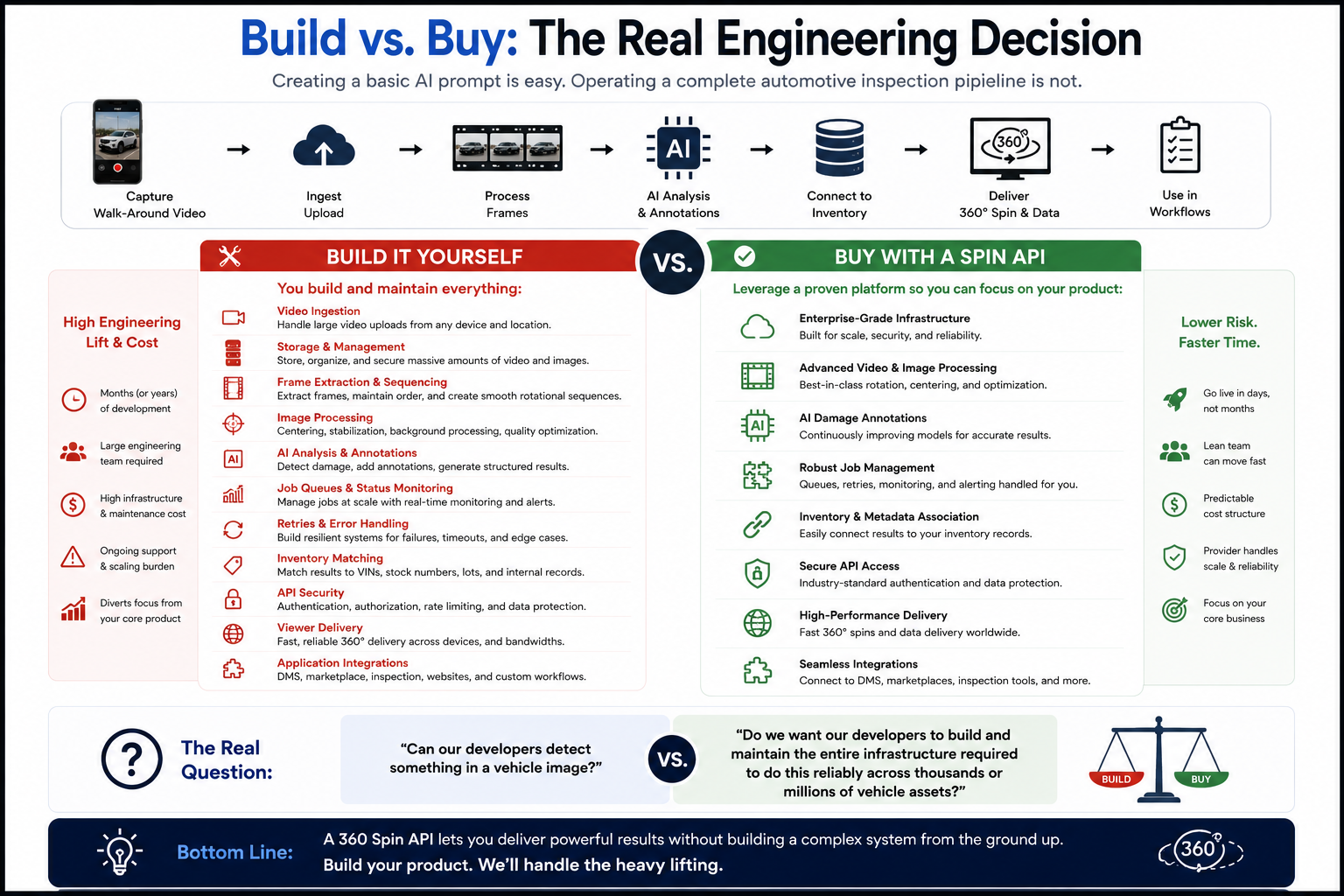
Creating a basic AI prompt is relatively easy.
Operating a complete automotive inspection pipeline is not.
An internal system eventually needs to manage video ingestion, storage, frame extraction, rotational sequencing, centering, image processing, AI analysis, job queues, status monitoring, retries, error handling, inventory matching, API security, viewer delivery, and application integrations.
That is the real build-versus-buy calculation.
The question is not simply:
"Can our developers detect something in a vehicle image?"
The question is:
"Do we want our developers to build and maintain the entire infrastructure required to do this reliably across thousands or millions of vehicle assets?"
A vehicle walk-around does not have to end as a collection of images.
With the right API architecture, the same capture can become a 360° merchandising experience, an inventory-linked media asset, and an input for AI-assisted recon and wholesale workflows.
A car damage annotation API can help turn visual information into actionable observations while reducing repetitive manual review.
The most effective implementation, however, keeps the human in the loop.
Use automation to surface information.
Use structured metadata to connect it to inventory.
Use the 360° viewer to provide visual context.
And use trained employees to confirm important condition decisions.
That combination creates a workflow that is faster without sacrificing operational judgment.
Review the Spin API Annotations options, test annotations_prompt with real dealership walk-around footage, and start exploring how one vehicle capture can power both your 360° merchandising and your recon or wholesale inspection workflow.


Compact, ready to go anywhere
Interchangeable lens that’s upgradeable
Dual 1-inch sensors for improved clarity and low light performance
Dynamic range and 6K 360° capture
360° photo resolution at 21MP

8K 360° video recording for ultra-detailed visuals.
4K single-lens mode for traditional wide-angle shots.
Invisible selfie stick effect for drone-like perspectives.
2.5-inch touchscreen with Gorilla Glass protection.
Waterproof up to 33ft for underwater shooting.

360° photo resolution in 23MP
Slim design at 24 mm thick
Built-in image stabilization for smooth video capture.
Internal 19GB storage for photo and video storage.
Wireless connectivity for remote control and sharing.

60MP 360° still images for high-resolution photography.
5.7K 360° video recording at 30fps.
2.25-inch touchscreen for intuitive control.
USB Type-C port for fast charging and data transfer.
MicroSD card slot for expandable storage.
.png)

.png)

Try it free. No credit card required. Instant set-up.







.svg)


.svg)