


.png)


A listing does not fail because the agent forgot to post it.
It fails because the media gets released in random order.
The photographer delivers photos. The agent uploads to MLS. Someone says, “We should make a Reel.” The email goes out two days later. The retargeting ad gets built after the listing already has 4,000 views and no structured follow-up audience. By the time the video strategy is finally live, the most important launch window is already gone.
That is the problem this workflow solves.
The goal is not just to make a nice listing video. The goal is to turn one set of property photos into a 24-hour distribution system: MLS-safe video, social Reels, email follow-up, property-page media, seller updates, and retargeting assets.
For agents, photographers, brokerages, and property managers, this is where AI app to turn property photos into videos becomes more than a content tool. It becomes a launch-day operating system.
A 24-hour listing video distribution flow is a structured process for creating and publishing multiple video versions from the same listing photo set within the first day of launch.
Instead of asking, “Where should I post this video?” after the video is done, the workflow starts with the channels first:
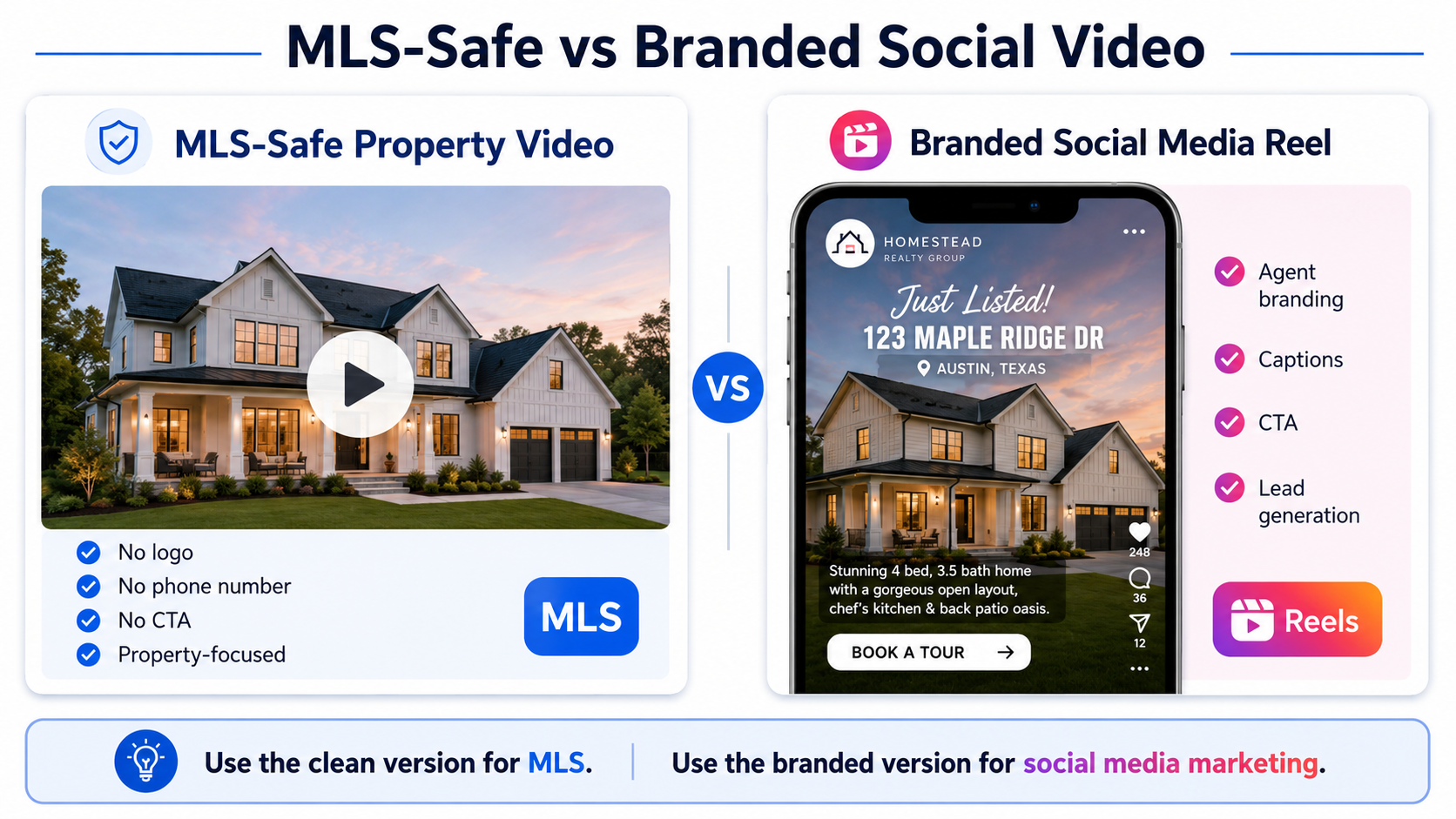
MLS needs a clean, compliant, unbranded asset.
Instagram Reels and TikTok need a faster vertical cut.
Email needs a short, clickable version that supports buyer follow-up.

Retargeting needs a version that keeps the listing in front of people who already showed interest.
Seller updates need a polished asset that makes your marketing feel visible.
That distinction matters. A single video file cannot do every job well.
In most real estate workflows, the mistake is treating video as a finished deliverable. The better approach is treating video as a source asset that gets shaped for each buyer moment.
The first 24 hours of a listing are not just about exposure. They are about organized exposure.
Buyers are looking online first, agents are using social media heavily, and listing media has to work across multiple environments. NAR’s 2025 technology research shows how deeply social media, video, and AI are now part of the Realtor toolset, especially for saving time and improving the client experience through digital workflows. NAR Realtor technology trends
That means the agent who only uploads photos and waits is leaving marketing surface area unused.
Here is the practical business impact:
A listing video gives buyers a faster feel for the property.
A Reel gives the agent a public-facing marketing moment.
An email video gives the agent a reason to contact buyers and past leads.
A retargeting video gives warm traffic another touchpoint.
A seller update gives the homeowner proof that marketing is happening.
That last one is underrated.
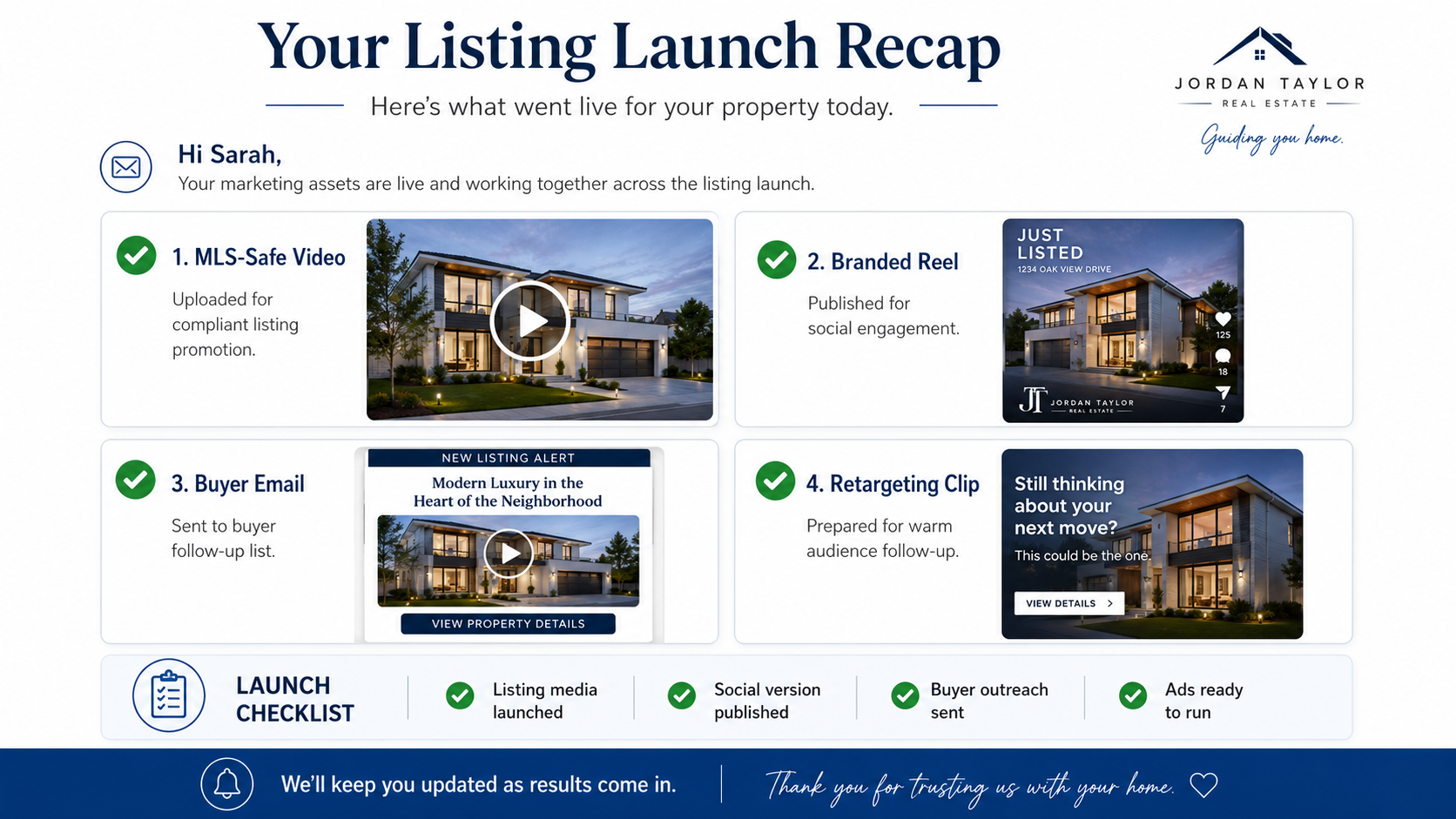
Sellers do not always see your MLS syndication, CRM automation, or ad audiences. They do see a polished video, a Reel, an email preview, and a simple “Here is how we launched your property today” update.
That helps you market the listing and protect the relationship.
Most real estate video workflows break in one of three places.
First, the asset is created too late. The listing goes live Monday morning, but the video is not ready until Wednesday afternoon.
Second, the video is created in the wrong format. The agent gets one horizontal branded video, then realizes the MLS version cannot include certain branding, the Reel needs vertical format, and the email thumbnail looks awkward.
Third, there is no distribution map. The video gets posted once on Instagram, maybe uploaded to YouTube, and then disappears.
This actually happens all the time:
An agent launches a listing at 9:00 a.m. The photographer’s gallery is beautiful. The MLS is live. Then the agent texts the marketing assistant: “Can we make a quick video for this?” The assistant grabs a few photos, makes a branded vertical Reel, and posts it. Later, the broker asks for an unbranded version for MLS. The agent realizes the video has a logo, phone number, and CTA baked into the file. Now the team either has to remake it or skip the MLS video entirely.
That is not a creativity problem.
It is a versioning problem.
A better workflow starts by deciding which versions you need before anything gets rendered.
PhotoAIVideo fits into the workflow after listing photos are edited and before the marketing calendar starts.
The best use case is simple: upload finished property photos, generate video assets, then create the right versions for the right channels. This is especially useful when you need to create real estate videos from photos with AI without scheduling another shoot.
For agents, that means speed.
For photographers, it means an upsell that does not require returning to the property.
For brokerages, it means a more consistent media standard across listings.
For property managers, it means vacant units can be turned into video campaigns without waiting for a full videography appointment.
PhotoAIVideo is not a replacement for strategy. It is the production layer that makes the strategy possible. When your team already knows the MLS version, Reel version, email version, and ad version it needs, AI real estate video software can help turn still listing photos into a repeatable video workflow instead of a one-off editing project.
Below is the practical version of the workflow I would give a listing team, photographer, or brokerage marketing coordinator.
Start with the edited listing photos, not the entire raw gallery.
For a standard property, choose 12–20 images. For a luxury listing, choose 20–35 images. For a rental or property management unit, choose 8–15 images.
Do not simply select the “prettiest” photos. Select the photos that explain the property.
Use this order:
Exterior hero
Entry or first impression
Main living area
Kitchen
Dining or open layout
Primary bedroom
Primary bathroom
Secondary rooms
Outdoor space
Community or amenity shot, if relevant
Final exterior or lifestyle closer
The actionable insight most agents miss: the photo order should match the buyer’s mental walkthrough, not the MLS upload order. A video that jumps from kitchen to backyard to bathroom to front elevation feels like a slideshow. A video that follows the way a buyer would tour the home feels intentional.
Use PhotoAIVideo’s photo-to-video workflow to generate the cleanest base version first.
This version should avoid anything that could limit reuse:
No agent headshot.
No brokerage logo.
No phone number.
No “Call me today.”
No branded intro.
No branded outro.
No testimonial overlays.
No neighborhood claims you have not verified.
Think of this as the master video. It is the safest starting point for MLS-aware workflows, property pages, and downstream edits.
This is where an MLS compliant video maker for property listings needs to be treated carefully. No tool can magically know every local MLS rule. Your local MLS, brokerage, and market-specific requirements still matter. NAR’s MLS policy resources are a useful reminder that MLS data and display rules are governed by specific policy frameworks, so teams should verify their own local requirements before publishing. NAR MLS policy guidance
The MLS-safe version should be clean, simple, and property-focused.
Use this checklist before upload:
No visible agent branding
No brokerage logo unless your MLS permits it
No contact information
No external CTA
No “DM me” language
No branded thumbnail
No watermarked social handle
No copyrighted music risk
No misleading edits
No exaggerated AI alterations
The safest mental model is this:
MLS video should sell the property, not the agent.
That does not mean your brand disappears from the overall campaign. It means the MLS version has a specific job. It should support listing exposure without creating compliance friction.
If your MLS allows branded video, you can still choose to keep this version clean because it gives you more flexibility later.
Now create the version built for attention.
This version can include:
Agent or team branding
Brokerage identity
Short hook text
Neighborhood name
Open house reminder
CTA
Music
Captions
Contact information
The branded version is where the video becomes a lead-generation asset.
For Reels, the first two seconds matter most. Avoid starting with a slow exterior pan unless the exterior is truly remarkable. A stronger opening might be:
“Just listed near downtown…”
“Backyard, pool, and no wasted space…”
“Three things buyers will notice in this home…”
“This kitchen is the reason people will save this listing…”
That is the difference between a listing video and a scroll-stopper.
A best AI real estate video generator for social media gives you the motion and polish, but the hook still needs local judgment. The best social videos combine automation with one human decision: what is the buyer supposed to notice first?
The email version should not be the same as the Reel.
Email viewers are different. They may be past clients, buyer leads, investor contacts, relocation prospects, or open house registrants. They are not scrolling for entertainment. They are deciding whether the property is worth attention.
Use a clean thumbnail and a short message.
Subject line examples:
Just listed: quick video tour of [Property Address or Area]
New listing video: [Neighborhood] home now live
Take a 45-second look inside this new listing
Email body structure:
One sentence about the property
One sentence about who it fits
Video thumbnail or link
One clear CTA
Example:
“Just listed in Westhaven: a four-bedroom home with an open kitchen, covered patio, and flexible office space. If you know someone looking in this area, this quick video gives the best first look before scheduling a showing.”
This is where automated real estate video creation becomes valuable. The video gives you a reason to send a helpful email instead of another plain-text listing alert.
Retargeting should not be an afterthought.
If your listing page, property website, landing page, or video page is getting traffic, you can build a warmer audience around people who already engaged. The retargeting video should be shorter than the full listing video.

Use 10–20 seconds.
Focus on one angle:
Best room
Lifestyle feature
Outdoor space
Price-positioning hook
Open house reminder
Buyer objection answer
Examples:
“Still looking near [Area]? This one has the backyard setup most homes are missing.”
“Missed the open house? Here is the 15-second tour.”
“Want a home office and a real backyard? Watch this.”
Do not retarget everyone with the same generic full video. Retargeting works better when the video answers a specific reason someone hesitated.
Google’s video SEO guidance also reinforces a broader point that applies here: videos perform better when titles, descriptions, thumbnails, and page context match the actual video content. That same principle applies to ads and retargeting. Google video SEO best practices
Most agents skip this step.
Do not.
Send the seller a simple launch recap with the video assets attached or linked.
Example:
“Your listing media is now live. Today we created the MLS-safe video, a branded social version, an email version for buyer follow-up, and a short retargeting clip for warm traffic. I’ll keep you posted as we collect activity and feedback.”
This one message can change how the seller perceives your marketing.
The homeowner may not understand ad frequency, audience segmentation, or click-through rates. But they understand speed, organization, and visible effort.
This is one of the best listing retention moves an agent can make.
A simple launch order works best.
MLS-safe version first.
Property website or landing page second.
Branded Reel third.
Email campaign fourth.
Retargeting audience setup fifth.
Seller update sixth.
Do not post the social version first if the listing page is not ready. You do not want attention landing on an incomplete page.
Do not send the email before the video link is tested.
Do not build ads before the thumbnail, caption, and CTA are checked.
This is the boring part of marketing that makes the visible part work.
The first day should not be “post and pray.”
Look for early signals:
Are people clicking the email?
Are viewers watching past the first few seconds?
Are buyers asking about the same feature?
Are agents requesting showings?
Are comments focused on the right selling point?
Is the seller sharing the video?
Then make one adjustment.
Not ten.
One.
Change the Reel hook. Swap the thumbnail. Shorten the email copy. Create a second retargeting clip around the kitchen instead of the exterior. Add an open house version.
The biggest advantage of using an MLS compliant video maker for property listings is that you can iterate without rebuilding the whole media package from scratch.
The winning workflow is not always the fanciest.
It is the one your team can repeat every time a listing goes live.
A solo agent gets photos back at 4:00 p.m. and wants the listing live the next morning.
Instead of waiting for a videographer, the agent selects 18 edited photos, creates a clean video through PhotoAIVideo’s listing video software, exports an MLS-safe version, then creates a branded Reel and email version.

By the next morning, the listing does not just have photos. It has a launch package.
A photographer already delivers photos and floor plans. The client asks, “Do you also do video?”
Instead of scheduling a second shoot, the photographer offers an AI video add-on using the finished photo gallery. This is where AI video software for real estate photographers becomes a practical revenue layer.
The photographer can offer:
MLS-safe video
Branded agent video
Vertical Reel
Open house teaser
Seller recap asset
For photographers, the positioning is simple: “You already paid for great photos. Let’s turn them into more marketing assets.”
The PhotoAIVideo photographer workflow is especially useful for media pros who want to add video without changing their entire capture process.
A brokerage with 30 agents does not need every agent inventing a different video process.
The coordinator can create a standard launch template:
Clean MLS video
Branded team video
Vertical social cut
Email thumbnail
Retargeting short
Seller update message
This makes the brokerage look more consistent and gives newer agents a better marketing system without forcing them to become editors.
For teams comparing volume and cost, PhotoAIVideo pricing can help decide whether individual agents, teams, or high-volume brokerages need a larger plan.
A property manager may not need cinematic luxury videos for every unit. They need speed.
If a unit turns over on Monday, the team can use updated photos to create a short rental video, post it to the listing page, email interested renters, and run a retargeting clip to people who viewed the property but did not apply.
The result is a faster leasing workflow without waiting for a full video appointment.
The agent launches the listing Thursday and has an open house Saturday.
The 24-hour flow creates the first wave of awareness. Then the agent uses a second short video Friday afternoon:
“Open house tomorrow from 1–3. Here is the 15-second preview.”
That is not random content. It is timed content.
If you make the branded version first, you may accidentally bake in elements that make the video harder to use elsewhere.
Start clean. Then add branding.
MLS rules vary. Brokerage policies vary. Platform requirements vary.
A video that is acceptable in one market may not be acceptable in another. Build your workflow around review and version control, not assumptions.
More photos do not always make a better video.
A tight 15-photo sequence often feels better than a 42-photo video that repeats the same room from six angles.
The thumbnail is not decoration. It is the doorway.
Use a bright, clear image that represents the property’s strongest feature. Avoid cluttered corners, dark bathrooms, or awkward exterior angles.
Every version needs a job.
MLS video: help buyers understand the property.
Reel: create attention.
Email: drive replies and showings.
Retargeting: bring back warm viewers.
Seller update: prove marketing activity.
If you cannot name the job, do not publish the asset yet.
AI video should enhance the listing presentation, not misrepresent the home.
Avoid visual changes that make rooms appear structurally different, hide flaws, exaggerate dimensions, or imply features that do not exist. The best AI listing video feels like motion added to real photography, not a fantasy version of the property.
That is especially important as AI-generated real estate media becomes more common and buyers become more sensitive to misleading visuals.


Compact, ready to go anywhere
Interchangeable lens that’s upgradeable
Dual 1-inch sensors for improved clarity and low light performance
Dynamic range and 6K 360° capture
360° photo resolution at 21MP

8K 360° video recording for ultra-detailed visuals.
4K single-lens mode for traditional wide-angle shots.
Invisible selfie stick effect for drone-like perspectives.
2.5-inch touchscreen with Gorilla Glass protection.
Waterproof up to 33ft for underwater shooting.

360° photo resolution in 23MP
Slim design at 24 mm thick
Built-in image stabilization for smooth video capture.
Internal 19GB storage for photo and video storage.
Wireless connectivity for remote control and sharing.

60MP 360° still images for high-resolution photography.
5.7K 360° video recording at 30fps.
2.25-inch touchscreen for intuitive control.
USB Type-C port for fast charging and data transfer.
MicroSD card slot for expandable storage.
.png)

.png)

Try it free. No credit card required. Instant set-up.







.svg)


.svg)