


.png)



Walk through almost any used-car lot and you'll find the same challenge: dealerships need a consistent way to showcase vehicles online without turning vehicle photography into an expensive, time-consuming production process.
Traditional turntable photo booths can require a significant upfront investment, dedicated space, specialized equipment, and staff who know how to operate the setup correctly. Even then, vehicle detail pages (VDPs) can end up with inconsistent 360° spins — mismatched lighting, poorly centered vehicles, or frames that jump or stutter during rotation.
Multiply that across a multi-location dealer group or a marketplace receiving listings from hundreds of independent sellers, and inconsistent vehicle spins become more than a cosmetic issue. They affect the overall quality and consistency of the online shopping experience.
This is the gap a vehicle 360 spin API is designed to close. Before going any further, it's worth defining exactly what that means because the term "360 API" can refer to several very different technologies.
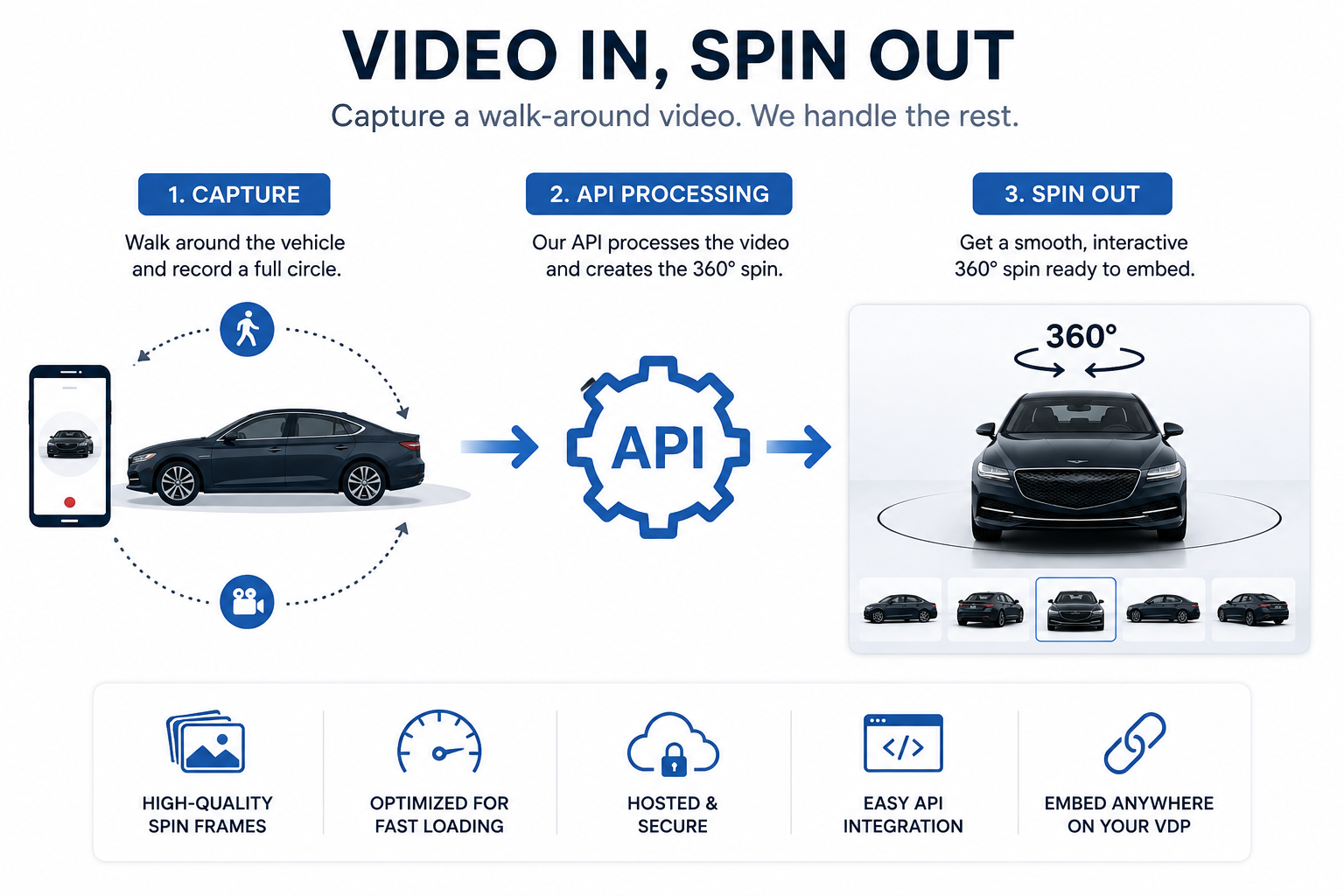
Mechanically, a vehicle 360 spin API is simple to describe:
Video in. Spin out.
Someone walks around a parked vehicle with a phone or camera, capturing one complete circle. The video is then uploaded to an API for processing.
The resulting assets can be used to create an interactive 360° vehicle experience for a VDP or other automotive platform.
Instead of relying on a turntable, studio lighting rig, or dedicated photography bay, the workflow starts with something much simpler: a vehicle walk-around video.
CloudPano's implementation of this workflow is explained in the Spin API documentation, which provides the technical details developers need to integrate spin generation into an existing automotive platform or inventory workflow.
There are several types of automotive businesses that can benefit from this technology:
The common requirement is scale.
The more vehicles or locations a business manages, the more valuable a repeatable vehicle-imaging workflow becomes.
It's worth being precise here because "360 API" is sometimes used to describe several unrelated technologies.
A generic photo API might remove backgrounds, enhance images, resize photos, or perform other processing on still images that already exist.
A vehicle 360 spin API starts earlier in the workflow. Instead of simply editing an existing image, it processes vehicle media to produce the frames needed for an interactive spin.
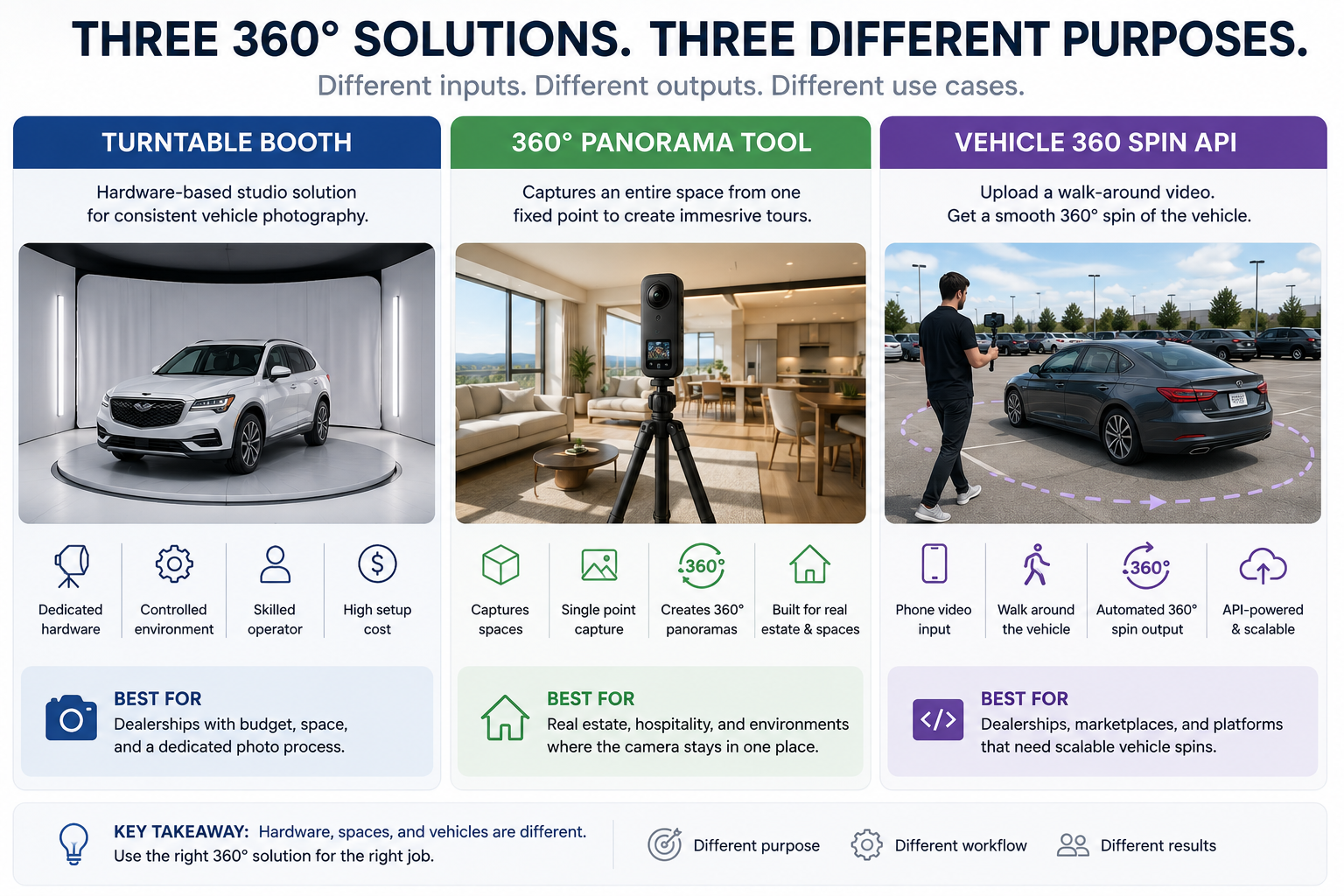
A 360° panorama or real estate virtual-tour platform, meanwhile, is designed around spaces.
A camera typically captures a room or environment from a fixed position, allowing viewers to look outward in different directions.
A vehicle spin works differently.
The camera moves around a fixed object — the vehicle — capturing it from multiple angles so the shopper can interact with the finished result as though the vehicle were rotating in front of them.
A general AI image API may enhance, upscale, or transform an individual image, but vehicle-spin processing needs to account for the relationship between multiple viewing angles and the consistency of the final rotation.
In short, if the input is vehicle walk-around footage and the output is an interactive rotating vehicle experience, you're dealing with a vehicle 360 spin API rather than a general-purpose imaging API.
At a high level, the workflow is straightforward.
First, someone captures a complete walk-around video of the vehicle.
The video is then submitted to the Spin API for processing. The API creates the assets required for the vehicle spin and makes the resulting information available to the connected system.
Developers can control and track this process through the API while dealership employees continue using a relatively simple capture workflow.
That separation is important.
The dealership employee capturing the vehicle doesn't need to understand the API. They simply need to capture usable footage.
The software integration handles what happens afterward.
When a vehicle is submitted for processing, additional information can be included to help identify and organize the resulting spin.
For example, a dealership can associate the vehicle's VIN or internal stock number with the submitted media.
That allows the finished vehicle spin to be connected automatically with the appropriate inventory record.
Rather than requiring dealership employees to enter the same information manually at multiple stages, an integrated system can pass those identifiers along with the vehicle media.
This becomes particularly useful when processing hundreds or thousands of vehicles.
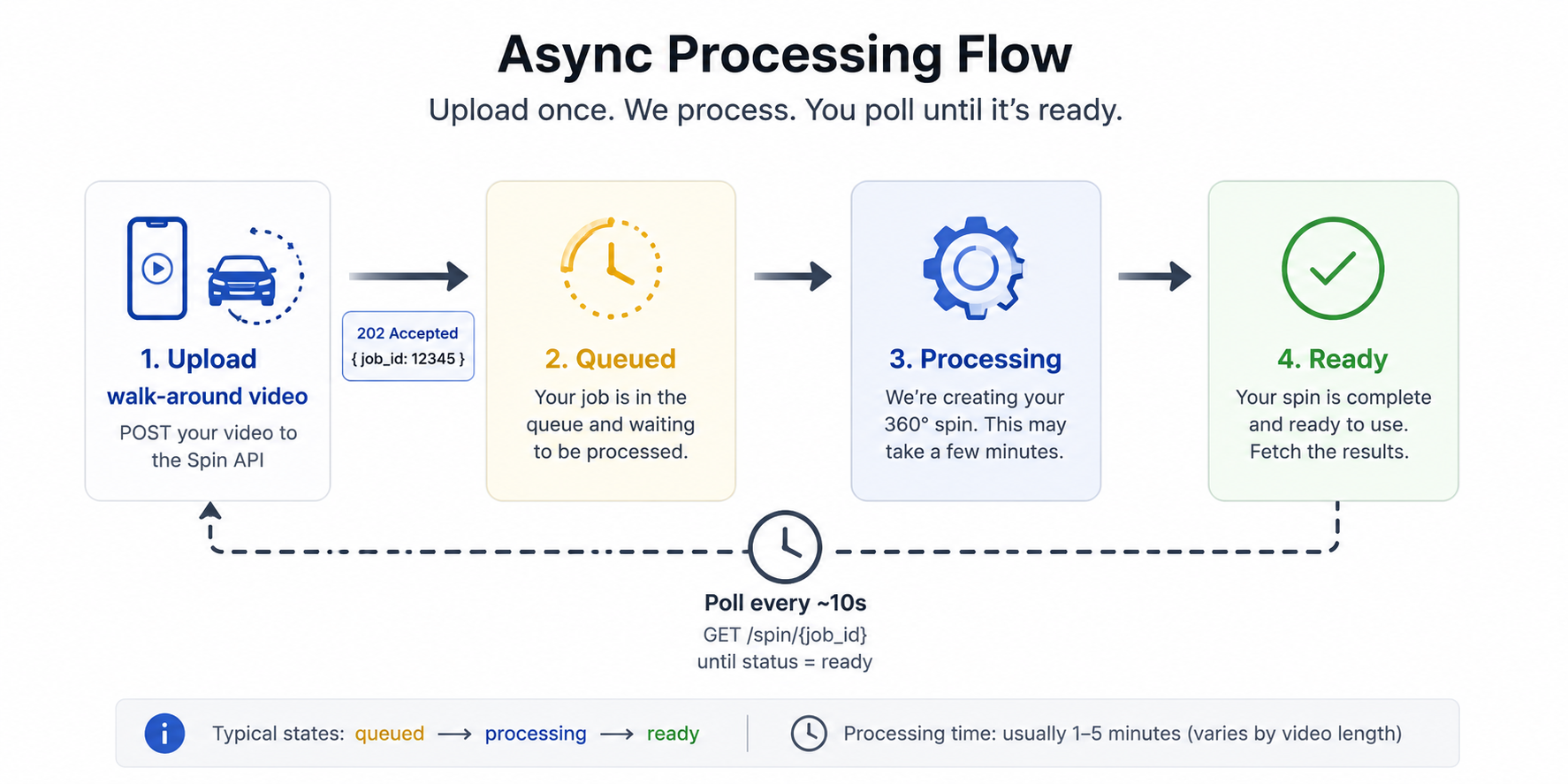
Vehicle-spin processing happens in the background after the footage is submitted.
The connected system can monitor the processing status and determine when the finished vehicle spin is ready.
For dealership employees, that means they don't need to wait with the upload screen open while the vehicle is processed.
They can capture the vehicle, submit the footage, and move on to the next unit while the software handles the rest.
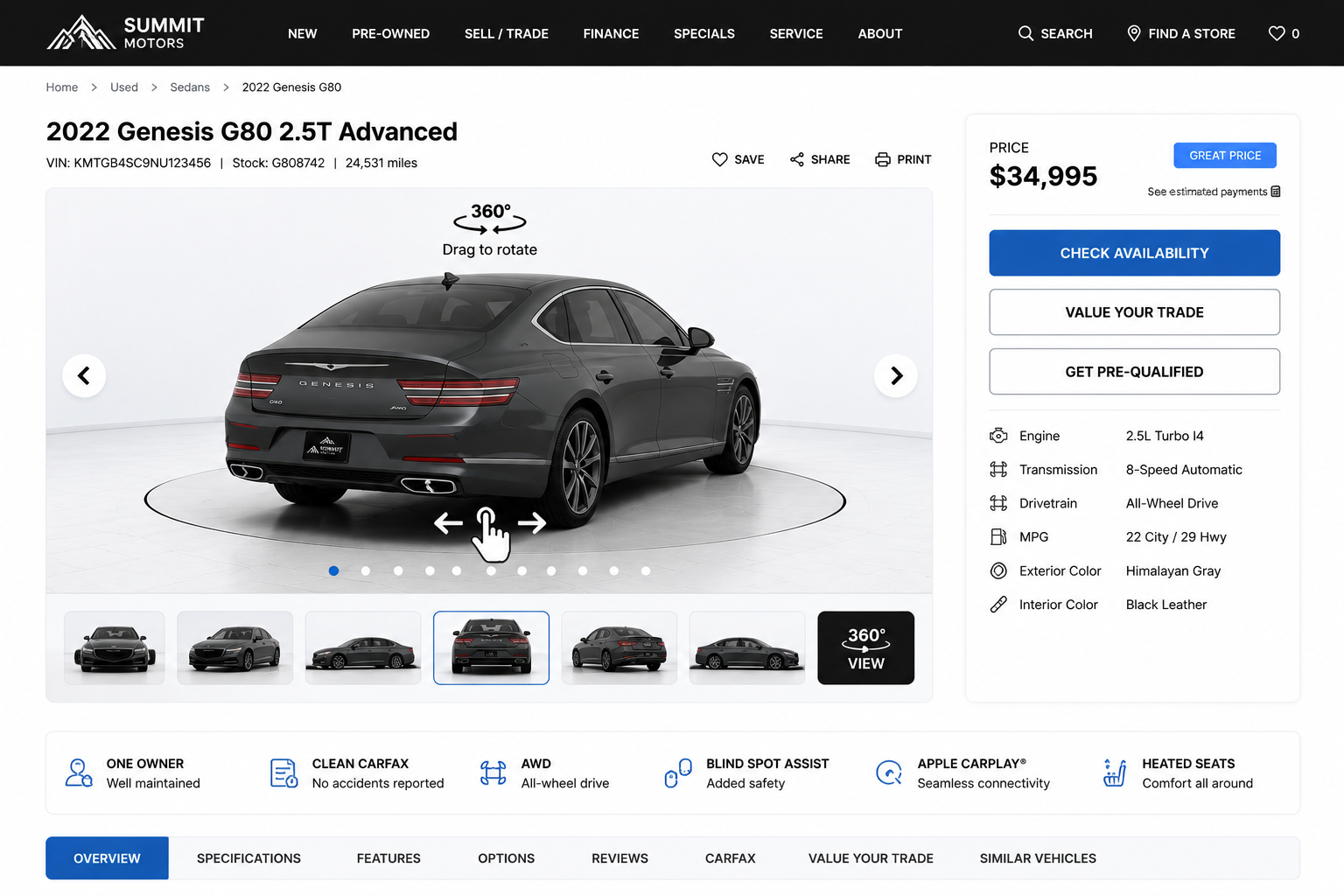
Once processing finishes successfully, the API can return the assets and information associated with the completed vehicle spin.
Several parts of the result are particularly useful for automotive businesses.
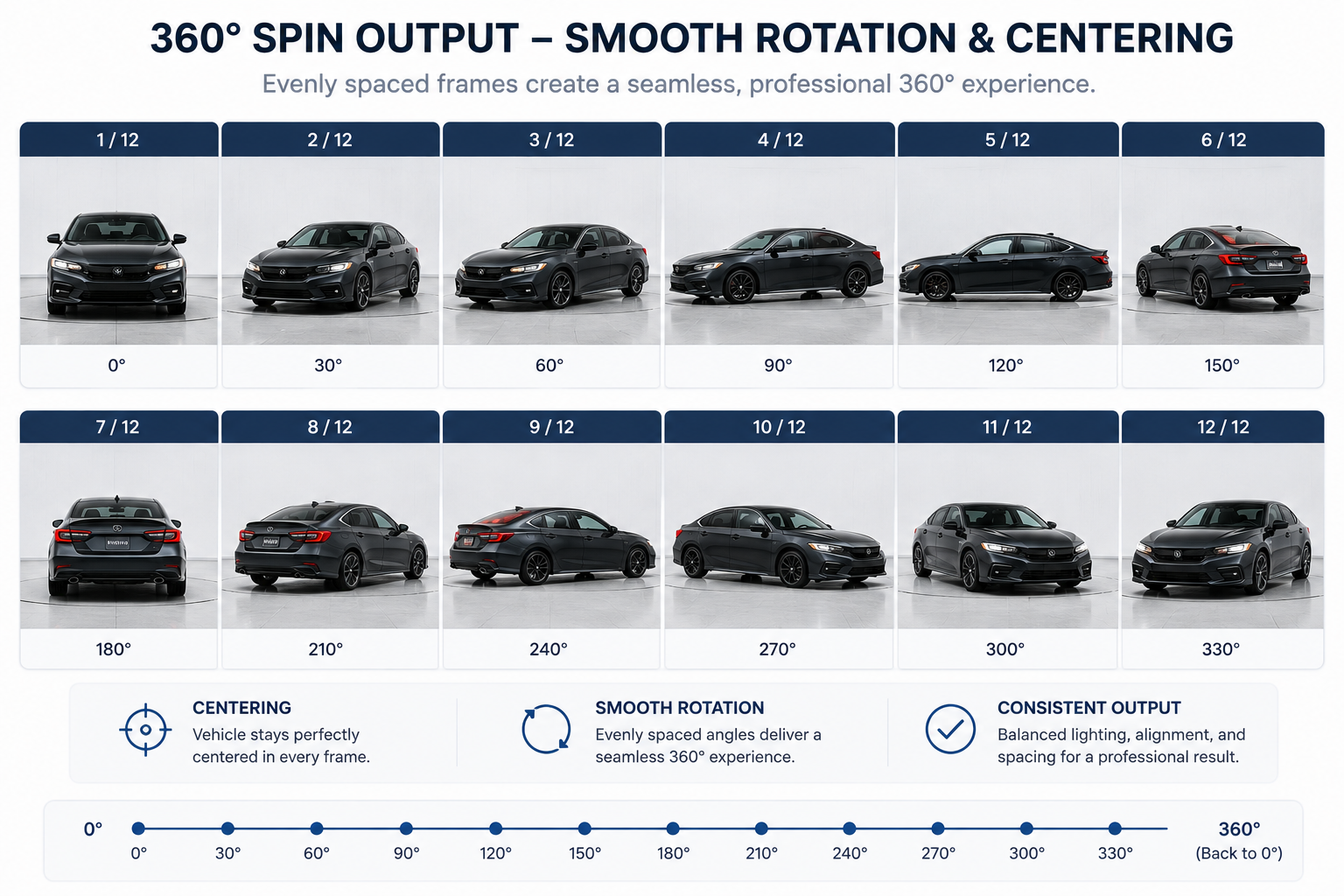
The finished vehicle rotation consists of processed images captured from different angles around the vehicle.
These images can be displayed through a compatible 360° viewer, allowing shoppers to interactively rotate the vehicle on a VDP.
Vehicle spins contain multiple images, so efficient loading is important.
Optimized assets can help a web-based viewer display the rotation smoothly without forcing the shopper to wait for every full-resolution image to load individually.
A hosted version of the finished vehicle experience can also make the spin easier to share.
Dealership teams can use a hosted experience to review a vehicle, share it internally, or provide shoppers with direct access without first building a custom viewer.
The finished result can retain identifying information such as the vehicle's VIN, stock number, and other relevant metadata.
This makes it easier for an inventory management system to automatically connect each completed spin with the correct vehicle listing.
Automated processing can also help improve the consistency of the finished vehicle presentation.
Depending on the available configuration, this can include improvements to vehicle positioning, background presentation, and rotational smoothness.
Vehicle-spin technology can extend beyond simply producing a rotating set of images.
Additional information can potentially be associated with specific parts of a vehicle within the interactive experience.
For example, annotations can help identify or highlight areas that shoppers, inspectors, or dealership staff may want to examine more closely.
This creates interesting possibilities for used-car listings, inspections, auctions, and other automotive workflows where communicating vehicle condition matters.
A vehicle spin API can automate much of the processing, but the quality of the source footage still matters.
The recording should capture a complete walk-around of the vehicle.
If an important angle was never recorded, processing can't recreate information that isn't present in the original footage.
A simple, repeatable capture routine can help dealership employees consistently collect usable source media.
The vehicle should remain visible throughout the recording.
Excessive obstruction, incomplete footage, or major changes in camera positioning can make processing more difficult.
Not every piece of footage will necessarily produce a successful spin.
An integration should be prepared to communicate processing problems clearly to the person responsible for capturing the vehicle.
That makes it possible to reshoot the vehicle rather than leaving an inventory record waiting indefinitely for media that couldn't be processed.
Video format, file size, resolution, orientation, and other capture requirements can evolve over time.
Development teams should check the current requirements in the Spin API documentation before building their upload workflow.
For one vehicle, almost any photography workflow can be manageable.
The challenge appears when a dealership needs to repeat that workflow hundreds of times.
It becomes even more important for a dealer group operating across multiple locations.
One dealership may have an experienced photographer. Another may rely on a salesperson. A third may have a lot porter capturing inventory.
Without a standardized workflow, the resulting VDPs can look as though they came from completely different businesses.
An API-driven approach makes it possible to move more of that standardization into the processing layer.
Instead of expecting every person capturing inventory to produce exactly the same photography, the organization can establish a simple capture process and use automated processing to create a more consistent output.
A physical turntable approaches vehicle photography through hardware.
The dealership controls the environment, lighting, camera position, and vehicle rotation to produce consistent results.
A vehicle spin API approaches the problem differently.
Rather than requiring every vehicle to be brought into a dedicated photography environment, the capture process can happen where the vehicle already is.
That difference can be significant for dealer groups and automotive platforms handling large amounts of inventory.
If you're deciding between the two approaches, our Car Photography API vs. Turntable Booth comparison looks more closely at the differences in workflow, equipment, scalability, and operational requirements.
Multi-location dealer groups introduce another challenge: consistency across rooftops.
A process that's easy to manage at one location may become much harder when dozens of employees across several dealerships need to follow it.
A centralized API integration can help separate the capture process from the processing workflow.
Each location captures vehicle footage according to the same basic guidelines, while the underlying system handles processing and connects the finished media with the correct inventory records.
For a closer look at that use case, read The 360 Spin API for Car Dealerships.
The easiest way to understand the workflow is to test it with a real vehicle.
Capture a complete walk-around video, submit it through the API, and review the resulting vehicle spin.
From there, you can evaluate the questions that matter for your specific workflow:
A vehicle 360 spin API ultimately has a simple purpose: turn practical vehicle capture into a consistent digital experience that can be integrated into an automotive platform.
Instead of building the workflow around a photography booth, the process can begin with something dealership employees already know how to use — a phone or camera.
The API handles the processing layer between that footage and the finished vehicle experience.
For developers evaluating an integration, the best place to start is the CloudPano Spin API documentation, which contains the current endpoint reference, available fields, response structure, and implementation requirements.
For automotive teams, the bigger question is even simpler:
Can a walk-around video become a repeatable, scalable way to put an interactive 360° experience on every vehicle listing?
That's the problem a vehicle 360 spin API is built to solve.


Compact, ready to go anywhere
Interchangeable lens that’s upgradeable
Dual 1-inch sensors for improved clarity and low light performance
Dynamic range and 6K 360° capture
360° photo resolution at 21MP

8K 360° video recording for ultra-detailed visuals.
4K single-lens mode for traditional wide-angle shots.
Invisible selfie stick effect for drone-like perspectives.
2.5-inch touchscreen with Gorilla Glass protection.
Waterproof up to 33ft for underwater shooting.

360° photo resolution in 23MP
Slim design at 24 mm thick
Built-in image stabilization for smooth video capture.
Internal 19GB storage for photo and video storage.
Wireless connectivity for remote control and sharing.

60MP 360° still images for high-resolution photography.
5.7K 360° video recording at 30fps.
2.25-inch touchscreen for intuitive control.
USB Type-C port for fast charging and data transfer.
MicroSD card slot for expandable storage.
.png)

.png)

Try it free. No credit card required. Instant set-up.







.svg)


.svg)