The 2025 Creator’s Guide to Scaling With AI Video Automation

June 29, 2025
5 min read
Share this post

The 2025 Creator’s Guide to Scaling With AI Video Automation

Creating videos at scale used to mean long hours in post-production, hiring editors, and managing time-consuming workflows. But in 2025, the smartest creators are using AI video automation to publish faster, repurpose smarter, and grow bigger—with less effort.

Whether you’re a YouTuber, real estate agent, or service-based creator, this guide will show you how to scale your video output using modern AI tools, create more content in less time, and future-proof your content strategy.

Why AI Video Automation is the Creator’s Edge

In 2025, content volume is no longer limited by editing time or production bottlenecks. With AI automation:

  • Creators generate high-quality videos from simple prompts or images
  • Agencies deliver white-labeled media to clients instantly
  • Realtors turn listing photos into cinematic highlight reels
  • Everyone repurposes content across 10+ formats with ease

🡆 Related: How to Generate Real Estate Videos From Just Photos in Under 5 Minutes

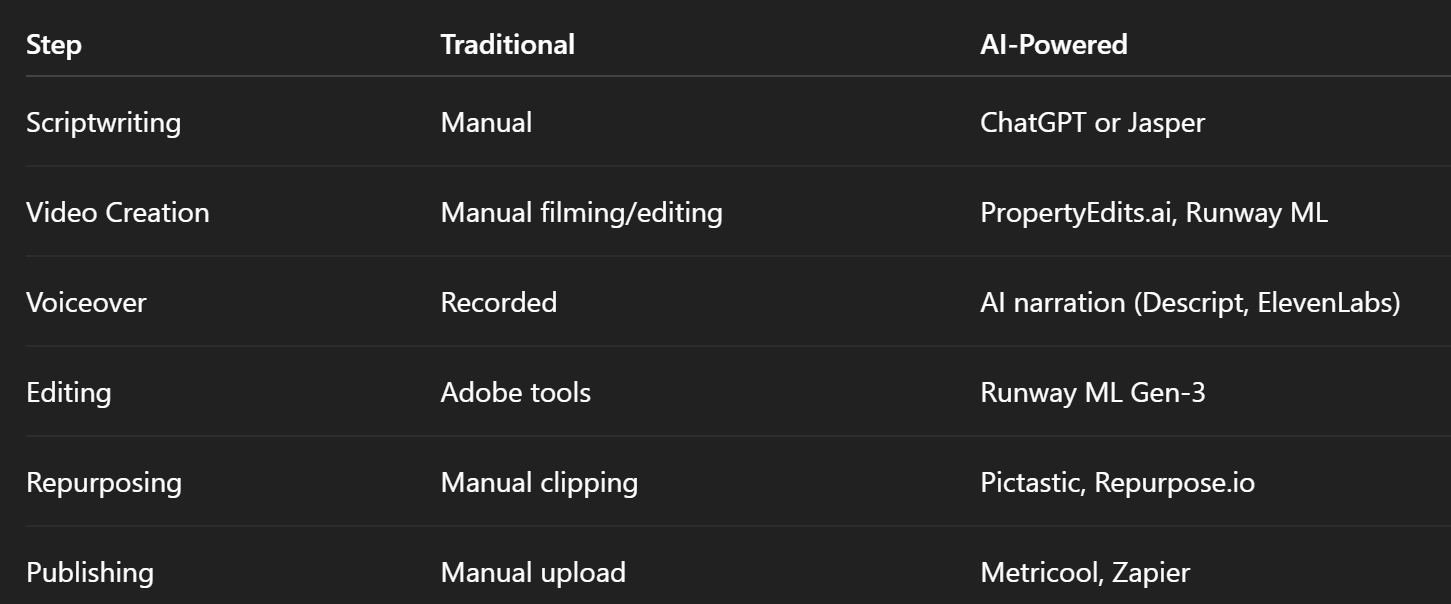
What AI Video Automation Looks Like in 2025

Here’s what an automated video workflow might include:
🡆 Related: Top 5 AI Video Editing Tools for Busy Creators in 2025

Step 1: Start With a Video System, Not a One-Off Project

Scaling doesn’t come from just one viral video. It comes from a repeatable system that you can run every week.

Here’s a simplified version:

  • Monday: Generate a script using ChatGPT
  • Tuesday: Use PropertyEdits.ai to create a branded video from photos
  • Wednesday: Export vertical versions for Shorts/Reels
  • Thursday: Repurpose for blogs, email, and LinkedIn
  • Friday: Track performance and rinse & repeat

🡆 Related: The Weekly AI Video Content Plan (Template + Tools)

Step 2: Repurpose Like a Pro

AI doesn’t just help with creation—it helps you squeeze more value out of every video.

One piece of content can become:

  1. Full YouTube video
  2. YouTube Short
  3. Instagram Reel
  4. TikTok highlight
  5. Email teaser
  6. Blog post with embedded video
  7. LinkedIn case study
  8. Facebook ad
  9. Pinterest video pin
  10. Carousel post

🡆 Related: From Static to Cinematic: Transforming Property Photos With AI

Step 3: Replace Costly Editing With AI-Powered Efficiency

Gone are the days of paying $300 per video or waiting 5–7 days for delivery.

Today, tools like Runway ML, Luma AI, and Pictastic auto-edit your videos with:

  • Scene detection
  • Smart transitions
  • Captions
  • Dynamic motion brush effects
  • Auto cropping for social media

🡆 Related: AI vs. Traditional Video Editing: Cost, Time, and ROI Breakdown

Step 4: Automate Captions, Voiceovers, and Formatting

AI voice tools let you generate narration that sounds like a real human (or even your cloned voice). Captioning software can identify speech and burn in subtitles automatically.

You can now:

  • Add professional voiceovers without a mic
  • Convert long-form to short-form with timestamps
  • Caption all your vertical exports instantly

🡆 Related: How to Add Voiceovers and Captions Automatically to AI Videos

Step 5: Use AI to Win Listings, Sales, and Clients

Real estate pros are especially benefiting from this new wave of video automation.

Instead of showing up with a promise, you show up with results:

“Here’s a branded video I made from your photos using my AI marketing system. It’ll be ready for Instagram, YouTube, and Zillow within 24 hours.”

🡆 Related: Why AI Video is the New Standard for Listing Presentations

Step 6: Build a Scalable, White-Labeled Service

If you’re a content creator or agency, you can use these tools to build a video-as-a-service offering.

  • Turn around videos for clients in 15 minutes
  • Deliver via branded project portals
  • Automate the editing, formatting, and delivery
  • Upsell content packages or retainer deals

🡆 Related: Building a White-Labeled Video Marketing Service With AI

Bonus: What’s Next for AI Video in 2025?

New trends we’re watching include:

  • Voice emotion control
  • Interactive video (clickable AI experiences)
  • Real-time generation based on user input
  • Instant client-specific branding templates
  • Smart AI avatars replacing spokesperson videos

🡆 Related: AI Video Trends We’re Watching (Q3 2025 Update)

Final Thoughts: Don’t Just Create—Scale

If you’re still creating videos one at a time, you're falling behind. With AI, you can:

✅ Create faster
✅ Publish more often
✅ Reach more channels
✅ Automate delivery
✅ Grow your brand (or client base) effortlessly

Want to see it in action?

🡆 Try PropertyEdits.ai With a Free Walkthrough

Share this post

Choose The Right 360° Camera

Insta360 ONE RS 1-Inch 360 Edition

  • Compact, ready to go anywhere

  • Interchangeable lens that’s upgradeable

  • Dual 1-inch sensors for improved clarity and low light performance

  • Dynamic range and 6K 360° capture

  • 360° photo resolution at 21MP

Learn More

Insta360 X4

  • 8K 360° video recording for ultra-detailed visuals.

  • 4K single-lens mode for traditional wide-angle shots.

  • Invisible selfie stick effect for drone-like perspectives.

  • 2.5-inch touchscreen with Gorilla Glass protection.

  • Waterproof up to 33ft for underwater shooting.

Learn More

Ricoh Theta Z1

  • 360° photo resolution in 23MP

  • Slim design at 24 mm thick

  • Built-in image stabilization for smooth video capture.

  • Internal 19GB storage for photo and video storage.

  • Wireless connectivity for remote control and sharing.

Learn More

Ricoh Theta X

  • 60MP 360° still images for high-resolution photography.

  • 5.7K 360° video recording at 30fps.

  • 2.25-inch touchscreen for intuitive control.

  • USB Type-C port for fast charging and data transfer.

  • MicroSD card slot for expandable storage.

Learn More
Property Marketing
Allows potential buyers to explore properties in detail from anywhere, enhancing the real estate marketing process.
Automotive Spins
Create an interactive virtual showroom and engage affluent digital buyers with live 360º video calls, all through the CloudPano mobile app for a complete automotive sales solution.
Interactive Floor Plans
Create 2D and 3D floor plans with measurements in 4 minutes or less, all from your phone. Download the Floor Plan Scanner app and get your first scan free.

360 Virtual Tours With CloudPano.com. Get Started Today.

Try it free. No credit card required. Instant set-up.

Try it free
Latest posts

See our other posts

Interviews, tips, guides, industry best practices, and news.

How to Control AI Camera Panning and Tilting Layouts Using Standard Room Stills

This blog post explains how Realtors, photographers, brokerages, and property managers can create smoother AI real estate videos by choosing room stills that support natural camera movement. It focuses on how to control AI panning, tilting, push-ins, pull-backs, and subtle motion using standard listing photos.
Read post

The Math of Media: How Much Money You Save Converting Photos to Video vs. Hiring Videographers

This article breaks down the real cost difference between hiring a traditional real estate videographer and using PhotoAIVideo to convert existing listing photos into videos. It explains that while videographers are still valuable for luxury listings, drone-heavy campaigns, lifestyle videos, and agent-on-camera content, many everyday listings do not require a separate video shoot.
Read post

From Raw Bracketed Shots to High-Definition Virtual Tours in Under Five Minutes

This article explains how Realtors, real estate photographers, brokerages, and property managers can turn edited bracketed listing photos into high-definition virtual tour videos in minutes using PhotoAIVideo. It focuses on a practical workflow: capture bracketed photos, edit them into polished HDR images, curate the strongest shots, organize them in a natural property sequence, and generate branded or unbranded video versions for MLS, social media, property websites, and leasing campaigns.
Read post



