


.png)


The agent did not have a video shoot scheduled.
No gimbal. No drone. No videographer. No second trip to the property.
Just an iPhone, a clean house, decent light, and a folder of still photos.
That is a real situation agents run into all the time. The listing needs more marketing content, but the media budget is already spent or the property is moving too fast to coordinate another appointment. The question becomes practical: can iPhone stills actually become a useful real estate walkthrough video?
Yes — sometimes.
But not every phone photo works. And not every AI video output should be published without review.
Testing AI software for creating real estate walkthrough videos from iPhone stills is really about understanding the limits of the source image. A strong iPhone still can become a smooth motion clip. A weak iPhone still can become a warped, awkward, low-trust video that makes the listing look worse.
That is the difference.
PhotoAIVideo helps real estate professionals turn property photos into AI-generated videos. For agents and property teams, the useful question is not only “Can this tool make a video?” The better question is, “What kind of iPhone photos produce the best walkthrough-style result?”
This guide breaks that down.
Creating real estate walkthrough videos from iPhone stills means using regular phone photos as the source material for AI-generated video movement.
Instead of recording actual video footage while walking through the property, you take still images of each key space. Then AI video software adds camera-style motion, sequencing, and transitions so the final asset feels more like a guided property presentation.
This is especially useful when an agent needs:
This is where an AI app to turn property photos into videos can be useful for agents who need speed without opening an editing timeline.
But there is an important distinction.
An AI walkthrough made from iPhone stills is not the same as a true filmed walkthrough. It does not capture continuous movement through the home. It does not show every transition between rooms. It creates a walkthrough-style presentation from still images.
That can still be valuable.
The trick is to shoot the iPhone stills with the final video in mind.
Most agents already carry a camera good enough to create useful marketing assets.
The iPhone in your pocket may not replace professional listing photography for every property, but it can fill important gaps in the workflow.
For example:
A rental unit turns over on Wednesday. The leasing team needs a video by Thursday.
A listing has professional photos, but the agent forgot to capture the garage, backyard shed, or upstairs bonus room.
A property manager needs a quick clip for a tenant lead.
A photographer delivers images next week, but the seller wants a “coming soon” preview now.
A brokerage wants agents to create seller update videos after staging is finished.
These are not luxury cinematic campaigns. They are operational media needs.
That is why tools like PhotoAIVideo matter. They help real estate professionals turn available still images into video assets quickly, which can support social media, listing promotion, property pages, and follow-up.
The business impact is simple: more useful content from the media you already have.
A professional photo shoot should still be the standard for serious listings. But iPhone stills can work when speed, access, or budget is the constraint. Google’s image SEO guidance also emphasizes the value of descriptive visual context and relevant surrounding text when publishing images or visual content online, which matters when those AI videos appear on property pages or blog posts.

The common mistake is taking iPhone photos like they are only going into a text message.
That is what ruins the video later.
This actually happens: an agent walks through the house quickly, snaps one vertical photo of each room, catches part of a door frame in the foreground, leaves the blinds half closed, shoots with mixed lighting, and then uploads everything into an AI video tool.
The output looks strange.
The kitchen crops awkwardly. The bathroom feels too tight. The hallway photo adds nothing. The living room moves in a way that makes the wall bend. The vertical format cuts off too much context. The video technically works, but it does not feel like listing media.
That is not really an AI problem.
It is a capture problem.
AI video software can animate a photo, but it cannot fully fix poor composition, low light, clutter, bad angles, or missing room context.
A better workflow starts before the upload.
If the goal is to create real estate videos from photos with AI, the photos need to be taken like video source material. That means wider shots, cleaner angles, more stable framing, and a logical sequence through the property.
The phone photo is the input.
The video can only be as good as the input allows.
PhotoAIVideo fits best after the iPhone photo set is already cleaned up and organized.
The workflow is not complicated:
Take intentional stills.
Choose the best ones.
Upload them.
Generate video movement.
Review the output.
Export the right version.
That makes PhotoAIVideo useful for agents who need a fast way to create video content from real estate images, including iPhone stills, professional photos, rental unit photos, staging updates, or property management images.
The biggest advantage is that the agent does not need to become a video editor.
The agent needs to understand three things:
That last point matters.
AI-generated movement should make the listing feel more engaging, not misleading. If a room looks larger than it is, if a crop hides something important, or if the motion creates a strange distortion, the agent should regenerate, replace the photo, or remove that frame.
PhotoAIVideo helps with production speed. The user still controls judgment.
For walkthrough-style videos, horizontal photos usually preserve more room context.
A horizontal kitchen photo shows the island, cabinets, appliances, and windows in one frame. A vertical photo may cut off too much of the room, especially if the AI adds motion.
Use vertical stills when you are intentionally making Instagram Reels, TikTok clips, or Shorts. Otherwise, capture horizontal images first.
A practical rule:
If the video needs to feel like a property tour, shoot wide.
If the video needs to feel like a quick social clip, vertical can work.
Room depth matters.
The best iPhone stills for AI movement usually show foreground, middle ground, and background. Corners and doorways help create that depth.
Good capture positions include:
Avoid standing in the middle of the room unless the composition is strong.
A centered, flat wall shot often produces boring movement.
Phone cameras are good, but they can struggle with windows, ceiling lights, and dark corners in the same frame.
Before taking the photo:
The AI video will magnify visual problems. A slightly bad photo can become very noticeable once it starts moving.
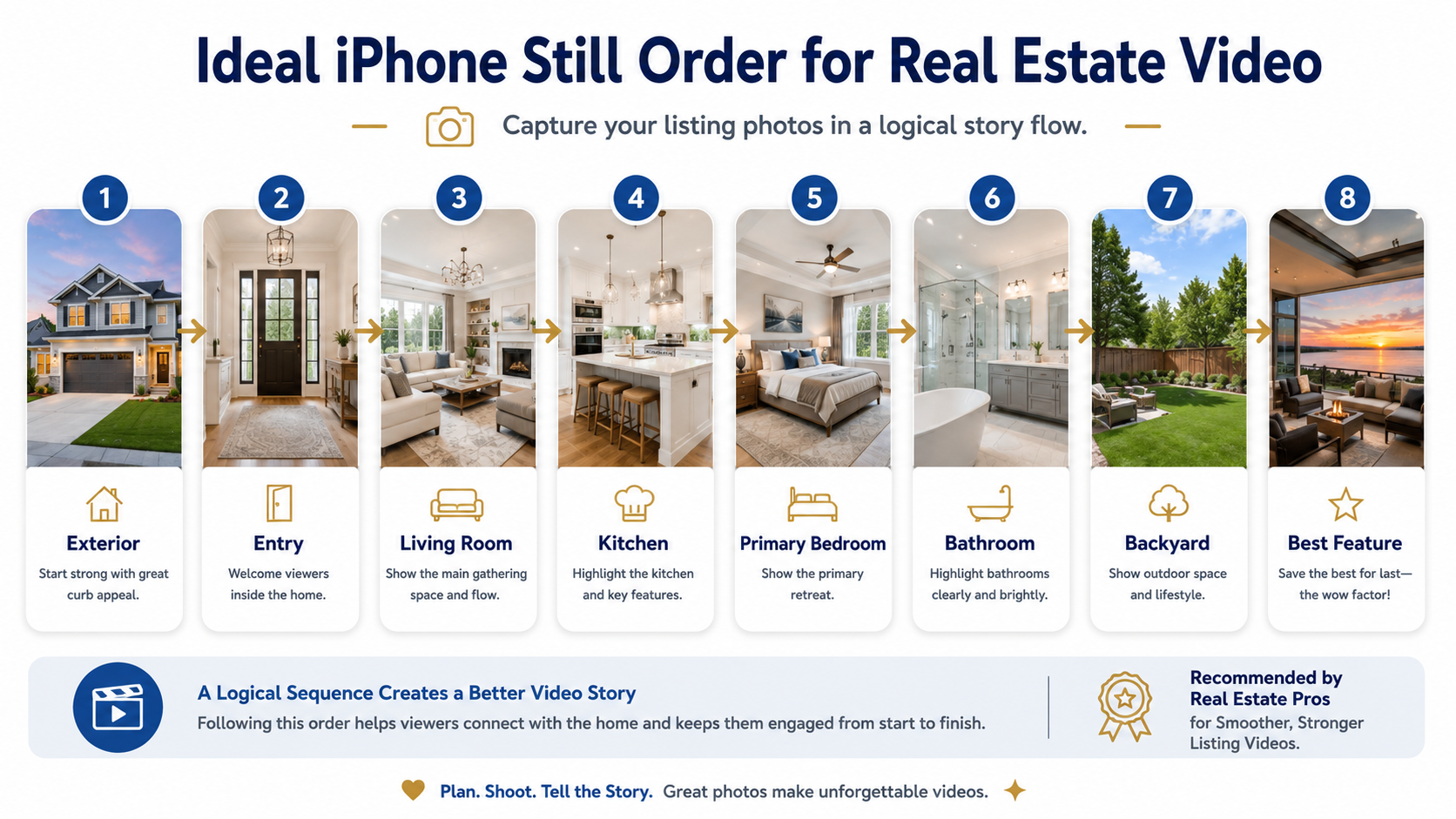
Do not just photograph rooms randomly.
Think like a buyer walking through the home.
A simple sequence might be:
For a rental unit, the sequence might be shorter:
The sequence should feel natural. If the video jumps from bathroom to backyard to kitchen to bedroom, the viewer feels the disorder even if they cannot explain it.
Do not overshoot every space, but do capture options for the rooms that matter.
For key areas, take:
For example:
Kitchen:
Living room:
Backyard:
This gives PhotoAIVideo better source material and gives you more control when building the final video.
Do not upload everything.
Skip images that are:
A short video with 10 strong images usually beats a longer video with 30 random images.
This is especially true for agents testing the best AI video software for real estate agents. The tool matters, but the photo selection matters just as much.
Once the stills are selected, upload them into PhotoAIVideo and generate the video.
Watch the output once like a normal viewer.
Then watch it again like a listing professional.
Ask:
That second viewing is where quality improves.
An iPhone-still walkthrough can be used in several ways, but not every version should be identical.
For social:
Use a shorter, faster version with a clear hook.
For a property website:
Use a smoother, more complete walkthrough-style version.
For seller updates:
Use a simple version that shows progress and marketing effort.
For MLS-aware use:
Review branding, captions, and local rules carefully.
MLS rules vary by board, brokerage, and region. Always confirm your local requirements before publishing listing media. NAR’s Clear Cooperation Policy and the NAR Handbook on Multiple Listing Policy are useful starting points for understanding broader listing marketing policy context.
If you embed the video on a property page or blog post, add descriptive text around it.
Do not rely only on the video.
A simple paragraph helps:
“This AI-generated walkthrough video was created from iPhone stills and highlights the living room, kitchen, primary bedroom, and backyard layout.”
That gives users and search engines context. Google’s video SEO best practices recommend making video content easy for Google to find and understand when it appears on a page.
The practical answer is not “iPhone or professional photos.”
It is both, used correctly.
Use professional photos for the main listing package whenever possible. Use iPhone stills when speed, access, rental turnover, staging updates, or supplemental content matters.

A Realtor can use iPhone stills when a listing needs quick supplemental content.
For example, the professional photos are already live, but the agent wants a fast open house reminder video showing the kitchen, living room, and backyard. Instead of waiting on a new edit, the agent captures a few additional iPhone stills and uses PhotoAIVideo to create a short video.
That can be enough for a social post or seller update.
Photographers can use this workflow when agents send phone images after the shoot.
This happens more often than people admit.
The agent forgot to mention the detached office. The seller finished staging the patio after the photographer left. A new appliance was installed. The photographer can either schedule a return visit or, in some cases, use clean iPhone stills to create a supplemental AI video asset.
This is a useful angle for AI video software for real estate photographers because it turns imperfect real-world situations into deliverable media.
Brokerages can train agents on iPhone capture standards.
That matters because bad agent-captured media can hurt the brand.
A simple brokerage SOP might include:
Then agents can use PhotoAIVideo without creating random low-quality content.
Property managers may benefit the most from this workflow.
Rental units turn quickly. Professional photography is not always scheduled for every unit refresh. Maintenance teams may already be inside the property.
A property manager can capture iPhone stills after cleaning, upload them, and create a simple walkthrough-style video for leasing follow-up, rental listings, or social media.
This is not about luxury branding.
It is about reducing vacancy friction.
Builders and staging teams can use iPhone stills to document updates.
A staged living room, finished kitchen, model unit, or newly completed exterior can become a quick AI-generated walkthrough clip. That clip can be sent to agents, posted to social, or used as a progress update.
The key is labeling the content accurately.
If a photo shows a model unit, say that. If a rendering is used, identify it as a rendering.
Phone cameras make it easy to step too close.
Too-close photos create tight, awkward video movement. Step back when possible. Use the doorway. Use the corner. Give the AI room to create motion.
A mix of vertical and horizontal can work, but it often creates inconsistent output.
Choose the final video format first.
Then capture accordingly.
iPhone ultra-wide shots can make small rooms look bigger, but they can also bend walls, stretch cabinets, and distort corners.
Use ultra-wide carefully.
If it makes the room feel unrealistic, do not use it.
Bathrooms, gyms, glass doors, and glossy kitchens can show the agent, phone, tripod, or personal items.
Check reflections before uploading.
Once motion is added, those details may become more noticeable.
The first version is a draft.
Always check crops, motion, room order, captions, and accuracy.
iPhone stills are useful.
They are not always the best primary listing media.
For higher-value listings, competitive markets, luxury properties, and seller presentations, professional photography still matters.
A walkthrough-style clip should lead somewhere.
Add a next action:
A video without a next step is just content.
A video with a next step becomes marketing.


Compact, ready to go anywhere
Interchangeable lens that’s upgradeable
Dual 1-inch sensors for improved clarity and low light performance
Dynamic range and 6K 360° capture
360° photo resolution at 21MP

8K 360° video recording for ultra-detailed visuals.
4K single-lens mode for traditional wide-angle shots.
Invisible selfie stick effect for drone-like perspectives.
2.5-inch touchscreen with Gorilla Glass protection.
Waterproof up to 33ft for underwater shooting.

360° photo resolution in 23MP
Slim design at 24 mm thick
Built-in image stabilization for smooth video capture.
Internal 19GB storage for photo and video storage.
Wireless connectivity for remote control and sharing.

60MP 360° still images for high-resolution photography.
5.7K 360° video recording at 30fps.
2.25-inch touchscreen for intuitive control.
USB Type-C port for fast charging and data transfer.
MicroSD card slot for expandable storage.
.png)

.png)

Try it free. No credit card required. Instant set-up.







.svg)


.svg)