


.png)


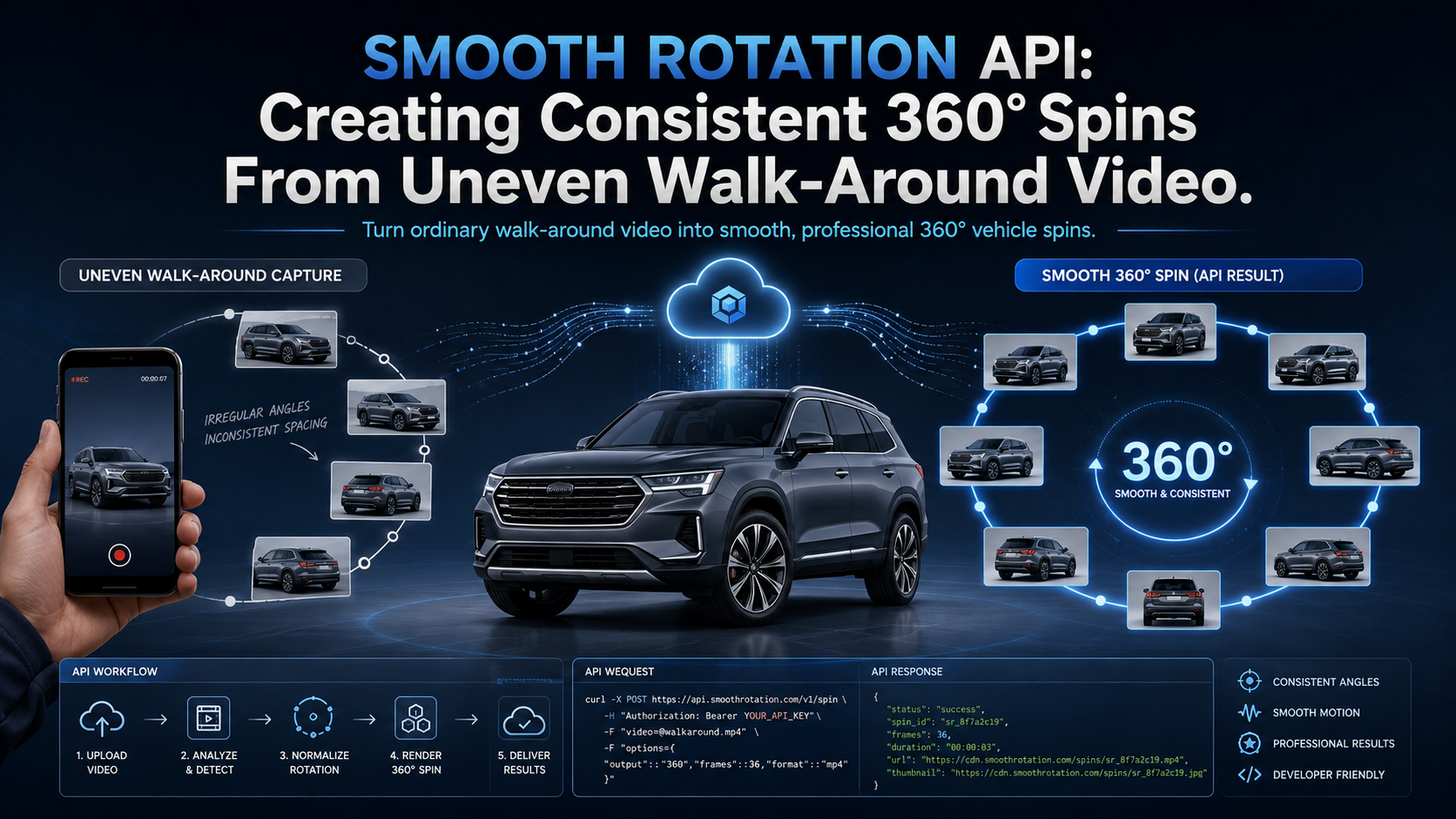
A dealership employee records a complete walk-around video of a vehicle. The footage looks good when played normally, but when individual frames are extracted and turned into a 360° spin, something feels wrong.
The vehicle rotates slowly around the front bumper, suddenly jumps through the passenger side, pauses near the rear, and then moves quickly again.
The problem may not be the camera, the frame count, or the 360° viewer.
It may simply be uneven walking speed.
People do not naturally walk around vehicles at a perfectly constant pace. They slow down near tight spaces, speed up along open sections of the lot, pause to avoid obstacles, and sometimes walk slightly beyond their original starting point.
A smooth rotation API helps compensate for those real-world variations by selecting frames based on the vehicle's changing viewing angle rather than relying only on equal intervals of time.
The result is a 360° experience that feels more like the vehicle is rotating smoothly in place—and less like someone is playing back a handheld video one frame at a time.
A video camera records according to time.
For example, a smartphone might capture 30 frames every second regardless of how quickly the photographer is moving.
That is perfectly reasonable for video.
A 360° spin works differently.
When a shopper drags the vehicle left or right, they expect each new image to represent a relatively consistent change in viewing angle.
Imagine someone spends five seconds walking around the front quarter of a vehicle but only two seconds walking along the driver's side.
If a processing system simply extracts one image every 300 milliseconds, it may select many nearly identical front-quarter images and relatively few images from the driver's side.
The result can feel like:
This is why frame extraction alone is not enough.
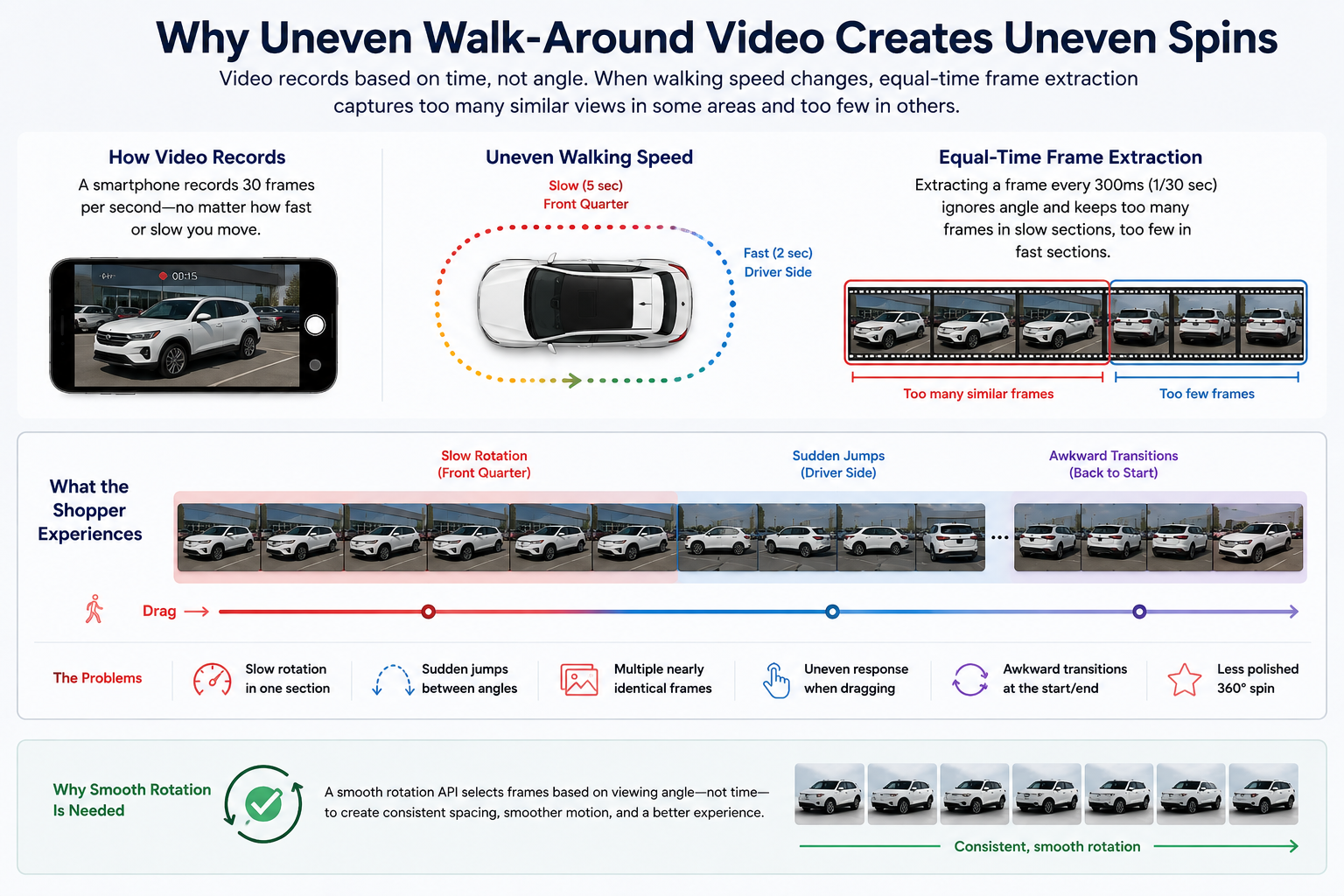
A smooth rotation API is designed to make the rotational progression between selected frames more consistent.
Instead of asking:
"Which image was recorded every X milliseconds?"
the processing workflow can effectively ask:
"Which image best represents the next desired viewing angle around the vehicle?"
Conceptually, the workflow looks like this:
That distinction is important.
The system is trying to normalize rotation, not playback time.
This is one of the most important concepts when building an automotive 360° experience.
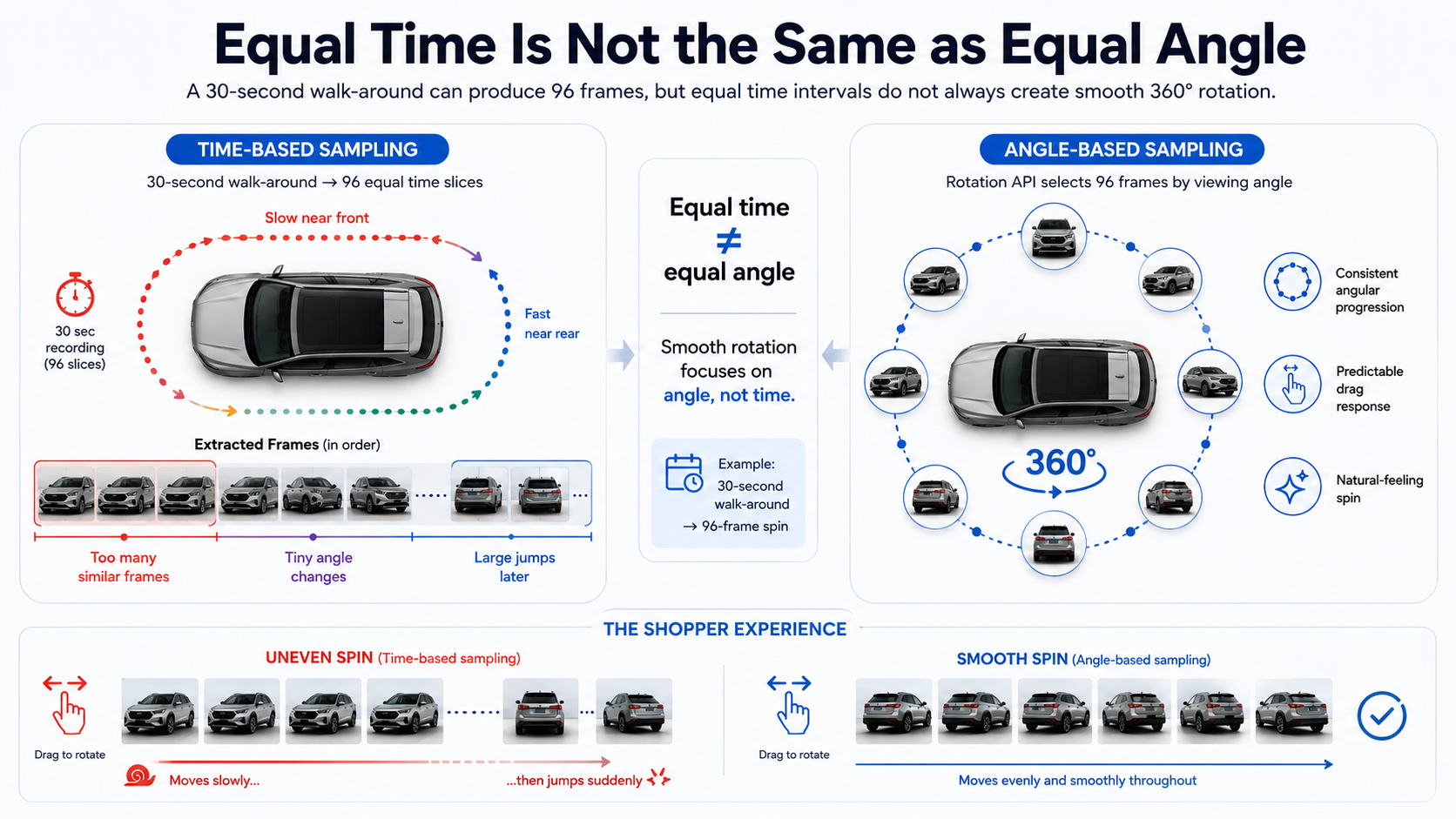
Suppose a dealership employee records a 30-second vehicle walk-around.
You want a finished spin containing 96 frames.
A basic time-based approach could simply divide the video into 96 equal sections and choose one frame from each section.
Mathematically, that sounds reasonable.
Visually, it may not be.
If the photographer slowed down near the front of the vehicle, many of those samples could represent tiny changes in viewing angle. If they sped up around the rear, the difference between two selected images could suddenly become much larger.
A smooth rotation API instead tries to create more consistent angular progression.
The shopper can then drag a similar distance and receive a more predictable amount of vehicle rotation.
That is what makes the interaction feel natural.
Smooth rotation and centering are related, but they solve different problems.
Centering helps keep the vehicle in approximately the same place within the canvas.
It can reduce the appearance of the car moving:
The goal is to make the vehicle appear to rotate around a stable visual center.
Smooth rotation determines how the sequence advances around the vehicle.
The car could be perfectly centered in all 96 images while still rotating poorly if the viewing angles are unevenly distributed.
Likewise, the rotation could be beautifully spaced while the vehicle drifts across the canvas.
The strongest automotive spin workflows address both issues.
Historically, dealerships seeking extremely consistent vehicle spins could install specialized photography systems.
That might mean:
Those systems can create controlled results, but they also introduce hardware, space, installation, and operational requirements.
API-driven processing takes a different approach.
Instead of forcing every rooftop to behave like a photography studio, software helps normalize ordinary real-world capture.
A dealership employee records the vehicle.
The application submits the footage.
The processing system generates the spin.
The finished assets are attached to inventory.
That makes 360° merchandising easier to incorporate into existing dealership workflows.
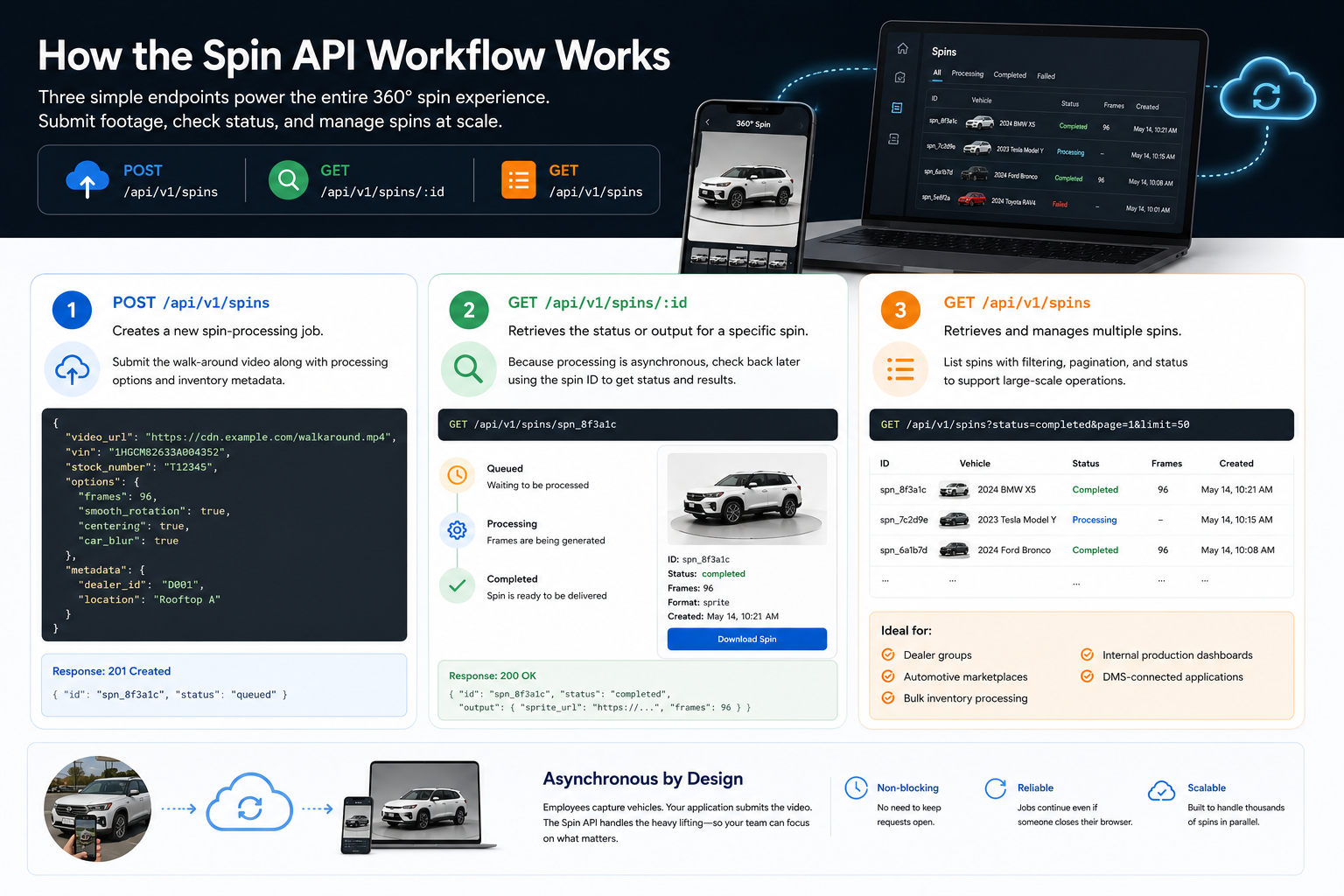
A basic implementation can revolve around three endpoints:
POST /api/v1/spins
GET /api/v1/spins/:id
GET /api/v1/spins
/api/v1/spinsThe POST request creates a new spin-processing job.
Your application can submit the vehicle walk-around along with relevant processing options and inventory metadata.
/api/v1/spins/:idBecause video processing is asynchronous, your application does not need to keep the original upload request open until processing finishes.
Instead, it can retrieve the specific spin later using its ID.
This lets your system check processing status and access finished outputs once they are available.
/api/v1/spinsThe collection endpoint can help applications retrieve and manage multiple spin records.
That becomes particularly useful for:
The architecture lets processing continue independently from the employee who originally recorded the vehicle.
Smooth rotation is one processing capability within the broader Spin API workflow.
Developers should review the current Smooth Rotation processing options when configuring production requests.
Conceptually, the relevant processing option is:
smooth_rotation
The objective is to create a more consistent angular sequence from imperfect capture.
It becomes especially valuable when dealership footage includes normal human variation rather than controlled turntable movement.
Frame count is another major part of the experience.
Imagine a full 360° rotation divided into only 12 frames.
Even if those frames are perfectly spaced, each transition represents a fairly large change in angle.
Increasing the number of frames reduces the visual distance between consecutive images.
But there is an important lesson:
More frames do not automatically create smoother rotation.
If those additional frames are poorly distributed, the spin can still contain repeated angles followed by abrupt jumps.
A strong workflow therefore considers both:
Frame quantity + rotational spacing
This is why the frames and smooth_rotation options should be evaluated together.
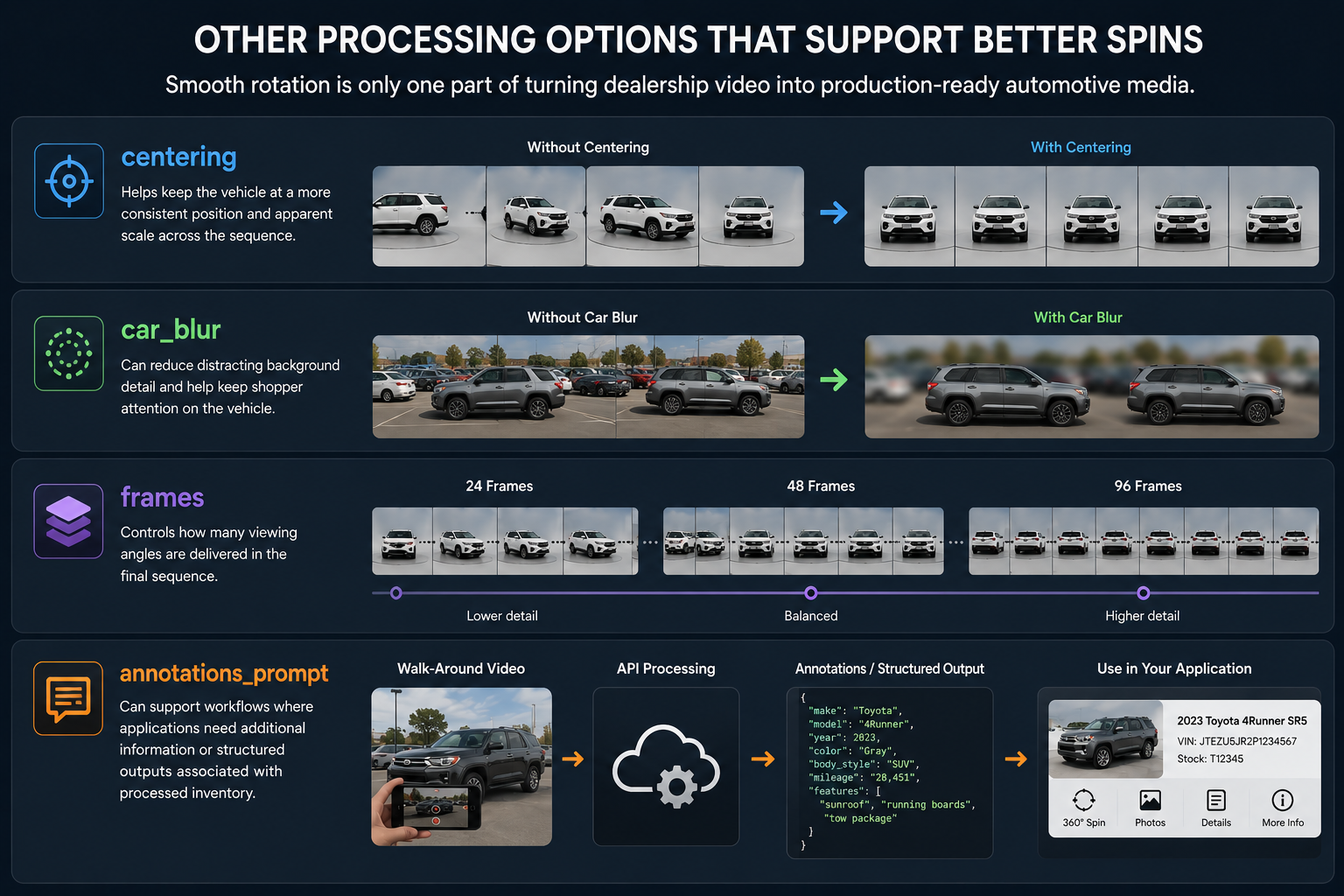
Smooth rotation is only one part of turning dealership video into production-ready automotive media.
centeringHelps keep the vehicle at a more consistent position and apparent scale across the sequence.
car_blurCan reduce distracting background detail and help keep shopper attention on the vehicle.
framesControls how many viewing angles are delivered in the final sequence.
annotations_promptCan support workflows where applications need additional information or structured outputs associated with processed inventory.
Geometry data can support more advanced automotive applications that need information beyond ordinary image delivery.
Different implementations may use these outputs for inspection systems, annotations, measurements, interfaces, or other vehicle-data workflows.
Creating the spin is only part of the engineering problem.
The browser still needs to display it efficiently.
Two common delivery approaches are individual frames and sprite sheets.
A viewer can receive an ordered collection of image assets.
As the shopper drags left or right, JavaScript advances or reverses through those images.
This approach provides flexibility for:
The tradeoff is that a large spin can involve many individual image requests.
Sprite sheets combine multiple spin frames into larger image assets.
Instead of loading every rotational angle as a completely separate file, the viewer displays different portions of the sprite sheet.
This can reduce the number of requests needed to initialize the experience.
For a dealership VDP, the right approach depends on viewer architecture, device performance, image resolution, caching, and network conditions.
The smoothness of a spin is therefore affected by both processing quality and delivery engineering.
More consistent shopper interaction
Rotational movement feels more predictable as users drag the vehicle.
Better results from ordinary walk-around footage
Employees do not need to maintain perfectly consistent walking speed.
Fewer noticeable jumps
More even angular selection can reduce abrupt transitions between viewing angles.
More scalable capture
Dealer groups can standardize output without requiring every employee to become an expert automotive photographer.
Works alongside other processing
Smooth rotation can complement centering, frame selection, background treatment, and other API options.
It cannot recreate missing angles
If an employee never captures part of the vehicle, processing cannot reliably manufacture the missing viewpoint.
Extremely poor footage still creates problems
Large camera movements, interrupted capture, or incomplete walk-arounds can reduce output quality.
More processing logic means more infrastructure
Building comparable technology internally requires analysis, frame selection, job management, retries, hosting, delivery, and monitoring.
Viewer performance still matters
Perfectly distributed images can still feel sluggish if the front-end viewer loads them inefficiently.
Complete a full walk-around rather than stopping exactly when you think you have reached the starting point.
A small amount of overlap can give the processing pipeline more flexibility around the beginning and end of the sequence.
Minor changes in speed are expected.
Long pauses are more difficult because they can produce many nearly identical frames.
Avoid framing so tightly that bumpers, mirrors, or rooflines regularly leave the image.
This also gives centering additional room to work.
Try not to rapidly point the camera toward the pavement, sky, or surrounding inventory.
Smooth capture still produces the best processing input.
Do not validate the workflow only with a professionally filmed demo.
Ask several dealership employees to capture vehicles naturally.
That will reveal how well the system handles real production conditions.
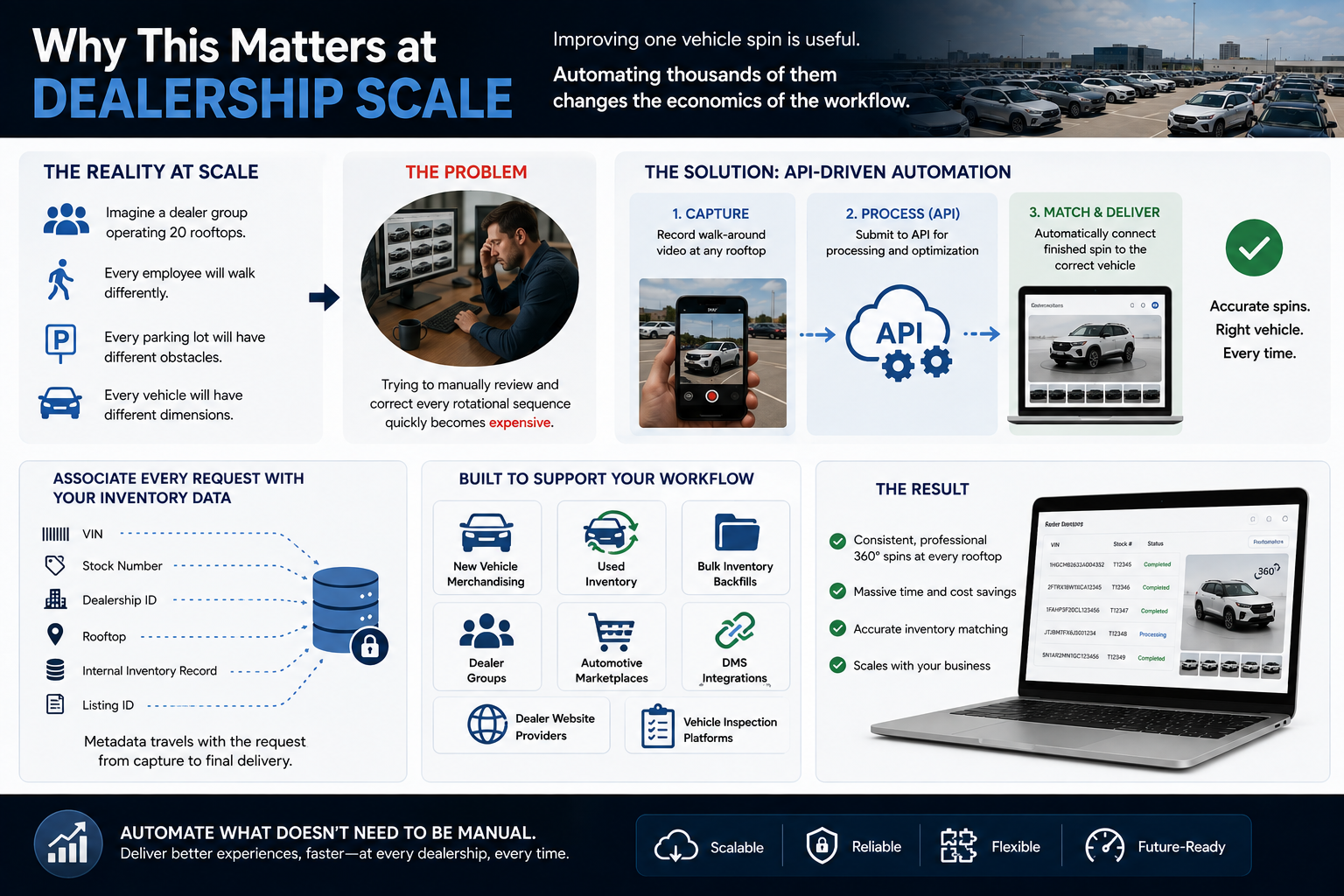
Improving one vehicle spin is useful.
Automating thousands of them changes the economics of the workflow.
Imagine a dealer group operating 20 rooftops.
Every employee will walk differently.
Every parking lot will have different obstacles.
Every vehicle will have different dimensions.
Trying to manually review and correct every rotational sequence quickly becomes expensive.
An API-driven process can standardize that workflow.
A processing request can be associated with:
When processing finishes, the application can automatically connect the finished spin with the correct vehicle.
That architecture can support:
A developer can write code that extracts frames from a video.
That is not the same thing as operating a production-ready vehicle processing platform.
At scale, your team also needs to consider:
The question eventually becomes less about whether your engineers can build the processing logic.
It becomes whether building and maintaining that infrastructure is where your company should spend engineering resources.
Dealership employees are not robots.
They will walk faster in some places, slower in others, stop briefly, avoid parked vehicles, and take slightly different paths around every car.
A modern 360° workflow should be designed around that reality.
A smooth rotation API helps transform uneven walk-around footage into a more consistent sequence by focusing on the vehicle's angular progression rather than simply extracting images at fixed time intervals.
Combined with centering, configurable frame counts, background processing, inventory metadata, geometry outputs, and efficient viewer delivery, smooth rotation becomes part of a complete automotive merchandising pipeline.
The goal is not simply to turn video into images.
The goal is to turn ordinary dealership capture into an interactive experience that feels intentional, consistent, and professional across every vehicle and every rooftop.
Review the Smooth Rotation processing options, submit a real dealership walk-around, and test the finished spin inside the same VDP or automotive application your shoppers will actually use.
Start with real footage, enable smooth rotation, connect the output to your inventory workflow, and build a 360° experience that can scale without requiring a $40,000 studio at every dealership.


Compact, ready to go anywhere
Interchangeable lens that’s upgradeable
Dual 1-inch sensors for improved clarity and low light performance
Dynamic range and 6K 360° capture
360° photo resolution at 21MP

8K 360° video recording for ultra-detailed visuals.
4K single-lens mode for traditional wide-angle shots.
Invisible selfie stick effect for drone-like perspectives.
2.5-inch touchscreen with Gorilla Glass protection.
Waterproof up to 33ft for underwater shooting.

360° photo resolution in 23MP
Slim design at 24 mm thick
Built-in image stabilization for smooth video capture.
Internal 19GB storage for photo and video storage.
Wireless connectivity for remote control and sharing.

60MP 360° still images for high-resolution photography.
5.7K 360° video recording at 30fps.
2.25-inch touchscreen for intuitive control.
USB Type-C port for fast charging and data transfer.
MicroSD card slot for expandable storage.
.png)

.png)

Try it free. No credit card required. Instant set-up.







.svg)


.svg)