


.png)


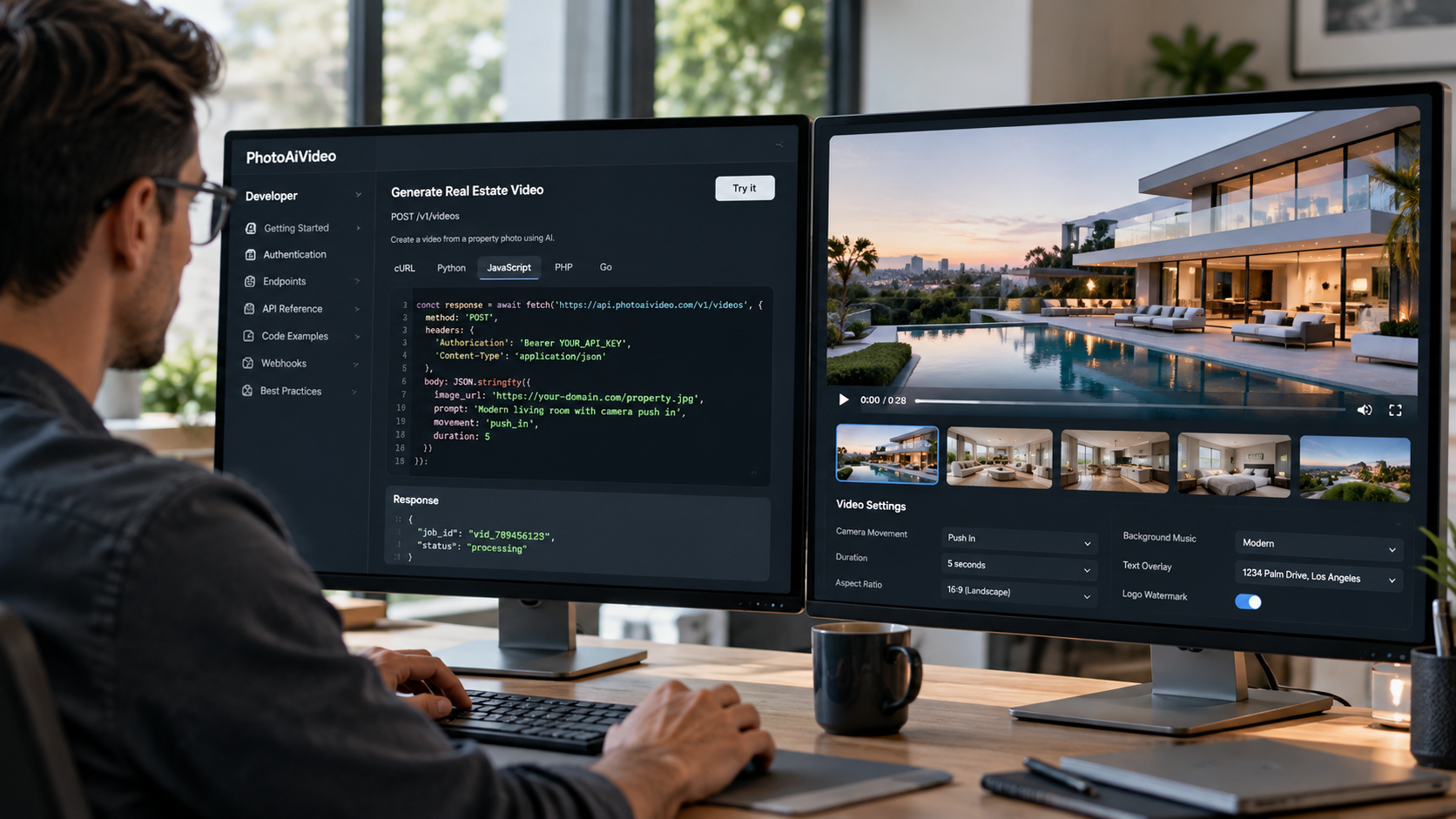
A real estate video API lets developers programmatically turn property photos into video. With PhotoAiVideo, an application uploads listing images, creates asynchronous video-generation jobs, monitors those jobs until completion, combines 2–20 completed clips into a branded reel, and retrieves the finished video for use inside a CRM, MLS platform, property-management system, or other real estate application.
Adding video generation to a real estate application sounds simple: send property photos to an AI model and return a video. In production, however, developers also need to handle image uploads, authentication, asynchronous rendering, job tracking, clip assembly, branding, output delivery, credit usage, and failures.
A real estate video API moves much of that infrastructure behind an API so developers can focus on how video fits into their product.
With the PhotoAiVideo API, an application can upload listing photos, turn individual images into cinematic video clips, monitor generation jobs, and merge completed clips into a branded property reel. The finished output can then be returned to a CRM, MLS platform, listing portal, property-management system, photography workflow, or another real estate application.
This guide explains how that process works from a developer's perspective.
A real estate video API is an application programming interface that lets software generate property video programmatically from assets such as listing photos.
Instead of asking a user to leave your platform, open a video editor, upload the same property images again, create the video, export it, and return to your application, video generation can become part of the workflow you already control.
For example, your application could trigger video creation when:
The application sends the appropriate property photos to the video API and tracks the resulting jobs until the output is ready.
For developers, the important distinction is that the API is not simply a video effect endpoint. It is an orchestration workflow involving uploads, generation jobs, status checks, reel assembly, and final output delivery.
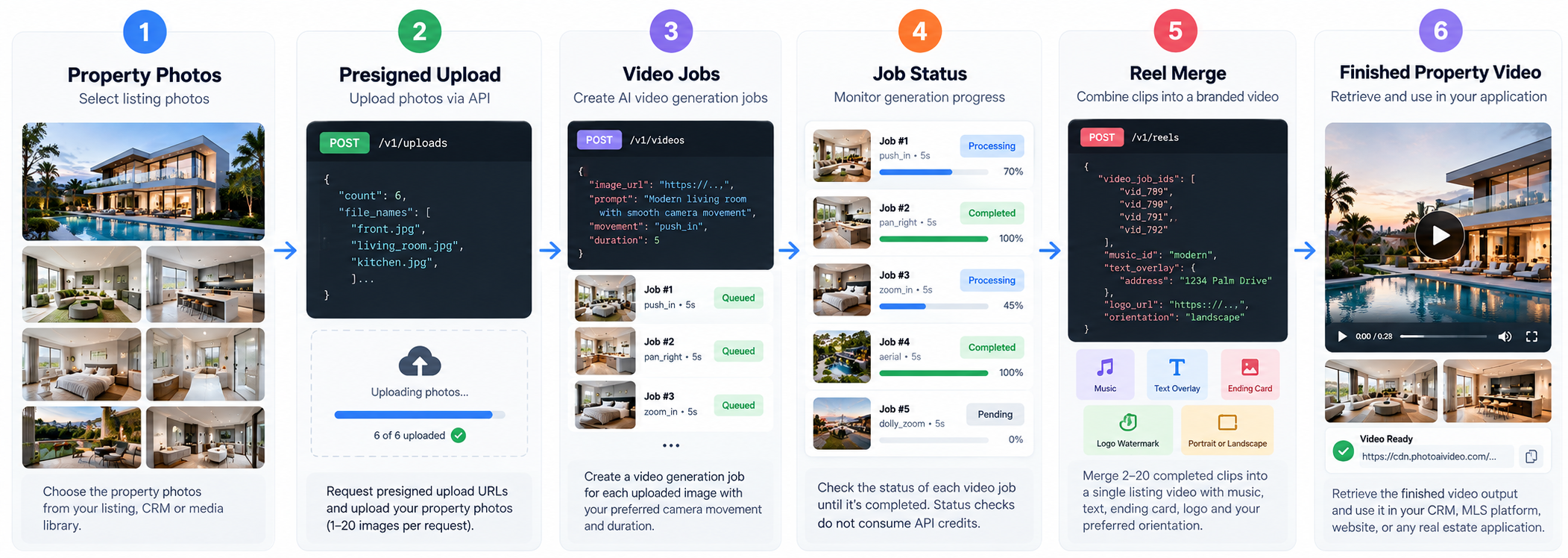
The complete workflow can be understood as a simple pipeline:
Property Photos → Upload → Generate Clips → Monitor Jobs → Merge Reel → Deliver Finished Video
PhotoAiVideo currently exposes eight API endpoints supporting that workflow.
Only two operations consume generation credits: creating an individual video clip and merging completed clips into a reel. Upload requests, job-status checks, job listings, and credit-balance requests do not consume generation credits.
Let's walk through the implementation.
The first step is generating an API key from the PhotoAiVideo developer dashboard.
Your server includes that key with authenticated requests. The API supports authentication using either a Bearer token or the x-api-key header.
API keys should remain on the server side rather than being exposed in browser JavaScript or a public client application.
If your product has separate development, staging, and production environments, separate keys can also make credential management and rotation easier.
Credits are associated with the account and shared across its API keys, so developers can separate credentials without having to maintain an independent credit balance for each key.
Before generating a video, the property photos need to be uploaded to PhotoAiVideo's storage.
The API provides a presigned-URL endpoint for this purpose.
Your application requests between 1 and 20 upload slots and receives the information needed to upload the corresponding images.
This creates an important separation between the two operations:
Uploading the image does not generate the video.
First, your application moves the image into the expected storage location. Then it uses the resulting public image URL when creating the generation job.
Presigned uploads also prevent your application from having to send large image files through the same request that initiates video generation.
For a property containing several selected images, your application can reserve multiple upload slots first and then process those photos as part of the same listing workflow.
Once an image has been uploaded, your application can request a video clip.
The generation request can contain the uploaded image URL, a prompt describing the desired result, camera movement options, and a supported duration.
PhotoAiVideo supports clip durations of 4, 5, or 6 seconds and provides 19 camera movement effects.
Available movements include options such as push in, pull out, zoom, pan, truck, crane, pedestal, orbit, aerial movements, and dolly zoom.
This gives developers the option to make motion selection part of their product logic.
For example, your application might select different camera movements depending on the image or room type:
Alternatively, you can expose movement controls directly to users.
The important architectural detail is what happens after the generation request is submitted.
The API does not keep the connection open until the video has finished rendering.
Instead, it immediately returns a job ID.
AI video generation takes longer than a typical API operation, so developers should design the integration around asynchronous processing.
When a video-generation request is accepted, your application receives a job ID and a pending status.
Persist that job ID.
It connects the API's generation process to the property, image, user, or order inside your own system.
A typical database record might associate:
Once the job has been stored, your application can monitor it independently of the original user request.
This means the user does not need to keep a browser tab open while a video renders.
The video-status endpoint allows your application to check the current state of a generation job.
A production integration should generally perform this work through a background worker or queue rather than making the user-facing HTTP request wait for generation to finish.
The basic logic is straightforward:
Status checks themselves do not consume generation credits.
That allows applications to monitor jobs without each polling request adding to the cost of the generated video.
Developers should still avoid unnecessary polling. A sensible interval, timeout strategy, and maximum retry policy will create a cleaner production integration than an aggressive loop.
Most listing videos contain more than one scene.
A property might include a front exterior, living room, kitchen, primary bedroom, bathroom, backyard, and several additional spaces.
Each selected property photo can be submitted as its own video-generation job.
Because those jobs are independent, your application can process multiple clips without forcing them to render sequentially.
This is where asynchronous architecture becomes particularly valuable.
Rather than:
Generate Clip 1 → Wait → Generate Clip 2 → Wait → Generate Clip 3
your system can initiate several appropriate generation jobs and monitor them in the background.
Once the required clips have reached a completed state, they are ready for reel assembly.
Generating individual clips is only the first half of a listing-video workflow.
PhotoAiVideo's reel endpoint can merge between 2 and 20 completed video jobs into a single property video.
Your application passes the completed job IDs in the order the clips should appear.
The reel workflow can also handle post-production elements such as:
This means your application does not necessarily need a separate video-processing pipeline simply to concatenate clips, mix music, and apply basic branding.
The reel request itself is asynchronous and returns another job ID.
Your application therefore handles reel generation using the same basic pattern as individual clips:
Create job → Persist ID → Monitor status → Retrieve output
The same property content may need to appear in several places.
A landscape property video might be appropriate for a listing page, brokerage website, or presentation.
A vertical video may be more appropriate for Instagram Reels, TikTok, or YouTube Shorts.
PhotoAiVideo supports portrait and landscape reel workflows, allowing the orientation to become another parameter in your application's video-generation process.
A real estate marketing platform could therefore offer options such as:
Listing Video
Landscape output for websites and property pages.
Social Reel
Portrait output for vertical social platforms.
Or your system could automatically generate the appropriate format based on the destination selected by the user.
Once reel generation is complete, your application can retrieve the finished video output.
What happens next depends entirely on the product you are building.
A CRM might attach the video URL to the corresponding property record.
An MLS or listing platform might display it in the property's media section.
A photography company could place it in the same delivery workflow used for finished photos.
A property-management platform might associate the video with an available unit.
A marketing automation system could trigger another workflow once the video becomes available.
This is one of the main advantages of using an API instead of a standalone video application: the video becomes data your product can act on.
Developers can think about the current API as eight endpoints supporting five main responsibilities.
Request presigned URLs for property-image uploads.
Create an individual AI video job from a property photo.
Check the status and output of a specific video job.
List video jobs associated with the API key.
Merge completed clips into a branded reel.
Check the status and output of a specific reel job.
List reel jobs.
Retrieve the account's credit usage and remaining balance.
This relatively small endpoint surface means the complexity of the integration lies less in learning dozens of API methods and more in correctly orchestrating the job lifecycle.
Understanding cost before building automation is important because one property can involve several generation jobs.
PhotoAiVideo currently uses a credit model where:
1 generated video clip = 1 credit
1 reel merge = 1 credit
Operations such as requesting upload URLs, polling job status, listing jobs, and checking the credit balance do not consume generation credits.
Suppose your workflow selects eight property photos.
Generating eight clips uses eight credits.
Merging those clips into one finished reel uses one additional credit.
The complete listing-video workflow therefore consumes nine credits.
This makes the generation cost predictable from the number of clips your product allows.
Applications can use that predictability to create per-user limits, plan allowances, listing-level budgets, or other controls.
Production integrations need to assume that individual generation jobs can occasionally fail.
PhotoAiVideo automatically refunds the credit consumed by a failed generation.
Your application should still record the failure and decide what happens next.
Depending on your product, that might mean:
Failures should be treated as a normal state in the job lifecycle rather than an unexpected condition that breaks the entire listing workflow.
The API uses HTTP status codes to communicate common problems.
Your integration should distinguish between errors that can be retried and errors requiring another action.
Examples include invalid request parameters, missing or revoked credentials, insufficient credits, API access that has not been enabled, inaccessible resources, and internal server errors.
A production integration should log enough information to answer three questions when something goes wrong:
Which listing was affected?
Which PhotoAiVideo job was affected?
Should the system retry automatically or require intervention?
That becomes increasingly important when your application processes hundreds of videos without direct human supervision.
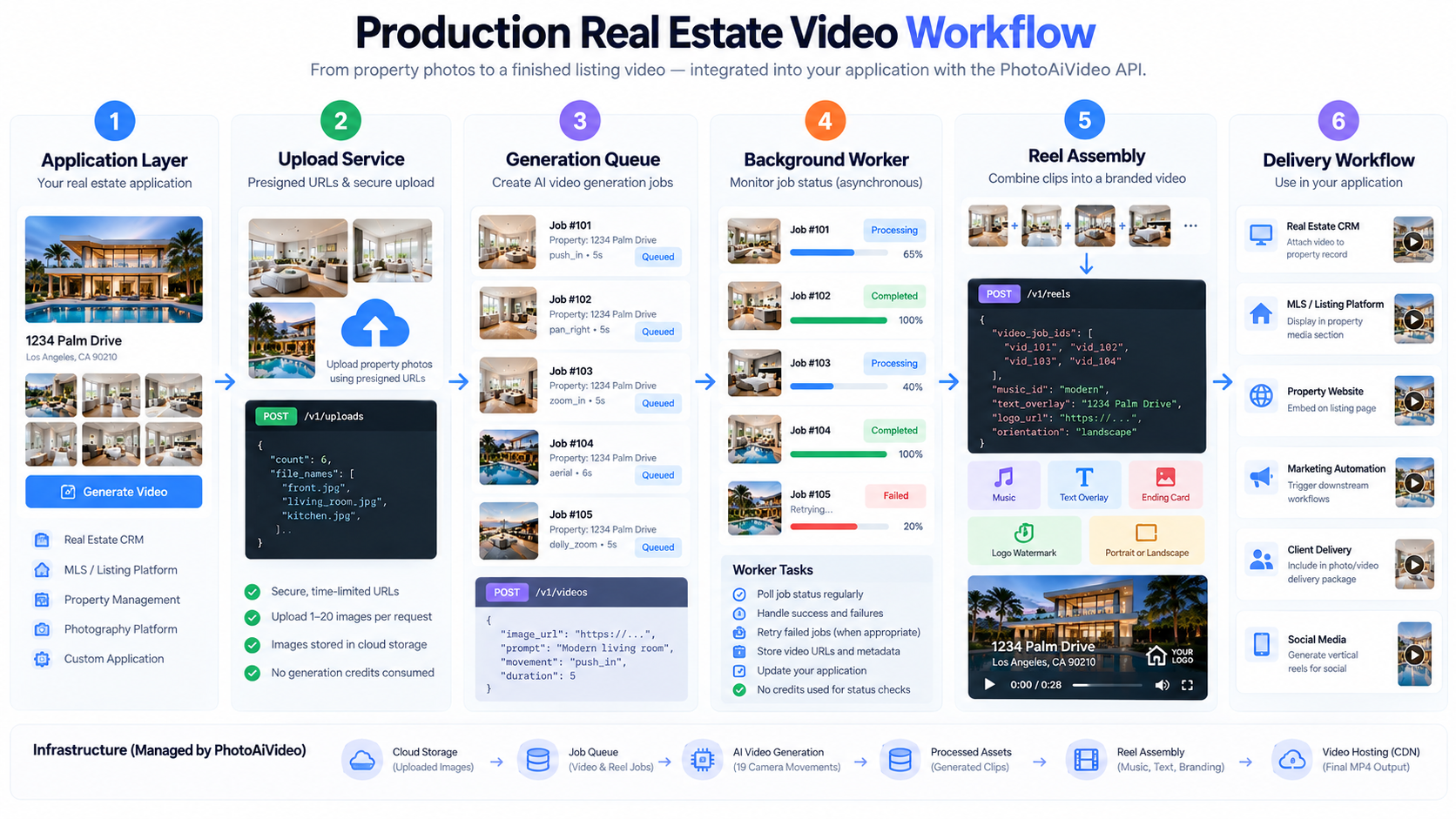
A simple prototype can create a job and repeatedly check whether it has completed.
A production application benefits from separating those responsibilities.
A common architecture looks like this:
1. Application layer
The user or an automated listing event requests a video.
2. Upload service
Property photos are transferred through presigned URLs.
3. Generation queue
Video jobs are created and their IDs are persisted.
4. Background worker
The application monitors outstanding jobs without blocking the user interface.
5. Reel assembler
Once the required clips complete, the reel-generation job is created.
6. Delivery workflow
The finished output is attached to the relevant listing, account, order, or marketing workflow.
This separation makes it easier to retry failures, monitor usage, process multiple listings, and scale generation without tying long-running video jobs to individual browser sessions.
The same underlying architecture can support very different products.
Add a Generate Video action to property records or automatically generate a video when a listing reaches a particular stage.
Use existing listing photos to create additional media without requiring users to upload the property again.
Generate marketing videos for available units or properties as part of the listing workflow.
Turn selected images from completed shoots into an additional client deliverable.
Generate branded listing reels and route the finished output into downstream marketing workflows.
Build a customer-facing video product while using PhotoAiVideo as the underlying generation and reel-assembly infrastructure.
The API stays largely the same. What changes is the orchestration and user experience you build around it.
For developers, the core PhotoAiVideo workflow is straightforward:
upload property photos → create video jobs → monitor their status → merge completed clips → return the finished property video to your application.
The surrounding architecture determines how powerful that workflow becomes.
You can place video generation behind a button, trigger it automatically from listing events, process multiple properties in the background, create vertical social reels, or use the API as the infrastructure behind a white-label video product.
Explore the PhotoAiVideo Real Estate Video API to review the complete API offering, then use the developer documentation for request schemas, endpoint details, authentication, and implementation requirements.
Video and reel generation are asynchronous. Creation requests return job IDs that your application monitors until processing reaches a completed or failed state.
No. Job-status checks do not consume generation credits.
The presigned-upload endpoint can reserve upload slots for between 1 and 20 images in a request.
A reel can contain between 2 and 20 completed video jobs.
PhotoAiVideo currently provides 19 supported camera movement effects.
PhotoAiVideo — Real Estate Video API
Real Estate Video API
PhotoAiVideo — How to Build a Real Estate Video App with the PhotoAiVideo API
Developer Implementation Guide
PhotoAiVideo — API Keys, Authentication and Credits: A Complete Guide
Authentication & Credits Guide


Compact, ready to go anywhere
Interchangeable lens that’s upgradeable
Dual 1-inch sensors for improved clarity and low light performance
Dynamic range and 6K 360° capture
360° photo resolution at 21MP

8K 360° video recording for ultra-detailed visuals.
4K single-lens mode for traditional wide-angle shots.
Invisible selfie stick effect for drone-like perspectives.
2.5-inch touchscreen with Gorilla Glass protection.
Waterproof up to 33ft for underwater shooting.

360° photo resolution in 23MP
Slim design at 24 mm thick
Built-in image stabilization for smooth video capture.
Internal 19GB storage for photo and video storage.
Wireless connectivity for remote control and sharing.

60MP 360° still images for high-resolution photography.
5.7K 360° video recording at 30fps.
2.25-inch touchscreen for intuitive control.
USB Type-C port for fast charging and data transfer.
MicroSD card slot for expandable storage.
.png)

.png)

Try it free. No credit card required. Instant set-up.





.svg)


.svg)