


.png)


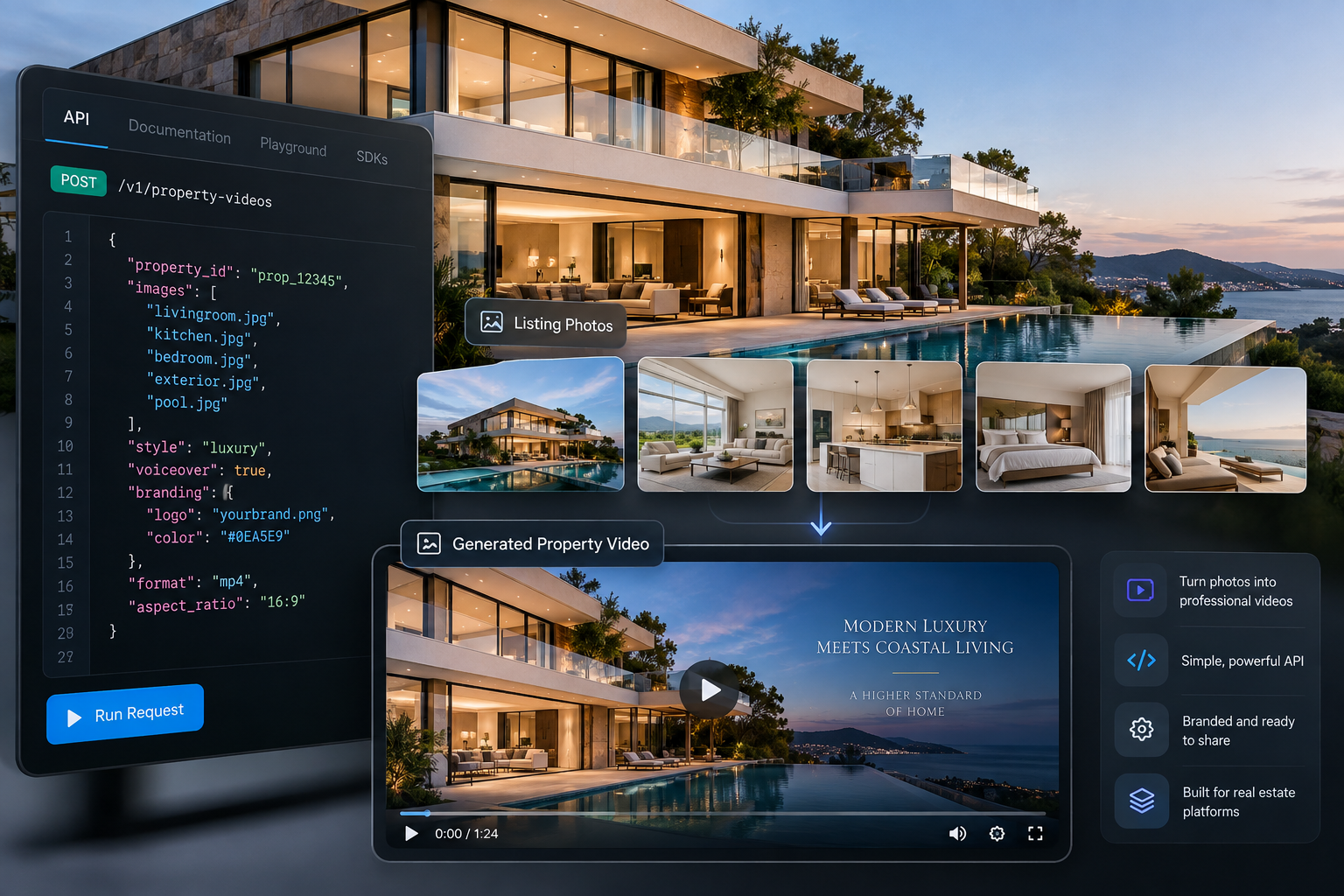
A real estate video API lets developers programmatically turn property photos into video content. PhotoAiVideo can generate cinematic clips from listing images, combine multiple clips into branded reels, add music, text and logos, and produce portrait or landscape video through an asynchronous API workflow.
Turn real estate photos into cinematic video clips and branded listing reels through one real estate video API.
PhotoAiVideo gives developers, MLS platforms, real estate CRMs, property-management software, media companies, and marketing platforms a photo-to-video API for adding automated video creation directly to their existing products and workflows.
Upload property photos, generate individual AI video clips, and combine them into finished listing videos with music, address text, ending cards, and your own logo. The API supports both portrait and landscape workflows, making it possible to create everything from property walkthroughs to vertical social media reels.
No separate video-production infrastructure is required.
Get Your API Key
Read the API Documentation
A real estate video API is an application programming interface that allows software to automatically create property videos without requiring a user to manually edit each video.
Instead of opening a separate video editor, uploading images, choosing transitions, adding branding, exporting a file, and downloading the result, an application can initiate those steps programmatically.
For example, a real estate CRM could detect when a new listing becomes active and automatically send its property photos into a video-generation workflow.
A property-marketing platform could offer a Create Video button beside every listing.
A photography company could process multiple properties after a shoot and automatically create branded videos for each client.
PhotoAiVideo is designed around these types of workflows. Developers send property images and generation instructions to the API, receive job IDs while processing occurs, and retrieve hosted video outputs after generation is complete.
The result is a video-generation layer that can sit inside an existing real estate product rather than requiring users to move between multiple tools.
The API can support different real estate products because video generation and reel assembly can be integrated into the workflow your application already uses.
Generate videos when a property enters your database or reaches a specific listing status.
Your system can:
This makes automated listing video generation possible without requiring an agent to create each video manually.
CRMs already contain much of the information required to create listing marketing content: property photos, addresses, agents, and listing records.
A video API for a real estate CRM can turn those existing assets into another marketing deliverable.
Video generation can become an action within the CRM instead of a separate external workflow.
MLS software, IDX products, listing portals, and other property platforms can integrate AI video creation into their existing interfaces.
A platform could allow users to generate a listing video directly from property photos already associated with a listing.
For brokerages, photographers, agencies, and property platforms managing many listings, generation can also be orchestrated in batches.
Instead of manually processing properties one at a time, your application can queue video jobs and monitor their status in the background.
PhotoAiVideo supports portrait-oriented reel creation for workflows targeting vertical video.
That makes the API useful for applications generating property content for channels such as Instagram Reels, TikTok, and YouTube Shorts.
Developers can also use the API as the video infrastructure behind their own customer-facing product.
Your interface and workflow remain yours while PhotoAiVideo handles the underlying generation, reel assembly, and video output.
The PhotoAiVideo API follows an asynchronous workflow designed for applications where video rendering takes longer than a normal HTTP request.
At a high level, the process looks like this:
Property photos → Upload → Generate clips → Check job status → Merge clips → Retrieve finished MP4
Activate API access and generate a key from the developer dashboard.
Requests can authenticate using a Bearer token or the x-api-key header.
API keys can also be revoked when necessary, allowing developers to separate environments or rotate credentials without rebuilding the integration.
Before creating a video, input images are uploaded to PhotoAiVideo storage.
Your application requests presigned upload URLs and uploads the property images using those URLs.
Up to 20 upload slots can be requested in a call.
The upload step itself does not consume a generation credit.
Once the image is available, your application can create a video-generation job.
A request can include the uploaded image URL, a generation prompt, supported camera effects, and the desired clip duration.
The API returns a job ID immediately instead of keeping the HTTP connection open until rendering finishes.
Use the returned job ID to check whether generation is pending, completed, or failed.
When processing is complete, the job response provides URLs for the generated video.
Because status requests do not consume generation credits, applications can build polling into background workers without adding a credit charge for every status check.
Individual property clips can be combined into a single listing video.
The reel endpoint accepts between 2 and 20 completed video jobs and can add presentation elements such as:
The output is a finished video rather than simply a collection of individual clips.
After the reel job completes, your application can retrieve the resulting video output and use it inside your own workflow.
For example, you might attach the URL to a property record, display it inside your application, send it through a client-delivery workflow, or make it available to your users for publishing.
Different rooms and exterior photographs benefit from different types of motion.
PhotoAiVideo currently supports 19 camera movement effects, giving developers more control over how a still property image is animated.
Available effects include movements such as:
Clips can use supported durations of 4, 5, or 6 seconds.
This allows applications to vary the movement used for different images instead of producing an identical animation for every room.
Generating motion is only part of a usable real estate video workflow.
A property video often also needs branding and presentation elements before it is ready for a client or marketing channel.
The PhotoAiVideo reel endpoint handles this post-production layer.
Applications can select from supported music options when assembling a reel.
Text overlays can display information such as the property address or another short listing message.
Developers can control properties including typography, size, positioning, background appearance, and display duration.
A closing card can add a final message or call to action after the property clips have finished playing.
A logo watermark can be applied to the finished reel with controls for its placement, scale, and opacity.
These features make it possible to generate client-ready branded output without building a separate video-compositing pipeline.
Real estate video is no longer distributed through one format.
Listing pages and websites often favor landscape video, while social platforms increasingly rely on vertical content.
PhotoAiVideo supports reel orientation options that allow developers to build workflows for both.
A brokerage platform, for example, could create a landscape property video for its website while also generating a portrait version for social marketing.
A real estate media company could add vertical reels to its existing photography packages.
A marketing platform could automate social-ready property content whenever a new listing launches.
Instead of maintaining completely separate video-generation systems, the same API can support multiple output workflows.
Predictable generation costs become especially important when video is being created across hundreds or thousands of property images.
PhotoAiVideo uses a credit-based model.
One video generation job costs 1 credit.
One reel merge costs 1 credit.
Other operations—including requesting upload URLs, checking job status, listing jobs, and checking the account's credit balance—do not consume generation credits.
For example, if your application generates eight individual clips and combines them into one reel, the workflow uses nine credits: eight for the clips and one for the reel.
Credits are charged when a generation job is accepted.
If generation fails, the credit for that failed generation is automatically refunded.
That makes costs easier to model before building large automated or bulk-generation workflows.
AI video generation should not be treated like an instant database query.
Rendering can take time, which is why PhotoAiVideo uses asynchronous jobs.
Your application creates a generation request and receives a job ID. It can then continue doing other work while a background process checks the status of that job.
This architecture is particularly useful for:
Bulk processing: Queue video creation across multiple properties.
CRM automation: Generate videos after listings are created without blocking the user's interface.
Background workflows: Let workers monitor jobs and update listing records when videos become available.
Scalable applications: Separate video generation from the user-facing request cycle.
For developers building production systems, the asynchronous architecture is an important part of making automated video practical at scale.
Failure handling matters when an API is part of an automated production workflow.
PhotoAiVideo exposes job status so your application can identify whether generation has completed or failed.
Failed generation jobs automatically return their consumed credit to the account.
The API also uses standard HTTP status responses for common integration problems, including invalid requests, missing or invalid authentication, insufficient credits, disabled API access, missing resources, and server errors.
Applications should still implement their own logging and retry strategy around appropriate failures, particularly when running large batch jobs.
Adding AI-generated video to an application involves more than connecting to a generative model.
A production system may also need image ingestion, storage, rendering infrastructure, asynchronous job management, clip assembly, audio processing, overlays, branding, file hosting, billing logic, usage tracking, and failure handling.
Building and maintaining all of those components internally can turn a seemingly simple video feature into a much larger engineering project.
A dedicated real estate video generation API moves much of that infrastructure behind a set of endpoints.
Your engineering team can focus on the experience surrounding the video:
The generation infrastructure remains behind the API.
PhotoAiVideo is designed for teams that need video generation to become part of a larger product or automated workflow.
That includes:
Real estate software developers adding photo-to-video capabilities to an existing application.
MLS and IDX platforms looking to add video generation directly to listing workflows.
Real estate CRMs that want agents to generate property videos without leaving the platform.
Property-management software companies producing marketing assets for multiple units or properties.
Real estate media companies and photographers automating video deliverables from existing photo shoots.
Agencies and brokerages creating branded listing content at scale.
Founders and SaaS companies building white-label property-video products without creating their own AI rendering infrastructure.
Property photos already exist inside real estate CRMs, MLS platforms, listing portals, property-management systems, photography workflows, and brokerage databases.
The PhotoAiVideo real estate video API turns those existing assets into another programmable marketing format.
Upload the images. Generate cinematic clips. Combine them into a branded reel. Retrieve the finished video and deliver it through the workflow your customers already use.
You do not need to build the underlying video-generation and post-production infrastructure before adding AI video to your product.
Generate an API key and make your first request.
A real estate video API allows software to programmatically create video content from property assets. PhotoAiVideo can turn uploaded property photos into AI-generated video clips and combine multiple completed clips into branded listing reels.
Yes. A video-generation request can use one uploaded property image to create an individual cinematic clip.
Yes. The reel endpoint can merge between 2 and 20 completed clips into one video.
Yes. Reel generation supports portrait orientation, allowing developers to create vertical property-video workflows for social media.
The reel endpoint supports features including logo watermarks, text overlays, ending cards, and background music.
https://app.photoaivideo.com/en/api-docs


Compact, ready to go anywhere
Interchangeable lens that’s upgradeable
Dual 1-inch sensors for improved clarity and low light performance
Dynamic range and 6K 360° capture
360° photo resolution at 21MP

8K 360° video recording for ultra-detailed visuals.
4K single-lens mode for traditional wide-angle shots.
Invisible selfie stick effect for drone-like perspectives.
2.5-inch touchscreen with Gorilla Glass protection.
Waterproof up to 33ft for underwater shooting.

360° photo resolution in 23MP
Slim design at 24 mm thick
Built-in image stabilization for smooth video capture.
Internal 19GB storage for photo and video storage.
Wireless connectivity for remote control and sharing.

60MP 360° still images for high-resolution photography.
5.7K 360° video recording at 30fps.
2.25-inch touchscreen for intuitive control.
USB Type-C port for fast charging and data transfer.
MicroSD card slot for expandable storage.
.png)

.png)

Try it free. No credit card required. Instant set-up.




.svg)


.svg)