Oil and Gas Emergency Preparedness Enhanced: 360 Virtual Tours + Documentation Software

Cloudpano
July 29, 2025
5 min read
Share this post

🛢️ Oil and Gas Emergency Preparedness Enhanced: 360 Virtual Tours + Documentation Software

In the high-risk world of oil and gas, emergencies aren’t just possibilities — they’re certainties. From gas leaks to blowouts to offshore evacuations, companies must be ready to respond fast and effectively. 🚨💨

But how do you prepare teams for scenarios they’ve never faced?

✅ The answer: 360° virtual tours + interactive documentation software.

This powerful combo is changing the game by creating immersive, interactive, and scenario-based safety simulations that transform how oil and gas teams are trained. In this post, we’ll break down how to use this tech to:

  • 🧯 Simulate disaster drills
  • 🎓 Train new hires faster
  • 🧠 Improve retention
  • 📊 Stay compliant

🚩 Why Traditional Emergency Training Falls Short

Let’s be honest — traditional training in the oil and gas sector still relies heavily on:

  • Paper manuals 📄
  • PowerPoint decks 💻
  • Infrequent in-person drills 🧪
  • Outdated SOP binders 📚

While these check the box for compliance, they often fail when it comes to engagement, retention, and readiness — especially in actual emergency situations.

And in oil and gas, seconds matter. ⏱️

That’s why more companies are turning to 360° documentation software.

🔗 Related: Why 360 Virtual Tours Are the Future of Emergency Training in Oil and Gas

🌍 What Is 360 Virtual Tour + Documentation Software?

It’s a blend of two technologies:

1. 360° Virtual Tours 🎥

Using tools like CloudPano, you can photograph your facility — onshore or offshore — with a 360° camera and turn it into an interactive walkthrough.

2. Interactive Documentation Software 🧠

You overlay clickable hotspots, emergency procedures, videos, quizzes, and SOPs inside the virtual environment.

The result?
A fully immersive, guided, emergency training simulation — available on any screen, from anywhere.

🔗 Related: Step Into Safety: 360 Virtual Tours for Oil and Gas Emergency Simulations

💡 Use Cases in Oil & Gas Safety Preparedness

🏭 1. Digital Emergency Protocol Walkthroughs

Show employees:

  • Where emergency shutoff valves are
  • How to exit during a fire
  • Where the muster points are
  • What the blowout plan looks like

All inside a 360° simulation.

🔗 Related: Digitize Oil and Gas Emergency Protocols with 360 Virtual Tour Software

👨‍🏭 2. Faster Onboarding for New Hires

New team members can “walk through” the site virtually before their first day.
They’ll know:

  • Who to call
  • Where to go
  • What to do in an emergency

🔁 3. Repeatable Crisis Simulations

Instead of costly, on-site drills, create repeatable digital disaster scenarios:

  • Fire in the compressor station 🔥
  • Offshore gas leak evacuation 🌊
  • Pipeline rupture in remote fields 🛢️

Every team member can go through the same simulation with measurable outcomes.

🔗 Related: How to Simulate Oil and Gas Crisis Situations with Virtual Tour Software

🚁 4. First Responder Coordination

Share virtual emergency layouts with:

  • Local fire departments
  • Hazmat teams
  • EMT responders

Let them rehearse site-specific responses before ever setting foot onsite.

🔗 Related: Oil and Gas Emergency Response Scenarios Enhanced by Virtual Tours

⚙️ How It Works

Step 1: Capture Your Site 🖼️

Use a 360° camera to document:

  • Entry/exit routes
  • Control rooms
  • Emergency gear locations
  • Critical hazard areas

Step 2: Build the Interactive Tour 🧱

On CloudPano, add:

  • Hotspots and clickable SOPs
  • Training videos
  • Quizzes and certifications
  • Voiceover instructions

Step 3: Deploy to Your Teams 🌐

Share a link with:

  • New hires
  • Safety officers
  • Supervisors
  • Contractors

They can access from mobile, tablet, or desktop — even remotely.

🔗 Related: Boost Oil and Gas Safety Drills with 360 Virtual Tour Technology
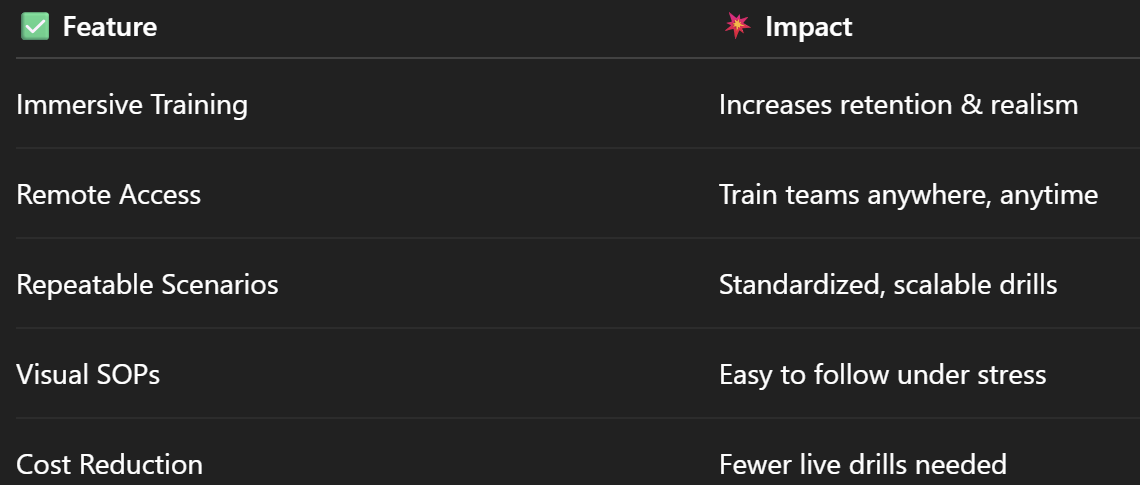
📈 Measurable Benefits

🔗 Related: Disaster Drill Simulations for Oil and Gas Made Easy with 360 Virtual Tours

📊 Real Results: Before vs After

Before

  • Static manuals
  • Low retention
  • Costly drills
  • Missed steps during real emergencies

After

  • Visual protocols
  • High retention
  • Repeatable simulations
  • Increased team confidence

🔐 Compliance + Preparedness = Safety

Safety isn’t just about checking the box for regulations. It’s about being ready for anything. With 360 virtual tours and documentation software, you’re not just training — you’re preparing your team to act with confidence.

And in oil and gas, that can mean the difference between containment and catastrophe. 🚧🔥

🔗 Related: Oil and Gas Emergency Response Scenarios Enhanced by Virtual Tours

Share this post
Cloudpano

Choose The Right 360° Camera

Insta360 ONE RS 1-Inch 360 Edition

  • Compact, ready to go anywhere

  • Interchangeable lens that’s upgradeable

  • Dual 1-inch sensors for improved clarity and low light performance

  • Dynamic range and 6K 360° capture

  • 360° photo resolution at 21MP

Learn More

Insta360 X4

  • 8K 360° video recording for ultra-detailed visuals.

  • 4K single-lens mode for traditional wide-angle shots.

  • Invisible selfie stick effect for drone-like perspectives.

  • 2.5-inch touchscreen with Gorilla Glass protection.

  • Waterproof up to 33ft for underwater shooting.

Learn More

Ricoh Theta Z1

  • 360° photo resolution in 23MP

  • Slim design at 24 mm thick

  • Built-in image stabilization for smooth video capture.

  • Internal 19GB storage for photo and video storage.

  • Wireless connectivity for remote control and sharing.

Learn More

Ricoh Theta X

  • 60MP 360° still images for high-resolution photography.

  • 5.7K 360° video recording at 30fps.

  • 2.25-inch touchscreen for intuitive control.

  • USB Type-C port for fast charging and data transfer.

  • MicroSD card slot for expandable storage.

Learn More
Property Marketing
Allows potential buyers to explore properties in detail from anywhere, enhancing the real estate marketing process.
Automotive Spins
Create an interactive virtual showroom and engage affluent digital buyers with live 360º video calls, all through the CloudPano mobile app for a complete automotive sales solution.
Interactive Floor Plans
Create 2D and 3D floor plans with measurements in 4 minutes or less, all from your phone. Download the Floor Plan Scanner app and get your first scan free.

360 Virtual Tours With CloudPano.com. Get Started Today.

Try it free. No credit card required. Instant set-up.

Try it free
Latest posts

See our other posts

Interviews, tips, guides, industry best practices, and news.

How Photographers Can Sell AI Listing Videos to Their Agent Clients

AI technology is transforming real estate media — and photographers who adapt early have a major competitive advantage. This in-depth guide explains how to sell AI listing videos to agent clients by positioning them as a premium marketing upgrade rather than a technical novelty. The article walks through practical sales strategies, pricing models, subscription opportunities, and common objections, while showing how AI-powered talking head videos can increase average order value and create recurring revenue. Readers will learn how to package AI listing videos into photo bundles, monthly content plans, and brokerage-wide solutions that elevate their services from simple media delivery to full marketing automation. If you’re a photographer looking to future-proof your business and increase profitability, this guide provides a clear roadmap to selling AI listing videos effectively.
Read post

How to Build a Recurring Revenue Stream Using AI Avatar Videos

AI avatar videos are transforming how real estate media professionals build stable, scalable businesses. In this comprehensive guide, we break down how to turn one-off video projects into a predictable recurring revenue real estate media model using AI-powered talking head technology. Instead of selling per-listing shoots, you’ll learn how to package automated listing videos, market updates, and branded content into monthly subscription offers that increase client retention and lifetime value. The article explores practical use cases, pricing strategies, workflow automation, competitive advantages, and common objections — all designed to help photographers, videographers, and marketing agencies shift from transactional income to recurring revenue. If you’re ready to move from freelancer to scalable media platform, this guide outlines a clear roadmap for building consistent monthly income in real estate marketing.
Read post

How to Create an AI Avatar Listing Video From One Headshot (Step-by-Step)

Learn how to create an AI avatar listing video from a single professional headshot using simple, step-by-step software tools. This guide walks real estate agents, brokers, and photographers through the exact process of turning one static image into a talking AI avatar that delivers listing presentations automatically. Discover how AI avatar listing videos save time, boost engagement, improve consistency across marketing channels, and help agents scale their video content without recording new footage. Perfect for anyone looking to modernize their real estate marketing with AI-powered automation.
Read post



