


.png)


A flat JPEG can still feel like a camera move.
That is the whole opportunity.
Most real estate agents already have the raw material needed for better video marketing: professional listing photos. The issue is that those photos often sit in a gallery, get uploaded to the MLS, appear in a carousel, and then stop working.
But a strong listing photo has more value than that.
A wide kitchen shot can become a slow push-in. A living room photo can become a subtle left-to-right glide. A backyard image can become a cinematic reveal. A front exterior shot can become the opening frame of a listing video. A primary bedroom photo can feel like a polished walkthrough moment if the movement is handled correctly.
That is why more Realtors, photographers, brokerages, and property marketing teams are learning how to generate cinematic movement from flat JPEG listing photos.
PhotoAIVideo helps real estate professionals turn property photos into AI-generated videos. The important part is not just “making photos move.” The real skill is choosing the right photos, applying the right type of movement, and reviewing the output so the final video feels polished, accurate, and useful for listing marketing.
This article focuses on the craft behind the workflow: how to make still property photos feel cinematic without making the property look fake, distorted, or overproduced.
MLS rules vary by board, brokerage, and region. Always confirm your local requirements before publishing listing media.
Generating cinematic movement from JPEG listing photos means using AI or motion tools to animate still real estate images in a way that feels like intentional camera movement.
Instead of showing a static photo, the video adds motion such as:
The goal is not to trick viewers.
The goal is to make the listing media feel more engaging while still representing the property honestly.
That distinction matters.
A cinematic real estate video should not make a small room look huge, hide layout problems, exaggerate finishes, or imply a walkthrough path that does not exist. The movement should support the photo, not fight it.
This is where create real estate videos from photos with AI becomes a practical workflow for agents and photographers. The AI can help create motion, but the human still needs to choose the right images and review the final result.
A good photo-to-video workflow asks:
Flat photos can become strong video assets.
But not every photo should move the same way.
Real estate buyers do not always read first.
They look.
They scan thumbnails, scroll feeds, watch short clips, swipe through galleries, and decide quickly whether a property deserves more attention.
That is why motion matters.
A static photo gallery is useful, but it leaves the buyer in control of the pace. A video creates a guided presentation. It can lead with the strongest exterior, move into the most attractive interior spaces, highlight the kitchen, show the living area, pause on the primary suite, and finish with the backyard or view.
That creates a stronger listing story.
For agents, cinematic movement also helps with content volume. One listing photo shoot can support:
This is why an AI app to turn property photos into videos is useful. It helps agents get more mileage from images they already paid to produce.
The business value is not only visual.
It is operational.
A busy agent does not always have time to schedule a separate video shoot. A photographer may want to offer video add-ons without filming every property. A brokerage may want more consistent video output across agents. A property manager may need rental video content from unit photos that already exist.
Cinematic motion from JPEGs gives all of those users a faster path to video.
Most bad photo-to-video content fails for one of three reasons.
The first problem is random image order.
A tool can animate photos, but it cannot always know the best story. If the agent uploads every image from the gallery in the wrong order, the final video feels scattered. The kitchen appears twice. The bathroom shows up too early. The best backyard shot is buried at the end. A hallway becomes the third frame for no reason.
That is not a technology problem.
That is a sequencing problem.
The second problem is aggressive movement.
Some photos look great with motion. Others fall apart. A tight bathroom shot, a heavily edited twilight exterior, or a narrow hallway image can look strange if the movement is too dramatic. The viewer starts noticing the effect instead of the property.
The third problem is treating every photo like a slide.
A cinematic video needs rhythm. Some images need a slow push. Some need a quick reveal. Some need almost no movement. Some should be skipped.
A flat JPEG does not become cinematic just because it moves.
It becomes cinematic when the movement matches the room, the composition, and the purpose of the video.
That is why agents need more than a generic slideshow mindset. They need a photo-to-motion workflow.
PhotoAIVideo helps real estate professionals turn listing photos into AI-generated videos.
The workflow starts with images agents and photographers already use every day: JPEG listing photos. Those photos can be uploaded and converted into motion-based video assets for listings, social media, property websites, seller updates, and rental marketing.
For a busy agent, this means fewer manual editing steps.
For a photographer, it creates a new deliverable from the same shoot.
For a brokerage, it supports more consistent video creation across agents.
For a property manager, it turns rental photos into videos without needing another appointment at the unit.
PhotoAIVideo can function as an AI software for creating real estate walkthrough videos when the user thinks carefully about image order, room flow, and movement style.
The strongest results usually come from a simple rule:
Do not upload photos and hope.
Curate the photo set first.
Then generate the video.
Then review the motion like a buyer would.
The first image matters more than agents think.
A weak opening frame makes the video feel average before the viewer has a reason to care.
Good opening options include:
Avoid opening with:
The first frame should give the viewer a reason to continue.

Cinematic movement works best when the photo has foreground, middle ground, and background.
For example:
A kitchen photo with an island in front, cabinets in the middle, and windows in the back has depth.
A living room photo with a sofa in front, fireplace in the middle, and patio doors behind it has depth.
A backyard photo with patio furniture, lawn, trees, and a fence line has depth.
Flat wall shots do not move as well.
If the image has no depth, the movement may feel like a basic zoom.
When choosing photos for PhotoAIVideo, look for images that already suggest movement.
The AI can enhance depth, but it works better when the composition gives it something to work with.
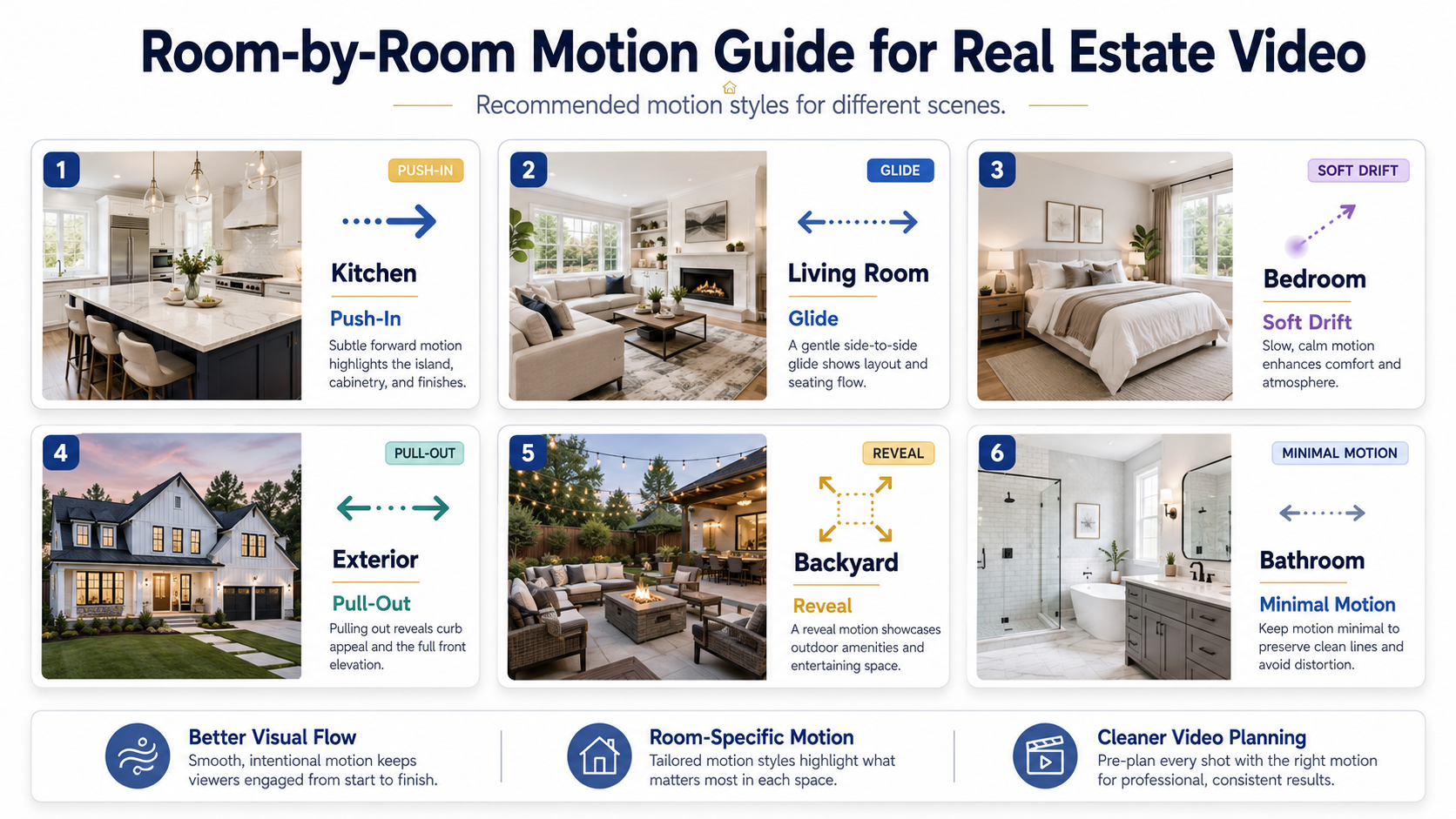
Not every room needs the same motion.
Use different movement styles based on the space.
For large rooms:
Use a slow push-in or gentle glide.
For kitchens:
Use a controlled push toward the island, stove, sink, or natural light.
For bedrooms:
Use softer motion. A slow drift usually works better than aggressive movement.
For bathrooms:
Keep movement minimal. Tight spaces can distort quickly.
For exteriors:
Use a pull-out, slight push, or slow pan depending on the composition.
For backyard shots:
Use a reveal-style movement if the photo has depth, patio space, or a pool.
For detail shots:
Use very subtle movement or skip them unless they support the story.
This is where the video starts to feel intentional.
The video should feel like a guided showing.
A simple structure works well:
That sequence can change depending on the listing.
A lake property may open with the view.
A condo may open with the living room and balcony.
A rental may open with the kitchen and floor plan feel.
A luxury listing may open with a slower exterior reveal.
The important part is that the order feels deliberate.
A thoughtful sequence is what separates an AI video from a moving slideshow.
A listing gallery may have 35 images.
The video probably does not need all of them.
For most short listing videos, 8 to 15 strong photos are enough.
For a longer property website video, 15 to 25 may work.
For a Reel or TikTok clip, 5 to 10 may be better.
Too many photos can make the video feel slow. Repetitive rooms make the viewer lose interest.
Select the images that tell the story clearly.
After generating the video, watch it carefully.
Look for:
Cinematic movement should never make the listing less trustworthy.
This is especially important for agents who want the best app for creating real estate listing videos. The best tool is not just the one that creates motion. It is the one that fits a review process agents can actually use.
A cinematic listing video may need different formats.
Create versions for:
A horizontal property website video and a vertical social media video should not always be identical.
This is where automated video marketing software for Realtors becomes useful. One set of listing photos can support multiple marketing assets.
A slideshow shows photos.
A cinematic AI video guides attention.
That is the difference.

A Realtor can use PhotoAIVideo to create a polished video from a standard listing photo shoot.
This is helpful when the agent wants better listing marketing but does not have time for a custom video project.
Useful outputs include:
Photographers can use PhotoAIVideo to create video add-ons from JPEGs they already deliver.
This can increase package value without requiring a full video shoot.
A photographer might offer:
This is a strong use case for an AI video app for real estate photographers.
Brokerages can use photo-to-video workflows to help agents create more consistent listing videos.
Instead of each agent using random editing tools, the brokerage can train agents to select strong photos, use PhotoAIVideo, review motion quality, and export channel-specific videos.
This supports consistency without requiring a full internal editing department.
Property managers often have unit photos but no video.
PhotoAIVideo can help turn those images into rental videos for:
A simple motion video can help renters understand the space faster than a static gallery.
Builders often have renderings, model home photos, or finished unit images.
Cinematic movement can help those images feel more dynamic in marketing campaigns.
The key is to label renderings accurately and avoid implying that a rendering is a finished property photo.
AI cannot fully rescue a bad source image.
If the photo is dark, crooked, cluttered, blurry, overcompressed, or poorly composed, the video will suffer.
Start with better photos.
Subtle motion usually feels more professional.
Aggressive zooms and strange pans can make a listing video feel cheap.
The movement should feel like a real camera operator might have made it.
Do not use motion that makes a room feel larger than it really is.
Buyers will notice when they tour the property.
Trust matters more than dramatic movement.
A full gallery is not a video plan.
Choose the best images and build a sequence.
If the image shows the backyard, do not use a caption about the kitchen.
If the image shows a bedroom, do not mention the open floor plan.
Captions should support what the viewer sees.
If you embed the video on a property page or blog post, include text that explains what the video shows.
Google’s image SEO best practices recommend helpful surrounding context, descriptive filenames, and alt text. Google’s video SEO documentation also explains how to help Google understand video content on a page.
A wide cinematic video may look great on a property website but weak as a vertical Reel.
Create the version for the platform.


Compact, ready to go anywhere
Interchangeable lens that’s upgradeable
Dual 1-inch sensors for improved clarity and low light performance
Dynamic range and 6K 360° capture
360° photo resolution at 21MP

8K 360° video recording for ultra-detailed visuals.
4K single-lens mode for traditional wide-angle shots.
Invisible selfie stick effect for drone-like perspectives.
2.5-inch touchscreen with Gorilla Glass protection.
Waterproof up to 33ft for underwater shooting.

360° photo resolution in 23MP
Slim design at 24 mm thick
Built-in image stabilization for smooth video capture.
Internal 19GB storage for photo and video storage.
Wireless connectivity for remote control and sharing.

60MP 360° still images for high-resolution photography.
5.7K 360° video recording at 30fps.
2.25-inch touchscreen for intuitive control.
USB Type-C port for fast charging and data transfer.
MicroSD card slot for expandable storage.
.png)

.png)

Try it free. No credit card required. Instant set-up.







.svg)


.svg)