


.png)



Calculate the time, direct expenses, overhead, hosting, and profit needed for each job, then adjust for property size, complexity, deliverables, and local demand. Use defined packages for repeatable projects and custom quotes for larger or unusual spaces. Published prices are useful reference points, but they are not a substitute for knowing your own costs.
A client asks, “How much would a virtual tour cost?” You have photographed a property like theirs before, so you have a number in mind. But then the details arrive: two floors, an outdoor area, a floor plan, and a request to keep the tour online indefinitely. Suddenly, your usual price feels less certain.
That is why virtual tour pricing deserves more thought than choosing a rate per square foot. You are charging for a complete service: planning, travel, capture, editing, tour assembly, publishing, and support after delivery. The right price covers that work, leaves room for profit, and tells the client exactly what they will receive.
There is no universal rate that works for every market or project. This guide gives you a way to set your own rates, build clear packages, and quote larger jobs without guessing.
“Virtual tour” can describe several different products. One provider may deliver a few connected 360° panoramas. Another may create an extensive walkthrough with a floor plan, information hotspots, branded design, and multiple publishing destinations.
Before discussing price, define the deliverable. Your proposal should answer:
A tour of a small, prepared apartment has a different workload from a tour of a hotel with dozens of rooms. Once you describe the scope, the price becomes much easier to explain.
If you are still building your service, CloudPano’s guide to virtual tour software for entrepreneurs offers a useful starting point for thinking through creation and delivery.
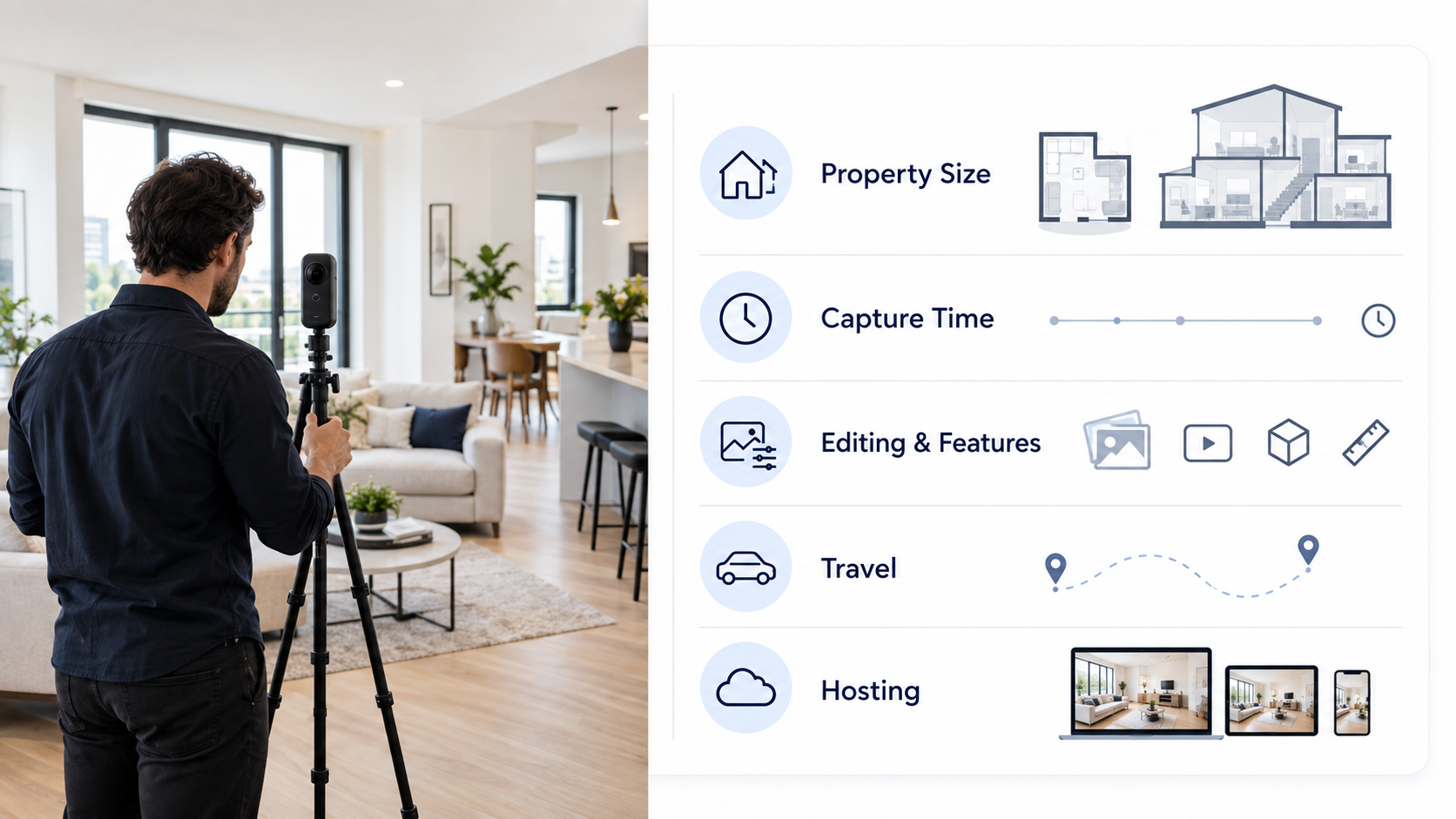
Published prices can help you check your assumptions, but they should not become your rate card. Providers use different equipment, cover different areas, and include different deliverables.
For one concrete point of reference, Matterport’s Capture Services lists ranges of $238–$325 for spaces of 1–3,000 square feet, $412–$812 for 3,001–10,000 square feet, and $937–$1,750 for 10,001–30,000 square feet. Those are prices for a particular capture service, not standard rates for every virtual tour. Matterport also notes that pricing varies with the size of the space.
Treat any published range as a comparison, then inspect what it includes. A $250 tour with limited coverage may cost less to produce than a $250 tour that includes extensive editing and a year of hosting. Your local competition matters, but your own costs and scope matter just as much.
Before making packages, work out what a typical job costs you. Count all the time between receiving the order and delivering the tour, including work the client never sees:
Then add direct expenses, such as travel, outsourced editing, platform charges, and any project-specific costs. Your equipment, insurance, software, and other business overhead also need to be recovered across your jobs.
Here is an illustrative calculation, using assumed figures rather than a recommended market price:
At those assumptions, a $200 quote would leave you short before accounting for unexpected work. A price above $285 gives you room for profit and the occasional job that takes longer than planned.
You can express the calculation simply:
Quote = working time + direct expenses + allocated overhead + profit allowance
Run this exercise using your own records. After several jobs, compare estimated hours with actual hours and adjust your packages. If an included revision routinely takes two hours, that time belongs in your pricing.
Most providers can use one of three approaches.
A flat package price works well for repeatable residential work. For example, you might offer one price for a property up to a stated size, with a defined number of areas and a fixed hosting period. Clients can quickly see what they are buying, and you can quote without rebuilding the estimate each time.
Size-based pricing works when the amount of space is a reasonable predictor of capture work. You might use square-footage bands rather than charge for every additional foot. Set a minimum fee so travel and setup are covered on small properties.
A custom project quote is better for hotels, campuses, large commercial spaces, or jobs with unusual access and publishing requirements. Estimate the number of spaces, capture days, production hours, and requested features. Spell out assumptions so a change in scope can be priced fairly.
Many businesses use all three: straightforward packages for common listings, size bands for larger properties, and custom quotes for complex work. The key is consistency. Two similar clients should be able to understand why their quotes are similar—or why they differ.
A good package makes the buying decision easier without forcing every client into the same service. Here is a sample structure, with no fixed prices because your costs and market will determine them:
Put limits on what “included” means. “Full-property tour” sounds attractive, but it can lead to disagreement about garages, outbuildings, storage rooms, and exterior areas. “Up to 15 connected viewpoints across the main living areas” is clearer.
The same applies to turnaround time and revisions. Say when the delivery clock begins, what the client must prepare before the shoot, and whether changes to room labels or tour order are included. Clear boundaries help you give a reliable service, especially when you begin taking on more projects.
Property size matters, but it is only one factor. Walk through the property requirements before confirming a price.
Layout and coverage. A compact, open-plan home may be quick to capture. A smaller property with narrow halls, multiple floors, and disconnected rooms may take longer. Ask for a floor plan or property details when available.
Property readiness. A ready-to-shoot space lets you work efficiently. If access is delayed or rooms need to be photographed around staff, guests, or ongoing work, build that into the schedule and quote.
Travel and scheduling. A distant site, several site visits, restricted access hours, or an urgent delivery all consume capacity you could use on other work. State your travel area and any additional charges before booking.
Tour features. Information hotspots, custom branding, room labels, embedded media, and floor plan integration take time to set up and review. Quote them as defined additions to your base tour.
Publishing and hosting. Sending a tour link, embedding it on a website, and publishing content to a third-party platform are different tasks. Hosting may also create an ongoing cost. If you offer continued hosting, tell the client what happens when the included term ends.
Usage and maintenance. A listing tour may only be needed while the property is on the market. A hotel or business may want to keep its tour live and request updates as rooms change. A longer relationship may call for a maintenance agreement instead of a single project fee.
For clients interested in local visibility, you can also discuss Google Maps and Street View tour services. Describe any publishing work and its price separately so the client understands what you control and what depends on the platform.
Add-ons give clients options and keep your entry package focused. Common examples include additional rooms or viewpoints, floor plans, drone imagery, extra property photos, branded graphics, faster delivery, and a second visit after renovations.
Price each add-on from the work involved. An additional viewpoint during the original shoot may be relatively simple. Returning to the property weeks later involves another appointment, travel, capture, editing, and checks. Those should not carry the same charge.
Bundles can still make sense. If you already photograph listings, offering photography and a virtual tour together may save travel and setup time. Share some of that efficiency with the client if you wish, but check the combined job against your minimum profitable price. A discount should reflect an actual saving or a deliberate business decision.
If you want to develop services beyond one-off tours, see CloudPano’s guide to virtual tour business opportunities.
Hosting is easy to overlook because it often happens after the visible work is finished. Yet the client may continue using the tour for months or years.
Choose a policy before you sell the service. You could include a fixed hosting term, offer an annual renewal, or quote ongoing hosting and maintenance together. Whatever you choose, your agreement should cover the included period, renewal cost or process, who manages the account, and what happens if the service ends.
Avoid promising “lifetime hosting” unless you have defined exactly what that means and can support it. Software plans, client needs, and your own business costs can change. A clear term gives both parties a dependable expectation.
Check your tour platform’s current terms when setting your rates. Its charges and publishing features are business inputs; your client price should also account for the service you provide around the software.
Suppose an agent requests a tour of a two-story home. They want the main rooms, an exterior view, a shareable link, and one round of changes to room labels. You expect the job to take about six hours across communication, travel, capture, editing, and delivery.
First, price the core work using your target hourly earnings and direct expenses. Next, include a reasonable share of overhead and the stated hosting term. Finally, check whether the quote leaves enough room for profit and unexpected delays.
In the proposal, describe the result in plain language: which areas you will cover, what the agent will receive, when they can expect it, and how long the tour will stay online. If they later ask to add a detached building, you can give a separate price for that work.
This approach is more useful than telling the agent you charge a certain amount “for virtual tours.” It shows them what their money buys and gives you a scope you can deliver with confidence.
Review your rates when your actual job records show that your packages take longer than expected, costs have risen, or demand regularly fills your available schedule. Better work and a smoother client experience can also support higher rates.
Make changes deliberately. Start by calculating the price your current service needs. Then look at which clients and jobs are profitable. You may discover that small listings work well as packages while complex commercial tours need a higher minimum or custom quoting.
You do not need to justify every increase with a new feature. You do need a price that sustains the quality and availability clients expect. If you are developing a broader business, the next step is to connect pricing with your niche, portfolio, and sales process. CloudPano’s entrepreneur virtual tour software page is a starting point for planning that service.
The best answer to “How much should you charge for a virtual tour?” is a price you can explain and repeat. Define the tour, calculate the work, set clear limits, and quote extras separately. That gives your client a straightforward decision—and gives your business a better chance of earning what each project is worth.
Start with your estimated hours, travel, production expenses, overhead, hosting, and desired profit. A beginner rate still needs to cover the full job. Use your first completed projects to compare estimates with actual time and refine the price.
Use size bands when property area predicts your workload reasonably well. For unusual layouts, extensive features, or multi-site work, quote the whole project based on a defined scope. A minimum project fee can protect small jobs from being underpriced.
You can include hosting for a stated period or charge for it separately. Either way, tell the client how long the tour will remain available and what renewal costs, if any, will apply.
Common extras include additional coverage, floor plans, custom hotspots, rush delivery, extended travel, and a return visit. List what the base package includes so clients can recognize when a new request changes the scope.
Ask about the areas to capture, site access, preferred features, publishing destinations, and deadline. Estimate capture and production time, then provide a custom proposal with deliverables, assumptions, milestones, and a process for approving additional work.


Compact, ready to go anywhere
Interchangeable lens that’s upgradeable
Dual 1-inch sensors for improved clarity and low light performance
Dynamic range and 6K 360° capture
360° photo resolution at 21MP

8K 360° video recording for ultra-detailed visuals.
4K single-lens mode for traditional wide-angle shots.
Invisible selfie stick effect for drone-like perspectives.
2.5-inch touchscreen with Gorilla Glass protection.
Waterproof up to 33ft for underwater shooting.

360° photo resolution in 23MP
Slim design at 24 mm thick
Built-in image stabilization for smooth video capture.
Internal 19GB storage for photo and video storage.
Wireless connectivity for remote control and sharing.

60MP 360° still images for high-resolution photography.
5.7K 360° video recording at 30fps.
2.25-inch touchscreen for intuitive control.
USB Type-C port for fast charging and data transfer.
MicroSD card slot for expandable storage.
.png)

.png)

Try it free. No credit card required. Instant set-up.




.svg)


.svg)