


.png)


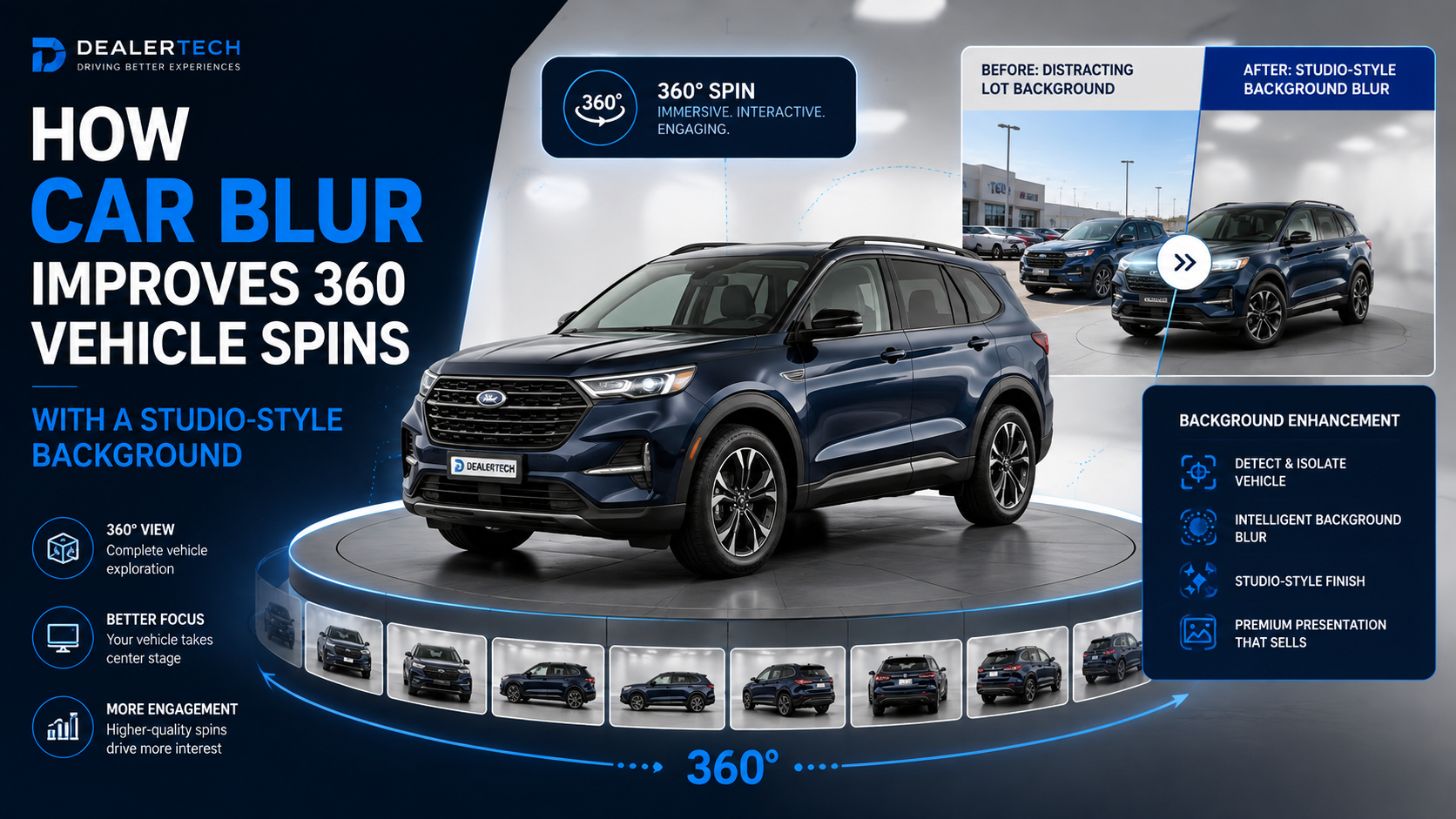
car_blur Improves 360 Vehicle Spins With a Studio-Style Backgroundcar_blur Is Quietly SolvingDealership vehicle photography rarely happens in a perfect studio.
Cars are often photographed directly on the lot, where the background may contain other vehicles, dealership buildings, light poles, signs, employees, customers, traffic, service bays, or other visual distractions.
The vehicle may look great, but the surroundings can make the finished listing feel cluttered.
Traditional automotive photography systems address this problem by controlling the physical environment. A dealership may invest in a dedicated photo booth, permanent turntable, studio installation, or carefully designed photography area.
Those systems can produce excellent results, but they also require space, equipment, maintenance, and a specific capture workflow.
An API-driven approach changes the equation.
Dealership employees can record a normal walk-around video and submit it for automated processing. The CloudPano Spin API can then transform that footage into an interactive 360° vehicle spin while applying visual processing designed specifically for automotive inventory.
One of those options is car_blur.
For developers looking for a car background blur API, car_blur provides a way to reduce distracting dealership-lot backgrounds while keeping the vehicle itself visually sharp.
The goal is simple: make the shopper focus on the car instead of everything happening behind it.
For the current technical settings, see the car_blur processing options in the Spin API documentation.
car_blur Actually Doescar_blur is not simply a generic image-blur filter.
It is designed around the vehicle.
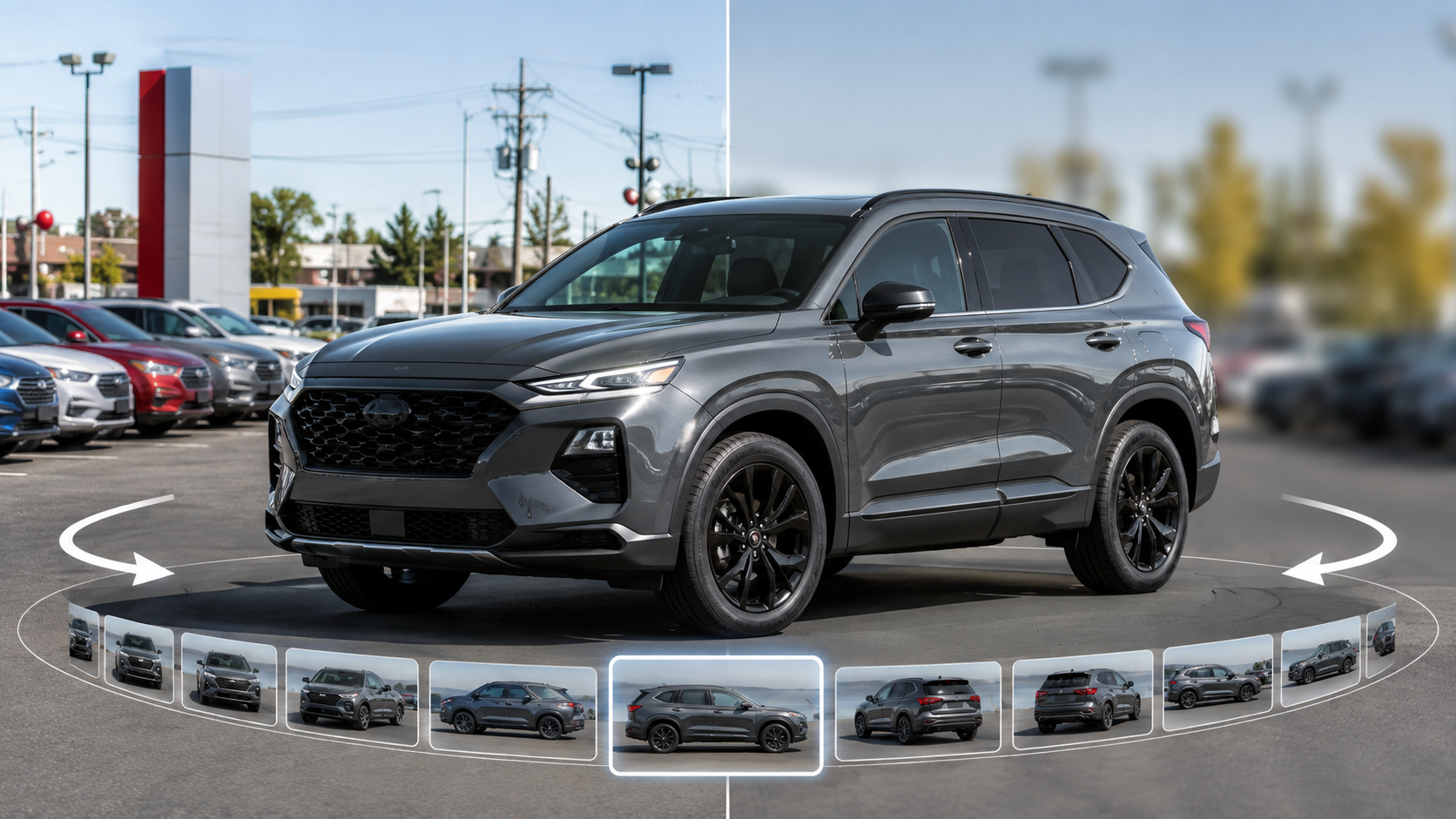
When enabled, the processing pipeline creates a studio-style background effect around the car while maintaining a sharper area of pavement near the tires.
That detail matters.
If every part of the scene outside the vehicle were blurred equally, the vehicle could appear artificially cut out and placed on top of another image.
Instead, preserving some definition around the vehicle helps it remain visually grounded in the original environment.
This is what makes the Spin API useful as a car background blur API rather than simply applying a standard photographic blur across an entire image.
The background treatment reduces distracting detail while preserving the vehicle as the primary subject.
For dealership merchandising, that can turn an ordinary parking-lot capture into something that feels significantly more controlled.
Vehicle shoppers move quickly online.
They may compare several vehicles in only a few minutes, moving between dealership websites, automotive marketplaces, search results, and individual VDPs.
Photography creates much of the first impression.
Consider a dealership where one vehicle is photographed against a clean wall, another sits beside a service entrance, another has ten cars behind it, and another includes employees walking through the background.
Nothing may be technically wrong with the photography.
But the inventory presentation lacks consistency.
Using a car background blur API can help normalize those environments after capture.
Instead of requiring every photographer to find the exact same backdrop, software can reduce differences between locations and create a more recognizable merchandising style.
That becomes increasingly valuable for dealership groups with multiple rooftops, photographers, lots, and inventory processes.
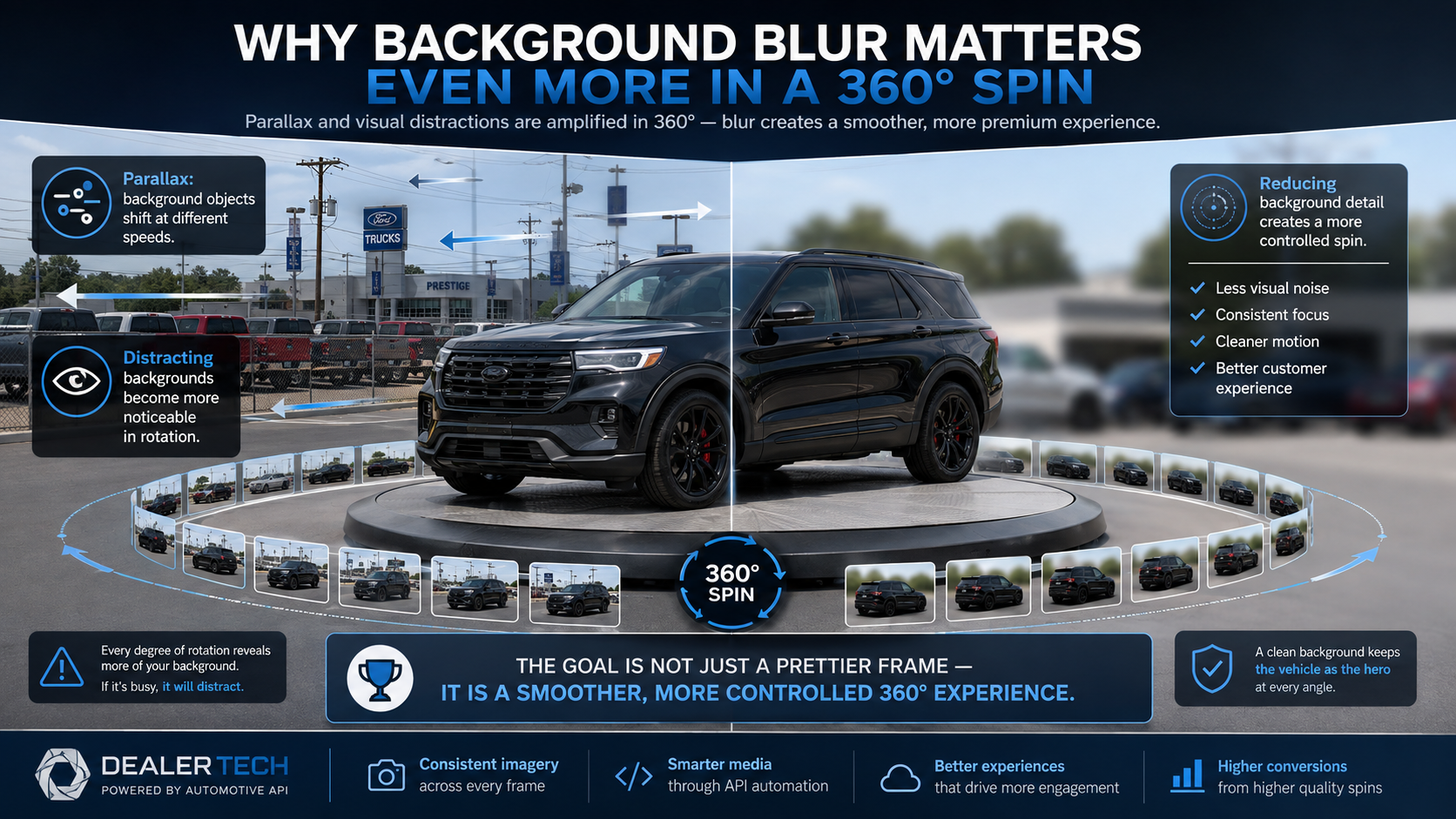
A distracting background can hurt a standard vehicle photograph.
In a 360° spin, that problem can become even more noticeable.
As the camera moves around the vehicle, objects in the background move differently based on their distance from the camera.
A parked truck behind the vehicle may shift dramatically from one frame to another. A building farther away may move more slowly. Light poles, signs, fences, and other objects can create even more visible motion.
This effect is called parallax.
The vehicle may remain centered while everything behind it appears to move as the shopper rotates the spin.
Reducing background detail helps make that movement less noticeable.
This is one reason a dedicated car background blur API can improve the perceived quality of a 360° experience beyond simply making each individual image look cleaner.
The objective is not only a prettier frame.
It is a more controlled rotation.
car_blur and Centering Solve Different ProblemsThe Spin API provides multiple processing options, and it helps to understand what each one contributes.
centering and car_blur are particularly easy to confuse because both affect the final visual presentation.
They solve different problems.
Handheld walk-around videos naturally contain camera movement.
The photographer may move closer to the vehicle, farther away, higher, lower, or slightly off course while walking around it.
The centering option adjusts the selected images so the vehicle remains at a more consistent scale and location within the output canvas.
This helps reduce the appearance of the car bouncing or drifting as it rotates.
car_blur Controls the Surrounding Environmentcar_blur focuses primarily on the scene surrounding the vehicle.
It softens the background while maintaining the vehicle as the visual focal point.
A simple way to think about the difference is:
Centering = where the vehicle appears.
car_blur = how the environment around the vehicle appears.
When the two are combined, developers can create a much more polished experience from ordinary handheld dealership footage.
For automotive platforms searching for a car background blur API, this distinction matters because background processing can operate alongside geometry correction instead of replacing it.
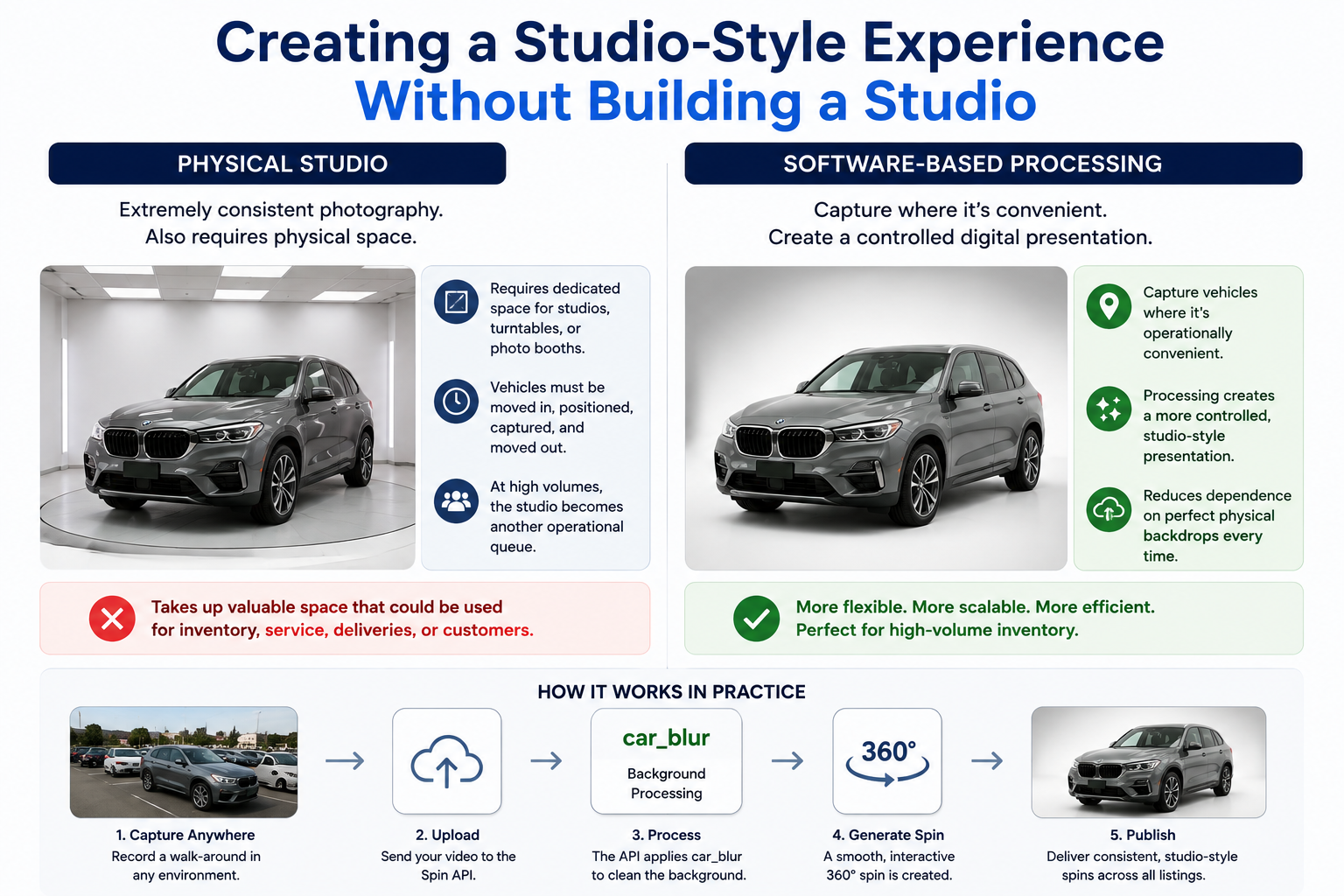
Physical automotive studios can produce extremely consistent photography.
They also require physical space.
That is not a small consideration for a dealership.
A dedicated turntable or photo booth may occupy an area that could otherwise be used for inventory, service operations, deliveries, or customer activity.
Vehicles also have to be moved into the photo area, positioned, captured, and moved out.
At high inventory volumes, the studio itself can become another operational queue.
Software-based processing creates another possibility.
Instead of moving every vehicle into a controlled studio environment, dealerships can capture vehicles where it is operationally convenient and use processing to create a more controlled digital presentation.
That is one of the biggest advantages of implementing a car background blur API inside an automotive merchandising workflow.
It does not eliminate the importance of good capture practices.
But it can reduce how dependent the finished listing is on having the perfect physical backdrop every time.
car_blur Fits Into the Spin API WorkflowThe workflow begins by submitting a vehicle walk-around using:
POST /api/v1/spins
The API creates a processing job and returns an ID.
Because processing happens asynchronously, an application can retrieve the individual job using:
GET /api/v1/spins/:id
Recent spins can also be retrieved through:
GET /api/v1/spins
The completed response can contain hosted vehicle frames, sprite sheets, processed and original image sets, metadata, vehicle geometry, annotations, and a hosted spin experience.
Developers can control car_blur as part of the processing configuration.
That makes the car background blur API functionality something that can be built directly into a larger automotive application rather than requiring employees to open another photo-editing tool for each vehicle.
Potential integrations include:
The background processing becomes part of the pipeline instead of a separate manual task.
One useful consideration when automating background processing is maintaining access to the original source presentation.
The Spin API can provide both processed and original frame sets.
That gives developers flexibility.
A platform could display the car_blur version on the dealership's public VDP while keeping the original imagery available internally.
A dealership might compare processed and original versions before deciding which presentation it prefers.
A software provider could even allow customers to change how vehicle imagery appears without requiring a completely new capture.
This is especially useful when implementing a car background blur API at scale because processing does not have to mean permanently replacing the original look of the vehicle photography.
The dealership can maintain both.
car_blurCleaner vehicle presentation. Distracting cars, buildings, signs, and dealership activity become less prominent.
More consistent inventory. Vehicles photographed across different areas or dealership locations can share a more unified presentation.
Greater shopper focus. Attention remains on the vehicle rather than the surrounding parking lot.
Reduced visual impact of parallax. Background movement across a 360° spin becomes less distracting.
Less dependence on dedicated studio space. Dealerships can photograph inventory in more practical locations.
Scalable automation. A car background blur API can process vehicle imagery automatically instead of requiring manual background editing.
Compatible with other processing options. car_blur can work alongside centering, smooth rotation, and configurable frame counts.
Original imagery can remain available. Processed and unprocessed frame sets can be retained for different uses.
Not every dealership wants a blurred environment. Some brands may prefer to show the dealership or local environment clearly.
Capture quality still matters. Processing cannot solve every badly recorded vehicle walk-around.
The look should match the dealership brand. A studio-style presentation may work better for some dealerships than others.
Real-world testing is necessary. Backgrounds differ significantly between stores, so dealerships should evaluate the effect using actual inventory.
The key advantage is flexibility.
car_blur can be used where it improves the experience without forcing every dealership into the same photography style.
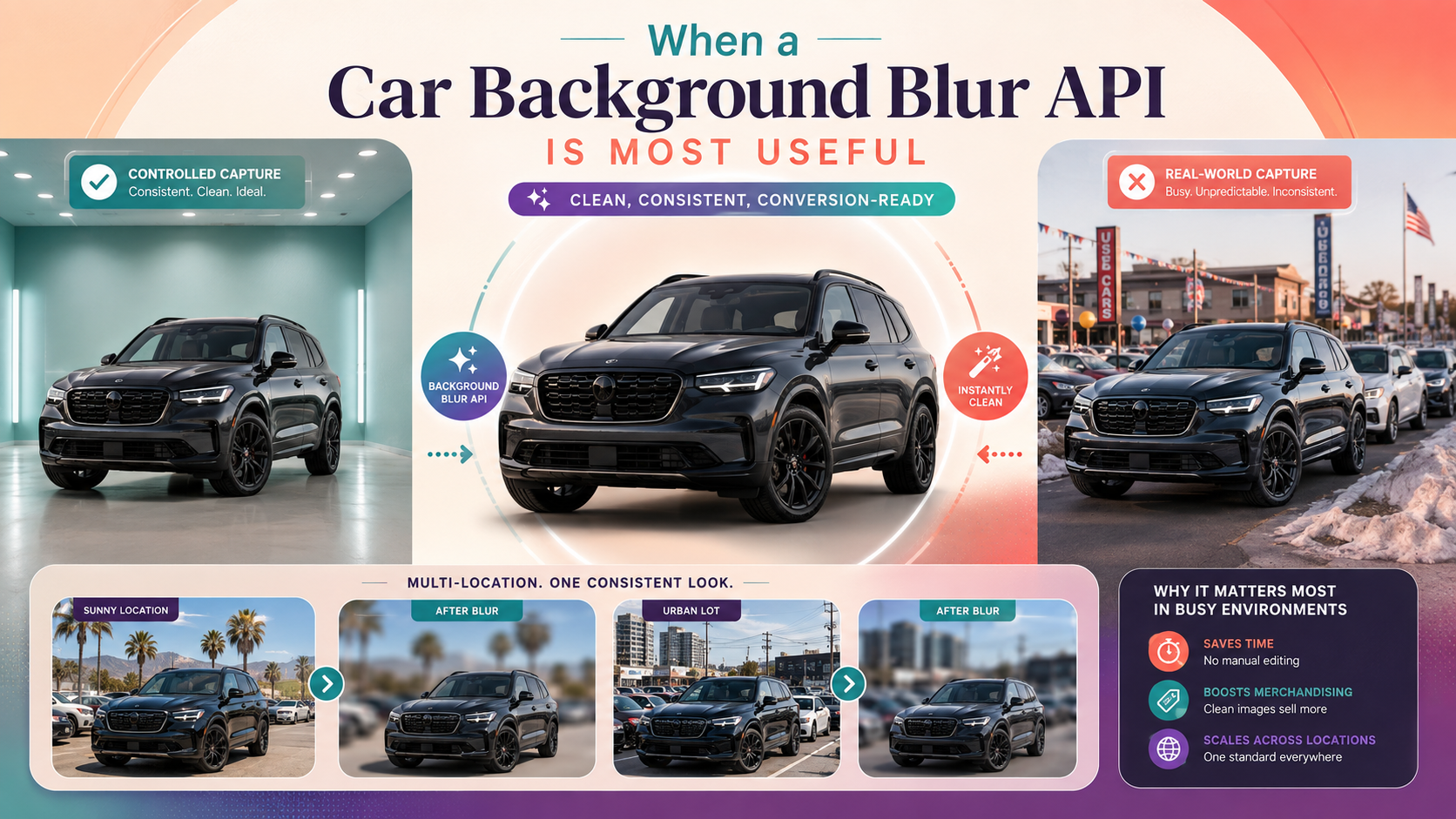
The value of background processing depends heavily on the environment in which inventory is captured.
A dealership with a permanent outdoor photo wall and perfectly controlled capture area may already have a consistent background.
Another dealership may photograph vehicles wherever space happens to be available.
In the second environment, a car background blur API can make a much larger difference.
The technology can be particularly useful when vehicles are captured near:
Multi-location dealer groups can also benefit.
One rooftop might have palm trees and bright sunlight behind its inventory while another has a crowded urban lot.
A consistent digital background treatment helps bring those dramatically different environments closer together from a merchandising perspective.
car_blur Results 💡Capture a complete vehicle walk-around with the car clearly visible throughout the footage.
Keep the phone in landscape orientation and maintain a reasonably consistent distance from the vehicle.
Avoid allowing large objects to pass directly between the camera and the vehicle.
Do not assume background automation makes capture quality irrelevant. Better source footage still creates better processing opportunities.
Test your car background blur API implementation using actual dealership inventory rather than polished demonstration footage.
Include vehicles photographed in busy lots, indoor areas, open pavement, harsh sunlight, cloudy weather, and visually complex environments.
Compare processed and original output inside the actual VDP where customers will interact with the spin.
Most importantly, review the complete 360° rotation.
A blurred background may seem like a subtle change when looking at one still image. The benefit can become much more noticeable once the vehicle begins rotating and the background would otherwise move from frame to frame.
car_blur Do?car_blur creates a studio-style blur around the vehicle while maintaining the car itself and a nearby area of pavement as the visual focus.
car_blur the Same as Centering?No.
Centering controls the vehicle's position and scale within the frames. car_blur changes the appearance of the surrounding scene.
A car background blur API allows background processing to become part of the automated vehicle-spin workflow. That is much more scalable than manually editing every image when dealerships process hundreds or thousands of inventory photos.
Yes. The Spin API can provide processed and original frame sets, allowing applications to retain access to both versions.
car_blur Work With 360° Vehicle Spins?Yes. It is designed as part of the Spin API's processing pipeline and can help reduce distracting background detail throughout the complete vehicle rotation.
No.
Good capture still matters. The vehicle should remain visible and the walk-around should provide sufficient coverage for the processing pipeline.
A strong 360° vehicle spin is not only about making the car rotate.
It is about controlling the entire presentation.
Dealership lots are practical places to capture inventory, but they are rarely clean studio environments.
That is exactly where car_blur can help.
By reducing distracting background detail while keeping the vehicle visually prominent, the processing can make ordinary dealership footage feel more consistent and professional.
For developers, implementing a car background blur API means that this presentation can be automated as part of the same workflow that creates the vehicle spin.
Combine it with centering, smooth rotation, configurable frame counts, VIN and stock-number metadata, and automated delivery, and the result becomes much more than a simple background effect.
It becomes part of a scalable automotive merchandising system.
A shopper viewing a vehicle online is interested in the car.
The parked inventory, building, street, light poles, signs, and activity behind it should not compete for attention.
With car_blur, dealerships can create a cleaner, more controlled 360° presentation from ordinary walk-around footage without requiring every store to build a permanent photography studio.
For automotive developers and merchandising platforms, a car background blur API makes that visual treatment repeatable across vehicles, locations, and inventory volumes.
Take a real dealership walk-around, process it with car_blur, and compare the result with the original. See how a cleaner background can improve the complete 360° experience with the CloudPano Spin API.


Compact, ready to go anywhere
Interchangeable lens that’s upgradeable
Dual 1-inch sensors for improved clarity and low light performance
Dynamic range and 6K 360° capture
360° photo resolution at 21MP

8K 360° video recording for ultra-detailed visuals.
4K single-lens mode for traditional wide-angle shots.
Invisible selfie stick effect for drone-like perspectives.
2.5-inch touchscreen with Gorilla Glass protection.
Waterproof up to 33ft for underwater shooting.

360° photo resolution in 23MP
Slim design at 24 mm thick
Built-in image stabilization for smooth video capture.
Internal 19GB storage for photo and video storage.
Wireless connectivity for remote control and sharing.

60MP 360° still images for high-resolution photography.
5.7K 360° video recording at 30fps.
2.25-inch touchscreen for intuitive control.
USB Type-C port for fast charging and data transfer.
MicroSD card slot for expandable storage.
.png)

.png)

Try it free. No credit card required. Instant set-up.







.svg)


.svg)