


.png)


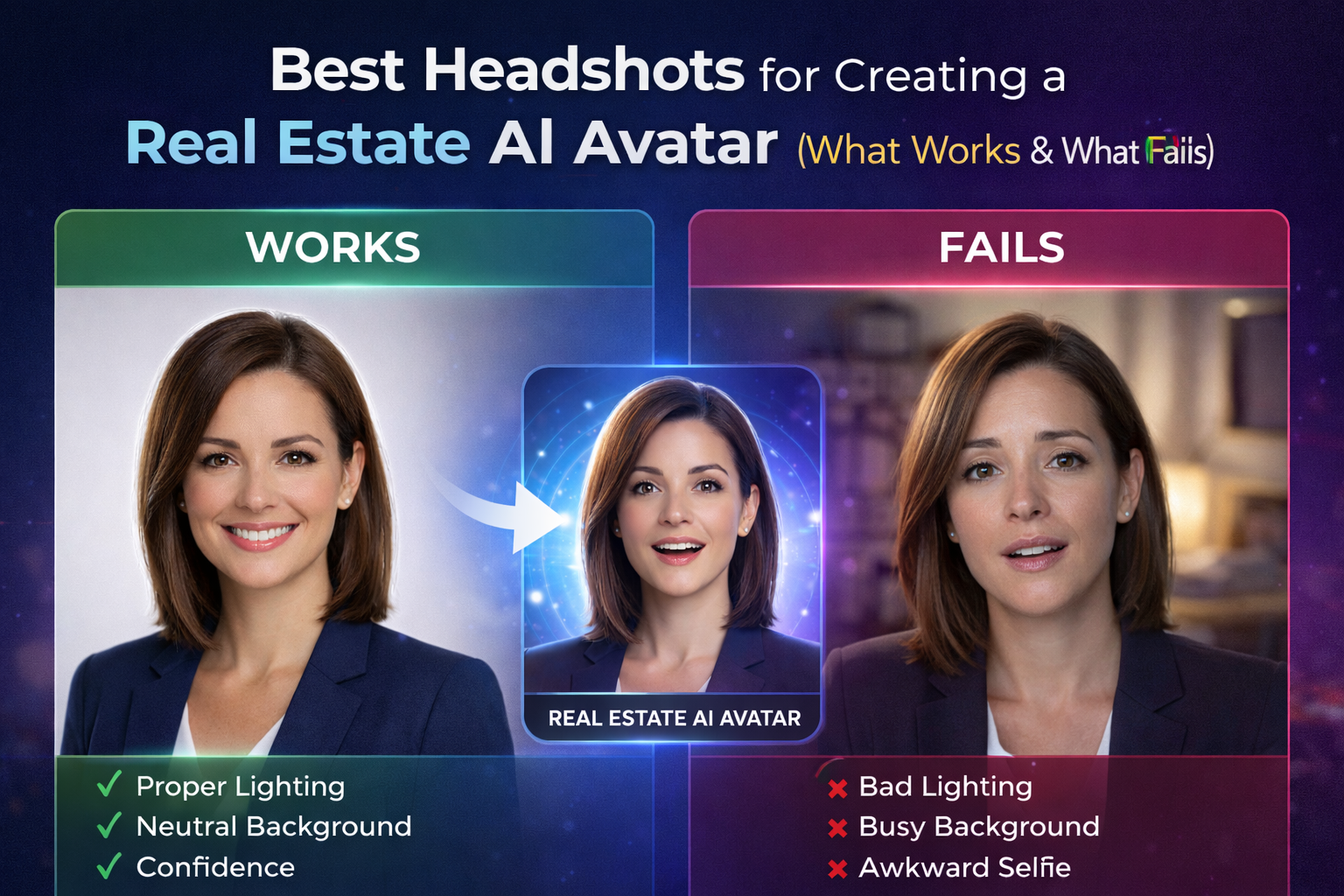
AI avatars are quickly becoming one of the most powerful tools in real estate marketing. From listing videos and social media content to follow-up messages and educational clips, a real estate AI avatar allows agents to show up consistently on camera—without recording every single video.
But here’s the truth most people overlook 👇
Your AI avatar is only as good as the headshot you start with.
If the headshot is right, the avatar looks natural, trustworthy, and professional.
If the headshot is wrong, the avatar looks awkward, artificial, or completely unusable.
In this guide, we’ll break down what works, what fails, and how to choose the best headshots for creating a real estate AI avatar—so your digital version actually helps you convert more leads instead of hurting your brand.
A real estate AI avatar is trained to mimic your face, expressions, posture, and visual presence. The AI doesn’t “guess” what you look like—it learns from the photo you provide.
That means your headshot determines:
In real estate, trust is everything. If your AI avatar looks off, potential clients will subconsciously disengage—even if your message is great.
That’s why choosing the right headshot is not optional. It’s foundational.
Let’s start with what actually works.
Lighting is the single most important factor in a successful AI avatar.
What works best:
AI models rely on clear facial contours. Uneven lighting confuses the system and leads to strange skin tones, flickering shadows, or unnatural face movement.
If your face looks evenly lit and natural in real life, it will look natural as an avatar.
Your background should never compete with your face.
Ideal backgrounds include:
Busy backgrounds distract the AI and reduce accuracy when separating you from the environment.
The goal is simple:
👉 Face first. Everything else second.
This is where many real estate professionals go wrong.
What works best:
AI avatars replicate facial expressions. If your headshot looks stiff, forced, or overly dramatic, the avatar will exaggerate those issues.
You don’t need a magazine-cover pose. You need a face that looks like you’d trust it explaining a home purchase.
Your headshot should be sharp, clear, and detailed.
Best practices:
AI needs real facial detail to animate naturally. Over-smoothing skin or blurring features removes critical data and results in plastic-looking avatars.
If you’re creating a real estate AI avatar, dress like the professional you want to present online.
What works well:
Your avatar becomes an extension of your brand. Make sure it aligns with how clients see you in real life.
Now let’s talk about the mistakes that break AI avatars.
Overhead lighting, fluorescent bulbs, or backlighting cause deep shadows under eyes and noses.
Why it fails:
If the lighting looks bad in a still image, it will look worse in motion.
Offices with clutter, homes with décor, outdoor shots with movement—all of these reduce avatar quality.
Why it fails:
Simple backgrounds always outperform creative ones for AI.
Ironically, AI-generated or heavily filtered headshots often perform poorly when used to create AI avatars.
Why it fails:
The AI ends up copying an already artificial face, compounding the problem.
Side profiles, tilted heads, or dramatic angles might look stylish—but they confuse AI models.
Why it fails:
A straight-on, eye-level shot is always best.
If your headshot doesn’t look like you anymore, your avatar won’t either.
That creates a trust problem.
Buyers and sellers expect consistency across:
If your avatar feels disconnected from reality, credibility drops.
Your AI avatar isn’t a one-time gimmick. It’s a long-term asset.
That means your headshot should support:
Choose a headshot that you’ll feel confident using everywhere.
If you’re unsure, take multiple clean headshots and test which one produces the most natural avatar output.
Video already outperforms text in real estate marketing. AI avatars take that one step further by allowing agents to scale video without constant filming.
With a strong headshot:
With a weak headshot:
In a crowded market, small details like this separate professionals from everyone else.
Creating a real estate AI avatar isn’t about flashy technology—it’s about starting with the right visual input.
What works:
What fails:
If you treat your headshot as the foundation of your AI presence, your avatar will feel natural, trustworthy, and effective.
And in real estate, trust is everything.


Compact, ready to go anywhere
Interchangeable lens that’s upgradeable
Dual 1-inch sensors for improved clarity and low light performance
Dynamic range and 6K 360° capture
360° photo resolution at 21MP

8K 360° video recording for ultra-detailed visuals.
4K single-lens mode for traditional wide-angle shots.
Invisible selfie stick effect for drone-like perspectives.
2.5-inch touchscreen with Gorilla Glass protection.
Waterproof up to 33ft for underwater shooting.

360° photo resolution in 23MP
Slim design at 24 mm thick
Built-in image stabilization for smooth video capture.
Internal 19GB storage for photo and video storage.
Wireless connectivity for remote control and sharing.

60MP 360° still images for high-resolution photography.
5.7K 360° video recording at 30fps.
2.25-inch touchscreen for intuitive control.
USB Type-C port for fast charging and data transfer.
MicroSD card slot for expandable storage.
.png)

.png)

Try it free. No credit card required. Instant set-up.







.svg)


.svg)