


.png)


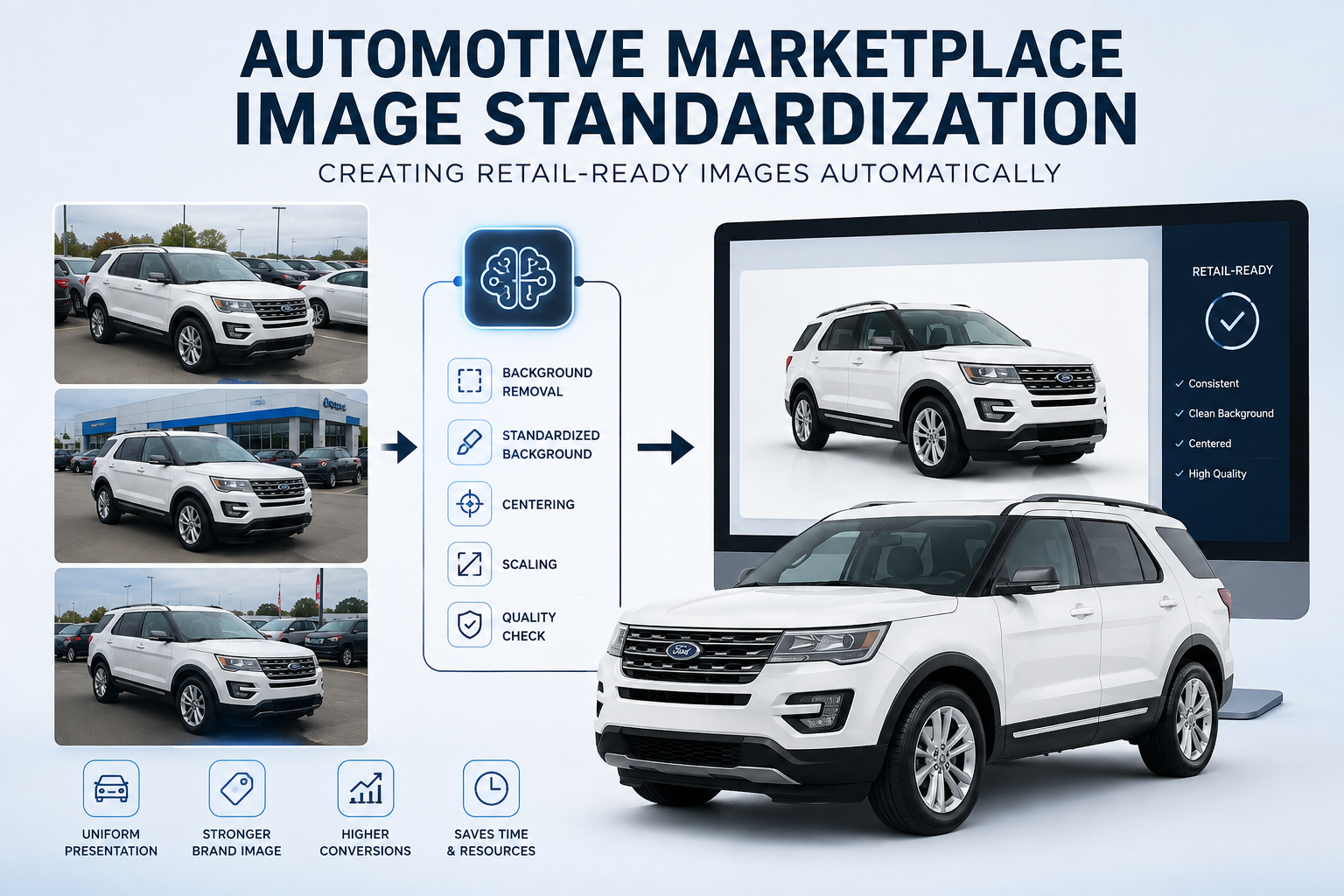
Automotive marketplaces have a consistency problem that becomes more noticeable as inventory grows.
A marketplace may receive vehicle photography from franchise dealerships, independent sellers, auctions, rental fleets, dealer groups, automotive photographers, inventory platforms, and other partners. Every source may use a different camera, photography process, location, image size, background, and framing style.
One dealership may photograph vehicles in a dedicated photo area. Another may shoot directly on a crowded lot. A third may have multiple employees capturing inventory with smartphones.
The vehicles can all be valid inventory, yet the marketplace can still look visually inconsistent.
That is the problem automotive marketplace image standardization is designed to address.
Instead of requiring every seller to create identical photography, automated processing can transform varied source images into consistent, retail-ready assets before shoppers see them.
At marketplace scale, this is more than an image-editing feature. It can become part of the infrastructure responsible for merchandising inventory.

Automotive marketplace image standardization is the process of applying a consistent set of visual rules to vehicle images before they are displayed or distributed.
Those rules might determine:
The objective is not to make every vehicle identical.
A pickup truck should still look like a pickup truck. A compact sedan should still appear smaller than a full-size SUV.
The objective is to standardize the presentation around the vehicle.
Think of it as creating a consistent digital showroom even when the original photography was captured in dozens—or thousands—of different physical locations.
A single dealership can train employees to follow a photography process.
A large marketplace has much less control.
Vehicle images might arrive from:
The photography itself may also vary considerably.
One vehicle might be photographed against a dealership building.
Another could be surrounded by inventory.
Another might have trees behind it.
Another might be photographed on wet pavement.
Some photos may use a wide landscape composition while others are captured vertically.
Lighting can range from harsh direct sunlight to overcast skies or indoor service lanes.
The challenge becomes even greater when different sellers upload different quantities of images.
A seller might provide 15 images for one vehicle while another provides 50.
Trying to force every contributing organization into the same physical photography process becomes increasingly difficult as a marketplace expands.
Automated processing provides another option: standardize what comes out rather than attempting to completely control what goes in.
A modern image-processing workflow can sit between the original dealership photography and the final marketplace presentation.
Instead of requiring employees to manually edit every vehicle photo, the system can automatically handle several processing steps after the images are uploaded.
A typical workflow may include:
The employee who photographs the vehicle may never need to open an image editor or manually perform these steps.
Processing takes place after the image enters the system.
This allows dealerships to maintain a familiar photography workflow while giving marketplaces and automotive platforms greater control over how inventory ultimately appears to shoppers.
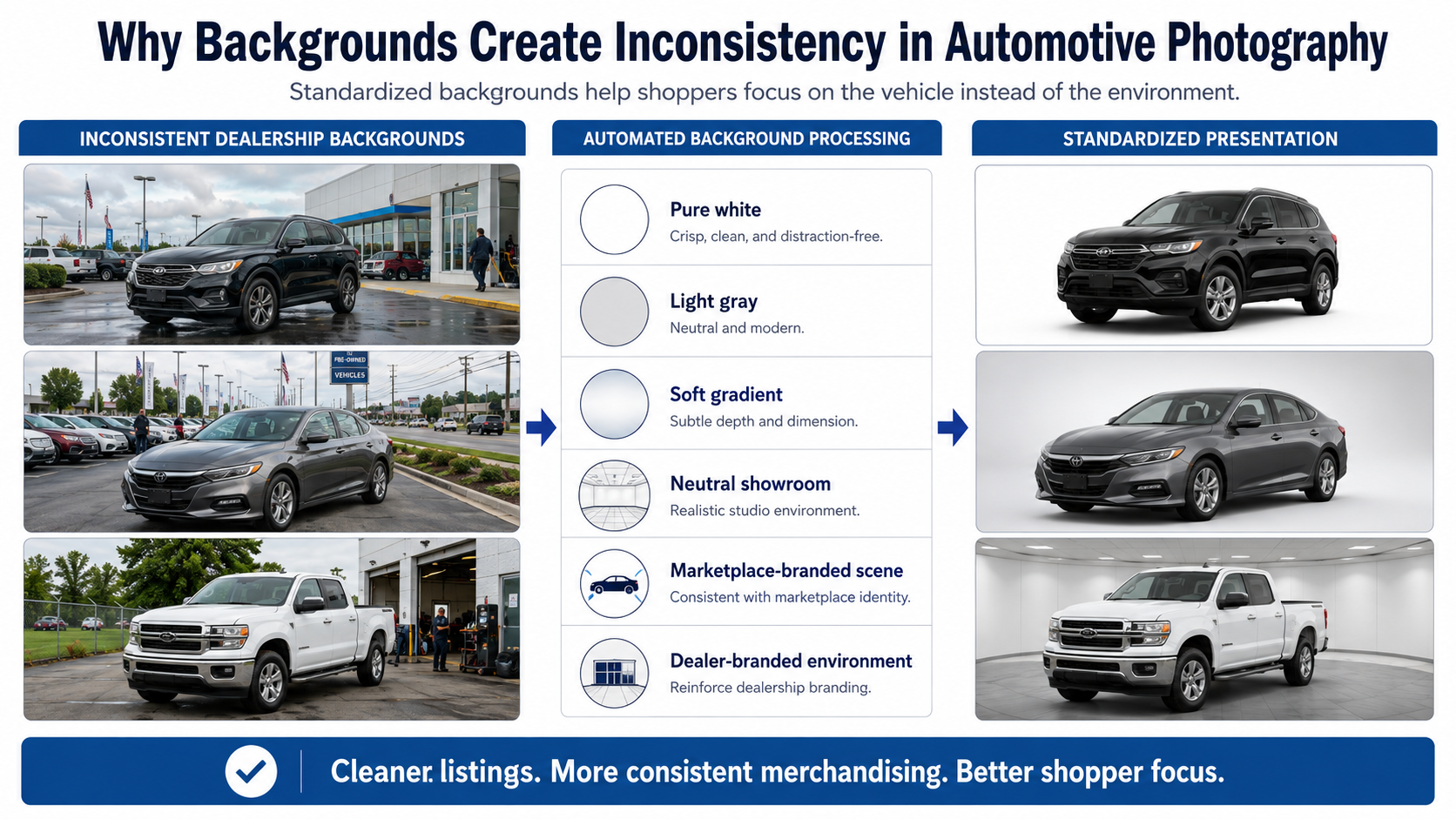
Backgrounds are one of the biggest sources of inconsistency in automotive photography.
Dealership environments naturally contain:
None of these elements necessarily indicate poor photography.
They are simply part of operating a dealership.
But when hundreds of listings are placed beside one another, those environmental differences can become distracting.
Automated background processing can replace the original environment with a standardized presentation such as:
A shopper can then focus on the vehicle rather than everything surrounding it.
This is one of the most visible applications of automotive marketplace image standardization.
A consistent background does not automatically create a consistent listing.
Vehicle positioning matters too.
Imagine three otherwise identical listings.
In the first image, the vehicle sits near the lower-left corner.
In the second, it is perfectly centered.
In the third, the bumper nearly touches the image edge.
The background may be identical, but the listings still feel inconsistent.
Automated processing can identify the vehicle's visible boundaries and reposition it according to predefined rules.
The system can determine:
That can create a much more uniform inventory grid.
For marketplaces displaying thousands of listings, seemingly small differences in positioning can become highly noticeable.
Another major advantage of standardization is format flexibility.
Vehicle inventory rarely appears in only one place.
The same image may need to work across:
Each destination may require a different image shape.
A marketplace might prefer landscape images.
A social feed may use square images.
A mobile advertisement might require vertical assets.
A recommendation widget may display a small thumbnail.
Instead of rebuilding the photograph separately for every destination, an automated workflow can first create a standardized high-resolution master.
From there, additional versions can be generated.
For example:
Standardized master
→ Landscape
→ Square
→ Vertical
→ Thumbnail
→ High-resolution VDP image
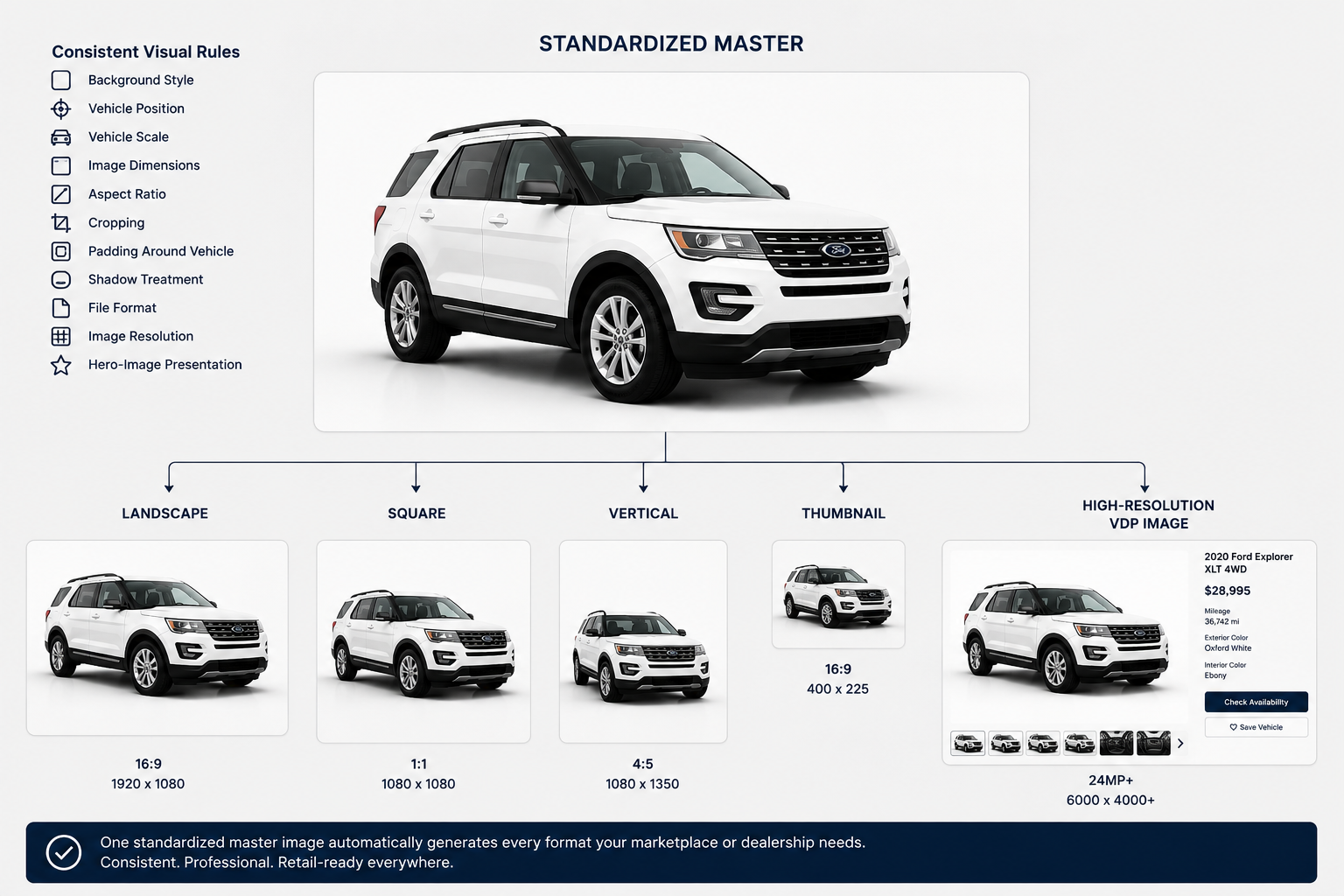
The more distribution channels a marketplace supports, the more valuable this approach becomes.
Automation should improve presentation without misrepresenting the inventory.
That means high-quality processing should preserve important visual details.
Particular attention should be given to:
A poorly processed vehicle may technically have a clean background but still look artificial.
For example, eliminating all contact shadows can make the vehicle appear to float.
Aggressive masking around wheels can remove tire details.
Incorrect processing around windows may make transparent areas look unnatural.
The goal is not simply to remove pixels around the vehicle.
The goal is to create an image that feels believable enough to function as professional automotive merchandising.
Marketplace shopping is fundamentally comparative.
A shopper may look at several similar vehicles simultaneously.
They may compare:
Photography should help that comparison rather than interfere with it.
If one vehicle occupies most of its image while another appears tiny, visual comparison becomes harder.
If one listing has a clean background while the next contains signs, employees, and parked vehicles, attention becomes uneven.
Automotive marketplace image standardization creates a predictable visual framework.
The specifications change from vehicle to vehicle.
The presentation does not.
That can make search pages feel more like a unified retail experience rather than a collection of unrelated classified advertisements.
The largest efficiency gains often appear when employees stop manually interacting with the processing system.
For high-volume marketplaces and automotive technology platforms, an API can connect image processing directly to the inventory pipeline.
A workflow could look like:
No employee needs to download a photograph, open an image editor, export a new version, and upload it again.
The image system operates behind the scenes.
This changes automated image processing from a creative utility into operational infrastructure.
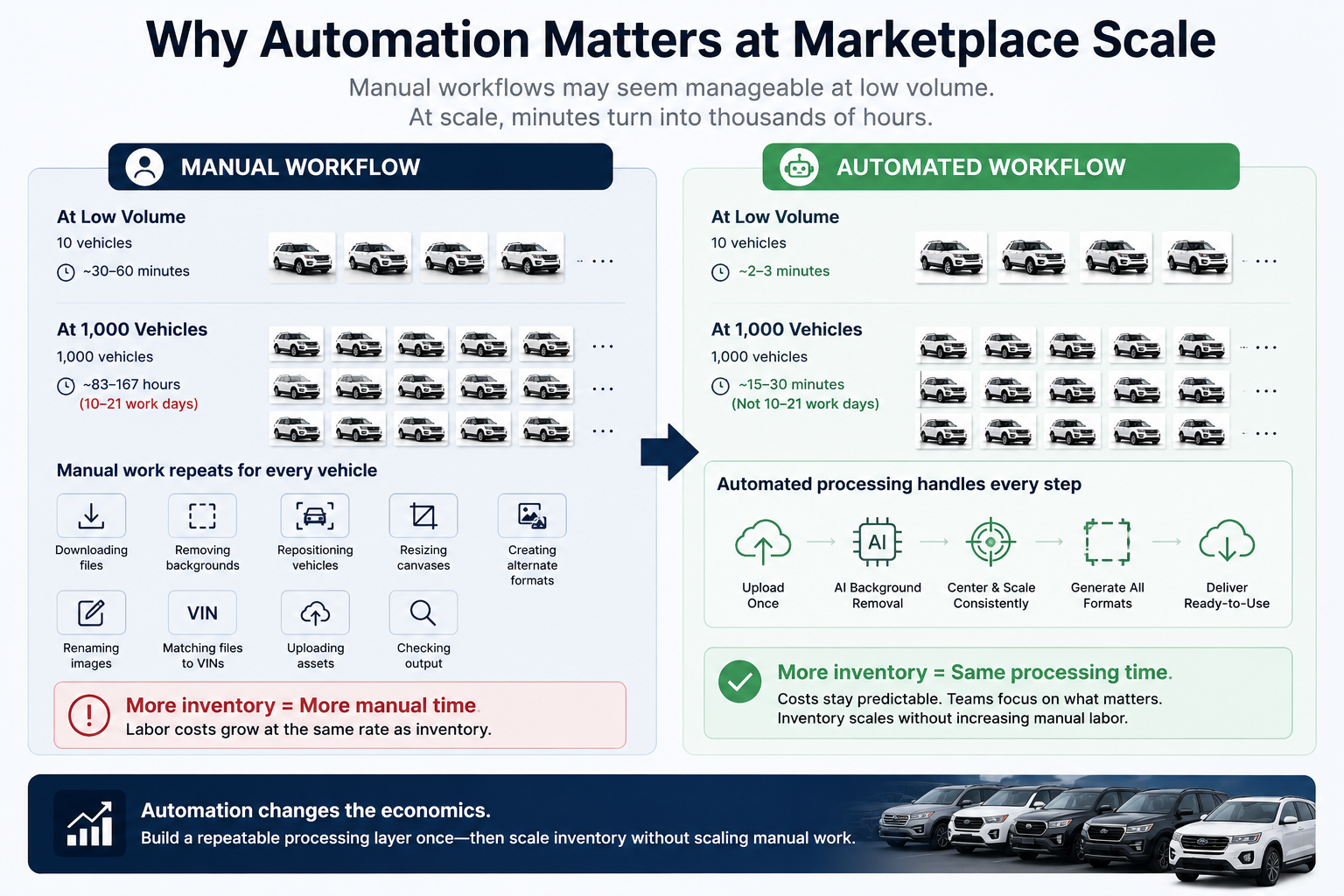
Manual workflows often appear manageable at low volume.
Suppose editing a vehicle takes only a few minutes.
That may not seem significant when processing 10 vehicles.
At 1,000 vehicles, those minutes compound quickly.
At marketplace scale, employees could otherwise spend substantial time repeatedly:
Automation changes the economics.
Instead of adding editing labor whenever inventory grows, the marketplace can build a repeatable processing layer.
More inventory can enter the system without requiring manual image work to increase at exactly the same rate.
Automation does not mean abandoning quality control.
Some source photographs will always be difficult.
Examples include vehicles that are:
Instead of requiring a person to manually process every image, an automated system can handle normal cases and flag unusual results.
Human review can then focus on exceptions.
This is a much more scalable model.
Automated standardization offers significant benefits, but it should be evaluated realistically.
The major advantages include:
Automation cannot completely compensate for poor source photography.
A system may struggle if:
Better input still generally creates better output.
The objective is not to eliminate good photography practices. It is to make good photography easier to normalize and distribute.
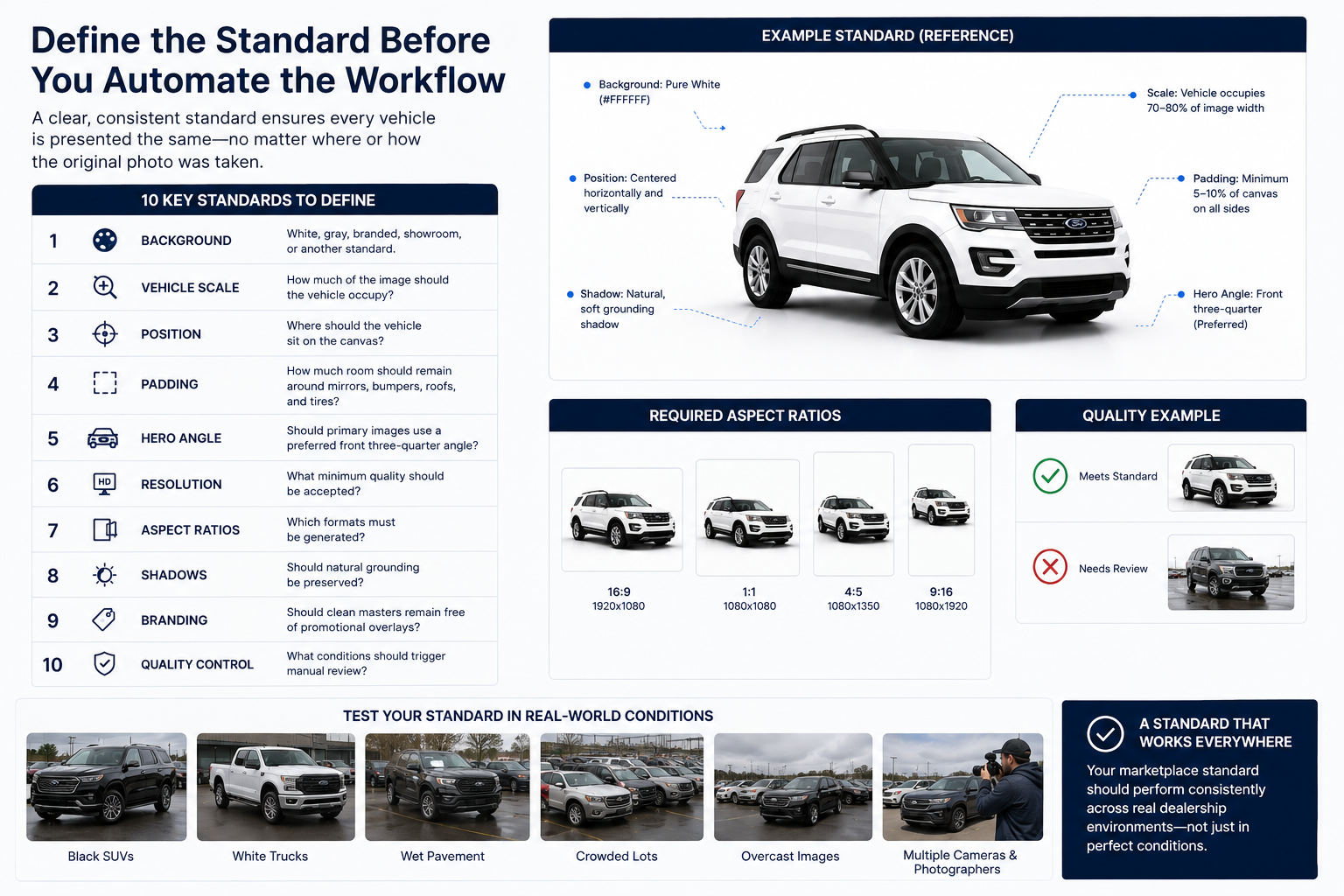
Before automating the workflow, define what the desired image should actually look like.
A marketplace should consider specifications for:
Then test those standards against difficult real-world inventory rather than only perfect photography.
Test black SUVs.
Test white trucks.
Test wet pavement.
Test crowded lots.
Test overcast images.
Test multiple cameras and photographers.
A marketplace standard needs to work in the environments dealerships actually operate in.
The most important change happens when automotive marketplace image standardization stops being treated as a one-off editing task.
At scale, it becomes infrastructure.
More dealers can contribute inventory.
More photographers can use different capture workflows.
More vehicles can enter the marketplace.
More output formats can be produced.
More partners can receive images.
Yet the shopper can continue seeing a consistent presentation.
That is the real opportunity.
The marketplace does not have to control every parking lot, every photographer, or every camera.
It can control the processing layer between the original image and the retail experience.
Creating retail-ready automotive images automatically is not simply about making vehicle photography look cleaner.
It is about building a system that can transform inconsistent source photography into predictable marketplace assets.
With automated background processing, centering, scaling, resizing, quality control, multi-format exports, and API integration, automotive marketplace image standardization can become a repeatable part of the inventory workflow.
For dealer groups, automotive marketplaces, inventory-management providers, website companies, and automotive SaaS platforms, that creates a compelling path toward better merchandising without requiring manual image editing to grow alongside inventory volume.
The starting point is straightforward: define what a retail-ready vehicle image should look like, test that standard against real inventory, and then automate as much of the transformation as possible.
At sufficient scale, standardized imagery is no longer just an aesthetic choice.
It becomes part of the infrastructure powering the marketplace.


Compact, ready to go anywhere
Interchangeable lens that’s upgradeable
Dual 1-inch sensors for improved clarity and low light performance
Dynamic range and 6K 360° capture
360° photo resolution at 21MP

8K 360° video recording for ultra-detailed visuals.
4K single-lens mode for traditional wide-angle shots.
Invisible selfie stick effect for drone-like perspectives.
2.5-inch touchscreen with Gorilla Glass protection.
Waterproof up to 33ft for underwater shooting.

360° photo resolution in 23MP
Slim design at 24 mm thick
Built-in image stabilization for smooth video capture.
Internal 19GB storage for photo and video storage.
Wireless connectivity for remote control and sharing.

60MP 360° still images for high-resolution photography.
5.7K 360° video recording at 30fps.
2.25-inch touchscreen for intuitive control.
USB Type-C port for fast charging and data transfer.
MicroSD card slot for expandable storage.
.png)

.png)

Try it free. No credit card required. Instant set-up.







.svg)


.svg)