
AppFolio for Agents: Using Video Tours to Close Deals Faster

Cloudpano
July 16, 2025
5 min read
Share this post

AppFolio for Agents: Using Video Tours to Close Deals Faster 🎥🚀

In today's competitive real estate market, speed and experience matter more than ever. Agents who adapt to digital-first strategies—especially video—are the ones winning more listings and closing deals faster.

Enter AppFolio + Video Tours — a winning combo for real estate agents looking to stand out.

Let’s explore how you can use video to attract more clients, showcase listings with cinematic style, and close with confidence — all inside the AppFolio platform.

🔍 Why Video Tours Help Agents Win Deals

The modern buyer or renter expects more than just images. They want experiences:

  • 📹 Video tours feel immersive and build trust.
  • 🚪 Properties with video convert 3x more often.
  • 🚀 Faster decision-making = faster deals.
  • ⏳ Save everyone time by pre-qualifying serious leads.

📍 Related: Boost Property Listings with Video Tours on AppFolio

🎓 Types of Videos That Work Best for Agents

Not all videos are created equal. Use these for maximum impact:

  • Walkthrough Tours: Use a smartphone gimbal for smooth interior shots.
  • 360° Virtual Tours: Ideal for online open houses using CloudPano.
  • Neighborhood Flyovers: Drone shots for premium listings.
  • Agent-Guided Tours: Personalized, selfie-style explanations add credibility.

📍 Related: How Real Estate Agents Can Add Video Tours to AppFolio Listings

🔧 How to Add Video Tours into AppFolio

AppFolio makes it easy to embed videos directly into listings:

  1. 📹 Upload your tour to YouTube, Vimeo, or Wistia.
  2. 🔗 Grab the share link or embed code.
  3. 📄 Inside AppFolio, edit the listing.
  4. ✏️ Paste the link into the description or embed code in the HTML editor.

📍 Related: Step-by-Step Guide: Embedding CloudPano Tours in AppFolio

🌟 Pro Tips to Stand Out with Video

Want to win more listings and build a brand? Use these video best practices:

  • 🎥 Keep your videos under 2 minutes
  • 🎨 Use soft lighting and stable shots
  • 🌟 Add branded intros/outros
  • 📺 Include captions for silent viewers
  • 👀 Use cinematic pans and transitions

📍 Related: Create Stunning 3D Tours with Movie Camera Support in AppFolio
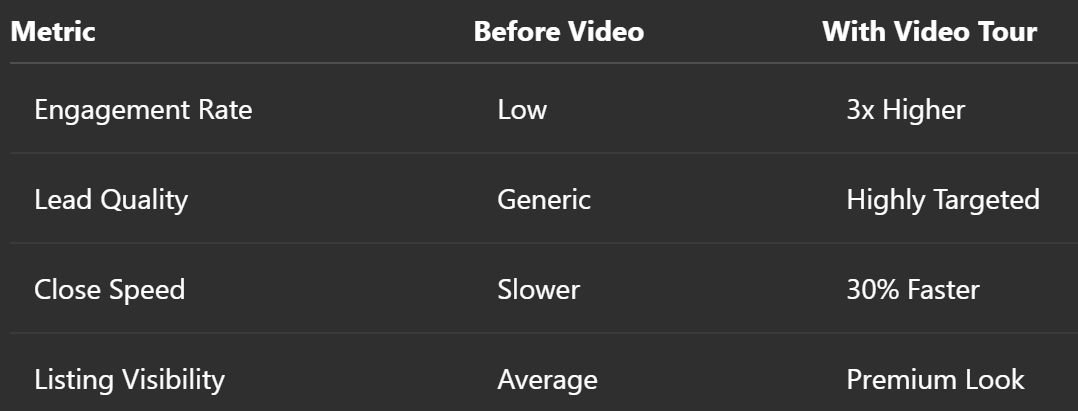
📊 Results: Before and After Using Video

📍 Related: Bring Listings to Life: Add Movie Camera Virtual Tours to AppFolio

🤝 Tools That Help You Succeed

Agents don’t need a huge production crew. These tools help you shine:

  • CloudPano: 360° tour creation & cinematic views
  • Canva Video or CapCut: Editing & branding
  • YouTube or Vimeo: Video hosting + SEO boosts

📍 Related: CloudPano and AppFolio Integration: Elevate Your Property Listings

🚀 Final Thoughts: Get Ahead with Video Today

AppFolio gives agents the platform to shine. Combine it with powerful, fast video marketing and you’ll:

  • 📈 Win more listings
  • 💪 Build stronger relationships
  • 📅 Close deals faster

If you're an agent using AppFolio, it's time to embrace video tours as your new competitive edge.

🎥 Start today and watch your conversions soar!

Share this post
Cloudpano

Choose The Right 360° Camera

Insta360 ONE RS 1-Inch 360 Edition

  • Compact, ready to go anywhere

  • Interchangeable lens that’s upgradeable

  • Dual 1-inch sensors for improved clarity and low light performance

  • Dynamic range and 6K 360° capture

  • 360° photo resolution at 21MP

Learn More

Insta360 X4

  • 8K 360° video recording for ultra-detailed visuals.

  • 4K single-lens mode for traditional wide-angle shots.

  • Invisible selfie stick effect for drone-like perspectives.

  • 2.5-inch touchscreen with Gorilla Glass protection.

  • Waterproof up to 33ft for underwater shooting.

Learn More

Ricoh Theta Z1

  • 360° photo resolution in 23MP

  • Slim design at 24 mm thick

  • Built-in image stabilization for smooth video capture.

  • Internal 19GB storage for photo and video storage.

  • Wireless connectivity for remote control and sharing.

Learn More

Ricoh Theta X

  • 60MP 360° still images for high-resolution photography.

  • 5.7K 360° video recording at 30fps.

  • 2.25-inch touchscreen for intuitive control.

  • USB Type-C port for fast charging and data transfer.

  • MicroSD card slot for expandable storage.

Learn More
Property Marketing
Allows potential buyers to explore properties in detail from anywhere, enhancing the real estate marketing process.
Automotive Spins
Create an interactive virtual showroom and engage affluent digital buyers with live 360º video calls, all through the CloudPano mobile app for a complete automotive sales solution.
Interactive Floor Plans
Create 2D and 3D floor plans with measurements in 4 minutes or less, all from your phone. Download the Floor Plan Scanner app and get your first scan free.

360 Virtual Tours With CloudPano.com. Get Started Today.

Try it free. No credit card required. Instant set-up.

Try it free
Latest posts

See our other posts

Interviews, tips, guides, industry best practices, and news.

5 Mistakes to Avoid When Forging an AI Walkthrough Video From Static Media

This article explains the five biggest mistakes Realtors, photographers, brokerages, and property managers should avoid when creating AI walkthrough videos from static media. It covers photo selection, image sequencing, motion style, accuracy review, and channel-specific publishing so users can create better listing videos with PhotoAIVideo.
Read post

Testing an AI software for creating real estate walkthrough videos from iPhone Stills

This article explains how Realtors, photographers, brokerages, and property managers can test AI walkthrough videos using iPhone stills and PhotoAIVideo. It covers when iPhone photos are good enough, how to capture better room images, what mistakes to avoid, and how to turn phone photos into useful listing videos, rental clips, seller updates, and social media assets.
Read post

How to Generate Cinematic Movement From Flat JPEG Listing Photos

This article explains how Realtors, real estate photographers, brokerages, and property managers can generate cinematic movement from flat JPEG listing photos using PhotoAIVideo. It covers photo selection, depth cues, motion types, sequencing, review steps, and how to turn static property images into polished listing videos, social clips, seller updates, and property website assets.
Read post



