


.png)


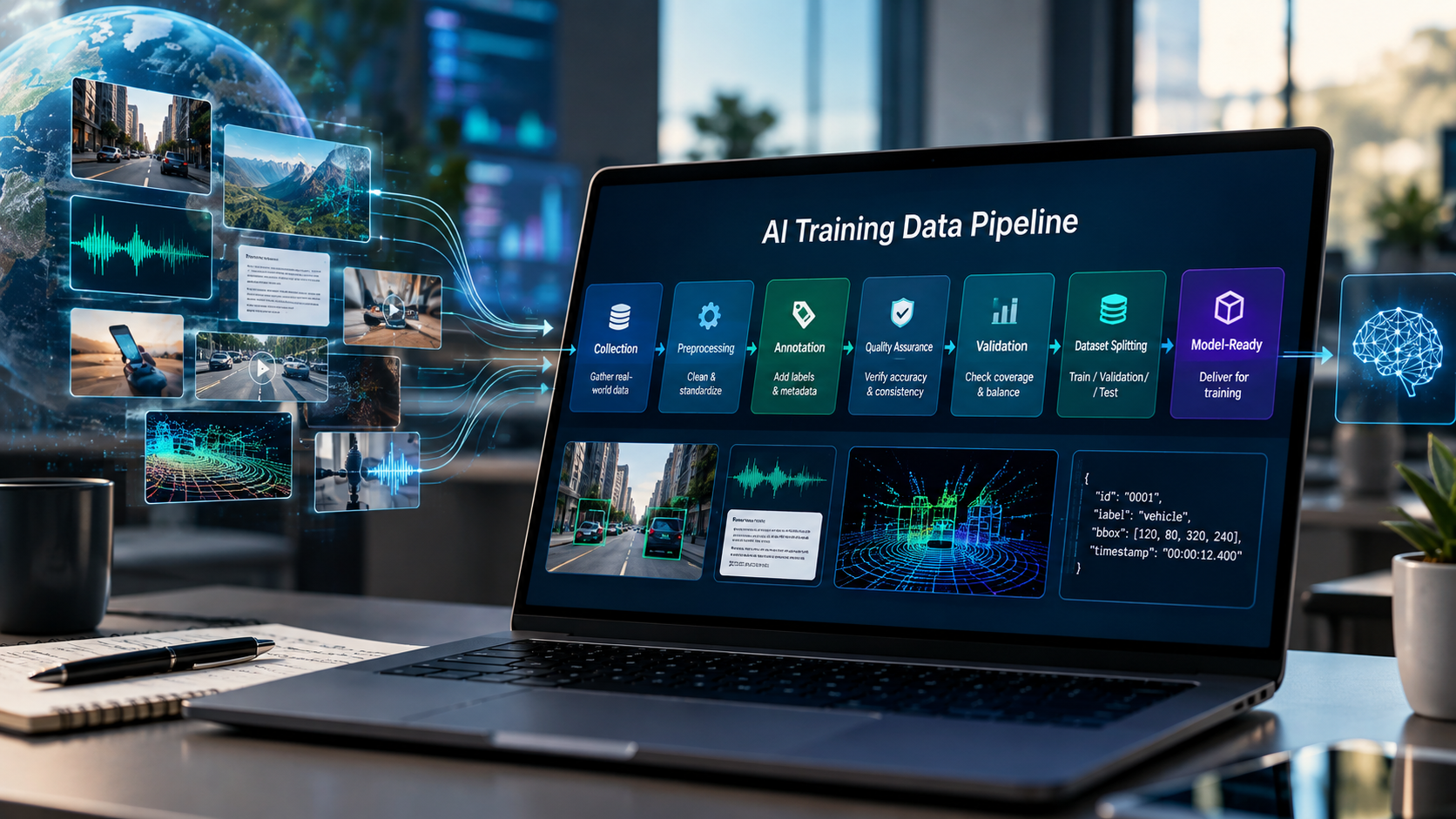
The AI training data pipeline is the end-to-end process that turns raw data into model-ready datasets for training, fine-tuning, validation, and evaluation. It typically includes defining requirements, collecting data, cleaning and preprocessing it, annotating it when needed, performing quality assurance, validating dataset coverage, creating dataset splits, delivering the data, and using model performance to guide future collection.
AI models learn from examples—but those examples rarely arrive ready for training.
Images may need to be collected across different devices and environments. Speech recordings may need transcripts and speaker metadata. Video may need action labels or timestamps. Multimodal datasets may need video, depth, audio, motion, and pose data synchronized correctly. Before any of that reaches a model, the data also needs to be checked for quality, coverage, consistency, and usability.
That end-to-end process is the AI training data pipeline.
The AI training data pipeline is the structured process that transforms raw data into model-ready datasets for training, fine-tuning, validation, and evaluation. A typical pipeline includes defining requirements, collecting data, cleaning and preprocessing it, annotating it when necessary, performing quality assurance, validating dataset coverage, creating dataset splits, packaging the data, and using model results to improve future collection.
In simple terms:
Define → Collect → Prepare → Annotate → QA → Validate → Split → Deliver → Evaluate → Improve
Understanding each stage helps AI teams build datasets around what a model actually needs to learn instead of simply accumulating more data.
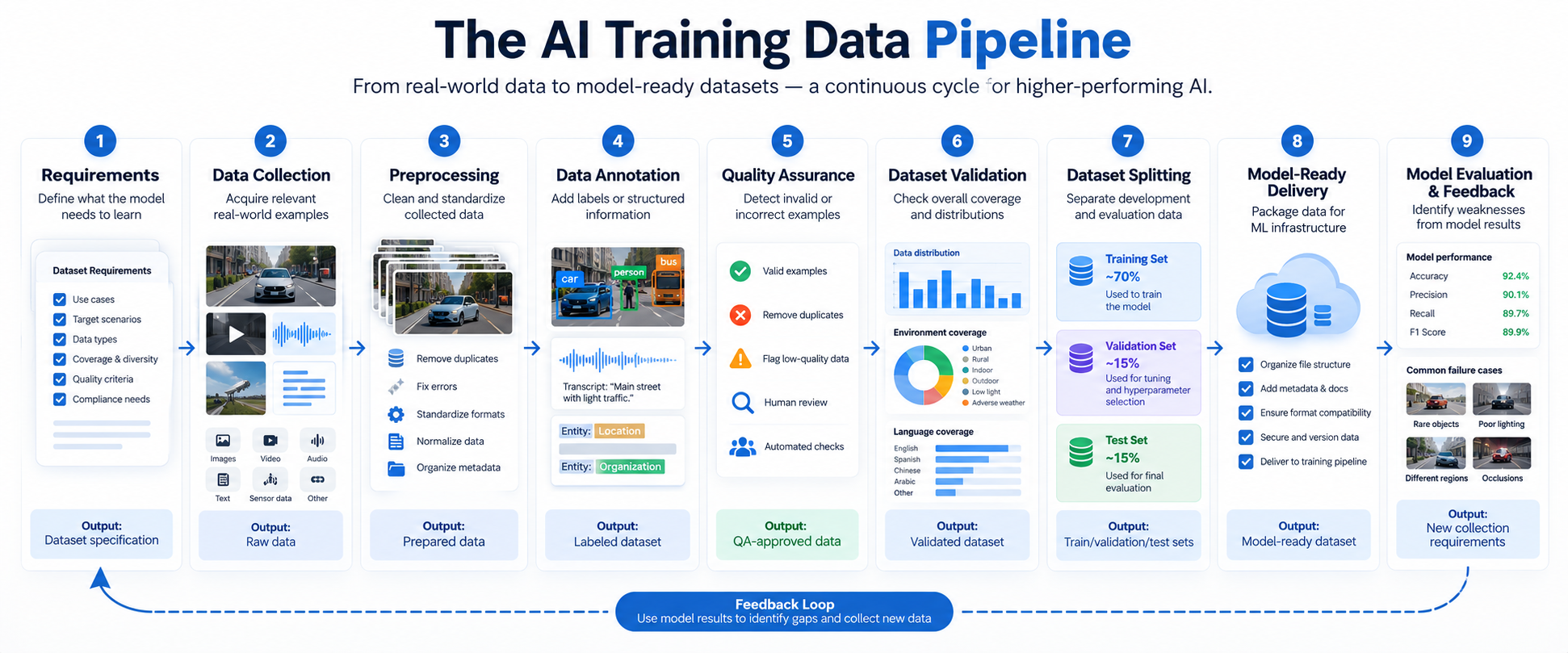
An AI training data pipeline is an organized workflow for creating and maintaining the data used to develop machine learning and artificial intelligence systems.
It connects two things that can otherwise be very far apart: real-world information and model-ready training examples.
The raw input can include:
These stages are often supported by specialized AI training data services that handle data collection, annotation, validation, quality assurance, and other parts of preparing data for model development.
The exact workflow varies by model. A speech recognition model and a robotic manipulation model do not require the same data. However, both need a deliberate process for deciding what to collect, determining whether the collected data meets the specification, and preparing it for model development.
A practical AI training data pipeline can be divided into nine connected stages:
These stages are connected rather than completely independent. A validation problem can send a project back to collection, while model evaluation can expose an edge case that was missing from the original specification.
The first stage defines what data the model needs and what acceptable data looks like.
Before collecting anything, teams should understand the intended model behavior and the conditions the system is expected to encounter.
A specification may define:
For example, a computer vision system intended to recognize products on retail shelves may need more than generic store photographs. The specification might require different shelf layouts, camera angles, lighting conditions, product densities, reflective packaging, partial occlusion, and low-stock situations.
A useful specification therefore describes the operating conditions the model must survive, not simply the type of file to collect.
When the required dataset does not already exist, custom AI data collection can be designed around those conditions from the beginning.
AI data collection is the process of gathering the raw examples needed to train or evaluate an AI system.
The collection strategy depends heavily on the model.
For computer vision, image collection may capture objects and environments across different angles, distances, backgrounds, devices, lighting conditions, and geographies.
For action recognition or embodied AI, video collection may record people completing real tasks, including first-person or egocentric footage.
Speech systems may require recordings across languages, accents, microphones, speakers, and acoustic environments.
Language models may use prompts, conversations, translations, domain-specific text, preference data, or evaluation examples.
Multimodal systems can require several signals from the same event. For example, video, depth, audio, motion, and pose may need to be captured and synchronized so that the model can learn relationships between them.
The goal is not simply more data. It is data with enough relevant variation to represent the problem the model will face.
Data preprocessing converts collected raw data into a consistent form that can move through annotation, validation, or model training.
Common preprocessing tasks include:
Quality rules should be based on the intended use of the dataset.
A video that is too dark to meet the collection specification may be invalid. But a low-light video should not automatically be removed if low-light performance is one of the conditions the model needs to learn.
That distinction matters.
Difficult data is not necessarily bad data. An unusual accent, partially hidden object, noisy environment, uncommon behavior, or difficult lighting condition can be an important training example when it reflects real-world use.
Data annotation adds labels, descriptions, classifications, or other structured information that tells a supervised learning system what an example represents.
Annotations can include:
Not every AI dataset requires the same annotation process, and some datasets may already contain the required signals.
When annotation is needed, clear guidelines are essential.
If one reviewer labels an activity “grasp,” another uses “pick up,” and a third interprets the same action as “lift,” the model may receive inconsistent supervision unless those terms have been deliberately defined.
This is why AI data collection and data annotation are related but different processes: collection obtains the raw examples, while annotation adds structured information to those examples.
For a deeper comparison, see AI Data Collection vs. Data Annotation: What’s the Difference (and Which Do You Need)?
Training data quality assurance checks whether individual data items meet the project's defined requirements.
QA can combine automated validation and human review.
Automated checks can identify corrupted files, invalid formats, missing fields, duplicate records, impossible values, or unexpected data distributions.
Human review is useful for problems that require context, such as inaccurate labels, poor task execution, ambiguous actions, incorrect transcripts, framing problems, or misunderstood annotation instructions.
Large data programs may use multiple QA layers. For example:
Automated validation → Human review → Sample audit → Correction or rejection
A useful QA process should also make rejection reasons visible. Knowing why examples failed can reveal systematic problems with instructions, capture conditions, devices, annotation guidelines, or contributor workflows.
The terms are sometimes used interchangeably, but they answer different questions.
Data QA asks whether individual examples are correct and usable. Dataset validation asks whether the completed dataset as a whole meets the intended requirements.
Imagine that every photograph in a computer vision dataset is sharp, correctly labeled, and properly formatted.
Individual QA looks excellent.
But analysis reveals that 85% of the photographs came from one device type and almost none were captured under low-light conditions.
The files can pass QA while the dataset still has a coverage problem.
Dataset-level validation should therefore examine dimensions such as:
If an important segment is underrepresented, the correct next step may be targeted collection rather than simply accepting the dataset because individual items passed QA.
Model-ready data is commonly separated into training, validation, and test sets, and each serves a different purpose.
The training set contains the examples the model learns from.
The validation set is held out from training and used during model development to evaluate choices and tune the system.
The test set is reserved for final or later evaluation against unseen examples.
The important principle is separation—not a universal percentage split.
Care is also needed to prevent data leakage. If near-identical frames from the same recording appear in both training and test data, evaluation may overstate how well the model generalizes.
Depending on the application, it can be more appropriate to split data by contributor, recording session, location, device, environment, or another meaningful grouping rather than randomly dividing individual files.
Model-ready training data is validated data that has been structured, documented, and packaged so the target machine learning system can consume it reliably.
Delivery may include:
The required format depends on the model and training stack.
For example, robotics and multimodal workflows may use formats such as RLDS, LeRobot, WebDataset, HDF5, zarr, or another project-specific schema.
Good delivery reduces the amount of additional engineering required between receiving the dataset and using it.
Instead of a loosely organized collection of files, the ML team receives a traceable dataset whose structure and assumptions are documented.
The AI training data pipeline is not finished simply because a dataset has been delivered.
Model evaluation can reveal gaps that were difficult to identify before training.
A model might perform well overall but struggle with a specific accent, object category, geographic environment, lighting condition, device, task sequence, or rare interaction.
Those failures become useful information for the next dataset version.
The cycle becomes:
Train → Evaluate → Identify Failures → Collect Targeted Data → Validate → Retrain
This feedback loop turns model performance into a source of new data requirements.
Rather than repeatedly collecting generic examples, teams can target the conditions where additional data is most useful.
A high-quality training data pipeline produces datasets that are relevant, consistent, traceable, appropriately licensed, and representative of the conditions the AI system is expected to encounter.
Five characteristics are particularly important.
Coverage: Does the dataset represent the environments, devices, languages, behaviors, and difficult cases that matter?
Consistency: Are collection and annotation rules applied predictably?
Quality: Are examples accurate, usable, and compliant with the specification?
Provenance and rights: Is the origin of the data documented, and are appropriate consent and usage rights available?
Traceability: Can teams determine how an example was collected, processed, labeled, and included in a dataset version?
Volume still matters for many models, but dataset size alone cannot answer these questions.
Custom training data becomes especially useful when existing datasets do not represent the specific conditions in which a model needs to perform.
That can happen when a project requires:
Public datasets remain valuable for research, experimentation, and many general applications. The limitation arises when a model has requirements that the available data was never designed to satisfy.
Firsthand's data collection services are built around this spec-first approach across image, video, audio and speech, text and language, and multimodal data. For projects with requirements that do not fit an existing dataset, custom data collection for AI training can take the process from specification and sourcing through capture, annotation, QA, and delivery.
The AI training data pipeline is the system that turns real-world information into data an AI model can learn from.
A mature pipeline does more than collect and label examples. It establishes what the model needs, deliberately captures those conditions, prepares and validates the data, separates development from evaluation data, documents the dataset, and feeds model failures back into the next collection cycle.
The complete process can be summarized as:
Define → Collect → Prepare → Annotate → QA → Validate → Split → Deliver → Evaluate → Improve
The most useful question for an AI team is therefore not simply “How much data do we have?”
It is:
“Does our dataset represent what our model actually needs to learn?”
When the answer is no, improving the training data pipeline can be just as important as improving the model itself.
An AI training data pipeline is the end-to-end process of turning raw data into structured, validated datasets that can be used to train, fine-tune, test, or evaluate machine learning models. It typically includes defining requirements, data collection, preprocessing, annotation, quality assurance, validation, dataset splitting, and delivery.
The main stages are defining data requirements, collecting raw data, cleaning and preprocessing the data, annotating it when required, performing quality assurance, validating dataset coverage, creating training and evaluation splits, delivering model-ready data, and using model results to guide future data improvements.
Training data quality affects what patterns an AI model learns. Missing coverage, inaccurate annotations, duplicates, inconsistent labels, or unrepresentative examples can reduce model performance and make the system less reliable when it encounters real-world conditions.
AI models can be trained using images, video, speech, audio, text, sensor measurements, human interactions, and multimodal datasets combining multiple synchronized data sources. The appropriate data type depends on the task the model is designed to perform.
Not necessarily. Mature training data pipelines are iterative. Model evaluation can reveal failure cases or underrepresented conditions, which can then guide targeted data collection, annotation, and validation before the model is trained again.
Google for Developers — Datasets: Dividing the Original Dataset
Use this to substantiate the training/validation/test discussion. Google's dataset splitting guidance
Google for Developers — Production ML Systems: Monitoring Pipelines
Useful for data validation, schemas, unexpected values, distributions, and production data quality. Google's ML pipeline monitoring guidance
Firsthand — Data Collection Services
Primary source for Firsthand's collection process and modalities. Firsthand Data Collection Services
Firsthand — Custom Data Collection for AI Training
Primary source for Firsthand's AI training workflow and offering. Firsthand AI Training Data Collection


Compact, ready to go anywhere
Interchangeable lens that’s upgradeable
Dual 1-inch sensors for improved clarity and low light performance
Dynamic range and 6K 360° capture
360° photo resolution at 21MP

8K 360° video recording for ultra-detailed visuals.
4K single-lens mode for traditional wide-angle shots.
Invisible selfie stick effect for drone-like perspectives.
2.5-inch touchscreen with Gorilla Glass protection.
Waterproof up to 33ft for underwater shooting.

360° photo resolution in 23MP
Slim design at 24 mm thick
Built-in image stabilization for smooth video capture.
Internal 19GB storage for photo and video storage.
Wireless connectivity for remote control and sharing.

60MP 360° still images for high-resolution photography.
5.7K 360° video recording at 30fps.
2.25-inch touchscreen for intuitive control.
USB Type-C port for fast charging and data transfer.
MicroSD card slot for expandable storage.
.png)

.png)

Try it free. No credit card required. Instant set-up.






.svg)


.svg)