


.png)



The fastest way to make an AI walkthrough video look fake is to treat every photo like it deserves motion.
It does not.
Some listing photos are perfect for AI movement. Others should stay still, be cropped differently, or be left out completely. A beautiful kitchen photo can become a smooth cinematic push-in. A tight bathroom shot can turn into a warped mess. A wide living room can feel like a walkthrough. A crooked hallway photo can make the entire video feel cheap.
That is the part most agents miss.
AI video is not magic. It is source-media amplification.
If the static media is strong, the video can feel polished. If the static media is weak, the video often makes the flaws more obvious. This is why Realtors, real estate photographers, brokerages, and property managers need a clear workflow before turning photos into AI walkthrough videos.
PhotoAIVideo helps real estate professionals turn listing images into AI-generated video assets. But the best results come when the user knows what to avoid: bad image order, too much motion, weak photo selection, misleading captions, and publishing without a channel-specific review.
This guide breaks down the five mistakes that usually cause AI walkthrough videos to fall flat — and how to fix them before the seller, buyer, or brokerage ever sees the final file.
Forging an AI walkthrough video from static media means taking still property assets — usually JPEG listing photos, iPhone stills, rental unit photos, staging images, or professional photography — and turning them into a video that feels like a guided property presentation.
The source media might include:
The AI video tool adds movement, pacing, and transitions. The final result may look like a walkthrough-style video, a social media clip, a property website video, or a seller update asset.
This is where create real estate videos from photos with AI becomes a useful workflow. Instead of starting with raw video footage or a blank editing timeline, agents can begin with photos they already have and turn those images into more valuable marketing content.
The mistake is assuming the tool does all the thinking.
It does not.
The user still needs to decide which images belong in the video, what order they should appear in, how much motion is appropriate, what the final video is for, and whether the result accurately represents the property.
A good AI walkthrough video feels intentional.
A bad one feels like a moving slideshow.
Real estate marketing has become more visual, but most listing workflows still start with still photos.
That is not a problem. Good photos are still the foundation.
The opportunity is using those photos more effectively.
A single property photo shoot can become:
That matters because agents need more content without scheduling a separate video shoot for every property.
A buyer scrolling on a phone may not stop for a photo carousel, but a smooth walkthrough-style clip can grab attention faster. A seller may not understand the effort behind a listing package until they see their home turned into video. A property manager may reduce unnecessary showings by sending renters a simple walkthrough clip first.
Tools like PhotoAIVideo’s AI property video platform help make that workflow easier because the starting point is media the agent already has.
But there is a quality gap.
The difference between a useful AI walkthrough and a forgettable one usually comes down to process. Google’s video SEO best practices also make clear that video content should be easy for search engines to discover and understand when it is published on web pages. That means the video itself matters, but so does the text, structure, title, and context around it.
A good AI walkthrough video should help the listing.
It should not create confusion.
This actually happens.
An agent gets a folder of 42 listing photos. They upload all 42 into an AI video tool. The first image is a hallway. The kitchen appears three times. The powder bathroom gets the same dramatic motion as the living room. The backyard is buried near the end. The video is too long, the pacing is uneven, and the agent cannot understand why it feels off.
The software did what it was asked to do.
The workflow failed.
Static media needs curation before animation.

A real walkthrough video has a path. It starts somewhere. It builds interest. It gives viewers a sense of the property. It does not jump randomly from room to room. It does not spend five seconds on a laundry closet and two seconds on the kitchen. It does not animate weak images just because they exist.
The most common workflow problem is treating AI video creation like a one-click export instead of a marketing decision.
That is why agents looking for an AI app to turn property photos into videos should think beyond speed. Speed helps. But selection, sequencing, and review determine whether the final video is actually usable.
PhotoAIVideo helps real estate professionals turn property photos into AI-generated videos without requiring traditional editing skills.
That makes it useful for:
The advantage is that the workflow starts with property photos. The user does not need to film a walkthrough, import raw footage, or build a timeline from scratch. They can use PhotoAIVideo to turn selected images into motion-based content for property marketing.
The best results come when PhotoAIVideo is used as part of a simple production system:
Choose the right images.
Put them in the right order.
Generate the video.
Review the motion.
Create the right version for the right channel.
That last step matters. A video for Instagram does not always need to match a video for a property website. A seller update does not need to feel like a paid ad. An MLS-aware video may need cleaner branding than a social media clip.
MLS rules vary by board, brokerage, and region. Always confirm your local requirements before publishing listing media. For general industry context, NAR’s Handbook on Multiple Listing Policy can be a useful reference point, but local rules still control the actual workflow.
Do not start by uploading photos.
Start by deciding what the video needs to do.
Is it for:
The destination changes the video.
A property website video can be smoother and more complete. A Reel needs a faster hook. A rental video should answer layout questions quickly. A seller update should show professionalism and marketing effort. An MLS-aware video may need to avoid certain branding elements.
This is the first mistake agents make: they create the video before they know where it belongs.
A photo gallery and a walkthrough video are not the same thing.
A gallery can include multiple angles of the same room. A video should be tighter.
For a basic walkthrough-style video, choose:
That is usually enough.
If the video is short-form, use fewer images. If the video is for a property website, use more — but only if they add value.
A good rule: if two photos make the same point, choose the stronger one.
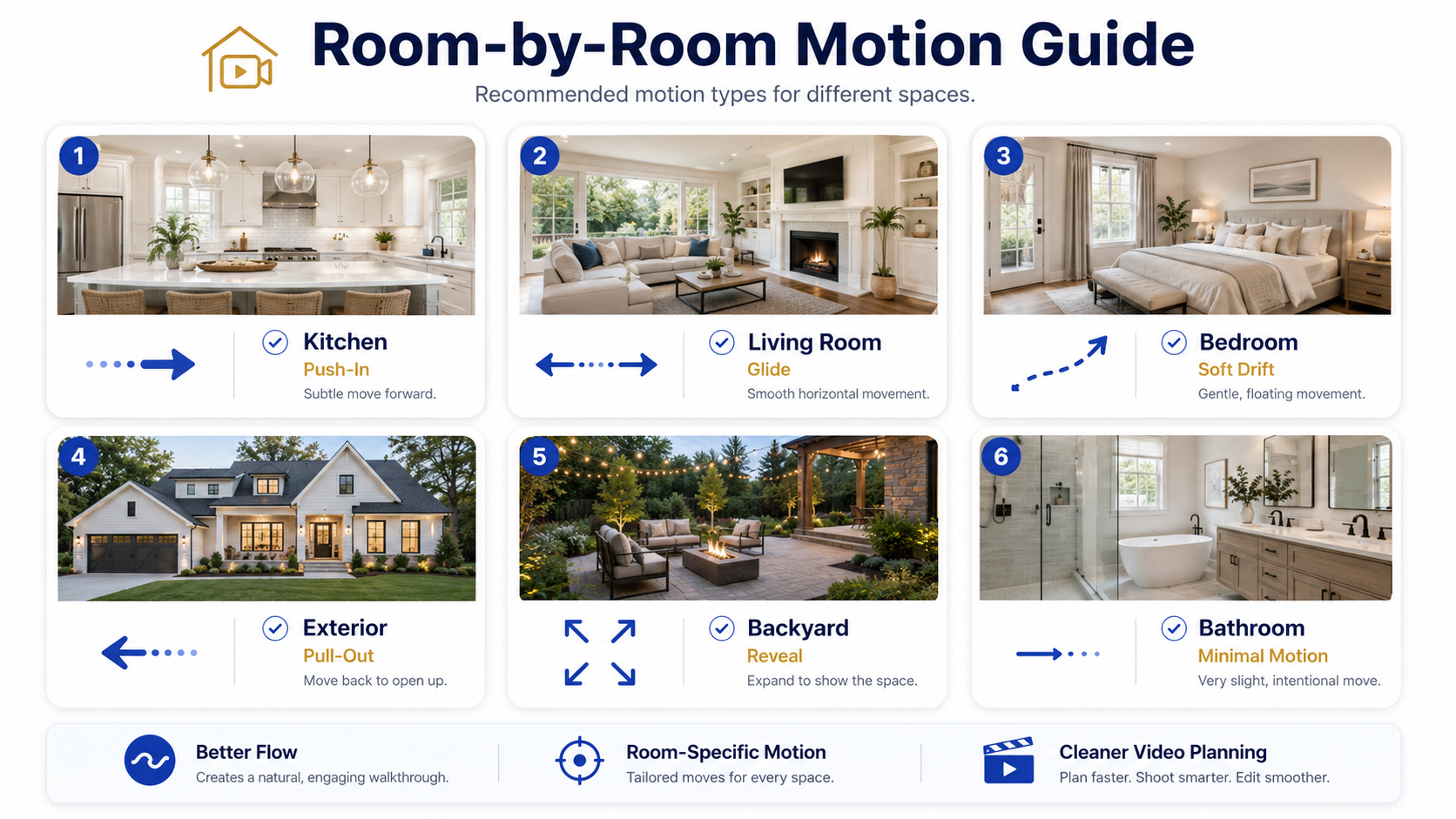
Not every photo should get dramatic movement.
Large rooms can handle more motion. Small rooms usually need less. Exteriors can work with a gentle pull-out. Kitchens often look good with a slow push-in. Bathrooms are risky if they are tight. Hallways are rarely worth lingering on unless they show a strong architectural detail.
This is where agents can improve output quickly.
Before generating the video, tag each image mentally:
That small step prevents the video from feeling chaotic.
After the image set is curated, use PhotoAIVideo’s photo-to-video workflow to generate the first draft.
Treat it like a draft.
Do not publish the first output just because it exists.
Watch it once as a buyer. Then watch it again as a listing professional.
Look for:
This is where the video becomes better.
Not in the upload.
In the review.
One video rarely does every job well.
Create different versions when needed:
Agents using automated video marketing software for Realtors should think in terms of batches, not single exports. One photo set can become multiple useful assets if the workflow is organized.
That is where the time savings become real.
The difference is not just the software.
It is the decision-making before and after the software runs.
A Realtor can use PhotoAIVideo to create a walkthrough-style video from listing photos after the photographer delivers the gallery.
The best use case is not every photo from the shoot. It is a focused sequence built around the property’s strongest selling points.
Example:
For a family home, lead with the exterior, living room, kitchen, backyard, and primary suite. For a condo, lead with the living space, view, kitchen, bedroom, and building amenity.
Different property. Different video logic.
Photographers can use PhotoAIVideo as an upsell.
Instead of delivering only photos, they can offer a video package:
This is a strong use case for AI video software for real estate photographers because it creates a new deliverable from the media they already capture.
The key is setting expectations. This is a photo-based AI walkthrough, not a filmed video tour. That distinction helps avoid confusion.
Brokerages can use a standardized workflow to keep agent-created videos from becoming inconsistent.
A simple brokerage policy might say:
That kind of guidance protects brand quality.
Property managers can use AI walkthrough videos for rentals.
A unit does not always need a full professional video shoot. If the team has clear, wide photos, they can create a quick walkthrough-style video for leasing inquiries, property pages, and follow-up messages.
This works especially well when the goal is practical clarity rather than luxury marketing.
Listing coordinators can build AI video into the launch checklist.
Once photos are approved:
That turns video creation into a repeatable process instead of a last-minute request.
This is the most common mistake.
The agent assumes more photos means a better video. Usually, the opposite happens.
Too many photos make the video slow. Repeated angles make it feel padded. Small rooms interrupt the story. The viewer loses the thread.
Fix it:
Choose the best 8–15 images for a short walkthrough. Use 15–25 only when creating a longer property website video.
Actionable insight: remove any image that does not introduce a new room, feature, or reason to care.
The opening frame determines whether the viewer keeps watching.
A weak first image creates a weak video.
Avoid opening with:
Better opening choices:
This is especially important for social clips. A Reel has very little time to earn attention.
Uniform motion feels robotic.
A kitchen push-in, backyard reveal, bedroom drift, and exterior pull-out all create different emotional effects. If every photo gets the same zoom, the video starts to feel like a template.
Fix it by matching motion to space.
Use:
The best AI walkthrough videos feel like a camera operator made choices.
AI motion can accidentally make rooms feel larger, cleaner, brighter, or more dramatic than they really are.
That can create trust problems.
Watch for:
For agents using real estate video software that works with MLS rules, accuracy matters as much as polish. A good video should make the listing more engaging without making the property feel misrepresented.
Google’s image SEO best practices also reinforce the importance of descriptive context around visual content. When you publish a video or image-heavy page, the surrounding text should accurately describe what the visual shows.
A video may look good and still be wrong for the destination.

Before publishing, ask:
This is where many teams slip.
The file is done, so they post it everywhere.
Do not do that.
A video for Instagram can have agent branding and stronger calls to action. A property website version can be smoother and longer. A seller update can include more context. A cleaner listing version may need a more neutral presentation.
If a video is being used in a public listing environment, review it against local rules and brokerage guidance. NAR’s Clear Cooperation Policy is also worth understanding when public marketing timing is involved.


Compact, ready to go anywhere
Interchangeable lens that’s upgradeable
Dual 1-inch sensors for improved clarity and low light performance
Dynamic range and 6K 360° capture
360° photo resolution at 21MP

8K 360° video recording for ultra-detailed visuals.
4K single-lens mode for traditional wide-angle shots.
Invisible selfie stick effect for drone-like perspectives.
2.5-inch touchscreen with Gorilla Glass protection.
Waterproof up to 33ft for underwater shooting.

360° photo resolution in 23MP
Slim design at 24 mm thick
Built-in image stabilization for smooth video capture.
Internal 19GB storage for photo and video storage.
Wireless connectivity for remote control and sharing.

60MP 360° still images for high-resolution photography.
5.7K 360° video recording at 30fps.
2.25-inch touchscreen for intuitive control.
USB Type-C port for fast charging and data transfer.
MicroSD card slot for expandable storage.
.png)

.png)

Try it free. No credit card required. Instant set-up.







.svg)


.svg)