Virtual Tours for Architects: The Best Matterport Alternative Revealed

Cloudpano
August 8, 2025
5 min read
Share this post

🏛 Virtual Tours for Architects: The Best Matterport Alternative Revealed

In 2025, architecture firms are embracing virtual tours as a core part of their client presentations, project approvals, and portfolio showcases. For years, Matterport has been the default tool — but a growing number of architects are switching to CloudPano for better flexibility, cost-effectiveness, and creative freedom.

In this guide, we’ll explore why CloudPano is the best Matterport alternative for architects, and how it can transform your workflow from concept to client handoff.

🏗 Why Architects Are Moving Beyond Matterport

Matterport is a powerful platform, but it comes with limitations that can be frustrating for architects:

  • High recurring costs that don’t scale well for small-to-mid-size firms.
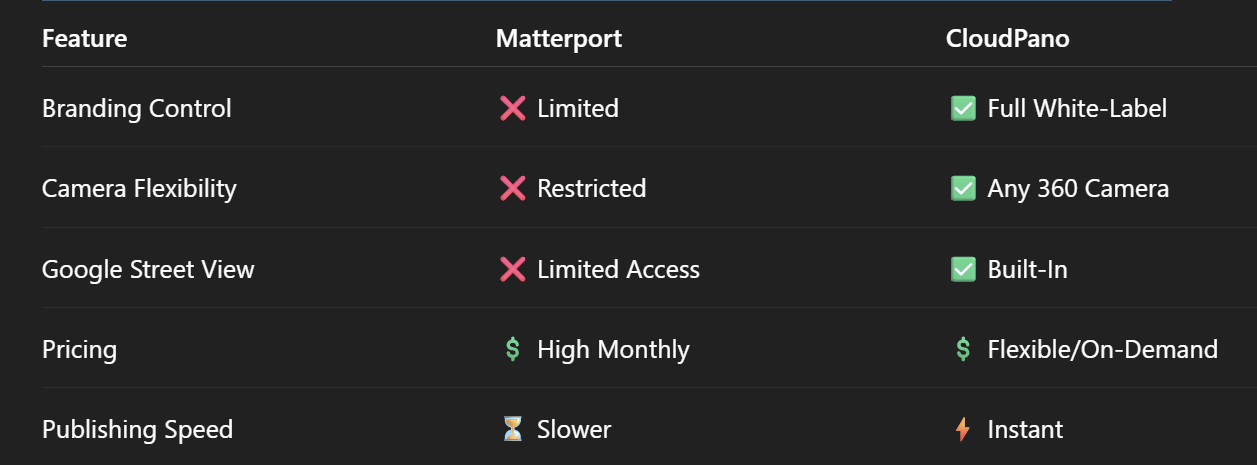
  • Limited branding control — every tour looks like Matterport’s, not yours.
  • Hardware lock-in — you need compatible cameras, often expensive ones.
  • Slow publishing that can delay client updates.

CloudPano solves these pain points with a flexible, architect-friendly approach to 360° documentation and presentation.

🎯 How CloudPano Elevates Architectural Virtual Tours

Here’s what makes CloudPano stand out for architecture and design workflows:

1️⃣ Full Branding Control (White-Label Tours)

Your designs deserve to shine under your brand, not a platform’s watermark. CloudPano offers full white-label capabilities, letting you deliver tours that feel custom and premium.

2️⃣ Any Camera Compatibility

No need to invest in a single expensive device. CloudPano works with Ricoh Theta, Insta360, DSLR rigs, and even drones, giving architects more freedom to choose the best capture method for the project.

3️⃣ Google Street View Integration

Architects working on commercial or public projects can instantly publish tours to Google Street View, making their work visible to the public and stakeholders with just a few clicks.

📌 Related read: Top Matterport Alternatives with Google Street View Integration in 2025

4️⃣ Faster Turnaround for Client Approvals

With CloudPano’s instant publishing, you can walk clients through updates in real time — perfect for design revisions, material approvals, and project milestones.

📐 Real-World Use Cases for Architects

Here’s how architects are using CloudPano to win clients and speed up projects:

  • Pre-Construction Visualization – Share interactive models and concepts before breaking ground.
  • Design Approval Meetings – Present interior and exterior designs virtually to decision-makers.
  • Portfolio Showcases – Build an interactive library of completed projects.
  • Construction Progress Tracking – Keep stakeholders informed with regular updates.

💡 Related read: Bringing Blueprints to Life: Virtual Tours for Architecture and Design

💰 Cost Savings That Matter for Design Firms

Unlike Matterport, CloudPano doesn’t lock you into high monthly fees for every project. Architects can:

  • Pay only when they publish tours
  • Choose cost-effective hosting plans
  • Avoid expensive camera requirements

This makes it ideal for firms juggling multiple projects without inflating overhead.

🚀 Why CloudPano Beats Matterport for Architects

When comparing CloudPano to Matterport for architectural use, the differences are clear:
📊 Case Study: Mid-Size Architecture Firm Switches to CloudPano

A 25-person architecture firm in Texas switched from Matterport to CloudPano to save over $7,500/year while shortening delivery time by 50%. Now, every client walkthrough is branded to their firm, and GSV uploads have helped attract new commercial clients.

🎯 Final Verdict

For architects, CloudPano is more than just a Matterport alternative — it’s a workflow upgrade. It gives you:

Creative freedom
Cost control
Faster delivery
More visibility through Google Street View

If your goal is to impress clients, speed up projects, and keep your brand front and center, CloudPano is the clear choice.

📢 Ready to Transform Your Architectural Tours?

Here’s your quick-start checklist to try CloudPano today:

Share this post
Cloudpano

Choose The Right 360° Camera

Insta360 ONE RS 1-Inch 360 Edition

  • Compact, ready to go anywhere

  • Interchangeable lens that’s upgradeable

  • Dual 1-inch sensors for improved clarity and low light performance

  • Dynamic range and 6K 360° capture

  • 360° photo resolution at 21MP

Learn More

Insta360 X4

  • 8K 360° video recording for ultra-detailed visuals.

  • 4K single-lens mode for traditional wide-angle shots.

  • Invisible selfie stick effect for drone-like perspectives.

  • 2.5-inch touchscreen with Gorilla Glass protection.

  • Waterproof up to 33ft for underwater shooting.

Learn More

Ricoh Theta Z1

  • 360° photo resolution in 23MP

  • Slim design at 24 mm thick

  • Built-in image stabilization for smooth video capture.

  • Internal 19GB storage for photo and video storage.

  • Wireless connectivity for remote control and sharing.

Learn More

Ricoh Theta X

  • 60MP 360° still images for high-resolution photography.

  • 5.7K 360° video recording at 30fps.

  • 2.25-inch touchscreen for intuitive control.

  • USB Type-C port for fast charging and data transfer.

  • MicroSD card slot for expandable storage.

Learn More
Property Marketing
Allows potential buyers to explore properties in detail from anywhere, enhancing the real estate marketing process.
Automotive Spins
Create an interactive virtual showroom and engage affluent digital buyers with live 360º video calls, all through the CloudPano mobile app for a complete automotive sales solution.
Interactive Floor Plans
Create 2D and 3D floor plans with measurements in 4 minutes or less, all from your phone. Download the Floor Plan Scanner app and get your first scan free.

360 Virtual Tours With CloudPano.com. Get Started Today.

Try it free. No credit card required. Instant set-up.

Try it free
Latest posts

See our other posts

Interviews, tips, guides, industry best practices, and news.

How to Pass the FAA Part 107 Exam Without Overstudying (AI Practice Tests + Smart Study Guide)

This guide explains the fastest way to pass the FAA Part 107 exam for commercial drone pilots using a smarter study method: an AI-powered practice test system paired with a structured Part 107 study guide. You’ll learn why most people fail by overstudying without practice, how AI feedback helps you remember missed questions, what topics matter most on the exam (airspace, charts, weather, operations, regulations), and a simple repeatable study plan that builds confidence and helps you pass on the first try.
Read post

Pass the FAA Part 107 Exam Faster With AI Practice Tests (Commercial Drone Pilot Prep)

This blog post breaks down a proven, modern strategy to pass the FAA Part 107 exam on your first try by combining a complete Part 107 study guide with AI-powered practice tests. It explains why most students fail (lack of repetition and no feedback), how AI quiz tools accelerate learning through personalized explanations for missed questions, and the best step-by-step plan to build confidence using realistic exam simulations. Perfect for aspiring commercial drone pilots who want to get certified legally and start earning faster. 🚁💰✅
Read post

Top Reasons Inventory Photos Look Inconsistent (And How to Fix It)

Inconsistent inventory photos can make a dealership look unprofessional, reduce click-through rates, and hurt buyer trust. This guide breaks down the top reasons inventory photos look inconsistent—such as multiple photographers without standards, changing lighting conditions, inconsistent editing, random shot lists, mixed background removal workflows, and lack of quality control. It also provides clear solutions including creating a dealership photo standards guide, using a dedicated photo zone or studio backgrounds, locking in hero image rules, applying editing presets, standardizing photo order, and implementing a simple QC checklist to keep every listing consistent at scale.
Read post



