


.png)



Vehicle photography plays a major role in how dealerships, automotive marketplaces, auctions, and inventory platforms present cars online. But creating clean, consistent vehicle images at scale can become expensive and time-consuming when every photo needs to be edited manually.
A vehicle photo background removal API solves that problem by allowing software to automatically detect a vehicle, separate it from the original scene, and return a cleaned or replacement-background image without requiring a person to open every photo in an editing application.
For a dealership processing a few dozen images, manual editing may be manageable. For a dealer group, automotive SaaS platform, or merchandising company processing thousands of photos per month, automation can dramatically change the economics.
This guide explains how vehicle background-removal APIs work from upload to final image, including masking, edge detection, batch processing, and API responses. It also breaks down the most common pricing models so buyers can estimate whether automation makes financial sense before comparing individual vendors.
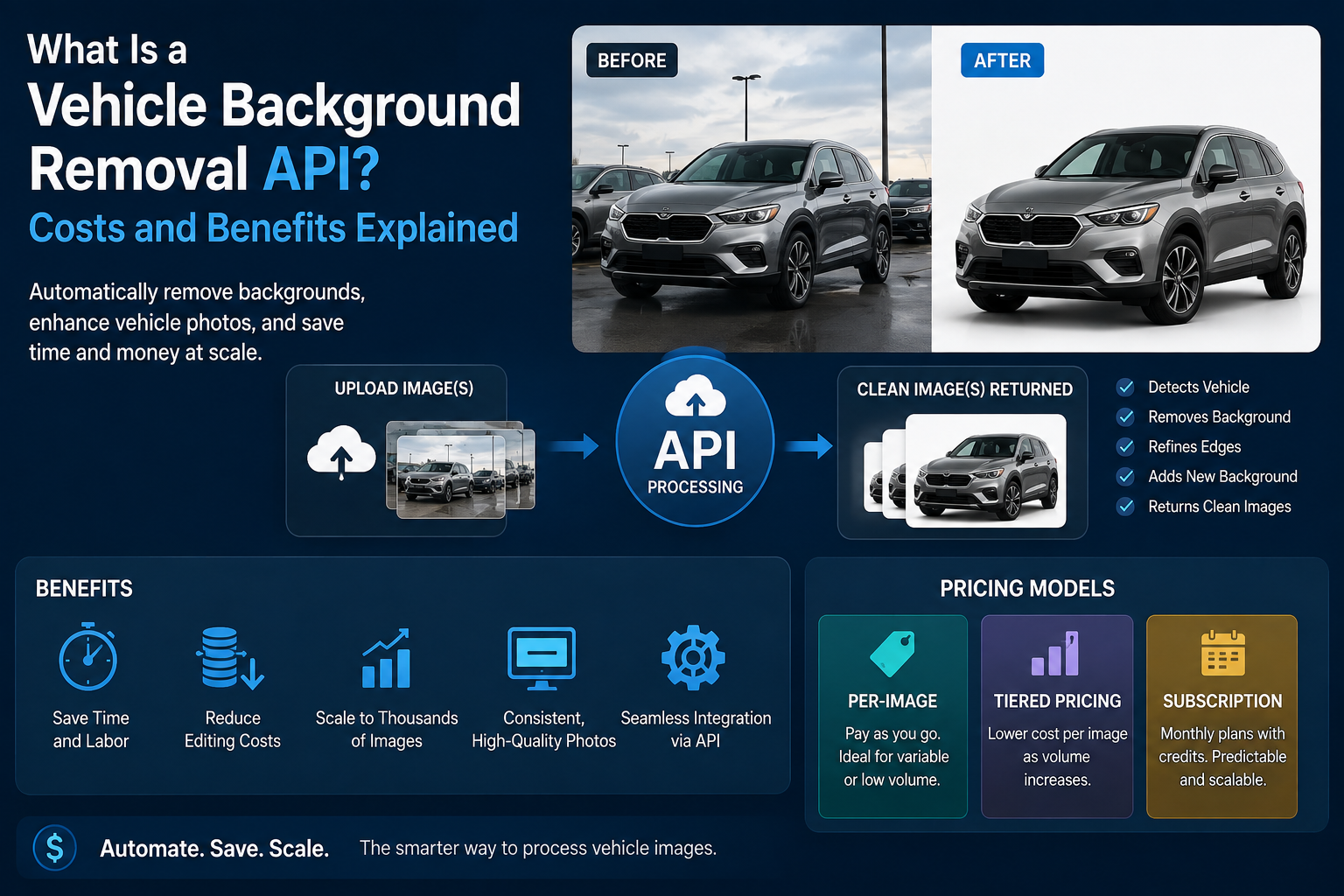
An application programming interface, or API, allows one software system to communicate directly with another.
A vehicle photo background removal API is specifically designed to accept vehicle photos, process them automatically, and return edited images or image files that can be used in another application.
Instead of having an employee:
An API can perform most or all of these steps automatically.
The dealership's inventory system, mobile photography app, dealer management tool, or custom software can send the original image directly to the API and receive the processed version back.
That creates a much more scalable workflow.
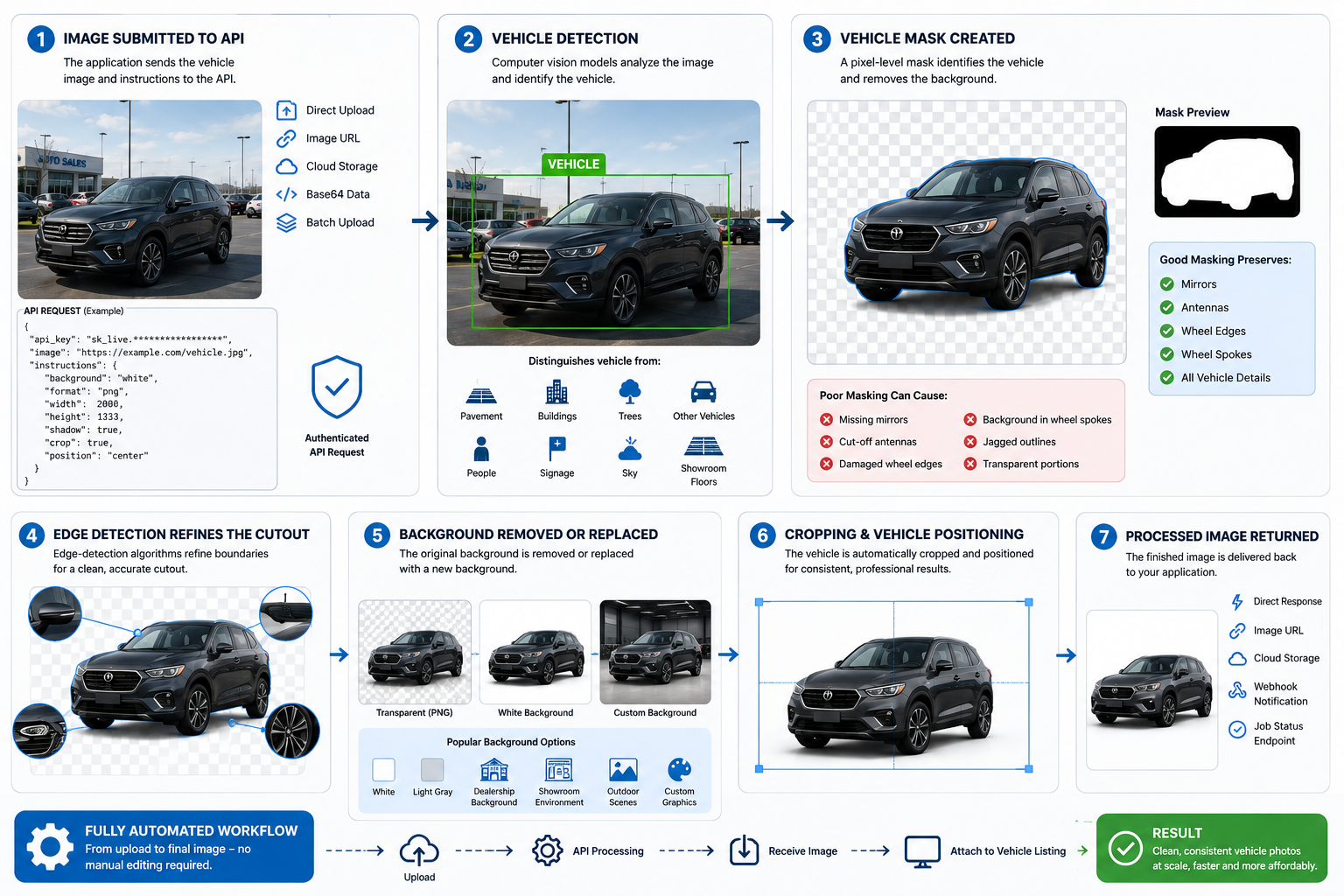
Although the user may simply see an original image become a clean vehicle photo, several technical steps happen behind the scenes.
The process begins when an application sends an image to the API.
Depending on the provider, images may be submitted using:
The API request usually includes authentication credentials, such as an API key, so the processing provider knows which account is making the request.
Developers may also send optional instructions with the image, such as:
For a single image, this happens almost instantly. Large systems typically use batch processing instead.
Before a background can be removed, the system must determine which pixels belong to the vehicle.
Computer vision models analyze the image and identify the main automotive subject.
The model may distinguish the vehicle from objects such as:
Automotive-specific models can be particularly useful because vehicles contain challenging visual elements such as mirrors, wheel spokes, windows, roof racks, antennas, and reflective surfaces.
A general-purpose background-removal system may work well on simple objects while struggling with these automotive details.
Once the car is detected, the system creates a mask.
A mask is essentially a pixel-level map showing which areas belong to the vehicle and which belong to the background.
Think of it as a digital stencil.
Pixels identified as part of the vehicle are preserved. Pixels identified as part of the environment are removed or made transparent.
This is one of the most important stages in a vehicle photo background removal API because mask quality directly affects the finished image.
Poor masking can create problems such as:
High-quality masking aims to preserve the complete vehicle while removing unwanted surroundings.
Basic subject detection is not enough for professional automotive photography.
The system also needs to understand where the vehicle ends and the environment begins.
Edge-detection algorithms help identify these boundaries more precisely.
Important vehicle edges may include:
The API may use multiple image-processing techniques and machine-learning models to refine these areas.
This step becomes particularly important when the vehicle and background contain similar colors.
For example, a white vehicle photographed against a bright concrete wall may be harder to separate than a red vehicle photographed against dark pavement.
After the mask is created, the original background can be removed.
The API may return the vehicle against a transparent background, commonly as a PNG file.
Alternatively, the system can immediately place the vehicle onto a new background.
Popular options include:
Some automotive workflows also add a realistic floor or shadow underneath the vehicle.
This helps prevent the car from appearing as though it is floating.
🚗 For dealerships, consistency can matter as much as background removal itself. A uniform set of vehicle photos can make an inventory page look much more professional than images photographed in multiple locations.
Advanced APIs may automatically crop and position the vehicle after background removal.
For example, a dealership might want every vehicle to:
This automation is particularly valuable when multiple photographers capture inventory.
Without standardized processing, one vehicle may fill 80% of an image while another occupies only 50%.
Consistent framing creates a cleaner online browsing experience.
Once editing is complete, the API returns the finished result.
This may happen through:
The dealership's software can then automatically attach the edited image to the correct vehicle listing.
In a fully automated workflow, nobody has to manually download or upload files.
Single-image processing is useful for testing, but automotive businesses usually need to process images in volume.
Suppose a dealership photographs 150 vehicles per month and captures 30 images of each vehicle.
That equals:
150 vehicles × 30 photos = 4,500 images per month
Sending each image manually would defeat much of the purpose of automation.
Batch API processing allows the software to queue or submit large numbers of images automatically.
Some APIs process an image while the original request remains open. This is known as synchronous processing.
It works well for quick individual jobs.
Larger automotive applications often use asynchronous processing.
The workflow might look like this:
Upload → Job ID → Processing Queue → Completion Notification → Download Result
The application sends the images and immediately receives a job identifier.
Processing happens separately, and the system checks the job later or waits for a webhook confirming completion.
This architecture is generally better suited for thousands of images.
When evaluating a vehicle photo background removal API, buyers should not judge performance using only one test image.
Ask what happens when the workload increases.
Important questions include:
An API that processes five images quickly may behave very differently when processing 5,000.
Pricing varies by provider, processing complexity, image volume, and additional features.
Most APIs use one of three structures.
The simplest model charges a fixed amount every time an image is processed.
For example:
5,000 images × $0.20 = $1,000
This model is easy to understand and works well when usage changes significantly from month to month.
Tiered pricing reduces the cost per image as usage increases.
A provider might structure pricing conceptually like this:
The exact thresholds vary.
This model often works well for dealership groups, software companies, and automotive photography businesses because larger customers receive better unit economics.
Before choosing a tier, calculate realistic monthly usage instead of estimating based only on vehicle count.
Use:
Vehicles photographed per month × average photos per vehicle = monthly image volume
Some providers charge a recurring monthly or annual subscription that includes a certain number of image-processing credits.
For example, a plan might include several thousand processed images each month.
Additional images may:
Subscriptions can make budgeting easier for businesses with consistent volume.
However, buyers should understand what happens to unused credits and what overages cost.
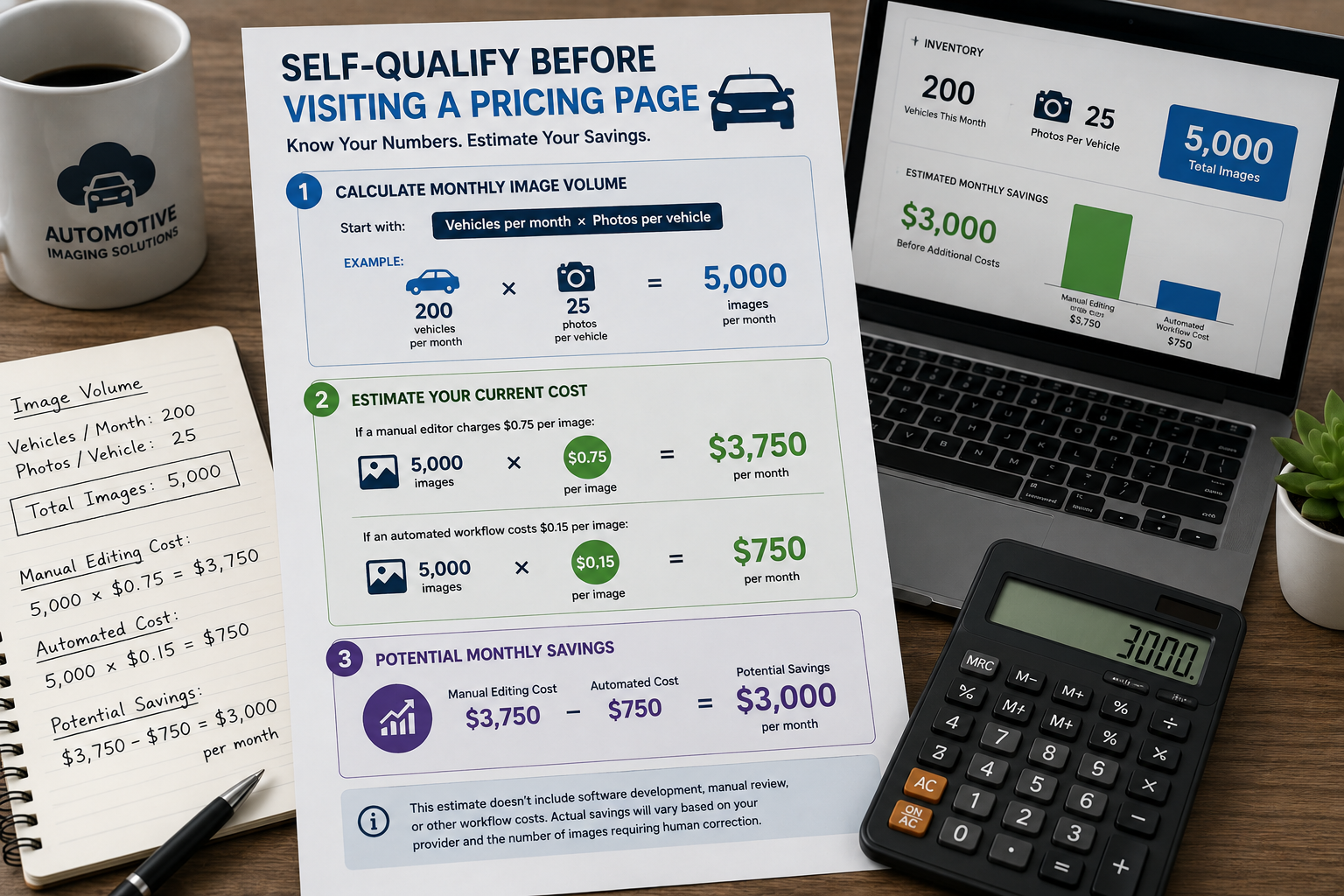
Before comparing plans, gather a few numbers from your own operation.
Start with:
Vehicles per month × photos per vehicle
Example:
200 vehicles × 25 photos = 5,000 images
If a manual editor charges $0.75 per image:
5,000 × $0.75 = $3,750 per month
If an automated workflow costs $0.15 per image:
5,000 × $0.15 = $750 per month
That represents a potential difference of $3,000 per month before accounting for software development, manual review, and other workflow costs.
Your actual savings will depend on your provider and how many images require human correction.
Lower labor requirements
Routine background removal can happen without an editor touching every photo.
Faster turnaround
Images can move from photography to online inventory much faster.
Scalability
Processing 20,000 images does not necessarily require hiring additional editors.
Consistent presentation
Automated positioning, backgrounds, and cropping can create a uniform inventory appearance.
Easy software integration
APIs can connect directly with dealer tools, photography applications, inventory systems, and automotive marketplaces.
Some images still require manual review
Complex reflections, unusual accessories, poor lighting, or cluttered scenes can cause errors.
Integration requires technical work
Using an API usually requires development resources unless a ready-made integration already exists.
Usage limits may apply
Providers may impose rate limits, batch limits, or concurrency restrictions.
Quality varies between providers
Two APIs can produce noticeably different results from exactly the same vehicle photo.
Do not select a provider based only on the lowest advertised price.
Test the vehicle photo background removal API using images from your actual workflow.
Include challenging examples such as:
Also evaluate the full workflow rather than only the cutout.
Ask whether the API can handle cropping, resizing, shadows, background replacement, branding, and batch processing.
A slightly more expensive API that eliminates additional manual work may ultimately cost less.
It is a software interface that automatically receives vehicle photos, detects the vehicle, removes the original background, and returns a processed image.
Accuracy depends on the image quality and the provider's computer-vision models. Automotive-specific systems can often handle complex details better than generic background-removal tools.
Yes. Many systems are designed for batch processing, although rate limits, concurrency, and processing capacity should be tested before committing to a provider.
Pricing usually follows per-image, subscription, or volume-tier models. Your effective cost depends heavily on monthly image volume and the features included.
Possibly, but usually for exceptions rather than every image. Many companies use automation for the majority of inventory and route unusual photos to an editor.
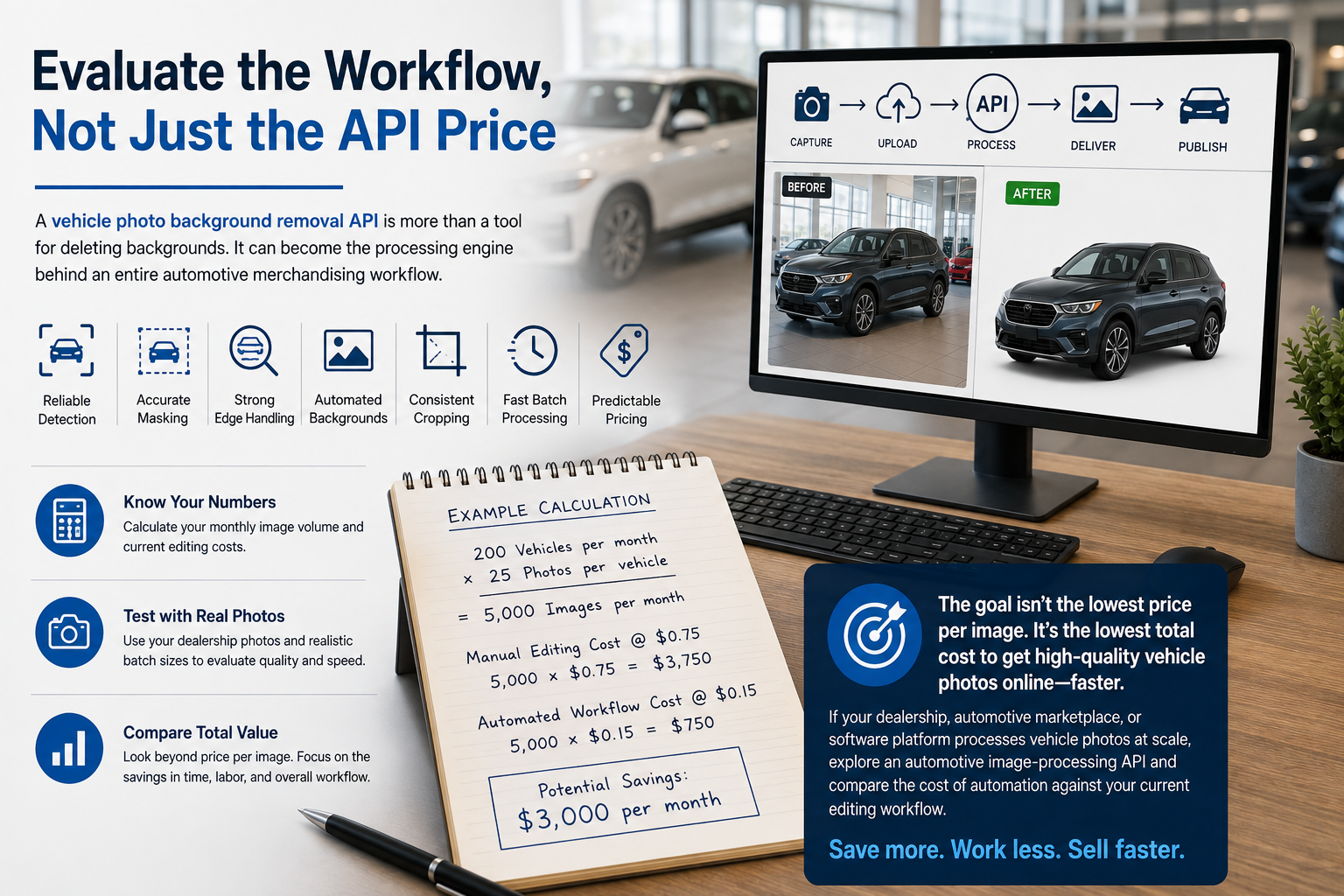
A vehicle photo background removal API is more than a tool for deleting backgrounds. It can become the processing engine behind an entire automotive merchandising workflow.
The best solutions combine reliable vehicle detection, accurate masking, strong edge handling, automated backgrounds, consistent cropping, fast batch processing, and predictable pricing.
Before comparing plans, calculate your actual monthly image volume and current editing expense. Then test potential providers using real dealership photos and realistic batch sizes.
The goal is not simply to find the lowest price per image. It is to reduce the total amount of money and human effort required to move high-quality vehicle photos from the camera to your inventory listings.
If your dealership, automotive marketplace, or software platform processes vehicle photos at scale, explore an automotive image-processing API and compare the cost of automation against your current editing workflow. The savings become much easier to evaluate once you know your true monthly image volume.


Compact, ready to go anywhere
Interchangeable lens that’s upgradeable
Dual 1-inch sensors for improved clarity and low light performance
Dynamic range and 6K 360° capture
360° photo resolution at 21MP

8K 360° video recording for ultra-detailed visuals.
4K single-lens mode for traditional wide-angle shots.
Invisible selfie stick effect for drone-like perspectives.
2.5-inch touchscreen with Gorilla Glass protection.
Waterproof up to 33ft for underwater shooting.

360° photo resolution in 23MP
Slim design at 24 mm thick
Built-in image stabilization for smooth video capture.
Internal 19GB storage for photo and video storage.
Wireless connectivity for remote control and sharing.

60MP 360° still images for high-resolution photography.
5.7K 360° video recording at 30fps.
2.25-inch touchscreen for intuitive control.
USB Type-C port for fast charging and data transfer.
MicroSD card slot for expandable storage.
.png)

.png)

Try it free. No credit card required. Instant set-up.







.svg)


.svg)